



These guys created the PlayStation 4 and here’s how they did it (video)

Earlier this month we were in the audience to see two gaming legends talk at length about the history of PlayStation, but if you want to watch PlayStation’s head of Worldwide Studios and the PS4′s lead designer have a lengthy chat for yourself, a video of the conversation is now available. Over the course of roughly 90 minutes, Shuhei Yoshida and Mark Cerney cover everything from the former getting banned from Nintendo’s Miiverse (twice), how the PS Move controller signaled a new era of design teamwork at Sony and what it was like working under SCEA’s legendarily hard-nosed chief, Ken Kutaragi. This type of insight typically isn’t seen much outside of the annual Game Developer’s Conference, so fire up the Chromecast, pour a frosty beverage and enjoy.
Filed under: Gaming, Home Entertainment, HD, Sony
Via: Shuhei Yoshida

Xbox One and PlayStation 4 support added to Unreal Engine 4 in latest update

Moving a game from one platform to another — from iOS to PC, from Xbox One to PlayStation 4 — isn’t as easy as it seems. Just change a few button prompts and you’re all set, right? Not so much. There’s a lot to consider: how do you control the game (mouse/keyboard/gamepad/touch/etc.)? does it sync up with online leaderboards? does it have the proper logos/attribution? Epic Games’ Unreal Engine 4 aims to circumvent as much of that as possible, and today it’s enabling two more platforms: Xbox One and PlayStation 4. In terms of Xbox One peripheral support, that includes Kinect, and in terms of PlayStation 4 peripheral support, that includes the Project Morpheus virtual reality headset.
The update brings UE4 to version 4.1, and is part of the same $19/mo. monthly subscription fee that customers are already paying. The engine itself is actually being certified directly by both Sony and Microsoft right now, which should help with game certification down the line; Sony’s PS4 is already ready-to-go and Microsoft’s Xbox One is in the works (though game makers can submit UE4-made games for publishing on either console before the process is complete for the engine itself).
With today’s update, the folks at Epic are actually running out of platforms to support: it already supports PC, last-gen consoles, current-gen consoles, SteamOS, Linux, and the Oculus Rift. They’re still working on Windows Phone 8 and, though there’s no “concrete roadmap,” a full version of the UE4 editor is in the works for Linux. The game industry’s most prolific engine is quickly becoming the game industry’s most widely available as well.

Sony to begin fixing combustible Vaio Fit laptops in May

It’s always sad when a company stumbles during its victory lap, but as Sony looked to gracefully exit the PC business, some spontaneously combusting laptops ruined the day. The company has now issued an update about the Vaio Fit 11A repair program, saying that reservations are now being taken and that battery replacements will begin part-way through next month. Until then, Sony’s line remains not to touch your device, and we add that you should probably shouldn’t store it next to those cans of gasoline in your office.
Source: Sony
Sony background defocus app released to the Play Store

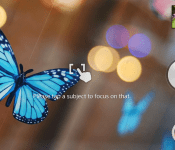
Sony have today released a new version of their app which allows users to defocus the background of their photos after they’ve been taken at a tap of the screen.
The update has been issued to the Google Play Store and is available to Sony Xperia phones running Android 4.2 or later.
How to use Background defocus:
1. Start the Camera and select Background defocus as camera mode
2. Tap the object you want to focus on in the viewfinder
3. Tap the camera key to take a photo
4. Change the blur level and blur effect with the controls on the screen
5. Tap the save buttonTips for best photos:
For best results, Sony recommends users to focus on objects that are 15-45cm away with a background at least 5 metres away from the subject.
The post Sony background defocus app released to the Play Store appeared first on AndroidGuys.
Sony’s streamer lets you watch one show (House of Cards) in 4K for £350

If you spent a fortune on the first Sony Bravia UltraHD TVs, it may have hurt to find out that Netflix was only streaming 4K using a format (H.265) that doesn’t work on those sets. Sony has now righted that wrong with the FMP-X5 4K media streamer, specifically made for European-only owners of the KD-84X9005, KD-65X9005A and KD-55X9005A Bravia TVs. House of Cards is the only 4K show available for it from Netflix (or anywhere else) right now, but the streaming outfit said that others, like Breaking Bad, will be arriving soon. The other drawback is a rather hefty £350 sticker (direct from Sony), but if you were an early adopter for one of those models, we think you can manage it.
Filed under: Home Entertainment, HD, Sony
Via: Techradar
Source: Sony

One of Activision’s top moneymakers gets a new entry in Skylanders: Trap Team

Like taxes, iPhones and, well, Madden, you can count on a new Skylanders game every year. If you’re unfamiliar with the franchise, that may just be a symptom of not being around kids — the toy / video game series is a dominant force in the kids gaming market, sharing responsibility with biggies like Call of Duty and World of Warcraft for bringing in 80 percent of Activision’s earnings in 2013. Each new entry in the game series comes with a new physical device for reading toy figurines; when said figurines are placed on the device (called a “portal”), they’re transported into the game world and playable in-game.
Between the figures ($5 – $7 apiece, on average) and the games (anywhere from $7 to $60), it’s easy to understand why the franchise is so profitable. Thankfully, the franchise is also lauded by most critics as a pretty decent game, too. The next entry, Skylanders: Trap Team, arrives this October — the first time the series is on PlayStation 4 and Xbox One — and it’s the largest game in the franchise to date.
When Skylanders: Trap Team launches on October 5th in North America (the 10th in Europe), it arrives with a new portal, and also even larger Skylanders figures than before. The hook this time around (beyond the whole “putting a toy from the real world into a game” thing) is the ability to “trap” in-game enemies. Using one of eight “Traptanium Traps” — that’s eight colored real-world toys that must be purchased — you can “trap” enemies (store the character data from the game). That enemy can then be used in-game, just like a Skylander. This enables players to quickly switch between two characters, one Skylander and one boss character, on-the-fly. There’s also a neat interactivity aspect wherein the portal now has a speaker and the boss character, once captured, will comment on the game in real-time.

We spoke with Toys for Bob’s Paul Reiche, head of the studio that both created the Skylanders franchise and headed up development of Skylanders: Team Trap. Before you ask: yes, all previous Skylanders toys work with this new one. All the parents in the crowd say “Yay-a!” Reiche (pronounced “Richy”) walked us through the new game, the scope of the series, and spoke to the design of the new characters. What’s with the new traps? Why are the characters larger? And what the heck is “traptanium”? Allow him to explain in the video above, and get a much closer look at all the new hardware while you’re at it.
Video produced by Edgar Alvarez and Daniel Orren.
Filed under: Gaming, Software, HD, Sony, Microsoft, Nintendo
Sony releases Background Defocus App for Xperia Owners
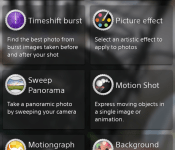
Ever since the release of the Google Camera app, everyone has been all googly eyed over the DSLR like blur effect that can be produced in images. I know you have seen a number of test shots from people with the Google Camera app, the Galaxy S5 and HTC One M8. Sony has had the same feature in their devices since the Xperia Z1, near as I can tell any ways, called Background Defocus. I know it wasn’t present in the T-Mobile Xperia Z but it might have been in international variants. Anywho, Sony has now released that camera setting add-on to the Play Store for Sony device owners.

 The Play Store listing says the Background Defocus app is compatible on Android 4.2+ devices. It will only work if you have the stock Sony camera app still. If you are rooted and stripped then it is pointless for you to get it unless you get the original camera installed first. It is interesting to note that the defocus app will only go to a 9MP resolution on the Xperia Z which contains a 13.1MP camera. Even more interesting is the Xperia Z1s only lets you push the same app to 8MP in 16:9 or 4:3 ratio.
I took a couple test shots with the Xperia Z to see how well it fared. I ran into a number of instances where it was unable to process the image correct and failed to blur the boackground. I would assume it was due to the various little suggestions made in the info box like the background object needing to be 5 meters away. I was able to snap one that didn’t fit that parameter though.
 It seemed to work out just fine. Additionally, it seems the location of the defocused images are saved in a separate folder on your device. You will still look in your DCIM folder, but there will be a new folder called XPERIA and with in that one is where you will find the BACKGROUND_DEFOCUS images.
 Feel free to go pick up the add-on Background Defocus app for your Sony device via the link below. If you find that your device is not compatible with it, and is should be, let us know.

//<![CDATA[
ord = window.ord || Math.floor(Math.random()*1E16);
document.write('’);
//]]>

Sony’s found the perfect use for its $1,100 Digital Paper: HR forms

In case you were wondering who would splurge for Sony’s $1,100 Digital Paper, it looks like the company has found another suitor: movie and television studios’ HR departments. Sony has already targeted lawyers with the 13.3-inch E Ink Mobius-toting device, but now it’s teaming up with Ease Entertainment to make short work of the hiring process for the motion picture and TV industries. According to the press release, “Digital Paper enables crew members to quickly and easily read, fill out, and submit all required paperwork, complete with legal signatures” — all while using less of the thin white stuff, we’d surmise. Ease’s part of the workflow is storing and securing the collected documents from wandering peepers. With all of those NDAs and so forth, the duo is sure to save some trees — so long as they remember to recharge every three weeks, and the set has a WiFi connection for passing along the signed forms.
Filed under: Misc
Source: Sony (Virtual Press Office)

Daily Roundup: Xperia Z2 Tablet review, Amazon’s phone and more!

You might say the day is never really done in consumer technology news. Your workday, however, hopefully draws to a close at some point. This is the Daily Roundup on Engadget, a quick peek back at the top headlines for the past 24 hours — all handpicked by the editors here at the site. Click on through the break, and enjoy.

Sony Xperia Z2 Tablet review: A top-tier slate with a familiar face
The Xperia Z1 slate was Sony’s debut into the high-end tablet market. Now, the company’s back for round two with the Xperia Z2 Tablet — and it looks a lot like its sibling. The Z2 may be more of a refinement than exciting new product. But hey, if it ain’t broke, don’t fix it.

Tilting Amazon’s phone could be the most important thing you do with it
We knew Amazon’s new phone would be souped up with sensors and multiple cameras, but BGR claims the handset will also feature a brand new way to interact with apps. All you have to do is… tilt it.

Lytro’s new light-field camera looks like an actual camera, costs $1,599
Lytro’s new light-field camera, the Illum, picks up where the original, rectangular shaped shooter left off. Now equipped with a particularly interesting camera housing, Lytro’s hoping to convince you to invest $1,599 in its refocus technology.

LG’s upcoming G Watch will be water resistant and ‘always on’
Back when Google revealed Android Wear, LG announced it was building a smartwatch for said platform. Now, the company has revealed that its wearable will be water resistant, always on and available in two color options: “stealth black” and “champagne gold.”
You also might like:
Filed under: Misc
Finally, you can customize the face on your Sony Smartwatch 2

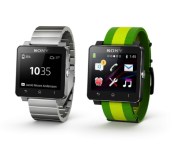
Sony has added new features to its Smartwatch 2 since its arrival last year, but there was one glaring omission. With the most recent update though, users can finally fine-tune that watch face with simple drag and drop motions. Customizable faces can sort widgets for displaying info including date, weather, calendar, battery level and more. Of course, Sony has invited third-party devs to join the party, so more options should be on the way soon. There’s also improved Gmail and Facebook functionality alongside swappable wallpapers, a calculator and notification drawer. If your devices haven’t already alerted you to the update, you can grab it via that second source link.

Filed under: Wearables, Software, Sony
Via: Android Police
Source: Sony, Google Play
 AIVAnet