


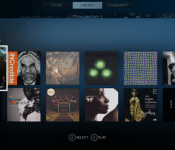
SteamOS gets a native music player in Steam Music

SteamOS still isn’t really in wide use, and it’s very firmly still in beta. Heck, the latest version still carries the disclaimer, “don’t install it on any machine you are not prepared to lose.” With Steam Music, though, SteamOS is one step closer to being a multifunctional operating system: it takes your locally-stored music and makes it playable directly in the Steam UI. There’s a version for Steam’s Big Picture Mode as well, if you’d like to give it a shot on your non-Steam Machine gaming rig.
Valve says that random beta participants (culled from group members here) will get access soon, and a desktop version of the player is on the way as well. There’s no ability to purchase music, nor can you pipe in music subscriptions/Google Play accounts — we’ve asked if (and when) that’s coming — but it’s a pretty major step toward offering multimedia functionality on the upcoming Steam Machines. Like every Valve initiative, Steam Music is an evolving one. The intro page says it all: “Our next steps for the feature will be influenced by your beta feedback.”
Source: Valve

Paper news-reading app makes Facebook prettier, a bit less functional (hands-on)

Upon installing Facebook’s newest app, you’re greeted by a friendly female voice. “Welcome to Paper,” she says. And, for many folks, Paper will be a welcome change indeed. But, before we tell you why Paper may be preferable to the full Facebook app, let’s establish just what Paper is — it’s only been a few days since it was revealed to the world, after all. Generally, Paper is a news-reading app that shows users the stuff they already get in their News Feed, in addition to stories pulled from content partners (including Engadget, of course) by Facebook’s in-house team of tastemakers.
After its verbal welcome, Paper shows you a beautifully shot, superfluous bit of marketing video. (We’ve already downloaded the app, right? We don’t need to be sold on it a second time.) It then tells you how to set things up. Should you already have Facebook installed on your phone, there’s no need to punch in your login info again; Paper knows who you are and takes you straight into your notifications. We thought that was a bit odd, but we suppose seeing your notifications first is something that some users might appreciate.

Regardless, upon dismissing the notifications window, the app then asks you to select the sources of news that you’d like to see. Your News Feed is, of course, selected by default, but you also get 19 other topics to choose from. Most are the usual subjects — news, tech, sports, food, photography, etc. — but there are some more unique choices, such as Ideas, which Facebook describes as “a daily, in-depth look at one standout idea, event or personality,” and Equalize, which is news about eliminating gender bias and discrimination. Naturally, you can shuffle these topics any time you want in the settings, and you can also arrange them in any order you prefer.
Once you’ve chosen the stuff you want to read about, Paper takes you to its central navigation screen. The top half is occupied by the aforementioned topics, and will be very familiar to users of Facebook Home’s Cover Feed. It cycles through stories from a particular feed every five seconds, and a tap takes you directly to the full post, where you can like, share or comment on it. The lower half is made up of a series of cards that are the full feed for a particular topic. Navigating through topics and individual stories is accomplished by swiping left to right, and switching back from individual stories to the main feed is done by swiping down from the top of the screen. After the app informed us how to navigate, it became second nature within a few minutes. We found the UI to be well thought out and intuitive. Our only quibble? We wished we could navigate among the posts that were cycling through the topic pane, instead of having to wait for the seemingly endless seconds required for the app to show posts we wanted to read, but missed the first time round.
In the lower carousel, individual stories are presented in a trio of ways: a white card with a tap-able link and an image, a card that is all image (truncated, à la Facebook Home) or a white card with a sub card that can be unfolded to view the full story. We’ve been unable to detect any rhyme or reason as to which posts get which stylistic treatment, and each type of card behaves a little differently. For instance, the two types of white cards look similar — the only differences are that the first type I mentioned has a grayed-out “Continue Reading” link and there’s an absence of text immediately beneath the image — but they behave differently enough to be annoying. The first style requires tapping on the link to open up the full story on its associated web page, while swiping up on the picture simply moves the image around until you release, whereupon you get the full, non-truncated version of the image. Performing the swipe on the second style of white card allows you to unfold the story into its web page directly (similar to its competition, Flipboard).
Meanwhile, the full-image cards incorporate some motion control: Users can tilt their phones left and right to see the undisplayed portions of the picture. It’s a largely useless addition to the app, in our opinion, simply because you have to turn the screen away from your eyes to view the far edges of an image, which means you’re seeing it at an oblique angle. Plus, you can simply tap the image or turn your phone (or iPod touch, in this editor’s case) to landscape mode to see the full picture head-on.

Aside from providing you with news to read, Paper also gives you limited access to Facebook in general. You can post to the social network, of course, and it lets you view your and your friends’ photos, pages and posts. There’s also search functionality and access to Groups, Events, notifications, messages and friend requests. Plus, you can change your account and privacy settings from within Paper, too.
We think that for many folks, Paper can serve as a main mobile Facebook access portal. As far as its UI is concerned, Paper puts the regular Facebook app to shame. Its swipe-based navigation is easy to use, and Paper reduces the amount of visual clutter on screen to a fraction of what you see in the full FB app. Because of that, it’s better able to highlight the content that most users come to Facebook to see in the first place. That being said, Paper doesn’t give power users full access to FB — we couldn’t find a way to access our Groups and apps, or Pages we administer, and that’s just the shortcomings we found in our first few hours using the app.
In short, Paper’s perfect if you’re looking for a more beautiful way to consume News Feed content, but it may not suit your all your needs if you require more out of your social networking app.

Grand Theft Auto 5 is the best-selling game of 2013

Between a $1 billion debut and rave reviews, it’s probably not a huge shock to you that Grand Theft Auto 5 was the best-selling game of 2013. Regardless, Rockstar Games’ parent company Take-Two Interactive confirmed suspicions today in the company’s financial earnings release. “Grand Theft Auto V finished as the best-selling video game of 2013,” the release states, attributing that claim to NPD. “To date, Grand Theft Auto V has sold-in more than 32.5 million units.”
Even with the game’s mass popularity and somewhat staid approach to world-building, we can’t help but commend Rockstar Games on the achievement — we loved our time in GTA5‘s single-player and (occasionally troubled) online worlds. Now all we can do is hope for an even prettier version on these new game consoles (or PC, for that matter) in 2014, though we don’t expect a repeat performance in the “best-selling game” category. Let’s not get too crazy.

Adobe’s Photoshop guru John Nack is heading to Google’s photography team

If you needed further proof that Google was serious about its photography efforts, one of Adobe’s main Photoshop folks is heading for Mountain View to pitch in. John Nack, former Senior Product Manager for Photoshop, has been with the creative software outfit for about 14 years and led the software’s first public beta (CS3) and the introduction of notable features like Smart Objects. Most recently, Nack has worked on Adobe’s mobile efforts as Principle Product Manager. It’s no surprise that Google is looking to dive further into photo editing after debuting Auto Awesome last year and snatching up Snapseed before that. In a blog post announcing the move, Nack noted that the two companies have collaborated for quite some time and that he hopes to pursue that relationship further, writing “There’s so much we can all do to help photographers & storytellers of every sort.” For now, we’ll just have to bid out time until Google’s next snapshot-focused software release.
Filed under: Software
Source: John Nack

Google Now comes to the desktop in Chrome and Chrome OS betas

Rumblings of Google Now on the desktop first started surfacing back in December of 2012, but it wasn’t until a couple of weeks ago that it actually broke cover. If you were a user of the Canary build of the Chrome browser, you could enable the card alerts by ticking an option buried deep within the recesses of chrome://flags. This week though, Google will bring the desktop version of its virtual assistant to the betas of Chrome on Windows and OS X, as well as Chrome OS. You won’t need to dig through any advanced options; you’ll just need to sign in with the same account you use on your handset — so long as you have Now enabled on your phone. Unfortunately, it sounds like Linux users are left out in the cold for now. Presumably that has something to do with how Now ties into existing notification systems on those other platforms (we’ve asked Google to clarify). With Now hitting the beta channel, enabled by default, it’s only a matter of time before Mountain View brings the feature to the masses. But if you’re anything like us, you’re already using the beta build and are maniacally hitting the update button hoping to be among the first customers it rolls out to.
Filed under: Internet, Software, Google
Source: Google Chrome Blog
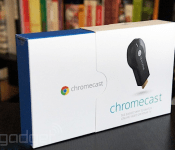
Google finally opens Chromecast SDK, invites developers to get hackin’

The Chromecast is already a pretty easy sell: It’s $35 and brings most of the biggest names in streaming media to your TV with minimal hassle. So, now that Google has opened the SDK to developers, it’s pretty much a no-brainer. While there are no specific apps to announce at the moment, it’s safe to assume the Play store will be flooded with updates soon enough. The SDK will allow coders to add a cast button to their app or site, be it on Android, iOS or in Chrome. The obvious use is for video apps, but there are plenty of other potential options here as well. If a developer decides to create a “custom receiver application” (rather than use the pre-built one provided by Google), they can put any standard web technologies on the big screen. So expect at least a few games and productivity apps to make the jump to Chromecast as well. Imagine firing up a presentation from Google Drive, displaying it on your 4K TV and controlling it with your phone. Or maybe Sony will build a version of Jeopardy where the board and clues are shown on the TV and your handset acts as the buzzer. Obviously, we’re just speculating right now, but if we see those ideas come to fruition, we’ll be expecting a nice royalty check. If you’re more technically inclined, check out the video overview of the Chromecast SDK after the break.
Filed under: Home Entertainment, Software, Google
Source: Google Blog, Chromium Blog
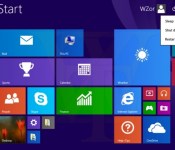
Windows 8.1’s first major update leaks online: improved Store app integration, time-saving tweaks

Microsoft’s incoming Windows 8.1 update might not make any grandiose changes, but it looks as if it will offer some appreciated navigation and start-up improvements. A new build has leaked online offering risky types the chance to try it several weeks before the official release. As teased last month, the update will let you pin your Windows Store apps alongside other programs on your desktop start bar. It sounds like a timesaving improvement, as before you’d have to labor through the Start screen to launch those aforementioned apps.
Windows 8-styled apps also pick up a new bar with close, minimize and snap options available to click on, forgoing those keyboard shortcuts or touch swipes. Live Tiles now have contextual menus available with a right click, making them easier to resize, move (or remove). A new shutdown button, as leaked just last week, also throws up a new drop-down menu for restarting, shutting down and sleep mode. This experimental build is apparently three weeks old already — the real deal is expected to arrive next month.
Filed under: Desktops, Laptops, Software, Microsoft
Source: The Verge
Android KitKat for Sprint HTC One is available for manual update from Sprint
 Just yesterday, the President of HTC America, Jason Mackenzie, came out to apologize saying that the carrier versions of Android KitKat destined for the HTC One would not be making it before the end of January as originally planned due to carrier certification. How quickly things chance as today, Sprint has said on its community site that Android KitKat for Sprint HTC One is now available via “customer initiated request”.
What this actually means is for everyone who wants the update with a Sprint HTC One to manually update their phones via the Settings Menu. If you’re unsure of how to do this, Sprint has put together a nice graphic to show you exactly how (see here). If you’re simply happy to wait till you phone updates automatically, you’ll only have to wait till February 11th when Sprint says the update will roll-out to all devices.
If you are able to successfully update your phone via this method, we’d love to hear from you in the comments. Unfortunately, there has been no word yet from the other carriers, but we’re willing to bet it will likely be over the next day or so when we do.
Source: Sprint via Android Police

Canadian Carriers Begin HTC One Updates to Android 4.4.2
The U.S. update was placed on a temporary delay following some “Carrier Certification” that prevented them from making the 90 day deadline that HTC was shooting for. It might be a hit to the carriers and to HTC, but our friends to the north in Canada don’t have to wait any longer.
The Android 4.4.2 OTA update for the HTC One has started rolling out to owners all across the country this morning. Literally, Rogers, Bell, Virgin, TELUS, SaskTel and WIND Mobile are all pushing the update out to their HTC One users. The update weighs in at 585.44MBs, at least for one of the carriers and carries a software version of 4.19.631.9.
 If you happen to be one of those lucky owners on any one of those carriers you might want to take a minute to check. To do that you will want a good amount of charge on your device and enough time on a Wi-Fi connection to pick it up. Head into your device Settings –> About Phone –> Software Update. You may or may not have it available yet as these sorts of updates tend to be on scheduled roll outs. So keep your eyes open.
Source & Image: MobileSyrup

Twitter buys hundreds of patents from IBM, ending legal spat

IBM’s the biggest patent holder of all time, and when it comes to defending them, it tries to work things out amicably. That’s exactly what’s happened with Twitter, after the social giant today announced it has bought 900 patents from Big Blue and entered into a cross-licensing agreement to limit the threat of future lawsuits. The move comes after IBM accused Twitter of infringing three of the company’s patents concerning: “efficient retrieval of uniform resource allocators,” “presenting advertising in an interactive service,” and “programmatic discovery of common contacts.” IBM noted at the time that it would rather talk it out instead of lawyering up, while Twitter claimed it could defend itself against IBM’s allegations. Thankfully, it didn’t move from the boardroom to the courtroom and the two parties have signed a deal that will provide Twitter with “greater intellectual property protection” and “freedom of action to innovate,” meaning it’s business as usual for users.
Filed under: Internet, Software
Via: AP
Source: IBM

