



Watch Dogs arrives on May 27th

When Ubisoft showed off Watch Dogs for the first time in 2012, there was no such thing as PlayStation 4 and Xbox One. Well, okay, they existed in some sense of the word, but both consoles were far from publicly ready, making Watch Dogs an unbelievably pretty game for Xbox 360 and PlayStation 3. Unbelievable to the point that many journalists were incredulous about it not being touted as intended for next-gen, but Ubisoft couldn’t say it was headed to unannounced consoles. In so many words, Watch Dogs was essentially the first “next-gen” game shown off…even before the consoles were unveiled. It’s somewhat hilarious then that we’re here to tell you today that Watch Dogs now has a release date — May 27th — after being delayed past the actual launch of the new consoles. It’s unclear if that means all versions (Xbox 360, Xbox One, PlayStation 3, PlayStation 4, PC and Wii U) will arrive on the same day, though the Wii U version was already given a release date sometime after the other versions. Sorry Wii U, owners!
Filed under: Gaming, Software, HD, Sony, Microsoft, Nintendo
Source: Ubisoft
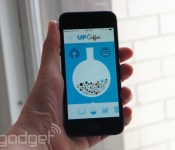
Jawbone’s ‘Up Coffee’ app tracks your caffeine intake, estimates when you’ll finally be able to sleep

Ah, caffeine. So addictive. So energizing. So unhealthy. It’s no secret that coffee lends itself to spurts of early-morning productivity, only to be followed by mid-afternoon slumps. And yet, we’re somehow always surprised when that 4PM frappuccino keeps us up past a reasonable hour. “Up Coffee,” a new iPhone app from Jawbone, probably won’t wean you off the good stuff, but it might take the surprise out of your next coffee coma. Here’s how it works: you enter a few specifics, including your sex, weight and caffeine tolerance, and then it’s your job to start logging. And let’s be clear here: this isn’t just a coffee-tracker, but a caffeine app, so in addition to all those coffees you consume throughout the day, you also should be logging any late-night Red Bulls.
Then, with the help of some pretty graphs, Up Coffee estimates when the caffeine will wear off — i.e., when you might be able to fall asleep. What’s nice is that you can use the app even if you don’t own an Up band; your sex and weight alone will help the software estimate what effect a cup of coffee will have. However, if you do happen to own a Jawbone Up band, you can link it up with the app and view your recent sleep data against your caffeine intake, confirming that yes, it really is a bad idea to drink java after five o’clock. Over time, the app might even challenge you to try experiments, as in, “What happens when you drink three cups instead of two?” There’s only one way to find out.
Up Coffee is available today on iOS only. In an interview, VP of Product Management Travis Bogard would neither confirm nor deny plans to release it on Android; it all depends on how successful the iOS version is (“we’ll see” were his exact words). In the meantime, Jawbone is also updating its regular app, the one that works with the Up and Up24 bands. Here, too, the updates are for iOS only — for now, anyway. All told, the changes are fairly minor. These include: sunrise and sunset times in the sleep graph; the ability to create custom reminders; new “Today I Will” challenges; and “Insight Reports,” which establish a connection between things like your bedtime and how many steps you’re likely to take the next day. Oh, and you may also notice a change in terminology: Jawbone now says “sound sleep” instead of “deep sleep,” which is technically a clinical term — a narrowly defined one, at that. Again, if you’re on iOS you can download the update today. If you’re on Android, well, we can only assume that version will catch up eventually.
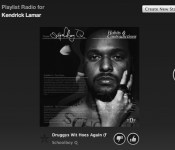
Spotify just bought the company that powers most online radio

Spotify now owns The Echo Nest, better known as “the company that powers the vast majority of internet radio.” That includes competing services like Pandora, Twitter Music, Rdio and more. But today’s news doesn’t necessarily mean that those services will lose support from Echo Nest’s API, as Spotify’s news announce today says, “The Echo Nest API will remain free and open to support its robust developer ecosystem.” The Echo Nest is staying in Somerville, Mass., with employees assuredly making Revolutionary War jokes every now and again to their Spotify counterparts in England. It’s not clear just yet what this will mean for Spotify Radio, but there’s this one oblique line about the acquisition’s potential impact: “The addition of The Echo Nest to Spotify will also strengthen Spotify’s ability to help brands and partners build amazing music experiences for their audiences.” Sure! Anyway, Spotify now owns the company that powers most of your internet radio. Take that as you will.
Source: Spotify

Huawei Ascend P6 gets Android 4.4.2 via OTA update in China
 A whole slew of Android smartphones have been getting updated to the latest software, Android 4.4.2, and the latest to join the party is the Huawei Ascend P6 which reportedly started getting its update as an over-the-air (OTA) update in China. Seeing as the P6 is still on Android 4.2.2 and using the slightly outdated Emotion UI 1.6, the updated should see the P6 get all the Android KitKat goods as well as the latest and greatest Emotion UI 2.0.
While this update hasn’t exactly been on time (Huawei promised the P6 would get its KitKat update in January), it’s better late than never and perfect timing seeing as all its competitors are being updated at this time as well. Seeing as the update is rolling out now in China, it’s only a matter of time before the update spreads around the world. Briefly holding the title of thinnest smartphone on the market, the P6 never quite found its feet away from its native China, but nonetheless has still helped the Chinese manufacturer reach third behind Samsung and LG on the Android manufacturers leaderboard.
Anybody out there excited that the Huawei Ascend P6 gets Android 4.4.2? We’d love to hear from you in the comments.
Source: Huawei News via Phones Review
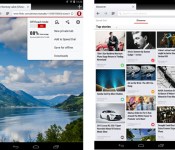
Opera’s Android browser catches up to rivals with support for webpage video chats

Given Google’s Chrome dominance, it’s easy to forget that there are other Android browsers. Opera is one of the also-rans, and it’s just brought a new version with a nice round number, 20, for your consideration. It’s touting WebRTC as the main hook, which lets you do video calls straight from Opera to any recipient with another WebRTC browser. That includes Opera, Chrome or Firefox, since the latter two apps have actually supported WebRTC on Android for quite awhile. Other additions include a new UI layout that you can customize for tablets or phones, an update to the Chromium 33 core (yes, Opera now uses WebKit), search improvements and a new download manager. It still claims to use less data than other browsers thanks to its off-road function, so if you’re pushing that hard carrier limit, check the source.
Filed under: Cellphones, Tablets, Software, Mobile
Source: Opera
“What’s Up” Command added to Motorola Touchless Control Update

Motorola pushed an update out for the Touchless Control app for the various supported Moto devices tonight. The update adds quite a few little things that are pretty cool. In addition to the usual bug fixes listing, the update also offers up enhanced end-of-speech detection for improved accuracy and faster responses.
While those are nice, it is the two new voice commands that were added that are really interesting. Now you can say “What’s Up” and “Read notifications”. The new voice commands are fully supported U.S. English, Spanish and Italian. While it is in beta in other languages. To clarify a little, you still need to say “OK, Google Now” prior to the new commands, so “OK, Google Now, What’s Up” or “OK, Google Now, Read notifications.”
What is a bit more interesting, and some what irritating, is that the updated commands are only supported on Android 4.4 KitKat. Which leaves a possibility for some users to not bea able to use it yet until their device gets updated. Obviously the app is only available legitimately for the Moto X, DROID ULTRA, DROID MAXX and DROID Mini.

Dell charging EU customers for Firefox installation, Mozilla’s not having it

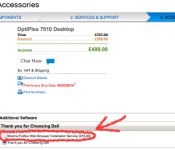
Installing a web browser is not a challenging task. In fact, you probably installed the one you’re using today all by yourself. Nevertheless, Dell is offering to take the burden off the hands of customers in Europe. The cost of avoiding a few lazy double clicks? Only £16 in the UK or €19.60 (about $26.74) the EU. The bizarre service can be found on the accessories page when ordering select workstations, specifically the OptiPlex 7010. It’s a strange and unnecessary option, harkening back to Best Buy’s silly PS3 Firmware upgrade surcharge. It’s also a blatant violation of Mozilla’s trademark policy, which states that companies may not charge for the company’s software in its unaltered, Mozilla-branded form. According to The Register, Mozilla is already looking into the matter. That said, there’s no reason for anybody to buy this absurd add-on: installing Firefox is ridiculously easy. We promise.
Via: TheNextWeb
Source: The Register

Flash Sale: Deus Ex: The Fall on Special for $0.99
 Looking for a game to keep you entertained for the rest of the week? Square Enix is having a flash sale on a must have game right now. For a limited time you can pick up Deus Ex: The Fall for just $0.99. The award winning games regular price tag is $6.99.
The game comes in at a hefty 713MB’s, so make sure you have plenty of space available and a Wi-Fi connection. Don’t hesitate on this one as the flash sale ends Monday. I am sure many of you have a buck sitting in your Play account from a few of those awesome Opinion Surveys from Google. Hit the snazzy banner link below to head straight to the Play Store.
‘Next-gen’ means gamepad updates: a guide to the first for Xbox One

The March Xbox One update is live; your friends list is now slightly more organized; and game broadcasting is mere days away. In reading through the laundry list of tweaks in last night’s refresh, perhaps you noticed a handful of gamepad notes? Something to the effect of, “firmware update to the Xbox One controller”? That’s secret code for, “You have to update your gamepad firmware.” The next generation! We are in it! Head below for a step-by-step guide on entering this brave new world.
Step 1: Connect the gamepad via micro-USB to the console

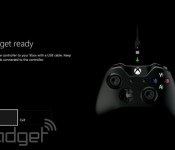
Grab your favorite Android game console-branded micro-USB wire (or, ya know, any micro-USB wire) and slap that puppy into the port atop the gamepad (next to the pairing button, as seen above). Plug the other end into any of the Xbox One’s USB ports (we opted for the front-left side). Easy!
Step 2: Navigate to the Xbox One Settings menu

If there’s a Kinect plugged in to your Xbox One, say, “Xbox, Go To Settings.” If you’re worried that the NSA’s watching you pick your nose and it’s disconnected, just push the Menu button (what used to be the Start button) and select Settings. In there, you’ll find the “System” tile. That’s what you want!
Optional: Get yourself a cool beverage.
Step 3: Downloading and Updating

Your gamepad’s plugged in via micro-USB; you’ve potentially got a cool drink to pass the one- to three-minute process. It’s time to update your controller’s firmware. Move the cursor down to “Update Controller” and let ‘er rip. On the next screen, select Continue. Feel free to sip that cool beverage. You’ve earned it.

Step 4: The Waiting Game

Annnnnnnny minute now…
Step 5: Rinse and Repeat

Maybe you bought a second controller? Maybe you got one last holiday as a present? Maybe you just picked up that snazzy Titanfall one? Anyway, if you’ve got more than one, here’s where you unplug the first, now-updated controller and plug in a second, or third, or whatever and start the process anew.
Step 6: Get Kinda Frustrated About Having to Update Gamepad Firmware

Right? Because it kinda stinks having to plug in each gamepad for an update. It’s a trade-off, absolutely — new, potentially improved functionality out of the Xbox One gamepad for the price of … hassle. Because let’s face it: This is a hassle. This how-to guide shouldn’t have to exist. Look at how upset it made the baby above? Just look at her face!
Seriously though, this is bound to be a more regular occurrence going forward. The PlayStation 4′s DualShock 4 has yet to require such an update, nor has the Wii U’s massive tablet controller, and the Steam Controller doesn’t even have a release date just yet (we’ve asked all three companies whether their controllers are even able to receive such updates and have yet to hear back). It’s a future we’ll grudgingly accept if it means cool new features in our controllers, but here’s hoping these “plug in all your gamepads” updates are few and far between.
[Image credit: Alamy]
Filed under: Gaming, Handhelds, Peripherals, Software, HD, Microsoft
KitKat Update Rolling out for T-Mobile Galaxy Note 3
Last week we saw Samsung had released the source code for Android 4.4 KitKat for the T-Mobile Galaxy Note 3. We usually see an update to the corresponding device within a day or so. Sadly it took a few more days than that for T-Mobile to start the push. It would appear that the Android 4.4.2 KitKat update for the Galaxy Note 3 has begun. It has popped up a few times for various users on XDA and a user on the T-Mobile support page has alerted people as well.
 The update carries software version KOT49H.N900TUVUCNB4 and is quite large, coming in at a reported 495.75MB’s. Obviously you will want to make sure you have some time to kill on Wi-Fi and well over 50% battery life before you start the process as the download is also being said to take almost 2 hours to download.
We can only guess at what the update has done, or what T-Mobile has altered. Certainly there will be some bug fixes, tweaks and performance improvements. Samsung reportedly was going to be altering the UI, Location Menu, Enhanced Messaging and Upgraded Google Mobile Service Apps.
Source: T-Mobile Support | XDA
Via Androidandme

