



Twitter update lets you tag people in pictures, attach multiple photos

If there’s a social network out there that epitomizes the mentality of “slow and steady wins the race,” it’s Twitter. With the addition of photo tagging and multiple picture uploads, the company is continuing to chip away at the advantages its competitors (both real and perceived) enjoy. In 2014 alone, the mobile and desktop sites have received face lifts, it introduced video previews on mobile apps, added ads in the form of promoted users, introduced photo editing tools and experimented with everything from view counts to hiding @ replies and hashtags.
The two latest features focus squarely on pictures. For one, you’ll now people able to tag people in the photos you upload. Sure you could always add their names to whatever text you appended before, but now you can tag up to 10 people without it counting against your 140 character count. Secondly, and this one will be rolling out more slowly, you’ll soon be able to attach up to four photos to each tweet. When you upload multiple pictures a thumbnail collage will automatically be created and you can tap on it to swipe through the images in full size. That is hitting iOS devices first and coming soon to both Android and the website. Hit your respective app store now to get the appropriate update.
Filed under: Internet, Software
Source: Twitter

Google Play Music for Chrome delivers browser uploads, finally

Google has finally enabled uploading tracks to its Play Music service through a browser, but for now, you’ll need to flip the switch yourself. In the Labs section of the menu, there’s an option for Google Play Music for Chrome. Ticking the appropriate box will allow for both drag-and-drop and manual song additions without the need to use that less than stellar Music Manger. Clicking the “Add Music” button at the top of the UI will also give you the option to choose folders that you’d like synced automatically. There’s also a mini player that can be accessed by clicking the arrow at the bottom right of the web app and the ability to download songs, albums and playlists directly from the web has been tacked on, too. All of the new features are powered by Google’s Chrome Apps and Native Client tech. What’s more, the folks in Mountain View have also added Info Cards to Movies and TV shows for added details on the actors in a particular scene. Of course, the selection you’re watching has to enable the feature for it to be available when you press pause on a mobile device. We’ve included a handy GIF after the break for a quick look at how it works.

Source: Google Play (Google+) (1), (2)

Google Brings Web Music Uploading and More to New Play Music for Chrome Lab
Google Play Music is a great service that many take advantage, as long as their country has support. Every track or album you buy through the Play Store is instant;y available on all your devices and online. You can listen to them right then and their, or even download them. The buck didn’t stop there though, you can also add up to 20,000 of your own songs to your account and Google would pull the information needed, sort them out for you and swap them for higher bit rate versions.
The more annoying part of the upload process was that you had to install the app to your PC and direct it to a folder on your hard drive to upload form. A necessary component, but a rather irritating one for many. Today Google Play’s G+ page let loose an announcement of a new feature in the Labs section for Google Chrome users. The new Lab option lets you simply drag and drop tunes from any PC directly to your Google Music account.
The Google Play Music for Chrome also has a handy little mini player that can be moved around your screen at will. It has all the controls to pause, change tracks, thumbs up or down , shuffle or repeat. Not to mention the cover art too.
 To get started you will want to head over to your Google Music account on the web. Check the box to enable the Google Play Music for Chrome lab and then save the changes.
 It might take a few minutes to process through and give you the access. It took about 5 minutes for me. Once it is available, you will have a small arrow in the bottom right corner.
 Click on it and then you can install the mini player.
 Kind of loving it right now. It is certainly evolving finally. Nice work Google. Now, if the mini player would just minimize and be be resizable. Hey, that is why this is a lab feature though. Give it a whirl and let Google know what they need to change before it makes it main stream.
Via Google Play G+
//<![CDATA[
ord = window.ord || Math.floor(Math.random()*1E16);
document.write('’);
//]]>

BlinkFeed coming to non-HTC Android devices ‘soon’

It was easy to miss in the fine print of yesterday’s HTC One press release, but it appears that BlinkFeed will be coming to the Play Store for non-HTC devices. We knew that a number of Sense apps were being broken free of their firmware chains, in particular Zoe, but it wasn’t clear just how fare the company was going to take that initiative. Now we know that the company plans to offer its own branded experience to any Android user. And it’s even putting BlinkFeed, which is arguably the centerpiece of Sense, up in the app store for use on devices running TouchWiz or even vanilla Android. For now it’s only listed as being compatible with the M8, but press materials state that:
Following its popularity with HTC users, HTC will now make HTC BlinkFeed available to other Android devices, launching on the Google Play store soon.
While we’ve never been huge fans of companies messing with the pure Android experience around here, we’re certainly in favor of more consumer options. With the Google Now Launcher in the app store and BlinkFeed coming soon it might not be long before you can buy whatever high-end handset your little heart desires then slap the launcher of your choice on top of it — be it HTC, Google, Samsung or Sony.
Filed under: Software, Mobile, HTC
Via: Android Central
Last.fm is killing off subscription radio, will focus on music-discovery app Scrobbler

Today, music-streaming service Last.fm announced plans to end its subscription service across all platforms. In place of its curated, ad-free radio for $3 a month, the company will focus on its Scrobbler app, which logs every song you listen to on your Last.fm profile and helps with music discovery. You’ll still be able to listen to your personal stations and library via the Youtube-powered Last.fm player on the desktop (currently in beta), and users can still play their Last.fm tracks on Spotify. In other words, Last.fm will now rely on third-party providers rather than streaming from its own servers.
Users have a few reasons to be disappointed: for one, the Scrobbler app is only available for iOS, and streaming on the Android app will end along with the subscription service on April 28th. And for our friends in Canada, this means Last.fm will join Spotify, Pandora and other biggies in not supporting streaming in the Great White North. We’ve reached out to Last.fm for some clarification on what this means for users on all platforms — we’ll have an update once we hear back.
Filed under: Internet, Software
Source: Last.fm

NYT Now curated news app coming to iPhone April 2nd for $8 per month

At a cocktail-fueled meet and greet at SXSW, we met with New York Times editors Jill Abramson and Clifford Levy to discuss the news organization’s 2014 lineup of services, including a new enterprise dubbed NYT Now. Created as an iPhone (and iPod touch)-only application, NYT Now is the company’s latest subscription-based product. On the surface, it appears to be simply a “lite” version of the paper’s daily content, but The Times is reassigning nearly a dozen editors to Now full time to curate internal content as well as articles from third-party news orgs, such as Engadget. Now is not without its challenges, though. Full access will run you $8 per month, which, while a far cry from the $45 you’ll fork over for a full digital subscription with Times Premier, is still a significant amount. You’ll be able to download the app on April 2nd, with free access to headlines, summaries and 10 articles each month. The $8 fee (billed every four weeks) will enable full access to any article that appears in the NYT Now app.
LastPass for Android can now fill your app logins in for you

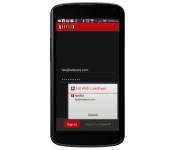
You may know LastPass, the cross-platform password manager, as a safe haven for website login details and common form info. Now, as well as playing nice with Chrome for mobile devices, the latest version of LastPass for Android can fill in app login data for you, too. Once it’s updated and you’ve authorized this new feature, loading up an app with a username / password prompt will trigger a pop-up with suggested login credentials you can choose to inject. Chances are, however, you’ll need to tell LastPass which of the logins stored in your vault the mobile app wants — you can also share your selection if you’d like to help it learn common associations. Because apps are often mobile portals for services you’d load up inside a browser on your computer, it makes sense. Then again, we can’t say we sign in and out of apps enough to justify $12 per year for the premium service LastPass’ mobile apps require.
Filed under: Cellphones, Software, Mobile
Source: LastPass, Google Play (LastPass)
Microsoft makes MS-DOS and Word for Windows source code public

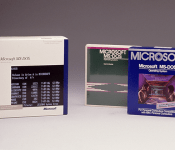
Microsoft believes the children are our future, and to prove it, it’s teamed up with the Computer History Museum to make source code available for two groundbreaking programs: MS-DOS and Word for Windows. In a blog post that outlined the deal, Roy Levin, managing director of Microsoft Research, said the company granted the museum permission to make the code public for MS DOS 1.1 and 2.0 and Microsoft Word for Windows 1.1a, “… to help future generations of technologists better understand the roots of personal computing.” MS DOS, originally code named “Chess,” took root in 1980 when IBM asked Microsoft to produce an OS to run on its computers. Word for Windows was released in 1989, and with in four years had captured half of the revenue of the word-processing market, according to Levin.
Both programs marked the beginnings not only of great successes for Microsoft, but also the PC industry as we know it today. The museum’s Chairman, Len Shustek, had this to say about the effort: “We think preserving historic source code like these two programs is key to understanding how software has evolved from primitive roots to become a crucial part of our civilization.” The move marks an ongoing effort to make landmark software code available to the public; the museum released the source for the 1989 version of Photoshop early last year.
Filed under: Desktops, Software, Microsoft
Source: Microsoft, Computer History Museum

Instagram is testing Facebook Places integration for location tagging

It looks like Zuckerberg and Co. may be looking to make a big push for Facebook Places, and an on-going trial indicates that it could start with Instagram. The folks in Menlo Park are testing the social networks’ own service for adding location info, but for now, Foursquare remains an option for sharing inside its popular filter-driven photo editor. In fact, some users have already encountered the tweak. Instagram has long used Foursquare’s API and venue data for attaching snapshots to a particular place, and there’s no guarantee that the trials will even make it to a new version of the app. Of course, in addition to Foursquare, users can beam photos to Twitter, Tumblr and Flickr in addition to the parent social network. We reached out for a comment on the matter and we recieved the following statement from an Instagram spokesperson:
Foursquare is a great partner, and people will continue to be able to share their check-ins to Foursquare from Instagram. We are constantly testing experiences throughout the app to provide the best possible user experience as part of future planning.
Filed under: Software, Mobile, Facebook
Source: Fast Company
HTC pushing Sense 6.0 to the OG One, One Mini and One Max soon

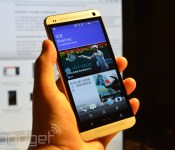
Well, we don’t have a specific date, but HTC’s latest Sense skin — which the company insists on calling Sixth Sense — will be coming to it’s older models this spring. Last year’s One, the One Mini and One Max will all be getting updates in the coming months with Sense 6.0. While it’s not a complete surprise, it’s nice to know that HTC isn’t leaving its customers out in the cold. It’s all part of its HTC Advantage program which guarantees two year of software updates and support. That’s longer than even Google suports its Nexus phone. Hopefully we’ll get specific launch dates sooner, rather than later.
Filed under: Cellphones, Software, Mobile, HTC

