


Just Saying: Android 4.4 KitKat is the most stable mobile OS
 In the endless war between iOS and Android, there are many contentious areas for heated discussion, some with little, or no, basis in logic. There is, however, possibly one less area for conflict now after Crittercism posted its report into mobile platform stability and found that Android 4.4 KitKat is the most stable mobile OS. According to Crittercism’s findings, which involved a sample of over 2,500 devices and 106 different mobile operating systems, Android KitKat had the lowest overall crash rate at just 0.7%.
According to the study, Gingerbread has the worst rate of crashing of all the Android operating systems at 1.7%. Across the way at Apple, iOS 7.1 came in at a crash rate of 1.6%, only marginally above that of Gingerbread, though that is nothing compared to the crash rate of iOS 5 which logged in at 2.5%. While it’s hard to say if these results are significant or definitive enough to represent the global device population, it’s nice to see an attempt to try and put this information together.
What do you think about the results of Crittercism’s study into mobile platform crashes? Think the study holds any water? Let us know what your thoughts are in the comments.
Source: Crittercism via TalkAndroid
//<![CDATA[
ord = window.ord || Math.floor(Math.random()*1E16);
document.write('’);
//]]>

Google clamps down on Android apps with deceptive ads

Google has issued revised rules for Google Play apps in its continuing effort to stay one step ahead of nefarious developers. This time, the primary target is apps with pop-up ads that spoof a system, service or app notification and trick you into clicking where you shouldn’t. It’s also cracking down on “promotion or install tactics” that cause downloads or Play store redirects without your say-so, along with apps that send unsolicited SMS ads. Finally, it’s forbidding any the use of “erotic content” to promote pornography and forcing advertisers to clarify when and how they use in-app purchases. Google will allow developers a 15-day grace period before it drops the ban hammer — by which point the bad guys will have likely found workarounds.
Via: Techcrunch
Source: Google Play

Shazam is now more social and better-looking on iOS, Android is next

As part of an ongoing major redesign on mobile, Shazam has just rolled out a new version of its iOS app. Adding to the changes we saw last month, today’s update focuses on offering improved social sharing features, an even better lyrics experience and a more polished UI throughout the application. Users will now see in-depth artist biographies, redesigned album and song pages, as well as the inclusion of videos for songs. Shazam also points out that the app was also tweaked to have enhanced audio recognition and suck a little less power out of your iDevice — much like Skype did recently with one of its apps. The update is initially only available for iOS, but the Android crowd can expect these revisions to come “in a couple of weeks.”
Filed under: Internet, Software, Mobile
Source: App Store
Future Office for iPad update will let you print your documents

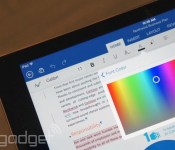
Although the Office for iPad suite is relatively full-featured, it won’t print hard copies. That’s a glaring omission even in this increasingly paperless era, we’d say. Not to worry, though: Microsoft tells PCWorld that printing support is coming as part of future app updates. The company hasn’t said just when those upgrades are due, but Office general manager Julia White promises to “iterate very fast” on the fledgling productivity software. In the meantime, don’t toss out your conventional PC — you may need it to print out that next contract or term paper.
Filed under: Tablets, Software, Microsoft
Source: PCWorld

Cut the Rope 2 Finally Makes its Debut on Android
 The Cut the Rope franchise from ZeptoLab has always been a great series of games to help keep your wits about you during rough days. Over the years we have seen a multitude of iterations of the quick thinking, rope cutting, candy munching Om Nom puzzler. He has graced pour devices in HD, in a Experiments edition and did a little time travelling in last hurra. Finally Zeptolab has brought a real sequel to the game out to the public with Cut the Rope 2.
Following the foot steps of the originals, you need to feed Om Nom candy. CTR2 brings in some new characters, the nommies, to help you along your quest for stars and candy. There are a total of 5 characters to learn about and utilize to crack the puzzles.
MEET OM NOM’S NEW FRIENDS, THE NOMMIES!
• Roto can carry Om Nom to the best candy catching locations
• Lick can make small bridges with his tongue to help Om Nom reach his goal
• Blue can lift Om Nom to new levels of candy hunting fun
• Toss can throw objects, including candy
• Boo can scare Om Nom to jump to new heights
Om Nom can even move around a bit this time around.
The game is free, but does sport in-app purchases and with it, some heavy hearts. You have will have to endure an energy bar in order to play. When the bar is empty, you either need to pony up some cash for some coinage to refill the bar, or kick back for a while and let it regenerate on its own. From what we gather in the Play Store comments, people aren’t to happy about the energy bar or the constant push for power-ups and hints that all cost you a little real word cash.
Don’t let the comments turn you away though, it is free, so we recommend you give it a try for yourself. I personally hate the whole ‘pay to play’ style model, but with little amount of time I actually spend playing any one game in a day, the 5 minutes to get another energy piece won’t bother me much. Really, it will give me another reason to stop playing and get something else done anyways. Hit the Google Play Button below to go to the Play Store and pick it up.

//<![CDATA[
ord = window.ord || Math.floor(Math.random()*1E16);
document.write('’);
//]]>

San Francisco Giants (and most of MLB) adopt Apple’s iBeacon for an enhanced ballpark experience

“It’s kind of a no-brainer.” That’s what the San Francisco Giants’ Chief Information Officer, Bill Schlough, said when asked why the team is implementing Apple’s iBeacon technology this season.
For the uninitiated, iBeacon is a small Apple device that communicates with iPhones through Bluetooth to expand the location services in iOS. In practice, it’s a marketing tool that lets apps know when you approach or leave the presence of an iBeacon. This is the first season that pro baseball is implementing the technology with 20 of the 30 Major League Baseball teams participating, though retailers have been using it since last year.
For the Giants, the technology is another way to better engage with fans. “Mobile and digital experiences are paramount to our fan experience,” according to Schlough, “and they have played a role in the fact that we’ve had 246 straight sellouts.” (Winning two World Series in the past five years probably doesn’t hurt ticket sales, either.)
The Giants have long been one of the most technologically progressive organizations in baseball. Fans first enjoyed in-stadium cell coverage in the early 2000s, and in 2004 the club became the first in professional sports to turn its stadium into a WiFi hotspot. Currently, there are 1,289 WiFi antennas blanketing AT&T Park with connectivity good enough to stream video to thousands of fans. Plus, during the offseason, when the Giants installed the iBeacons (it only took a day to do it), Schlough’s team put in an entirely new LTE backhaul system to deliver more mobile bandwidth to ticket holders.
All told, 19 iBeacons are located at all of the fan entry and exit points of the ballpark, per MLB policy. That number will vary at other stadiums — the Dodgers, for example, are reported to have 65 installed, presumably due to the presence of more ways to get inside Dodger Stadium. They’ll be used to check fans in (think Foursquare) upon entry, assuming they have an iOS 7 device running the MLB At the Ballpark app and have Bluetooth turned on when they walk through the gate. The app’s available to both iOS and Android devices — and provides maps, concession info, video clips and the ability to upgrade your seat — but only folks with Apple devices benefit from the bespoke iBeacon experience.

Once checked in, teams can push tailor-made notifications and relevant offers through the app. Fans need not fear that they’ll be bombarded with junk, though, as MLB is soft-launching the technology as a pilot on Opening Day, and there are restrictions on its use… at first, at least. “We don’t want to turn this into some sort of SPAM engine,” says Schlough. So, the club’mms exploring new and creative ways to use the devices to improve, not take away from the gameday experience. Of course, users can always opt-out of the program altogether, too.
Generally speaking, iBeacon strategy is controlled by MLB: the league tells teams where to place the hardware and what sorts of stuff can be sent to folks who check in using the technology. For now, that means fans get a welcome message when they check in, and maybe an offer to upgrade their seat or get a discount on concessions. Schlough wouldn’t tell us exactly what kind of offers the Giants will be making, but he did say that he’s particularly excited about geo-targeting. “It opens up a world of possibilities,” he says, indicating that iBeacons could enable the club to send notifications about activities happening nearby (not everyone sits and watches the game from their seat) or target offers for specific parts of the park.
The expectation is that MLB will let clubs “get more creative” once iBeacon has proven stable and useful for fans. Naturally, the Giants don’t know when that’ll be, but the team will have things ready to go whenever the league office gives the go-ahead. Until then, Schlough’s biding his time and figuring out how to best use iBeacon to service one of the most tech-savvy fan bases in the bigs.
[Lead image credit: Jeff Chiu,AP]
Filed under: Cellphones, Software, Apple
LG G Flex receives KitKat update, but only in South Korea for now

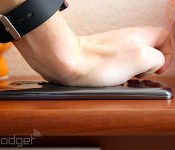
When it rains, it pours. Shortly after the news that AT&T’s Galaxy Note 3 is finally getting a taste of Android 4.4, LG is doing the same with its G Flex back at home, in South Korea. Most notably, this update will bring the company’s Knock Code feature, which debuted on the G Pro 2, to the flexible smartphone — yes, it really does flex. But that’s not it: LG’s KitKat update also brings improved Bluetooth Car-Kit controls and a boost in overall performance, thanks to things like Google’s ART experiment. And don’t worry if you down own a South Korean model of the G Flex, you should take this as being a step closer to arriving on your device.
Filed under: Cellphones, Software, Mobile, Google, LG
Via: UberGizmo
Source: LG (translated)

Want a free year of Office 365? Bring your iPad to a Microsoft Store

If you’re enamored with Office for iPad but don’t want to fork over $70-plus per year for the necessary Office 365 subscription, you’ll want to make a beeline to your local Microsoft Store this weekend. Microsoft has launched a promo that will offer a free year of Office 365 to the first 50 people who bring an iPad to a given retail location from March 28th through March 30th. You’ll undoubtedly have to hustle if you want to take advantage of the deal, but the trek could be worthwhile if you like the idea of giving Office an extra-long trial run.
Filed under: Tablets, Internet, Software, Microsoft
Via: ZDNet
Source: Microsoft (Facebook)

Android 4.4.3 spotted running on Nexus 5 and Nexus 7
Over the last few weeks, the evidence that the next iteration of Android KitKat, Android 4.4.3, is on its way to being released is mounting. Last we heard, LlabTooFeR suggested that the software update would be addressing a well-known Nexus 5 camera bug, and today, myce.com is reporting that Android 4.4.3 has been spotted running on the Nexus 5 and Nexus 7.
 According to the report, Android build KTU83 has been spotted running on the Nexus 5 and another build, KTU79, has been seen on the Nexus 7; this fits the naming convention that Google generally uses for its Android builds, and it also supports the existence of the KTU72B build that LlabTooFeR spotted last week. According to the report, the ‘U’ in the build name suggests that Android 4.4.3 is targeted for release in Q1 2014, so we should ideally be getting news about a release very soon.
How soon do you think Android 4.4.3 is going to be released? And what would you like to see in this software update? Let us know what you think in the comments.
Source: myce.com
//<![CDATA[
ord = window.ord || Math.floor(Math.random()*1E16);
document.write('’);
//]]>

AT&T’s Galaxy Note 3 gets a bite of Android 4.4 KitKat

Samsung’s Galaxy Note 3 may already be running the latest version of Android in some places. Here in the US, however, most carriers still haven’t updated the faux leather-covered device to KitKat. But, starting today, at least a good number of Note 3 owners will be getting a taste of it, with AT&T announcing that its version of Android 4.4 is now rolling out to the 5.7-inch handset. You can expect to experience quite a few new things as part of this, such as a revamped user interface, improved GPS and the option to choose a default messaging app. The update is said to be available now — all you need to do is tap your way to that Software Update menu, download the goods and voilà.
Filed under: Cellphones, Software, Mobile, Samsung, Google, AT&T
Source: AT&T

