


Here are a few lesser-known new features in iOS 8

Widgets! Quicktype keyboard! Hey, Siri! Interactive notifications! Like most new versions of Apple’s mobile OS, iOS 8 comes with its fair share of features that, in theory, will help improve the experience from the previous version. Our list of new features covers nearly every highlight from Apple SVP Craig Federighi’s presentation, but every year there’s always one slide filled with additional enhancements they don’t have enough time to call out individually on stage, and every year that slide disappears within a few seconds. So, what else will iOS 8 offer that wasn’t specifically called out by Hair Force One?
Admittedly, there’s a reason why the majority of these features only get a few seconds of precious keynote time: A lot of them simply aren’t that interesting to the average end user. New languages and refined dictionaries, for instance. There are, however, quite a few gems that are worth paying a little more attention to, and even a few that may not be fully explained until consumers get their hands on the OS for themselves.
First, we already wrote about support for WiFi calling, a feature T-Mobile currently touts on most of the Android devices and Windows Phones it carries. This service, which gives you the ability to use WiFi networks to make calls, is extremely handy when you’re in an area with spotty cellular coverage but more than capable WiFi signal.
If you’ve used an iPhone in the past, you likely have found yourself frustrated by unexplained battery drain. Is a rogue app sucking your battery dry? Who knows! Fortunately, Apple appears to have heard your cries of annoyance, as it’s introduced battery usage by app; now you can go into the settings menu and find out which apps are utilizing significant portions of your storage space.
Privacy fans will like this one: iOS 8 will list DuckDuckGo as a default search option in Safari, in addition to Google, Bing and Yahoo. We won’t blame you if you haven’t heard of the search engine before — essentially, its whole reason for being is to not track your searches. You won’t have to worry about your interests or other information getting sent to advertisers, for instance.
iOS 8 will also offer a few new enhancements to the camera app: Separate focus and exposure controls, as well as instant burst mode and a camera timer. Apple’s preferred to keep its camera app as simple as possible, so this is certainly adding a layer of complexity that wasn’t there before.
And here’s one for the iPad users: Panoramic mode. Its absence in iOS 7 was a bit of a head-scratcher, but Apple has finally determined that there are plenty of people out there who actually do use their tablets to take photos. Why not make the best of the experience by adding in the ability to take panoramic shots?
Also on the list of iOS 8 features is FaceTime call waiting. It’s a nice enhancement if you use the video chat service on a regular basis, since there’s always a possibility that someone else wants to set up a FaceTime call with you at the same time.
Finally, given the huge push Apple’s making in China — it landed a deal with China Mobile, the largest carrier in the country, earlier this year — it makes sense to offer more local support. Namely, iOS 8 adds lunar calendar, navigation and vector map support for Chinese users.
Naturally, this isn’t the full list: iOS 8 users will also enjoy things like multi-device support for made-for-iPhone hearing aids, the ability to purchase iTunes content using Siri, travel time notifications, rich text editing in the Notes app, flyover city tours, built-in iBooks support and Braille keyboard for direct six-dot input. Of course, there may be other stuff added in between now and the final public release, but we’ll have to wait for the Fall to know what else will make the cut.
Filed under: Cellphones, Software, Mobile, Apple

Useful Cloud Storage App, Copy, Updates With Chromecast Streaming Support
The Cloud storage app, Copy, has pushed out a new update to their app today that moves it to version 3.0. The update offers up some UI enhancements along with some major stability improvements. While that is great, what is a bit more tantalizing is that the update also brings in the ability to stream your stored movies, photos and audio to your Chromecast device.
 If you don’t have Copy, you are missing out on another 15GBs of cloud storage. Building that space is pretty simple, much like Dropbox, a referral nets you more space. 5GBs to be exact. The app and the 15GB of storage are both free and with the recent UI changes and Chromcast support, it just became a little more useful. Hit the link below to grab the app now, or go sign up online at Copy.com.
//<![CDATA[
ord = window.ord || Math.floor(Math.random()*1E16);
document.write('’);
//]]>

Android 4.4.3 Factory Image for Nexus Devices Released
Earlier this morning T-Mobile support page listed Android 4.4.3 updates were heading out to the Nexus 4, Nexus 5 and Nexus 7 (2013). It brought up a lot of questions, like, will the unlocked versions be getting it. It is a given that the unlocked versions for those devices would be receiving the update, the news was centered around T-Mobile’s carrier versions. For those that might be a little bit more than irritated by the news, there is some other good news out there for you guys. Google has just released the Android 4.4.3 factory image for the Nexus 4, Nexus 5, Nexus 7 and Nexus 10. It does seem to be missing for the Nexus 7 LTE version though. The file size rolls through at 444MB’s and you’ll need fastboot set up to to get it installed.
 If you know what you are doing and just can’t wait for the update to roll trough to your device, then head over to developers.google.com and pick up your image and get to work.
Source: Android Central
//<![CDATA[
ord = window.ord || Math.floor(Math.random()*1E16);
document.write('’);
//]]>

Apple App Store getting developer bundles and video previews

As Tim Cook embarked on the developer section of the keynote at WWDC, it might be easy for end users to disconnect. But, if you did, you’d have missed out on two fairly solid updates: developer app bundles and (finally) video previews. Now, developers can combo their apps and sell the for a discounted price should they choose. Likewise, previews allow developers to give us a better taste before we buy. If you happen to dabble in developing yourself, then you might also be relieved to hear that TestFlight is now officially part of Apple’s developer set-up, too.

Apple’s iOS 8 supports widgets in Notification Center

It’s been a long time coming, but Apple is finally adding support for widgets to iOS. On stage at its Worldwide Developers Conference, the company’s senior VP of Software Engineering, Craig Federighi, revealed that devs can now start building widgets within the Notification Center on iOS 8. Unlike Google’s take on widgets with Android, Apple’s equivalent won’t have them living on the home screen of your smartphone or tablet. Instead, iOS widgets will share the drop-down hub with app notifications. Still, there’s a lot of potential here, as it’s going to let those of you with an iOS device have more interactivity and quick access to your favorite applications. iOS 8 will be available this fall.
Filed under: Cellphones, Software, Mobile, Apple

iOS 8 apps can share data, features with each other

Apple’s annual developer conference is well underway, and it just revealed what could be a seismic shift in the iOS world: third party apps will soon be able talk to each other. Historically, applications on iOS have lived in their own silos, without being able to share data and features, but that’s set to change in iOS 8. Apple has given developers “Extensibility” tools — a suite of APIs, if you want to get technical — that they can wield to let their apps share everything from documents to translation services. A demo onstage showed a Bing extension for Safari doing inline translation of a Japanese website, and using Pinterest to share a photo from a website in just a few taps.

Of course, info sharing is bound to be a boon for third-party Twitter apps and other social networking services. This kind of interaction between apps has existed on other platforms like Android, and of course the best examples are support for third-party keyboards and widgets in notifications. Both features will be in the new iOS, but the implementation goes deeper. Apps can also select a default storage location that’s accessible by other apps — it’s not exactly a traditional file browser but it sounds close. As a security measure, iOS 8 will act as a middleman when it comes to sending data between apps, rather than letting applications chat directly with each other.

Picture-taking apps can also embed their filters and photo editing tools directly into the new Photos app, letting users make adjustments without bringing the images to yet another app. Finally, devs can create custom buttons for the action sheet (the popup menu that looks the same in every iOS app and lets you choose what to do next, shown above from iOS 7) so users can add watermarks, translate documents, or do anything else. We’ll have to wait and see how developers make use of the new tools, but there should be a mix of existing services and features ported over from Android, plus some entirely new takes on sharing.
Filed under: Software, Mobile, Apple
Source: Apple iOS 8 Developer site

Apple’s WWDC 2014 in numbers: 40 million on Mavericks, 800 million iOS devices and more

Charts, graphs and stats: these are the things Apple keynotes are mad of, and today’s WWDC 2014 kickoff was no different. CEO Tim Cook took to the stage this morning at the Moscone center in San Francisco armed with enough numerical ammunition to put your best boardroom PowerPoint Keynote to shame. Cook kicked things off boasting over 40 million copies of OS X Mavericks installed and more than 50 percent of the install base working on its latest OS. He went on to point out that while PC sales continued to slip (down 5 percent, according to Cook), Apple’s computer sales are growing.
Developing …
However, according to Gartner’s Q1 2014 shipment estimates, Apple failed to crack the top five in worldwide shipments, coming in at number three in the US with 10.8 percent of the market.
In the OS wars, Apple may have strong adoption for its latest, but OS X still trails Windows by a large margin. Microsoft’s Windows 8 (released in late 2012) reached 200 million licenses by February of this year. While we don’t have internal numbers on its latest update, Windows 8.1 (released in October 2013) surpassed both Apple’s OS X 10.9 Mavericks and Microsoft’s own Windows 8 with 6.35 percent of the market according to May 2014 stats from Net Applications. Meanwhile, that same report pegs Windows 7 at 50 percent of the OS market. Regardless of its growth and reach, Apple is still a distant second in the race for desktop dominance.

In the smartphone market, iOS is still second to Android. According to Strategy Analytics, Apple’s mobile OS reached 15.5 percent of the market in 2013, down from 19.4 percent the year before, with Android hitting 78.9 percent, up from 68.8 percent in 2012. Despite those numbers, Cook mocked the competing operating system’s fragmentation issues, saying 98 percent of iOS users are now on iOS 7, while only nine percent of Android users are now on its latest OS, KitKat.
According to Cook, a 97 percent customer satisfaction rating shows why its had 130 million new iOS users in the last year and half of its Chinese customers switching from Android to iPhone in the last six months. To be fair, the iPhone just reached that country’s largest carrier, China Mobile, in January. As Cook not-so-lightly put it:
“They bought an Android phone, by mistake, then sought a better experience, and life …”
Taking a step back and looking at the big picture, Cook boasted a total of 800 million iOS devices shipped. Back in June of last year, that number was 600 million, up from 500 million in January, 2013. The iPhone, which launched in 2007, has since reached 500 million units shipped. Samsung, Apple’s biggest mobile rival, meanwhile, announced it sold 200 million Galaxy S smartphones (launched in 2010) as of February. So where does the rest of that 800 million come from? Apparently, Apple’s shipped 100 million total iPod Touches and 200 million iPads.
At this rate, we wouldn’t be shocked to hear Cook boasting iOS billions some time next year. In the mean time, Apple has more than just billions in profits to gloat about. As of today, users have downloaded 75 billion apps from the App Store, with 1.2 million apps to choose from and 300 million visits to the digital storefront every week.
Filed under: Cellphones, Desktops, Laptops, Software

OS X Yosemite: Apple’s latest desktop operating system is free this fall

Apple’s just unveiled the latest update to its desktop operating system for Macs and it’s called Yosemite. While last year’s Mavericks brought the inevitable reality of iOS/OS X integration even further with the introduction of familiar apps, like Maps and iBooks, this time around Apple’s Tim Cook promises both systems are now “engineered to work seamlessly together.”
Craig Federighi, SVP of Software Engineering at Apple, explained that Apple’s focus for OS X Yosemite was on clarity, continuity and clear font type throughout the operating system. Finder window menus are now translucent, matching up with the image backgrounds on your desktop to dynamically shift for personality and color temperature. This effect has been translated to the refreshed dock which, itself, has also gotten a slight makeover with newer, flatter-looking icons and even a new trash can; something Federighi referred to as “fundamentally still Mac.” There’s even a new “dark mode,” giving users the option to eschew translucency for dark grey toolbars.
As Cook mentioned at the start of today’s WWDC kick-off, the prevailing theme of this OS X update is one of uniformity and the enhancements made to Yosemite reflect that direction. The OS now sports changes to menu navigation for Apple’s suite of desktop applications that see the nav bar moved to the left rail across all programs, like Messages or FaceTime.
Federighi went on to highlight changes to Notification Center in Yosemite, saying that users can expect to now see a full day’s worth of their schedule lumped in with regular notifications from other apps. To swap between the two, Apple’s added in tabs at the top to let users minimize the information (i.e., calender, reminders, news updates) shown at a glance. Widgets for weather, stocks and calculator have also been tossed into this new Notification Center for easy access.
One of the more glaring changes to OS Yosemite, is the addition of Spotlight search as a front and center service throughout the system. A search bar, akin to Google’s search bar across Android devices, will appear in the midst of the desktop so users can quickly index and surface apps, docs and other items of interest without having to go all the way to the icon on the upper right of the menu bar. This new Spotlight can even be used to bring up full contacts info and any related information — be it a shared document or scheduled appointment — attached to a specific contact search.
The change to Spotlight here, as we mentioned previously, really seems to be going after the preemptive search of Google Now. Federighi showed off how the feature can now make recommendations for movie times, nearby restaurants and even offer measurement conversions. Apple’s even worked Spotlight into the address bar of the revamped Safari browser, again, to give users a one-stop shop for search across the web and local files.
As for Safari, that browser has predictably been updated for continuity, Federighi’s favorite buzz term for this WWDC. The browser’s window carries over the translucency seen in other areas of the operating system, but also sports changes to some familiar functions. Favorites are now hidden by default, but users can access these by clicking on the address bar. Sharing out links to social networks has been simplified with a one-click process and RSS feeds will populate in the browser’s sidebar.
AirDrop in Yosemite now works with iOS, so iPhone owners can easily transfer files to the Mac and back. Another example of “continuity” is Hand-off, OS X Yosemite’s ability to recognize work being done on iOS that a user might want to continue on the desktop. The feature works very simply: Once an action is detected on iOS, Yosemite will create an icon on the desktop to remind the user to complete the task. This sensing ability also extends to creating a tethered connection, as a user’s iPhone will now appear as a connection option in the WiFi dropdown.
Gmail users have long enjoyed the ability to make and receive calls from their laptop and now Apple’s giving users of its ecosystem that same perk. Once connected to your iPhone, Yosemite will prompt users with notifications to answer or ignore incoming calls (both audio and video); a feature Federighi demoed by ignoring his Mother’s call and then calling new Apple employee, Dr. Dre. The OS will even allow users to click on a number within a website (say from a restaurant page) to dial it directly.
Since WWDC is a developer-focused conference, Apple is making OS X Yosemite available to them to download beginning today, with a non-dev beta to be released this summer. But, as it was with OS X Mavericks, today’s Yosemite reveal is only a teaser for the Apple user public-at-large and that full retail release won’t be available until sometime this Fall. Though, when Apple does unleash OS Yosemite later this year, users will be able to download it for free.
Apple reveals iOS 8 at WWDC 2014

We all knew it was coming, and now it’s here. Apple CEO Tim Cook just put months of breathless speculation to rest by pulling back the curtain on iOS 8 during the company’s WWDC 2014 keynote address in San Francisco. It doesn’t look like the sort of quantum leap that iOS 7 was, but Apple’s head honcho assures us that it interacts in some fantastic ways with the new version of OS X and that it pairs great end user features with great developer features. Well, we’ll be the judges of that. The big keynote is still underway, but here’s what we know so far.
Interactive Notifications

We’ve all been there — you get a message while you’re doing something else, and you just can’t be bothered to switch apps. With iOS 8, you can pull down from that notification shade and respond from right there. It’s not limited to messages, either — you’ll be able to like/comment on Facebook messages or handle your calendar events.
Improved Mail

Apple has introduced Mailbox-style actions to its stock Mail application, too. You can easily tag or dismiss certain missives without even having to open them up, and all it takes is a quick swipe on the contents of your inbox.
Spotlight
The company made a big to-do about how much better Spotlight is in OS X Yosemite, so it’s only natural the iOS version gets an upgrade as well. Among other things, it’ll let you search for apps you haven’t even installed yet, songs in the iTunes store, movie times and locations and more. Media isn’t the only focus here, though. It’ll also show directions to locations you type in to even news.
QuickType

At long last, iOS is getting an improved on-screen keyboard. In short, we’re looking at an improved recognition service that can more accurately predict what it is you’re trying to say. Hopefully this means an end to all the “ducking” typos going on out there.
iMessage takes on Whatsapp

Facebook just bought Whatsapp for an obscene amount of money, but that hasn’t stopped the folks in Cupertino from replicating some of the app’s most-used features. Among other things, you can send audio and video messages from within the app — in the old days, you’d have to pop out into the camera or Voice Memos to create your content and then send it over. Even better: you can respond to one of those audio messages right from the lock screen if you just raise your iPhone to your face.
Continuity
We’ve touched on this elsewhere, but the newly announced Continuity between iOS and OS X is a very, very welcome shift for Apple. You’ll be able to pick up and initiate phone from within OS X, even when your iPhone is across the house. Is someone calling you? You’ll get a caller ID notification, and a quick touch lets you use your Mac as a speakerphone. And if one of your non-Apple pals shoots you a plain ol’ text message, your iPhone will relay it to all your other iDevices.
HealthKit and the Health app

Think of HealthKit as a one-stop shop for all the health data that gets collected from all the tracking apps on your phone. Apple’s teaming up with a few key partners to use that data — Nike can provide access to your fitness and activity data, and the Mayo Clinic hopes to get actual, real-time health information from patients through HealthKit. And for you, the end user? You’ll be able to keep tabs on the measurements that matter most to you by way of a (startlingly pretty) new Health app.
Family Sharing
Apple is being embraced by businesses all over the place, but that’s not the only organization the company is concerned with winning over. With its new Family Sharing push, those even smaller groups (up to 6 people, if you were curious) can share a single calendar and app and content purchases. If you’re a parent and your lil’ whippersnapper has an affinity for buying things from iTunes with your credit, well, never fear. Once connected, those young ones will be told to seek your permission and you’ll get a notification on your phone to that effect.
A Slightly Smarter Siri
Craig Federighi just glossed through a spate of Siri modifications, none of which were as interesting as what we were hoping for. She’s still in solid shape, though: You can invoke her presence in the car by saying “Hey, Siri,” and the virtual assistant can listen to music and identify it (thanks to a little help from Shazam). In case you happen upon something you like, you’ll be able to download that track right from Siri’s results page.
This is a developing story, please refresh for updates (or check our liveblog!)
Filed under: Mobile
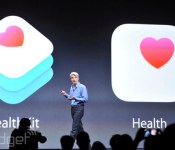
Apple’s Health app for iOS 8 collects your vitals from Nike and more

Apple’s iPhone is going from part-time health stat monitor to full-time mobile monitoring unit. HealthKit is a new service coming to the iPhone that tracks, records and analyzes your fitness level across a variety of metrics (sleep, movement, etc.). The way you use it on iOS 8 is through a new app called, simply, “Health.” The initiative works with companies like Nike to bring all your health information into one place, under the Health app in the next update to iOS. It looks a lot like Passbook, using cards to identify various stats. Thusly, it enables customization of the stats you want tracked and how you want it presented.
Apple says Health will work with more than just Nike, though other big players weren’t given the same shoutout. Beyond exercise applications, HealthKit is working with healthcare providers to provide up-to-date information on patient vitals in real-time.
The Mayo Clinic, a Minnesota non-profit, is already working with Apple on making the software work best for both doctors and patients. In the examples shown today at Apple’s WWDC event in San Francisco, Health advised patients of wellness plans set by their doctors and enabled a futuristic approach to healthcare.
Health assuredly works with Apple’s M7 chip, first introduced in the iPhone 5S, which tracks motion stats and enables collection of much of the metrics HealthKit aims to collect. It also sounds like the software bedrock for the long-rumored iWatch concept — a smartwatch/wearable of some form directly from Apple — though we’re yet to hear anything official on that.
Filed under: Cellphones, Misc, Household, Software, Apple

