



Dead Trigger 2 gets massive content update with weapons, new arena, environments and More
 If you are a zombie killing machine, then chances are you have and play Dead Trigger 2 fairly often. Madfinger Games has just released a pretty massive update to the game that you should probably pick up.
“We have strengthened the spirit of competition with exceptional tournaments and awesome prizes” explains Pavel Čížek, vice president of MADFINGER Games. “Now we bring the best and most extensive update of Dead Trigger 2. Our fans will enjoy a variety of tournaments with custom gladiator rules and powerful new guns” adds Čížek.
The weekly tournaments are the only thing that have been added though. They updated the story campaign, improved the world maps, added new environments, added a purgatory arena along with new weapons and other content. The purgatory arena looks like it should be quite a fun battle with hordes of zombies and wickedly awesome traps like the impaling spike you see above. Check out the brief game trailer about the update.
Dead Trigger 2 is a freemium game that does offer in-app purchases. That doesn’t mean you can’t spend countless hours playing without spending a dime. I know my daughter took over my account a while back on the tablet has been plugging away just fine without spending any money. If you have the game, then head to the Play Store and snag the update. If this is all new to you, hit the link below and get to zombie slaughtering on a global scale.
//<![CDATA[
ord = window.ord || Math.floor(Math.random()*1E16);
document.write('’);
//]]>
The post Dead Trigger 2 gets massive content update with weapons, new arena, environments and More appeared first on AndroidSPIN.

Paul McCartney banks on apps, not albums

Paul McCartney went through a rift with streaming services, but the former Beatle has been always been keen to keep his albums available on iTunes. Now, Sir Paul is following a growing trend for releases and reissues: apps. Five of McCartney’s classic albums (Band on the Run, McCartney, McCartney II, RAM and Wings over America) are now available as iPad apps, complete with bonus material. On top of the extra videos, photos, interviews and remastered tracks, the standalone downloads are priced at $7.99 — $5 less than the regular deluxe versions. Of course, you’ll have to contend with streaming the tracks through each app rather than hopping around the complete set in your mobile library. The move is nothing new though, as Lady Gaga, Björk and others have taken a similar route with companion software and added content. It’s no secret that artists are having a hard time paying the bills from record sales, so packaging music as paid apps seems a tactic to fill the void.
[Photo credit: Daniel Boczarski/Getty Images]
Filed under: Software
Via: 9to5Mac, The Next Web
Source: iTunes (1), (2), (3), (4), (5)

6 best new Android apps you might want to take a look At [SP]
There are hundreds of thousands of apps out there that you can get for your phone, tablet, and even your desktop computer. However, some of the best apps available are Android-based. This is because of the open market and code-sharing available to Android developers. If you’re looking for the hottest new Android apps, look no further.

Android Apps via Siddartha Thota
Image via Flickr by Siddartha Thota
Themer
Have you ever wanted to make your phone look just a little different than the standard? Themer allows you the ability to really customize your phone so that it looks how you want. This is one of the features of Android mobile phones that you simply don’t get with iOS smartphones. With Themer, you’ll be able to find different wallpapers, widgets, and icon packs. It’s extremely easy to set up and revert if you decide that you don’t like the theme you’ve come up with.
Find Themer on the Play Store.
Fences
Getting your phone automated is one of the best ways to ensure that you never go into a business meeting with your phone blasting your favorite song. You can use Fences to create virtual areas around different locations. These areas allow you to automate what happens to your phone while you are inside or outside of them. Do you go to the same theatre every week? Create a fence around the theatre so that your phone automatically goes to silent when you enter the building, and returns to normal when you leave. The great thing about this app? It’s completely free.
PingTune
Sharing music with friends is one of the best ways to get your favorite bands heard and appreciated. With PingTune, you can share your favorite music and chat with your friends at the same time. The app is being marketed as the go-to music and messaging platform. On top of being able to send songs to your friends, you can send just a snippet of a song. You can use different tabs to keep all your shared music in one place.
Find PingTune on the Play Store
Secret
Are you dying to know about the biggest secrets in the tech industry? Does gossip from the latest celebs, or even the guy next door interest you? If so, you need to check out Secret. This app is now available on Android, and is garnering a lot of buzz. The problem with Secret is that not everything that is posted is true. However, you’re likely to find some insider tips that will make you salivate. Gossip from Silicon Valley posted here doesn’t have any names attached to it. Because of this, it’s hard to verify what is real and what is not. In the long run, when you’re using Secret, you’re likely to be one of the first to know what’s coming out soon.
Roomer
Consider this – you have a vacation planned and have booked your hotel room in advance. However, for one reason or another, you can’t make it on your trip. It’s past the cancellation date, and now you’re out of luck. If you have Roomer on your Android phone, you’re not dead in the water yet. This app allows you to sell your previously booked hotel rooms. If you’re on a trip and need a room, use Roomer to help you find the perfect hotel. You can use the app or the desktop version to get a room nearly anywhere.
Downcount
Do you have an event coming up in the near (or distant) future? Have you ever wanted to know exactly how long it is until your event? Downcount allows you to count down the days on your phone. You can set up multiple different events, and see them all in one clear, simple design. On top of this, you can even count up with the app. How many days have you been alive? Find out with Downcount. You need to keep in mind, however, that this app doesn’t count seconds, minutes, or hours. It only shows you the days.
Find Downcount on the Play Store
There are a ton of new apps coming out every month. Android offers great new apps all the time that can help you stay social, get organized, and more. When you browse the Google Play Store, you can find the newest apps in any category.
//<![CDATA[
ord = window.ord || Math.floor(Math.random()*1E16);
document.write('’);
//]]>
The post 6 best new Android apps you might want to take a look At [SP] appeared first on AndroidSPIN.

Deezer gets rid of paid music streaming plans on the desktop

Sure, PCs aren’t going anywhere anytime soon. But there’s no denying people nowadays also prefer to listen to music on a smartphone, tablet and even a gaming console, not just their laptop or desktop. So, taking a cue from rival Spotify, streaming service Deezer is now prepared to stop charging users for its web-only, ad-free listening experience. Earlier today, Deezer confirmed this to The Next Web, stating that its Premium desktop place was no longer required because “listeners needs have changed.” As a result, Deezer’s service will only offer two options going forward — one of which is free with ads and usage caps, the other being a £10-per-month, unlimited and ad-free plan. The obvious winner: users. Thanks to this, you can stream tunes on your computer free of charge, so long as you’re willing to deal with pitches from companies here and there.
Filed under: Desktops, Internet, Software
Source: Deezer
BlackBerry announces virtual assistant to take on Siri and Cortana

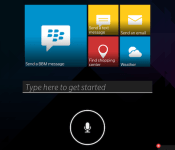
Apple has Siri, Microsoft has Cortana, Google’s got Now voice search and BlackBerry… doesn’t have a virtual assistant of any kind. This morning, however, the Canadian smartphone maker confirmed that it has one in the works and will be showing up on the company’s next major release. Known aptly as BlackBerry Assistant, the new program is a part of OS 10.3 and will be available on the upcoming Passport phone. Assistant is voice-activated and comes with quite a few of the standard features we’ve come to expect on the other mobile platforms, such as the ability to open apps, send messages and tweets, set reminders and change settings. It also is smart enough to learn and adapt to your needs, so it theoretically should become more useful over time as it gets to know you. BlackBerry isn’t revealing all that Assistant can do yet, and it hasn’t offered a firm timeframe for availability aside from the fact that it’ll be part of the Passport, but so far we haven’t seen much to set it apart from the competition. It’s at least a good sign that the company is trying remain competitive, however.
Filed under: Cellphones, Software, Mobile, Blackberry
Source: BlackBerry

UK police begin trialling the world’s fastest face recognition tech

With more than six million CCTV cameras in operation, Britain is the most watched country in the world. London’s police officers are trialling body-worn cameras to help bring about “speedier justice,” but only now are other forces beginning to find efficient ways to process that surveillance. Leicestershire Police today confirmed it has become the first force in the UK to test NEC’s NeoFace face recognition software, which it hopes will “transform the way criminals are tracked down.” NeoFace’s strengths lie in analysing “dozens” of facial features from digital images captured by CCTV or police body cameras and matching them with the 90,000 photos stored on Leicestershire Police’s database.
Because processing only takes a matter of seconds (NeoFace ranks number one in independent face matching speed and accuracy tests), it stands to eliminate the need for officers to manually search for possible matches, which can take hours. Although the face recognition tech is only now making its UK debut, it has already proved invaluable in the US. Just last month, the Chicago Police Department used the system to sort through 4.5 million booking photos to help convict a suspected armed robber. Unfortunately, Leicestershire Police can’t submit NeoFace’s findings as evidence in court — instead it’ll serve as a useful tool to detect possible suspects (and also their family members) and develop new lines of enquiry.
Filed under: Software
Via: The Next Web
Source: Leicestershire Police
Jawbone takes on Weight Watchers with its latest app update

There are things fitness trackers are generally pretty good at. You know, like counting your steps, measuring how many calories you burned. And then there are things fitness trackers are generally bad at. Logging your food intake is a particularly sore point. After all, it’s not like the onboard sensors can tell when or what you’ve eaten, so you have to go through the tedious business of manually entering all your meals. What’s more, companies like Jawbone and Fitbit aren’t exactly weight-loss specialists, which means their food databases tend to have gaping holes compared to services like Weight Watchers. So, even if you’re disciplined enough to keep a food diary, the thing you ate might not even be in the system. That goes double if you eat out — how are tech companies supposed to know how many calories are in the brownies at that cafe around the corner?
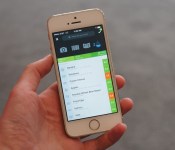
Incidentally, that’s where Jawbone thinks it can do better. The company just released a major update to its iOS app, and it’s all about weight loss. Accordingly, users can now set a weight goal, at which point the app creates a daily calorie target based on your height, goal, current weight and physical activity (remember that the app can log workouts, in addition to your total step count). Unsurprisingly, it would seem existing Up owners have been clamoring for features like this: According to the company, 76 percent of people who use the Up band have a weight goal in mind, and 84 percent of those who log food do so to lose weight. Makes you wonder why Jawbone didn’t address this sooner — rival Fitbit has let you set a weight goal for ages now.
Things get interesting when you actually start to log your food. For one thing, Jawbone lets you batch-add lots of items at once. So, if you had oatmeal, a banana and orange juice for breakfast, you can do a long-press and then add it all in one fell swoop. (If that sounds like a rudimentary feature, consider this: Weight Watchers’ apps still don’t let you do batch-add, and its entire business is centered on weight loss.) Also, Jawbone’s app learns its users’ habits, so it’ll surface foods you eat often. Similarly, if you start to add something like fried eggs, the app will show you foods that other people often eat at the same time. Bacon, for example — people like to eat bacon with eggs.
And now we get to the part where you go to brunch and your tempura oyster frittata isn’t in the food database. So then what? Well, Jawbone’s app now shows listings for local restaurants, and thanks to integration with recipe/food-delivery services like Munchery, PlateJoy, The Orange Chef, HealthyOut and NuMi (coming soon), it can sometimes import the calorie info. Unfortunately, though, if a restaurant isn’t represented there, you’ve got little choice but to turn to crowdsourcing. You could enter the data yourself, for instance, which would involve doing the calorie math on your own (eggs + oysters + home fries). That’s what Weight Watchers users do when they go out, and it isn’t always precise, depending on who’s entering the data. Alternatively, you could ask the restaurant staff about calories, though let’s be real: That’s kind of awkward. Or, the eatery could add its nutritional info through the same back-end service used to aggregate those restaurant listings in the first place. All told, it’s not an especially comprehensive system, but it’s better than nothing: While other apps might include chains like Starbucks, they tend not to offer calorie data for mom-and-pop joints.

Throughout, the app shows how many calories each food item is worth, and you can see at a glance how many calories you “have left,” depending on your daily target. In addition, though, Jawbone has created what it calls a food score, a single number on a scale from 1 to 10 that illustrates how healthy your food choices are. These numbers are color-coded too, so when you see a score of 1.8 for cream cheese in bright red, you know you’ve done something wrong. (Ed. note: If cream cheese is wrong, I don’t want to be right.) Finally, in addition to seeing your rolling food-score average for the day, you can also see how you’ve been doing over longer periods of time. Basically, then, the idea is not just to count your calorie consumption, but also to give you information you can use to possibly even change your habits. To that end, Jawbone is also adding some food-related challenges to its “Today I Will” feature. Think: eating a certain amount of fiber for the day. Yum.
Version 3.2 of the Jawbone Up app is available today, but only on iOS for now. The Android app will receive the same update, according to a company rep, but it’s still in development. So happy downloading, iPhone users, and Android fans, even if you can’t try out the new features today, you might still enjoy Jawbone’s interactive food-pairing table — it’s a pretty good way to waste a few minutes at work. You know, after you’ve had your toasted bagel with cream cheese.
Filed under: Wearables, Software, Mobile
Source: Jawbone

Hacking the friendly skies: creating apps for wearables at 36,000 feet

Few activities are as taxing, time-consuming and mentally draining as air travel, and there are hundreds of thousands of travel-related apps to help us get from point A to point B with as little hassle as possible. But there’s always room for improvement, especially now that wearables like Android Wear, the Pebble smartwatch and embedded sensors are growing in popularity. While it’s already possible to scan boarding passes or receive flight notifications on smartwatches, there are surely other use cases that would ease the burden of flying. Wearable World, which teaches wearable-related startups the ins and outs of the business, partnered with American Airlines to create what it’s billing as “the first in-air wearables hackathon.” Teams were asked to come up with the best travel app for wearables, and the finalists got to jump on one of the airline’s newest planes to polish their app and show it off to real-life passengers.

Calling it an “in-flight hackathon” is debatable, since the biggest chunk of the event actually took place on the ground in San Francisco. In traditional hackathon style, 200 developers had 24 hours to create a travel-related wearables app from scratch. Finalists were chosen and given 30 days to work on their app before it was time to get on an Airbus A321T from San Francisco to JFK Airport. Here, the four teams tested their creations in a real-life setting, which included going through security, boarding the plane, using in-flight WiFi (Gogo was a sponsor) and limited workspace in Economy Class. This was their last chance to make any tweaks based on their in-flight experience. The next day, each finalist boarded another A321T bound for San Francisco and pitched several people on the flight who acted as judges.

The winning app came from UsTwo (the creators of Monument Valley), and is handy for family or close friends that like to monitor where you are in your travels. As you arrive at the airport, make it through security, board the plane, take off and land, the app pushes notifications to both you and another person of your choice. Even though two devices are involved, each one shows different information based on who’s using it; your device (and smartwatch, if applicable) shows flight information, boarding passes and other details that may help you get to the plane, while your loved one will get updated on what stage of the experience you’re in. When you’re in-flight, they’ll also be able to follow your plane’s location.
Since GPS isn’t available indoors, the app relies on a network of common-use iBeacons placed at various points within the airport (known as the SITA registry, it’s currently undergoing a trial run at Dallas/Fort Worth Airport). The beacons communicate with your phone as you pass by, and the app will send notifications as it detects each one along the way. The primary issue is that the app relies on these beacons in order to work in every airport. As a result, it may be limited to use in specific locations at first.

Next up was InFlight Social, an app that wants to connect you with other people on the plane. When you get on the flight and connect to WiFi, InFlight Social can detect if anyone else on the plane is using the app; then, by looking at your Facebook and LinkedIn accounts, it will determine if anyone has mutual friends or associates. Once a connection is established, the app will check Concur to see where the two of you are going — perhaps both of you are going to the same conference or staying at the same hotel, so why not split a cab or car rental? Or, if that’s not really your thing, you can send your new pal a welcome gift online via MasterCard. The problem is that many travelers prefer to keep to themselves and will balk at the idea that other people can see their travel itinerary, even if both of you know the same people. Fortunately, your information can only be picked up by others if you download the app, opt-in to the service and are connected to Gogo.
Proximity Signage was put together by NewAer, a company that licenses proximity-advertising software to other businesses. As you step off the plane, digital signs will be there to greet you with personalized suggestions on where to go based on your connecting-flight info, along with travel and shopping preferences. If you’re getting to another flight, the signs provide you with gate information as well as a map and a place to get your favorite coffee along the way; if you’re at your final destination, it could tell you how to get to baggage claim or ground transportation. To address privacy concerns, as soon as you walk by the sign, the personal messages are deleted and replaced with a generic screen. (The company said that wearables easily fit into this situation, but no demonstrations took place.)

The company refers to the tech, which is already available to developers, as “reverse iBeacons”; whereas iBeacons ping your phone incessantly whenever you pass by, in this case your phone actually pings the signs and relays profile information. The software can easily be extended to other uses, such as personalized advertising at mall kiosks, file exchanges between mobile devices, automatic check-ins to locations and even unlocking your car.
Finally, if you have pets in the cargo area of the plane, Furry Flyers will be helpful. Embed a sensor into your pet’s collar that tracks their location, heart rate, temperature and other conditions. It also includes a handy checklist of your pet’s lengthy onboarding process, so you can make sure they’ll get on. If the team finds success with the app, it wants to eventually make it possible for you to talk to (and perhaps even see) your dog or cat during the trip. This may put an anxious pet owner at ease during the flight — as long as everything is going well for Fluffy. If things take a turn for the worse, well… your travels just became much more stressful.

None of these apps are available yet, and some of them may never make it into an app store. But the hackathon served its purpose: It gave developers an opportunity to come up with creative travel-related uses for wearables, Bluetooth beacons and smartphones. As the tech continues to grow in popularity, the more impact these types of events can have. And when it comes to travel, any app that makes life easier is a welcome one.
Filed under: Cellphones, Wearables, Software, Mobile

Anomaly series and Plex all on Sale for a limited Time
Looking for something to spend some money on today? 11 Bit Studios has placed all three of their tower defense games series, Anomaly, on sale.
 Each of the three tower-defense games has been steeply discounted this week, and this week only. Anomaly Warzone Earth HD and Anomaly Korea are on sale for $0.99 vs their normal $3.99 and Anomaly 2 is down to $.99 from $4.99. Basically you can get all three for the price of one.
If tower-defense gaming isn’t you thing, then maybe media is. One of our favorite apps fro delivering media from you PC to your tablet, phone, Chromecast and other devices is Plex. As luck would have it, the Plex team has put the Plex app on sale as well. Taking it from the usual $4.99 down to $1.99. It is a good time to check it out if you don’t already have it.

To snag any of the deals just direct yourself to the Play Store via any of the links below.
//<![CDATA[
ord = window.ord || Math.floor(Math.random()*1E16);
document.write('’);
//]]>
The post Anomaly series and Plex all on Sale for a limited Time appeared first on AndroidSPIN.
Root app offers Chromecast Screen Mirroring to those of us without It
I was pretty excited for screen mirror through Chromecast when Google announced it and showed it off at Google I/O. It took some time for the Chromecast app to finally get the update that would allow for it to happen. Google stressed that it is currently still in a beta phase and the devices that are supported could still have issues. The list of supported devices is pretty small but does include the Nexus line, some Samsung, HTC and LG devices. Even with some reports of no audio, major lag or just plain not having the option, we all still want it. Luckily there is a way for those of us that don’t have it to give it a whirl. .
I caught a shared post from QBKing77 lastnight that alerted me to a apk that was created by XDA developer r3pwn. With a simple install on a rotted device, you should be able to utilize the screen casting function. It really is a s easy as side loading the apk, hitting the button and letting it do its thing. I gave it a whirl on my stock, but rooted, T-Mobile Sony Xperia Z late last night to see if it would actually work.

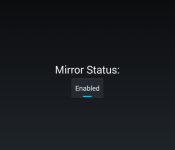
As you can see, after installing the app and hitting the button, I was able to open up the Chromecast app and be greeted with the “Cast Screen now available”. I was pretty stoked to finally get a chance to check it out. I cast the screen, checkout out a few apps and was satisfied it worked and went to bed. Today I checked on the casting again and opened Angry Birds Star Wars just to see about sound and things. I had sound through my TV just fine, doesn’t mean everyone will of course.


There is a slight lag on that particular game, but it isn’t like Angry Birds is a fast paced shooter. I know the cast screen isn’t designed really as a gaming alternative to your big screen, but it works. I did notice that the back of the Xpeia Z was getting quite warm after a few minutes of using it though. You should use this option at your own risk.
The current list of devices that the #MirrorEnabler app is said to have been tested on and verified working is as follows:
ASUS PadFone X
ASUS PadFone 2
Droid RAZR MAXX HD
Droid RAZR M
Sony Xperia Z
Sony Xperia Z Ultra
Sony Xperia Z1
Sony Xperia Z1 Compact
Sony Xperia Z2
Sony Xperia ZL
Huawei Honor 3C
HTC One M8 (Including GPE)
Motorola Moto X
Motorola Moto G
Samsung Note 8 Tab
Samsung Note 10.1 Tab
Samsung Note Pro 12.2 Tab
Samsung Galaxy Tab Pro 8.4
Nexus 7 2012
Oppo Find 7
Oppo Find 7a
OnePlus One
LG GPad 8.3
LG G2 Mini
LG Optimus G
LG G Flex
NVIDIA SHIELD
Xiaomi Mi2
Stock only:
Samsung Galaxy S III
Samsung Galaxy Note 2
HTC Droid DNA
Tested Not Working:
HTC EVO 3D
Droid 4
Galaxy Nexus
Samsung Galaxy S II
Most older devices
It doesn’t hurt to give it a shot so long as you have the latest Chromecast app and root. To get started, visit r3pwn’s thread over at XDA to pick up the apk and give it a shot.
//<![CDATA[
ord = window.ord || Math.floor(Math.random()*1E16);
document.write('’);
//]]>
The post Root app offers Chromecast Screen Mirroring to those of us without It appeared first on AndroidSPIN.
 AIVAnet