


The cloud keeps Microsoft afloat while it reconsiders hardware and content

We always want to know how Microsoft is doing, but today we’re paying especially close attention: The company just released its earnings for its fourth fiscal quarter, the first full quarter that new CEO Satya Nadella was on the job. Also, let’s not forget that Microsoft just announced it’s cutting 18,000 jobs and axing Xbox Entertainment Studios. So how’d the company do? Not bad, actually: The company says revenue is up, mostly thanks to its strong cloud business (previously led by Nadella himself). In particular, Microsoft has its loyal business customers to thank: The company saw big gains in commercial cloud revenue, Windows licenses (natch) and server products. Other honorable mentions include Bing, which gained 40 percent in revenue; Microsoft Office 365 subscriptions; and revenue from PC makers.
Largely missing from the report: mentions of hardware. Though the company’s new mobile business helped revenue a bit, the company also had to take a $38 million hit on Surface inventory. Basically, then, there are few surprises here: Microsoft made the most money off its bread and butter — things like enterprise services, the cloud and its core Windows business. And to be honest, we could have expected as much. Consider that just last week, Nadella posted an open letter to employees, reiterating that cloud and productivity tools were the future.
All told, the company generated $4.61 billion in profit on $23.38 billion in revenue. To put that in perspective, revenue is up 18 percent over the year-ago period, and profit only fell by a modest 7 percent — that’s not bad considering Microsoft recently closed its massive $7 billion purchase of Nokia’s mobile division.
Image credit: Associated Press
Developing…

Wacom’s sketching app finally arrives on Android, Kindle Fire and Windows 8

Wacom loves doodlers almost as much as serious artists, but its Paper-esque sketching app was limited to iOS devices only. That changes from today, now that the company has launched Windows, Android and Kindle Fire versions of Bamboo Paper. Thanks to Wacom’s Ink Layer Language, your notes will seamlessly be shared between your devices — enabling you to sketch out a plan on your leisure tablet before passing it to your work one. The free app is available to download at the links below, and you’ll also be able to try out the various premium brushes for a limited time before you’re asked to open your wallet to keep them.
Filed under: Tablets, Software, Microsoft, Google, Amazon
Source: MarketWatch, Google Play, Windows Store, Amazon Store

Amazon has a new service for managing payments, named Amazon Wallet

Tried Apple’s Passbook and Google’s Wallet and not feeling satisfied? Perhaps Amazon’s flavor of mobile payment app will strike your fancy. It’s also named Wallet, and it arrived in beta form on the Google Play store recently. Like Apple and Google’s versions, Amazon Wallet collects your gift cards, loyalty programs, and membership cards in one place — on your phone — and pushes them to the cloud. Should you switch from, say, Apple’s iPhone to Amazon’s Fire phone, all that information would move over with you, tied to your Amazon account.
There’s another added benefit with Amazon’s service in that your other, far more important financial info is likely already part of Amazon’s system and connected to your profile. As a result, when you browse Amazon Wallet through the web, all that extra payment info is all in the same place.
It’s not clear when Amazon Wallet is coming out of beta (if ever), but for now, consider yourself a guinea pig if you’re jumping in.
Filed under: Cellphones, Handhelds, Software, Mobile, Amazon
Source: Google Play, Amazon

NVIDIA’s new Shield is a tablet built for gaming

In January 2013, NVIDIA unveiled its first end-to-end consumer product: NVIDIA Shield. In our review, I wrote, “NVIDIA Shield is a truly strange device” One year later, that statement stands — only now it applies to NVIDIA’s second consumer product as well: the Shield tablet. Okay, okay, Shield Tablet isn’t quite as bizarre as the original Shield, but it’s a close second.
Shield Tablet dumps the original Shield’s 5-inch screen in favor of a bigger 8-inch, 1080p display, swaps the original Tegra 4 in favor of K1, and drops the controller bit entirely. Should you wish to pair a controller with Shield Tablet — and NVIDIA thinks you should — NVIDIA’s making one (it’s even got WiFi Direct for lower latency than Bluetooth), but it’s totally optional and doesn’t come packed in with the tablet. So, what is this thing? Who is it for? And is it any good? Let’s find out.
Here’s NVIDIA’s logic: just like automakers originally started with a few base model sedans and eventually diversified into trucks, vans, coupes and much more, so NVIDIA sees the tablet market. The Shield Tablet is the so-called “ultimate tablet for gamers,” in that it has a powerful processor (K1), runs NVIDIA’s GameStream tech (which streams full PC games to the tablet), it can stream out to Twitch (on a system level, no app required) and it has WiFi Direct for ultra low-latency wireless gamepad connectivity. It also runs Android and does all the normal stuff you’d expect from an Android tablet. But that’s not the point of the device.
Let’s be clear up front: we find some of Shield Tablet’s suggested use cases — pairing the tablet with a stand and playing with a controller in public — to be off-base at best. Who is doing that? Are there people using wireless gamepads with their laptops in coffee shops? If you’re one of those people, stop it.
But what about, say, using the tablet in your house via HDMI-out? That seems a bit more reasonable. If nothing else, Shield Tablet could act as the streaming component of your gaming PC, living in your living room as a conduit for playing PC games on the big screen. An expensive conduit, no doubt, but it makes a heck of a lot more sense to us than pairing a tablet with a controller and playing games at the local Starbucks.
IMPRESSIONS — TABLET

The Shield Tablet is a nice piece of electronics: it’s well-built and sturdy, it has a slick design, it’s got nice angles, it’s got a sharp screen, and it’s a good size at just over 8-inches. It’s a bit on the thick side, but that’s a measure of Shield Tablet running a cutting edge mobile chip and needing more battery power. We’re not talking Microsoft Surface levels of thickness — let’s not get crazy — but it’s thicker than an iPad Mini, for instance.
Speaking of the Surface, there’s a stylus included in the Shield Tablet package (dubbed “Directstylus 2″). While there are certainly applications for the stylus in terms of the tablet’s uses as a tablet, there are no gaming applications that use it. NVIDIA’s including a program called “Dabbler” for drawing images; we’re gonna go ahead and guess that the folks buying a gaming tablet will never use this functionality, but hopefully we’re wrong. It’s not that Dabbler isn’t neat — it’s totally fine, and hey, drawing is fun! — it’s that it’s incongruous with the rest of the package.
SPECS:
- NVIDIA Tegra K1 SoC
- 8-inch “Full HD” screen (1920 x 1200, IPS LCD display)
- Front-facing stereo speakers (think: HTC One)
- 5MP front-and-rear facing cameras
- Directstylus 2
- 16/32GB of internal storage, expandable to 128GB via microSD
- WiFI a/b/g/n, Optional LTE
- 19.75 Watt hour Lithium Ion battery
But what about gaming? Like the original Shield before it, gaming on Shield Tablet is a smooth, easy experience. While Android games continue to lack control standardization and therefore lack predictability in how they’ll function on a paired gamepad, PC games continue to both look and feel great. We (briefly) tried out a demo of Grid 2 and had no issue… turning the in-game car sideways and driving directly into a wall. But the controls were responsive! We’re just bad at rally racing.
We were also shown an update to NVIDIA’s “TegraZone” software, which is transforming into the “NVIDIA Shield Hub” (the update will also be pushed to the original Shield). This takes your Android games, PC games, cloud streaming games, and media options, and puts them all in one place. While it’s a necessary step for Shield given how it’s intended for use at home, it’s a halfstep on the way toward a real console UI. Anyone with a game console used for media knows the plight of the accidental controller input: you put down your PlayStation controller after selecting the latest episode of Orange is the New Black, a trigger accidentally gets pushed, and suddenly you’re halfway through an episode, fumbling to get back to the start. Such is the case with Shield Tablet: you have to use a paired gamepad to control it, even for media playback, when in “console mode.” Not a huge issue, but a step below what other devices offer.
IMPRESSIONS — GAMEPAD

You remember the gamepad that was built into the first Shield? It’s broken away from the trappings of the portable Shield and is its own device now. When we say it’s very similar to the first Shield’s gamepad, we mean “nigh identical.” With the exception of the buttons in the middle — the Android control buttons, a new NVIDIA button, volume controls and a touchpad — the controller feels very similar.
One major, hugely important difference is analog stick placement. Since there’s no screen sitting on top of them, the analog sticks were heightened, making it a much more comfortable experience. It’s not a bad controller. It’s not a great controller. But considering that it uses WiFi Direct in place of Bluetooth, we’re inclined to suggest the Shield Gamepad over other options. But know that it feels a little undercooked.
THE SHIELD FAMILY

With Shield Tablet and Gamepad, NVIDIA is expanding its line of consumer products by two. The original NVIDIA Shield becomes “Shield Portable” and, NVIDIA says, it’ll remain in feature parity with the new Shield Tablet for the foreseeable future.
Of course, if you didn’t snag the first Shield and the concept of a gaming tablet sounds enticing, you’ll be glad to hear that it’s going up for sale on July 29th in US and Canada, August 14th for Europe, and other regions at some point in the fall. The base model — 16GB of internal storage, no LTE — costs $299, while 32GB of internal storage and LTE adds another $100. The gamepad is another $59, and the cover (which you’ll need if you want to use Shield Tablet as a game screen) is another $39. All that is to say that you could spend $500 in total on Shield Tablet. You probably shouldn’t, but you could.
Filed under: Gaming, Handhelds, Tablets, Software, Mobile, NVIDIA
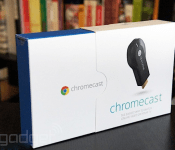
BBC Sport apps for iOS and Android get Chromecast support

Four months after it updated the iPlayer app to play nice with Google’s Chromecast, the BBC has extended support for the streaming dongle to its sport apps. As part of today’s update, BBC Sport users can now stream live and on-demand video to their TV from their iOS or Android device. The feature comes just days ahead of the start of the Commonwealth Games, allowing the BBC to double down on its in-app coverage. That’s why it’s also included an option to set medal alerts and access dedicated sections for UK nations, letting you to catch up on related news, analysis and performance charts over the next couple of weeks.
Filed under: Cellphones, Tablets, Internet, Software, Google
Source: BBC Sport (App Store), (Google Play)

Seoul plans to ban Uber and introduce its own GPS-based app for taxis

Uber may win some and lose some, but the battles rage on in cities where it operates. Seoul, Korea has now indicated that it would outright ban Uber, calling it illegal and harmful to taxi drivers. Uber operates its UberBLACK service there to connect professional chauffeurs to passengers via its app. That differs from UberX, UberPOP or Lyft — the services that have faced the most bans and protests — since those mostly use non-professional drivers. Seoul’s city council called Uber an illegal threat to traditional cabs, since its drivers didn’t have the usual insurance and safety controls. However, Uber told the WSJ that the city council’s comments “show Seoul is in danger of remaining trapped in the past and getting left behind by the global ‘sharing economy’ movement.” Despite that, the city must feel Uber is doing something right — it said that it would soon launch its own, Uber-like geo-location app to connect regular taxis to passengers.
Filed under: Transportation, Software
Via: WSJ
Source: AFP

ZTE continues the trend toward minimizing Android customization

For all its beauty, Android’s openness is the reason why manufacturers and carriers are able to make their own tweaks to the OS. Some companies go as far as completely forking the platform, and we know how terrible that can be — though there are exceptions like Amazon’s Fire ecosystem, which offers a solid experience overall. Thankfully, manufacturers are beginning to realize it’s much better to deliver Android as Google intended, or at least as close to it as possible (e.g. HTC’s Sense 6). Chinese outfit ZTE will join this movement very soon, announcing that the Google Now launcher will be set as the default home screen on its future smartphones, starting with the launch of the Blade Vec 4G next week. Naturally, doing so means giving buyers a cleaner look right out of the box; plus, it puts all of the search giant’s services front and center, including the Play store and, of course, Google Now. Most importantly, it’s definitely going to make Google happy.
Filed under: Cellphones, Software, Mobile, Google
Via: PocketNow, Android Police
Source: ZTE
Amazon UK rep says an Android version of its video app is ‘imminent’

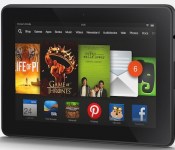
Amazon’s video service is well-rounded, with both video-on-demand selection and Prime all you can eat viewing, but there’s one big hole — Android. Even though Amazon has apps for its Android-based Kindle family of devices (along with iOS, game consoles, Roku and other TV boxes), the rest of the Android family tree is left out of the party. That could change soon however, as PC Advisor reports Amazon UK Marketing & Merchandising Director said that an app for the platform is “imminent.” The news came at the firm’s Christmas show (yes, in July, just go with it), however it’s unclear if it will apply to both phones and tablets. He also indicated that work on 4K content is progressing, confirming what we’d heard at CES, but there’s no word on when the high-res video will hit Amazon’s service. Despite repeated attempts to contact Amazon PR in the US and UK we have not received a response concerning the report, but if an app arrives soon it would help make Amazon a much better competitor against the likes of Netflix and Hulu.
Filed under: Home Entertainment, Software, HD, Mobile, Amazon
Via: Droid-Life
Source: PC Advisor

Google experimenting with major redesign of Chrome OS

Google has made attempts in the past to unify the design of its various properties with varying degrees of success. Material Design, which is major part of the upcoming Android L release, may be its most coherent effort to date. The new look is expected to touch every corner of Google’s catalog, and Chrome OS will be part of that revamp. A screen shot posted by Chromium evangelist François Beaufort on Google+ shows the very early fruits of Athena, an effort to “bring a new kind of user experience” to Mountain View’s desktop OS. The image shows windows with minimal controls and decoration in a stacked card view, similar to the app switcher revealed as part of the next Android update. There’s also what appears to be a launcher bar with a search field at the bottom of the screen. While the redesign is clearly in the very early stages, you can see the important elements of Material Design at work. Everything is flat and paper like, but exists in a three-dimensional space, complete with less-than-subtle drop shadows. You can compile a copy of Chromium OS yourself to give Athena a test run, but we’d hold out for a more complete version.
Source: François Beaufort (Google+)
Vent: A semi-anonymous app that feels your pain

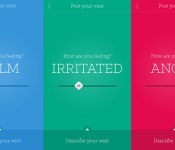
I really enjoy the anonymous sharing app Secret, as the posts are quite often hilarious and I’m usually able to narrow down a sharer’s identity to two or three people. (Those Engadget in-jokes are a real telltale.) For the same reasons that I like reading Secret, though, I’d never consider posting on the app myself. If I were to share anything remotely personal, I’d want to get as far away from my extended group of friends and colleagues as possible. That’s why I found a relatively new app, called Vent, so intriguing. Currently available on iOS (with an Android version on the way), it does exactly what its name implies: It lets you vent. And the best part is that your contacts list stays out of the picture — you’re sharing with random users who stumble upon your posts, and your profile can remain as anonymous as you like.

It’s a little addictive; you can search for vents sorted by emotion (Calm, Irritated, Annoyed, Angry or Furious, and from mildest to most intense), and as with the Secret app, you can like and comment on individual posts. You can also follow individual users, though the beauty of Vent is that you don’t need to have other friends posting to enjoy the app.
On a recent trip, I turned to the app to voice my discontent about the lack of personal space in airports — I categorized that vent as “irritated,” for the record — and even though I have yet to receive any likes or comments, it felt satisfying to see my post in the river of complaints from other irritated souls. The comments I’ve seen on others are overwhelmingly positive and supportive as well. As with Secret, you have the option to report any inappropriate posts, and the comments on Vent are extremely civil as a result. That’s a very good thing, too, because there’s plenty of serious material mixed in with the more petty complaints.

The purpose of venting is to air your issues so you can move on and calm down, and this app is an effective way to virtually get something off your chest. And when many social apps require plenty of your friends to be signed up in order to get the best experience, Vent’s a refreshing take on anonymity. Plus, it’s interesting to see how others categorize their emotions — having overly strict parents might make some posters “annoyed,” but if it was me, I’d be in full-on “furious” mode.
Dean Serroni, Vent’s co-founder, told me that an upcoming app overhaul would bring new emotions to choose from, along with additional ways to interact with fellow users’ vents (this likely means private chat). For now, iPhone users can download the app via the source link below. The Android version should launch later this year.
Filed under: Internet, Software
Source: Vent (iTunes)
 AIVAnet