


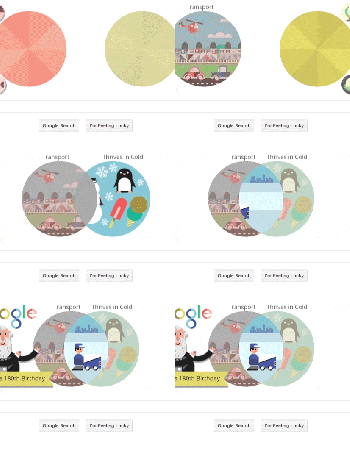
Google’s Venn diagram doodle is where logic and whimsy intersect

Venn diagrams are a high-school math right-of-passage, teaching us (to hate) the logical relations between sets. Google has now honored their creator, John Venn, with his own Google Doodle. Mountain View said it was going for “sound logic and silliness” by letting you pick between five objects in two sets to see what they have in common. For instance, the relationship between “Transport” and “Thrives in Cold” as shown above is “Zamboni,” the ice-rink vehicle honored in a previous Doodle. You can try the other 24 permutations yourself today at Google.com, or check some of the better ones from the past here.
Filed under: Internet, Software, Google
Source: Google
.CPlase_panel display:none;

You can now try Android L on the LG Optimus G, the second port to a non-Nexus Device
 The collective Android community’s jaw dropped when Android L was shown off at Google I/O 2014 and since then, only a select few devices, namely the Nexus devices (and unofficially, the HTC One M7) have had a taste of what Android’s next version is going to feel like. You can now add the LG Optimus G to that very short list as it becomes only the second non-Nexus device to receive a ‘working’ port of the Android L Developer Preview. Thanks to a bunch of clever people over at XDA, you can now install the custom ROM on your device; for the file and installation instructions, you can visit the original forum post below:
Naturally, there are still a few bugs and issues to be figured out: NFC isn’t working and the camera isn’t working exactly as intended. There are also apparently some heat issues, but there are workarounds that hopefully lessen the impact of the issue. All the same, if you have an LG Optimus G, this is a perfect opportunity to try something that a large proportion of the Android community has yet to try, so get on it.
If you could see Android L on another device next, what device would it be? Let us know your pick in the comments below.
Source: XDA via The Android Soul
//<![CDATA[
ord = window.ord || Math.floor(Math.random()*1E16);
document.write('’);
//]]>
The post You can now try Android L on the LG Optimus G, the second port to a non-Nexus Device appeared first on AndroidSPIN.
.CPlase_panel display:none;

XBMC renames its media app as it leaves its Xbox roots behind

XBMC’s name (which stands for Xbox Media Center) isn’t really relevant these days. The media center app only runs on the original Xbox through hacks, and it does a lot more than play your music and videos. Accordingly, it’s getting a long, long overdue rebranding: meet Kodi Entertainment Center, the moniker you’ll see from version 14 onward. The new naming scheme is both more universal and less prone to legal issues. The developers now have control over their trademark, and the move should prevent trouble with “other companies” — no doubt including Microsoft — that might send lawyers after fans or the XBMC team itself. The first Kodi release is a rough alpha, so don’t expect to see the new name everywhere just yet. However, it shouldn’t be long before the XBMC badging is consigned to the history books.
Filed under: Home Entertainment, Software, HD
Source: XBMC
.CPlase_panel display:none;

Ask Ooloo puts the ‘person’ back in personal assistant

Before Google dominated search, Ask Jeeves depended on a team of humans — yes, humans — to answer your internet queries. Ultimately, search algorithms killed the internet’s favorite butler, but the idea that humans are worthy competition for the software we create didn’t follow him to the grave. Case in point: Ask Ooloo, a digital assistant powered by living, breathing human beings. According to Ooloo’s makers, the PPDA (people-powered digital assistant) is staffed with “real people 24/7″ ready to offer you quick, localized search results with a personal touch. All you have to do is speak your question, as you would with Google Now, Siri or Cortana, and wait for an answer. We put the iOS app to the test, asking it ‘Who invented the Internet?” What it revealed, probably won’t shock you.
And seven minutes later someone named Shefali replied: “Al Gore! Just kidding, check this out!” We were then directed HowStuffWorks for a detailed account of its creation. So no, it’s not nearly as fast as the automated competition, but it does give you a bit of human-generated sass to accompany its answer. When asked the same question, Siri delivered a very dry, though prompt response via Wolfram Alpha. Considering the fate of Jeeves, we can’t say we’re confident in Ooloo’s staying power. But for now, it’s free to download and use via Google Play and Apple’s App Store.
Filed under: Cellphones, Software, Mobile
Source: App Store, Google Play
.CPlase_panel display:none;
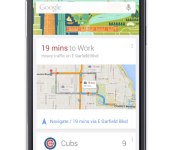
Google Now Launcher available for most Android phones

The trusty Google Now launcher that debuted on the Nexus 5 had already made its way to the rest of that family and Play Edition devices. Now, folks wielding any handset running Android 4.1 (Jelly Bean) and later can grab the feature, even if it’s absent one of the aforementioned monikers. The software add-on makes Google’s card-based repository accessible by swiping to the right of the home screen or speaking an “OK Google” voice command from that main UI. Gadgets that weren’t officially stamped by Google hadn’t been privy to the functionality, but now even if OEMs drape the OS with their own look and features (looking at you, Samsung), you can still get a taste of stock Android.
Upgrade your home screen with the #GoogleNowLauncher – launching today for all #Android 4.1+ devices http://t.co/2blmlJE0Vh
– Android (@Android) August 1, 2014
Filed under: Cellphones, Software, Mobile, Google
Via: Android (Twitter)
Source: Google Play
.CPlase_panel display:none;

Verizon and T-Mobile Galaxy S5 get new OTA Updates
If you happen to own a Samsung Galaxy S5 on either Verizon or T-Mobile, then be on the look out for an update that being pushed out to your device. Each update is a little different in terms of what it will bring to your device.
On the T-Mobile side of things you can expect to be moved to baseband version G900TUVU1BNG3 and carries a file size of 38.6MBs. The update turns on T-Mobile VoLTE service to the flagship device which allows for phone calls to be made over LTE data services. Your location and coverage will have an impact on how well, or if, it works at all. The update is rolling out now and be picked up as a OTA or through Samsung Kies.
As for Verizon’s version of the device there are quite a few additional things you might notice. The software Version moves to KOT49H.G900VVRU1ANE9 and it will bring along updates to the Caller Name ID, Message+ and Cloud apps from Verizon. There is also a fairly substantial list of bug fixes as well.

We don’t see a file size mentioned on the Verizon support page for the device, but we imagine it will be fairly large. You will want to make sure you are over 50% on your battery life and have a Wi-Fi connection available to download either update.
Via 9to5Google
//<![CDATA[
ord = window.ord || Math.floor(Math.random()*1E16);
document.write('’);
//]]>
The post Verizon and T-Mobile Galaxy S5 get new OTA Updates appeared first on AndroidSPIN.
.CPlase_panel display:none;

New malware can live inside any USB device undetected

It turns out that the stalwart USB thumbstick, or any universal serial bus device, isn’t as trustworthy as once thought. A pair of security researchers has found we need to worry about more than just malware-infected files that are stored portable drives, and now need to guard against hacks built into our geek-stick’s firmware according to Wired. The proof-of-concept malware Karsten Nohl and Jakob Lell have created is invisible and installable on a USB device and can do everything from taking over a user’s PC to hijacking the DNS settings for your browser. Or, if it’s installed on a mobile device it can spy on your communications and send them to a remote location, similar to the NSA’s Cottonmouth gadgets. If those don’t worry you, perhaps that the “BadUSB” malware can infect any USB device — including keyboards — and wreak havoc, will. What’s more, a simple reformat isn’t enough to disinfect either, and the solution that Lell and Nohl suggest goes against the core of what many of us are used to doing.
The duo says that the only way around BadUSB is to more or less treat devices like hypodermic needles; trusting only those that have been used within our personal ecosystem and throwing away any that’ve come in contact with other computers. Hopefully you don’t have a ton of untrustworthy Porsche sticks laying around.
[Image credit: Getty Images]
Filed under: Internet, Software
Via: Gizmodo Australia
Source: Wired
.CPlase_panel display:none;
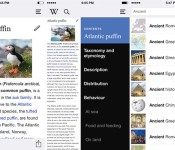
Wikipedia iOS app relaunches with mobile editing and a new design

Wikipedia recently revamped its app for Android, bringing the ability to edit articles and view random articles in the process. Starting today, those features are also available on iOS, with a new version of the official app available for download in the App Store. In addition to adding new functionality, the Wikimedia Foundation’s overhauled the design, and it promises a better, faster navigation experience. Check it out for yourself via the source link below.
Filed under: Internet, Software
Source: Wikimedia Blog, Wikipedia Mobile (iTunes Preview)
.CPlase_panel display:none;

To-do app Wunderlist gets a fresh coat of paint and real-time sync

The folks at 6Wunderkinder have been quite busy as of late, releasing version 2 of the Wunderlist productivity app on top of Pro and Business options for power users. Keeping up the pace, the third installment of the to-do list manager is rolling out with over 60 improvements in tow. Notable additions include a visual overhaul to clean up the UI, real-time sync (insures tasks will show up on all of your devices immediately) and public lists for widespread sharing. The latest version is now available for iOS, Android, Mac and on the web with an update for Windows pending for the recently-announced universal app option.
Filed under: Software
Source: Wunderlist
.CPlase_panel display:none;

Facebook’s Internet.org app offers free web access in Zambia

We’ve heard quite a bit about Mr. Zuckerberg’s plans to bring low-cost internet access to the otherwise disconnected, and today, his social network announced plans to do just that in Zambia. The new Internet.org app allows users to browse weather, health and employment info at no cost. And that’s not all Google Search, Facebook, Messenger and Wikipedia are available as well. Right now, the option is available to Airtel subscribers in the country, but it will roll out to other parts of the world in the future. Cellular service blankets much of the globe, however the cost of the mobile web deters many from opting in. This will certainly help.
Filed under: Internet, Software, Mobile, Facebook
Source: Facebook
.CPlase_panel display:none;
 AIVAnet