



Image-editing technique lets 2D objects get flipped, turned upside-down

Sure, Photoshop and other image editors are becoming increasingly good at transforming elements of a photo, but most of those tweaks are limited to two dimensions (resizing, rotating, repositioning, etc.). Researchers at Carnegie Mellon are pushing into the third dimension, using a technique that compares the 2D objects in a regular photo with 3D models freely available online. The result? The ability to manipulate part of photo as if it were a real, three-dimensional object, even exposing angles and sides that weren’t visible in the original image.
The new technique takes advantage of the growing number of publicly available 3D models online (the researchers, for example, call out TurboSquid and 3D Warehouse, in particular). First, a user selects part of a standard image, like a chair or a banana. Then they search online repositories for a 3D model that’s a close match. Once imported into the image, a three-dimensional mesh is rotated and tweaked until it closely matches the 2D element (after all, not every banana curves the same way and not every pear is the same size). At that point, the technique estimates lighting based on the rest of the photo and uses data from the 3D model to guess at parts of the object that can’t be seen in the original pic.
Check out the video below to see some of what’s possible, like changing the angle of WWII planes to face the viewer, closing the lid of a laptop or setting upright a knocked-over chair. While the team admits the technique isn’t perfect (it still has issues with translucency), and further development will likely include automating the search process, the potential is already pretty apparent.
Filed under: Science, Software
Source: Carnegie Mellon University, Carnegie Mellon University (2)
.CPlase_panel display:none;

Nvidia Shield Portable gets substantial OTA Update
Nvidia has started pushing out a OTA update for the original Shield portable today that carries a pretty hefty amount of changes and file size. The update is simply called OTA 5 Release 82 and weighs in at 158.6MBs in size.

The update adds in quite a few things of importance such as support for the Nvidia Shield wireless controller. That is the new add-on accessory you can get for the Shield tablet. Meaning you can grab the extra controller and connect your current Shield portable to your TV and game that way as well as wireless stream the audio from the Shield Portable to a headset. Nvidia is also replacing the TegraZone app with a new Shield Hub app. You should also see game streaming improvements, Netflix HD support up to 1080p, new onscreen controls and remote GameStream goodies.
If you happen to be the lucky owner of a Shield, be sure to check for the update and get it installed.
Source: Nvidia
Via Android Central
//<![CDATA[
ord = window.ord || Math.floor(Math.random()*1E16);
document.write('’);
//]]>
The post Nvidia Shield Portable gets substantial OTA Update appeared first on AndroidSPIN.
.CPlase_panel display:none;

Gmail now recognizes email addresses from non-Latin alphabets

Since the beginning of time — or at least since email was invented — most email services have required the use of non-accented characters from the Latin alphabet for each individual’s address. It’s inconvenient for those who don’t natively use that alphabet, which means that more than half of the world’s population have been frustrated. Here comes Google to the rescue: Gmail (and soon to be Calendar, we’re told) now recognizes email addresses that have accented characters or use non-Latin alphabets, so you’ll be able to send and receive correspondence to these types of addresses as much as you want, and soon Gmail will let you create non-Latin accounts to call your own.

It’s all thanks to an email standard established by the Internet Engineering Task Force (IETF) two years ago. Now it’s simply up to each individual email service to officially support that standard. Gmail isn’t the first email service to give it a shot. A provider in Taiwan is currently conducting a public trial, and Chinese email addresses began surfacing as early as 2003. But with the standard now set, we’ll likely start seeing more providers follow Google’s footsteps.
[Image credit: Getty Images, Google]
Filed under: Misc, Software, Google
Source: Google Blog
.CPlase_panel display:none;

Virgin Media customers can now log into Sky’s Movies and Sports iOS apps

Virgin Media said last month its TV subscribers would soon be able to use Sky’s iOS apps for getting their film and sports fixes on the move, and as of today, that’s now possible. If your Virgin TV package includes Sky’s Movies and Sports channels, then their respective iOS apps should let you log in with your Virgin account details. Furthermore, the same sign-in option is now available through Sky’s websites, which should placate Android users while they wait for the same functionality to be added to Sky’s apps on their platform.
Filed under: Cellphones, Home Entertainment, Tablets, Software, HD
Source: Virgin Media
.CPlase_panel display:none;

Viber’s Snapchat-like voice feature comes to Windows Phone 8

Internet calling is what Viber’s mostly known for these days, although the Rakuten-owned service does invest heavily in the messaging side of things, too. Hold & Talk (aka push-to-talk), for example, allows Viber users to send quick voice messages to each other, with the touch of a button. And now, nearly eight months after it came to iOS and Android, the feature is ready to grace Windows Phone 8 handsets. This means contacts can communicate between themselves almost instantly, in a Snapchat-like way but with voice messages rather than pictures. Viber also made some design changes to the application, which brings the looks of it more in line with Microsoft’s desired guidelines after that WP 8.1 software refresh. Your move, Skype.
Filed under: Cellphones, Software, Microsoft
.CPlase_panel display:none;

Talkitt voice software helps the speech-impaired communicate in any language

Over the years we’ve seen companies big and small introduce products to aid users with speech impediments, but many of these solutions ignore the fact that disabled users still have a voice. Talkitt, a new application currently up for crowdfunding on Indiegogo, translates users’ pronunciation into understandable speech and plays back their words on a smartphone or tablet. Danny Weissberg, co-founder and CEO of VoiceItt, the company behind the product, said he began developing Talkitt after his grandmother had a stroke and experienced difficulties in communicating. For people with other conditions such as Lou Gehrig’s, Cerebral Palsy, Brain Damage, Autism and Parkinson’s Disease, this tech could make everyday tasks, such as ordering lunch and communicating with friends, more manageable.
The software is currently being tested with several partners (including hospitals and universities) across Israel and Europe, and its makers assure us that it will work with any language — it can even translate between languages. Provided the project meets its $50,000 funding goal, the application will hit the market some time in 2015. Once it’s widely available, there will be a monthly subscription fee of $19.99. Down the line, Talkitt will also run on laptops, PC and wearables. Check out the video below for a closer look.
Voiceitt from VoiceItt on Vimeo.
Filed under: Software
Source: Talkitt
.CPlase_panel display:none;

EE’s NFC payment app now works on London buses

Last week, EE said its Cash on Tap NFC wallet app would soon work with Tube barriers when they start accepting contactless payments next month. Today, the carrier’s announced you don’t have to wait to try travelling the NFC way, as Cash on Tap can now be used to pay fares on London buses. The capital’s bus network has taking contactless payments from sources other than Oyster cards since December 2012, but EE’s claiming it’s the first to implement NFC support. Daily fare caps for multiple bus journeys work with any contactless payment method already, just like if you were using an Oyster card, but today Transport for London has introduced a new weekly fare cap for bus travel paid this way. A weekly fare cap will also be introduced on the Tube when contactless payments go live in September.
Unfortunately, hopping on the bus with nothing but your phone in hand is only something a minority of people can enjoy — you have to be an EE customer and posses one of the few phones that Cash on Tap is currently compatible with. Contactless payments on the London transport network has been a hot topic of late, though, so we probably won’t be waiting long before someone comes up with a more inclusive solution that gives all NFC-enabled handsets that same functionality.
Filed under: Cellphones, Software, Mobile
.CPlase_panel display:none;

The original BioShock is headed to iOS this summer

If BioShock Infinite‘s brief stopover in Rapture wasn’t enough to sate your Randian desires, 2K Games’ China studio is currently in the process of moving the original BioShock from last-gen consoles and PC to iOS. Like XCOM: Enemy Unknown before it, BioShock is a “premium” iOS game and thus carries a “premium” price — that price is unknown thus far, but we’d put it somewhere in the $10 – $30 range. As one 2K Games rep told us in an interview late last week, “It is a seven year old game.” So perhaps on the lower-end of that scale, then.
Other than that, well, it’s BioShock. Would you kindly head past the break if you’d like to know more?
Yes, BioShock doesn’t look as good on iOS. It’s the truth. In-game lighting and shadows are cut down pretty dramatically, as are art assets. The grandeur of Rapture is distinctly less grand, which sucks some of the life out of one of my personal favorites. The first thing you’ll notice is “iOS fire.” The game’s opening — a plane crash — puts main character Jack in the ocean surrounded by some hideously ugly fire animations. It’s the first hint that the iOS version of Rapture has been shrunken down to fit within Apple’s app store file size limitation, and it’s a nagging issue that I couldn’t shake in my hands-on time.
But maybe you haven’t played BioShock before and you’re not overloaded with lofty expectations (like me). First things first, you’re in for a treat! Second, even without my lofty expectations, you should probably play this on a couch with an Xbox 360. BioShock is a great example of world-building in video games, and the iOS experience is a subpar representation. Simply put, between the lessened scale and the delivery medium, BioShock iOS is distinctly less immersive.

The good news is that it plays perfectly fine, even with touch controls. Admittedly, the touch control situation is not ideal. Like Grand Theft Auto‘s mobile ports, virtual buttons appear contextually on screen. Also like Grand Theft Auto‘s mobile ports, I found myself scrambling to figure out which virtual button to push as a gang of enemies descended on me. “But Ben,” you ask with a hint of hesitation in your voice. “Why not use a bluetooth controller?” Well, you can. And I tried that with a MOGA bluetooth controller. That totally works.
Here’s the thing: I don’t carry a bluetooth gamepad on me. Do you? Does anyone? Okay, does anyone who isn’t a crazy person? You can play BioShock iOS with a gamepad. But will anyone?
In terms of nuts and bolts, BioShock iOS doesn’t have any of the extra downloadable content that the console/PC version has. It requires a newer iOS device — iPad Air, iPad Mini 2, iPad 4, iPhone 5S, iPhone 5C or iPhone 5 — and straight up won’t run on earlier devices (says 2K). It’ll arrive sometime this summer at an unknown, “premium” price.
Filed under: Cellphones, Gaming, Handhelds, Tablets, Software, Mobile, Apple
.CPlase_panel display:none;
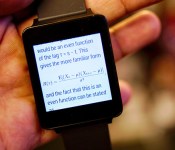
Android Wear app tries to squeeze Wikipedia onto your wrist

Android Wear will soon be buzzing our wrists numb with notifications, but what else can you do on such tiny screens? An app called Attopedia is testing those limits by letting you browse Wikipedia on your smartwatch. The logic is that mobile phone screens weren’t great for browsing either until sites were designed for them, so why not take it down even further? After loading a page, the grid interface lets you use your watch’s tactile screen to scroll up or down to access menus and left or right to see more detail. We’re not sure it’s the best way to view a content-saturated site like Wikipedia, but it’s a pretty good test for Android Wear — it’ll have to be more than a one-trick pony to take off. Grab it here if you’ve got an Android Wear device, you early adopter you.
Filed under: Wearables, Internet, Software
Source: Attopedia
.CPlase_panel display:none;

Chinese government drops foreign security software

China’s government isn’t just giving the boot to foreign operating systems; it’s doing the same for security software, too. A national procurement agency has dropped Kaspersky and Symantec from its antivirus supplier list, leaving only Chinese companies as options. It’s not clear that the move is directly linked to the country’s concerns about foreign software being used for espionage. Kaspersky tells Reuters that it’s in “conversations with authorities” about the move, but there isn’t an official statement on the subject just yet. It wouldn’t be shocking if there was a connection, however, since security tools are at the very heart of China’s fears. The real surprise is the nature of the targets — while many would expect China to distrust an American outfit like Symantec, it may be treating a Russian developer (Kaspersky) with a similar level of suspicion.
Filed under: Internet, Software
Via: Reuters
Source: People’s Daily
.CPlase_panel display:none;
 AIVAnet