



SwiftKey’s iOS 8 app will come with swipe gestures and cloud access

Of the list of features that will be available in iOS 8, the ability to add third-party keyboards certainly stands out. And while Apple didn’t mention any of these keyboards at length in yesterday’s iPhone event, that doesn’t mean these third parties aren’t getting closer to having a working model. SwiftKey is one such keyboard; it was one of the most popular apps in the Play Store for months, and it’s also one of our favorites to use on Android. Fortunately, the company’s nearly ready for beta testing. There’s no word yet on how long these tests will take, nor how many people will get to try it out initially, but the company at least provided us with some details on what the keyboard will be capable of.

As you can see above, one of the shining features of the new SwiftKey for iOS app is its swipe gestures. Just like SwiftKey on Android, as well as other ‘boards like Swype, Sense and so on, it gives you the ability to glide your finger across the screen from one letter in the word to another. It also can learn from your typing, so it’s able to predict what you’re going to say more accurately as you continue to use it more. And thanks to SwiftKey’s Cloud service, if you want it to learn your style even faster, just hook up your Gmail or Facebook account and it’ll analyze what you type the most so the prediction engine continues to improve.
SwiftKey isn’t ready to discuss when it’ll be available to the public yet — nor how much it’ll cost in the Apple Store — or if the beta test will be open or closed. (The latter is most likely.) Still, this is a good sign that third parties are getting closer and closer to having finished iOS 8 keyboards ready to go, and hopefully many of them will be ready to go by the time iOS 8 hits general availability. The app, when it’s ready, will come in several different languages: English, French, German, Italian and Spanish. We’ll keep you posted as more boards are coming out in fully functional mode.
Filed under: Cellphones, Software, Mobile, Apple
.CPlase_panel display:none;

If the internet had slow lanes, you’d still be waiting to read this article

Today is the internet’s “Day of Action,” an organized protest aimed at the Comcasts and Time Warners of the world from internet denizens, organizations, and companies. And some of the internet’s biggies are on board: Netflix, Twitter, Dropbox, Reddit, Tumblr and more. Perhaps you noticed a widget on Netflix today (seen above)? That’s part of the protest: not actually slowing down websites (which would no doubt frustrate users), but helping to enlighten users who might not know what net neutrality is.
Wait — are you one of those people? That’s totally possible! Here’s a quick summary: net neutrality is the internet as it exists today. All websites are created equal — there are no websites that load noticeably faster or slower than others due to internet providers signing financial contracts with website owners/service providers. Today’s protest is about keeping things that way.
Okay okay, that “all websites are created equal” bit is only partially true: Netflix signed deals with several major internet service providers (ISPs) just this year. Netflix did as much because it provides a service that’s dependent upon fast, consistent internet speeds. As Netflix provided data shows (seen below), some ISPs began “throttling” the bandwidth Netflix required to maintain its service. After Netflix ponied up cash, those connections were mysteriously fixed.

But it’s not a mystery, right? Internet providers have monopolies in much of the United States. If Netflix wants to fix connection issues its users are having in various regions of the US, it has one option: work out a deal with the company that dominates that region to provide a “fast pipe.”
Rather, Netflix pays X Internet Company for a separate, dedicated line of bandwidth — what is known as “paid prioritization.” This sets a dangerous precedent and threatens the basis of an open internet: if Netflix has to pay for that kind of pipe, who’s next? Will Netflix pay for that access with each ISP? And since Netflix can afford that option, it freezes out competition: if Netflix competitors can’t afford to pay for a dedicated fast pipe, Netflix has a competitive advantage that can’t be matched. The argument goes that companies like Facebook and Netflix wouldn’t exist today if the open internet didn’t exist.
It’s kind of a huge mess, right?

That’s exactly why today’s Day of Action exists. It’s an effort to remind the millions of internet users in the US to get in touch with Federal Communications Commission head Tom Wheeler ahead of a major legislative decision this year that sets standards for how the internet operates. Day of Action’s official website gets even more specific: the coalition seeks to reclassify internet providers under Title II of the 1934 Communications Act (the whole thing is here in PDF if you’re so inclined).
Put more simply, the reclassification would disallow the concept of paid prioritization.
Wheeler and co. specifically asked for feedback following a vote earlier this year in favor of new, very open regulation governing how the internet works; the period for comment submissions ends on September 15th. The proposal, which passed 3-2, still has another hurdle to pass before becoming law: yet another vote.
So! If the proposal sounds bunk to you — read it right here — today is your day to tell the FCC how you feel. And maybe tell a friend! Just imagine if, say, pieces like this one were intentionally throttled by ISPs because it doesn’t present the ISPs in a positive light. We think that sucks, and we’re betting you do too.
[Image credit: Netflix, HBO (“Last Week Tonight with John Oliver”), Netflix, Battle for the Net, Tumblr]
Filed under: Internet, Software
.CPlase_panel display:none;

Facebook test lets users schedule when a post will be deleted

It’s certainly nothing new for Facebook to test new features amongst a limited number of users before a widespread rollout, or killing them entirely (it did ask for willing participants, after all). With its latest trial, the social network is trying out an option in its iOS app that allows you to schedule when a post will delete. Taking a cue from its own ephemeral offering Slingshot, the feature will sort the erasing after a period ranging from one hour up to a week. As The Next Web points out, it’s likely that deleted posts will remain on Facebook servers rather than being permanently deleted, but that’s a point we’ll be looking to clarify if the tool gets officially added in the future.
Filed under: Internet, Software, Facebook
Source: The Next Web
.CPlase_panel display:none;

Hangouts Dialer lands in the Play Store to allow you make voice calls via Hangouts
Last night the talk of the town centered around an update that started filtering out for our beloved Google Hangouts app. The update moved it to version 2.3 and gave it a bit of an overhaul in the looks department. More importantly though, it added in the long, and maybe way overdue, Google Voice integration that was rumored to be on its way. With the new Hangouts update and GV integration comes a new app as well, Hangouts Dialer.

 Once the app is installed you will see a third pane appear in your Hangouts app for the dialer. In all truthfulness, the app is just a shortcut to the dialer, but without it installed, you don’t have access in Hangouts to the dialer. Annoying, but a necessary evil if you want to use your Google Voice number for voice calls via your device. Calls to all Hangout friends are free, as are almost all calls in the US and Canada. Other International rates do apply, but are relatively low.
You will need the new Hangouts v2.3 update to get it to all work. Luckily for you, we have that APK waiting for your downloading pleasure as well over at Gappsearly.com.
//<![CDATA[
ord = window.ord || Math.floor(Math.random()*1E16);
document.write('‘);
//]]>
The post Hangouts Dialer lands in the Play Store to allow you make voice calls via Hangouts appeared first on AndroidSPIN.
.CPlase_panel display:none;
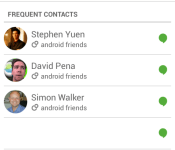
New Hangouts v2.3 update brings tabs and Google Voice Integration [APK Download]
As we are sure many of you Googlers are aware, there is an update rolling out for Hangouts. The update moves to v2.3, which is a pretty large version change from the previous 2.1 that was available. With a large number change we expect large changes. Google certainly delivered quite a bit in this update, all while bringing the file size down.
The biggest news about the updated Hangouts was the Google Voice integration that so many have been longing for. We knew Google was working on it and now it is a reality. Pairing the newest update with the new Hangouts Dialer gives you the ability call out to friends and family in the US and Canada for free. Along with giving you some super cheap international rates. The calling aspect isn’t initially available unless you install the Hangouts Dialer app. I would assume Google took this route so people who need it and want it can have it, and those that don’t, don’t have to deal with the extra tab. A simple install adds the third tab to your Hangouts app along with a slightly annoying additional icon that opens up Hangouts in the dialer for you.
Google Voice integration is probably the biggest aspect of the update, but we can’t overlook the complete look change that comes with the update app. Offering up a very green toolbar at the top. You will also notice that you have two tabs, one for your friends list/contacts and one for your ongoing conversations. If you install the Hangouts Dialer you will have a third tab added for the dialer.
 In your settings menu you will see your confirmed phone numbers along with a check box to turn on incoming calls from your Google Voice number to ring through to your Hangouts.
 The best way to really see it though is to grab the update. You can wait for it to land via the Play Store if you would like, but that could take a few hours or a few days. The alternative is to grab the APK and just install it now. If you are as impatient as we are, then you will want the APK. So hit the link below to go grab it and see for yourself what the new Hangouts is all about.
Hangouts v2.3 Download Link . You can also find the Hangouts Dialer over there as well, or you can hit the Play Store for that one.
//<![CDATA[
ord = window.ord || Math.floor(Math.random()*1E16);
document.write('‘);
//]]>
The post New Hangouts v2.3 update brings tabs and Google Voice Integration [APK Download] appeared first on AndroidSPIN.
.CPlase_panel display:none;

Post-Play being added to Netflix for Chromecast users
Netflix has pushed out an announcement today to alert us that the Post-Play feature that came about back in August of 2012, is finally making its way to your Google Chromecast experience. If you aren’t familiar with the feature, Post-Play simply moves along from the current TV episode you are watching to the next when it is over. Simplifying your marathon Sundays a little.

Post-Play isn’t just for TV shows. If you happen to be watching a movie you will get similar film recommendations. They say it will function like other devices, so you can expect to be prompted to continue watching after a period of episodes so that you don’t miss an entire season while you are sleeping. Netflix also mentions that they are working to integrate the same functionality to the PC.
I am not seeing the update happening just yet on my devices, but Netflix states that it will be hitting all Netflix customers over the next few days.
//<![CDATA[
ord = window.ord || Math.floor(Math.random()*1E16);
document.write('‘);
//]]>
The post Post-Play being added to Netflix for Chromecast users appeared first on AndroidSPIN.
.CPlase_panel display:none;

iOS 8 will be available to download on September 17th

New iPhones mean new software to go with it. So, with the iPhone 6 and 6 Plus going on sale soon, that means iOS 8 is on the way as well. Apple just confirmed the next-gen operating system will arrive next week, on September 17th, as a free download. In particular, you’ll be able to download it for every iPhone from the 4s on, every iPad starting with the iPad 2, and the fifth-generation iPod touch.

Included in the update is Apple Pay, a new feature that allows iPhone 6 and 6 Plus users to make payments via NFC. Otherwise, not much has changed since we last saw iOS 8, back at WWDC in June. Key features still include interactive notifications, an improved mail app, Spotlight search, support for third-party keyboards, Apple’s new HealthKit application, audio messages and improved integration with other Apple devices, like Macs. We’ll have a review up at some point but of course, you can also just download it for yourself.
Filed under: Software, Mobile, Apple
.CPlase_panel display:none;

Apple Watch monitors your activity and workouts with two separate apps

Has the Apple Watch spelled doom for dedicated fitness devices? Apple knows how seriously its users take fitness, which is why it’s built a pair of apps specifically for the new wearable. The first is activity, which eliminates the need for a Fitbit-esque activity tracker by measuring your sitting, standing and movement on a daily basis. For instance, you can set the move ring to disappear when you’ve burned off enough calories that day. It’s the same situation with exercise: which it qualifies as anything over the intensity of a brisk walk, which you need to do for half an hour each day. Then there’s the standing ring, which goes away once you’ve stood for at least a minute in each hour, up to 12 hours. The software will also learn your activity patterns and, when it spots you being particularly sedentary, will give you a Jawbone-esque reminder to get up off the couch.
Developing…
Follow along with your iPhone event liveblog!
Filed under: Software, Mobile, Apple
.CPlase_panel display:none;

Apple’s WatchKit ensures third-party wearable support from day one

Apple has unveiled its long-rumored wearable, and with it a third-party tool chest called WatchKit. For starters, the initiative will help developers integrate compatible apps with the Watch’s Glances screen, and do so from day one. It’s also part of a larger mindset in Cupertino, including HomeKit and HealthKit, that allows more openness and a range of features when new devices launch. This means that companies like Twitter, American Airlines and Starwood Hotels can get in right from the start, with custom features for wearable-driven tasks. For example, guests can expect to unlock hotel rooms by waving the Apple Watch in front of the lock and BMW will let you check the charging status of your car.
.CPlase_panel display:none;

Bungie’s leap forward with ‘Destiny’ isn’t gameplay: it’s social

“Waffles. Waffles with Swedish fish in them!” Destiny developer Bungie’s community manager Eric Osborne is telling me about his crew’s Halo LAN-party ritual. Lugging bulky CRT TVs everywhere (“You didn’t have a 36-inch [Sony] Trinitron Wega?” he asks), snaking ethernet cable around a possible stranger’s house, sipping Mountain Dew in the kitchen between games of capture the flag, eating lots of cheap pizza. Or, in Osborne’s case, breakfast food sprinkled with candy. “That was my experience!” It’s easy for him to chuckle at how ridiculous his go-to game fuel sounds in retrospect.
Back then, host advantage wasn’t having non-lagging bullets – it was knowing where the bathroom was and not having parents home. Times were a lot simpler.
When Halo 2 released in 2004, though, that all stopped. Mostly because Bungie more or less made LAN parties obsolete by taking them online with a sort of “virtual couch” that let you keep playing with the same buddies all night long in a, err, party. Fast forward ten years and much of the groundwork that the team laid for Halo 2 is boilerplate for any successful online game regardless of genre. Hell, much of Bungie’s conventions for online play (party chat, ranking systems, game invites) are baked directly into the online infrastructure of modern consoles.
Our interview with Destiny publisher Activision’s CEO Eric Hirschberg
The leap in social interactions between Halo: Combat Evolved and its sequel was nothing short of a paradigm shift, but where does Osborne see the change between its last game, Halo: Reach and its latest, the just released Destiny?
“I don’t know if you call it community or social play; I’ve heard some people call it ‘mingleplayer.’ I’m in a world, it’s my story, it’s my character. All the gear is mine; I’ve earned it in a bunch of different story missions,” he says. “I encounter some random people and we do a lot of stuff together and it’s super fun. But, I’m not bound to them in any way. I don’t need to lug a TV or even send them a friend request.”
He’s speaking of course about Destiny‘s unique take on traditional single-player campaigns in shooters. Though Bungie hasn’t quite come out and said the game is a massively multiplayer online title (MMO) like World of Warcraft, at its core that’s what the game is. When you start a new character, you drop into a world, quickly find an assault rifle and start shooting at aliens. In pretty short order, it becomes apparent that you aren’t alone. There are hundreds (if not thousands or even millions if pre-order numbers are to be believed) doing the same thing as you, and some are even doing it right alongside you. Should you desire, you can jump into their pick-up group – or, as they’re called in Destiny – a fire-team, and fight through scads of aliens together without much effort.

“In previous games, sending a friend request took you out of the flow of gameplay,” Bungie’s server software engineering lead Roger Wolfson says. He describes meeting someone online, then backing out of the actual game and wading through layers of menus and a massive list of recent players, just to interact with someone that you just met. It’s a hassle.
“And then you find out they’re a racist later,” Osborne says. He’s joking, but unfortunately that situation is’t far from the truth.
It’s why I, and most people I know, choose to not play online with anyone but a carefully curated group of friends. For me it helps preserve a shred of that LAN experience.
“A lot of times, you want to have a multiplayer experience where you don’t want to have to send a friend request,” Osborne says. “It can take a lot even in person to say, ‘Oh, I’ll give that person my phone number.’ Or, ‘I’ll give that person my email address.’ We’re cognizant that these types of things need to be lightweight and positive – that’s where the term ‘mingleplayer’ comes from.”
This, more than anything, is what Bungie thinks sets Destiny apart from any of its previous games: it’s taking all of the knowledge of how people interact online and how people want to interact online, that its gleaned even since launching Minotaur on the Mac in 1992, and putting it into motion. It’s what the team refers to as “lightweight social connections” that make the difference in Destiny. Stuff like walking up to a warlock with bad-ass armor and emoting a salute at him or her. Or, just kicking a ball around in The Tower, the in-game social plaza, with another player while she waits for her fire-team member to grab a new rifle or armor piece.

“You can choose to have positive interactions and you can choose to have negative interactions,” Wolfson says. “The most pestering a person can be is just running up to you and emoting a lot.”
That’s a far cry from tea-bagging the corpse of the flag carrier you just pistol-whipped from behind. What the team is trying to do at its core is eliminate a lot of the barriers that make it hard for people to have fun together.
“It’s so important to remember that what we’re doing is making a game, and a game is just a rule-based system that allows people to have fun and challenge themselves, share victory and social connections,” he says. “I think we’re celebrating that with Destiny.”
We’ll fire up the waffles.
Filed under: Gaming, Home Entertainment, Software, HD, Sony, Microsoft
.CPlase_panel display:none;
 AIVAnet