


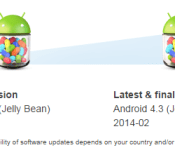
Sony bids adiós to future updates for the Xperia L, M, C and SP

“There is no real ending. It’s just the place where you stop the story.”
The above line is just a hint about the news we want to present to you i.e.: Sony has reached the end on updating the Xperia L, M, C, and SP. The end to software update is indeed a bad news, We simply tried to ease the hard blow by reminding you that there is no certainty with end. Did it help? We hope it helped.
Anyway, all of these Xperia devices are presently running Android 4.2 Jelly Bean, and that’s the highest they will ever go. Sony confirmed this earlier today when it updated each device’s respective software update page with an end-affirming “Latest and final version” tag. Ah! That hurts.So now, let’s take a look at the lighter side: Our lives are still updating and (as of now) there is no end to it. Deep insight. Period.
Feel free to check out each devices update page at Sony.
//<![CDATA[
ord = window.ord || Math.floor(Math.random()*1E16);
document.write('‘);
//]]>
The post Sony bids adiós to future updates for the Xperia L, M, C and SP appeared first on AndroidSPIN.
.CPlase_panel display:none;
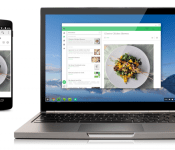
Google brings Android apps to Chrome OS, starts off slow
At Google I/O the Android and Google community were in awe at Google’s plans for the future. We saw Android L, Material Design, screen mirroring for Chromecast, Android TV and Android Auto. Something else that came out of the Google I/O conference was the long-awaited hope and dream of Android apps on Chrome OS, Chromebooks to be more precise.

After just a few months, Google has started to make that a public reality. The flood gates aren’t opening just yet, but Google is making a select number of apps available. Those apps are Duolingo, Evernote, Sight Words, and Vine. Oddly enough Flipboard was mentioned during Google I/O but didn’t make the initial cut. Moving forward Google will be working with a handful of developers to start moving their apps over and making sure they work as they are supposed too.
“Over the coming months, we’ll be working with a select group of Android developers to add more of your favorite apps so you’ll have a more seamless experience across your Android phone and Chromebook.”
So, does this mean you need some sort of new install, or a special emulator of sorts installed? Nope. Ars Technica plugged Google for a little more detail in terms of how it all runs.
The app code is all running on top of the Chrome platform, specifically inside of Native Client. In this way the ARC (Android Runtime for Chrome) apps run in the same environment as other apps you can download from the Chrome Web Store, even though they are written on top of standard Android APIs. The developers do not need to port or modify their code, though they often choose to improve it to work well with the Chromebook form factor (keyboard, touchpad, optional touchscreen, etc).
Quick and simple. You don’t need anything nor do you need to do anything. All you need to do is grab the app from the Chrome Web Store and use it. You do need to be on Chrome OS version 37 though. Hit up the links below to go grab each of the specific apps from the Chrome Web Store mentioned and let us know what you think.
Duolingo | Evernote | Sight Words | Vine
Source: Chrome Blog Via: Ars Technica
//<![CDATA[
ord = window.ord || Math.floor(Math.random()*1E16);
document.write('‘);
//]]>
The post Google brings Android apps to Chrome OS, starts off slow appeared first on AndroidSPIN.
.CPlase_panel display:none;
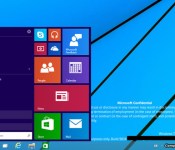
Leaked Windows 9 screenshots hint at a redesigned desktop

Slowly but surely, we’re starting to get a clearer idea of what the next version of Windows will look like. Microsoft already teased a classic-style Start Menu, while ZDNet‘s usually-reliable Mary Jo Foley has reported that the Charms Bar might be removed. Today, we’re sifting through what might be the biggest single leak yet — a collection of 20 screenshots from the German sites ComputerBase and WinFuture. In these images, reportedly from the “Windows Technical Preview” expected to arrive this fall, we can see not just the Start Menu, but a refined Taskbar, with a new search icon located next to the Start button.
Alongside the search button there’s another new icon — what appears to be a shortcut for the rumored virtual-desktop feature. Indeed, a few of the screenshots here show a pane along the bottom of the screen that you can use to toggle between different desktops. Finally, one of the screens includes the new notification center, which apparently lives in the System Tray in the lower-right corner. Based on the images we have here, though, it remains unclear how exactly these notifications will work.
On that note, it’s worth a reminder that these images almost certainly don’t represent a final version of the software — again, not even the preview version has been released yet. In the meantime, we’ve asked Microsoft to confirm whether these screenshots are authentic, and will update this post if we learn more.
Filed under: Software, Microsoft
Via: The Verge
Source: Computer Base, WinFuture
.CPlase_panel display:none;

The Premier League’s new app helps you enjoy a wet Wednesday night in Stoke

Old football folklore states that a super-talented and skillful overseas player hasn’t earned his stripes until he’s performed on a cold, wet and windy Wednesday night in Stoke. Those achievements would be nothing without fans there to chronicle them, so the Premier League has launched a new app to ensure there’s enough travelling supporters there to do just that. Available on both iOS and Android, Away Days has a simple premise: to get you to the stadium with plenty of time before kick-off. You’ll get access to live travel updates, details on the best places to crash, pubs to drink in, as well as comprehensive overviews of the stadiums themselves. The Premier League has gone as far as partnering with clubs and suppliers to cut the cost of getting to the ground, while also offering money off food, drink and parking when you arrive. Good news if you’re looking forward to seeing Falcao, Di Maria, Shaw, Rojo, Blind and Herrera attempt to emulate legends past at the Britannia come New Year’s Day.
Filed under: Cellphones, Internet, Software, Mobile
Source: Premier League Away Days (iOS), (Android)
.CPlase_panel display:none;
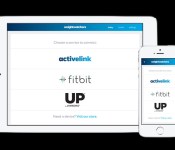
Weight Watchers now pulls in data from fitness trackers like Fitbit and Jawbone

If you’ve ever belonged to Weight Watchers, you know it’s pretty good at logging your food intake. But exercise? Not so much. Unless you use a qualifying pedometer, you have to manually enter your activity, which means calculating how much time you spend walking each day. Finally, though, Weight Watchers is doing the sensible thing: It’s integrating its app with fitness trackers, starting with models from Jawbone and Fitbit. So, if you walk an hour while wearing your Up24 or Fitbit Flex, the Weight Watchers app will suck in that data, and convert that activity to Weight Watchers points. (People on Weight Watchers earn a sort of currency, which they can trade in for more food, if they so choose.)
As someone who until recently subscribed to Weight Watchers, I can confirm this is good news. Even with so many fitness trackers on the market, WW still has a best-in-class food database; it’s simply more comprehensive than anything Fitbit or Jawbone has to offer. And, you know, the program works. That’s why people pay for it. But food-logging regimens are harder to follow faithfully when you have to manually enter lots of data and indeed, it can be annoying to type in my 35 minutes of running, when I already logged it with Jawbone.
Ideally, the integration with Jawbone, etc. would be two-way: Weight Watchers would share your food log, to make up for the fact that Jawbone and Fitbit aren’t as good at recording your food intake. Also, since Jawbone and Fitbit both work with WiFi scales, it would be nice if those apps could send your weight straight to Weight Watchers so that you don’t have to log it manually. Alas, though, the connection is one-way-only, with Jawbone and Fitbit sending your activity data to Weight Watchers, but not the other way around. Which makes sense: Weight Watcher’s food database is its crown jewel, and I can see why it doesn’t want to share it. But Weight Watchers is a weight-loss program first, and a technology company second; its app isn’t as polished as Jawbone or Fitbit’s. To let users bring their WW data into a different app would make for a more pleasant user experience.
For now, at least, Weight Watchers will only pull in data from Jawbone and Fitbit, though Weight Watchers says support for other devices is coming soon. Also, because the integration works with the help of Apple HealthKit for iOS 8, this feature is only available on iPhones and iPads. (Boo.) Weight Watchers declined to say if an Android version is on the way. In the spirit of choice, though, we hope it is.
.CPlase_panel display:none;

Google Play officially extends return window to two hours

While Google already had been offering an extended two-hour window for app and game returns, the outfit has officially acknowledged the change. Before the switch, Android users had 15 minutes to decide whether or not they wanted to keep software they’d just purchased. From the title’s page in Google Play, options for Open and Refund are displayed during the 120-minute period following the initial download. Once that time is up though, you’re saddled with it for good as Refund is replaced the Uninstall button. Don’t expect to get multiple refunds for the same app, either. Once you’ve received your funds back, if you choose to splurge for the same selection again, you can’t return it a second time.
Filed under: Software, Mobile, Google
Via: Android Central
Source: Google Play Support Page
.CPlase_panel display:none;

A watch expert’s take on the Apple Watch: the benefits and failures of digital

Despite Benjamin Clymer’s many accolades across the past several years — the New York Times calls him the “High Priest of Horology” — it’s possible you’ve never heard of his website Hodinkee. The name might not bring watches to mind, but it’s actually a Czech word for “wristwatch” (technically it’s “hodinky” in Czech). The site’s established itself as a go-to source for wristwatch obsessives, and Clymer’s its executive editor, which is exactly why we were so interested to read his thorough dissection and impressions of Apple’s first ever watch: Apple Watch.
In a lengthy piece (that we suggest you read in full), Clymer begins by setting expectations: “I’m not even sure we can call it a watch.” That isn’t to say he doesn’t like Apple’s effort, but comparing it directly to a traditional, mechanical wristwatch is near impossible.
Compared with similarly priced ($350) watches, Clymer says, “the Apple Watch simply blows away anything — digital or analog.” He also notes that Apple Watch pays special tribute to the history of human time-telling. “The Apple Watch, in its own way, really pays great homage to traditional watchmaking and the environment in which horology was developed,” Clymer writes.
In terms of major faults, he cites two thoroughly watch-centric issues: not being able to fit easily underneath a cuff (“I was surprised by how bulky this is”) and lack of timelessness (“It is still not as cool as a mechanical watch, to real people.”). That latter bit is especially interesting. In the video seen below, Clymer speaks to how he got into watches: his grandfather and him were great friends, and on his 16th birthday, his grandfather gifted him a watch. As he puts it, “My watches will last for generations, this Apple Watch will last for five years, if we’re lucky.”
Again, take the time to read the whole enchilada from Clymer himself on Hodinkee. It’s a thoroughly interesting perspective on Apple’s newest product category.
Filed under: Wearables, Software, Mobile, Apple
Source: Hodinkee
.CPlase_panel display:none;

Sound off! What apps help you get things done?

For the procrastinators among us, I share your philosophy: Why do today what you can put off until tomorrow? Sadly, the people who sign our paychecks don’t really agree; they strongly encourage us to get things done today. Right now! There’s a ton of different apps that help manage our to-do lists and claim to make us more productive people. With so many options, how do you choose something that gets you down with GTD? Share your favorite productivity apps in the Engadget forums!
.CPlase_panel display:none;

Stroll through Egypt’s pyramids on Google Street View

If you’re leery about taking a trip to Egypt just now, Google can at least give you part of the experience with new Pyramids of Giza Street View imagery. That includes the Great Pyramid, the only remaining ancient wonder of the ancient world that’s still standing, along with the Great Sphinx and Imhotep’s Pyramid of Djoser. As befitting the addition of such a famous landmark, Google also included a raft of extras: imagery from the Abu Mena Christian site, the medieval Cairo Citadel fortification and other iconic spots. From there, you can head to the Google Cultural Institute‘s Egyption Pyramid gallery and see archival photos and drawings. As we found, you’ll be able to while away a few enjoyable hours, and (we think) a digital tour carries a minimal risk of any curses.
Filed under: Internet, Software, Google
Source: Google
.CPlase_panel display:none;

Peggle Blast and SimCity BuildIt coming to Android
EA slipped a little news into our inbox this afternoon. It was cleverly geared towards the latest Apple devices and what EA has in-store for it. Clicking through lead to a little information on two new games that will not only be finding their way to iOS, but also to our little Android world as well.
 First up is SimCity BuildIt. This title will use a 3D interface that looks pretty similar to the full-sized editions of the game. EA states that you will be able to pinch to zoom in and out of your metropolis and spin 360 degrees for full access to all the happenings. While it might have a lot of the similar aspects, it is noted that this is an “all-new SimCity game like you’ve never seen before.”

 With EA behind the title there are plenty of things that can be terrorized. For instance, it will probably be a free-to-play title laden with in-app purchases and time based abilities. It is the state of the mobile gaming industry and the best way to make long-term profits.
Another title that is on its way is a new iteration of Peggle, Peggle Blast.


 I always did like the Peggle series. Looking at the screenshots, and the very limited description from EA, it looks like this should be a pretty decent addition for Peggle fans. That is assuming we don’t find out that power-ups and moving forward will be a nightmare with coins or jewels that take to long to earn.
EA leaves us hanging on many of the details surrounding both titles. There is a hint that they are both slated for a fall release, but that was part of the iOS post they released. We can never count on a company pushing the game cross-platform at the same time. There could be more little goodies coming from EA though in terms of adding in wearable functionality. EA already has a small team prototyping ideas that could put some factor of gaming on your wrist. Again, aimed at the iOS and Apple Watch crowd, but it is feasible that Android Wear is mixed in there too. They are leaning towards extension apps that would let you make quick passive actions from your wrist for your game. They use Real Racing 3 as a potential example where you can access “Team Driver” and have your team race events when you aren’t able to actually play. I could see this coming to fruition from Sims Free Play and SimCity BuildIt where you could send your Sims to work and such from your wrist without the need to grab your phone or tablet.
We will have to wait and see exactly when EA will release these for Android and if they did their due diligence to make them affordable and less “GIVE US MONEY NOW TO PLAY” or not.
Source: EA | Peggle Blast | SimCity BuildIt
//<![CDATA[
ord = window.ord || Math.floor(Math.random()*1E16);
document.write('‘);
//]]>
The post Peggle Blast and SimCity BuildIt coming to Android appeared first on AndroidSPIN.
.CPlase_panel display:none;
 AIVAnet