


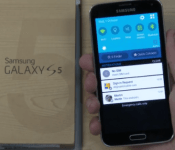
SamMobile gets a 8 minute sneak peak of Android L on the Samsung Galaxy S5
 We’re now less than one month away from the alleged official launch of Android L which means that software update season is going to begin. Samsung isn’t usually the first name to come up when talking about quick updates, but from an eight minute exclusive video of Android L on the Samsung Galaxy S5, it looks like Samsung has already been busy behind the scenes. The video walks through a few of the new improvements and menus which is featured in the Samsung Android L test build LRW58J. Check it out:
As you can see, Android L on the Galaxy S5 has all the hallmarks of Material Design, with the slick transitions and a brighter colour palette. Perhaps unfortunately, Samsung’s interpretation is still very skinned and very much TouchWiz influenced – Samsung has apparently even neglected the notification icon changes that we have spotted in previous leaked screenshots. Whether you support this or not is entirely your preference, but we would have though more OEMs would have opted for a more “stock” approach given that Google has worked so hard on the UI for Android L.
What do you think about Android L on the Samsung Galaxy S5? Let us know your thoughts in the comments below.
Source: SamMobile
//<![CDATA[
ord = window.ord || Math.floor(Math.random()*1E16);
document.write('‘);
//]]>
The post SamMobile gets a 8 minute sneak peak of Android L on the Samsung Galaxy S5 appeared first on AndroidSPIN.
.CPlase_panel display:none;

Flipboard finally arrives for Windows Phone

Have you been frustrated that your Nokia handset hasn’t had the same Flipboard access as your Windows PC and tablet? Well, you’re in luck. The popular reading app has finally made its way to Microsoft’s mobile OS. Outfitting Windows Phone 8.1 devices with at least 1GB of RAM, the software has been retooled specifically for smartphones with easy access to Cover Stories’ highlights, search and sharing options. It’ll come preloaded on the Lumia 830 that’s set to arrive soon, and compatibility for phones with less memory is in the works as well. If your device meets the current requirements though, you can get to downloading right now.
Source: Blogging Windows, Flipboard
.CPlase_panel display:none;

Deezer’s regular subscription plan arrives in the US as a Bose exclusive

Deezer brought its high-quality streaming option to Sonos systems in the States last month, and now it’s delivering a regular subscription option… but there’s a catch. The outfit’s Premium Plus plan hits the US for the first time — so long as you’re wielding either a Bose SoundLink speaker or SoundTouch WiFi setup. A $10 monthly subscription allows access to Deezer’s catalog of 35 million songs ad-free, with radio, playlists, offline mode and other perks you’ve come to expect from the likes of Spotify, Rdio and Beats Music. Bose owners will get a 50 percent discount for the first year though, and an October 10th software update will ensure SoundTouch systems are properly equipped to access the service.
Filed under: Portable Audio/Video, Software
.CPlase_panel display:none;

Evernote to add collaborative chat to its note-taking app

In an effort to make Evernote a more efficient workspace, CEO Phil Libin announced a new chat feature in its note-taking app. Simply called Work Chat, it’s meant as a collaboration tool for the workplace where co-workers can communicate and work together on a document or a project in real time. Not only will you be able to see who’s viewing the note, you can also see if they’re looking at it from the desktop or mobile. “We’re trying to break the tyranny of the inbox,” says Libin. “We want to reduce your dependence on that.” Realistically, he says that we’ll never be free from email, but he would like Work Chat to help alleviate that burden. Work Chat should be available for all platforms — Android, iOS, Mac, PC and web — later this year.
Filed under: Internet, Software
.CPlase_panel display:none;

Popular reading app Instapaper is now free on iOS and Android

Thanks to a new subscription model it plans to take on, Instapaper’s making its mobile applications available at no cost starting today. That said, the reading app does plan to lure in users to a premium tier it recently created, which costs $3 per month or $30 a year. If you recall, last year Instapaper was acquired by Betaworks, a company that also owns websites Bitly and Digg, so this recently adopted business scheme is part of the goal to continue growing and developing the read-it-later service. Those who choose to go the premium route will get access to features that won’t be on the free version of the app, such as unlimited highlighting, text-to-speech playlists and others that haven’t been announced yet. Having solid competitors like Pocket meant that Instapaper had to change its pay-for-play ways sooner or later, and this is definitely a great start.
Filed under: Misc, Internet, Software, Mobile
Via: iMore
Source: Instapaper
.CPlase_panel display:none;

Google Play Newsstand gets a redesign and new magazine view

Google is working is working its way through all its apps and updating them in anticipation of the release Android L. Next on the list is Play Newsstand, which most obviously is getting a Material Design facelift. That means a card based UI with bigger images and lots of transitional animations. But a visual revamp on its own isn’t particularly exciting. The best news is that the reading experience for print magazines has been revamped. Until now reading a magazine meant scrolling around a PDF version of the print editions, with a few notable exceptions that had “interactive” editions. Now, you’ll actually be able to browse a list of articles in the issue and open them up in a format that’s much more phone friendly. You get clean easy to read text, without having to sacrifice the big images. Newsstand is also getting much more fine grained control over the topics in the explore section. So instead of just Food & Drink, you can get articles dedicated to vegetarian cuisine or the paleo diet delivered straight to your phone. The new version of Google Play Newsstand will be rolling out on Android over the next week. iOS users will probably have to wait a long while…
Filed under: Software, Mobile, Google
Source: Google
.CPlase_panel display:none;

Apple may bring back the Camera Roll to iOS 8

Sometimes it’s all about the small things. With the release of iOS 8, Apple waved goodbye to its renowned Camera Roll, the hub where pictures and videos lived in previous versions of the operating system. Instead, the Cupertino company replaced it with a “Recently Added” section — and let’s just say some users weren’t too happy about that. Fortunately, if you were one of the people disappointed by this, Apple appears to be having a change of heart. According to the site Product Reviews, which points to release notes of the most recent iOS 8 beta seeded to devs, the Camera Roll is back in its original spot, right where it once belonged. Of course, there’s always a chance Apple could decide not to reverse course at the last minute, so don’t get too, too excited. We won’t know for sure until the next version, likely to be iOS 8.1, gets pushed out to the public; for now, you’ll have to make due with what you have on your shiny new iPhones.
Photo by Will Lipman.
Filed under: Cellphones, Software, Mobile, Apple
Via: Business Insider
Source: Product Reviews
.CPlase_panel display:none;

Wunderlist now lets you attach Dropbox files to tasks

Wunderlist has long been a popular choice for folks looking to wrangle both individual and collaborative to-do lists. With today’s update though, the productivity app gets a major boost from Dropbox. When creating a new task, you can attach files from that cloud-based repository, and they’re accessible right from the to-do list. From an item’s detail menu, simply clicking the paperclip or Dropbox icon allows you to hunt for the file(s) you’ll need, added as links for easy grabbing later. Update a document that’s attached to a task? No worries. It’ll automatically sync, ensuring that the latest version is available when needed. As TechCrunch notes, this is Wunderlist’s first third-party integration and it’s one that’ll save some time searching for and opening up files. TC also reports that Evernote and calendar syncing could be next up. If you’re anxious to give it a try, the new version is available now on iOS, Android and on the web.
Filed under: Software
Via: TechCrunch
Source: Wunderlist
.CPlase_panel display:none;

‘Duke Nukem 3D’ and leaked Yahoo passwords pass for art at this gallery

It wasn’t all that long ago that the biggest argument surrounding video games was whether or not they should be considered art — something that’s given way to more distressing topics as of late. A German gallery has an opinion on the former, however, and with the “Hurt Me Plenty” exhibit, it examines the intersection of gaming and technology and their effects on the real-world. In the video below, artist Aram Bartholl gives a guided, first-person (naturally) tour of the exhibit, explaining the reasoning behind pieces based on the idle hands animation and that of the pistol firing from Duke Nukem 3D. As Make notes, the installation melds the pixely digital imagery with physical media like wood and halftone printing to pretty great effect.
The showcase isn’t just limited to developer 3D Realms’ legendary shooter, either: there are pieces dedicated to the fetishization of GPUs and their uses beyond graphics rendering — like bitcoin mining and security cracking — too. Perhaps most interesting of all, though, are roughly 40,000 plotter-printed Yahoo passwords that were made vulnerable in 2012. Hurt Me Plenty runs through November 1st at Berlin’s DAM, but if you can’t make it in person there’s a Flickr gallery that’s just begging you to come get some.
[Image credit: agoasi / Flickr]
Filed under: Desktops, Gaming, Home Entertainment, Software, HD
Via: Make
Source: Datenform (German), YouTube
.CPlase_panel display:none;
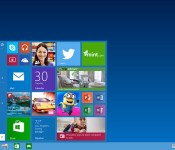
The Windows 10 Technical Preview arrives

If you can’t wait to put Windows 8 behind you (and you’re the adventurous type) you can now download the Windows 10 Technical Preview. As we saw, Microsoft has made the “Modern UI” all but disappear on the desktop and moved it to the resurrected start menu. That gives users a more familiar, almost Windows 7-like, experience. This also marks the first time virtual desktops have been baked into Windows, and you can switch between via a thumbnail in the taskbar. Some features from the mildly loathed previous version, like charms, were retained, but Microsoft said that pretty much everything was subject to change before it launches late next year. If you’re ready for a long download an no doubt plenty of bugs, have a go here. And if you’re still unsure, check out the quick guide to the preview, though be warned, it’s a sizable PDF file.
Filed under: Software, Microsoft
Source: Windows
.CPlase_panel display:none;
 AIVAnet