


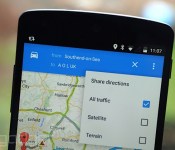
Google Maps for Android now lets you easily share directions

While you’ve been able to share specific places you’ve located in the Google Maps app for some time, pinging directions over to your friends and family hasn’t been so simple. With today’s Android update, however, the company has finally done something about it. Now, when you load a navigation route inside the app, you’ll notice a new “Share directions” option appear in the menu. The feature automatically creates a numbered list of text directions and attaches a link, which can then be shared via any compatible app on your Android device. WhatsApp and Facebook are probably the most logical destinations, letting the recipient load the link and see the same route on their device. Although Android users are currently only able to send routes using this new option, iPhone owners can receive load shared directions inside the Maps iOS app (if they have it installed) — useful if you’re the one having to constantly help someone operate their new smartphone.
Filed under: Cellphones, Tablets, Internet, Software, Mobile, Google
Via: Android Police
Source: Google Maps (Play Store)
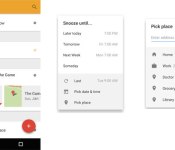
Google adds a snooze button to Inbox emails

No, you don’t need to reply to that email immediately in the middle of dinner. Now Google’s trying to help that happen, with Snooze. A new addition to its Gmail Inbox app, users can “snooze” emails with automatic quick settings or their own customized reminders. You can delay a message for later the same day, tomorrow or even a week from now. There’s also the hilarious someday option — we’re going to assume it’ll reappear later in the week, but don’t hold us to that. You can even “geo-snooze” a message to remind you when you’re at a place, rather than a prescribed time. You can still access any reminders or snoozed messages if you manage to make time and adjust reminders if needed. Inbox zero could be within in your grasp in 2015. Well, kind of.
Source: Gmail blog
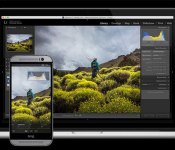
Adobe Lightroom mobile comes to Android, but it’s only for phones

Last spring, Adobe brought a version of its Lightroom photo-editing software to the iPad making for some convenient editing on the go. Months later, a version of the app is ready for Android devices and it brings all of the key features from the iOS version to those handsets running Google’s mobile OS. You’ll notice that I said “handsets” there, and that’s an important caveat. The app is designed for use on phones, and not tablets. Adobe says a version that’s optimized for tablets is on the way, but for now, the app is meant to be used on phones. If you’ll recall, the iPad version preceded the iPhone app, which, you know, makes sense. While this new Lightroom mobile equips devices running Android 4.1 (Jelly Bean) and later with its toolbox of tweaks (more on that in a minute), the creative software company recommends that you have at least 8GB of free space on your device to keep things running smoothly.
Just like the iOS version, the Android app is a free download, but you’ll need a Creative Cloud subscription to use it. You don’t need the full membership though, as the photography-specific plan is now a permanent fixture at $10 a month. Lightroom mobile syncs edits, metadata and collections with Lightroom 5.4 (or higher) on both Windows and Mac. It also automatically imports shots from your phone and allows you to access Creative Cloud-stored files for editing while your away from that work machine. Don’t expect the full set of tools, as the mobile software is limited to much of what’s in the Basic Panel and cropping tools. Options like color temperature, exposure, highlights and contrast are available, but those handy presets that you’ve created, or purchased from the likes of VSCO, won’t be accessible. Adobe says that expanded preset support is something it’s working on, but there’s no timeline for when they’ll be added to the mobile apps.

Just like the iPad app, Lightroom mobile uses the RAW file to create a compressed preview version that’s only about 5 percent of the original size (around one to two megabytes). The original is maintained, and a 2,560-pixel wide image ensures that the collection you edit during your evening commute doesn’t take forever to download or take up all of your storage space. As we’ve already mentioned, Adobe says you’ll need 8GB of internal storage (not extra space you’ve added on a microSD card) to move the files back and forth, along with a minimum 1.7GHz quad-core CPU.
Remember when I said most of the key features from iOS made it over to Android? Well, the one difference is Lightroom’s commenting system is absent on this version, but Adobe says it will be part of a future update. You can, however, still like, flag and reject images as needed. My biggest gripe here is the lack of tablet support. I’ve used Lightroom mobile on an iPad, and the app seems much better served with the larger display of a slate. Here’s to hoping Adobe’s plan to outfit Android tablets is just around the corner, but until then, those who prefer Google’s software will have to settle for using smaller screens.
Source: Adobe, Google Play
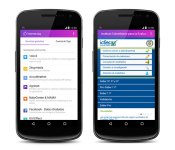
Facebook takes its Internet.org app to Colombia

Facebook took it’s Internet.org app to Zambia back in July, and now it’s heading to Latin America. The social network announced today that folks in Colombia would now be able to use a handful of connected tools free of charge. Tigo customers can access Instituto Colombiano para la Evaluación de la Educación (an education service) and Agronet (agriculture and rural development info) at no cost, as well as things like Facebook, Messenger, UNICEF, Wikipedia, AccuWeather and more. In addition to the initial 16 services, more will be added in the future as Internet.org continues to expand its reach to other parts of the world. While a load of useful tools have been a part of the free app for a while, the version that’s launching in Colombia is the first to offer access to government services.
During a Q&A in Bogotá, CEO Mark Zuckerberg said that due to the infrastructure required to do so, giving folks in developing areas access to the entire internet for free may never happen. However, through the Internet.org project, handy apps for searching job listings, speaking with a doctor and getting local news will help give users info they usually wouldn’t have access to. Zuckerberg also noted that by removing the data plan requirement, only the cost of a phone is the barrier to access, and the one-time cost of the device itself is much cheaper. What’s more, once Internet.org reaches more locales, further reducing the cost of those handsets is a goal for the future.
Filed under: Cellphones, Internet, Software, Mobile
Source: Facebook
Bring tech to class; Google releases Classroom mobile apps for Android and iOS
I distinctively remember constantly getting my little flip taken away in class all the time for playing snake and attempting to text. Now kids are encouraged to bring their phones, tablets and laptops to class as an extension of the learning environment. I for one am rather happy to see it really. Today Google announced […]
The post Bring tech to class; Google releases Classroom mobile apps for Android and iOS appeared first on AndroidSPIN.
Android 5.0 Lollipop for the HTC One M8 Unlocked and Developer Editions is available today
Just a day after getting a sneak peek at what it was going to look like, Android 5.0 Lollipop for the HTC One M8 Unlocked and Developer Editions has been made available today. The news dropped after HTC VP of Product Management, Mo Versi, tweeted that the OTA would be going out today, and it’s being […]
The post Android 5.0 Lollipop for the HTC One M8 Unlocked and Developer Editions is available today appeared first on AndroidSPIN.
Samsung Galaxy S6 could have a toned down TouchWiz UI, almost “Nexus-like”
One of the biggest criticisms about Samsung devices is its TouchWiz user interface (UI). That’s not to say that there aren’t people that like it, but on a scale from stock Nexus to heavily controlled and themed, the TouchWiz UI is next to almost nothing else. Having seen TouchWiz on almost every Samsung device for […]
The post Samsung Galaxy S6 could have a toned down TouchWiz UI, almost “Nexus-like” appeared first on AndroidSPIN.
Galaxy S5 Lollipop updates rolling to owners in the UK
Samsung has steadily been pushing OTA updates around the globe for Android 5.0 for their flagship Galaxy S5. We know it went over well in Poland, Russia, Malaysia and Spain. Next on the mega OEM’s list is a roll out that is currently underway in the UK. While the update does bring the device more […]
The post Galaxy S5 Lollipop updates rolling to owners in the UK appeared first on AndroidSPIN.
HTC One M8 with Android 5.0.1 gets spotted with Sense 6.0 written all over it
This seems to be the week for software update leaks. Next on the list of leaks is a HTC One M8 with Android 5.0.1, as spotted in the hands of htcviet.vn. The almost-4 minute demo shows us what Sense 6.0 and Android 5.0.1 is likely to look like on your One M8 whenever the update finally […]
The post HTC One M8 with Android 5.0.1 gets spotted with Sense 6.0 written all over it appeared first on AndroidSPIN.
Android 5.0.2 becoming available for some 2nd Gen Moto G owners
Android 5.0.2 has so far only been made available for the 2012 Nexus 7. While there has been no indication of whether this seemingly spurious software update will eventually reach other Nexus devices, it appears the device next in line to receive the update is the humble 2nd Gen Moto G. Users in the U.S. […]
The post Android 5.0.2 becoming available for some 2nd Gen Moto G owners appeared first on AndroidSPIN.
 AIVAnet