


Is a Gold Moto 360 on the cards in the future? Motorola removes suspect watchface on website
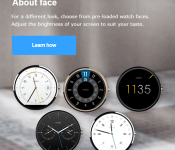
 The Motorola Moto 360 has been hitting people’s wrists for a few weeks now and the general consensus is that it is the best Android Wear smartwatch out there now, but by no means does that mean it is perfect. Battery life appears to be the biggest sticking point, but with careful management, it looks like users can probably live with what they’ve got. With black and silver Moto 360‘s flying off the shelves, people have been happy with the available colours offered so far, but what if there was also a gold Moto 360? If the above image is anything to go by, it might be a possibility. If you look at the middle watchface on the top row, you will see that the watchface has a definite gold sheen to it. While that alone probably isn’t enough evidence, the hypothesis got a definite boost after Motorola hurriedly removed the watchface from the website. If you visit it now, it will look like this:
 Gone is the gold Moto 360 watch face with just the other four remaining. Again, that still probably isn’t enough evidence to say that there will be a gold Moto 360 – it may have just been a concept, or just an innocent mistake – but if there is, it could potentially come at a bit of a premium in price. We’ll keep an eye on this one and see if anything pops up over the next few days.
What do you think about a gold Moto 360? Let us know your opinion.
Source: Reddit via Android Police
//<![CDATA[
ord = window.ord || Math.floor(Math.random()*1E16);
document.write('‘);
//]]>
The post Is a Gold Moto 360 on the cards in the future? Motorola removes suspect watchface on website appeared first on AndroidSPIN.
.CPlase_panel display:none;
TAG Heuer smartwatch coming soon, “must not copy the Apple Watch”
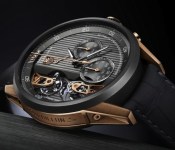
 Hot on the heels of Fossil announcing that they are teaming up with Intel to develop a new smartwatch, similarly premium (but probably more premium) watch maker, TAG Heuer has announced that they are also developing a wearable of their own. Jean-Claude Biver of the LVMH group that owns TAG Heuer said that such a TAG Heuer smartwatch “must not copy the Apple Watch” and that “we cannot afford to just follow in somebody else’s footsteps” – I assume Biver also meant to say “and also not copy the countless Android smartwatches too”, but I’m sure everyone’s just worried about the Apple Watch.
The TAG Heuer smartwatch faces some pretty stiff competition, not only from the Apple Watch, but a relatively large number of Android Wear-based smartwatches (and a Tizen-based one) that were announced at IFA 2014 earlier this month. Wearables from Sony, ASUS, LG, Motorola and Samsung already occupy what most people would already consider the “premium” priced range in the smartwatch market, so we can only imagine given TAG Heuer’s history that any wearables they develop will be generally unaffordable. Still, it’s interesting to see smartwatches start to become more mainstream and we look forward to seeing something when TAG Heuer possibly has something ready at the Basel watch fair next Spring.
What do you think about TAG Heuer joining the smartwatch race? Let us know your thoughts in the comments below.
Source: Reuters via Phones Review
//<![CDATA[
ord = window.ord || Math.floor(Math.random()*1E16);
document.write('‘);
//]]>
The post TAG Heuer smartwatch coming soon, “must not copy the Apple Watch” appeared first on AndroidSPIN.
.CPlase_panel display:none;
Moto 360 review: It’s the best Android Wear watch, but that isn’t saying much

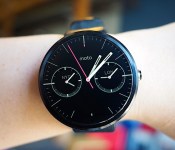
When it comes to wearables, fashion trumps function. That’s the mantra Motorola went by when it designed and developed the Moto 360, and judging by the enthusiastic response the watch received when it was unveiled earlier this year, plenty of people agree. The Moto 360 is undoubtedly the best-looking of the three inaugural Android Wear watches (the LG G Watch and the Samsung Gear Live are the other two), with its premium leather strap, chamfered glass and circular design. As Motorola designer Jim Wicks said in an interview, “We wanted to hit that ‘Whoa!’ mark.” And so it did. But is that enough? In the past few days, I struggled to like this watch, even though it’s the best Android Wear device available today. Allow me to tell you why.
Hardware

The Moto 360’s claim to fame is that it’s the first Android Wear device with a round face. And that’s a big deal. As I said, when it comes to an item that you wear on your person, it’s crucial that it looks good. Compared to the other two Android Wear watches on the market, the Moto 360 looks the most like an actual timepiece partially due to that round design. Indeed, one of the reasons Motorola went with a circular design is that it believes a round face is simply more watch-like. Of course, there are traditional analog watches with square designs too, but the 360’s round face does make it stand out in a sea of square smartwatches. Motorola made a conscious decision to make the 360 more watch than gadget; more mainstream than early adopter; more SoHo than Silicon Valley.
That thought process included not just the shape of the watch, but also the materials used to make it. The housing is constructed from glass and stainless steel, and the leather strap is sourced from a high-end Chicago tannery. It’s a smartwatch that actually feels comfortable when worn; the leather feels much softer and more flexible than the rubber straps on the G Watch and the Gear Live. What’s more, with the leather strap, the Moto 360 is also quite a bit lighter at 49 grams (the G Watch weighs 63; Gear Live, 59). In other words, the 360 not only looks like a regular watch, but it also feels like one.
If you can’t decide on just what color to get — the initial watchbands come in black, dark gray or light gray — the straps are thankfully interchangeable. However, do note that you’ll need to visit a jeweler to swap them out and Motorola says the 360 is only compatible with straps made specifically for it. Later this year, Motorola plans to release a Moto 360 with metal bands, which is more in-tune with the style of the thick metal housing.

That brings me to one of my problems with the Moto 360. While I don’t deny that the Moto 360 is well-crafted, its 46mm diameter and 11.5mm thickness paired with the leather bands make it much too big for me. I felt a little embarrassed to be wearing such an enormous, attention-grabbing timepiece, and my husband remarked that it looked like I had a hockey puck strapped to my wrist. During a tour of Motorola’s headquarters recently, we were told that the 360 was designed for both men and women — apparently large watches are trendy accessories for some folks these days — but I’m simply not one of them. Of course, this is based entirely on personal preference. And again, even though it’s not to my taste, the Moto 360 is still one of the most striking smartwatches I’ve seen yet.
Display

The primary reason for that is the circular display. It goes practically edge to edge with pixels spread across the entire surface, leaving a sliver of a bezel around it. The result is a watch face that’s nearly all screen, which isn’t something you can say about the Gear Live or the G Watch. That’s a good thing, especially as the Moto 360’s screen is a touch smaller at 1.56 inches across, resulting in a 320 x 290 resolution that translates to 205 pixels per inch. It’s not the sharpest display by any means, but it’s also not bad for such a tiny screen; it seems clear and colorful enough to me.
Unfortunately, there’s a rather noticeable black slice at the bottom that mars the display’s circular perfection. Motorola says that in order to maximize the screen size of a small and round display, it opted to house the watch’s display drivers and ambient light sensor in that little wedge instead of creating a thick circular bezel. If that is indeed the trade-off, I agree that the edge-to-edge chamfered glass is a better option. But if you’re even the slightest bit of a perfectionist, that tiny, little black slice might be difficult to un-see.
Additionally, round displays and Android Wear don’t always get along. Motorola apparently worked closely with Google to ensure that the UI would play nicely with a round screen, and it succeeded — for the most part. Text occasionally gets cut off at the corners, especially when scrolling through messages and long lists. Also, the beveled sides make the circular border look a touch jagged at certain angles, especially against a white background.
Speaking of that ambient light sensor, the Moto 360 is also the first Android Wear watch to even have one. That means that unlike the G Watch and the Gear Live, the 360 supports auto-brightness, which is extremely handy considering the 360 is equipped with a backlit LCD that would otherwise be unreadable in bright sunlight. It’s naturally not quite as crisp as the e-paper display on the Pebble, but it’s legible enough that I could make out the time and read my email notifications. And seeing as turning on maximum brightness would likely put a big dent in the battery life, I’m glad the sensor is there.
It’s important to note here that the ambient light sensor is separate from a Moto 360 watch setting called “ambient screen.” This feature is off by default, and what that means is that the watch will go completely black when it’s idle or not in use — it’ll only light up when you lift the watch to look at it. When ambient screen is turned on, however, the 360 won’t immediately go black when idle. Instead, it dims just enough so that you can still tell the time if you casually glance at it. But if you happen to take the watch off and leave it somewhere, the display will eventually go black, even with ambient screen enabled.

In addition to tapping the screen or lifting the watch, you can also activate the display by pressing on a small protruding crown on the right. If you hold it down, you’ll bring up the watch’s settings menu — a great little shortcut I wish the G Watch and the Gear Live had. Pressing and holding on the screen will bring up a selection of watch faces that have been customized for the 360’s round display. You can adjust the different watch face settings even further with Motorola’s own Connect app. I like the Dials face option the best because it lets me see what time it is in two other cities — a handy thing when you work with a global team.
Now, you might be wondering how you charge this watch; it’s not like there are any ports to plug in a cable. Instead, the Moto 360 charges wirelessly via Qi magnetic induction. Just set it inside the included charging cradle and the watch will get the juice it needs to keep going. When docked, the Moto 360 will display a digital clock along with how much charge it still has. This way, you can use it as a bedside alarm clock if you like. It works as promised, but I do wish Motorola had included a USB-only cable in the box in addition to one that requires a power outlet. Since the 360 charges via the Qi standard, you could theoretically charge it on an existing Qi wireless charger if you happen to have one already.
Features

Phew. That was a lot of words just about the watch’s design. But seeing that most of the watch’s features are the same as the other Android Wear devices — Google isn’t allowing manufacturer-specific skins — the 360’s main differentiator is its design.
But if you’d like a brief recap, here’s what Android Wear offers. Beyond just telling the time, Android Wear is a platform that transmits what’s on your phone to what’s on your wrist. If you allow it, you’ll see everything from emails to Twitter notifications to Google Now cards popping up on the watch. There’s some notification anxiety as a result — having to scroll through all of those can be a pain, especially as you can’t quite ignore them as easily as you might on a phone. As with the other Android Wear watches, you navigate through the 360’s interface by swiping and tapping on the watch’s touchscreen display. A key component is voice commands, where you can say things like “Navigate” to find directions or “Call a car” to request a Lyft ride. For more details on Android Wear, check out our full review.
Beyond Android Wear, the 360 does have a couple extra features that bear mentioning. Remember that Motorola Connect app I alluded to earlier? That’s also where you can track your steps and heart rate, because the 360 not only has a built-in pedometer, but it also has a heart rate sensor as well (it’s located on the underside of the watch). As with the Gear Live, you do need to hold your wrist relatively still for the sensor to read your beats per minute, but it only takes a few seconds.
Additionally, the Moto 360’s heart rate app also comes with an activity monitor that tracks how active you are in a day. Once you enter in your vital stats (height, weight and so forth), the app will attempt to divvy up your daily heart activity into three categories: “Inactive,” “Active” and “Vigorous.” Motorola’s goal here is for you to get at least 30 minutes of moderate activity a day for five days. As the 360 periodically keeps an eye on your bpm, it’ll know to notify you if you’re almost or at your goal. From my experience with the 360, achieving this 30-minute moderate activity goal is pretty easy — just walking around the house and the local farmer’s market got me to my goal before noon. Still, it’s a noble enough objective and gives us the illusion that we’re trying to be healthy.
Battery life and performance

There’s probably a subset of you that completely disregarded everything I’ve written above and came right down to this section. And I don’t blame you. After all, what’s the point of a watch that runs out of battery in the middle of the day? The problem, of course, is that the Moto 360 isn’t a normal watch. Just like the other Android Wear devices, it comes with a rather dinky battery. The official specs state 320mAh, though a recent teardown reveals that the battery actually has “300mAh” printed on it. Motorola’s official statement is that the battery offers a range of 300 to 320mAh, but opted to print just “300mAh” due to the lack of space.
Regardless of which it is, the battery is still tiny. Under heavy use, the 360 barely lasts the day. With the ambient screen mode on, I had it so that it would notify me of every incoming email, message and notification from apps like Twitter, Facebook and Google Now. I also tried out a couple of different navigation routes and used voice commands several times throughout the day. In about 12 hours, the 360’s battery life dropped to 9 percent. It’s not pretty, to say the least.
However, in the days after the initial thrill of playing with the 360, I found myself hardly ever using the watch in such an active manner. I mostly just relied on it for timekeeping and notifications — I rarely bothered using it for voice commands or navigation, since, well, I could just use the phone for that. With this kind of minimal use, it got to around 23 percent after 12 hours, which is enough to last through a typical day. But if you’re not going to use a smartwatch as a smartwatch, that kind of defeats the purpose of getting one. Plus, even with such skimping, I still had to charge the watch every night.
Under the hood, the Moto 360 has a TI OMAP3630 processor, which is surprisingly old technology — we’re talking the kind of chip used in the Droid 2. Yet, I didn’t encounter too much sluggishness when swiping through the menu or scrolling through messages. I did notice the occasional hiccup when trying to remove notifications — sometimes it took a couple of swipe attempts instead of one — but they were few and far between.
The competition

Android Wear is so new that the Moto 360 only has two other direct competitors, at least for now. When it comes to look and feel, however, both the Samsung Gear Live and LG G Watch pale in comparison to the 360. Unfortunately, better look and feel come at a price — the watch is far more expensive at $250 with a leather strap and $299 with a metal one. Worse, the battery life here is the shortest of the bunch.
Additionally, the 360’s honeymoon period as the only round-faced Android Wear watch will be short-lived as both LG and Samsung are trying their hands at circular designs too. If the 360’s rotund face is the only factor you’re considering in a smartwatch, you might do best to wait to see if you like those. It’s worth noting, for example, that while the 360 has that black slice at the bottom of its circular display, the upcoming LG G Watch R doesn’t. From a brief hands-on we had with it at IFA, however, we can definitively say that the 360 is still the nicer, more premium option.
I’d also be remiss if I didn’t mention the most recent rival to the Moto 360: the Apple Watch. It remains to be seen how intuitive the UI is in real-world use, but in terms of design and style (not to mention app support), it looks like the 360 has some serious competition afoot.
Wrap-up

With its stylish good looks, comfortable feel and overall premium build, the Moto 360 is the Android Wear watch to beat. When it comes to design, at least, it outclasses everything else on the market. Aside from aesthetics, the 360 offers many of the same features as its rivals, including a heart rate sensor and a pedometer, plus some other goodies like wireless charging and an ambient light sensor.
Even with the design, though, Motorola didn’t totally get it right. The 360’s large size is a legitimate concern for narrow-wristed individuals, and the experience is dampened by various imperfections that include cutoff notifications and that “flat tire” at the bottom of the screen. What’s more, the battery life is actually worst in class — and that’s saying a lot considering other Android Wear watches also need to be charged once a day.
All told, the smartwatch landscape is so new that I’d recommend waiting to see if something better comes along. Sure, the Moto 360 is the best option right now, but it might be obsolete in just a few months. That said, if you want to jump on the Android Wear wagon now, the Moto 360 is your best bet.
Filed under: Wearables, Mobile
.CPlase_panel display:none;

Six models in a year: Samsung’s struggle to perfect the smartwatch

Can you name them all? It’s been merely a year since Samsung revealed its first smartwatch to the tech press crowds in IFA, Berlin. Then, roughly six months later, the company switched software — and, ugh, gear — with three new wearable models, the Gear 2, the (possibly most forgotten) Gear Neo and the fitness-oriented Gear Fit wearable. Now Apple’s shown off its (already divisive) offering, the race towards the definitive wearable is on. To its credit, Samsung continues to tweak, bend and experiment on each subsequent smartwatch, and appears to be taking on customer (and reviewer) feedback along the way. However, you’re likely still pissed if you were one of the few to plunk down cash for the company’s first attempt. Let’s start there. `
Filed under: Wearables, Mobile, Samsung
.CPlase_panel display:none;
[VIDEO] Apple Watch Parody Ad: “You didn’t really ask for it, so here you go”
 Apparently something happened in Apple land yesterday – something about new devices – but naturally we didn’t pay much attention to it as it was business as usual from the tech giant. As an Android fan though, I love the parody ads that spring up on YouTube around this time when Apple announces new products. Apple’s new smartwatch, the Apple Watch, is no different, and a new Apple Watch parody ad courtesy of Jack Douglass of jacksfilms has been doing the rounds today. Check it out:
It definitely gave me a few laughs, particularly the part were he keeps accidentally saying “iWatch” instead of “Apple Watch”. I also didn’t know that “Apple Watch” stood for “A Pleasantly Plump Little Electronic Watch Android’s Terrible Come Here” but you learn something new everyday. I don’t think I’ll elaborate more about the Apple Watch here, suffice to say that it doesn’t really offer anything to the smartwatch industry that we haven’t seen before, nor does anything better, unless you count sending your heartbeat to somebody else as innovative – I just find it slightly creepy. Plus, it just looks like a LG G Watch with a shinier wristband.
What do you think about jacksfilms’ Apple Watch parody ad? Let us know your thoughts in the comments below.
Source: YouTube via TalkAndroid
//<![CDATA[
ord = window.ord || Math.floor(Math.random()*1E16);
document.write('‘);
//]]>
The post [VIDEO] Apple Watch Parody Ad: “You didn’t really ask for it, so here you go” appeared first on AndroidSPIN.
.CPlase_panel display:none;
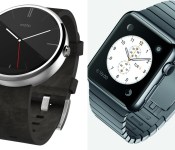
Early impressions on the Moto 360 vs. Apple Watch

In case you’ve been living under a rock, the wearable space has grown drastically for major companies throughout the world over a few months’ time. With Google’s quicker-than-ever rollout of Android Wear and Apple’s first iteration of Apple Watch, things are bound to get heated over who can make the best device. So many companies already have smartwatches, but who stands out? Who will create the device that will revolutionize the space? Though we need to wait awhile to use one of the contender’s devices, we can help answer a few questions so far: Who is pushing the boundaries of the wearable technology space, and which device is best suited for you?
Preface: There is more that one Android Wear watch available to the public, I know. I chose the Moto 360 for this comparison because of the seemingly superior build quality over the rest of the competition (though fans of the LG G Watch R might disagree).
And I know… the Apple Watch was just announced yesterday. We know much less about this device than we’d like to, but nonetheless, these are my thoughts regarding the future of wearables and how each company is approaching the space.
The Moto 360 and Android Wear
The Moto 360 is the first Android Wear device from Motorola, and is available for purchase today. It offers a circular design, Qi wireless charging, and comes with a Horween Leather strap (or a brushed metal strap if you don’t mind waiting).

Source: talkandroid.com
The watch itself has a brushed metallic outer edge, and offers a 1.56-inch 320×290 round LCD display. One thing that has been getting on peoples’ nerves is the black strip that cuts off the bottom of the display, where the ambient light sensor sits. Like it or hate it, the Moto 360 is the closest thing we have to a fully circular display.
Some other specifications include a TI OMAP 3 processor, 512MB RAM, 4GB of internal storage, pedometer and hear rate sensor, and a 320mAh battery. It measures 46mm in diameter and 11.5mm in width, and weighs 49 grams.
Apple Watch
Apple Watch is Apple’s first attempt at a smartwatch, available for purchase in early 2015. It has a square display, inductive wireless charging, and comes in two sizes and three different iterations: Apple Watch Collection, Watch Edition Collection, and Watch Sport Collection. Each one is different, so let’s break it down a little bit.

Apple Watch Collection: The body is stainless steel or Space Black finish, complete with six different types of straps that buckle into the top and bottom of the watch. This collection is the standard collection, more geared towards the general user.
Watch Edition Collection: This will be essentially the same as the Apple Watch Collection, but will be offered in an 18-karat rose or yellow gold finish and will have design enhancements added to the digital crown.
Watch Sport Collection: The body has an aluminum finish, and comes with only synthetic rubber straps.
Each collection will offer two different sizes: 38mm and 42mm, appropriately made keeping everyone in mind. All collections offer sapphire glass finishes, a custom S1 SiP chip, and a “digital crown” home button (more on that later). Apple’s also offering a new Force Touch technology that can tell whether a touch is normal or forceful. There is no word on battery quite yet, which has some concerned about how long it will last from day-to-day.
Square vs. Circle
The main difference you’ll notice right away is the difference in form factor. The reason the Moto 360 got so many people amped right away was because of it’s circular display. A circular display had never been done on a mainstream device before this, so it really looked like an attractive option for many of us. It looks like a more traditional watch, and absolutely strays away from having a small computer on your wrist. It is a bit bulky compared to the thickness of the watch strap, but that’s about the only design flaw we’ve heard thus far.
On the other hand, the Apple Watch really surprised many of us because of its seemingly underwhelming design. It’s a bit bulky for the overall design, not to mention the square shape of the device. It’s not ugly, but it’s also not anything special. Apple has long had a reputation for creating premium hardware, and I just don’t see that here.
Interface: Voice dictation vs. traditional (touch) navigation
Now this is what really matters. How will you interact with the device? The reason to buy a smartwatch is because of the functionality… and if you don’t like the way it works, why buy it? We’re seeing two very different ways of navigating through the watch, so let’s see which one better fits you.
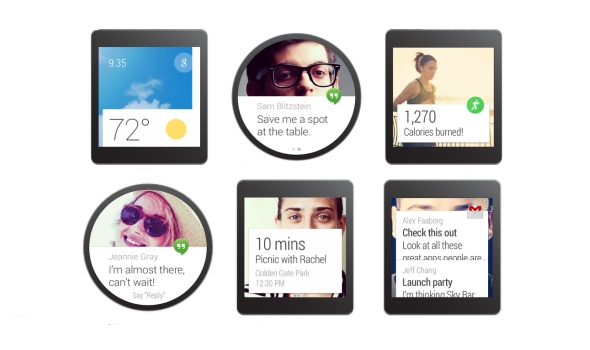
Android Wear’s approach to navigating the device is to use your hands as little as possible. The main screen is a clock (obviously), with a Google Now card on towards the bottom of the screen. It will give you the most recent one that’s available, including texts, emails, weather, or basically anything else.
The easiest way of navigating through the available actions is to use your voice. Android Wear needs some improvements in this area, especially if you need to use your finger to swipe through different menus. It’s basically a never-ending list to scroll through, which is not user friendly in the slightest. However, Google Now has long had a reputation of getting you information before you need it, so it absolutely helps to see navigation, weather, and other relevant information the moment you need it.

Source: Digital Trends
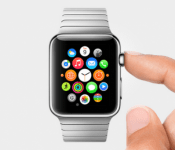
Apple is taking a different approach when it comes to interaction with your watch. The main screen of the watch is a bulk of circular icons, sporadically laid out throughout the screen. Want to open an app? It’s right there, waiting for you, similar to how the iPhone’s home screen is laid out. Swipe up from the bottom to access Glances: useful information, right when you need it. The Glance feature is basically like Google Now cards that you can swipe through and get as much relevant information as you need.
One other unique feature Apple is using is the new “digital crown” scroll wheel. Not only does it turn the screen on and off, but you can use it to scroll through lists, zoom in to maps, and much more. It’s definitely an interesting concept, but it doesn’t seem like it’s necessarily the most intuitive. Setting a traditional watch’s time is already an awkward hand movement, scrolling a tiny dial with your fingers. Going back to using a dial, even though it isn’t in the traditional sense, just seems backwards. Besides, isn’t this why touch screens were invented?
Both ways of navigating through the respective interfaces aren’t great quite yet, but they aren’t necessarily horrible. They’re both innovative, but we’re going to have to use the Apple Watch before we make any more comparisons.
Price & availability
The pricing information we have so far is as follows: the Moto 360 is on sale now for $249.99 through Motorola.com, Google Play, or BestBuy.com. Motorola’s site and Google Play both have the watch on backorder, and Best Buy only currently has the device available in-store.

All three collections of the Apple Watch will be available at the beginning of 2015. We’re assuming that means sometime in Q1. Unfortunately, that is right after the holiday season is over, and Motorola should already be working on getting the next version of their watch out to the general pubic. We don’t know specifics on the prices, but the Apple Watch’s base price will be $349.99. We don’t know what collection will start at this price, but the other collections will likely start at 50-100 dollars more than that.
So, what’s the draw?
I would, by no means, call myself a fanboy for Motorola. In fact, the Moto 360 is the only piece of Motorola hardware I’ve ever purchased in my life. So why did I pull the trigger and order right away? From the moment I laid eyes on it, it felt different. It felt like the future. A circular (albeit not a perfect one) display paired with the Android Wear interface looks like something out of a crazy concept video that could only be executed in the future.
The Apple Watch doesn’t do that for me.
The Apple Watch reminds me of an LG G Watch/Samsung Gear Live hybrid with a more confusing, cluttered interface, and I can’t just get around that. I can’t pay $100 more for a watch that does the exact same thing as the competition in an uglier package. The software seems too much like a traditional smartphone’s, and that just won’t work on on a screen smaller than 2 inches.

When Apple was showing off the full gallery view of all of their pre-loaded pictures, I laughed at the sheer ridiculousness of the concept. When they were showing off the zooming feature with the digital crown in Apple Maps, I thought that it was a completely pointless feature, yet they were still showing it off to millions of people. Two-inch wide screens aren’t the same as 5-inch screens, and I think Apple needs to understand that. The software seems rushed, and I just can’t get behind it.
Though this is a battle of smartwatches, what it comes down to is this: which complete package offers the best features for you? The competition isn’t just about the best smartphone anymore… it’s about the ecosystem. Both smartwatches, though brand new and partially unreleased, offer incredible leaps in technology that gets me excited, no matter which one I like more. By the looks of it, though, Android Wear and the Moto 360 looks like a more complete, well-thought out package compared to the competition.
But you know what? There are people out there that think Apple just invented the smartwatch. And I would know… just look at my Facebook News Feed. People will still buy the Apple Watch no matter how much catching up it needs to do to other technology out there, no matter how much it costs, simply because it’s Apple we’re talking about. Apple creates great products 99% of the time… I just think they could have done so much better with an entirely new product category.
What are your opinions of the Apple Watch? Am I completely wrong in my thoughts? Let me know in the comments… I’d love to hear from you!
The post Early impressions on the Moto 360 vs. Apple Watch appeared first on AndroidGuys.
.CPlase_panel display:none;
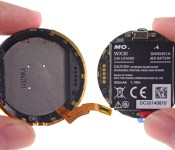
Moto 360 teardown reveals ancient chips, clever tech and a small battery

Motorola has been willing to offer a quick peek at the Moto 360’s inner workings, but let’s face it: that doesn’t really go deep enough to sate your curiosity, does it? You don’t have to worry, though, as iFixit has torn apart the circular smartwatch to examine every last detail. In the end, the hardware is an odd mix of the latest technology with surprisingly old components. While that round LCD and inductive charger are pretty forward-thinking, the teardown also confirms the presence of TI’s OMAP3630 processor — a chip that hasn’t been cutting edge since that Droid 2 you rocked back in 2010.
There’s also a bit of a rude surprise in iFixit’s unit. The DIY repair shop spotted a 300mAh battery, which is decidedly smaller than the officially claimed 320mAh. What gives? Motorola tells Computerworld that 320mAh is only the “typical” figure, and that 300mAh is the “minimum” you’ll get. That’s bound to rub a lot of would-be owners the wrong way, although the company says it’s thinking of showing both the minimum and typical figures in the future. However you feel about that discrepancy, you probably won’t want to double-check yourself given the tricky disassembly process; this teardown will likely be the closest you get to seeing what’s under the hood.
Filed under: Wearables, Google, Lenovo
Source: iFixit
.CPlase_panel display:none;
Apple Watch: Much ado about nothing

I don’t get it. Based on my demographic standing; by sheer dint of my position within the tech press; as someone who grew up with the first Macintosh in his house and a subscription to Macworld, I should be standing and applauding and ferociously tweeting my awe and amazement at the unveiling of Apple Watch. Yet, I am not. Apple did not save wearables, as many thought it would. Apple caved to the incredibly high bar of expectations set by the public. Apple unveiled something, at best, lukewarm. At most, it’s prettier than the smartwatches that’ve come before, and that’s likely its greatest innovation.
My stance on the smartwatch as a viable mobile accessory is unambiguous; I’ve argued my case before. As a category, it needs to replace — needs to completely replace our need for a cellphone. Otherwise, it’s just one more thing to remember to charge throughout our busy days. To date, there’s nothing any of these thinly veiled, proof-of-concept, wrist-worn devices can do that the smartphone already in your hand can’t. Apple, I once thought, would prove me wrong. It would be the one to come along and actually make the strongest argument for wearables by analyzing the use cases and delivering that missing core functionality intuitively. Apple’s perfectionism would be the hallelujah wearables so desperately needed.

Gamers communicate using hand-drawn images on Nintendo’s DS portable.
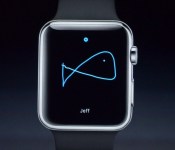
Instead, at today’s Cupertino, California, event, we — the press, the world at large — were treated to a beautifully designed smartwatch (e.g., those interchangeable straps) laden with an embarrassing slew of useless gimmicks. With Apple Watch, you can view the phases of the moon or the positions of the planets; you can draw crude pictures with your finger and send them to friends (a feature eerily reminiscent of Nintendo’s PictoChat for the DS) or even send them your heartbeat. Cheap tricks that consumers will tire of after a few weeks. But let’s not forget the saddest part: Apple Watch will also tell you when you’ve been sitting too long and need to stand up. Hang your collective head, humanity — it’s a poor reflection on us all.
To date, there’s nothing any of these thinly veiled, proof-of-concept, wrist-worn devices can do that the smartphone already in your hand can’t.
Then there’s the Digital Crown (once simply known as the “crown”), a hardware feature Apple spent several minutes of its slickly produced intro video praising the genius of, as part of its effort to redefine the smartwatch UI. The extensive engineering self-congratulations almost had me fooled: “What was this new UI that obliterated the need for a touchscreen?” I wondered. And then Kevin Lynch, the Apple VP overseeing Watch, came out on stage to demo this revolutionary feature… and wound up mostly using his finger to touch the screen. That app cloud, though — now, that deserves a nod. Rather than lazily recreate the app grid from iOS, Apple reimagined it as a dynamically expanding mosaic for the stuffy confines of a watch face. And it did so beautifully.
Don’t get me wrong: Apple Watch does appear to have some actually useful features, but the bulk of them come from third-party apps. Starwood Hotels, the hotel group that counts bougie faves like the W amongst its portfolio, has an app to let you open your hotel room door with a wave of your wrist. And American Airlines has an app that’ll push all your flight info to your Watch for easy boarding. Even BMW’s making a play for the Watch space: Its haute clientele will be able to check on the status of their car’s charge and location. All of which is very interesting and yet Apple covered each with nary more than a blip of time within its presentation.
To Apple’s credit, I do very much want a Taptic mapping experience (read: a much more marketable name for haptic feedback) that’ll guide me along my designated route solely with vibrations. (I’d mention Apple Pay, but that distinction really belongs to the new iPhones and Touch ID, not this Watch.) Fitness tracking is in there, too, but that’s so old hat by now; it’s just expected. If you don’t mind, I’ll hold my applause.
Will Apple Watch fail? Doubtful. There’s too much of a persistent, lingering Jobsian-halo surrounding the Apple brand to let that product fall on its (watch) face. It’ll get better with time; most things/people/products inevitably do. It could even make wearables slightly more palatable for the mainstream. But it’s not a revolution and it’s not what any of us really expected. It’s lipstick on a smartwatch. It’s an accessory and nothing more.
[Image credit: Kaptain Kobold/Flickr]
.CPlase_panel display:none;
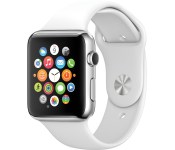
Apple Watch vs the competition: is it worth the wait?

Long rumored and eagerly awaited, the Apple Watch is now a reality. It’s certainly not the first smartwatch on the block, but could it be the best? The features look impressive, but we’ll still need to get one on our wrist and write a full review. In the meantime, there’s always the specs to look at. How does the Apple Watch fare against some of the other wearables on the market? Just take a look below to see where it stands against notable smartwatches like the Pebble Steel, Moto 360 and the Samsung Gear Live.
| Apple Watch | Pebble Steel | Moto 360 | Samsung Gear Live | |
|---|---|---|---|---|
| Price | $349 | $249 | $249 | $199 |
| Display | Retina display with sapphire screen | 1.26 inch Memory LCD e-paper, 144×168 pixels | 1.5 inch LCD, 320×290 pixels | 1.63-inch sAMOLED, 320×320 pixels |
| Battery | NA | 130mAh | 320mAh | 300mAh |
| Processor/RAM | Apple S1 | STM32F205RE Cortex M3; 128KB RAM | TI OMAP 3; 512MB | 1.2GHz quad-core Snapdragon 400; 512MB RAM |
| Water resistance | NA | 5 ATM | Yes, IP67-certified | Yes, IP67-certified |
| Dimensions | 38mm and 42mm options available | 46 x 34 x 10.5mm, 56g | 46 x 46 x 11.5mm, 60g | 37.9 x 56.4 x 8.9mm, 59g |
| Storage | NA | NA | 4GB internal storage | 4GB internal storage |
| WiFi | Yes | None | Yes | Yes |
| Operating System | iOS | Pebble OS | Android Wear | Android Wear |
| Standout features | Siri, accelerometer, heart rate monitor, Apple Pay | Accelerometer | Google Now, pedometer, heart rate monitor | Google Now, pedometer, heart rate monitor |
.CPlase_panel display:none;
Apple’s WatchKit ensures third-party wearable support from day one

Apple has unveiled its long-rumored wearable, and with it a third-party tool chest called WatchKit. For starters, the initiative will help developers integrate compatible apps with the Watch’s Glances screen, and do so from day one. It’s also part of a larger mindset in Cupertino, including HomeKit and HealthKit, that allows more openness and a range of features when new devices launch. This means that companies like Twitter, American Airlines and Starwood Hotels can get in right from the start, with custom features for wearable-driven tasks. For example, guests can expect to unlock hotel rooms by waving the Apple Watch in front of the lock and BMW will let you check the charging status of your car.
.CPlase_panel display:none;
 AIVAnet