


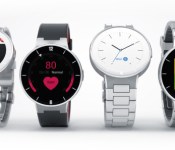
Alcatel OneTouch to reveal new smartwatch line at CES

Alcatel OneTouch may be poised to catch some people off guard at CES 2015 starting next week when they reveal a new line of smartwatches. As you can see from the image above, Alcatel OneTouch has decided to go with a round watch face for their devices along with several different straps. According to Alcatel OneTouch, they were aiming for a traditional watch look and feel for the hardware, which it appears they may have achieved that goal with their new line of Watch devices.
Judging by the image, it looks like the devices will be powered by Android Wear. No details about the specific hardware that is located within the device has been revealed yet, though the images and Alcatel OneTouch’s statement that the devices will “allow users to monitor daily activity” suggest at least some items like pedometers and heartbeat monitors may be present.
Alcatel OneTouch also says they are aiming for what they call a “smart price.” It is not clear exactly what that may mean, but a good guess is that they are aiming at or below other round smartwatches on the market like the Moto 350 or the LG G Watch R.
Just based on the looks, do you think you may be interested in grabbing an Alcatel OneTouch Watch if the price is right? Let us know in the comments and be sure to check back for our CES 2015 coverage starting next week for all the details on this and other devices being announced.
source: phoneArena
Come comment on this article: Alcatel OneTouch to reveal new smartwatch line at CES
The Alcatel Onetouch Watch will be shown off at CES 2015, actually looks gorgeous
The name Alcatel Onetouch doesn’t come up often, apart from being mentioned for purchasing Palm trademarks, but we thought this news was too good to pass up. If you’re wondering what those smartwatch devices are in the image above, they are part of the Alcatel Onetouch Watch line that Alcatel is planning to announce and show […]
The post The Alcatel Onetouch Watch will be shown off at CES 2015, actually looks gorgeous appeared first on AndroidSPIN.
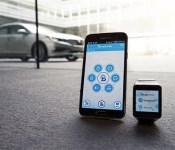
Soon you can start Hyundais with an Android Wear watch

Oh, you use an app on your phone to start your car? How passé. Hyundai’s gearing up for CES by talking up an Android Wear app that’ll let you remotely unlock, locate and start your car with a tap on the wrist. Naturally, if you just can’t muster the energy to swipe on your smartwatch, you’ll be able to issue voice commands to get the job done, too. Isn’t the future grand?
While we’re not exactly surprised to see a major player like Hyundai embracing the ballooning wearables market, it’s definitely not the first company whose cars have bent to the whims of your watch. Android developer Matthew Patience whipped up a little Wear app of his own back in July that lets Tesla S owners fiddle with the sunroof remotely secure their rides… albeit without Tesla’s express permission. While that clever hack only worked for one car, Hyundai’s Wear app should play nice with several — any of the company’s BlueLink-enabled cars should listen to your commands, even ones as long in the tooth as the 2012 Sonata. For now companies like Hyundai are in the wearable-friendly minority, but somehow we don’t think it’ll be long before others start to see the light (especially since the Droidification of the automotive industry is already well underway).
Via: The Verge
Source: Hyundai News
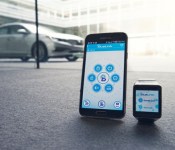
Hyundai set to launch Blue Link app at CES 2015

One of the big technology trends we expect to see at CES 2015 is increased convergence between mobile devices and automobiles. Today Hyundai announced that they will be releasing the next generation of their Blue Link System on 2016 Elantra GT and Veloster models. Along with the announcement about the next generation of the system, Hyundai also announced they will be releasing a new Blue Link smartwatch app to make it even easier for car owners to interact with their vehicles.
The new smartwatch app will give users the ability to access features like door unlocking, remote starting or even access service information via their smartwatch devices. Hyundai’s executive director Barry Ratzlaff says the new features in Blue Link,
“expands Hyundai’s exploration into how wearable technology and Blue Link fit into a customer’s lifestyle. Connecting to your car through a smartwatch and voice recognition was previously something seen only in science fiction movies. Now, we can provide this capability to owners of Hyundai vehicles equipped with Blue Link.”
Along with tapping their smartwatch to access features, Hyundai owners will also be able to use voice activated commands through their smartwatch or smartphone, to perform actions like:
- Remote Engine Start
- Remote Engine Stop (Only available when vehicle is in remote engine start mode)
- Remote Door Lock / Unlock
- Remote Flash Lights / Honk Horn
- Car Finder
- Call Roadside
- Call Blue Link
On top of these, with the next generation of the Blue Link app, Hyundai says users will be able to access functions like a destination search and receive maintenance alerts when new vehicles are released that support these features.
Hyundai says they will be on hand at CES 2015 to demonstrate the Blue Link smartwatch app on Samsung, Motorola, Sony and LG smartwatches. They also indicate Android Wear users will be able to download the app from Google Play during the first quarter of 2015.
Be sure to check back here next week for our coverage of CES 2015 and see if we are able to get some hands on time with the Hyundai Blue Link system.

source: Hyundai
Come comment on this article: Hyundai set to launch Blue Link app at CES 2015
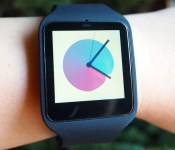
Sony SmartWatch 3 review: dull design, but great for runners

This here is the Sony SmartWatch 3. That might make it sound like it’s the third iteration in a line of gadgets, but really, it’s the first. That’s because even though this is Sony’s third smartwatch (fourth if you count the Sony Ericsson LiveView), it’s actually Sony’s first that comes with Android Wear. Both the original SmartWatch and the SmartWatch 2 ran Sony’s own proprietary platform, which, while Android-friendly, didn’t have nearly the same reach as Google’s Android Wear. It’s great that Sony has finally seen the light, but the SmartWatch 3 has arrived remarkably late to the party, letting rivals like Motorola, LG and Samsung gain ground. On the other hand, the SmartWatch 3 is currently the only Android Wear option with a built-in GPS radio, allowing for more precise workout tracking. Which, as it turns out, could be enough to help Sony stand apart from the pack.
Hardware

While some Android Wear watches like the Moto 360 and the ASUS ZenWatch make attempts at being stylish, Sony’s SmartWatch 3 seems to have given up that notion entirely. Its square watch face, in combination with a rubber strap, definitely gives it more of a sporty, utilitarian look than a fashionable one. Worse still, the band that encapsulates the watch makes the 1.6-inch display seem larger than it is. Indeed, while the bezel surrounding the screen is relatively small, it appears so much thicker when worn in the strap, giving it an unfortunately chunky appearance.
Yet, the fit is not altogether uncomfortable. The flexible strap is coated in what feels like a soft-touch velveteen material, and the weight of the core watch unit is only 45 grams (with the strap, it’s about 74 grams). It’s relatively easy to take on and off thanks to a simple metal clasp, which you can adjust to fit the size of your wrist. The watch might jostle around a bit when you’re running, but on the whole I found it pleasant enough to wear on a daily basis.
The SmartWatch 3’s wrist strap comes in a few different colors: white, black, pink and green. To swap them out, simply push the watch unit out of its rubber enclosure; it should pop out without much effort. That’s easy enough, but this does mean that the SmartWatch 3 isn’t compatible with standard 22mm straps, so you’re stuck with whatever bands Sony offers.
Unlike a lot of other smartwatches, Sony’s latest doesn’t need a proprietary charging dock or cradle. It actually has a micro-USB port housed right in the watch itself, over on the backside, covered by a removable rubber stopper. Though portable charging docks generally contribute to slimmer and more streamlined designs, I actually really like that the watch has this built-in port. If it means not having to carry around yet another thing with me when I travel, I’m all for it. I do recommend popping the watch out of its rubber strap before plugging in the charging cable, however, because it’s rather awkward otherwise.

If you want the watch to survive a dunk in the pool, you should definitely keep that micro-USB port sealed. Once covered though, the SmartWatch 3 is IP68-rated for dust and water resistance, which means it can withstand submersion in up to 4.9 feet of water for 30 minutes. That’s a touch better than the IP67 rating for most other watches like the Moto 360 and the LG G Watch R, which can supposedly be submerged in up to a meter (3.28 feet) of water for half an hour.
Though you’ll be doing most of your navigation via the watch’s touchscreen display, the SmartWatch 3 does have a physical button on the side for when you need to quickly wake it up (or put it back to sleep). You can also hold it down as a shortcut to the Settings menu. The button sits slightly above the surface of the strap and has a nice give when pressed. Internally, the SmartWatch 3 makes use of a rather beefy 1.2GHz quad-core ARM Cortex-A7 processor along with 512MB of RAM, plus 4GB of built-in storage so that you can load it with apps and music from Google Play. Other sensors include an accelerometer, a gyroscope and a compass. Of course, it also has Bluetooth, which you can use to pair with your phone, or connect to a set of headphones.
As I noted earlier, the SmartWatch 3 is also the first Android Wear device to have built-in GPS, which I’ll return to in much greater detail in just a moment. It’s also said to have WiFi and NFC capabilities on board, but as Android Wear doesn’t quite support those two functions just yet, I wasn’t able to test them. Still, it’s comforting to know that the SmartWatch 3 is future-proof in this regard — something I can’t say about most earlier Android Wear devices.
Display

While the design of the SmartWatch 3 might not exactly dazzle you with its style, its display is something else. It’s not round like some of the fancier Android Wear options and it’s a hair smaller too, but its clarity more than makes up for it. The 1.6-inch screen has a 320 x 320 resolution, which amounts to a pixel density of 283 ppi, making it one of the sharpest panels you’ll find on any Android Wear device. I had no problems reading text, even on such a small display. I did, however, find the colors to be a bit muted and the whites to be a little yellow. Suffice it to say, it’s not quite as stunning as the OLED screen we saw on the LG G Watch R.
In exchange for some dull colors, though, a transflective LCD screen makes the SmartWatch 3 easy to view in direct sunlight. I left it on auto brightness most of the time, and thanks to the ambient light sensor, I was able to tell time and find out what song was playing with a quick glance, regardless of how bright it was outside. Like most other smartwatches, the SmartWatch 3 packs an internal accelerometer that lights up the screen whenever you lift it to meet your eyes. This, however, takes a second or so longer than I would like. Normally, this isn’t a big deal, but when I was out and about, running errands, it got a little annoying.
In use

In a sign that Sony is finally coming to its senses, the SmartWatch 3 is blessed with Android Wear and not some proprietary Sony operating system like its previous smartwatches. That means if you’ve read any of our reviews of previous Android Wear devices — or maybe even own one yourself — you probably already know how to use the SmartWatch 3.
But perhaps you could use a refresher, so here’s a brief primer. You’ll need an Android phone to get started (obviously), at which point you’ll need to download the Android Wear application. From there, it’s just a matter of pairing the watch with the phone by following the onscreen instructions. Interestingly, I wasn’t prompted at all to install any additional software like some of the other Android Wear watches (the Moto 360, for instance, requires Motorola Connect, while the ZenWatch wants you to have the ZenWatch Manager installed).
As for navigating the watch itself, here’s how it works: From the default watch face, you can swipe down to reveal the date, battery life information and gain quick access to mute, Theater Mode (where it shuts down the display) and the settings. Whenever you get a notification, you can swipe up take a peek, and then swipe right to dismiss it or left to get a further look at it. Pressing down on the default watch face lets you swap out different watch styles. It’s all fairly intuitive and you should have no problems navigating it if you’re at all familiar with smartphones.
If you’d rather not go through the trouble of finger-swiping, you can also give voice commands thanks to the watch’s built-in microphone. Simply say, “OK Google,” and it’ll bring up a short list of eligible voice commands. You can tell it to do all kinds of things, like set a reminder, send a message or find directions, and it’ll do so. Voice recognition can be a little spotty — I sometimes had to repeat myself once or twice — but it worked pretty well most of the time.

As I mentioned up top, the most distinguishing feature of the SmartWatch 3 is that it’s the first Android Wear device with built-in GPS. This is a very important feature for runners, who often like having GPS in their watches to track their distance, route and pace. In previous Android Wear devices, you still had to lug your phone around with you in order to get that geolocation data, which can be a pain if you want to run with as little burden on you as possible. The SmartWatch 3, on the other hand, lets you keep track of your run completely phone-free.
Of course, this only really works if you use a running app that taps into the built-in GPS function of Android Wear. There aren’t too many of these available right now, but thankfully one of the more popular ones, RunKeeper, updated its app to take advantage of it. I simply downloaded RunKeeper on my phone and it automatically synced the app to my watch. I then left the office to go on a brief walk, leaving my phone safely in my desk drawer. Before I took off, I told the RunKeeper app on the watch to start tracking the workout, and it did. When I came back and reconnected the watch with my phone, it automatically transferred the route, along with the pace and distance information, to the RunKeeper website. In short, the SmartWatch 3’s GPS function works as advertised, and I can imagine it being a popular feature among runners and joggers.
While the SmartWatch 3 also has a pedometer for counting steps, it curiously doesn’t have a heart rate monitor like on the Moto 360 or ASUS ZenWatch. We’ve had mixed experiences with these optical heart rate sensors in the past, but omitting it completely in a supposedly sports-oriented watch seems like a big oversight. That said, the fact that the SmartWatch 3 includes two other uncommon features (WiFi and NFC) could make up for it. We just have to wait for the supported apps to arrive.
Performance and battery life

With a 1.2GHZ quad-core ARM Cortex-A7 processor along with 512MB of RAM, the SmartWatch 3 performs beautifully. I experienced little to no lag when navigating around the watch, and voice commands took no time at all to register. As I mentioned earlier, the accelerometer did seem a little slow to act when attempting to light up the watch with an elbow raise, but on the whole, performance was good.
Battery life, however, is where the SmartWatch 3 really shines. It packs in a 420mAh battery, which is the biggest battery we’ve seen yet in an Android Wear watch. The rated longevity is somewhere around two days. In practice, I found this to be mostly accurate. I left notifications on for Twitter, Facebook and my calendar appointments; used GPS to track the occasional walking route; listened to a few songs on repeat (which I loaded onto the watch via Play Music); and used voice commands extensively throughout the day. The watch kept trucking along for about a day and half before it started begging to be plugged in. When I switched over to Airport Mode and kept the display off for the rest of the day, it lasted almost a full 48 hours. Under what I’d consider moderate to heavy use, that’s quite impressive.
The competition

The smartwatch space is getting increasingly competitive, which makes it all the more important for newcomers like the SmartWatch 3 to stand out. Thankfully, it does. It’s certainly not as stylish as the Moto 360, LG G Watch R or ASUS ZenWatch, and it doesn’t have the sort of unique circular display you’ll find on the first two. At $250, the SmartWatch 3’s price is priced on par with the competition too; the 360 and G Watch R cost $250 and $299, respectively, while the ZenWatch rings in at a more affordable $200.
But what the SmartWatch 3 lacks in style, it makes up for in features. It has built-in GPS, which is great for runners and outdoor enthusiasts, and other goodies like WiFi and NFC mean that the SmartWatch 3 is far more future-proof than any of the other Android Wear devices on the market. Further, its battery life is relatively good, lasting a whole day longer than rivals like the ZenWatch and the Moto 360.
Wrap-up

Sony’s SmartWatch 3 certainly isn’t for everybody. It’s dull compared to its rounder, sexier rivals; its strap is made out of rubber rather than leather; and the display is not as bright or vibrant as others. But if you care more about function than form, the SmartWatch 3 suddenly looks a whole lot more interesting. For runners in particular, built-in GPS is a great feature that lets you leave your phone at home. It also has WiFi and NFC, making it more future-proof than the competition. It also eschews the need for a charging dock thanks to a built-in micro-USB port and has a battery life that makes it one of the longest-lasting smartwatches on the market. No, you shouldn’t get the SmartWatch 3 if you want a watch to impress people at a cocktail party. But if you want one that’s more suited for fitness, this is absolutely worthy of consideration.
Alcatel Onetouch announces a smartwatch and Pixi 3 series phones ahead of CES

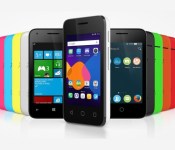
CES 2015 doesn’t officially begin until January 6th, but that never stops companies from announcing their new products a bit early. Alcatel Onetouch is one of the first manufacturers to make an early announcement, and it’s quite a big one. The company has just announced a new affordable smartwatch, as well as the Pixi 3 line of smartphones. They plan to show these devices off in full at CES 2015 in the coming days.
The Pixi 3 line is a set of affordable smartphones that come in 4-inch, 4.5-inch and 5-inch sizes, which are all 4G LTE compatible. There’s also a 3G-capable 3.5-inch model that will likely cost much less than the others. The best part about these devices is that they’re OS-agnostic, meaning there are three different operating systems to choose from: Android, Windows or Firefox OS. One thing to remember about these devices: Alcatel’s Pixi line has been around for a few years now, and they shouldn’t be confused with the Alcatel Onetouch/Palm rumors that have surfaced lately. Unfortunately, we shouldn’t get our hopes up to see Palm coming back anytime before CES.

Alcatel Onetouch has also announced their new affordable smartwatch. Named the Watch, it connects to Android devices to monitor daily activity, control music, receive notifications and more. The Watch has a circular display and small bezels, and unlike the Moto 360, it doesn’t appear to have a break in the display at the bottom for any type of sensors. Alcatel Onetouch says the Watch aims to be an small, affordable smartwatch that will be sold for a fraction of the price of its competitors. There is no mention of the OS running on the Watch, so we’ll have to wait until the company shows it off at CES.
The company will have both of these devices to show off at CES in the coming days. If the price is right for both of these devices, would you buy into the Pixi 3 line or the Watch?
The brand’s new PIXI smartphones make mobile Internet available to everyone, while offering another innovative feature of OS-agnostic. It is available with Firefox, Windows or Android, providing the flexibility to all consumers. What’s more? The smartly priced WATCH creates a newly attainable smartwatch category.
4G LTE at an affordable price
First among ALCATEL ONETOUCH’s announcements at CES, the smartphone brand is launching its affordable PIXI 3 series, ranging from a pocket-friendly 3.5-inch display to a larger 5-inch display. Offering both 3G and 4G LTE connectivity for the PIXI 3 (4″), (4.5″) and (5″) and 3G for the PIXI 3 (3.5″), the PIXI 3 series further features easy customization and the most popular applications pre-loaded.
OS-agnostic – Firefox, Windows or Android
Besides being the first among the PIXIs to offer 4G, the PIXI 3 series is also first to be compatible with three major operating systems: Firefox, Windows and Android.
“Our users do not want complicated systems — they want something familiar from their work environment in the office, but also on a smartphone,” said ALCATEL ONETOUCH Chief Marketing Officer Dan Dery.
Cross-device integration, from smartphones through to PCs. PIXI 3 series offers consumers simplicity of use and the reassurance of having the same system at home, at the office and on the go. With its OS-agnostic PIXI 3 series, ALCATEL ONETOUCH presents operating-system choices to its customers. This continues the efforts begun last year, when the brand teamed with Mozilla to launch the Firefox OS on its FIRE series of smartphones.
A Smartwatch at a Smart Price
It looks like a watch and feels like a watch but it’s much smarter than that. ALCATEL ONETOUCH introduces the WATCH series, a smartwatch that puts a premium on elegant design at a very accessible price. In launching the WATCH, ALCATEL ONETOUCH creates a new market segment: the affordable smartwatch.
Offering the WATCH at a fraction of the cost of competitors, the smartphone brand has implemented its compact design expertise to offer a series of fine finishing that meet the demands of everyone looking for the same look and feel as a traditional watch.
While offering choices and styles, the WATCH is also packed with sensors and apps that allow users to monitor daily activity, and connects to Android smartphones to control music, take photos, receive notifications and more.
A Blast of Color: ALCATEL ONETOUCH’s Interactive Booth
Visitors to ALCATEL ONETOUCH’s CES booth will not only be able to test the brand’s products but also really get in the game with activities such as the Interactive Color Run. Color Run is a five-kilometer race during which runners are doused with color at every kilometer. In this virtual version, a video wall will display landscape at a scrolling speed that matches the runner’s speed. To win points, players will be able to throw colored sand at the images of other people as they run. Four different smartwatch functions will also display onscreen.
Stop by our booth #9829 at the International CES.
Flappy Bird on Android Wear is now a reality thanks to Corbin Davenport
Yes, I know, you’re probably thinking: wasn’t Flappy Bird on Android Wear months ago? Well, yes and no – a Flappy Bird clone called Flopsy Bird was released to Android Wear within a month of the new operating system being released, but if you wanted that original Flappy Bird feeling because you’re some kind of Flappy […]
The post Flappy Bird on Android Wear is now a reality thanks to Corbin Davenport appeared first on AndroidSPIN.
The upcoming Montblanc Timewalker Urban Speed collection will include the option of a smart ‘e-Strap’
Over the last year, we’ve seen many premium watchmakers make announcements that promise their entry into the smartwatch market. Whether they genuinely see a market there or they are trying get some more recognition in a fledgling industry, manufacturers like Fossil and TAG Heuer have made grand claims that their smartwatches are going to take […]
The post The upcoming Montblanc Timewalker Urban Speed collection will include the option of a smart ‘e-Strap’ appeared first on AndroidSPIN.
Looking forward: What will we see from Android in 2015?
2014 was a great year for Android, so 2015 has a lot to live up to. A lot of great new stuff was released last year – like Android Wear and Android 5.0 – that have set the stage for what should be a very exciting year, and we’ve given our top 3 things that […]
The post Looking forward: What will we see from Android in 2015? appeared first on AndroidSPIN.
The Choose Your Own Android Smartwatch Giveaway: Moto 360, G Watch R and more

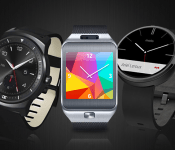
Though Android Wear smartwatches are futuristic and stylish, they’re still a little bit pricey. If you’ve had your eye on one of the first generation Android Wear devices (and we know you have), today might be your lucky day. StackCommerce is giving away an Android smartwatch. The best part? You get to choose which one you win!
To enter, simply head to the giveaway page and enter your email address to win your choice of one of these Android Wear Devices:
- LG G Watch R
- Motorola Moto 360
- Samsung Gear Live
This is a super easy way to win one of the best smartwatches on the market. The contest will be open for the next five days, so be sure not miss out! Head to the giveaway page to enter now.
Editor’s Note: This deal is through StackCommerce, in partnership with AA Deals Store and other StackSocial partners — and not an exclusive Android Authority contest.
 AIVAnet