


Samsung Galaxy security flaw discovered that provides remote access to data
Security has always been an interesting topic on Android and that discussion just got another reason to exist with a development team discovering a security flaw affecting the Samsung Galaxy series that could enable remote access to data on your device.
The development team behind an open-source operating system based on Android called Replicant OS, discovered that this ‘backdoor’ affects not only the version of Android running on Samsung Galaxy devices, but also those custom firmwares based on stock Android images such as Cyanogenmod.
The ‘backdoor’ is said to be caused by “the proprietary software that is in charge of handling the communications with the modem, using the Samsung IPC protocol, implements a class of requests known as RFS commands, that allows the modem to perform remote I/O operations on the phone’s storage.”
What that means is that hackers have the potential to harness this method and remotely access data stored on the device without your consent.
Some of the handsets known to be affected include:
- Galaxy Nexus (I9250)
- Galaxy Nexus S (I902x)
- Galaxy S (I9000)
- Galaxy S II (I9100)
- Galaxy S III (I9300)
- Galaxy Note (N7000)
- Galaxy Note II (N7100)
- Galaxy Tab 2 7.0 (P31xx)
- Galaxy Tab 2 10.1 (P51xx)
Expect Google and Samsung to fix this very quickly.
The post Samsung Galaxy security flaw discovered that provides remote access to data appeared first on AndroidGuys.
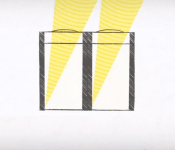
Samsung Posts New Video Talking About ISOCELL CMOS Image Sensors

Ever wanted to know what ISOCELL CMOS Image Sensors are? Samsung to the rescue. The company that strives for the very best in camera quality, posted a new video today talking about the ISOCELL CMOS Image Sensor technology.
Samsung fit this new camera sensor into the Galaxy S5 naturally, and it will help in those low-light moments when you desperately need to snap those crazy moments or selfies in a dimly lit place. But don’t let me spoil the video for you, check it out below, and let us know if you plan on getting yourself a Galaxy S5.
)
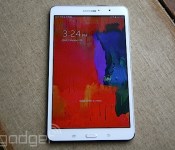
Samsung Galaxy Tab Pro 8.4 review: great screen, disappointing battery life

We often tease Samsung about the seemingly arbitrary way it divvies up its tablet offerings — not content with round numbers, it’s released tablets that are 10.1 inches wide instead of 10, 8.9 instead of 9, 7.7 instead of 8, and so on. And so too is the case with the Samsung Galaxy Tab Pro 8.4, whose extra 0.4 inch seems unnecessarily tacked on. Yet, this results in a 16:9 aspect ratio that makes it well-suited for watching movies, which makes us willing to forgive its silliness. Plus, even if that weren’t enough to sway us, there’s so much else to like about Tab Pro 8.4 that the odd screen size is but a minor detail. Indeed, while Samsung released its latest Galaxy Tab Pro line of tablets in both 10.1 and 12.1 inches, it’s the 8.4-inch model that’s likely to win the hearts of most.
Why do I say that? Simple: Portability. Just like the iPad mini with Retina display, the Galaxy Tab Pro 8.4 offers a sharp tablet in a travel-friendly form factor. Except, of course, the Tab Pro 8.4 runs Android, and is thus an alternative for those who’d like a premium 8-inch tablet without having to lock themselves into iOS. And that’s not all that the tiniest Tab Pro has going for it: The display is pin-sharp; the design is handsome; and the quad-core processor is not to be sneezed at. But at $400, it’s not exactly cheap and it’s also got some serious competition.
Hardware
I didn’t think that extra 0.4 inch would differentiate the Galaxy Tab Pro from previous models like the Galaxy Tab 3, but it does. The Tab Pro is noticeably taller, and like an adolescent wearing an ill-fitting suit, it looks a little, well, stretched out. Once I started using the tablet on a regular basis however, that additional length soon became an asset rather than an oddity. It provides just a touch more head space when browsing lengthy web pages and when turned on its side, its 16:9 aspect ratio lends itself well to watching movies and TV shows.
But before I get to the display, let’s take a brief tour of the hardware. Like last year’s Galaxy Note 3 and the recently released Note Pro 12.2, the Tab Pro has a faux-leather exterior — everything from the pebbled back to the “stitching” on the sides is actually made from plastic. Yet, as much as I hate to admit it, this design trickery gives the Tab Pro a premium feel that sets it apart from the last generation of Galaxy Tabs, whose glossy plastic left much to be desired. Add in some metallic accents and the Tab Pro looks like it would fit right in at a Parisian fashion house.
Speaking of fashion-forward looks, I’d be remiss if I didn’t mention the Tab Pro’s slender, lightweight build. Measuring 8.62 inches long, 5.06 inches wide and 0.28 inch thick, the tablet features rounded corners and tapered edges, both of which make it easy to hold in the hand. Scratch that: I should say hands instead, as the slate’s 11.85-ounce weight and extra length make it much too top-heavy to use one-handed.

The front of the Tab is simple and uncluttered. Samsung’s logo is proudly displayed up top near the front-facing 2-megapixel camera. Along the bottom are the usual task-management and back navigation soft keys plus a slightly raised home button. The display takes up a large chunk of the tablet’s surface, leaving a relatively slim bezel around it. Still, when holding the Tab Pro in portrait mode, my thumbs naturally rested on the screen’s edge, far enough to the side that they never got in the way. In landscape mode, however, I found myself constantly dodging the touch-sensitive soft keys, especially when settling in to watch a video. It’s a minor enough quibble, but it might prove to be quite annoying if you’re using the Tab Pro on the subway.
Breaking the monotony of the faux-leather back is an 8-megapixel camera along with an LED flash. Meanwhile, the edges are home to the usual array of ports and buttons. In portrait mode, the 3.5mm headset jack sits on top, while the power, volume buttons and IR blaster sit along the right side. At the tablet’s base are a pair of stereo speakers and a micro-USB charging port that does data transfers at USB 2.0 speeds. Last but not least, there’s a microSD reader on the left side, which is absolutely crucial in a device that only comes with 16GB of internal memory (there will also be a 32GB version, but the price has yet to be announced). Aside from that, the Tab Pro 8.4 houses a 2.3GHz Qualcomm Snapdragon 800 quad-core processor, 2GB of RAM and a non-removable 4,800mAh battery.
| Samsung Galaxy Tab Pro 8.4 | |
| Dimensions | 8.62 x 5.06 x 0.28 in. |
| Weight | 11.68 oz |
| Screen size | 8.4 inches |
| Resolution | 2,560 x 1,600 (359 ppi) |
| Screen type | IPS LCD |
| Battery | Up to 10 hours |
| Internal storage | 16GB / 32GB |
| External storage | microSD card (up to 64GB) |
| Rear camera | 8-megapixel AF |
| Forward camera | 2-megapixel fixed-focus |
| Video capture | 1080p |
| NFC | N/A |
| Bluetooth | 4.0 |
| SoC | Quad-core Snapdragon 800 |
| CPU | 2.3GHz |
| RAM | 2GB |
| WiFi | Dual-band 802.11a/ac/b/g/n |
| Wireless charging | No |
| Operating system | Android 4.4 |
| Details correct as of March 2014 | |
Display

I’ll cut straight to the point: The Galaxy Tab Pro’s display is gorgeous. I was dazzled from the minute I turned it on. Like the rest of the Galaxy Tab Pro line, the 8.4 boasts an impressive 2,560 x 1,600 resolution. But, because the 8.4-inch model has the smallest screen of the lot, its pixel density is the sharpest, topping out at an impressive 359 pixels per inch. That makes the Galaxy Tab Pro 8.4 the most pixel-dense slate we’ve ever seen, and it shows. Icons and images are so crisp and lifelike that they look painted on. Further, the Tab Pro utilizes a TFT LCD instead of the Super AMOLED found in previous Samsung tablets, which results in much more natural colors, a welcome change from AMOLED’s hyper-saturated hues.
This was especially apparent when we used the Tab Pro to watch movies and TV shows from Netflix and HBO Go. The tablet’s smaller screen did not deter from the experience at all — in fact, its sharpness and clarity made it a downright pleasurable experience. If you want a tablet with one of the best displays on the market, you should definitely be looking at the Galaxy Tab Pro 8.4.
Software

The Galaxy Tab Pro 8.4 ships with Android 4.4 KitKat, but as is typical with Samsung products, it also includes the company’s custom TouchWiz UI. This time, however, the Tab Pro uses an interface called Magazine UX, which you’ll also find on the new Galaxy Note Pro 12.2. It still has that familiar Android home screen we all know by now, but now, with a simple swipe to the left or right, you’ll be presented with a Flipboard-style layout that shows tiles from three different sources: news feeds, apps or social media. As we pointed out in our review of Note Pro 12.2, some of those news sources are in fact from Flipboard itself. So Magazine UX essentially is Flipboard, just without the name.
Of those categories, your options are limited to what Samsung has picked out for you (only nine apps are listed as possible choices, for example), but they at least include essentials like calendar, email, Twitter, News and Sports. Once you set them up, you can flip through them almost exactly like you can with Flipboard.
While I rather liked Magazine UX after playing around with it for a few days, its expansive tile-like layout is perhaps more well-suited for tablets with larger displays like the Note Pro 12.2. On larger devices, there’s room for more text in news excerpts — you’ll be able to read most of the story’s lede paragraph without needing to click through to the article. That’s not the case with the Tab Pro 8.4. Still, if you’re a fan of Flipboard, you might be able to tolerate such a compromise. Unfortunately there’s no way to really disable it, but then again, it’s not mapped to your home button, so it’s easy to ignore.
We’re not done with the software flourishes just yet. As with other recent Galaxy devices, the Tab Pro has a Multi Window feature that lets you view multiple applications at once. Swipe left from the right bezel, and a tray of application shortcuts will appear. From there, you can drag and drop the apps to the main screen area. You can resize them so that they take up two halves of your display, or simply let them float around like pop-out windows. When minimized, the windows are reduced to tiny circular icons that you can position anywhere on the screen.

Samsung’s Smart Screen eye-tracking features are here as well. When enabled, you can have the screen stay on and not go to sleep when you’re looking at it, have a video pause automatically when you glance away or simply cause the screen to rotate to whichever mode you’re looking at it. As for input methods, the Tab Pro 8.4 comes with the Google Keyboard and SwiftKey options by default. Google’s Pinyin input software is also installed if you need it.
Though you can easily use the Galaxy Tab Pro to watch movies and listen to music, Samsung would like you to consider using it for more serious tasks too, if only to justify the addition of “Pro” to the product’s name. Indeed, the tablet ships with a slew of business-centric apps such as WebEx, e-Meeting, Hancom Viewer (for editing documents) and Remote PC, a feature that lets you remotely control your PC or Mac from your tablet. There are other more leisure-oriented apps too, like Flipboard, Magazine Here & Now (a location-based news aggregator that’s similar to Google Now) and Samsung’s WatchON, which acts as a second-screen remote for your home theater. If you just can’t get enough Samsung apps, there’s the Samsung App Store in addition to the usual Google Play storefront and, well, it’s exactly what it sounds like.
Performance

With a 2.3GHz quad-core Snapdragon 800 processor and 2GB of RAM, the Tab Pro 8.4 theoretically offers plenty of power. And after spending some serious quality time with the tablet, I have to agree. Swiping and flipping around the tablet’s various apps and screens felt gloriously smooth for the most part, and launching most software took mere seconds. For example, in just under two seconds, I was able to launch the camera app and start taking photographs. Snapping pictures is practically instantaneous as well, which is great if you need to capture that perfect moment.
I was especially impressed with how the Tab Pro fared during multitasking. I launched several apps using Samsung’s Multi Window feature, with two taking up the entire screen and a few more pop-up windows hovering above. I did things like surf the web with Chrome, play YouTube videos, check email and chat with friends using Hangouts all at the same time. And on the whole, I was able to do these tasks without serious issues. I even tried playing two or three videos simultaneously (with YouTube, Chrome and the built-in video player), and to my surprise, the videos didn’t stutter at all.
That said, the more apps I launched, the more the performance started to lag; resizing windows and moving them around took a bit more patience than usual (if you recall, the same thing happened when we tested the Note Pro 12.2). Chrome also crashed once during my little multi-window experiment. While I wouldn’t recommend using Multi Window all the time, it’s at least robust enough for occasional, lighter use.
As for the device’s speakers, I was pleasantly surprised by how loud and rich the stereo speakers sound. To my non-audiophile ears, I didn’t detect much tinniness, and found them perfectly acceptable for listening to tracks from Rdio and Spotify. I wouldn’t replace your best Bluetooth speakers with them of course, but they’ll do in a pinch.
| Galaxy Tab Pro 8.4 | LG G Pad 8.3 | Nexus 7 (2013) | ||
|---|---|---|---|---|
| Quadrant 2.0 | 23,433 | 10,504 | 6,133 | |
| Vellamo 2.0 | 1,735 | 2,218 | 1,597 | |
| AnTuTu 4 | 34,930 | 21,277 | 19,755 | |
| SunSpider 1.0.2 (ms) | 768.7 | 1,226 | 602 | |
| CF-Bench | 35,177 | 22,926 | 15,366 | |
| *SunSpider: Lower scores are better. | ||||
As you can see from the table above, the Galaxy Tab Pro 8.4 stands up well to other similarly sized quad-core tablets in synthetic benchmark tests such as Quadrant, AnTuTu and CF-Bench. Its Vellamo score, meanwhile, though not the highest, was very respectable as well.
Battery life
| Tablet | Battery Life |
|---|---|
| Samsung Galaxy Tab Pro 8.4 | 7:13 |
| Microsoft Surface 2 | 14:22 |
| Apple iPad Air | 12:45 (LTE) |
| Apple iPad mini | 12:43 (WiFi) |
| iPad mini with Retina display | 11:55 (LTE) |
| Apple iPad (late 2012) | 11:08 (WiFi) |
| Amazon Kindle Fire HDX (7-inch) | 10:41 |
| Apple iPad 2 | 10:26 |
| ASUS Eee Pad Transformer Prime | 10:17 |
| Samsung Galaxy Note Pro 12.2 | 10.07 |
| Apple iPad (2012) | 9:52 (HSPA) / 9:37 (LTE) |
| Nexus 7 (2012) | 9:49 |
| Microsoft Surface for Windows RT | 9:36 |
| Apple iPad | 9:33 |
| ASUS Transformer Prime Infinity TF700 | 9:25 |
| Samsung Galaxy Tab 2 10.1 | 8:56 |
| Sony Xperia Tablet Z | 8:40 |
| Hisense Sero 7 Pro | 8:28 |
| Galaxy Tab 2 7.0 | 7:38 |
| HP Slate 7 | 7:36 |
| LG G Pad 8.3 | 7:19 |
| Samsung Galaxy Note 8.0 | 7:18 |
| Nexus 7 (2013) | 7:15 |
| RIM BlackBerry PlayBook | 7:01 |
The Galaxy Tab Pro 8.4 has a 4,800mAh battery, which is a slight bump over the Tab 3′s 4,450mAh power pack. In our standard battery test where we play a video on loop with 50 percent brightness while having notifications for email, Facebook and Twitter turned on, the Tab Pro lasted for seven hours and 13 minutes. That’s substantially less than the iPad mini with Retina display and though it’s about on par with the LG G Pad 8.3, it fares much worse than Amazon’s 7-inch Kindle Fire HDX, which lasted well over 10 hours. We admittedly didn’t set the brightness as high as we should have with the 8.9-inch version of the HDX, but that being said, it did manage 15 hours in our battery test, which is more than double what the Tab Pro 8.4 is capable of.
With moderate use — by which I mean checking email, surfing the web and refreshing my Twitter feed — the tablet easily lasted through a whole day. I left it mostly idle throughout the weekend, and the battery barely dipped below 50 percent. That said, the poor showing in our battery test is rather disappointing given the tablet’s otherwise stellar performance.
Camera

Let me be clear: I would never advocate actually using a tablet to take photos. It just doesn’t make sense, when a smartphone could do a better job. If all you had was the Galaxy Tab Pro 8.4, however, it would work in a pinch. As on previous Galaxy products, the camera is equipped with a number of presets like Beauty Face, Best Face, Sound and Shot, Drama and Eraser. For most of my tests, though, I used Auto mode, just because that’s what most consumers are likely to do. Even then, the rear 8-megapixel camera takes reasonably good shots — my sample pictures looked crisp and colors appeared accurate and lifelike.
As soon as you try to use the camera in low light, however, the quality drops considerably. In darker environments, images looked fuzzy and grainy, and I had to hold the tablet super still in order to get a shot that wasn’t too blurry. The LED flash didn’t help matters either, as it often resulted in shots that were blown out. As for the 2-megapixel front-facing camera, it’s alright for selfies and the occasional conference call, but I really wouldn’t use it for anything else given the low resolution. Surprisingly, though, the Tab Pro records pretty decent 1080p video. It captures motion smoothly enough, and it records ambient sound quite clearly.
The competition

The Galaxy Tab Pro 8.4 is by no means the only 8-inch tablet on the market, but it has enough going for it to stand out from the pack. When compared to the LG G Pad 8.3, for instance, it’s just as well-designed, but sports a much higher screen resolution (2,560 x 1,600 compared to the LG’s 1,920 x 1,200) and is faster thanks to a Snapdragon 800 processor (the G Pad has a Snapdragon 600 chip). Seeing as how the G Pad 8.3 is almost just as pricey at around $350, we’d give the edge to Samsung on this one.
Looking at the rest of the market, the Amazon Kindle Fire HDX 8.9 comes close to the Tab in terms of specs; it has a similar screen resolution and processor. Still, if we want to get nitpicky, the Tab Pro’s 359-ppi screen is sharper than the Kindle’s 339-ppi display, and its 2.3GHz quad-core Snapdragon 800 processor is a hair faster as well. As far as pricing goes, Amazon’s offering is about $20 cheaper at $379, but — and this is a big “but” — you won’t have access to the Google Play Store.
Of course, we’d be remiss if we didn’t mention Apple’s iPad mini with Retina display, which also costs $399. It’s comparable to the Tab Pro in almost every respect. The Tab Pro’s 359-ppi screen does edge the iPad’s out by about 33 pixels per inch, but the iPad offers much longer battery life. As ever, your decision here will largely come down to which ecosystem you’d rather invest in.
Wrap-up

Despite my trepidations about the Galaxy Tab Pro 8.4′s faux-leather stitching and skinned UI, I gradually came to accept — nay — fall in love with it. It has premium written all over it, from its crisp display and sleek exterior to a robust processor that more than keeps up with the tablet’s multitasking capabilities. The downside, of course, is that it comes at a cost, with a price that’s right up there with the Retina display iPad mini. Further, its battery life is poor compared to the competition — at the very least, there’s a three- to four-hour difference between the Tab Pro and devices like the Retina display iPad mini and both of Amazon’s Kindle Fire HDX tablets. Still, if you want a thin and light tablet with top-tier performance, the Galaxy Tab Pro 8.4 is a good choice. Just be prepared to plug it into an outlet more often than you might like.
Edgar Alvarez contributed to this review.
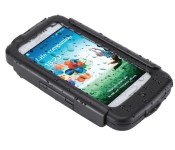
BikeConsole Power Plus for Galaxy S4 review
Don’t look now, but we’re just about out of the winter and finally into warmer weather. With the friendlier temperatures comes our favorite outdoor activities, such as biking.
I love nothing more than to toss my handset into a bag and put in some miles on the mountain bike. Very few things beat pairing some Bluetooth headphones with my smartphone and killing a few hours. The problem I run into, however, is that it’s fairly easy to deplete the battery if I’m out for more than a few hours. Between music, GPS tracking, and the occasional message, I often finish the ride with less than desirable remaining battery life.
 I found a solution that I like quite well in the BikeConsole Power Plus. Available for multiple device types, I spent time playing with the Galaxy S4 version.
In essence, this is an extended battery pack, protective carry case, and bike mount kit. Not only does it allow you to see your device, it’s also charging it while you’re out and about. And, thanks to its kickstand and cutout for headphones, it’s a handy device off of the bike as well. Bonus points are awarded for the exposed camera port which lets me pull of the Galaxy S4 and snap some photos. Just know this isn’t some sleek designer case that’s going to look sexy in public.
One of the other details I like most about the Power Plus is that it is waterproof. While the battery pack itself cannot be submerged, the case is able to take a rainstorm without breaking a sweat.
The clip-on battery pack is rated at 2800mAh which means it essentially doubles your handset’s juice. No more worry about wrapping up a ride with like 30% of your battery to get you through the rest of the day.
The whole unit comes together quite easily and feels very snug when in place. Thanks to its double locking mechanism, the phone never feels like it’s going to fall off the handlebars. I’ve really come to like the Power Plus in that it brings my phone out in front of me again. Rather than keeping it in a backpack or bag, I can see the phone and interact with it much quicker.
I shot a short video outlining the process of installation but found that the official clip told the story better.
You can purchase the BikeConsole Power Plus for your Samsung Galaxy S4 for $89.99. That price is a little steeper than I’d like, and would recommend something closer to $75 for the bundle. I’ve checked Amazon and found it listing for as low as $49.99 through various retailers. If you can get one of these for that price then I say hop all over it.
// <![CDATA[
amzn_assoc_ad_type = "product_link"; amzn_assoc_tracking_id = "agref_apps-20"; amzn_assoc_marketplace = "amazon"; amzn_assoc_region = "US"; amzn_assoc_placement = "B00E9QQRF8"; amzn_assoc_asins = "B00E9QQRF8"; amzn_assoc_show_border = true; amzn_assoc_link_opens_in_new_window = true;
// ]]>
// <![CDATA[
// ]]>
The post BikeConsole Power Plus for Galaxy S4 review appeared first on AndroidGuys.
Spritz’s speed-reading tech shows up to 1,000 words a minute, makes its debut on Samsung devices

Two weeks ago, we were so busy getting hands-on with the new Samsung GS5 and Galaxy Gear 2 smartwatch that an exclusive app for the two devices flew completely under our radar. That “app,” as we call it, isn’t really an app at all: it’s Spritz’s speed-reading technology, and if all goes according to plan, it will soon be embedded into loads of websites, apps and wearables devices. For now, though, the tech is making is debut on the GS5 and the Gear 2, with a public SDK set to come out in a few weeks.
Here’s how it works: Spritz shows you one word at a time through a narrow, rectangular viewing pane called the “Redicle.” That name is a pun of sorts, as each word has one letter highlighted in red (get it?!). In more technical terms, that letter is the “optimal recognition point,” the letter that helps your brain piece the word together quickly (and with as little eye movement as possible). The speed is adjustable, too, ranging from 100 words per minute to 1,000 — far exceeding Spritz’s claimed average of 220 words per minute.
Once Spritz releases its SDK, sometime in the coming weeks, developers will be able to build it into their apps, as well as create things like Chrome extensions. (Spritz CEO Frank Waldman says Spritz has no intention of doing this itself, which is probably fine, as 12,000 developers have already requested access to the SDK.). Website owners, meanwhile, will be able to integrate the technology by embedding some simple HTML code.
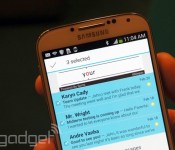
As of today, though, the GS5 and Tizen-powered Gear 2 are the only confirmed devices that will make use of the technology. On the GS5 in particular, Spritz will be baked into the native email application so that you can read your emails through a viewing pane at the top of the screen. I started out at 240 words per minute (just above the supposed average) and had no problem keeping up. I’ve embedded a demo gif below — and don’t mind the fact that I’m using a GS4 instead of a GS5.

It’s a similar deal with the smartwatch, which, when you think about it, is actually a genius place to install a speed-reading app. The idea is that you can speed-read from your wrist if you’re in a hurry, but if you want a longer look you can tap a “reply” button on the watch, which will prompt the email to open on your Galaxy phone. Once again, I’m using a last-gen device (the original Gear), as Spritz didn’t have any of the new devices on hand. But you get the idea.

Again, that’s it as far as officially sanctioned devices go. Still, the Spritz team has been doing some hacking on its own, if only to show developers what the technology is capable of. In particular, the company has cooked up an unofficial version of Kindle for Google Glass, allowing you to read novels and other materials, in addition to whatever you might encounter on regular websites. It’s a neat idea, and one I hope Amazon at least considers implementing. Still, it won’t be for everybody: after a few minutes of practice, I still struggled to read a simple young-adult novel at 280 words per minute. When it comes to fiction, at least, I might continue to read one sentence at a time, even if it does take me a little more time. But that’s just me. In any case, take a look for yourself (and thank the Google gods for that convenient screencasting feature for Glass).

Filed under: Cellphones, Wearables, Internet, Software, Mobile, Samsung

The Samsung Galaxy S5 is so hot it’s set a factory on fire. Literally.
 Despite reservations from critics about its overall innovation and design, the Samsung Galaxy S5 still appears to have garnered a lot of attention and a lot of interest, becoming one of the hottest topics of the last month, but we never expected this: apparently, the Samsung Galaxy S5 is so hot that it’s set a factory on fire, in particular a factory that has been contracted to build the S5′s PCBs.
 It wasn’t some small, contained fire either; the fire required the attention of 287 firefighters and 80 fire vehicles, causing an estimated $1 billion in equipment damage. Thankfully, it seems that nobody has been hurt. Samsung hasn’t outright said that this incident is going to affect the launch date of the S5, however, it has said they are looking at getting the same PCBs from other factories as to not cause a delay. With a month till the April 11th release date, we hope they get that sorted soon.
Do you think this incident is going to affect the Samsung Galaxy S5 supply when it is finally released? Let us know your opinion in the comments.
Source: Asia News Agency via SamMobile

Samsung announces security-minded Cloud Print apps for Android and iOS

Does anyone actually cable up to a printer anymore? Not if they’re kitted out with Google Cloud Print, Apple AirPrint, or Sammy’s new alternative: Samsung Cloud Print. The service will launch with an Android app in June, followed by an iOS version in the second half of the year and possibly a Smart TV app at some point too, and all the apps will come with a number of promises about security. Users will have their data encrypted between their device and their inkjet, and those who also use Samsung’s freshly updated Knox service are promised “enhanced security” through a level integration between Knox and Cloud Print. Finally, the Android app will also support NFC pairing, allowing a compatible mobile device to be connected to “as many as 20 printers with just a few simple taps” — although that currently only applies to Samsung’s small range of NFC-enabled Xpress-branded printers.
Filed under: Cellphones, Tablets, Mobile, Samsung

Nexus 6 Already Being Talked About?! All New HTC One Spotted…Again! – The ManDroid Show

Another Saturday, and another late ManDroid Show. Trying my best to get these out on time, or at least the scheduled day I set for myself. The Nexus 6 is already being talked about which just shows you how the tech world is. It isn’t about what’s current, it’s always about the next thing. Enjoy the show!
News Topics
Nexus 6 already being talked about
All New HTC One spotted again
HTC Desire 310 added to HTC’s line
Samsung’s thing for (faux) leather continues with the ATIV Book 9 Style

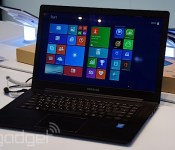
Samsung’s clearly been listening to Venus in Furs a lot recently, which explains why it’s gone a bit crazy on the faux-leather all of a sudden. After covering both the Galaxy Note 3, Galaxy Tab Pro and Chromebook 2 in the stuff, the company has now sought to do the same to a member of its Windows notebook family. Having taken the recently refreshed ATIV Book 9 that we found at CES, this new model gains the fetish-friendly backing and, erm, not much else. We spent a few seconds with an engineering sample of this unit, and felt compelled to share your impressions with you.
Spec-wise, you’ll find the same 15.6-inch, 1,920 x 1,080 display, Haswell Core i5 CPU, 4GB RAM and a 128GB SSD that was available in the base model ATIV Book 9. The keyboard was, broadly, the same, although on this model they felt a tad too spongy for our taste, although the issue concerning the lack of travel remains unsolved. We liked the roomy trackpad, and imagine that the jitters we found while mousing around were merely teething troubles associated with the unfinished hardware. One of the things we were impressed with is the Sound Alive speaker tweaks, which made this slender 4.2-pound Ultrabook loud enough to drown out the din of construction that surrounded us. There’s no word on how much this hardware will cost you, or when it’ll arrive, but we’d imagine it’ll be close to the price of the existing ATIV book – after all, that faux-leather can’t be too expensive, can it?
Via: MobileGeeks
Source: Samsung Germany (Translated)

Daily Roundup: Samsung’s Milk Music, a stun gun-equipped drone and more!

You might say the day is never really done in consumer technology news. Your workday, however, hopefully draws to a close at some point. This is the Daily Roundup on Engadget, a quick peek back at the top headlines for the past 24 hours — all handpicked by the editors here at the site. Click on through the break, and enjoy.

Hands-on with Samsung’s Milk Music internet radio service
Samsung’s getting its own piece of the internet radio pie with Milk. Milk Music, to be exact. The company’s new adless music service brings a unique, Slacker-powered way to explore online radio. The catch? It’s only available for Galaxy devices.

Punching sharks with an Oculus Rift and Leap Motion controller
By combining an Oculus Rift, Leap Motion controller and a little know-how, folks at Chaotic Moon studios developed SharkPunch. A game where you… punch sharks. And though it may be humorous, the company sees big potential for 3D-immersive tech in the education industry.

Hewlett Packard unveils the $170 HP 8 tablet
Two weeks after Mobile World Congress, Hewlett Packard quietly released its $170 HP 8 tablet: an 8-inch budget tablet with a (relatively) low res display and mediocre internals. Though, if screen size isn’t an issue, you might consider last year’s similarly-priced Slate 7.

This drone packs 80,000 volts of stun power
Drones can deliver pizza, dance in synchronous fashion, and now they can electrocute people too. Dubbed the Chaotic Unmanned Personal Intercept Drone, or CUPID for short, this aircraft can deliver 80,000 volts of stopping power directly into your skin.
You also might like:
Filed under: Misc

