


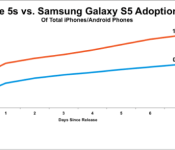
The Samsung Galaxy S5 makes up 0.7 percent of all Android devices in just one Week
 We always knew that sales for the Samsung Galaxy S5 were going to be astronomically high. If there was any doubt of that, reports that the Galaxy S5 is outdoing even its predecessor, the Galaxy S4 (at least in Europe), and being traded-in for iPhones are probably an indication that all is more than just good for Samsung‘s latest smartphone. If you needed even more evidence of exactly how good the Galaxy S5 is doing, Localytics is today reporting that, according to their data, the Samsung Galaxy S5 makes up 0.7 percent of all currently active Android devices after only one week.
That’s a pretty impressive feat considering the iPhone 5S only managed to achieve 1.1 percent penetration of all iOS devices. And why are we saying “only”? To put that in perspective, current estimations put Android at having 80% of the entire smartphone market. Even if we assume that iOS makes up the other 20% of the market, 0.7 percent of 80 is an absolutely massive chunk of that pie and an incredible number of devices to have sold in a week. Despite what you may think of the Korean smartphone giant, you have to give credit where credit is due. And again, that’s just after a week.
 Localytics goes on to report that of the Galaxy S5′s that have been sold, 64% of them have been sold in America, distantly followed by another 23% sold in all of Europe. No doubt the Galaxy S5 is going to continue its barnstorming to the top of the Android sales leaderboard.
What do you think about these sales figures? Let us know your thoughts in the comments below.
Source: Localytics via SamMobile
//<![CDATA[
ord = window.ord || Math.floor(Math.random()*1E16);
document.write('’);
//]]>
Google offered to help Samsung with Apple patent battle costs

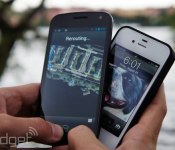
Confirming what a lot of us thought already, Google is more than a little interested in Apple and Samsung’s continuing court battle. New evidence revealed by Apple’s lawyers outlines emails from Google that offered to foot some of the damages (if Samsung lost), as well as cover part of the legal costs in the current trial. This would cover two of the five patents that Apple is fighting over. Google lawyer James Maccoun confirmed that it would help Samsung as part of the Mobile Application Distribution Agreement, the framework that allows Samsung to use Google-made apps on its Android devices. According to Maccoun’s taped deposition: “As I read it, Google’s essentially offering to defend Samsung to the MADA and does offer to defend some [patent] claims.”
Apple is looking to claim $2.2 billion from Samsung over five patents, while in return (you know how these things go), the Korean company is claiming a smaller $7 million for infringing two of its patents. Samsung had already stated that four of Apple’s patents are covered by Google’s Android OS, and has called in engineers to testify to that effect. The details of exactly how much cash Google will be willing to offer up haven’t been disclosed, although it’s likely hoping it won’t have to pay a thing.
Filed under: Cellphones, Software, Apple, Samsung, Google
Source: WSJ
Samsung KQ specs tipped, a premium Galaxy S5?

We have seen the Samsung Galaxy S5 and its amazing results, and surely it is the best Galaxy device to date. But as the new flagship is here, its time for the rumors to start floating about the next flagship smartphone. SamMobile is reporting that Samsung is working on a premium version of the Galaxy S5, which will feature an octa-core Exynos 5430 processor and QHD (2560×1440) display. It is codenamed as “Samsung KQ”, and also the device will feature Intel-crafted LTE modules as well.
Galaxy S5 is an excellent device, but it was not what we heard about it in rumors. But it seems that the Samsung KQ will be a dream device for every Samsung fan. Right now, we don’t know when Samsung is going to release it, but you can expect it to be a Summer vacation surprise by the Korean giant, or maybe in Fall 2014.
Do you think a ‘premium’ S5 is a good idea? Let us know in the comment box below.
Source: SamMobile
The post Samsung KQ specs tipped, a premium Galaxy S5? appeared first on AndroidGuys.

Daily Roundup: Netflix raises prices, a tour of the Samsung Innovation Museum, and more!

You might say the day is never really done in consumer technology news. Your workday, however, hopefully draws to a close at some point. This is the Daily Roundup on Engadget, a quick peek back at the top headlines for the past 24 hours — all handpicked by the editors here at the site. Click on through the break, and enjoy.

Samsung opens its own Innovation Museum, we take an early tour
Today, Samsung opened its new Innovation Museum to the public, offering a stylish look at the history behind some of the greatest technological milestones of our time. Fortunately for you, our own Mat Smith already visited the complex for a tour.

Samsung Gear Fit review: a messy merger of fitness band and smartwatch
Samsung’s Gear Fit is an interesting blend between a smartwatch and fitness tracker. Sure, it’s comfortable, has a beautiful display and a built-in hear rate monitor, but its software leaves much to be desired. As is, the Gear Fit isn’t worth $200.

Netflix is raising prices for new customers
Today, Netflix announced a slight price increase for new customers that’s scheduled to take effect at the end of the quarter. Those of us already paying $8 a month will be grandfathered in for a “generous time period,” but it won’t last forever.

How a toy designer dreamed up the geek-friendly AeroPress coffee maker
Does that Keurig-made cup of Joe leave your taste buds wanting? If so, you might like the AeroPress. Designed by toy maker Alan Adler, this French Press style contraption aims to bring you high-quality coffee in under two minutes.
You also might like:
Filed under: Misc
Samsung Expert Says It Only Owes Apple $40 Million in Patent Case, Not $2 Billion [Mac Blog]
In the ongoing Samsung vs. Apple lawsuit, experts hired by Samsung took the stand on Monday to explain to the jury why Samsung should only pay Apple $38.4 million in damages for infringing on Apple’s patents, rather than the $2 billion Apple says it is owed.

Samsung’s paid expert, Judith Chevalier, a professor of economics and finance at the Yale University School of management, said a reasonable royalty on the five patents — if they were infringed — would be approximately $1.75 per device, a total of $38.4 million in total damages. Apple had previously argued that it was owed $40 in damages per device.
She also called Apple’s patents “very negligible” in value because they were not mentioned as frequently in customer reviews as other features that are not at issue in the case.
Chevalier also pointed to Apple’s accounting for each of its annual iOS software updates since 2009, which Apple pegs between “100+” and “200+” new features at each release, and come in at $10 to $25 per device in deferred revenue. Dividing the number of features, Chevalier claimed you could classify these features, on average, as costing 5 to 25 cents per feature.
Following Chevalier’s testimony, Samsung rested its defense before starting its own case accusing Apple of infringing on its patents. The trial is expected to conclude and head to jury deliberations sometime next week.

Samsung Gear Fit review: a messy merger of fitness band and smartwatch

Fitness trackers and smartwatches come a dime a dozen, but devices that combine the best of both? Still exceedingly rare. Now, however, Samsung thinks it has the perfect solution in the Gear Fit, a fitness band with a beautiful, curved screen, as well as a heart rate monitor, pedometer and a few smartwatch features thrown in for good measure. It’s an ambitious product, no doubt, but unfortunately, this $200 fitness-tracking smartwatch hybrid didn’t quite meet my expectations. Here’s why.
Hardware and display

Beautiful. That’s the thought that ran through my mind when I handled the Samsung Gear Fit for the very first time back in February. Mostly it was the screen that got me, a 1.84-inch curved Super AMOLED display that wraps around your wrist. It helps this smartwatch/fitness band hybrid look and feel more natural, and it’s much more aesthetically pleasing than most of its rivals, too. The screen itself has vibrant colors, making it fun to stare at even when you’re not using it. It’s barely readable in sunlight, though; you’ll need to bump it up to “outdoor brightness” mode, and even then it only stays in that mode for five minutes before reverting back down to your previous setting. And since there’s no ambient light sensor, there’s no auto-brightness setting to make it easier for your display to adjust when you go outdoors.
Moving beyond the screen, the Fit is a narrow plastic module that comes with an interchangeable wristband. It’s easy enough to swap colors, though you won’t have many options at the beginning — just six for now. It’s comfortable enough that it’s not a burden to wear for long periods of time, which is something I can’t say about many rival watches. Still, it’s a sporty-looking device, if you know what I mean, which means anyone looking for something elegant should probably look elsewhere.
The Fit has one physical home button, which you can also double-press as a shortcut to certain apps (that part’s customizable — just choose the feature you use most often). On the underside of the device, you’ll find the heart rate monitor, which uses an LED to measure your pulse, along with a proprietary docking/charging port. Inside, the watch comes with Bluetooth 4.0 Low Energy, an accelerometer and gyroscope. What’s missing? GPS, which could’ve made it possible to add more fitness-tracking options (especially useful when it’s not within range of your phone).

The charging dock used here is quite small, which also makes it a huge liability. Not only is it one more accessory to take around whenever you go on a long trip, but it’s also incredibly easy to lose. There’s not much to the cradle itself: It features a micro-USB port and a couple wing-like tabs that help secure it onto the sides of your Fit. It does a good job of attaching to the watch whenever I need to plug the device in. The problem is, if one of those tabs were to break off later, it’d be virtually impossible to charge the device.
Just like Samsung’s new Galaxy S5, the Fit is IP67-certified, which means it can be immersed in up to a meter of water for up to 30 minutes. So, taking a shower and washing dishes are perfectly acceptable, and it’d probably even be OK if you jumped into the pool with it.
Software and functionality

I won’t bother mincing words here: The hardware is good, but the software isn’t. It’s not running Android or Tizen OS, like Samsung’s other Gears. Instead, it uses a specialized operating system that’s limited in functionality and doesn’t allow third-party apps to work on the device itself (this may change eventually, but probably only if the watch sells well enough to justify it).
Once the watch is set up, you’ll be greeted by a home screen. You can change this panel to one of several different preset options: You can display the pedometer, the local weather, your next calendar appointment or even a second clock for a different time zone. If you want to jazz up your clock beyond that, you can choose from 10 different themes; you can also make your own wallpaper by cropping a narrow strip out of any pic in your gallery.
Aside from the clock, the user interface is comprised of 10 menu options (11 if you count App Connect, which pops up if a Fit-compatible app like Strava is installed on your Galaxy device). If you’re fine with small text, you can fit up to three icons on the screen at the same time; if you prefer everything to be larger, however, you’ll have to make do with one. Gear Fit Manager, a Samsung phone app you need in order to manage your watch, lets you rearrange the menu as you see fit.
Finally, the menu can be split up into two sections: apps that function as fitness-tracking features, and apps that utilize the smartwatch part of the device. I’ll discuss them separately.
As a fitness band

If you have a Gear Fit-compatible phone or tablet, chances are you’ve seen the S Health app. It’s meant to be a one-stop destination for almost all of your fitness data, such as your heart rate, exercise, calorie intake and so on. It links with your Samsung Account, so you should be able to back up your data and transfer it to other Samsung-made devices down the road if you feel so inclined. As you might have guessed, almost any fitness tracking you do on the Fit can be downloaded and synced with S Health. By default, the phone and Fit are supposed to talk to each other once every three hours for data transfers, but you can have it less frequently (e.g., once or twice a day).
The idea behind the heart rate monitor is wonderful, but in practice, it isn’t as useful as I was expecting. First off, it’s not accurate enough; just like the Galaxy S5 and Gear 2, the sensor’s numbers range anywhere from a solid “in the neighborhood” to outright “outlandish.” The measurements varied wildly when I adjusted the Fit to a different position on my wrist, and the variation was even bigger when I measured my pulse on both wrists. All told, the sensor is too sensitive to sweat, movements and noise, often requiring you to make multiple attempts. Lastly, the only way to have the Fit continually measure your heart rate is to go in and tell the watch that you’re starting your workout. Even then, that option is switched off by default.

When you’re ready to begin your workout, tap on the exercise menu option. Doing this gives you a small number of workout types to choose from: walking, hiking, running and cycling. These are capable of tracking your distance, the amount of time it takes to complete the activity and the number of calories you’ve presumably burned in the process. Unfortunately, regardless of which activity you choose, there’s no way to pause once you’ve started, so your workout time won’t be accurate if you stop to take a break.
Some of the options, such as running mode, come with a built-in coaching feature. As you run, the heart rate monitor keeps an eye on your pulse and the coach will give you simple instructions like speed up or slow down. Like I said, walking is one of the workout options in the exercise menu, but the pedometer is treated as a completely separate app on the main menu. This is incredibly unintuitive; it means that if I want to go on a walk and track all of my data, I have to go into two different parts of the Fit to activate everything before I can even leave my house. (The pedometer is turned off by default.) If the pedometer had already counted your steps for the day up until that point, you’d have to reset it so you can begin your workout at zero. I want to count both daily and workout-specific steps, so it would make more sense to include a “steps counted” feature as part of the workout screen instead of treating it as a separate data point.

All of this is frustrating, but it could almost be forgivable if the pedometer were at least accurate. Not only is it imprecise, but it doesn’t sync properly with S Health. Regarding the first concern, I took a walk and counted my steps the old-fashioned way (with my brain); when I compared it with my Fit, the two figures weren’t close enough to each other to blame margin of error. I also took my GS5 and Fit along with me for a mile-long exercise — half of it walking and the other half running — and the Fit calculated 200 more steps than my phone. These are just a couple examples, of course, but I’ve noticed many more discrepancies over the past week and a half.
The syncing problem only manifested itself when I used both the Fit and Galaxy device to monitor my exercise; because the S Health app knows you might have both your phone and smartwatch on you at the same time, it only syncs the workout with the earliest start time. On paper, it’s a smart idea; both devices should measure the exact same results. Since they clearly don’t, though, this means you’ll end up with a discrepancy in your exercise unless you turn off the activity tracker on one device (or leave your phone at home when you’re going for a run). The Fit also didn’t do a good job of calculating distances traveled. I used a local track to run a mile, but the Fit told me I’d only travelled one-fifth of that distance. Again, GPS would have come in mighty handy here.

Sadly, the Fit’s woes go beyond fitness tracking — its sleep tracker is also fairly pointless. The Fit uses its built-in accelerometer to detect motion as a way of determining if you’re fully asleep, and… that’s about it. It also has a timer that tracks when you want to begin sleeping and when you wake up, but even that’s a hassle. Unlike the Basis B1 band, which automatically detects when you fall asleep, the Fit requires you to do it manually. So, if it takes you a full half-hour to conk out, the Fit will be none the wiser.
Not only is the amount of sleep data limited but also, the only way to store any of it is to download a standalone app in the Samsung Store called “S Health Sleep.” That’s right, one of the Fit’s marquee features has no place in the main S Health app. Why the company did it this way, I can’t be sure. What I do know, however, is that you currently need three different apps to properly manage the Gear Fit and all of the data you collect on it. At this point, you probably can see exactly how confusing the user experience is here. I imagine many of these problems will be solved over time, but by then it might be too late.
As a smartwatch

The fitness tracker obviously needs some work, but how does the Fit do as a smartwatch? Let’s start with a recap of what it does: like the Pebble, It’s an extension of your phone, with notifications for incoming calls, text messages and emails, and also select apps. Most of that works fine, but notifications — especially long ones — are a bit of a mess simply because of the awkward screen. If I look at it in horizontal mode, I have to view it from an awkward angle that hurts my neck (more on this in the next section). Most apps don’t even show the actual notification; they display a teaser and give you the option to look at it from your phone. In the case of Gmail, you can see the sender’s name and subject line, but nothing else. Worse, if you have more than one email, your most recent message details blend into one single notification like a run-on sentence.

There’s also a timer, media controller and stopwatch on board if you need them, but this is essentially where the functionality stops — remember that there are no third-party apps here. For a lot of people, this will be more than plenty — as I mentioned before, this isn’t meant to replace your smartphone, but I’d still like to see what else developers could do to the Fit to make it more effective when it comes to completing basic tasks.
In case you’re wondering, the Fit comes with a Do Not Disturb mode (which Samsung calls Blocking Mode), but there’s a catch: It’s combined with the sleep tracker, so that’s the only time you can use it. While I definitely like to use this mode when I’m sleeping, there are plenty of times when I’m trying to focus on other tasks and don’t want my wrist vibrating every few seconds. This seems like a huge oversight on Samsung’s part.
Performance and battery life

There’s one other problem with using the Fit as a smartwatch: The display itself may be fun to look at, but the actual contents on the screen aren’t. That’s because the panel is so narrow that I had to strain my neck every time I wanted to read the Fit display in horizontal (landscape) mode. Vertical (portrait) mode solves this problem, but introduces another issue: You can only read a few characters of text on each line, forcing you to scroll even further down the screen just to get to the end of the message.
On the plus side, scrolling isn’t terribly difficult since the screen is reasonably responsive. But unless your phone is in another room and you’re not able to get up and grab it, using two hands to scroll through a notification on your watch pretty much defeats the purpose — it’d be faster to just pick up the phone.
Meanwhile, I never had any problems pairing the Fit to my Galaxy S5, nor did I have any issues maintaining my Bluetooth connection. Also, the built-in accelerometer makes it possible to wake the display up when I raise my arm, but the performance here is hit-or-miss. On multiple occasions, I found myself grossly exaggerating my movements because simply raising my arm didn’t actually turn it on.
As for runtime, Samsung claims the Fit’s battery will last three to four days. After spending a little over a week with it, I have to agree. I only had to fully charge the unit twice during my time reviewing it, and each time it lasted for four days. Admittedly, though, it probably would have drained faster if I were a more avid runner, which means the usual caveat applies here: Your mileage may vary.
The competition

The $200 Gear Fit is unique in that it faces competition from not one, but two types of wearables: fitness trackers and smartwatches. That means you have a lot to choose from, even though the Fit is one of a few devices that attempt to bridge the gap between the two genres. But it’s not the only one. When it comes to being a jack-of-all-trades, the $400 Adidas miCoach Smart Run does a good job combining several elements, doing quadruple-duty as a media device, training coach, GPS tracker and heart rate monitor. The problem is, it’s pricey. In fact, given the feature set, the Gear Fit feels like a steal at half the cost.
Aside from the performance issues, the Fit also has limited compatibility. It can only connect to specific Samsung smartphones and tablets, so anyone using other Android or iOS devices won’t be able to do anything with it. It’s also on the expensive end of the fitness-band spectrum, going up against the $199 Basis band. Although the Fit has a few more smartwatch-type qualities, the Basis B1 does a better job tracking most fitness activities. And, as mentioned earlier, it even monitors your sleep automatically, a killer feature that puts the Fit’s capabilities to shame.
On the cheaper side, you can choose from the $150 Jawbone Up24, $100 Fitbit Flex, $100 Polar Loop and $130 Garmin Vivofit. The Garmin and Polar devices have optional heart rate monitors, and the former has a simple display for stats; all of them can connect with most smartphones to sync your data. While most fitness trackers don’t have many smartwatch qualities (if any), most smartwatches have at least a few fitness tracking features. The Pebble (which ranges from $150 to $249 depending on the model) is backed by an enthusiastic developer community, and it’s got a bunch of clever apps related to health and fitness, such as sleep trackers, swim counters and pedometers (to name a few); you’ll find Strava, RunKeeper, Runtastic Pro and other well-known apps in the Pebble store as well. Unfortunately, though, the Pebble, doesn’t have a heart rate monitor.
Wrap-up

I’ll give Samsung credit where it’s due: It’s one of the first companies to blend a fitness tracker with a smartwatch, and there is indeed a market for such a device. In terms of hardware, the company did a fantastic job crafting a curved device that feels comfortable and looks good, to boot. Samsung also included a heart rate monitor, a beautiful display and interchangeable bands — all good things.
Where Samsung failed is in the software. The user interface is confusing; the display is awkward to read; the heart rate monitor and pedometer aren’t accurate; and the sleep tracker only logs a couple important stats. Ultimately, the company tried so hard to integrate a fitness tracker with a smartwatch that it ended up half-baking both aspects. As is, it’s not worth the $200 asking price.
History, too, would suggest it’s not a good idea to buy this right now. As I mentioned in my original Galaxy Gear review, the device felt more like a proof of concept. Samsung clearly agreed, since it pushed out an improved sequel less than six months later. Now, the Gear Fit appears to be in the same position: great on paper, but poorly executed. It’s best to wait this one out, but hopefully Samsung will push forward, listens to feedback and comes out with a much better version before too long.
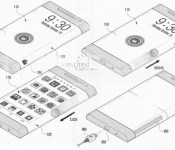
[RUMOUR] Could the Samsung Galaxy Note 4 be using the Youm wraparound Display?
 Last week, we heard from Yoon Han-kil, Samsung’s Senior Vice President of Product Strategy, that Samsung would be looking to give the next Galaxy Note device a “new form factor”. The device, which would most likely be called the Samsung Galaxy Note 4, plans to breath new life into the Galaxy Note line of devices in an attempt to recapitalize on the market that the phablet devices helped create. According to ZDNet in Korea, this revitalization may include a Samsung design patent that we saw late last year.
 The patent in question is one named “Youm” and features a wraparound screen that does away with the conventional side bezels. What this allows is the extra screen space, which is tilted away from the main screen, to be used for addition user inputs including lock/unlock gestures or quick menu options. It’s a concept that Samsung has shown off prototypes for before, but has been suspiciously quiet about since then. While it’s definitely a tantalizing idea to consider that this design could feature on the Note 4, there’s no real concrete evidence to say that Samsung will utilize Youm.
What do you think about the Samsung Galaxy Note 4 using the Youm wraparound screen? Let us know what your thoughts are in the comments below.
//<![CDATA[
ord = window.ord || Math.floor(Math.random()*1E16);
document.write('’);
//]]>

Samsung opens its own Innovation Museum, we take an early tour

Before arriving at the Samsung Innovation Museum, I had an idea of what to expect: the Korean company shoehorning itself into every technological milestone, whether it deserved to or not. Fortunately, the five-storey complex in Suwon’s Digital City (that’s a nerve center of Samsung Electronics) starts with the advent of electricity and goes from there and any notion that this is a Samsung… thing is when the company starts building electronics itself — oh and a big helping of those see-thru touchscreen displays boxes… yeah, they were a hint. The museum opens to the public today, but we took an (admittedly on-the-rails) tour with other foreign media last week. Is it worth a trip to Korea? Maybe not, but if you’re a tech obsessive already visiting Seoul, it could be worth the trip out to Samsung’s Digital City. Be warned: it was mildly educational.

Samsung Electronic’s CEO said it will give the public a chance “to see where we’ve come from” — and that’s exactly what the first floor’s dedicated. The museum is undeniably stylish (and it helps that it’s brand new), but what I liked the most was the realia; the for-real artifacts from history. Not just a StarTAC and the first slimline TV, but an Edison filament lightbulb, the first ever TV. The Samsung Innovation Museum (SIM: see what they did there?) gets a credibility boost from these merely being here.
This isn’t just a Samsung showcase, and I’m sure the company has knowingly skewed the content to pull in school trips
The whole museum has similar style lines to Samsung’s pop-up stores and even event booths at the likes of CES and MWC: all curved corners and cutaways. Standalone stations that guide visitors through the floors have a trigger inside, from a power switch, to morse code tapper to a radio dial, and these initiate a quick video, projected onto the walls. It’s all very institutional-styled, but I was surprised at how much detail some of the displays went into. This isn’t just a Samsung showcase, and I’m sure the company has knowingly skewed the content to pull in school trips, but there’s a lot more to absorb here than at the company’s showcase store in the middle of Seoul.

Moving up to the next floor, the tour takes a heavier Samsung bent. This level is meant to represent the present, and well, recent past, covering the advent of TV sets, phones, smartphones, the internet — the things that made Samsung Electronics the multinational giant it is today. It also attempts to outline the lifestyle and sociological changes that have accompanied the expansion of electronics. The early stages and stations focused on the inventors, the museum tries to elaborate on the role played by corporations in expanding and realizing these ideas — without the production scale of big business, the narrative says that large-scale roll-out of technologies (and more importantly, products) would have been impossible. Thanks corporations!
The floor is all very B2B — it’s called exactly that. It felt a lot like a haunted trade show booth… all the gadgets and none of the crowd crush.
The final floor is an out-and-out Samsung promotion, although there are some interesting things (military-styled Galaxy S4 anyone?), alongside the chance to test out its latest releases — at this point there’s several tables of Gear 2s and Gear Fits to mess with. There’s also setups for contactless payments, point-of-sale displays. The floor is all very B2B — it’s called exactly that. It felt a lot like a haunted trade show booth… all the gadgets and none of the crowd crush.
Further down, there’s also a curved UHD theater, but for the moment, it’s another cheery showcase of Samsung Electronics and another little presentation trick that we won’t spoil for anyone that makes the trip to SIM. The content here’s a bit insipid, but hopefully the company might host some awesome 4K content in the near-future, maybe when there’s more 4K content out there.
It wouldn’t be a museum without a gift shop, either, and several product ranges here including charitable donations. Unfortunately, there’s some Chelsea Football Club merchandize too, but I won’t hold it against them.

Samsung’s museum is another effort to improve its image, not that it was necessarily a bad one to begin with — and it really wants to be called innovative. I think I’d have preferred it titled the Innovation Museum, but then, why wouldn’t you put your company’s name in there, right? The phone segment, in particular, while dodging recent innovation issues, touches on many firsts. The first phone with a TFT-LCD display? A Samsung. The first MP3-playing phone? That’ll be another Samsung.
There’s an unmistakeable Samsung tinge to everything, but I imagined this was going to be far more obvious and cloying.The exhibit, while skipping over a lot of Apple and (native rival) LG products, makes room for the likes of the StarTAC and the before-its-time Simon Personal Computer — grown-up moves that better help to illustrate the blazing fast progress of technology and electronics. But as a museum, perhaps nothing demonstrates the industry’s pace better than the semiconductor section (an arm of Samsung that forms the backbone of the company and its profits), with a side-by-side look at the first, huge, transistor and its contemporary ancestor — a fraction of the size and several times more capable.
Based in Suwon, Samsung’s Innovation Museum is open from 10 am to 6 pm, Monday to Saturday. Visitors on weekdays have to make an appointment in advance at samsunginnovationmuseum.com, but weekend visits can be done without reservation.
Filed under: Cellphones, Internet, Alt, Samsung
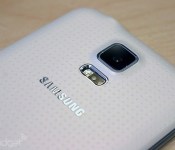
Samsung data center fire causes outage, errors on smart TVs and phones (update: fixed)

Seeing an error message on your Samsung phone, tablet or Smart TV today? You’re not alone, as the Samsung.com website appears to be down and owners worldwide have reported anything from error messages to being unable to access apps on their smart TVs. Reports have spread on Twitter, mostly from a community news site called Wikitree, that a fire at a Samsung SDS building in Gwacheon, South Korea is the culprit. We’ve contacted Samsung but haven’t heard anything back yet, and while some of its social media pages have noted the outage, there isn’t an official explanation posted.
Update: Naturally now that we’ve mentioned it, the outage that lasted several hours appears to have ended around 6:15AM ET. Many of the same users who were having problems with their smart TVs and phones seem to have full access again, and Samsung.com is back up and running. A Samsung SDS blog post confirms the fire and subsequent outage, while apologizing for the inconvenience. Despite some scary photos (after the break) Korean news reports indicate there were no fatalities. The big question left? Why a fire at one location seemed to have such a wide ranging affect on the company’s devices and services.
[Thanks, Mark & Martin!]
오늘 ICT 과천센터 화재로 심려를 끼쳐 드려 사과드립니다. <공식입장 전문 : http://t.co/PDvwuGZkyQ>
– ICT story (@ICTstory) April 20, 2014
Photo of Yonhap showing materials of Samsung SDS building is falling off because of fire,. pic.twitter.com/E1gzO9t3ff
– Jaehwan Cho 조재환 (@hohocho) April 20, 2014
Samsung’s website been down for 3+ hours, and this is the global site. Things are normal, I assume?
– Evan Hindra (@evanhindra) April 20, 2014
헐. 과천 삼성 SDS 건물에 불났네. 사상자가 없었으면 좋겠는데. pic.twitter.com/uwefIMgDI1
– Joshua (@shbaik82) April 20, 2014
@SamsungUK the smart hub is down. Is there really no support or information?!!
– Cromerty York (@Cromerty) April 20, 2014
#Fail http://t.co/aTeVEzEaDJ is down, all ‘Smart’ devices – TV, Bluray – boned. Obv the internet is down if http://t.co/xDtqnPOYIq is down!
– Ed S (@iMiMiMx) April 20, 2014
@Micko3 Hi! Thanks for reaching out. We are currently looking into this. We’ll let you know once we have the information. ^Jonah
– Samsung Support USA (@SamsungSupport) April 20, 2014
Filed under: Cellphones, Home Entertainment, HD, Mobile, Samsung
Source: Wikitree, Samsung.com, Is It Down Right Now?, ICT Story, YTN (Korean)
HTC poaches Samsung Galaxy marketing guru, looking for “The Next Big Thing”
 HTC‘s marketing in the past year has been wildly hit and miss; the slightly absurd Here’s To Change campaign featuring Robert Downey Jr. was met with very mixed opinions though its HTC Technical Translations videos seemed to be a lot more popular. Either way, HTC is probably planning to really break through with their own marketing and to that end, they’ve hired Samsung‘s former Chief Marketing Officer, Paul Golden, the man who proclaims he “created and launched the highly successful Galaxy brand for Samsung”.
Golden was reportedly hired by HTC very recently and will serve as an adviser to HTC chairman, Cher Wang. Wang has previously said that “We just have to communicate well with our customers… I believe if we can communicate better, we will do better,” which is a sentiment we can all agree with, though it can be said that Samsung’s communication and marketing is generally extremely vague. Regardless, we look forward to what could be a resurgence in HTC marketing and hopefully a brighter future for the Taiwanese manufacturer.
What do you think about HTC’s acquisition of Paul Golden? Do you think he can really help HTC’s position in the market? Let us know what your thoughts are in the comments.
Source: Bloomberg via engadget
//<![CDATA[
ord = window.ord || Math.floor(Math.random()*1E16);
document.write('’);
//]]>

