



Barnes & Noble teases its Samsung-made tablet

In order to save cash, Barnes & Noble decided to kill off its homegrown line of Nook tablets, and just asked Samsung to rebrand a Galaxy Tab instead. We’ve already seen images of the elegantly-named 7-inch Samsung Galaxy Tab 4 Nook, but in a new video, discovered by The Digital Reader, the bookseller asks Nook-owning customers to give the device a spin. The company even recruited Grumpy Cat to glare disapprovingly at the hardware, albeit with the caption “I don’t hate it.” Given that it’s less than a week before the company’s glitzy New York launch, it won’t be long before we can get the slate into our testing labs and work out if it’s as good as those passionate Nook fans — who were paid with a new Nook for their time — say it is.
Via: The Digital Reader
.CPlase_panel display:none;

Samsung’s ‘Smart Home’ dreams get bigger with $200 million SmartThings buy

Count Samsung in — it’s officially purchasing home automation startup SmartThings, a move that should help it keep up with the Joneses, aka Apple and Google. TechCrunch has sources confirming a $200 million pricetag, matching the amount it heard last month when rumors of the deal leaked out. In a blog post, SmartThings CEO Alex Hawkinson said the team would continue to be run independently, but that it’s moving home base to Palo Alto, where Samsung has one of its Innovation Centers. He says Samsung is ready to get behind its vision of an open smart home platform that works for third party devs as well as different hardware manufacturers, and already has support from some 8,000 apps. SmartThings has gone from Kickstarter to playing with the big boys, now we’ll see if its Hub device and wide-open strategy can get your doorknob, stove, drapes and lightbulb all on the same page.
The next big thing is already here: @SmartThings, @Samsung, and the Open Platform: http://t.co/94ZNhfIos8
– SmartThings (@smartthings) August 14, 2014
Filed under: Household, Samsung
Source: SmartThings, Samsung (Businesswire)
.CPlase_panel display:none;

How a keyboard case can turn your 8-inch tablet into a productivity machine

What’s up with 8-inch tablets? Microsoft reportedly canceled the Surface Mini at the last minute. Samsung’s Galaxy Note 8.0 is long overdue for a refresh. Even the current class leader, the iPad mini, only came about after years of procrastination at Apple. Perhaps it’s just a little harder to convince people of the merits of this category of device, compared to the greater pocketability of a phablet, the affordability of a 7-inch Android slate or the extra productivity offered by a full-sized tablet, hybrid or laptop. However, I’m happy to report that with a bit of smart accessorizing — namely, the addition of a high-quality keyboard case that allows for proper touch-typing — an 8-inch tablet has plenty of scope to operate as a serious productivity tool, if not an outright laptop replacement.

Due to the sheer size of Apple’s following, the iPad mini offers the greatest choice of tailored keyboard cases of any 8-inch tablet. Demand for iPad mini keyboards has evidently persisted since launch, because new products from reputable companies have continued to hit the market in the past six months. This includes a miniature version of the ClamCase Pro, which was the winner of my full-size iPad keyboard roundup last year and which can bend backwards to work as a stand. There’s also now an intriguing rugged keyboard from ZAGG, which has a magnetic hinge allowing you to quickly detach the tablet section from the keyboard. I’ve spent a few weeks with both of these, as well as with a more lightweight ZAGG keyboard for the Samsung Galaxy Note 8.0, in an effort to acclimatize to what are inevitably more-cramped conditions.
These accessories may be small, but none of them are half-hearted add-ons — something that is reflected in both their designs and their price tags. Crucially, all three keyboards have backlit, chiclet-style keys, and they also have proper hinges to replicate a laptop-style experience. In other words, if fast, comfortable typing is ever going to be possible on this sort of accessory, these examples probably stand the best chance of making it happen. What’s more, with all these cases, the combined size, weight and cost of the tablet-plus-keyboard combo is significantly less than a MacBook Air or Microsoft Surface Pro 3 — which is a key reason to be interested in this sort of solution in the first place.
(Incidentally, I haven’t been able to find any similar hinged cases for 8-inch Windows 8 tablets like the Lenovo ThinkPad 8 or Dell Venue 8 Pro. For now, it seems, those tablets are stuck with more casual folding cases that prop the tablet up at an angle.)
| Price | Weight (with tablet) | Thickness | |
|---|---|---|---|
| ClamCase Pro for Apple iPad mini | $100 | 391g (699g) | 17.5mm (0.69 inch) |
| ZAGG Rugged Folio for Apple iPad mini | $140 | 529g (837g) |
24mm (0.94 inch) |
| ZAGG Folio for Samsung Galaxy Note 8 | $100 | 367g (707g) | 18mm (0.71 inch) |
Typing speed

Let’s start with the most important statistic: words per minute. I define “touch-typing” as typing without looking at the keyboard, rather than following any sort of specific method taught at a secretarial school (do those things even exist anymore?). So all the numbers in the table below reflect typing while mostly staring at the screen, and with all errors corrected on the fly in order to produce a clean passage of relatively complicated text (which included some large numbers, special characters and people’s names, so that autocorrect couldn’t fix everything).
|
Words per minute |
|
|---|---|
| 15-inch MacBook Pro (benchmark) | 69 |
| iPad mini Retina onscreen keyboard | 31 |
| ZAGG Rugged Folio for iPad mini | 56 |
| ClamCase Pro for iPad mini | 53 |
| ZAGG Folio for Galaxy Note 8 | 45 |
As you can see, I wasn’t able to match my natural typing speed (69 wpm, as achieved on a 15-inch MacBook Pro) on any of the 8-inch accessories. The closest I came was with the ZAGG Rugged Folio, which yielded 56 words per minute, with the ClamCase Pro not far behind at 53 wpm. These latter two products honestly felt about equal to me in terms of typing comfort, and their sensible layouts actually allowed me to type just as fast as on a 10-inch iPad keyboard case — in other words, trading down from a full-size iPad to a mini didn’t seem to come with a huge sacrifice in potential typing speed. That was quite a revelation.
Bear in mind, many of the simpler errors I made during these tests were fixed by iOS’ autocorrect before they had a chance to slow me down. This actually explains why the ZAGG for Galaxy Note 8.0 got such a low score — it wasn’t the keyboard’s fault so much as Samsung’s, because the autocorrect function in TouchWiz let many more errors slip through, forcing me to go back and fix them manually. For some reason, in order to use a Bluetooth keyboard with the Note 8.0, you have to use Samsung’s default keyboard, which means the user can’t benefit from the superior autocorrect offered by SwiftKey or Google Keyboard. That’s a major nuisance.
Design and usability

There’s more bad news for ZAGG on the Galaxy Note 8.0: The Bluetooth connection sometimes took a while and often failed unless I messed around in the settings menu, which seems like another TouchWiz issue. I also encountered repeat presses, where I’d hit a key once and see the letter repeated five times in succession on the screen. Worryingly, this was even worse with the Backspace key — I’d try to delete a word and it’d go haywire and delete a whole sentence or paragraph. This ZAGG also doesn’t allow any of the flipping or detaching contortions that are possible with the two iPad mini models — it’s stuck in a traditional laptop mode. Suffice to say, my Galaxy Note 8.0 has come out of the case and gone back to dressing in its birthday suit.
By contrast, the iPad mini’s Bluetooth connection and processing was absolutely flawless, and both the ZAGG Rugged and ClamCase Pro were effortless to use. It was easy to turn the keyboards off to break the wireless connection and re-enable the onscreen keyboard. And it was just as easy to turn them back on to re-establish the connection and start typing again. During the course of testing the accessories, I made two big trips without my MBP, just relying on the keyboard-equipped iPad mini as my primary work laptop, plus a Wacom stylus for note-taking. Overall, I think I could cope with this as a permanent laptop replacement, if it wasn’t for an occasional need to batch-process images and cut video.
Wrap-up

Overall, it’s safe to conclude that touch-typing is possible on an 8-inch tablet keyboard, so long as you make an effort to get used to it, and so long as your particular keyboard is nicely designed. I’d forget about the ZAGG keyboard for the Galaxy Note 8.0, mostly due to the software issues, but both the iPad accessories covered here are solid purchases. If I had to choose one, it’d probably be the ZAGG Rugged — not because of its slight advantage in typing speed, but because of its Toughbook-style tactility and the ease with which it lets you pull the iPad section away from the keyboard section. Both of these features came in handy on cramped flights, or when passing the iPad to someone across a desk during a meeting. Of course, many people will be put off by the ZAGG’s extra bulk, in which case they can default to the ClamCase Pro instead. But ultimately, I’ve arrived at the same conclusion that I did in my last roundup a year ago: I think a great keyboard accessory is one that is bold enough to totally transform a device’s function for as long as it is attached, rather than just trying to be as small and inconspicuous as possible.
Filed under: Peripherals, Tablets, Mobile, Apple, Samsung
.CPlase_panel display:none;
Samsung Galaxy Note 4 specs leaked with 4GB RAM, QHD display

As many of you know, the Samsung Galaxy Note 4 is expected to be announced at the upcoming IFA event on September 3rd in Berlin. Apparently Indonesian company Erafone thought it would generate news by posting what appears to be the upcoming spec sheet of the new Note 4 on its website earlier today. Not that… Read more »
The post Samsung Galaxy Note 4 specs leaked with 4GB RAM, QHD display appeared first on AndroidGuys.
.CPlase_panel display:none;
Samsung Galaxy Note 4 leak suggests huge QHD display and improved camera

If there’s one thing that you’re guaranteed to see at IFA, it’s Samsung showing off the fourth version of the Galaxy Note. Unfortunately, any surprise factor the company might have been relying on has been lost if this credible-looking spec list is true. Indonesian retailer Erafone is claiming that the new flagship will arrive with a 5.7-inch 1,440 x 2,560 (515 ppi) Super AMOLED display and a 16-megapixel camera with optical image stabilization. Like other Samsung units, the device will come in two variants, one packing a quad-core Snapdragon 805 (SM-N910S) and an octa-core version running an Exynos 5433 (SM-N910C) that we assume will remain in Korea. Rounding out the notable specs are 4GB RAM, up to 128GB of microSD card storage and Android KitKat 4.4.3. According to the retailer, the device is priced at IDR 9,499,000, which roughly converts to $812, but either way, September 3rd simply cannot come fast enough.
Filed under: Cellphones, Mobile, Samsung
Via: PhoneArena
Source: Erafone
.CPlase_panel display:none;
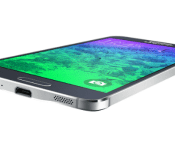
Download Samsung Galaxy Alpha’s official wallpapers

Samsung announced it’s premium built Galaxy Alpha smartphone recently. The device is pretty much what lots and lots of leaks have been pointing at. Plastic (or polycarbonate if you will) built with a metal trim around the device sporing a 4.7″ 720p Super AMOLED display, 2GB of RAM and a 12MP rear-facing shooter. On the… Read more »
The post Download Samsung Galaxy Alpha’s official wallpapers appeared first on AndroidGuys.
.CPlase_panel display:none;
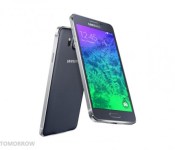
Samsung officially announces the Samsung Galaxy Alpha, the “evolution of Galaxy Design”
 Samsung is calling its latest smartphone, the Samsung Galaxy Alpha, an “evolution of Galaxy design”. Today, Samsung officially announces the Samsung Galaxy Alpha, looking every bit the phone we were expecting. Chief among the departures from the design of the Galaxy S5, and arguably the biggest “evolution”, is the inclusion of a metal frame on the Galaxy Alpha. Samsung has also made sure to make the Galaxy Alpha extremely thin, coming in at a very impressive 6.7mm thickness.
As expected, the Galaxy Alpha will have a hardware specification that runs with either an unspecified octacore or quad core processor (likely to be the Snapdragon 801), with 2GB RAM, a 720p 4.7-inch display and a 1,860mAh battery. It will also be available with 32GB storage, but no microSD expansion slot, which definitely furthers the argument that the Galaxy Alpha is a direct competitor to the rumoured iPhone 6. The phone will be available in Charcoal Black, Dazzling White, Frosted Gold, Sleek Silver, and Scuba Blue, though availability will vary depending on your region; no word on what regions it will be available in yet.
What do you think about the Samsung Galaxy Alpha now that it is released? Let us know your thoughts in the comments below.
Source: Samsung Tomorrow
//<![CDATA[
ord = window.ord || Math.floor(Math.random()*1E16);
document.write('’);
//]]>
The post Samsung officially announces the Samsung Galaxy Alpha, the “evolution of Galaxy Design” appeared first on AndroidSPIN.
.CPlase_panel display:none;

Samsung ushers in new design language with Galaxy Alpha
Expected to launch at the beginning of September, the new desgin focuses on both beauty and functionality After months of rumors and speculation, the Samsung Galaxy Alpha has finally become official. Announced on Wednesday, the Android-powered smartphone ushers in a new design language that offers users a compact body with a metal frame. If you ask… Read more »
The post Samsung ushers in new design language with Galaxy Alpha appeared first on AndroidGuys.
.CPlase_panel display:none;
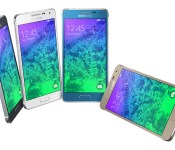
Samsung Galaxy Alpha gallery

Samsung on Wednsesday announced its latest smartphone, the Galaxy Alpha. Featuring a new “design language”, the handset boasts a metal frame and 6.7mm chassis.
The post Samsung Galaxy Alpha gallery appeared first on AndroidGuys.
.CPlase_panel display:none;
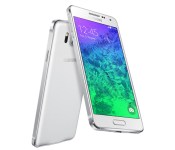
Samsung’s premium Galaxy Alpha packs a metal frame and octa-core chip

Samsung’s finally launched the much-leaked Galaxy Alpha, a fancier-looking but stripped-down version of the Galaxy S5. As expected, it sports a substantially different, less rounded design than the GS5, with metal sides that gives it a glancing resemblance to an iPhone 5s. The phone is also much lighter and thinner than the flagship at a mere 7mm. However, Samsung has also slimmed the specs a notch: The screen is 720p compared to full HD (or quad HD), while the CPU is an octa core model (quad 1.8GHz + quad 1.3GHz), rather than the flagship’s top-of-the-line Snapdragon 801. It also has a rather lackluster-sounding 1,860mAh battery, nearly 1,000mAh less than the GS5 — meaning you might really need the ultra-power saving mode. Other features include 4K video capture, S Health a fingerprint scanner, Gear wearable connectivity, and the usual array of Google apps. There’s no pricing yet, but it’ll arrive in September in black, white, gold, silver and blue colors, depending on the market.
Filed under: Cellphones, Mobile, Samsung
Source: Samsung
.CPlase_panel display:none;

