


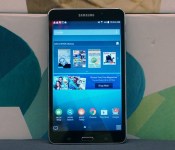
Samsung Galaxy Tab 4 Nook review: good for reading, but hardly the best budget tablet

There was a time when Barnes & Noble was so big, so dominating, that even Tom Hanks managed to look like a jerk when he played a book-chain executive. But times have changed, and as people began to order their books online — or even download them — B&N found itself struggling to keep up. After losing a lot of money last year, the company decided it was time for a change: It vowed to stop making its own tablets, and instead team up with some third-party company to better take on Amazon and its Kindle Fire line. Turns out, that third party was none other than Samsung, and the fruits of their partnership, the $179 Galaxy Tab 4 Nook, is basically a repackaged version of the existing Galaxy Tab 4 7.0. Well, almost, anyway. The 7-inch slate comes pre-loaded with $200 worth of free content, and the core Nook app has been redesigned to the point that it actually offers a better reading experience than the regular Nook Android app. But is that a good enough reason to buy this instead of a Kindle Fire? Or any other Android tablet, for that matter?
Hardware

As you’ve already gathered, this is the same hardware you’ll find on the 7-inch Galaxy Tab 4, which came out four months ago. Since we never got around to reviewing that, though, I’ll do a thorough walk-through here as if it were a brand-new device. What’s funny is that depending on how you look at it, you actually have seen this tablet before: The Nook (available in black and white) has the same textured plastic backing as other recent Samsung devices. As I’ve said about other products, like the Chromebook 2, the leathery plastic and chrome accents go a long way in making an otherwise generic device look more expensive than it is. As a bonus, the textured plastic doesn’t pick up fingerprints, and it’s pretty scratch-resistant, too. During my testing, I routinely tossed the tablet in a bag with pointy items like pens and keys, and it never emerged worse for wear.
The Galaxy Tab 4 Nook is a 7-inch device, so of course it’s small, lightweight and easy to hold. At 0.35 inch thick, it’s a little chubby compared to other small-screen slates, like the 8-inch Galaxy Tab S. Even so, it weighs just 0.6 pound, so let’s not nitpick to the point where we’re calling this thing “heavy.” It’s not. And besides, you might even find that those wide, flat edges make the tablet easier to hold.

For a budget device, the screen is actually quite lovely. Sure, the 1,280 x 800 resolution translates to a not-so-great pixel density of 216 ppi, but then again, what more did you expect on a $179 tablet? For the money, you get a bright panel with good viewing angles that’s well-suited for reading and movie-watching. Even at half-brightness, I had no problems using it on a long rail trip, with daylight streaming in through the window next to me.
Flip the device around and you’ll find the usual spate of ports: a headphone jack up top, a micro-USB charging socket on the bottom, a speaker and 3-megapixel camera around back and a 1.3MP one up front. The right edge, meanwhile, is home to a volume rocker, power button and IR blaster — a fairly uncommon feature on a budget tablet. Nearby, you’ll also find a microSD slot supporting cards up to 32GB. It’s a shame that’s not a microSDXC slot, capable of holding higher-capacity cards — you’ll need every last bit of storage space to augment the device’s skimpy 8GB of built-in memory, only 2GB of which is user-accessible.
Software

The way Samsung and Barnes & Noble pitched the device, this is Samsung hardware mixed with B&N’s Nook software. That’s a little misleading: This is a Samsung tablet, with Samsung’s user interface, but with some Nook apps sprinkled in, too. What we have here is the same TouchWiz experience — everything from the icons to the onscreen keyboard to the settings menu is the same as on other Samsung tablets. Likewise, there’s Samsung’s signature Multi Window feature, allowing you to view two apps side by side. It even has Google Play access, so you can download all the apps you’d install on any other Android device — yes, including Amazon Kindle. What’s nice, though, is that unlike other Samsung tablets, this one doesn’t include Sammy’s intrusive My Magazine — big panels that sit to the left of the home screen and can’t be removed. I don’t really like the Galaxy Tab 4 Nook, as you’ll see, but I do wish other Samsung products had this scaled-back UI.
Other than that, the biggest difference is that Sammy pre-loaded the Nook tablet with some key Barnes & Noble applications, including Nook Apps, Nook Library, Nook Search, Nook Settings, Nook Shop, Nook Today (a personalized recommendation engine) and Nook Highlights (useful if you choose to underline stuff as you’re reading). You’ll also find (removable) widgets for your library and the Nook Store — in fact, both were waiting for me on the home screen when I booted up the device.
Additionally, Samsung and Barnes & Noble tossed in some free content — a motley collection of books, magazines, movies and TV shows said to be worth $200. There’s something for everyone here; the flip side is that much of it will probably register as junk. On your bookshelf, To Kill a Mockingbird sits alongside a Danielle Steel romance and the kid’s title Pete the Cat. For film and TV, there’s the pilot episode of Veep, among other shows, as well as The Lego Movie. (Fortunately, the Nook has a parental control feature allowing for different user profiles.) If it’s magazines you’re after, you have a choice of three: Us Weekly, National Geographic and Sports Illustrated. Finally, you’ll get $5 in Nook Store credit. It’s a nice gesture, but it won’t go far: Five bucks isn’t enough to buy most e-books in B&N’s catalog. Again, I’m sure the two companies meant well, but if it were a choice between extra content and a tablet with faster performance and longer battery life, I’d choose the latter in a heartbeat.
What’s surprised me is that this is not a copy-and-paste of the regular Nook for Android app. Whereas the Nook application on my Moto X combines the library, search and store functions into one place, the Galaxy Tab 4 Nook contains different apps for all those things. Whichever you use, the core functionality is the same: In addition to reading content, you can access the store, highlight passages and rate/review stuff. But here, the icons are different, and you don’t always have to drill as far into menus to get what you want (see: font options, search, table of contents). Highlighting text is also easier in the Samsung app than the regular Android one. If anything, the UI feels more similar to Barnes & Noble’s e-ink e-readers, which is funny because that would seem to be an entirely different class of product. Certainly, this is a more pleasant Nook experience than what you’d get on other Android devices. Something to keep in mind if you’re already a loyal Barnes & Noble customer.
Beside the various Nook apps, Samsung installed a few other third-party programs as well, including Dropbox, Hancom Office 2014, Netflix, OfficeSuite 7 (the more robust of the two office programs here) and the game Rayman Jungle Run. You’ll also find a shortcut to Samsung’s own curated app store — you know, should Google Play not be enough. Obviously, this is a bit of a mixed bag, but to each his own. You can at least uninstall anything that doesn’t suit you.
Performance and battery life
| Samsung Galaxy Tab 4 Nook | ASUS MeMO Pad 7 and 8 ** | Nexus 7 (2013) | Samsung Galaxy Tab S *** | Amazon Kindle Fire HDX (7-inch) | |
|---|---|---|---|---|---|
| Quadrant 2.0 | 4,224 | 19,495 | 6,133 | 18,591 | 19,655 |
| Vellamo 2.0 | 1,058 | 1,933 | 1,597 | 1,672 | N/A |
| SunSpider 1.0.2 (ms)* | 1,636 | 607 | 602 | 1,109 | 554 |
| 3DMark IS Unlimited | 2,659 | 14,171 | N/A | 12,431 | N/A |
| CF-Bench | 11,474 | 22,284 | 15,366 | 31,695 | N/A |
|
*SunSpider: Lower scores are better. **Average score for the 7- and 8-inch models. ***Average score for the 8.4- and 10.5-inch models. |
|||||
I only saw the Galaxy Tab 4 Nook for the first time last week, but already I’ve heard Barnes & Noble reps say several times that the tablet is built for reading. To some extent, they’re just stating the obvious: Samsung and Barnes & Noble built a tablet together, and it’s supposed to offer a great reading experience, because that’s what B&N is good at. Duh. But I also suspect the two companies have been trying to keep our expectations in check. Even for a budget tablet, this thing is kinda slow, and I think Samsung and Barnes & Noble both know it. Under the hood, it has the same internals as the regular Galaxy Tab 4 7.0 — a 1.2GHz quad-core Marvell PXA 1088 processor and 1.5GB of RAM, a combination that sorely trails the competition in benchmark tests. The results were so bad, in fact, that I thought at first the numbers might be flukes. Indeed, I ran the tests many, many times, and the results were always far below other tablets, even the similarly priced ASUS MeMO Pad 7, last year’s Nexus 7 and the 7-inch Amazon Fire HDX.
That sluggishness rears its head in real-word use, too. The accelerometer was often slow to catch up as I flipped the device from portrait to landscape mode and back. Web browsing is smooth enough, though the benchmarks suggest you’d have an even snappier experience on competing devices. Cold-booting the device takes a long 24 seconds, forcing you to wait through animated splash screens for both Samsung and Nook. Multi Window mode works, but it can take a second or two for a new app to load if you decide to replace one of the two panes. Even the Nook library — the app that matters most — was often slow to load up my bookshelf. Like other Samsung devices, the Nook was initially slow to minimize apps when I pressed the home button. Luckily, there’s a solution, and it actually has to do with S Voice, of all things: Just go into S Voice settings and uncheck the box “open via the home key.” That way, when you press the home button, the device won’t wait to see if you’ll do a double-press to launch the voice assistant. With that issue, at least, I was able to improve the performance.
The problem, too, is that for the folks buying this, the Galaxy Tab 4 Nook isn’t just for reading. If it were, they’d get a standalone e-reader and call it a day. But if you’re going to get an Android tablet, particularly one with multi-window support and access to the Google Play store, you probably want to do more than just read e-books. You want to download apps. Stream movies. Browse the web. Maybe play the occasional game. The Galaxy Tab 4 Nook can do most of that, but not always smoothly. Another device — even a competing budget tablet — will probably feel faster.
| Tablet | Battery Life |
|---|---|
| Samsung Galaxy Tab 4 Nook | 7:34 |
| Microsoft Surface 2 | 14:22 (LTE) |
| Apple iPad Air | 13:45 (LTE) |
| Samsung Galaxy Tab S (10-inch) | 12:30 |
| Samsung Galaxy Tab S (8-inch) | 12:22 |
| Apple iPad mini with Retina display | 11:55 (LTE) |
| Amazon Kindle Fire HDX (7-inch) | 10:41 (WiFi) |
| Nexus 7 (2012) | 9:49 |
| ASUS MeMO Pad 8 | 9:21 |
| Kindle Fire HD (8.9-inch) | 9:01 |
| ASUS MeMO Pad 7 | 8:36 |
| NVIDIA Shield tablet | 8:23 |
| Sony Xperia Z2 Tablet (2012) | 7:57 |
| Nexus 7 (2013) | 7:15 |
Samsung says the Galaxy Tab 4 Nook’s battery can last up to 10 hours. With light usage, that might well be true. But in our (admittedly taxing) video rundown test, the battery died out a few hours sooner. All in all, the tablet was able to last through about seven and a half hours of looping a 1080p video at fixed brightness, with social networks periodically refreshing in the background. Again, your mileage will vary, but it’s worth noting that other devices can do better. ASUS’ MeMO Pad 7 also got about an hour more than the Nook. Meanwhile, the 7-inch Amazon Kindle Fire HDX managed nearly 11 hours in the same grueling test. Even the 2013 Nexus 7 gets about the same runtime as the Galaxy Tab 4 Nook — and the performance is slightly better, too.
The competition

When the original Nook Tablet came out, it was easy to forgive some of its shortcomings, just because the price was fairly low. At the time, $249 was cheap for an Android tablet, especially when flagships routinely sold for $500 and up. This is a different time, though, and while $170 isn’t bad for this new Nook device, it also faces stiffer competition. The ASUS MeMO Pad 7, for instance, has a lower price of $150, complete with an IPS display, double the internal storage, longer battery life, a microSDXC slot supporting higher-capacity cards and a quad-core processor that creams the Galaxy Tab 4 Nook in benchmarks.
Meanwhile, Dell sells the $160 Venue 7, which has a 1,280 x 800 IPS screen and a higher-resolution 5MP rear camera. (I haven’t tested that, so I can’t vouch for the performance.) Finally, it comes with 16GB of storage, and can accommodate memory cards as large as 64GB. It goes without saying, too, that any Android tablet is capable of running the standard Nook app. So far as I can tell, then, the one thing the Galaxy Tab 4 Nook has going for it is Multi Window support, but what good is that if the processor is too weak to handle it?
If you’re willing to spend more, the 7-inch Amazon Kindle Fire HDX starts at $229 with 16GB of storage ($244 without ads on the lock screen). For the money, almost everything is better: The battery life is several hours longer, and the performance is stronger, thanks to a fairly up-to-date Snapdragon 800 processor and 2GB of RAM. The screen is sharper too, with 1,920 x 1,200 resolution and a tight pixel density of 323 ppi. You won’t get Google Play access, unfortunately, but Amazon’s own app store has grown steadily over the years, and its digital content selection is just as diverse as Barnes & Noble’s.
Amazon even basically matches B&N on technical support: Whereas Barnes & Noble offers lifetime in-store service for its Nook tablets, Amazon’s built-in “Mayday” feature lets you access live help anytime. Other than the fact that Amazon’s tablet costs $50 more, it’s hard to say why you’d get the Galaxy Tab 4 Nook instead. Because even if having access to Google Play is important to you, you’d still be better off with last year’s Nexus 7. It costs $229, just like the Kindle Fire HDX, and it too has a 1,920 x 1,200 screen. The performance won’t be quite as brisk as the HDX, but it should still be snappier than the new Nook tablet. The battery life is similar to the Nook as well, so you’re not giving up anything in the way of endurance.
Wrap-up

This should come as a shock to no one, but the Galaxy Tab 4 Nook is only a good idea if you’re already a loyal Barnes & Noble customer. Setting aside the fact that it comes with free content (a gimmick, if you ask me), this tablet is appealing because it offers a better reading experience than even the regular Nook for Android app. Until Barnes & Noble redesigns its standard Android application, this is the best Nook experience you’re going to get, short of buying one of B&N’s standalone, e-ink e-readers.
Even then, that’s a stretch: It’s not like the regular Nook app is so bad that you shouldn’t consider other Android tablets. If you’re not even a Nook customer, then there’s definitely no reason to buy this. Sure, the design is nice, and the screen is bright, but the battery life is short compared to competing devices, and the performance is slower. Adding insult to injury, you get less built-in storage for apps, books, photos and music, and the microSD slot doesn’t accept cards larger than 32GB. For people who just want a budget Android tab, and don’t care where they buy their books, you can do better, even for $179.
Filed under: Tablets, Mobile, Samsung
.CPlase_panel display:none;

Amazon will stream in 4K starting this October

Earlier this year, Amazon said that its 2014 original series lineup would be shot and eventually streamed in 4K to Samsung UltraHD TVs, and now we know when — sometime this October. It was Samsung that actually revealed the date, revealing it would support Amazon’s Prime Instant Video UHD streaming on most Samsung 4K TVs. There’s no word if Amazon’s 4K service will hit other manufacturer’s UltraHD models, but Samsung noted it has also expanded 4K content in Europe to Netflix, Wuaki.tv, Chili and Maxdome. Like Sony, Samsung has other plans to make sure you’re not wasting all those pixels, as well. It recently did a live 4K stream of a Placido Domingo opera in Europe and released a 500GB drive with 40 recent 4K movies and documentaries.
Filed under: Home Entertainment, HD, Samsung, Amazon
Source: Samsung
.CPlase_panel display:none;
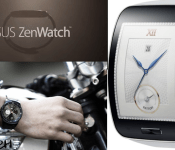
Smartwatch Mania with ASUS, LG, and Samsung! – ManDroid Daily

Welcome to Smartwatch Mania! Wow. Passed couple hours have been very intersting indeed, folks. ASUS, LG, and Samsung all teased new smartwatches today that will be officially unveiled at IFA. Not bad designs for these smartwatches. I kind of dig LG’s new design with that circular face. Let us know which watch will be landing on your wrist, or will you still go with the Moto 360. Enjoy the Daily!
Android News
ASUS ZenWatch
LG G-Watch R
Samsung Gear S
Import G+ videos to YouTube
//<![CDATA[
ord = window.ord || Math.floor(Math.random()*1E16);
document.write('‘);
//]]>
The post Smartwatch Mania with ASUS, LG, and Samsung! – ManDroid Daily appeared first on AndroidSPIN.
.CPlase_panel display:none;
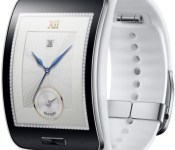
Who needs phones? The Samsung Gear S can make calls, has 3G modem
 Previously we suspected that Samsung‘s latest wearable device would be called the Samsung Gear Solo and would be able to be used as a standalone devices to make calls. That wasn’t far from the truth as Samsung has officially detailed the new device, called the Samsung Gear S (oh, so close!), which is able to make calls and also has mobile data capability thanks to a 3G modem. It is powered by a dual-core 1GHz processor which is behind a curved, 2-inch AMOLED display. And all the above is going to be running on a 300mAh battery.
Considering that LG’s (sort of) announced LG G Watch R runs on a 410mAh battery without a 3G modem, we can’t imagine the Gear S is going to last terribly long. Having said that, Samsung does say typical use will get you 2 days battery life and it is running the Tizen operating system instead of Android Wear. Whether that will save the Gear S a massive amount of battery life remains to be seen.
Samsung says the Gear S will start becoming available in October this year but hasn’t yet specified prices.
What do you think about the Samsung Gear S? Let us know your thoughts in the comments.
//<![CDATA[
ord = window.ord || Math.floor(Math.random()*1E16);
document.write('‘);
//]]>
The post Who needs phones? The Samsung Gear S can make calls, has 3G modem appeared first on AndroidSPIN.
.CPlase_panel display:none;
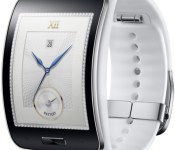
Samsung’s Gear S smartwatch doesn’t need a phone to get online or make calls

Samsung is taking the wraps off of yet another new smartwatch, but the Gear S (not Solo) has a twist: there’s a 3G modem inside. While it may not be especially fast, that means that even when it’s outside of the range of a Bluetooth-connected phone or WiFi, it can still send and receive messages or make calls. It has a 2-inch AMOLED screen plus a dual-core 1GHz CPU inside along with GPS, heart rate and motion sensors, all powered by a 300mAh battery Samsung says can last up to two days. It runs Tizen instead of Android Wear, with pedestrian navigation available from from Nokia’s HERE and support for Facebook. In the run up to IFA next week Samsung is also bringing the Gear Circle headset (yes, we also figured they’d save that name for a round watch) that pairs with a phone over Bluetooth, letting users hear notifications, use voice commands or listen to music through the earbuds.

Both devices will go on sale in October, although there’s no word on a price for either. The Gear S is outfitted for all kinds of fitness tracking, either through Samsung’s S Health or Nike+ Running, it’s IP67 dust and water resistant, packs 4GB of storage and 512MB RAM. The Gear Circle has a magnetic clasp so it fits around your neck while not in use, a touch sensor and battery with up to 11 hours of talk time. So will either of these wearables break into our gear bag or wardrobe? We’ll have a better idea next week after getting our wrists/necks on them during the IFA 2014 show in Berlin.
Filed under: Wearables, Mobile, Samsung
Source: Samsung
.CPlase_panel display:none;

Get an early Samsung Galaxy Note 4 Quad HD wallpaper here now
 I won’t mince words: the Samsung Galaxy Note 4 is one of the most anticipated devices of 2014. While its size as a phablet isn’t the most appealing for some, it’s undeniable that it will be Samsung‘s stand-out flagship device to round out 2014, as it has been in the past. It will also be Samsung’s first device to incorporate a Quad HD display, what is also affectionately known as 2K resolution. Naturally, this means huge, beautiful wallpapers, of which one has already been released in the wild, thanks to SamMobile. We’d embed it on our site, but at 16.1MB, it exceeds the maximum file size for images, so if you want to check it out, you can download the full resolution Samsung Galaxy Note 4 Quad HD wallpaper at the link below:
Samsung Galaxy Note 4 Quad HD wallpaper
The wallpaper is more than sufficient for most desktops, let alone a mobile device. The Note 4 is expected to have a Snapdragon 805 processor clocked at 2.7GHz and a 5.7-inch Quad HD display. Rumours about it’s shape and form factor appear to be inconclusive, but Samsung has scheduled its UNPACKED event for September 3rd at IFA 2014, so we won’t have long to wait before we get to see what Samsung has in store.
Source: SamMobile via Droid-life
//<![CDATA[
ord = window.ord || Math.floor(Math.random()*1E16);
document.write('‘);
//]]>
The post Get an early Samsung Galaxy Note 4 Quad HD wallpaper here now appeared first on AndroidSPIN.
.CPlase_panel display:none;
The Galaxy Alpha was just the start; Samsung to launch A series devices soon
 If you like the direction that Samsung took with the Galaxy Alpha, you may be glad to hear that it won’t be the last time Samsung uses that design philosophy. According to SamMobile, Samsung is looking to launch a new line of devices called the A series, of which the Galaxy Alpha was the first, and three more devices are expected to be announced in coming weeks. These devices are expected to carry the model numbers SM-A300, SM-A500 and SM-A700, with the three spanning three different price points. The A300 is going to be the most basic model with a 960×540 display, whereas the other two devices will have a higher spec HD display.
According to the report, these devices will all incorporate metal in their frame, like the Galaxy Alpha, and will have better quality front facing camera than usual (possibly 3.7MP). These devices are set to be launched in Q3, however it’s not clear if they will make a showing at IFA next month. Whether this A series will take some of Samsung’s attention away from its main Galaxy S line remains to be seen, but it seems Samsung is committed to delivering new devices with this new design.
What do you think about Samsung continuing with more Galaxy Alpha devices in the A series? Let us know your thoughts in the comments.
Source: SamMobile
//<![CDATA[
ord = window.ord || Math.floor(Math.random()*1E16);
document.write('‘);
//]]>
The post The Galaxy Alpha was just the start; Samsung to launch A series devices soon appeared first on AndroidSPIN.
.CPlase_panel display:none;

Huawei boss says Tizen has ‘no chance’ of success

Fans of mobile operating systems not called “Android” or ‘iOS” might be sad to hear what Huawei’s head honcho just told the Wall Street Journal. In an interview, Richard Yu spoke about the company’s plans regarding Tizen, Windows Phone and a long-rumored homegrown OS, and basically said they were all doomed.
According to the executive, unnamed mobile networks had asked Huawei to make Tizen smartphones, but Yu feels that the platform has “no chance to be successful.” It’s a bit of a u-turn, since the company has previously had a research unit looking into the Samsung-made software, but Yu said that he shut it down.
On the subject of Windows Phone, Yu conceded that Huawei had spent two years losing money on its W series handsets, saying “it has been difficult to persuade customers to buy a Windows phone.” That’s why, at least for now, a follow-up to the promising, yet flawed W1 and W2 is off the table.
That leaves the company with Android as the only thing its handsets can run, and when asked about this potential over-reliance on Google, Yu admitted that he’s concerned, but has “no choice.” On the upside, he did emphasize that he has a “good collaboration” with the search engine, before swiftly moving on to other matters, like writing off any plans for a homegrown operating system of its own. In his own words, Yu feels that “it’s easy to design a new OS, but the problem is building the ecosystem around it.”
Filed under: Cellphones, Software, Mobile, Samsung, Microsoft, Google
Source: Wall Street Journal
.CPlase_panel display:none;
Samsung Teases Galaxy Note 4 in New Video

IFA 2014 is almost here, so Samsung wanted to remind us that the Galaxy Note 4 will be showing it’s big, pretty face at the event. The video below pays a little homage to the craft that human beings has performed in history, which then have led to some innovations to help the every day man. The S-Pen is the main focus in this teaser video which is being referred to as “a truly notable invention”.
So are ready to Note? IFA is right around the corner, so you Galaxy Note fans are probably ready. Let us know what you think about the video of the Galaxy Note 4.
//<![CDATA[
ord = window.ord || Math.floor(Math.random()*1E16);
document.write('‘);
//]]>
The post Samsung Teases Galaxy Note 4 in New Video appeared first on AndroidSPIN.
.CPlase_panel display:none;

Wearable device shipments have soared in the past year

In case you had any doubts that wearable devices were catching on, Canalys just delivered some tangible proof. The analyst group estimates that the tech industry shipped roughly 4.5 million smartwatches and fitness trackers in the first half of 2014, or nearly 700 percent more than it managed a year earlier. Not surprisingly, most of the watches were Samsung devices — the Korean company’s rapid-fire Gear watch releases made it almost ubiquitous. Pebble and Sony also did well in this fledgling space. Fitbit and Jawbone, meanwhile, moved many of the simpler wristbands.
Having said this, wearables are still far from hitting the mainstream. Mobile device makers shipped over 300 million smartphones in the second quarter of the year alone; smart wristwear ultimately represents a drop in the bucket. And that’s also assuming that it’s selling well. Samsung’s quick reinvention of the Gear line was an admission that it didn’t have many fans early on. Shipments may be up across the board, but it’s possible that some of the companies involved are struggling. All the same, interest isn’t likely to cool down any time soon — between the arrival of Android Wear and rumors of watches from Apple and Microsoft, the category may just be getting started.
Filed under: Wearables, Samsung, Google
Source: Canalys
.CPlase_panel display:none;

