



Sprint to carry the Samsung Galaxy Note 4, Note Edge and Gear VR
Looks like Sprint really wants to make a name for themselves today. Not long after the new device announcements from Samsung, they put out their own press release alerting us that they will not only carry the Galaxy Note 4, but also the Note Edge and the Gear VR.
Sprint’s announcement states that they will be the only US carrier to offer the trio of devices. The Galaxy note 4 and Note 4 Edge will pack the Sprint Spark high-speed data ability and I am sure it will carry along Wi-Fi calling and free International Wi-Fi calling too.

“Samsung Galaxy Note 4 and Samsung Galaxy Note Edge powered by Sprint Spark and Samsung Gear VR continue our tradition of working with Samsung to innovate and bring our customers advanced features they appreciate. We make it easier than ever to choose Sprint for Galaxy Note 4 and Galaxy Note Edge with the Sprint Family Share Pack boasting the best deal on shared data. Or enjoy all of the robust features of Galaxy Note 4 and Galaxy Note Edge without hesitation if you choose the Sprint $60 Unlimited Plan offering unlimited talk, text and data on America’s newest network at one low price without surprising overage charges. Galaxy Note 4 and Galaxy Note Edge with the benefit of Sprint Spark and the value of our rate plans is a no-brainer decision for anyone looking for an innovative device at the right price.”
Pricing and specific launch dates hven’t been made available yet. Sprint does have a pre-register page set up with October listed. We already heard the Note 4 would launch in October, so that isn’t all that new. I don’t know is the Note 4 Edge and Gear VR will make an appearance at the same time or not though. I would suspect at the very least that the Gear VR would since it needs to be paired up with the Note 4. Having both available at launch time would make for an interesting packaged deal.
Source: Sprint
//<![CDATA[
ord = window.ord || Math.floor(Math.random()*1E16);
document.write('‘);
//]]>
The post Sprint to carry the Samsung Galaxy Note 4, Note Edge and Gear VR appeared first on AndroidSPIN.
.CPlase_panel display:none;
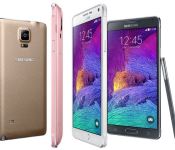
Samsung Galaxy Note 4 and Note 4 Edge officially announced, launching this Fall
Samsung has taken the wraps of their new line up for the Note line. Offering not just one, but two Note 4 devices. You have the more traditional Note 4 and a spin off Note 4 Edge device. For the most part both devices are the same, with the exception of a few minor details. First though, let’s tell you what the new Samsung Galaxy Note 4 is packing.
Samsung Galaxy Note 4 Specs:
- 5.7-inch 2560×1440 Quad HD Super AMOLED display
- 2.7 GHz Quad-Core processor or a 1.9GHz Octa-Core processor depending on your region
- 3GB of RAM
- 32GB internal storage
- Micro SD card slot
- 16MP rear camera
- 3.7MP front camera
- 3,220 mAh battery
- Dimensions: 153.5 x 78.6 x 8.5mm
- Weight: 176g

The new Galaxy Note 4 will be offered in Charcoal Black, Frost White, Bronze Gold and Blossom Pink in global markets starting in October. You will notice the Note 4 has a bit more of the Galaxy Alpha design paired up with faux leather backing. They even were kind enough to toss in the Heart Rate monitor from the Galaxy S5 in for good measure. It also includes a revamped S-Pen and accompanying software that gives it a more fluid and natural feel. The S-Pen also introduces a more user friendly Air Command functionality with features like Action Memo, Screen Write, Image Clip and Smart Select. It also includes a new fast charge capability that is said to be able to charge the device from 0% to 50% in just 30 minutes.
Moving along to the other variant that Samsung announced today we see the Galaxy Note 4 Edge. Like the name might lead you to believe, there is a screen on the edge of the device. This was previously rumored to be coming and we are intrigued to see it, and also glad to see that it is a variant and not the only model option.

You can see the design is pretty much the same as the Note 4, with the exception of that small 160 pixel curved screen aspect on the side. The internal battery on this guy had to be shrunk slightly and comes in at 3,000 mAh. The side screen acts as a notification ticker, quick access to most used apps and various bits of device functionality. Samsung is quick to point out that a user can do a quick swipe to read notifications while not interrupting a movie on the screen or flipping the front cover of the folio open.
The Note 4 Edge specs:
- 5.7-inch 2560×1440 Quad HD Super AMOLED display + 160 pixel side ticker
- 2.7 GHz Quad-Core processor or a 1.9GHz Octa-Core processor depending on your region
- 3GB of RAM
- 32GB/64GB internal storage
- Micro SD card slot
- 16MP rear camera
- 3.7MP front camera
- 3,000 mAh battery
- Dimensions: 151.3 x 82.4 x 8.3mm
- Weight: 174g
It does look pretty weird and I am not sure how useful it will be. Not being in Berlin to handle it myself makes it a little tricky to form any opinion beyond it looking odd. The Samsung Galaxy Note Edge will be launched in Charcoal Black and Frost White in select markets, Samsung’s retail channels, e-commerce and carriers later this year.
As for the more traditional Note 4, we do know that AT&T, T-Mobile, Sprint and US Cellular will be offering the device. We also know that Sprint will also carry the Galaxy Note Edge as well. No pricing or specific dates were mentioned yet.
What are your thoughts about the new Note line from Samsung? Is the Note 4 everything you hoped it would be with the metal frame, rocking screen and killer hardware, or are you finding yourself oddly drawn to the Note 4 Edge with the curved notification display?
More info from Samsung – Note 4 | Note 4 Edge
//<![CDATA[
ord = window.ord || Math.floor(Math.random()*1E16);
document.write('‘);
//]]>
The post Samsung Galaxy Note 4 and Note 4 Edge officially announced, launching this Fall appeared first on AndroidSPIN.
.CPlase_panel display:none;
Samsung partners with Mont Blanc on a chic Galaxy Note 4 stylus

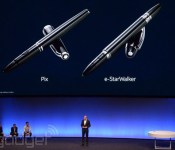
At IFA 2014 Unpacked, Samsung has announced that it’s partnering with venerable pen-maker Mont Blanc on two custom styluses for its new Galaxy Note 4. The “Pix” and the “e-Starwalker” are done in the pen maker’s classic style for any Note smartphone or tablet user. The company calls it a “digital writing” device, a clear sign they’re targeting those for whom a flimsy plastic pen just won’t do. The company also revealed two flip covers for the Note 4, the “Extreme” in a threaded fabric that mirrors Samsung’s Galaxy S5 “band-aid” design, and the “Soft Grain” with a classic leather look. There’s no word yet on availability or cost, but we don’t imagine that a digital writing device comes cheap.

Filed under: Cellphones, Peripherals, Mobile, Samsung
.CPlase_panel display:none;
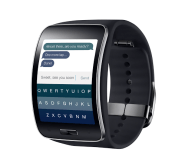
The Samsung Gear S makes Fleksy its day-one integrated keyboard
 Fleksy is one of the more recognizable names when it comes to third-party keyboard apps and it’s about to get a little more recognizable. Fleksy has announced a new partnership with Samsung which will see the new Samsung Gear S smartwatch make Fleksy its only fully-integrated keyboard at launch and is going to be free for all Gear S owners. This makes a lot of sense for the Gear S seeing as it will be a standalone device able to make calls and access mobile data, and having Fleksy there will make it all the more simple to type commands on the Gear S’s curved display.
Of their partnership with Samsung, Fleksy founder Ioannis Verdelis had this to say: “We are delighted to announce our first OEM partnership today, and we are excited to be part of the Samsung ecosystem… This is a big milestone for Fleksy, and we plan to solidify our position as the leading typing technology for smart devices over the coming months.”
Fleksy is already available as an option on the Gear 2 and Gear 2 Neo with their messaging app, so this new move seems like the next logical step in their relationship with the Korean tech giant.
Press Release
Fleksy partners with Samsung to bring its keyboard to Samsung Gear S
First OEM partnership for Fleksy keyboard
SAN FRANCISCO — September 03, 2014 — Fleksy, the fastest keyboard in the world, announced a partnership with Samsung today to bring its keyboard to the newly launched Samsung Gear S smartwatch.
The partnership makes Fleksy the only fully integrated third-party keyboard on Gear S on launch day, allowing users to type in every app right from their wrist. Through the partnership, Fleksy will be available for free for all Gear S users.
“We are delighted to announce our first OEM partnership today, and we are excited to be part of the Samsung ecosystem” said Ioannis Verdelis, Founder and CEO of Fleksy. “This is a big milestone for Fleksy, and we plan to solidify our position as the leading typing technology for smart devices over the coming months”.
Fleksy confirmed it will also continue support for its Fleksy Messenger app, available for Samsung Gear 2 and Gear 2 Neo smartwatches, with a major update coming soon.
“With thousands of daily downloads of Fleksy Messenger, we are already publishing one of the Top 3 selling apps of the Gear ecosystem” said Kosta Eleftheriou, Founder and CEO of Fleksy. “We are very excited by the growth of the wearable tech market, and proud Fleksy has already established itself as the leader for typing on watches”.
Fleksy confirmed that it will be providing demonstrations of its keyboard on Samsung Gear S during the IFA trade show taking place in Berlin this week.
About Fleksy
Fleksy is a next-generation keyboard powered by patent-pending technology that makes typing on any device fast, accurate and so easy you can even type without looking. Fleksy recently broke the Guinness World Record for fastest typing on a touchscreen keyboard (May 2014).
Its unique language algorithm founded on Geometric Intelligence moves beyond text prediction and autocorrect, to give a much more accurate and easier typing experience than last-generation keyboards.
Winner of the prestigious “Golden Apple” award, Fleksy is the first keyboard to enable full-speed typing by blind iPhone users. Winner of the 2013 CES “Innovations Design and Engineering Award”, Fleksy is also the first keyboard app to be shipped on a SmartWatch, the first to arrive on iOS, the first to work on 3D gesture systems (Leap Motion) and the first app developer to integrate with the Samsung Gear 2.
Fleksy’s award-winning design and technology is backed by venture capital including Highland Capital Partners and Kleiner Perkins Caufield & Byers. To learn more about Fleksy, visit http://www.fleksy.com.
About Samsung Electronics Co., Ltd.
Samsung Electronics Co., Ltd. is a global leader in technology, opening new possibilities for people everywhere. Through relentless innovation and discovery, we are transforming the worlds of TVs, smartphones, tablets, PCs, cameras, home appliances, printers, LTE systems, medical devices, semiconductors and LED solutions. We employ 286,000 people across 80 countries with annual sales of US$216.7 billion. To discover more, please visit http://www.samsung.com.
//<![CDATA[
ord = window.ord || Math.floor(Math.random()*1E16);
document.write('‘);
//]]>
The post The Samsung Gear S makes Fleksy its day-one integrated keyboard appeared first on AndroidSPIN.
.CPlase_panel display:none;

Samsung’s announcing a bunch of new products today, get your liveblog here!

The headline says it all, really: Samsung is one of the biggest, if not the biggest, companies here at IFA, and it’s about to unveil some shiny new stuff. Join us at 9AM ET today as the tech giant holds its annual “Unpacked” event. Will we see a new Galaxy Note? Maybe that leaked virtual reality headset? Another smartwatch? We’ll be on the ground in Berlin, reporting live — and you can bet your Galaxy S5 that we’ll be getting hands-on afterward. Bookmark our liveblog, and meet us there in exactly one hour. Be there or be square.
Filed under: Misc, Mobile, Samsung
.CPlase_panel display:none;

Live from Samsung’s ‘Unpacked’ event at IFA 2014!

Samsung may have already announced a smartwatch that can make phone calls (and also one covered in Swarovski crystals), but that doesn’t mean it’s showing up to IFA empty-handed. The company is holding its annual “Unpacked” press event today, where it’ll almost certainly unveil a new Galaxy Note phone, like it has every year since 2011. Who knows? We may also see that forthcoming virtual reality headset we’ve been reading so much about. Something tells us, though, that you won’t be seeing another Samsung smartwatch so soon. We don’t think so, anyway.


.CPlase_panel display:none;
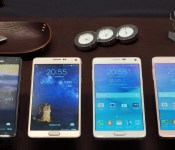
The Samsung Galaxy Note 4 looks and feels like a premium device (hands-on)
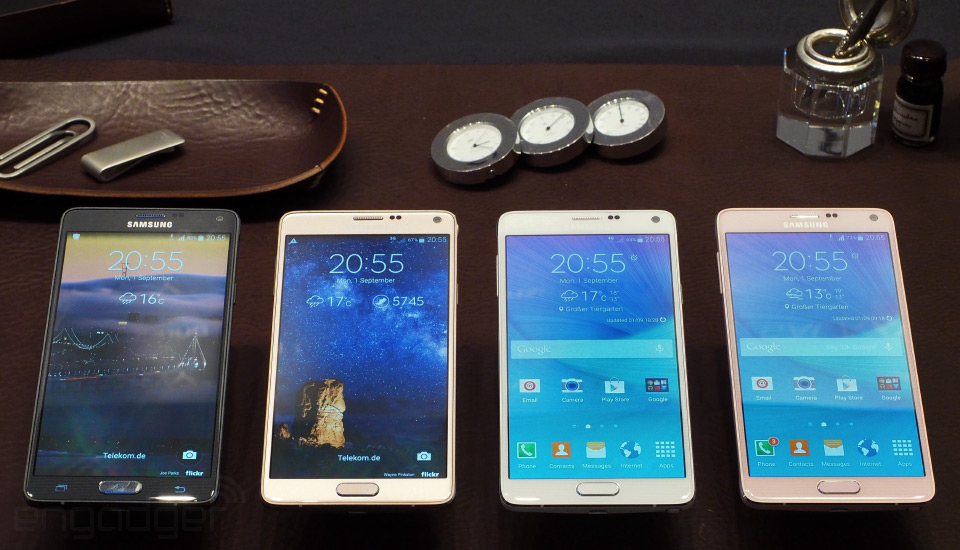
When Samsung launched the very first Galaxy Note at IFA 2011, the device — a 5.3-inch behemoth that came with a stylus – seemed absurdly large. But the idea was crazy enough to work: It was the beginning of a brand-new phone genre adopted by nearly every handset maker around the world and beloved by millions. Three years later, we’re being introduced to the fourth smartphone in the series, known as the Galaxy Note 4. As you might expect, the device comes with new and improved specs in both hardware and software, but the design of the 5.7-inch phone itself has made a huge step in the right direction: It comes with an aluminum frame, and based on my first impression, it’s the best looking of the bunch. It’s time to explore Samsung’s latest large-screened device.
When it comes to design language, Samsung likes to be consistent across most of the devices in its repertoire. Often, it’ll choose a specific style and use that in multiple devices over the course of several months (last year’s faux leather and skeuomorphic stitching; the “inspired by nature” design of two years ago) before changing its focus. Starting with the Galaxy Alpha and now continuing on with the Note 4, it appears that Samsung recently began a new and improved style that features aluminum sides, chamfered edges and the company’s signature “leather-like” back. Yes, the Note 4′s frame is made of actual, honest-to-goodness aluminum, not the usual faux-chrome plastic that’s supposed to look like it’s metal (but ends up appearing a bit cheap in the end). It’s something I’ve hounded Samsung about for years, and I’ll give the company credit for finally finding a way to make it work. The Note 4 looks — and feels — like an elegant, premium phone as a result.
I shouldn’t sing so much praise over just one aspect of the phone’s design. After all, it’s entirely possible to make a phone with metal sides look ugly and/or cheap, right? Fortunately, Samsung kept that in mind, because in my first impressions, it’s hard to find fault with any aspect of the Note 4′s hardware. The sides use chamfered edges to meet the front and back (similar to the iPhone 5s or HTC One M7); the removable back is still made of the same “leather-like” polycarbonate build as the last Note, but Samsung got rid of the distracting stitches that went around the perimeter of the phone. The glass is 2.5D, which means it’s not entirely flat — like many Nokia Lumias (and even the Galaxy S3), there’s a very subtle bend along the edges of the screen.

Compared to the previous model, the Note 4 uses the same screen size and is about as thin (8.3mm), but it’s 2.3mm taller, 0.6mm wider and eight grams heavier. It seems odd because the first two Note sequels were smaller than their predecessors, despite coming with a larger display. I don’t think Samsung needed to make the screen any larger this time, as it’s done in the past, but I would’ve preferred to see the chassis trimmed down, at least. That said, this additional width may simply be taking into account the fact that the sides bulge out slightly at the top and bottom, because I didn’t immediately feel any noticeable difference in comfort level.
Just as you’d expect in any incremental device in a given phone series, the new phone comes with plenty of improvements over the last. The Super AMOLED screen got a bump from 1080p resolution to Quad HD (2,560 x 1,440); the rear-facing camera is now 16MP (up from 13); and the battery gets a marginal increase from 3,200mAh to 3,220mAh. The Note 4 also marks the first time in a long time that Samsung has improved the front-facing camera: It’s blessed with a 3.7MP sensor and an aperture of f/1.9 for theoretically better low-light selfies. The Korean Note 4 will feature an octa-core Exynos 5433 chipset, which is split up into a 1.9GHz quad-core processor for bigger activities and a 1.3GHz quad-core for the menial tasks; everywhere else, the Note 4 will boast a 2.7GHz quad-core Snapdragon 805 with a 600MHz Adreno 420 GPU. Both versions will feature 3GB of RAM, the same amount as the Note 3. For internal memory, you can choose between 32 and 64GB, and you can add up to a 64GB microSD card (not 128GB, oddly). Lastly, just like the Galaxy S5, you’ll get a fingerprint scanner on the front and a heart rate monitor on the back underneath the camera and next to the flash; Samsung’s added a UV light sensor to the back as well.

If you recall, the Note 3 came with an unsightly USB 3.0 connector port, which Samsung added for the sake of faster data speeds. This year, the phone maker went back to USB 2.0; the product managers said that not many people were using the 3.0 port for data transfers, so they didn’t see the point in taking up room inside the phone for that purpose. The charger at least comes with fast-charging capability and the phone maker claims that the battery will charge 30 percent faster when you use the charger that comes in the box. I clarified with Samsung that it chose a proprietary solution instead of licensing Qualcomm’s QuickCharge tech, but it insisted that you could still use QuickCharge 2.0-compatible chargers to achieve the same results.

As I mentioned earlier, the front-facing camera is supposed to be better in low-light scenarios, thanks to its f/1.9 aperture, and Samsung has added a “Smart Optical Image Stabilization” feature to the rear camera to minimize shaking and allow more light in dark situations. It feels as though there’s more of a focus on the front cam, however, since so much attention is being put on the selfie experience; on the Note 4, it comes with a 90-degree shooting angle by default that can be extended to 120 degrees through a special “wide selfie” mode that takes three photos and stitches them together — just like a panorama shot. The Note also comes equipped with three mics to help with directional noise cancellation. This has been featured on other phones (some devices even have four mics, in fact), but Samsung has given the device the ability to automatically adjust the recording volume depending on how much noise is around you; the voice recorder also comes with the opportunity to tag and select up to eight directions you want to pick up voices from — if you only want to pick up the interviewer’s voice, for instance, you can do so.
The Note 4 uses Android 4.4 KitKat and keeps to the same overall UI as the Galaxy S5. But since this is a Note product, there are plenty of enhancements to the S Pen experience, both in hardware and software. First, Samsung has doubled the pen’s pressure sensitivity. It was already pretty good, but making it even more sensitive allows the pen to detect when you’re drawing and writing at an angle, so you can have the same experience as a regular pen. As a bonus, there’s also a new pen mode specifically for calligraphy that takes advantage of the extra sensitivity as well; Samsung reps were proud of the fact that all of the lines still look incredibly smooth when you zoom in on them.

As for software improvements, there are a few features worth pointing out. Snap Note is the most impressive: You can take a picture of any analog note (a regular notepad, signs, pieces of paper) and within a couple minutes, the Note 4 can convert it into digital, which means you can erase and edit that information to your heart’s content. There’s also a new Smart Select mode, which lets you select multiple images in a gallery with your pen, or multiple lines of text without having to long-press the screen and highlight it manually. Samsung’s added a new way to float apps and web pages by dragging your finger toward the center of the screen from the top-right corner; you can then resize the app, as well as minimize or maximize it. You can even convert it into a multi-window screen by dragging it to the top or bottom of the display.
Samsung says the Note 4 will be available starting in October and will come in four color options: white, black, gold and pink. Some of the colors, like black and gold, feature different color accents on the metal sides, which go well with the rest of the device. No price has been set yet, but this will largely depend on the region and carrier; I’d expect the price to remain about the same as last year’s Note. (The Note Edge, which I discuss here, will come out later in the fall and at a higher cost.) I’m excited to spend more time with the phone as we get closer to launch.
Zach Honig contributed to this report.
Filed under: Cellphones, Wireless, Mobile, Samsung
.CPlase_panel display:none;
The Galaxy Note Edge: Samsung’s first smartphone with a bent display

It’s been over a year and a half since Samsung briefly (and from a distance) showed off the Youm, a prototype of a smartphone with a curved display that wrapped around the right-hand side. While it seemed like a far-off reality at the time, Samsung announced today that the Youm’s spiritual successor — aptly named the Galaxy Note Edge — would be coming out this fall. Sure, mass-producing a phone with a bent screen is a tremendous display of manufacturing prowess, not to mention something to show off at parties, but is there more to this unique handset than eye candy?
The Galaxy Note Edge is, in almost every respect, a Note 4. Almost all of the hardware and software enhancements that I outline in my Note 4 preview are present and accounted for in the Edge. The primary difference, obviously, is the 5.6-inch Quad HD+ bent display (the “plus” in Quad HD+ refers to the 160 rows of extra pixels used on the side display), and any variance in hardware here is to account for the phone’s unique design: It’s 3.8mm wider and 2.2mm shorter than the Note 4, and comes with a smaller 3,000mAh battery. If your hands already experience fatigue with the Note 3 or similarly large phones, the Edge likely isn’t a good choice for you — not only because it’s so much wider (though that’s a significant factor), but also because the right side of the phone, where the screen meets the back, is actually quite sharp and an uncomfortable place to grip the phone. (Insert obvious “cutting edge” or “bleeding edge” joke here.)
There’s a special kind of beauty to the Note Edge that comes as a result of its brand-new form factor. Aside from a very brief encounter with the Youm prototype phone at CES 2013, we’ve never actually seen a device with a bent display. Despite the fact that it’s not as comfortable as the Note 4, Samsung did a great job of blending its counterpart’s design language with the form factor. It’s a very sleek-looking device, and I found it hard to stop staring at it — even when trying to play with some of Samsung’s other products. The phone maker will definitely be charging a premium for the Edge, but it will at least come with some serious bragging rights and a whole lot of people suddenly paying attention to you (or your phone, at least).

But the edge display isn’t just a pretty face. Since the whole point of the phone’s very existence is the screen, Samsung made sure to add enough functionality to put it to good use. In fact, it serves many different purposes, and once developers have access to the SDK (which Samsung says should come out very soon), there will be plenty more ways to take advantage of it. That is, as long as you’re a right-handed user. Since the display bends only on one side, it isn’t quite as convenient for left-handed users; Samsung believes this shouldn’t come as a deterrent because it’s easy enough to just flip the phone around and use it upside-down instead. This would be fine in theory, but it’s still a huge inconvenience if you plan on using the home button or making phone calls at all.
The UI of the bar is straightforward and basic, since there isn’t much you can do with a narrow strip of display space. Often, what’s shown here will depend on the app: If you’re in the camera or watching videos, this strip becomes a sidebar containing all of your shortcuts and settings so they don’t take up other valuable screen space or get in the way. However, you can still access a plethora of different types of bars, whether in or out of the app; notifications, weather info, stock tickers, clocks, news feeds, quick shortcuts and even games are available from nearly every screen. There’s only one game — a Simon-like memory game — available right now, but I’ll be interested to see what else developers can come up with. Swipe up on the bar to reveal a settings button that lets you manage which types of bars are displayed and in which order. If you swipe down on the bar instead, a toolbar pops up. Here you’ll find options like a timer, stopwatch, flashlight and a ruler (the latter is actually a really clever use case).

The settings menu is your key for adding your own customized stuff. You can take any image and crop out a narrow, 160-pixel strip; although I didn’t see much functional value in this, having the ability to show off pictures of the family or your pets can be a neat touch. However, as developers start adding the edge display SDK to their apps, I’ll be interested to see what kinds of stuff they come up with. I’d love to have to-do lists show up here, as well as incoming tweet mentions, Facebook messages and any custom notes, among other things. Basically, any type of viewable information could find a home here.
One of the handiest use cases for me is the night clock, which does exactly what it sounds like — a black-and-white digital clock will appear while the screen is dark. So whether you’re sleeping in bed and your phone is on the nightstand, or if you’re just at your desk and want to see the time, the bent display makes this a rather ideal option. It’s probably not enough to justify spending the extra money for a new phone, but it’s just one example of the flourishes Samsung has added to give the edge screen enough functional value, instead of being just another way for the company to show off its manufacturing talents.

I couldn’t help but feel as though this is a work in progress (and very much a niche product for now), but this shouldn’t come as a surprise because it’s the very first of its kind to hit the market. A year from now, provided there’s enough excitement and developer interest, it could be a very different story.
Zach Honig contributed to this post.
Filed under: Cellphones, Wireless, Mobile, Samsung
.CPlase_panel display:none;
Samsung Gear S preview: What’s it like to type emails on a 2-inch screen?

Six. That’s how many smartwatches Samsung has unveiled in the past 12 months. If these devices were Friends episodes, there’d be the original Galaxy Gear (“The one announced last year at this time”), the Gear 2 (“The one with fewer bugs”), the Gear Fit (“The one designed for fitness tracking”), the Gear 2 Neo (“The one that didn’t cost as much”) and the Gear Live (“The one that ran Android apps”). If nothing else, it shows that Samsung is willing to experiment — and maybe even listen to feedback from users, and reviewers like us. Now, as the original Gear turns one, Samsung is showing off its sixth watch, the Gear S: the one that can run without a smartphone. Thanks to its very own nano-SIM card, the Gear S can make calls, as well as show you emails in full, with the option to reply directly from the device using a tiny on-screen keyboard. To Samsung’s credit, it’s unlike any other device it’s made before. But the age-old question still remains: Was anybody asking for this?
In addition to being the first of the company’s watches that you can use without a smartphone, this is also Samsung’s biggest wearable to date. With a curved screen that measures two inches diagonally, it absolutely dwarfs my (admittedly dainty) wrists, as you can see in the above hands-on photos. Even so, some of my bigger-boned male colleagues also tried on the watch, and they too found it rather bulky. Not that style was a top priority here. The key selling points — making calls and responding to emails — require extra space, and frankly, even two inches is pushing it. The kind of 1.63-inch display used on the Gear 2 and Gear Live (a big, honking watch face in its own right) wouldn’t have cut it here.
Other than the fact that it’s not very conspicuous, the design isn’t what I’d call fancy. Certainly, it’s no Pebble Steel, nor even a Moto 360. True, it’s marked by metal accents around the clasp and edges, but my guess is that you’re more likely to notice the removable plastic band, available in white and black. It’s comfortable on the wrists, no doubt thanks to the curved screen shape, but ultimately, it feels more functional than it does stylish. When you’re ready to swap bands, for instance, you basically just pop out the watch face like a piece of Fruit Roll-Up. The design feels functional, but also like an afterthought.
Although Samsung recently came out with its first Android Wear watch, the Gear S runs Tizen OS, just like the Galaxy Gear, Gear 2 and Gear 2 Neo. That means getting around is much the same as it is on those older devices. If you want to navigate backward out of a page, for instance, you swipe down from the top. Likewise, you can swipe up from the bottom of the Super AMOLED display to see a full menu of apps, including the settings menu. Otherwise, the watch only allows up to five home screen widgets. In addition to notifications, the defaults include things like calendar appointments and news headlines, but you can, of course, customize all that to your liking. Ditto for watch faces: There are around a dozen preloaded watch faces, with a mix of new ones, as well as some that were included on older models.

Because things like emails and calls are a big part of the story here, they’re always within easy reach: Just swipe to the left of the main home screen to see a list of your messages, emails and fitness stats from Samsung’s S Health app. Once you’re in the emails page, you can read the full text of a message, as well as see the rest of the conversation listed below it. From there, you can reply using an on-screen keyboard. As it happens, the keyboard allows for both traditional pecking, as well as Swype for dragging lines between letters.
I had the chance to test the feature on multiple test units in various stages of development, none of them final. In some cases, I had an easy time both typing and swiping out letters, with very few typos to speak of. With certain cruder devices, I had trouble getting it to register an “H” instead of a “J.” Either way, the word prediction is hit-or-miss: Sometimes it was spot-on; other times it served up the most unhelpful word possible (“My name is…’included’”?) Obviously, then, the precision here is something we’ll have to revisit in our full review. Until then, I’m quite sure it would have been easier for me to just pull out my phone and type out “My name is Dana” with two thumbs.
Another thing we’ll have to save for our eventual review: the whole phone call thing. Samsung wasn’t demonstrating this feature when we saw the watch in its non-final state. Sorry, folks.

Elsewhere on the device, there’s a heart rate sensor built into the watch’s underbelly. So, in addition to tracking your steps and recording workouts, the device can give you a beats-per-minute rating. Of course, some older Samsung devices like the Galaxy S5, Gear Fit and Gear 2 had similar capabilities, and none of them gave particularly accurate readouts. So I don’t have super-high hopes for the Gear S when we eventually try out a more polished unit, but I’m ever hopeful that Samsung has continued to tweak its algorithm.
As you can see, there are all sorts of things we can’t fairly test until we take home a final unit, like the kind you’d buy in stores. That won’t happen until sometime in October, when the Gear S becomes available. No word on price yet, or whether any mobile carriers will be selling it, but all will be revealed eventually. For now, check out our video walk-through if you haven’t already — it might be the closest you get to the device for a couple months yet.
Ben Gilbert and Zach Honig contributed to this report.
Filed under: Wearables
.CPlase_panel display:none;

Samsung and Oculus partner to create Gear VR, a virtual reality headset that uses the Note 4 (hands-on)

Facebook’s Oculus VR is creating the Rift. Sony’s PlayStation is creating Project Morpheus. Google is… well, Cardboard exists. And now Samsung’s getting in on the virtual reality action, announcing Gear VR at IFA 2014 today in Berlin, Germany. Gear VR is a virtual reality headset with a removable front cover where Samsung’s newly announced Note 4 slips in, acting as the screen. Paired with adjustable lenses built into the headset and a comfy strap, Gear VR turns Samsung’s next Note into a virtual reality machine. And what’s the first thing you’ll see when you strap on Gear VR? Oculus VR’s handiwork. The company behind the re-birth of virtual reality is partnering with Samsung on Gear VR: Samsung handles the hardware, Oculus offers up its software prowess.
Unlike Sony, Oculus and Google’s VR projects, though, Samsung’s delivering a consumer product this year with Gear VR. But is it too early?
First things first, let’s answer that question: no, it’s not too early. While there are major technological limitations with mobile VR — horsepower, among many other issues — Samsung’s Note 4 is a shockingly capable device for virtual reality experiences. In our time with it, video looked sharp, there was no perceptible lag between turning my head and what I saw on screen, and navigating the UI was a snap. Is it hot? Yes. Are the graphics less impressive on Gear VR than on, say, Sony’s Project Morpheus or Oculus VR’s latest dev kit? Absolutely, no question about it. But is it capable of providing a great virtual reality experience, regardless of those handicaps? I believe it is.
SET UP
I plugged the Note 4 into the Gear VR headset by removing the headset’s front cover and slotting the phone into a microUSB dock. The parallel area has a latch where the top of the phone nestles in, and that’s it: the Note 4 is paired with the Gear VR headset.
If you want to slot the cover back on the Gear VR, you can. Or not! If you want to adjust the straps so it stays snug to your head, that’s another option. And when you’ve finally got it secure on your noggin, an adjustable dial on the top of the headset allows for focusing your view (that means no changing out lenses for near and farsighted folks — just adjust the distance as needed).

Notably, I encountered a few issues while removing and placing the phone: if you accidentally open up an application on the phone while placing it, for instance, that might break the pairing. A few times, Samsung reps had to outright reset the Note 4 and start from scratch because it froze. These are prototype devices and not the final product that’ll ship to consumers later this year, but there’s some roughness to how the phone is physically paired. A slight jingle plays when it connects, which is a nice touch, but I’d also like a more secure docking area. It feels like trying to jam a phone into a microUSB port at an awkward angle, and that’s not a great first experience.

Samsung product manager Joo Namkung told me his team named the first Gear VR the “Innovator Edition” specifically because of these rough edges. Samsung’s PR for the device describes the first Gear VR in a similarly couched way: “Designed for innovative consumers, specifically VR enthusiasts, developers, mobile experts and professionals, and early technology adopters.” While the headset is certainly a play for the mainstream, Samsung is keenly aware that it’s got improvements to make in the next model — if there is a next model, of course.
HARDWARE
Let’s get the unexciting stuff out of the way right now: Gear VR has an accelerometer and a gyrometer for tracking head movement. That means it only tracks where you’re looking and not depth; if you move your head forward or backward in the real world, that movement isn’t reflected in the virtual one. And that stinks.
When you turn your body all the way around and look behind where you’re sitting (in the real world), and there are no wires stopping you from looking wherever you want, that is magical.

This duality is at the heart of Gear VR, but it applies to all mobile VR at the moment. No wires means better immersion, which is crucial for delivering the promise of “presence.” No wires also means no dedicated video feed from an autonomous device (like a PlayStation 4 or a PC, for instance). While Sony tackles depth tracking with its PlayStation 4 camera and Oculus handles it with a camera peripheral of its own, Gear VR is dependent on the hardware in the phone and headset. That is both a benefit and a curse with current technology.
There is no “screen” — Gear VR uses your Note 4 screen, which is of the 5.7-inch Quad HD (2,560 x 1,440) Super AMOLED variety. It looks crisp, and the Cirque du Soleil video I watched was neat. When I turned quickly, I wasn’t able to discern any major irregularities (“screen-tearing” or other nasty hitches). It’s got a 96-degree field of view (just four shy of Oculus Rift’s latest kit) and a 60Hz refresh rate. There’s a square touch pad, a back button, and a volume rocker on the right side of the headset; the touch pad is used for tap-based selecting, while the back button is both for exiting software and enabling pass-through video mode (both of which I’ll get to in the next section).
Gear VR isn’t very large (198 x 116 x 90mm), nor is it very heavy (exact specs aren’t available), and I wasn’t ever uncomfortable wearing it. The padding around the eyes can be replaced easily, which Namkung calls a necessity for long-time users.

Samsung’s been working on the Gear VR for approximately 1.5 years now, and Namkung says some of the development units — the ones we heard about so much back in May — got a little rough around the edges after prolonged use.
Audio is handled by the Note 4, and it’s of the “3D spatial sound” variety. That just means that it sounds like it’s going to both of your ears despite the fact that it’s coming out of the Note 4′s non-stereo speaker setup. This actually works better than expected: audio consistently sounded like it surrounded me, which makes the immersive experience all the better.
SOFTWARE
This is Oculus’ first consumer product and, bizarrely, it’s on a Samsung device. Oculus VR CTO John Carmack personally led the mobile software development team at Oculus, and the software interface is all built in collaboration with Samsung. It’s basic: point a reticle in the middle of the screen at what you want to select and and tap the touch pad to select it. The options are sparse and base level, and the only content management that exists right now is a store of sorts. It looks like the Google Play store to an extent, except it’s floating in space.
There were a few demos to check out, and they were mostly video. The aforementioned Cirque du Soleil performance that puts you directly on stage for the show was a standout, as was an underwater game where a whale floated past. None of this was meant to demonstrate launch content, but to demonstrate the potential of the hardware.
Do I want to sit and watch a film in a VR headset? I’m not sure that I do, but maybe you do! It’s a neat gimmick to turn and look around the stage where Cirque du Soleil performs, and Samsung’s got a bunch of heavy-hitting Hollywood folks on board with VR, but it’s hard to get excited about just yet. Without interactivity, it’s just a 360-degree head-mounted display device, and that’s not what I want from virtual reality. When filmmakers start shooting with VR in mind, then we’ll see.
The most important software on Gear VR is video passthrough. By long-pressing the back button on the headset, the Note 4′s 16-megapixel rear camera shows a feed of the real world (albeit a slightly delayed one). While this can be used for augmented reality applications, it’s also sure to be a standard in all VR headsets going forward. Using a headset and want to sip your tasty beverage? Video passthrough. The dog’s barking and you’re wondering what’s up? Video passthrough. You want to do literally anything without having to remove the whole headset? Video passthrough. Seriously, this is a standard-setting situation. Expect it from the competition.
Okay, one major question remains: since the Note 4 is a phone, what happens if you get a notification when you’re using it with Gear VR? Samsung doesn’t know. Namkung said his team is split on the decision, with some arguing the phone aspect should trump the immersion of VR. In so many words, people won’t want to ignore their phone just because they’re using Gear VR. But getting a ringing phone call in your face all of a sudden sounds pretty intense! It’s certainly an issue Samsung is aware of, though the decision hasn’t been made just yet. Might I suggest making it optional?
WHEN DOES GEAR VR COME OUT? HOW MUCH DOES IT COST? WHAT’S THE DEAL?

The only information on availability is “this year,” and there is no price just yet; it’ll be available for purchase online and through “select carriers.” Considering how low-tech Gear VR is, and the fact that Samsung’s pushing a product into a market that doesn’t really exist just yet, I expect the company will aim as low as possible in terms of pricing.
When you do get one, it comes with a 16GB microSD pre-loaded with a variety of “360-degree videos and 3D movie trailers from major studios” (that’ll go into the Note 4, naturally). Oh, and you’ll need a Note 4 (not a Note 4 Edge — just the Note 4), as Gear VR is built to work with only that device.
Filed under: Cellphones, Gaming, Peripherals, Wearables, Software, HD, Mobile, Samsung, Facebook
.CPlase_panel display:none;

