


Tip: How to speed up your Samsung Galaxy S5

We published a tip that would instantly speed up your Samsung Galaxy S4, and whilst the Galaxy S5 is no slouch the same tip applies to the new device and will have it lightning quick.
The tip will help speed up your Samsung Galaxy S5 and have it feeling brand new, and it’s as simple as having developer options enabled.
The little hack revolves around the animations applied to transitioning between windows and turning the device on or off. By simply turning this off, it contributes to making the device seem extremely snappy and fast.
First, you’ll need to enable the Developer Options hidden menu. To do this, go into Settings -> About Device and scroll down to “Build Number”. Now, tap on “Build Number” five times and you’ll see a notification saying that “Developer mode has been enabled”.
With that hidden menu now enabled, we can head on into it to begin fastening up our Samsung Galaxy S5.
- Head on in to Developer Options in Settings.
- Scroll down to the Drawing section.
- Of interest here is the Window Animation Scale, Transition Animation Scale, and Animator Duration Scale.
- Click on them individually to change the scale.
You are able to turn the animations off completely, or set them to 0.5x (default is 1x) so the animations will be double speed for those who would like to retain them.
You’ll notice your Samsung Galaxy S5 feels substantially quicker. Let us know your comments in the section below.
Deals, Discounts, Freebies, and More! Click here to save today!
The post Tip: How to speed up your Samsung Galaxy S5 appeared first on AndroidGuys.
.CPlase_panel display:none;
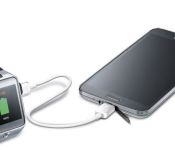
New device to device charging cable announced by Samsung
Samsung announced the release of a new accessory and companion app today that looks to be pretty useful. The idea behind it isn’t new, however the execution is, at least to me. The new cable is called the Power Sharing Cable. Basically it is a cable that sports a micro USB tip on both sides. It will allow you to plug your Galaxy S 5, Galaxy Tab S or other select Galaxy devices into another micro-USB compatible device to charge it from your phone or tablets battery.

As I said before, the idea behind using your phone to tablet to charge up another device isn’t all that new. There have been a number of devices that allow that same operation. However, Samsung has also created a free companion app that takes the sharing of power from a compatible device and manages it a little. The Power Sharing app will give you control over how much power to transfer. Essentially letting you boost your smartwatch power, or any other device, by the amount you need to get you through the rest of your day without sucking the life out of your phones own battery.

 You can use the cable without the app, but you do lose out on the power transfer control and it will continuously pull power. Not a huge issue if you unplug it obviously, but setting it and forgetting it could potential be a problem. The full list of supporting devices according to Samsung include the Galaxy S5, Galaxy Tab S 10.5, Galaxy Tab S 8.4, Galaxy Alpha, Galaxy Avant and Galaxy Note 4. The new Power Sharing Cable is available to order from Samsung today for $19.99.
//<![CDATA[
ord = window.ord || Math.floor(Math.random()*1E16);
document.write('‘);
//]]>
The post New device to device charging cable announced by Samsung appeared first on AndroidSPIN.
.CPlase_panel display:none;
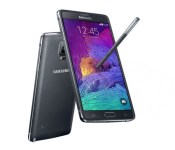
Android L for the Samsung Galaxy S5 and Galaxy Note 4 may be available as soon as November/December
 When you think of timely software updates, Samsung isn’t typically one of the manufacturers who’s name comes up first. However, if today’s rumour is true, Samsung may be one of the first to make available Android L for the Samsung Galaxy S5 and Galaxy Note 4. This rumour comes from SamMobile, who’s Samsung insiders are reporting that the Android L update will come to Samsung’s flagship devices in late November/early December. If true, this should be a much faster turnaround than we have seen from Samsung in the past, however its software has also been buggy at times, buggy enough to withdraw the update entirely – hopefully that won’t be the case this time. We’d love to see Samsung challenge Motorola for fastest manufacturer to update their devices, but we’ll take what we can get.
And while we were expecting Android L to be officially released around Halloween time, along with the new Nexus devices, this allegedly release window for Samsung software updates also gives us further confidence that the release is right around the corner. While this is going to be a very fast update for the Note 4, which hasn’t even started shipping yet, the Android L update will be a breath of fresh air for the Galaxy S5 which has been on the same build of Android since its launch in April.
What do you think of the November/December timeline for Android L for the Samsung Galaxy S5 and Galaxy Note 4? Let us know your thoughts.
Source: SamMobile
//<![CDATA[
ord = window.ord || Math.floor(Math.random()*1E16);
document.write('‘);
//]]>
The post Android L for the Samsung Galaxy S5 and Galaxy Note 4 may be available as soon as November/December appeared first on AndroidSPIN.
.CPlase_panel display:none;

AT&T Users Using an HTC One M8 and Galaxy S5 Receive Updates – Device Updates

Happy Labor Day my friends, or at least to the friends living in the States. Others, it is just another Monday, so let’s talk some device updates. Looks like the only ones we have are for users on AT&T rocking either an HTC One M8 or a Galaxy S5. M8 users are getting some Android 4.4.3 while Galaxy S5 users are just getting a a fix update. Hopefully those updates have hit your phone already.
Device Updates
AT&T galaxy S5 OTA update
Android 4.4.3 HTC the AT&T HTC One M8
//<![CDATA[
ord = window.ord || Math.floor(Math.random()*1E16);
document.write('‘);
//]]>
The post AT&T Users Using an HTC One M8 and Galaxy S5 Receive Updates – Device Updates appeared first on AndroidSPIN.
.CPlase_panel display:none;
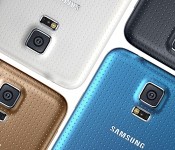
Samsung Galaxy S5 on AT&T gets a new OTA update

Looks like there is a new update on the way out for Samsung Galaxy S5 owners on AT&T‘s network. The update rolls in at a smaller sized 142.8MB’s, but brings a few fixes and improvements that you might like. Assuming you are stock. Here is the list according to the AT&T support page.
- Security updates and patches
- Application installation enhancements
- Accidental emergency dial fixed on the lock screen
- Several lower layer modem crashes and sluggishness improvement enhancements
- E-mail UX enhancements
- S-View cover error
- Re-activation lock improvements
AT&T makes mention that the update is only available as a OTA. All that means is that Samsung Kies won’t have the update waiting for you when you plug your device in. As usual, make sure you have over 50% battery, a Wi-Fi connection and a little time to kill to download and install the update.
Source: AT&T Via Android Central
//<![CDATA[
ord = window.ord || Math.floor(Math.random()*1E16);
document.write('‘);
//]]>
The post Samsung Galaxy S5 on AT&T gets a new OTA update appeared first on AndroidSPIN.
.CPlase_panel display:none;
Moshi iVisor XT and iVisor Glass for Samsung Galaxy S5 Review: Serious protection for your Device
 We’re big fans of Moshi‘s products here at AndroidSPIN – they’re not to everybody’s taste nor are they the most heavy duty accessories around, but they more than make up for it in style and functional quality. Today, we’ll be taking a look at two screen protectors that Moshi has made for the Samsung Galaxy S5, the iVisor XT and the iVisor Glass.
 We’ll start with the iVisor Glass. As the name suggests, the iVisor Glass is a tempered glass screen protector that Moshi currently only has available for the Galaxy S5 and the iPhone 5S/5C. Moshi claims that their screen protector features “an atomically-strengthened structure that is stronger than glass found in typical glass screen protectors”. A very impressive claim.
 Applying the iVisor Glass is extremely simple, with a suction cap provided to help you get that perfectly aligned installation, as well as for removing the protector. Moshi says that their proprietary design will prevent any bubbles ever forming under the screen when applying the screen protector, and we’re likely to believe them; I applied and re-applied the iVisor Glass several times and not once did I see any bubbles.
 Next, we’ll take a look at the iVisor XT. We’ve had a look at some of Moshi’s iVisor range before, in particular the iVisor Anti-Glare for Samsung Galaxy Note 2 (read the full review here), and the iVisor XT is another screen protector in this line, this time made of plastic.
 The iVisor XT is likewise very easy to apply with no risk of bubbles thanks to Moshi’s proprietary design. As you might expect from a plastic screen protector, you do feel a lot closer to the screen than with a glass one, and gives a great feel for the screen.
 A neat thing for both these screen protectors is that they can be removed, cleaned off with water and reapplied, effectively extending their lives as screen protectors should you feel the need to try something else in-between. Regarding the toughness of these screen protectors, I didn’t put them through rigorous tests, but I can personally vouch for their performance – I have been using the iVisor Anti-Glare protector on my Note 2 since I reviewed it a year again and there are only a few minor cosmetic marks on it.
In terms of pricing, the iVisor XT will set you back $24.95 USD whereas the iVisor Glass will be $39.95 USD.
 In closing, the iVisor XT and iVisor Glass looks like a fantastic way to protect your Galaxy S5 depending on the level of protection you want. Both of these screen protectors are premium quality, and come with a big personal recommendation from me. If you’re hoping to pick one up, you can check out the product page for the iVisor XT here and iVisor Glass here, or we’ve provided Amazon links below too.
Gallery of Photos


//<![CDATA[
ord = window.ord || Math.floor(Math.random()*1E16);
document.write('‘);
//]]>
The post Moshi iVisor XT and iVisor Glass for Samsung Galaxy S5 Review: Serious protection for your Device appeared first on AndroidSPIN.
.CPlase_panel display:none;

Samsung shows the Galaxy S5 taking the Ice Bucket Challenge, may have missed the point
 One of the most viral initiatives all over the world right now is the Ice Bucket Challenge which started as an awareness campaign for the Motor Neurone Disease Association. While the campaign has done wonders for awareness and a lot of good has come out of it, it’s almost at the saturation point where some are using the core concept to their own advantage. Exhibit A: Samsung. Samsung Mobile UK posted up a video yesterday of the Galaxy S5 taking the Ice Bucket Challenge:
// <![CDATA[
(function(d, s, id) var js, fjs = d.getElementsByTagName(s)[0]; if (d.getElementById(id)) return; js = d.createElement(s); js.id = id; js.src = "//connect.facebook.net/en_US/all.js#xfbml=1"; fjs.parentNode.insertBefore(js, fjs); (document, 'script', 'facebook-jssdk'));
// ]]>
While there’s probably nothing malicious in the video, it’s pretty clear that the primary focus of the video is not awareness of Motor Neurone Disease but rather the waterproof properties of the Galaxy S5, something that is missing from the “iPhone 5S, HTC One M8 and Nokia 930″. While it is a clever bit of marketing, it seems almost too opportunistic to piggy-back of a charitable awareness campaign, especially when they haven’t mentioned any monetary contribution to the cause.
What do you think about the Galaxy S5 taking the Ice Bucket Challenge? Do you think Samsung’s missed the point? Let us know your thoughts.
Source: Facebook via Phone Arena
//<![CDATA[
ord = window.ord || Math.floor(Math.random()*1E16);
document.write('’);
//]]>
The post Samsung shows the Galaxy S5 taking the Ice Bucket Challenge, may have missed the point appeared first on AndroidSPIN.
.CPlase_panel display:none;

LG G3 vs. HTC One M8 vs. Samsung Galaxy S5
 Today, LG debuted it’s newest newest global flagship phone, the G3. The Android smartphone is a followup to the LG G2 from 2013, which had an unique design which moved the power/lock button and volume controls from the sides of the phone to the back of the device, below the camera lens. The G3 sports that same design, but with a more polished look, complete with a brushed metallic body (available in five colors) and a more mature-looking Android operating system.
The G3 packs the high-end specs we’ve come to expect in premium phones, and it’s perfectly poised to go up against it’s top Android competitors, the HTC One M8 and the Samsung Galaxy S5.
With similar eye-popping screens, powerful processors, and capable camera lenses available on all three devices, deciding on which one is best for you really comes down to the extra features, design, and personal brand preference. The LG G3 is no slouch when it comes to extras, with the Knock Code security feature, a front-facing camera designed specifically for selfies, and a high-capacity battery.
Check out the chart below to see how the phone’s specs stacks up against its competition, and let us know in the comments below which phone comes out on top for you.
LG G3
HTC One M8
Samsung Galaxy S5
Size
5.7 x 2.9 x 0.3 inches; 5 oz.
5.8 x 2.8 x 0.4 inches; 5.6 oz.
5.5 x 2.9 x 0.3 inches; 5 oz.
Screen
5.5 inches; 2,560×1,440 pixels; 538ppi
5 inches; 1,920×1,080; 441ppi
5.1 inches; 1,920×1,080 pixels; 431ppi
Operating system
Android 4.4
Android 4.4
Android 4.4
4G LTE
Yes
Yes
Yes
WiFi
Wi-Fi 802.11 a/b/g/n/ac
802.11 a/b/g/n/ac
802.11 a/b/g/n/ac
NFC
Yes
Yes
Yes
Bluetooth
4.0 Low energy
4.0 Low energy
4.0 Low energy
RAM
3GB
2GB
2GB
IR Blaster
Yes
Yes
Yes
Fingerprint scanner
No
No
Yes
Rear camera and recording
13-megapixel; 4K HD video
4-’Ultrapixel’; 1080p HD video
16-megapixel; 4K HD (1080p HD default)
Front-facing camera
2.1-megapixel; 1080p HD video
5-megapixel; 1080p HD video
2-megapixel; 1080p HD video
Processor
2.5GHz quad-core; Snapdragon 801
2.3GHz quad-core; Snapdragon 801
2.5GHz quad-core; Snapdragon 801
Battery
3,000mAh, removable
2,600mAh; embedded
2,800mAh, removable
Capacity
32GB
16GB, 32GB
16GB, 32GB
Expandable storage
Yes
Yes
Yes
Notable extras
One-watt speaker with amp
BlinkFeed, BoomSound
Fingerprint scanner, heart rate monitor
US Carriers
T-Mobile, Sprint, AT&T, Verizon
AT&T, Sprint, T-Mobile, Verizon
AT&T, Sprint, T-Mobile, Verizon
Color options
Metallic white, black, gold, red, and violet
Gray, silver, rose gold
Black, white, blue, and copper
.CPlase_panel display:none;

Spigen Galaxy S5 Tough Armor Bundle $49% OFF (Deal of Day)

Looking to protect your Samsung Galaxy S5 but don’t wanna smash your piggy bank in the process? Swing by deals.androidguys.com and pick up the Spigen Tough Armor Bundle! Priced only $37.99 right now, it’s just about half off the normal price and it’s got everything you’ll need. The new Air Cushion Technology corners reduce the… Read more »
The post Spigen Galaxy S5 Tough Armor Bundle $49% OFF (Deal of Day) appeared first on AndroidGuys.
.CPlase_panel display:none;
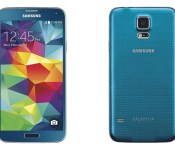
Best Buy nabs Electric Blue Samsung Galaxy S5

The exclusive color will be available starting from August 17 Best Buy will soon be carrying an Electric Blue version of the Samsung Galaxy S5 smartphone. Slated to arrive on August 17, the phone will be sold for AT&T, Sprint, and Verizon. Pricing remains the same as the other versions available; $199 with a two-year… Read more »
The post Best Buy nabs Electric Blue Samsung Galaxy S5 appeared first on AndroidGuys.
.CPlase_panel display:none;
 AIVAnet