


Samsung Galaxy J3 Release Date, Price and Specs – CNET
Samsung’s entry-level Galaxy J3 has just landed another carrier. It joins Verizon Wireless’ prepaid lineup six months after debuting with Virgin Mobile and Boost Mobile, Sprint’s two prepaid brands. The phone is on sale immediately for $110, all in. (It debuted for $180 with the other two carriers.)

Verizon Wireless
The phone’s specs lean heavily to the low end; this is a simple Android phone that’s aimed for wallet-watchers.
- 5.0-inch Super AMOLED 1280×720 display
- Android 6.0.1 Marshmallow software
- 5-megapixel rear camera with a flash
- 2-megapixel front-facing camera
- 8GB of internal storage with a microSD card slot for expansion
- 1.2GHz quad-core processor with 1.5GB of RAM
- 2,600mAh removable battery
Samsung Galaxy S7 Edge Injustice Edition Release Date, Price and Specs – CNET
This isn’t your ordinary Samsung Galaxy S7 Edge. One look at the deep gold bat icon on the back of this special “Injustice” edition announces its difference, its darkness, its yearning to be worthy of the Batman.

The Injustice edition Galaxy S7 Edge comes with its own Batman case.
Jessica Dolcourt/CNET
An all-black body and deep gold accents around the home button, speaker grille and camera mount are the phone’s other physical tip-offs, markers that’ll help it stand out on the street. On the software side, a pervasive theme ties in wallpaper, dark gold icons and skins. For example, the apps icon is transformed into Batman’s pointed mask, and the dialer gets a retro look.
When the phone rings, you’ll hear a jangly version of the movie theme song (It’s called Injustice: Gods Among Us). The always-on display faintly beams out the Batman logo like a muted Bat-signal.
Beneath the cosmetic details, the phone’s high-end hardware remains the same as any other S7 Edge, including the water-resistant coating and the customizable Edge screen.
This special edition phone is clearly for Batman fans who have been considering an S7 Edge, but haven’t yet taken the plunge. For their sake, it’d be great to see even more Easter eggs by default, like maybe some surprise entries waiting in the phone book. How much more fun would it be to call Superman, Wonder Woman or even Bane to hear a recorded message or a hint for a contest or game?
I am vengeance. I am the night. I am Samsung’s…
See full gallery


1 – 4 of 27
Next
Prev
After all, it’s not what the phone is underneath, but what it does that defines it.
Extras
Samsung’s Batphone, er…Injustice edition, comes in a fancy box to match. It’s topped by a gold metal bat, beneath which you’ll find the phone, an all-black version of the Samsung Gear VR (which comes preloaded with a Batman Injustice game preview) and a burly case. I’m told not every region will get the VR bundle.
When can you get it, and for how much?
We know that the phone will come out in June to the US, China, Singapore, Korea, Latin America and Russia, but Samsung hasn’t unmasked a specific sale date, or pricing for that matter.
LG K8 V Release Date, Price and Specs – CNET

The K8 V will cost under $150 when it launches June 16.
Verizon
LG’s K8 V officially lands on Verizon Wireless on June 16, but we’ve seen this phone before.
It’s a rebranded version of the LG K8, which was announced back at Mobile World Congress in February. This time around, it joins Verizon with a slightly different design: a soft-touch finish instead of the original phone’s more eye-catching ballistic nylon backplate.
You can preorder the K8 V today for $144 off contract, or for $6 per month for 24 months on a payment plan.
This is not a flagship device like the G5 or V10; instead it is an affordable, entry-level option. Despite the low-end specs, the K8 V is thankfully up-to-date on Android (it runs version 6.0) and has a removable battery, which is a bonus for people who value swapping out their juice packs.
Plus, as an international device, the V8 K has global roaming capabilities but you do need a international service plan from the carrier to use it.
Hardware specs
- 5-inch, 1,080×720-pixel resolution display
- Android 6.0.1 Marshmallow software
- 8-megapixel rear camera
- 4-megapixel front camera
- 16GB of internal storage with a microSD card slot for expansion up to 128GB
- 1.3GHz Snapdragon quad-core processor
- 2,125mAh removable battery
More budget phones from LG:
GE GFWS2600FWW review – CNET
The Good GE’s $1,100 GFWS2600FWW washing machine skillfully removes stains and offers all of the features you need for your laundering basics.
The Bad You’ll suffer from sensory overload looking at its cluttered display panel.
The Bottom Line If you can get past its complicated controls, the GE GFWS2600FWW is a fine front-load washing machine.
The $1,100 GE GFWS2600FWW is a fine washing machine. It’s very good at removing stains and it offers all of the basic features you need, plus a steam function for targeting tough stains. And yet I wouldn’t recommend it over close competitors like the $1,099 Electrolux EFLS617S.
That’s mainly because the GFWS2600FWW has an annoyingly cluttered display panel. Not only does this detract from its overall look, it also makes regular use less convenient. This isn’t a total deal-breaker since you’ll likely get used to the interface over time, but other models in the same price range manage to offer impressive performance and intuitive controls — I’d look to them first.
This GE washer stands out, but not in a good…
See full gallery


1 – 5 of 5
Next
Prev
Getting to know the GFWS2600FWW
Given that most washers live out their days in a closed-off laundry room or closet, design isn’t hugely important. Features, usability, and performance are all factors we weigh more heavily during washing machine testing. But in the GFWS2600FWW’s case, GE’s aesthetic choices impact overall usability.
The display panel is the main point of access between you and your washer — all of the various buttons and knobs let you select among different settings, as well as the soil level, the temperature, and the spin cycle. And this washer has a seriously cluttered display panel that isn’t all that easy to use.
While you can figure out how to navigate your way around the display, it is much more convoluted than the tidy, and comparatively minimalist looks of the Electrolux EFLS617S. It may seem minor, but this is just one more thing to cause frustration during chore time.
The two machines do share similar specs, though:
Comparing washers
| $1,100 | $1,099 |
| 4.5 cubic feet | 4.4 cubic feet |
| 12 | 9 |
| 153 kWh/year | 85 kWh/year |
| 28 x 39.4 x 34.4 inches | 27 x 38 x 31.5 inches |
| Limited 1 year, parts and labor | Limited 1 year, parts and labor |
| 120V; 60Hz | 120V; 60Hz |
| No | No |
As you can see from the chart above, the GFWS2600FWW is competitive with other models in the same price range. It even offers more cleaning cycles than Electrolux’s EFLS617S.
Sony Xperia X review
The Sony Xperia Z range is dead. Long live the Sony Xperia X range. Other than the change in name, from Z to X, the Xperia X (and Xperia X Performance) have a lot in common with the previous Xperia Z line in terms of design language and overall look & feel.
Of course, there are differences including more rounded corners and sides, plus curved glass on the front. However there are also familiar aspects like the signature Sony power button and the dedicated camera button.
- Sony Xperia X series hands on
- Sony Xperia Z5 Review
- Is the Xperia X Performance just the Xperia Z6?
Is the Sony Xperia X a worthy successor to the Xperia Z5 or does it fail to hit the heights that Sony want – and desperately need – their smartphone range to achieve? Let’s find out in this in-depth Sony Xperia X review!
Buy the Xperia X now!
Design
The design of the Xperia X will be instantly familiar to anyone who is acquainted with Sony’s previous Xperia Z devices. The Z range could have been modeled on the monolith from Arthur C Clarke’s 2001, and while the Graphite Black Xperia X still bears some resemblance to the monolith, the more rounded corners help to give the X a less jarring design. And if Graphite Black isn’t your thing then you can also get the Xperia X in White, Lime Gold and Rose Gold.
The Xperia X has Sony’s familiar button layout, including the dedicated camera shutter button and the centrally placed power button, which houses a fingerprint reader.

Like the Xperia Z5, the downside of Sony’s button layout is that the volume rocker is towards the bottom of the right side, between the power button and the camera shutter button. This makes the volume rocker hard to reach, regardless of which hand you are using to hold the device.
Going around the device, there is the 3.5mm headphone jack on the top, and the micro USB port on the bottom. Both the top and bottom have microphone holes as well. On the left is the tray for the SIM card and the SD card. On the front you will find the 5 inch Full HD 1080p TRILUMINOS display, the front facing camera and the front facing speakers. On the rear is the main camera and the Xperia logo.

Overall the Xperia X feels nice in the hand and is easy to handle. It has a symmetrical design making it easy to grip and although this design has been updated since the Z5, the Xperia X remains quintessentially a Sony smartphone.
Display

The Xperia X comes with a 5 inch Full HD (1920 x 1080) display, resulting in a pixel density of 441 ppi. This resolution and pixel density works perfectly for a 5 inch display. You get the color reproduction that you’d expect from the Triluminos display with the X-REALITY Engine enhancements, along with the great viewing angles from this IPS screen. The Xperia X also includes Sony’s Dynamic Contrast Enhancer, which the company says makes the bright parts of the screen brighter and the dark parts a truer, deeper black.
The Xperia X features Sony’s “smart backlight control” which detects if you are holding the phone in your hand. If you are then the screen stays on, for example when you are looking at a photo, without touching the screen. When you aren’t holding the device then the display switches off according to the standard display sleep settings. I tested it out, and basically it does what it says on the tin!
Overall the display on the Xperia X is a pleasure to use. The color reproduction is great and the display can go very bright when needed, making outdoor usage good.
Performance and hardware

A little surprisingly Sony has opted for the Qualcomm Snapdragon 650 for the Xperia X. For those of you looking for a Snapdragon 820, you will need to go to the Xperia X Performance. So what is the Qualcomm Snapdragon 650? It is a 1.8GHz hexa-core processor with two ARM Cortex-A72 cores and four Cortex-A53 cores. Those 6 cores are supported by the Qualcomm Adreno 510 GPU and 3GB of RAM.
There is also 32GB of internal storage (up to 64 GB on some of the dual SIM models) and the option to add more via a microSD card. The Xperia X supports SDXC which means it can support cards up 2TB, but Sony’s listings says “up to 200GB microSD” as that is the largest readily available card on the market at the moment.

You also get all of the normal connectivity options including NFC, Wi-Fi 802.11 a/b/g/n/ac, GPS, Bluetooth 4.1, and 4G LTE. One odd thing about the NFC on the Xperia X is that the NFC reader/sensor is on the front of the phone. This means to use the NFc you need to hold the back of one phone near the front of the Sony.
During my experiments to transfer a photo from one device to the Xperia X I found it hard to get the alignment right, plus holding the other phone so close to the X’s screen means it was easy to mistakenly touch the screen and erroneously start apps etc.

As for sound, the Xperia X features dual front facing stereo speakers meaning that the sound is unobstructed when you place the phone on a flat surface and that the sound is projected directly upwards and outwards. The speakers can get quite loud and placing the device on flat on a surface seems to boost the sound more than when held in the hand.
There are a number of Audio settings which can be used to improve the sound quality including DSEE HX, ClearAudio+ and a Dynamic normalizer. There is also a manual mode which allows you to enable the equalizer or activate various surround sound options including S-Force Front Surround.

When it comes to the battery, the Sony Xperia X packs a 2620 mAh unit. I was quite curious to see how the battery performed because I was expecting a battery closer to 3000 mAh. The good news is that I was pleasantly surprised.
My initial charge, from when I took it out of the box, lasted just over two days (as I didn’t really use it for the first day) with a screen on time of 4.5 hours, which included running lots of benchmarks and using the camera app to record video to see if it over heated.
The next charge gave me 5.5 hours of screen-on time from a mixture of web browsing, YouTube, navigation, 3D gaming and 2D gaming. What this means is that with moderately heavy usage, you will be able to get a full day of battery life and this could be improved by turning on some power saving features once the capacity goes down to 25 percent. You may be able to get more. A screen on time of between 4 to 6 hours is quite possible, as my tests show that you can stream YouTube videos for around 9 hours on one charge or play 3D games for around 5 hours.

According to Sony’s website the Xperia X supports Quick Charge 2.0, which means that the phone can be charged up to 80% relatively quickly. However, the charger that came with my review unit was not QC 2.0 compatible. Using the supplied charger it took 1 hour 15 minutes to charge from 5% to 75%.
In terms of general performance the Snapdragon 650 provides a snappy user experience. The UI is smooth and there aren’t any noticeable lags. The gaming experience is also very good, in fact the Xperia X scores an impressive 59.5 fps for Epic Citadel in High Quality Mode and 58.0 fps for Ultra High Quality mode. As for some of the popular benchmarks, the device managed a score of 77,306 in AnTuTu, 1442 in Geekbench’s Single Core test, and 3800 in Geekbench’s multi-core test.
Camera

With a 23 MP Sony Exmor RS sensor, a wide angle 24mm G Lens, and support for low-light photography at ISO 12800, I was really looking forward to seeing what the Xperia X’s camera could do. However, my expectations were lower due to the underwhelming performance of the camera on the Xperia Z5 Compact, which I reviewed towards the end of last year. This meant that if the Xperia X didn’t meet my expectations, I wouldn’t be so disappointed.
So, what do I say? The camera on the Xperia X is good, but it isn’t the best. Although the camera has a 23MP sensor, it is set into 8MP (16:9) mode by default. Sony smartphone enthusiasts will tell you that this is the best mode as it uses supersampling and gives better results. As well as using 8MP (16:9), I have also taken shots using 20MP (16:9) and 23MP (4:3). All the pictures in the gallery below are marked with the relevant mode used:

As you can see in good daylight the camera works well and there is little to choose between the 20/23MP and 8MP images (other than the resolution). However some pictures seem dull and washed out. Take particular notice of the sky, it is meant to be blue! However using HDR does improve the washed out sky problem, but it does alter the color of the overall picture quite drastically.
In low light situations the camera tries very hard to produce a good shot, even though the noise level goes up (which is to be expected) the overall results are good.

The Xperia X also features Sony’s predictive hybrid autofocus, which can help to predict the movement of an object on screen in order to anticipate and capture the perfect in-focus picture. In a nutshell you tap on a object in the frame and if it moves (like kids and dogs tend to do) then the Xperia X uses object tracking to keep things in focus.
While there is no 4K video recording, the Xperia X does support 60 fps while recording in full HD. There has been some concern about the Sony Xperia X overheating while recording video. When I first used the camera app I saw a warning message which said, “If the device temperature rises, the app may close during use. Your recording will be saved automatically.” There is then the option to tick the box and not see this warning again.

To see if the Xperia has an overheating problem, I started to record a full HD 60fps video and set the camera on top of a jar to see how long it could record for. Everything went OK until about the 18 minute mark when a warning was displayed, “Camera will now turn off temporarily to cool down.” Which it promptly did. The temperature rise on the back (measured using my infrared temperature gun) was some 13C.
On the plus side, the bundled camera app is quite good. Along with a semi-manual mode, there are lots of additional modes including an AR mode, which can superimpose computer generated scenes like dinosaurs and fish onto your photos or videos; an AR mask mode, to mask your face with different generated masks; and a timeshift video mode, which records at a high frame-rate and applies slow motion effects.

One problem I have with the app is that it seems the only way to enable HDR is to use the semi-manual mode, and even then it is buried away in a settings menu and isn’t an on screen control. The upshot of this is that, for me at least, the semi-manual mode became the equivalent of HDR mode – if I wanted HDR then I switched to semi-manual, if I didn’t then I switched back to full auto.
Software

The Xperia X comes with Android 6.0.1 Marshmallow along with a light skin on top of stock Android and also includes extra features and Sony related apps. As well as the software for managing the fingerprint reader there is a myriad of device connection options including the ability to wirelessly play content on your Xperia X on other devices (i.e. Sony TVs), screen mirroring, connecting to Playstation controllers, and MirrorLink. There is also a theme library with some free color based themes that match the phone’s colors (e.g. White, Lime, and Gold) along with a theme store full of themes, both paid and free.
Under Battery (in the Settings) there are two different power saving modes available: STAMINA mode and Ultra STAMINA mode. With STAMINA mode enabled then GPS, vibration, image enhancement etc are restricted to reduce battery consumption. Also background data is restricted, again to save battery. With Ultra STAMINA mode enabled your data connection (both Wi-Fi and cellular) is disabled and the home screen is switched to the Ultra STAMINA mode home screen, which gives you access to only a few apps like phone, contacts, messaging, camera and the clock!

In terms of extra apps, Sony has included Lifelog, for tracking calories, steps and sleep, etc.; Movie Creator, which makes movies from your photos, in a similar way to Google Photos; TrackID, Sony’s music recognition app; Xperia Lounge, featuring Xperia related content; plus the PlayStation app.
Specifications
| Display | 5″ Full HD (1920 x 1080) |
| Processor | Qualcomm Snapdragon 650 (2 x ARM Cortex-A72, 4x Cortex-A53) |
| GPU | Qualcomm Adreno 510 |
| RAM | 3GB |
| Connectivity | NFC, Wi-Fi 802.11 a/b/g/n/ac, GPS, Bluetooth 4.1, and 4G LTE |
| Storage | Up to 32GB, expandable up tp 200GB via microSD. |
| Camera | Rear: 23MP 1/2.3” Exmor RS with Predictive Hybrid AF.
Front: 13MP 1/3” Exmor RS, 22mm Wide Angle Lens F2.0 |
| OS | Android 6.0.1 Marshmallow |
| Battery | 2620 mAh |
| Colors | White, Graphite Black, Lime Gold, or Rose Gold |
| Dimensions | 143 x 69 x 7.7mm. 152g |
| Misc | Fingerprint sensor, front facing stereo speakers |
Gallery

Pricing and final thoughts

The Xperia X is available in the UK from a variety of carriers and outlets and costs around £459.99 without a contract. In Europe you can buy it off contract for around EUR 589.99. It will also be available from June 26 in the USA from Best Buy, B&H, Amazon and Reagan Wireless for around $549.99. To put the UK price into some context, the LG G5 can be found for around £449 and the Samsung Galaxy S7 for £526. However those prices are fluctuating.
Considering that phones like the G5 and the S7 come with higher resolution displays and the Snapdragon 820, the Xperia X is a tough sell at these prices. However, you may find it available with a good deal via your carrier, and so negating the high off-contract price. If you are a Sony fan or you are looking to upgrade from a Xperia Z device and want to stick with Sony then the Xperia X could just be what you are looking for.
- Sony Xperia X series hands on
- Sony Xperia Z5 Review
- Is the Xperia X Performance just the Xperia Z6?
Lastly, a quick shout out to Vodafone (UK) for lending us this Sony Xperia X for review, plus a big thank you to Bailey Stein for confirming the video overheating problem and for some great photos.
Buy the Xperia X now!
Crucial MX300 Limited Edition (750GB) review – CNET
The Good The Crucial 750GB MX300 SSD Limited Edition is competitively priced and delivers fast performance. The solid-state drive uses efficient 3D flash memory and provides strong security with hardware encryption.
The Bad The drive is available in a single capacity of 750GB that might not be a good fit for those needing something smaller. The drive has a short 3-year warranty and in performance it can’t touch its main competitor, the Samsung 850 Evo.
The Bottom Line If you’re looking for a high-capacity SSD upgrade for your computer, the new Crucial MX300 is speedy and affordable.
 View full gallery
The Crucial MX300 is available in a single capacity of 750GB.
Dong Ngo/CNET
If my review of the first solid-state drive with 3D flash memory, the well-balanced Samsung SSD 850 Evo, piqued your interest, then you’ll be happy to know there’s a new player in town: the all-new MX300 750GB drive from Crucial.
The MX300 is the second SSD to use 3D flash memory (as opposed to the traditional, planar 2D flash memory.) If you think of each memory cell as a person, then 3D flash memory to 2D flash memory is like high rises to single-family homes. You can house a lot more people with the former, on the same patch of land.
CNET Labs SSD copy tests
Samsung SSD 850 Evo
182.78
214.45
205.63
Samsung SSD 750 Evo
180
246.45
203.67
Crucial MX300
178.34
245.67
199.32
Toshiba Q300
165.67
355.6
202.7
OCZ ACR 100
163.53
289.39
385.71
OCZ Trion 100
124.19
185.35
352.32
Legend:
As OS drive (read and write)
As secondary drive (write only)
As secondary drive (read only)
Note:
Measured in megabytes per second. Longer bars mean better performance.
The Crucial drive is quite different from Samsung’s, however. For one the MX300 is available in just a single capacity of 750GB, whereas the 850 Evo can be bought at 120GB all the way up to 2TB. (Crucial says it will release more capacities and physical designs later this year.) Ironically, the Crucial drive is missing a few crucial features, most notably the ability to customize overprovisioning (a predetermined amount of storage space put aside to better the drive efficiency) and boost speed by using a host computer’s system memory as cache, both perks available on the Samsung. For this reason, in testing, the MX300, though faster than many budget SSDs and significantly faster than any hard drives, was clearly slower than the SSD 850 Evo.
PC Mark Storage test
Samsung SSD 750 Evo
4986
284.78
Samsung SSD 850 Evo
4983
276.16
OCZ ACR 100 series
4948
203.72
Crucial MX300
4914
198.33
Toshiba Q300
4894
186.68
OCZ Trion 100
4875
175.38
Legend:
Storage Score
Storage bandwith (MBps)
Note:
Longer bars mean better performance.
To make up for that fact, the 750GB MX300 is cheaper, with a suggested price of just $200 (£140, AU$270, converted,) or about 27 cents per gigabyte. The Samsung SSD 850, which came out 2.5 years ago, is not available in a 750GB capacity but on average costs about 31 cents per gigabyte, or $233 for $750GB. It’s likely that the MX300’s price will get even lower in next couple of months.
The MX300 supports the highest AES 256-bit hardware encryption, making it great for business users looking to keep their data private. It also has very high endurance rating: Crucial says you can write up to 220TB of data to the drive (or 120GB per day and every day for five years) before it would become unreliable. That’s a lot of writing, since most of us don’t write more than 10GB on a busy day. However, it comes with just a three-year warranty, which is shorter than the five years the Samsung SSD 850 Evo gets.
Should I get it?
Available at one large capacity of 750GB, the Crucial MX300 is a great deal for those in need of a large SSD and have $200 to burn on it. But on the other hand, if you want a smaller capacity, you can save some money by going with the Crucial BX200 or the Samsung SSD 850 Evo. In all, the MX300 is easy for me to recommend to anybody who wants to upgrade a computer still running on a regular hard drive.
FoldiMate Release Date, Price and Specs – CNET
A startup has dreamed up a device to ease some of the burden of doing laundry.
It’s called the FoldiMate, a home robot designed to fold your clean clothes all by itself with professional skill and quality results. About the size of a standard domestic washer or dryer and with a big ticket price to match ($700 to $850), the appliance will apparently grab garments within its reach, pull them inside its innards for processing, then spit out piles of smartly stacked and crisply folded clothing.
The quest for making laundry chores less onerous isn’t new. Manufacturers of washing machines and clothes dryers have added special steam cycles to their products that promise to remove wrinkles (and even odors) from garments so you’ll spend less time ironing. Lately, other laundry gadgets with lofty claims have come to market, such as the LG Styler and Whirlpool Swash. These machines are designed to “refresh” delicate items at home to cut down on pricey trips to the dry cleaners. And the Foldimate isn’t the first folding machine we’ve come across. Last year at the CEATEC consumer electronics show in Tokyo, we saw a garment-folding solution called the Laundroid that managed to fold a dress shirt in about five minutes.
But companies have yet to give consumers products that can actually hold up to human performance. Steam washer and dryer cycles can smooth out wrinkled fabrics, but cannot dispel them entirely. Sadly, the Styler and Swash don’t actually remove dirt from your clothes the way regular washing machines do, nor do they press as well as an old-school iron, and they are limited to tackling a few (or one) item at a time.
Unfortunately, the FoldiMate seems to have similar limitations and sounds even more complicated to use. For instance, you can’t just dump mounds of apparel into the FoldiMate all at once and expect it to sort everything out. To use the FoldiMate, you must first clip individual garments such as shirts, sweaters and pants onto the horizontal racks on the front of the machine.
The inner workings of the FoldiMate do sound intriguing — if the product works as the company promises. The FoldiMate draws clipped clothing into an inner chamber where a series of mechanisms robotically flip, fold and flatten cloth items into shape. FoldiMate also subjects clothes in the chamber to a special treatment similar to the Whirlpool Swash that includes steam, perfume and fabric softeners. The result, say the people behind FoldiMate, will be garments that are neatly folded, expertly layered and ready for your wardrobe. The machine is supposed to be swift too, tackling laundry loads twice as fast as you would if you folded them manually.

The FoldiMate stacks crisply folded items
FoldiMate
If you’re dreaming of owning a FoldiMate device of your own, you have a bit of a wait in store. While the startup behind FoldiMate says they will begin taking preorders in 2017, the unit isn’t expected to ship until sometime in 2018 and will cost between $700 to $850. If you want the dewrinkling feature, you’ll have to fork over an additional $200 to $300 plus the cost of treatment capsules ($15 to $40 each).
More details about FoldiMate
- Can handle medium-sized items like shirts, pants and towels
- Can’t fold small or large items like underwear, socks and bed sheets
- Clip capacity is 15 to 20 garments
- Takes 10 seconds to fold one item, 20 to 30 seconds to dewrinkle
- Measures 28x32x31 inches (71cm x 81cm x 79cm) and weighs 66 pounds (30kg)
- Dimensions similar to typical home clothes dryer
- Uses standard 110V / 220V electrical power
Meizu Pro 6 review
Meizu is well known for their mid-range and entry-level smartphones that are surprisingly low-cost, but the Chinese OEM does have some solid high-end phones on offer as well, that continue to be priced quite aggressively.
For Meizu, these high-end devices are seen in the form of “Pro” iterations of their base “MX” flagships. This time around however, the company seems to have done away with the MX line altogether, by jumping directly into the releasing the latest Pro edition smartphone.
- Meizu MX5 Review
- Meizu MX4 Pro Review
What does this device bring to the table? We find out, in this comprehensive Meizu Pro 6 review!
Buy now from Amazon
Design
As has been the case with previous Meizu smartphones, the inspiration in terms of design is quite obvious at first glance. However, with the Pro 6, Meizu attempts to do things a little bit different and includes a few unique design elements, that allows for some separation from the design of the iPhone, and previous generation Meizu smartphones as well.
The Pro 6 does come with a full metal unibody construction, with the aluminium used appearing to be of a higher quality grade. There are no sharp or flat edges on this phone, with the back curving in along the sides to meet the front. The antenna bands appear at the top and bottom on the back as well, but with a unique look that certainly hasn’t been seen before. The rear camera is actually HTC 10-esque in its appearance, below which can be found a 10 LED flash.

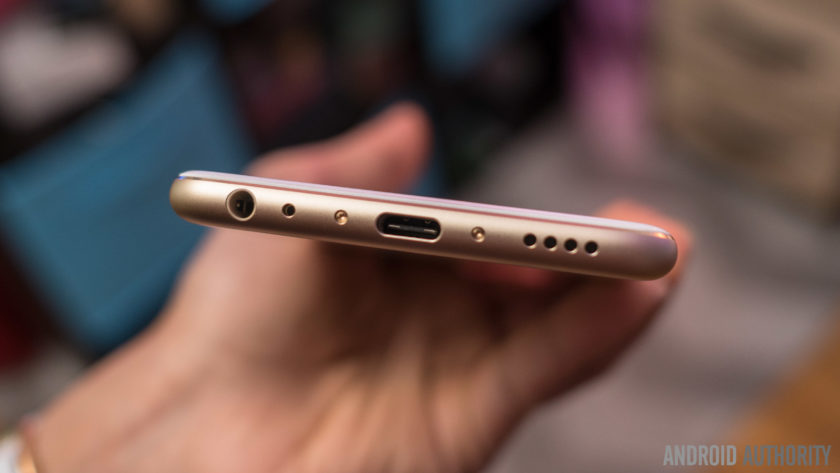
The volume rocker and power button are on the right side, and at the bottom is the headphone jack, USB Type C charging port, and single speaker unit, in a design that will be extremely familiar. In fact, the overall design of the Meizu Pro 6 will be rather recognizable, but that isn’t necessarily a bad thing. Helping the well known design language is a high quality build that allows for the device to feel fantastic in the hand, and design is an aspect that most will consider to be a positive.
Display
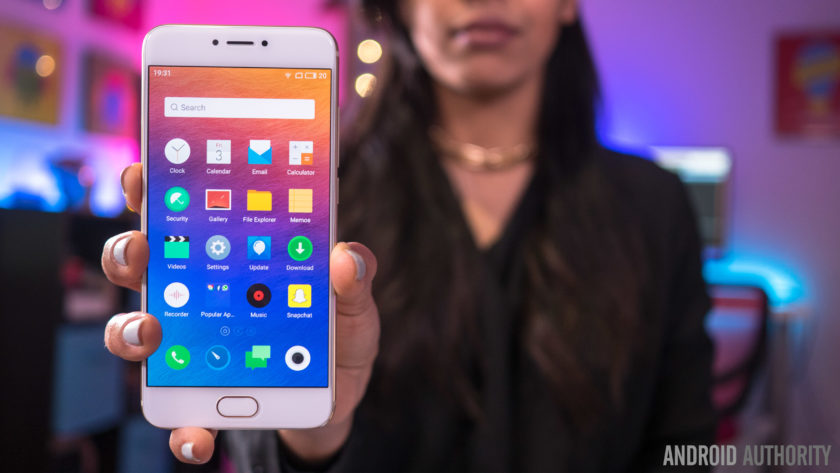
Unlike previous Pro iterations that featured large 5.7-inch displays, the Pro 6 features a 5.2-inch screen, that allows for a more manageable handling experience, and the AMOLED display comes with a Full HD resolution, resulting in a pixel density of 424 ppi.
This display offers everything you’d expect to see from a high quality AMOLED screen, including vibrant, saturated colors, and deep, inky blacks. While some AMOLED displays tend to have a pinkish tinge when setting the display at the lowest brightness level, that doesn’t seem to be the case here either. It may not boast the highest resolution or pixel density when compared to its flagship brethren, but 1080p is more than enough at this screen size, and the display of Pro 6 proves to be quite impressive.
The display comes with a few interesting software and hardware features as well. On the software side, these features include eye protection, which results in an orange hue to help avoid the harmful effects of blue light, and is especially useful when you are trying to sleep. You can also manually change the color temperature of the display, and there are also various display modes that let you adjust the level of color saturation on this display.
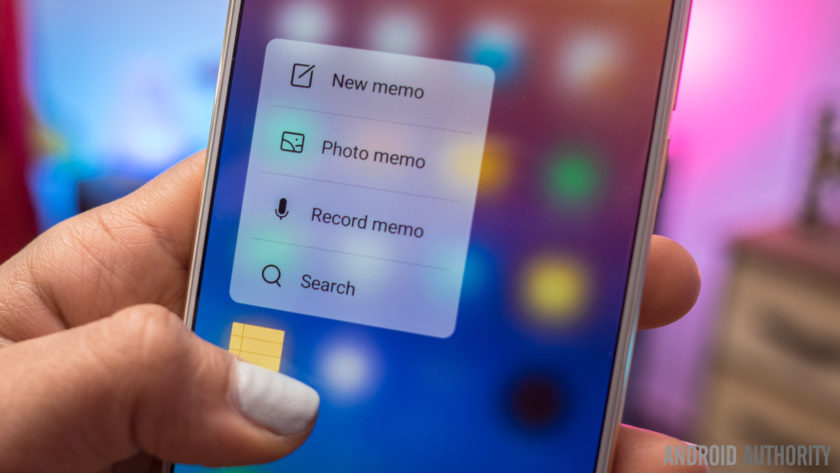
However, the new addition, that will also result in more comparisons with the iPhone, is the availability of Meizu’s take on 3D Touch, called Force Touch. If you’ve used 3D Touch on an iPhone before, you will find the experience to be largely similar here. A force press will display different shortcuts, like video mode or selfie mode with the camera, and there is also a peek and pop gesture, where a bit of pressure will bring up a a preview of an image, and adding more force makes the image larger and larger, until it becomes a full size. Unfortunately, the number of third-party Android apps that support Force Touch is extremely limited, so for now, you are restricted to using these with Meizu’s apps only.
Performance
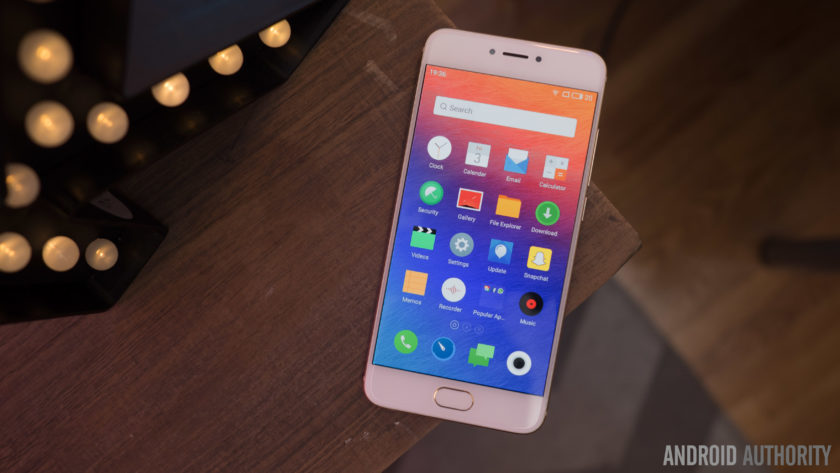
Under the hood, the Meizu Pro 6 comes with a deca-core MediaTek MT6797T Helio X25 processor, clocked at 2.5 GHz, and backed by the Mali-T880MP4 GPU, and 4 GB of RAM. You can see the benchmark scores in the screenshots below, but as far as real world performance is concerned, the device handled everything very well.


The Pro 6 didn’t really slow down in any instance, and everything from opening, closing, and switching apps, to all other everyday tasks is smooth and snappy for the most part. There are some issues as far as gaming is concerned though, with load times being a touch slow, and a few instances of lag and stutter seen when playing processor-intensive games.
Hardware
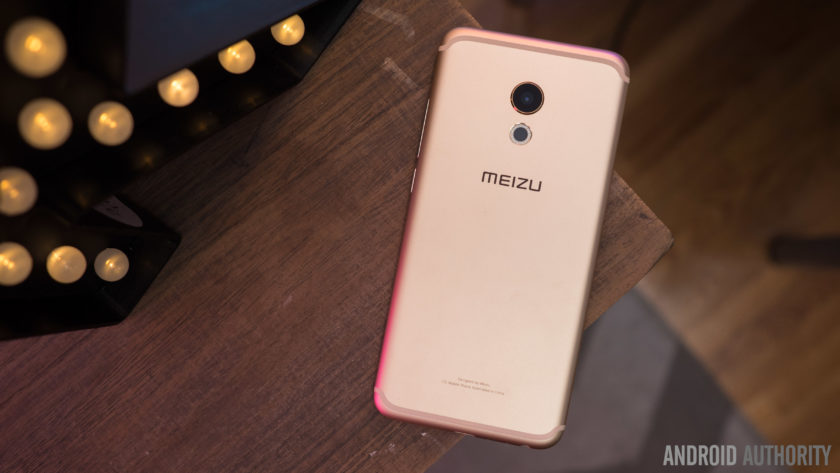
32 GB or 64 GB are the in-built storage options available with the Meizu Pro 6, but users with storage concerns will have to opt for the higher version, with the device not coming with expandable storage. You do get dual SIM capabilities here, which can be useful for some, depending on the market.
Below the display is a lone home button that also doubles as a fingerprint scanner. The performance of the scanner was actually very surprising, and is one of the fastest we’ve seen on a smartphone so far. Granted, you do need to press the home button and turn the screen on before the device can be unlocked, but when the screen is on, just a tap of the home button is enough to unlock the device. Of course, the sensor is very reliable as well but it doesn’t quite compare to other smartphone fingerprint sensors that allow you to unlock your phone without waking the phone first.
There are no on-screen of capacitive navigation keys to be found on this device, and Meizu has quite an unique implementation in place. The back button functionality is actually a part of the home button as well. While a press of the home button works as expected, a simple tap on it will work as a back key. This can take some getting used to, especially when considering that the majority of Android smartphones has a dedicated back and Recent Apps key, but is a nice way to keep the front of the device clean, and avoids using up any additional display real estate.
As far as the Recent Apps page is concerned, this can be opened by a swipe up from the bottom of the display. The app you are currently using will slowly shrink as the Recent Apps list comes up, with a good looking animation, and this works really well, for the most part. It can be a touch frustrating to trigger this action, with only a slow and steady swipe up guaranteeing a result every time, and this can get quite annoying for users who switch between apps often.
 The single speaker unit sits at the bottom of the device, and as is always the case, this isn’t the best position for a speaker. Not only is the sound going away from you when watching videos or listening to music, but the speaker is also easy to cover up when holding the device in the landscape orientation. However, Meizu does manage to impress when it comes to audio quality. The sound is clear and loud, and the speaker delivers a good amount of bass as well, and this is easily one of the best bottom-mounted speakers we’ve seen on Android smartphone thus far.
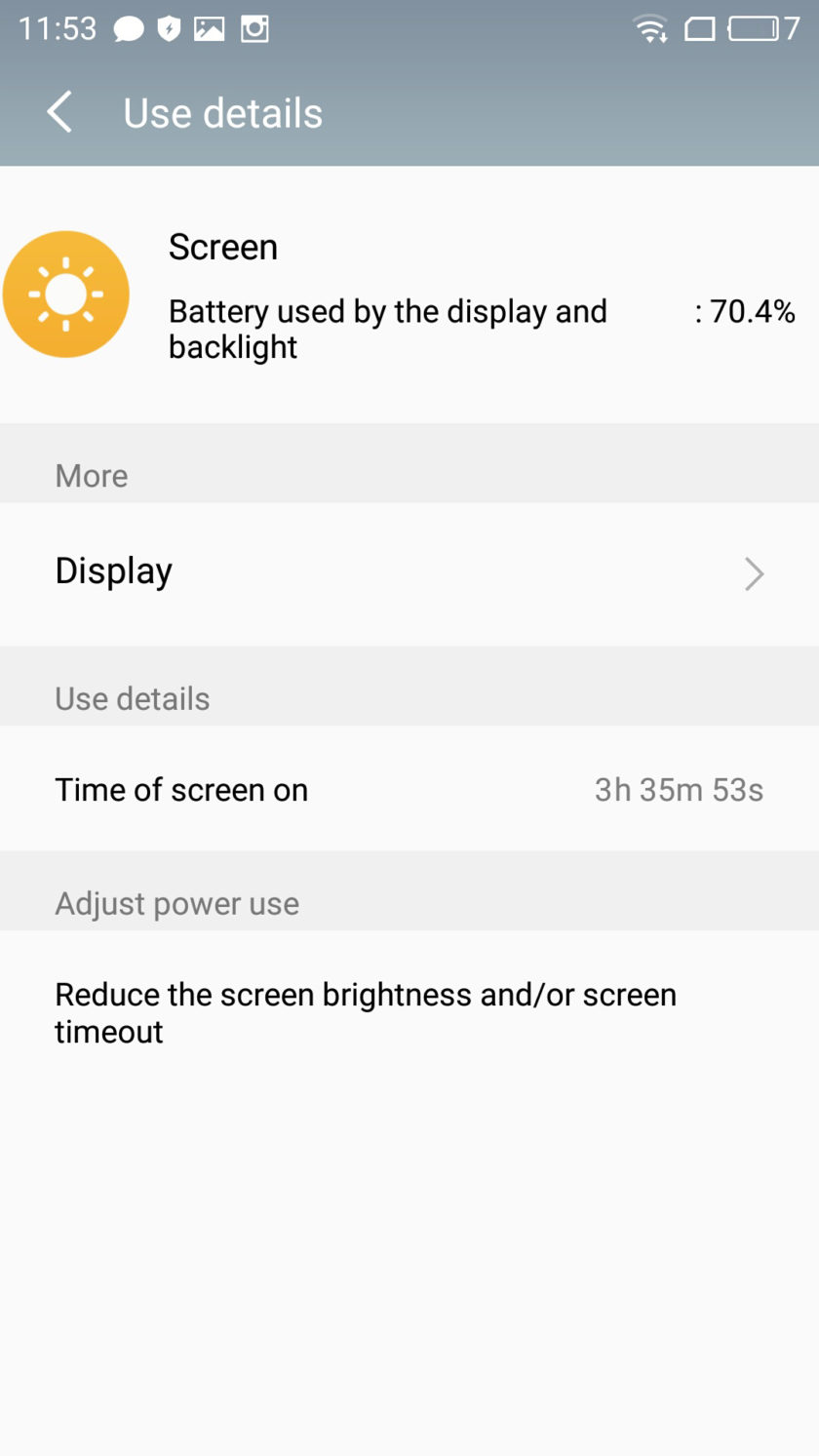
The Meizu Pro 6 comes with a rather small 2,560 mAh non-removable battery, but the battery life is still quite good. You will get around 3 hours and 45 minutes of screen-on time with moderate usage, and for the most part, that may be enough to get you comfortably through a full day of use. Depending on your usage, you may find yourself needing to recharge the phone half way through your day, but the good news is that the Pro 6 does come with a USB Type C port (USB 3.1) and some form of fast charging capabilities, that will allow you to be up and running in no time.
Camera

The Meizu Pro 6 comes with a 21 MP rear camera, with a f/2.2 aperture, a laser-guided auto focus system, and a 10 LED dual tone flash, along with a 5 MP front-facing camera with a f/2.0 aperture. There is no optical image stabilization here however, which is quite disappointing to see.
21 MP does allow for you to zoom in a lot into shots and crop in a good amount, but unfortunately, images don’t appear very sharp, with a lot of detail being lost as well. There is some noise to be seen, even in well-lit conditions, and the color reproduction is lacking as well. The camera is capable of taking some decent shots, but the lack of color is noticeable no matter what. HDR does help a lot in some situations, but sometimes that is often to a point where the shot begins to look unrealistic.
Image quality is definitely a mixed bag when it comes to this camera. The usual issues crop up when taking pictures in low-light conditions, with the loss of a lot of detail, colors being even more lackluster, and the overall image being generally dark and noisy. HDR is also hit and miss in poorly-lit situations. Sometimes, it will brighten the image just enough to create a good shot, but at other times, it will brighten the image way too much, which does bring out more detail in the shadows, but also results in overblown highlights.

You can shoot 4K video with the Pro 6, and while the video quality is decent for the most part, the lack of OIS is very noticeable here, making for some very shaky videos. The camera also sometimes struggles when it comes to focusing on objects when shooting video as well.
The 5 MP front-facing camera has a larger pixel size than most, in order to capture more light, but selfies are also below average. In brightly-lit outdoor situations, you can get a decent selfie, even though the image will often end up quite soft, and with some amount of noise. If you’re taking a selfie in anything other than well-lit conditions however, the images will turn out to be very blurry, or with lots of distracting noise.
Software

On the software side of things, the Meizu Pro 6 is running the latest version of the Flyme OS, based on Android 6.0 Marshmallow. Past iterations of the Meizu’s custom OS weren’t the best, but the company has been making some useful changes the help make the user experience a lot better.
There’s still no app drawer available though, leaving users dependent of creating folders to keep things organized. Some of the changes include the Recent Apps screen that can be opened with a swipe up from the bottom of the display, and comes with a cool animation and is presented in a nice layout. The pull down menu isn’t divided into two sections anymore, with the quick toggles and notifications all housed in a single page. Finally, Meizu has also added a Settings icon and shortcut at the top of the notification drop down, something that was surprisingly missing from previous iterations of the Flyme OS.
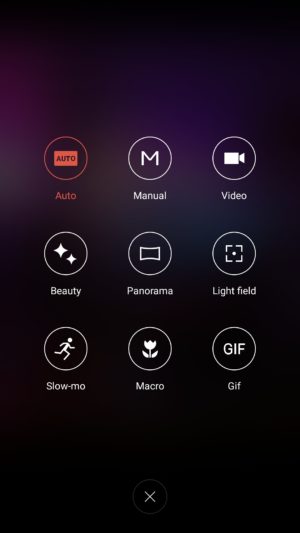
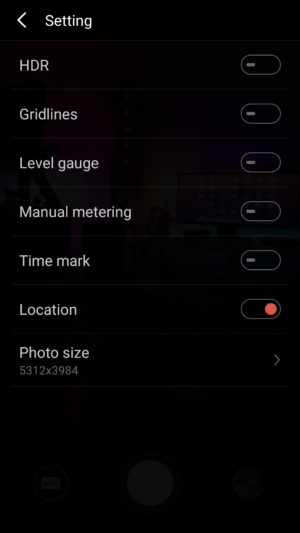

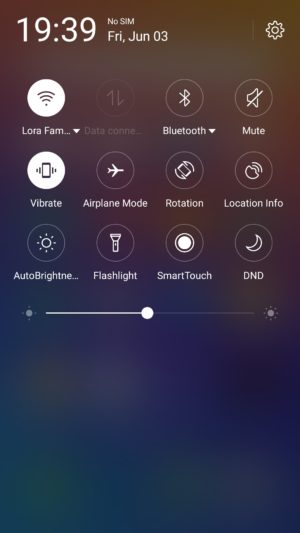


There are some nice features baked in as well, such as a slew of gesture controls, that include double to wake, a gesture input to pull down the notification shade, and up to eight different letter inputs that can be assigned to bring up specific applications. The Flyme OS offers a very different take on Android than what you may be used to, but different doesn’t have to mean bad, and it certainly doesn’t in the case of the Meizu Pro 6.
Specifications
| Display | 5.2-inch Super AMOLED display Full HD resolution, 423 ppi |
| Processor | 2.5 GHz deca-core Helio X25 processor Mali-T880MP4 GPU |
| RAM | 4 GB |
| Storage | 32/64 GB |
| Camera | 21 MP rear camera, f/2.2 aperture, laser auto focus, 10 LED flash 5 MP front-facing camera, f/2.0 aperture |
| Connectivity | Wi-Fi 802.11 a/b/g/n/ac Bluetooth 4.1 NFC GPS+GLONASS USB Type C 1.0 (USB v3.1) |
| Battery | 2,560 mAh |
| Software | Flyme OS based on Android 6.0 Marshmallow |
| Dimensions | 147.7 x 70.8 x 7.3 mm 160 grams |
Gallery

Final thoughts

So there you have it for this in-depth look at the Meizu Pro 6! The latest flagship Meizu managed to impress in more ways than one, and while there may not be anything unique to help this device stand out from the crowd, it does really well with the features it does have to offer. The fingerprint scanner is fast, and while the placement of the bottom-mounted speaker isn’t ideal, the audio quality is surprisingly good. Meizu has also managed to clean up their software experience to some extent, and while it will still take some getting used to, the additional features end up being quite useful.
That said, the camera isn’t particularly impressive, which can be a deal breaker for a lot of users. The Pro 6 isn’t the most affordable when importing the device to the US, but in markets where the phone is officially available, what you do get is a solid smartphone that proves to be dependable for the most part.
Buy now from Amazon
What do you think of the Meizu Pro 6 and do you intend to buy one? Let us know your views in the comments below!
Bose SoundSport Wireless review – CNET
The Good The SoundSoundSport Wireless is a very comfortable in-ear wireless Bluetooth sports headphone that’s sweat-resistant and sounds great. The earphones fit securely in your ears thanks to winged tips. The headphone works decently as a headset for making cell-phone calls and has an auto-off feature to preserve battery life.
The Bad The ear pieces protrude noticeably from your ears (they’re a little bulky but don’t feel heavy); battery life tops out at 6 hours.
The Bottom Line The Bose SoundSport Wireless is the most comfortable, best overall in-ear Bluetooth sports headphone you can buy right now.
Visit manufacturer site for details.
Over the years I frequently get asked what the best Bluetooth sports headphone is. My stock answer is that none are perfect, all have their drawbacks, and the handful of top models may fit you well and work great — or they may not.
Bose’s SoundSport Wireless, the company’s first Bluetooth sports headphone, isn’t perfect either, but it may just be the best Bluetooth sports headphone currently out there.
What makes it the best? Well, it’s very comfortable to wear, sounds good, seems well built, and — at $150 (£140, AU$249) — it isn’t outrageously priced.
Like the original SoundSport wired, which remains in the line and gets a price chop from $130 to $100, this new SoundSport Wireless has an open design. By open, I mean you don’t jam the earbud into your ear and completely seal off your ear canal (that type of headphone is referred to as a “noise-isolating” in-ear headphone). Thanks to Bose’s StayHear+ eartips, which come in three sizes — small, medium, large — the bud sits loosely in your ear yet remains securely in place.

The SoundSport Wireless comes with three sizes of StayHear eartips.
Sarah Tew/CNET
This model is equipped with a special sport version of the StayHear tips that’s different from the StayHear tips included with Bose’s earlier in-ear headphones, so they aren’t interchangeable. I should also point out that because the earpieces extend out from your ears you’ll probably have some trouble wearing these under certain helmets.
The ear pieces are somewhat bulky, but not so bulky to feel heavy on your ears. However, if there’s a criticism of this headphone’s design, it’s that the ear pieces could protrude out a little less and be more discrete-looking. Easier said then done, of course — today’s battery technology is holding back miniaturization efforts.
Rival headphones — such as Jaybird’s X2 and Freedom, Beats’ Powerbeats 2 Wireless and Monster’s Adidas Sport Adistar — give you the ability to shorten the cord length (or cinch up the cord) for those who want to wear the cord closer to the neck. With this headphone, you can’t adjust the cord length, but what Bose has done is provide a clip you can hook on to the back of your shirt (at the top) to keep the cord from flopping about. It’s a smart design and I thought it worked well; the cord remained fairly stable, even while I was running.

The headphone comes in aqua and black colors at launch with yellow arriving in September.
Sarah Tew/CNET
The only downside to the floating-fit, open design is that ambient sound does leak in: this isn’t a great headphone for noisy environments. (If that’s your preference, Bose’s upcoming QuietControl 30 is a wireless model that features active noise-canceling.) But if you’re out running or biking, you’ll be able to hear cars coming, which is why a lot of runners and bikers prefer their headphones to have open designs.
As you might expect, the headphone is sweat- and water-resistant and there’s an inline mic and remote that lets you skip songs, adjust volume, and take and make calls. Bose is touting its quality as a headset for making calls, as well as how reliable the Bluetooth connection is. I can attest to experiencing only minimal Bluetooth hiccups and was satisfied with how it performed as a headset, though the QuietControl 30 and QuietComfort 35 offer superior headset performance. Those models have noise-reduction features that muffle ambient sound, including wind and street noise.
Just as importantly I had no trouble pairing and repairing the headphone with my iPhone 6S and Samsung Galaxy S7 Edge (the Bose features near-field communication tap-to-pair technology for devices like the Samsung that support this feature). I also simultaneously paired it with my iPhone 6S and MacBook Air and had no trouble switching between the two when a call came in as I was watching a video on the computer.
Bose Connect, a free app for Android and iOS, allows you to manage your pairing list, upgrade the firmware and change the auto power off settings (the headphone powers down if you don’t use it for a certain length of time, which is a good battery-saving feature). When you turn on the headphones, a female voice alerts you how much battery life is remaining and with which devices you’re paired. That information is also available in the app.
Solarin Release Date, Price and Specs – CNET
A star-studded London launch with actors Leonardo DiCaprio and Tom Hardy. Premium materials like titanium and leather. These are not the reasons anyone would want to buy a $16,500 (or £9,500 or AU$22,700) phone.
But if Sirin Labs, the creator of the ultra-pricey Solarin phone, has its way, a little switch on the back will bring celebrities, government officials and other Very Powerful and Important People flocking. Rich people, who have the cash to spare.
Meet the luxury phone for the super-rich…
See full gallery


1 – 4 of 14
Next
Prev
The switch in question turns on an enhanced security mode that encrypts messages and limits much of the Android phone’s hardware and software capabilities. You would use this when sharing extremely sensitive information, the kind of heady stuff that Sirin Labs imagines would make Solarin owners a target for hackers.
To that end, the company joined with two other security firms, Zimperium to guard against threats, and KoolSpan, which boasts military-grade chip-to-chip encryption with 256-bit AES. Security support remains on twenty-four hour standby.
Solarin isn’t meant for the mass market, which is probably the only thing saving it from being a complete farce. Its core customers “are international business travelers that spend much of their lives on the move,” Sirin Labs CEO Tal Cohen told CNN.
If you really wanted to, you could buy the Solarin now online or at a few stores in London.

Solarin, left, compared to the Apple iPhone 6S.
Andrew Hoyle/CNET
Solarin’s hardware specs
- 5.5-inch LED display (2,540×1,440 pixel-resolution)
- 23.8-megapixel camera
- 8-megapixel front-facing camera with flash
- Wi-Gig technology (speeds of up to 4.6Gbps)
- Qualcomm Snapdragon 810 processor
- 4,000mAh battery
- 128GB storage, 4GB RAM
Is it worth the cost?
Phone security is a big deal; nothing highlighted that more than the FBI asking Apple to build a backdoor into its iPhones, and there are other security solutions out there.
Samsung already goes beyond Google’s Android security with its Knox software for Galaxy phones and BlackBerry claims boosted security on the Priv phone. The Blackphone promises even greater security, as does Silent Circle’s GranitePhone.
Speciality devices, especially those cloaked in fancy materials, typically use claims of keeping confidential information secure in order to justify a slightly higher cost — but this sticker price shoots into the realm of the absurd. And clearly draws on the very real fears of an extremely narrow segment of the population.
But without seeing the Solarin in hacker-thwarting action, it’s hard to think of it as anything but exploitative — though of course, we’ll reserve our final judgment.
 AIVAnet