


Xiaomi Mi Notebook Air Release Date, Price and Specs – CNET

Xiaomi
While China’s Xiaomi is best known for its budget-friendly phones, the company has recently branched out into all sorts of other tech products. From action cameras to smart weighing scales to water purifiers, the $60 billion startup has been building a diverse ecosystem around its core business.
Xiaomi’s latest product, the Mi Notebook Air, isn’t quite as novel as a hoverboard or the company’s latest drone, but it does have one thing most other ultraportable laptops lack — a discrete graphics card (discrete graphics cards are typically faster than their embedded brethren). A Nvidia GeForce 940MX, to be exact.
Other specs include a 256GB solid state drive and 8GB of RAM, and if you need more space there’s an additional SATA slot available to boost storage by up to 256GB.
Unveiled at a press event here in Beijing alongside the dual-camera wielding Redmi Pro phone, the 13.3-inch Mi Notebook Air was designed to fill a niche, Xiaomi’s CEO Lei Jun said. Similar ultraportables, such as the Razer Blade Stealth, lack discrete graphics and rely on Intel’s integrated graphics to do the legwork, which means their gaming capabilities are limited. Xiaomi says you can play games like Dota 2 at 85 frames-per-second at full-HD resolution on its Notebook Air.
Clad in aluminium, the device lacks any exterior logos. It’s a very clean look. Only when you open up the laptop do you find a Mi logo. While Xiaomi is selling the Mi Notebook Air under its own branding, the laptop is actually made by a partner called Tian Mi.
Xiaomi’s making an interesting bet in the laptop segment, though. IDC Research analyst Bryan Ma isn’t too optimistic about the Chinese notebook market, saying that IDC “expects China’s consumer notebook market to contract by 10.4 percent this year versus the -7.7 percent in the US and -9.3 percent worldwide.”
Key specs
- Intel Core i5-6200U, up to 2.7GHz
- 8GB RAM, 256GB SSD
- 13.3-inch, full-HD (1,920×1,080-pixels)
- 309 by 210.9 by 14.8 mm; 1.28 kg (2.82 pounds)
- Type-C USB for charging, 2x USB 3.0, 1x HDMI, 3.5mm audio port
- 40Wh battery, 9.5 hours
Xiaomi also announced a 12.5-inch version of the Mi Notebook Air that is slightly thinner and lighter at 12.9 mm and 1.07 kg (2.36 pounds). The 12.5-inch will lack discrete graphics, have only a 128GB SSD, 4GB RAM and use an Intel Core-M processor. That downgrading of specs comes with an upside, however — a battery life of 11.5 hours, 2 hours longer than the 13.3-inch model.
If you’re lusting for either one of these laptops, the bad news is that Xiaomi will only officially sell the Mi Notebook Air in China. They go on sale on August 2 and will retail for 4,999 yuan (this converts to about $750, £570 and AU$1,000) and 3,499 yuan (or about $525, £400 and AU$725) respectively. Check back later for our hands-on impressions after the press event ends.
Electrolux EI24ID30QS review – CNET
The Good The $900 Electrolux EI24ID30QS reliably rids dishes of stuck-on foods. For the price, it has an appealing mix of features such as easy to use wine racks and jets that shoot directly into a water bottle or wine glass.
The Bad The EI24ID30QS isn’t as reliable when it comes to keeping off bulky foods — the filter struggled with chopped spinach and mac-and-cheese noodles. The controls can be sluggish and it doesn’t have a countdown timer or a delicate cycle.
The Bottom Line It’s not the best at anything, but the $900 Electrolux EI24ID30QS is pretty good at everything. It won’t wow you, but If you scrape the bulky stuff off of your plates, this dishwasher will easily handle the rest, making it a fine upper midrange option.
The Electrolux EI24ID30QS feels like a piece we’ve been missing from our collection of dishwashers thus far. It fits in the middle perfectly. Nothing about it is exceptional, but it’s pretty good at just about everything you’d want in a dishwasher. It has an upper mid-range $900 price. It cleans well, has a nice lineup of features, looks the part of a high-end dishwasher, and it’s easy to load and to use.
For roughly the same price, the $800 Bosch SHS63VL5UC has better cleaning performance but it’s also a pain in the butt to use and doesn’t have many features to speak of. The Electrolux EI24ID30QS does everything besides cleaning much better than that Bosch, and is a pretty good cleaner itself.
If you want the best dish cleaner for the price and don’t care about the occasional headache, go with the Bosch SHS63VL5UC. If you rinse your dishes, I’d recommend the easier to use Electrolux EI24ID30QS.
Electrolux’s average Joe dishwasher delivers…
See full gallery


1 – 5 of 8
Next
Prev
Blending in nicely
With unbroken stainless steel on the front and few color accents breaking up the mostly grey interior, the design of the EI24ID30QS walks a fine line between understated and boring. In a crowd of premium appliances, you’d have a hard time picking it out, but taken on its own, it looks the part of an upper echelon machine.
You can purchase the EI24ID30QS from large appliance retailers such as Best Buy, Sears and AJ Madison. As usual with large appliances, you’ll find it on sale for less than the listed $900 price. Best Buy has it for $720. You can also enter your ZIP into the Electrolux website and find retailers near you. The Electrolux EI24ID30QS isn’t available overseas.
Loading your dishes

You can clip a water bottle to these fold out jets on the upper rack.
Chris Monroe/CNET
Blue accessories adorn the mostly gray interior in a few places. The bottle wash jets on the upper rack fold out and let you clip on tall items. It’s a neat way of scraping the dirt off the hard to reach bottom of baby bottles or water bottles. The $1,200 GE PDT750SSFSS has something similar, but it’s a clever feature nonetheless and I appreciate its inclusion in a sub-$1,000 model.
The upper rack also has blue braces on its stem holders which do a great job of keeping your wine glasses in place without taking up too much room. We saw similar stem holders on the $1,100 Frigidaire FPID2497RF, which makes sense, as Frigidaire is owned by Electrolux. Great stem holders might not seem like a huge deal, but Electrolux does them better than any other brand we’ve tested.

The stem holders keep your fragile glasses secure without taking up extra room.
Chris Monroe/CNET
You can also raise and lower the upper rack. Lift it to set it in its higher position, then lift it again and release it to drop it back down. That flexibility helps you put tall dishes on either the top or bottom rack, and a couple of sets of fold down tines also help make room for larger or oddly shaped dishes. In all, the front half of two upper rack columns fold down, and the back two rows of tines on the bottom fold down.
The rest of the rack design is pretty straightforward. The EI24ID30QS doesn’t have anything tremendously helpful like a third rack or tines that change angles, but you’ll be able to load plenty of dishes without much hassle.
Selecting your cycle
The last blue color accent on the interior comes from the orbiting wheel of jets at the bottom of the tub. Between the wheel of jets, the jets beneath the upper rack, and another set of jets at the top of the tub, the Electrolux EI24ID30QS does a good job of spraying every inch of your dishes once you get your stack of dishes loaded into it.

View full gallery
The wheel of jets at the bottom of the tub helps the EI24ID30QS keep missed spots to a minimum.
Chris Monroe/CNET
Select your cycle on the touch controls hidden on the upper lip. The EI24ID30QS has a standard mix of settings, including a snappy 30-minute “Fast” cycle and helpful options such as “hi temp” and “max dry.”
I’d have liked some sort of display estimating the time to completion as you select your cycle. You’ll need to hang on to the instruction manual for that info. It doesn’t have a delicate setting for fine china, which might be a problem for some. And the controls can be a little sluggish when you first start pressing buttons.
Sennheiser PXC 550 Wireless review – CNET
The Good The Sennheiser PXC 550 Wireless is very comfortable, relatively lightweight over-ear wireless headphone that sounds very good and features impressive noise-cancellation technology. It has touch controls and delivers excellent performance as a headset. Good battery life.
The Bad It’s pricier than the Bose; while the sound quality is excellent for Bluetooth, it’s lacking that little bit of extra sparkle and definition (Sennheiser’s own Momentum II Wireless sounds better).
The Bottom Line While it doesn’t quite eclipse the less-expensive Bose, the Sennheiser PXC 550 Wireless headphone is comfortable and feature packed, and performs very well.
Visit manufacturer site for details.
When it comes to headphones, one tends to associate Bose with the “business traveler” demographic. But Sennheiser’s making a pitch to that segment of the market with its new PXC 550 Wireless, a “premium” over-ear Bluetooth headphone that also features active noise-cancellation. It’s a direct competitor to Bose’s QuietComfort 35 and costs $399, £329 or AU$630.
Sennheiser is not only touting the PXC 550’s sound quality, but its customizable sound modes (via the company’s CapTune app for iOS and Android), touch controls, long battery life (30 hours) and strong headset performance for making phone calls.

The Sennehsier PXC 550 Wireless plush ear cups offer a very comfortable fit.
Sarah Tew/CNET
Like the Bose, this is a very comfortable headphone, relatively lightweight at 8 ounces or 227 grams. Its ear cup design is different than the Bose QC35’s and it doesn’t have as wide an opening as the Bose, partially because its ear pads are puffier (those with big ears may find the pads sitting more on their ears than around them). I give Bose the comfort edge over longer listening sessions, but the Sennheiser isn’t far behind.
The headphone folds up for storage into an included carrying case and seems well built, though it doesn’t have the premium design touches of Sennheiser’s Momentum II Wireless, which has comes down in price online since its release in 2015.
What differentiates the PXC 550 from the Bose is that it has those aforementioned touch controls on the right ear cup and automatically turns on when you put the headphone on your ears. It then shuts down when you fold the headphone flat. Bluetooth pairing worked flawlessly for me, and I encountered only minimal Bluetooth streaming hiccups.
The CapTune companion app for iOS and Android allows you to tune the sound to your liking, tailoring it to the music you listen to. But to customize the sound, you either have to play files stored on your device or use the Tidal Music service. The app doesn’t support Spotify or other music streaming services at this time. However, a small button on the right ear cup allows you to toggle through a few different effect modes, including club, movie, speech or no effect. That works with anything you’re listening to.

The CapTune companion app for iOS and Android.
Sarah Tew/CNET
I found the sound quality and adaptive noise canceling very good. Bose is generally considered the gold standard when it comes to noise cancellation, and I’ve yet to find a headphone that offers superior performance in that regard. This Sennheiser comes close, offering essentially hiss-free listening, even with the highest level of noise canceling engaged (you can adjust the amount of active noise canceling).
Nintendo NES Classic Edition Release Date, Price and Specs – CNET
Did you hear? The Nintendo Entertainment System is back, and it’s cuter than ever.
The new NES Classic Edition (aka NES Classic Mini) is an official Nintendo product that crams 30 of the company’s most beloved games into a miniature version of the hit ’80s game system. It fits in the palm of your hand. It comes with an HDMI port so it can plug into a modern TV, and a freshly manufactured NES gamepad for that old-school feel.
And when it ships on November 11 for just $60, £50 or AU$100, it could also be an unbeatable deal: we ran the numbers, and you can’t get this many retro Nintendo games anywhere else for the money.
Surely you have some questions, yes? Here’s everything else you need to know.

Christine Cain/CNET
Can I use my old NES cartridges?
Nope! There’s no cartridge slot — according to Nintendo, the 30 games are all stored in onboard memory, and you can’t add or download any more.
But the little cartridge door opens, right?
Sadly, no. “The console does not use physical media and therefore the Chamber Lid does not open,” Nintendo told Kotaku.
How about my old NES gamepads and Zappers?
Not those either! The NES Classic Edition has a different controller port. You might recognize that port, though — it’s the same one you’ll find at the bottom of a Nintendo Wii remote. If you want to play a two-player game, you can connect a Wii Classic Controller or Classic Controller Pro for player #2.
Which games come with the NES Classic Edition?
- Balloon Fight
- Bubble Bobble
- Castlevania
- Castlevania II: Simon’s Quest
- Donkey Kong
- Donkey Kong Jr.
- Double Dragon II: The Revenge
- Dr. Mario
- Excitebike
- Final Fantasy
- Galaga
- Ghosts ‘n Goblins
- Gradius
- Ice Climbers
- Kid Icarus
- Kirby’s Adventure
- Mega Man 2
- Metroid
- Mario Bros.
- Ninja Gaiden
- Pac-Man
- Punch-Out!! Featuring Mr. Dream
- Star Tropics
- Super C
- Super Mario Bros.
- Super Mario Bros. 2
- Super Mario Bros. 3
- Tecmo Bowl
- The Legend of Zelda
- Zelda II: The Adventure of Link
Which awesome NES games don’t come with the Classic Edition?
Duck Hunt. Contra. Bionic Commando. Dragon Warrior. River City Ransom. Battletoads. A Boy and His Blob. Blaster Master. Crystalis. Castlevania III.
Nintendo’s tiny NES Classic Edition comes…
See full gallery


1 – 4 of 10
Next
Prev
What comes in the box?
One NES Classic gamepad, an AC adapter and an HDMI cable, as well as the console itself.
What if I want a second NES Classic gamepad for player #2 instead of using one designed for the Wii?
You’ll be able to buy a second Classic pad for $10, £8 or AU$20.
How does the new old (or old new?) gamepad feel, and how do the games look on a modern TV?
Watch this space! Nintendo hasn’t let any journalists touch the mini-NES quite yet, but we’re hoping to remedy that ASAP. Nintendo’s own video gives us some idea what the games might look like:
Can you save your game?
Yes. Nintendo told Polygon, “Each game has multiple suspend points, so you can start where you left off at a later time.”
What’s the best way to ensure I get an NES Classic Edition this holiday season?
In the UK, you can already pre-order one at Amazon. Pre-orders aren’t open yet in the US, but Best Buy seems to have a listing. In Australia, EB Games already seems to be sold out but maybe you can watch this space.
What if I just want to blow on cartridges again?
Seriously, don’t. But if you really want the old-school NES experience in a modern HDTV-compatible package and have a bucket of cash to spend, keep an eye out for an Analogue NT. It’s a thing of beauty.
2017 Audi R8 V10 Plus review – Roadshow
Jul 2016
The Good The 2017 Audi R8 has sophisticated looks that fly under the supercar radar a bit, but a screaming V10 engine that lets drivers rev to the stratosphere.
The Bad Not a lot of storage, no adaptive cruise control and the steering doesn’t offer much feedback. Oh, and it’s super-pricey.
The Bottom Line If you’ve got nearly $200,000 to drop on a car, the R8 is well worth your money.
“Tell me that’s a car with a ski rack on the roof and not a cop,” I pleaded to my pal just after demonstrating the extreme acceleration of the 2016 Audi R8 Plus. That’s the one with 10 cylinders and a whole gob of horsepower. Unfortunately, the men in blue noticed my (highly illegal) demonstration and immediately pulled me over.
Whoops.
The R8 debuted 10 — yes, 10 — years ago, at the Paris Auto Show. It’s always been an undercover supercar lacking the élan of a Ferrari or the swagger of a McLaren. Still, its 5.2-liter engine, available detuned with 540 horsepower or a full-bore 610, is a twin to the Lamborghini Huracan, thankfully without any of the harsh angles prevalent on that angry bull.

Audi
Instead, this second-generation R8 carries the tight Audi design language seen on the new TT. Smooth curves tuck into a tightly conscripted front fascia. LED headlights and tail lights are standard, and the dynamic sequential rear turn signals grab the attention of the driver behind.
But you can’t talk Audi R8 without talking about the blade. The slash of solid black from top to bottom on the profile of the R8 is no more. Instead, the body color cuts through the blade, bisecting it into two distinct parcels. I love it, but some of my colleagues at Roadshow contend that the new style line interrupts the visual flow of the rear quarter panel.
Track time

Emme Hall/Roadshow
I knew I had to get the R8 on the track to truly appreciate its mid-engine power. Thunderhill Raceway, a few hours north of Roadshow HQ, may not be the fastest track in the world, but there’s enough of a front straight to break triple digits and plenty of turns to toss the R8 around.
Upon startup, the V10 engine roared to life at a timbre that thrilled my soul. I wanted to turn it off and back on again just to hear its basso growl.
After a few warm-up laps on the two mile track, I was finally ready to let the R8 do its thing. I pushed the checkered flag button on the steering wheel to select Performance mode, which then let me drill down further to select Dry, Wet or Snow. The sky was blue and the temperature gauge read 105 degrees. Dry, it is.
Coming out of the horseshoe at turn 2 and into a downhill straight highlighted the Audi’s high-revving engine. The cylinders screamed behind me as I waited for the seven-speed dual-clutch transmission to upshift. The revs climbed higher and higher as I dared a quick peek at the tachometer. 6,500 rpm, then 7,000 rpms and still climbing. I started to get nervous. Will this thing ever shift? Will I blow the motor? Will Audi ever talk to me again?
All my concerns were for naught as the R8’s 5.2-liter engine is designed to rev that high. It doesn’t even hit peak horsepower until 8,250 rpm, and redline comes soon after at 8,700. Keeping on the gas is an exercise in pushing through your fear and trusting the vehicle.
Through the turns, the R8 hugged the track like I’d hug Chris Pratt should he walk into my office. That is, constantly and without interruption. In fact, with the all-wheel-drive technology I would have to work hard to get the R8 to break traction. Had I turned traction control off I might be singing a different tune, but while drifting around a corner is fun and all, it certainly isn’t the fastest way around the track. Instead the Audi stayed flat in the turns, exhibiting little body roll, letting gravity push me into the firmly bolstered (and heated!) racing seat.
2016 Chrysler 300 Limited AWD review – Roadshow
The Good The 2016 Chrysler 300 looks good, drives smooth and packs the always excellent Uconnect touchscreen infotainment system.
The Bad Fuel economy is not great, and mediocre interior materials make certain parts creak and groan while other parts look old straight from the factory.
The Bottom Line The Chrysler 300 gives you a uniquely stylish look, combined with a comfortable cabin and driving demeanor, but it lags behind the competition in fuel economy and interior fit and finish.
Ever since the Chrysler 300 appeared on the scene in 2004, it provided sharp-looking big-body cruising, without breaking the bank. More than a decade later, it still occupies that same spot, albeit with a flashier wrapper and nicer equipment.
Trouble is, while the 300 was rolling down the boulevard, several new challengers appeared — a refreshed Toyota Avalon, an all-new Nissan Maxima and even a refreshed platform-mate, the Dodge Charger. The 300 hasn’t gotten worse over time, others have risen up around it. But in the face of all these new, uh, faces, the 300 remains a competent machine.
Looks and feels

If it’s good enough for Heisenberg…
Andrew Krok/Roadshow
The 300 has never not been handsome. It’s a blocky car, punctuated by strong fenders and the appearance of a low roofline. It looks mean, which might explain its brief appearance as Walter White’s wheels in “Breaking Bad.” It’s a more restrained, conservative look than the overly stylized Maxima, the musclebound Charger or the Avalon, which looks like the visual embodiment of a lullaby.
Inside, large and commanding front seats lend a feeling of executive-style appointment, and while an all-black interior may add a bit of drabness, it’s never unattractive.
While the look is fine, I had some issues with the fit and finish. Whereas the leather is surprisingly supple, the plastics throughout are anything but. The softest plastic lies atop the dashboard, but looks like it’s fading straight from the factory. My car’s faux-wood trim was attractive, but the storage cubby door on the center stack creaked like a 100-year-old house’s stairs.
There’s also the matter of the shift knob. The rotary dial is love-it-or-hate-it. I don’t mind it, but it’s made of a very cheap looking plastic. The gauges are also a bit in your face for a car that’s more on the demure side — neon blue lighting and sportily arranged numbers make for a strange juxtaposition.
Tech-forward, but not leading the charge

The 300’s Uconnect system is excellent as always, but its 3G telematics is a bit behind the times.
Andrew Krok/Roadshow
If there is one thing I absolutely adore in a Chrysler, it’s the infotainment system. Uconnect is snappy, well laid out and easy to get used to, all of which earn high praise from me. The associated information display between the gauges is easy to navigate, and I like just how much it’s capable of displaying, from engine oil temperature to individual tire pressures to one of the best looking fuel economy gauges in the industry.
Bear in mind, not all 300s feature this system. With a 300 in base trim, you will need to add the $2,395 Premium group to get the 8.4-inch touchscreen Uconnect system. The Anniversary Edition 300 I drove came with the system as standard, but with a $2,995 premium over the base price.
Additional apps are available in the system, such as Pandora, iHeartRadio and Slacker Radio, but they require the Uconnect Access phone app. There’s a Wi-Fi hotspot with an embedded modem that also powers some of Uconnect’s apps, like Yelp, but its 3G speeds are a bit behind the curve. Nevertheless, the 300’s two USB ports in the back, complementing the one up front, let passengers keep their phones charged on longer hauls.
In its effort to innovate, Chrysler integrates the windshield wipers and turn signals into a single stalk on the left side. If you’re not used to Chrysler vehicles, this will be as annoying as it is confusing. Changing a very traditional configuration may be a bridge too far.
iBaby Air Release Date, Price and Specs – CNET
I love raising my baby in a city, if only because I’m able to maintain a life without too much trouble. But with cities often comes pollution, and air-quality problems have been linked to major long-term health concerns — especially for young children. It’s not just an outdoor problem, either. Volatile Organic Compounds (VOCs) are commonly found indoors, including carbon monoxide, methane, ammonia, and plenty of others.
But now iBaby, a company that’s built a name as a popular developer of baby monitors, has a solution: a smart air-quality monitor and purifier called the iBaby Air. The device just reached full funding on Indiegogo, but I got my hands on one before it launches later this year. Here are four things you need to know about iBaby Air.
iBaby’s tiny new air purifier packs a punch
See full gallery


1 – 4 of 8
Next
Prev
It does something few other devices do
Sure, plenty of gadgets monitor your home for carbon monoxide or smoke. Some even track dust, pollen, and CO2 levels. But few devices offer the sort of all inclusive air-quality monitoring that iBaby says it does. Of course, how well it tracks VOCs still has to be tested. But it’s at least trying something few consumer devices in the past have done.
The iBaby Air has some legit smarts
Aside from tracking air quality in the moment, the iBaby Air maps your home’s air quality over time, letting you see improvements as you make them. While another recent crowdfunding project called Wynd is doing something similar, iBaby Air sweetens the deal with a speaker for music and two-way audio, a full RGB color nightlight and other features in the app.

Chris Monroe/CNET
The iBaby Air is small, portable and sleek
The white finish looks fine, and the additional optional wood finishes will fit nicely with different home aesthetics. Plus, unlike those conventional air purifiers that take up a whole corner of your house, the 6-inch-tall iBaby Air can just perch on a mantle, out of the way.
The iBaby Air costs $150
That’s not expensive, but it’s not cheap either. Standard air ionizers cost around $60 to $80. The iBaby Air adds a lot of smarts to the package, but whether that merits the extra 70 or 80 bucks will depend on what users are looking for.
Nikon D500 review – CNET
The Good The Nikon D500 is fast with excellent continuous-shooting and autofocus performance, its 4K video support is a welcome novelty for its dSLR price class and, of course, there’s the great photo quality.
The Bad Terrible wireless file-transfer and remote-control app, and its Live View (contrast) autofocus could use a boost.
The Bottom Line There’s tons to like about the Nikon D500, from its fast shooting and excellent image quality to its broad feature set and streamlined design. But it still falls short with its Live View autofocus and seriously subpar wireless file transfer and shooting operation.
After 6 years neglecting the power APS-C action photographer, Nikon released the mostly impressive D500 dSLR, the little sister to the pro full-frame D5. With the same autofocus and metering systems as that model, a high-sensitivity 20.9-megapixel CMOS sensor, a large tilting touchscreen and 4K video, it hits most of the essential targets for a camera in its class. Only a couple of flaws knock it slightly off course.
The D500’s body runs $2,000 (£1,730, AU$3,500); the camera also comes in a kit with the DX 16-80mm f2.8-4mm lens for $2,600 (£2,480, AU$4,500). Unlike a lot of kit lenses I’ve seen, this one’s pretty good, and has a useful general-purpose focal-length range equivalent to 24-120mm. The lens is sharp, with a reasonable maximum-aperture range that should match the needs of people who’d be buying the body and want something for routine situations.
Joining the 1-million ISO club
It takes more than just raw speed to optimize a camera for continuous shooting. You need the ability to take decent photos at high sensitivities. That’s the only way you can use action-stopping fast shutter speeds and sharpness-maximizing narrower apertures under a lot of conditions; most activities don’t take place in bright, direct sunlight. The D500 delivers a maximum sensitivity of ISO 1,640,000 — highest in its price range — though the camera’s native range stops at ISO 51200, leaving five stops in the expanded range.
Nikon D500 full-resolution photo samples
See full gallery


1 – 5 of 16
Next
Prev
JPEGs look clean through ISO 6400. At ISO 6400 you can still process the raws to obtain more detail, though the trade-off is a lot of “grain” and hot pixels in dark areas. Between ISO 12800 and ISO 102400 (Hi 1) in JPEGs you can see some smearing and processed color noise, but it still retains modest amount of detail. Beyond that, you can still get recognizable photos at small sizes. Processing the raw files doesn’t help much; I suspect Nikon’s performing some in-camera wizardry to produce what it does. Overall, though, the similarly priced Nikon D750, with its full-frame sensor, still produces better photos
The color rendering and white balance are excellent. Its default Standard Picture Control increases contrast and you lose some highlight and shadow detail, and midtones are compressed, but the occasional hue shift is minor.
The D500 is the first camera to bring 4K video to a consumer-priced dSLR, and the quality is quite good for an APS-C sensor; sharp, with a solid dynamic range and the same excellent color. You can see a lot of noise in shadows above ISO 6400, but overall it’s peachy.
Analysis samples

Low iso tk
Lori Grunin/CNET

Despite the stratospheric ISO sensitivity claims, JPEGs are only clean through about ISO 6400, though depending upon the scene and lighting you may get pretty good results through ISO 25600.
Lori Grunin/CNET

You don’t want to venture into the expanded sensitivity ranges often, but they’ll serve if you’re desperate in low lighting. There’s an odd white-balance shift in both raw and JPEG files at ISO 102400.
Lori Grunin/CNET

In dim light the highest ISO sensitivity images look much better than our test shots, but you still don’t want to use them at 100 percent.
Lori Grunin/CNET

I’m impressed that Nikon can produce a recognizable image from this noisy mess at its Hi 5 sensitivity, equivalent to ISO 1638400. (JPEG on left, unprocessed raw on right.) In the expanded ranges, the JPEG processing delivers better results than you can probably get with raw processing, so if you enter that territory then change the in-camera settings to help keep from blowing up the highlights.
Lori Grunin/CNET

The D500 delivers excellent color reproduction and white balance under most conditions.
Lori Grunin/CNET
Lenovo K4 Note review
Lenovo is slowly but surely making an impact in the Android smartphone market, particularly here in India. Lenovo has some fantastic devices on offer, with a smartphone portfolio that is continuously expanding, and one of the most popular of their devices is the Lenovo K4 Note.
Its predecessor was very popular, and the latest offering takes things one step further, with the K4 Note bringing some of the best features of the higher-end Vibe X3 to this affordable series. What does this device bring to the table? We find out, in this comprehensive Lenovo K4 Note review!
Buy now from Amazon
Unboxing
The phone comes in pretty standard packaging, with an image of the phone and the large VIBE branding splashed across the box. Opening the box reveals the phone in all its glory, and it’s nice to see the device already in a protective case. The hard plastic case isn’t the most impressive though, and if you are particularly clumsy, you may be better off picking something sturdier.
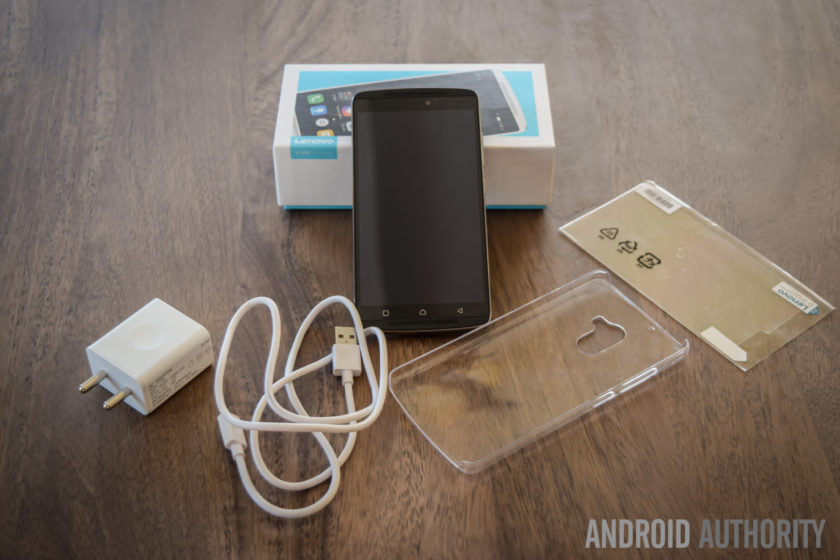
Diving in deeper, you will find the standard documentation, an AC wall adapter, and a USB charging cable, and Lenovo also includes a screen guard with the device, which is another nice touch. There are no headphones included, but that does make sense, given the affordable nature of this phone. Setting up the device only takes a few minutes, and follows the standard steps that any Android smartphone user will be familiar with. Once the phone is setup, you will find the official update for Android 6.0 Marshmallow waiting for you.
Design

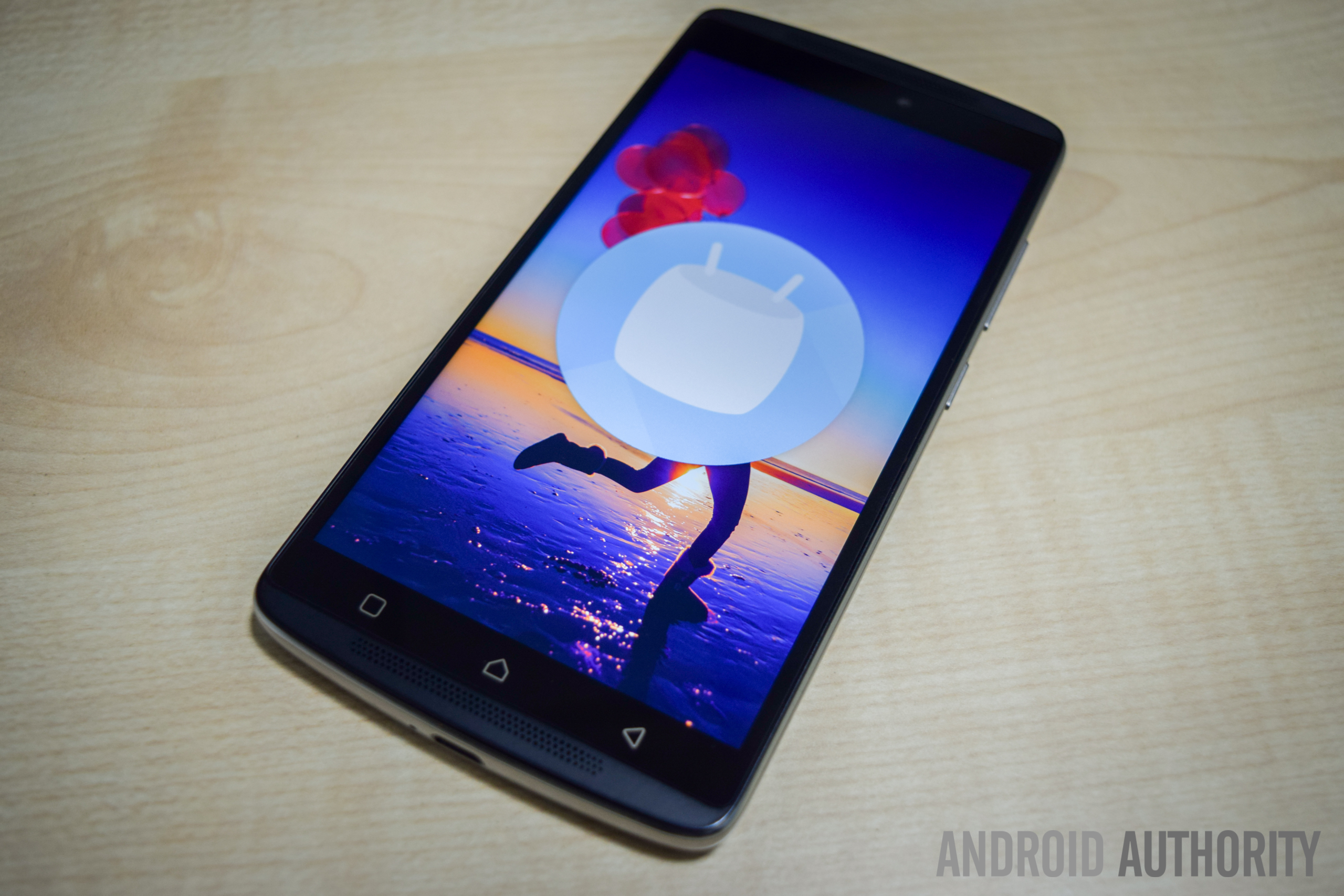
The K4 Note sees a significant upgrade in terms of design and build quality, when compared to its predecessor. The device now features a metal frame and a polycarbonate plastic backing, which makes the phone feel sturdy and solid in the hand. The combination of dual-front facing speakers and a fingerprint scanner just below the camera makes the K4 Note aesthetically similar to the Lenovo Vibe X3, which isn’t really surprising, given that this device has been released in some markets as the Vibe X3 Lite.
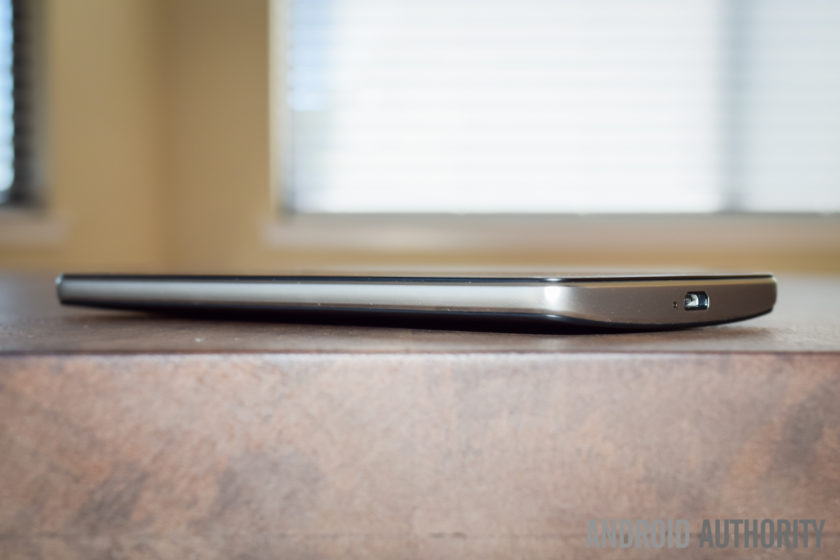
The plastic backing is removable, giving you access to the microSD card and SIM card slots, but the battery cannot be replaced. Removing the plastic back cover is when you notice how thin and flimsy it is, but despite appearances, it certainly holds up very well, and is something you won’t even notice when snapped in place. For those still worried, the device does come with a plastic protective case in the box, and there is also a version of the phone now available with a wood backing. The wooden back doesn’t seem to be sold separately yet, but is something that we can expect to see soon.
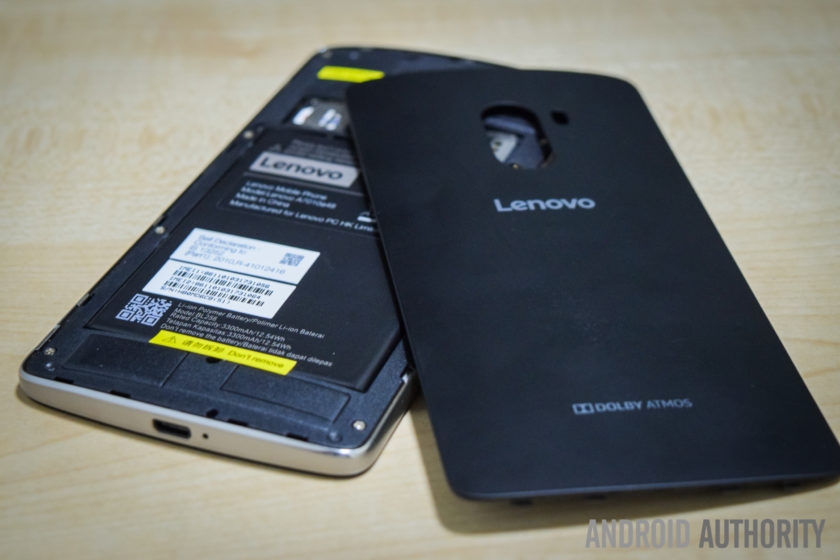
Taking a look around the phone, the headphone jack and microUSB port are at the top and bottom respectively, and the power button is below the volume rocker on the right side. On the back is the camera that is centrally located along the top, and below it is the fingerprint scanner. Up front, below the display are the three capacitive navigation keys, but these buttons aren’t illuminated, which can make them quite difficult to see in the dark.
The power button doesn’t come with something like a ridged pattern to help differentiate it from the volume rocker, but the buttons are placed far enough away from each other for this to be a minor concern. The buttons also protrude quite a bit, so you can actually easily see which button you are pressing. The buttons don’t offer as much tactile feedback as might be expected, and the power button in particular feels quite mushy. However, with you being able to unlock the device and directly go to the homescreen using the fingerprint scanner, you won’t need to use the power button all that much anyway.

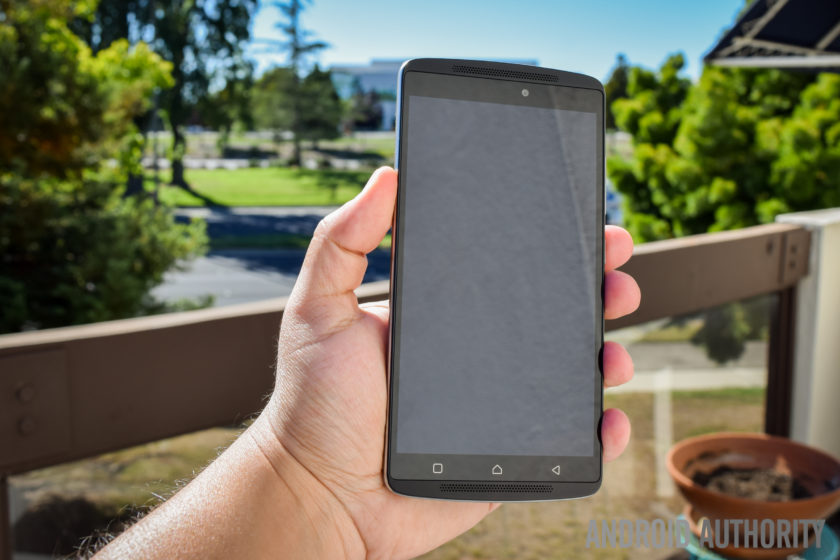
As far as the handling experience is concerned, a slight curve on the back allows for the phone to nestle nicely in the palm of your hand, and unlike metal smartphones, the device isn’t slippery either, courtesy of the polycarbonate backing. Overall, the Lenovo K4 Note is a very well-designed smartphone, and as is also the case with some of its competitors, the design and build quality of the phone certainly goes beyond what you would expect from a sub-$200 device.
Display

The K4 Note comes with a 5.5-inch IPS LCD display, with a Full HD resolution, resulting in a pixel density of 401 ppi. Many affordable smartphones are starting to boast Quad HD screens now, but 1080p gets the job done here, with text appearing sharp, and watching videos and playing games is a lot of fun as well. The viewing angles aren’t great however, and while the brightness at the highest setting is good enough to allow for easy outdoor viewing, the screen can be quite dull and dark when the brightness is set to less than 40% even when indoors.
Lenovo in video:
-

Lenovo foldable smartphone a… -
Lenovo PHAB2, PHAB2 Plus, PH… -
Lenovo Tab3 Lineup Hands On -
Lenovo Vibe K5 and K5 Plus h…
The default color balance is good enough, but the color temperature is on the cooler side. You do have some options available to set the color balance and temperature to your liking, including a manual mode that gives you granular control over these aspects. One preset setting is called Comfort Mode, that helps protect your eyes when browsing the phone for long periods of time. There is also Smart Brightness, which judges when the phone is in harsh lighting conditions and enhances the visibility. It works well enough, but as mentioned, the display brightness is cranked up anyway.
Performance

Under the hood, the K4 Note comes with an octa-core MediaTek MT6753 processor, clocked at 1.3 GHz, and backed by the Mali-T720MP3 GPU and 3 GB of RAM. There is also a version with 2 GB of RAM, but this iteration hasn’t been released in India. The performance has been pretty good, helped along by a clean software package, and there have been no glaring issues. The device handles day to day tasks very well, and opening, closing, and switching between apps has been smooth.


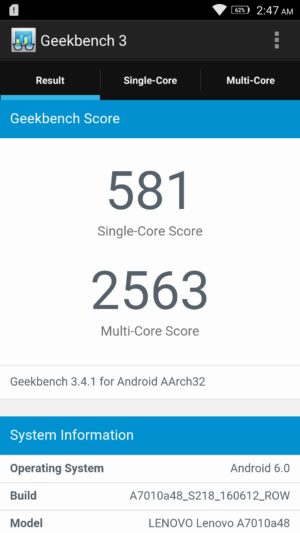
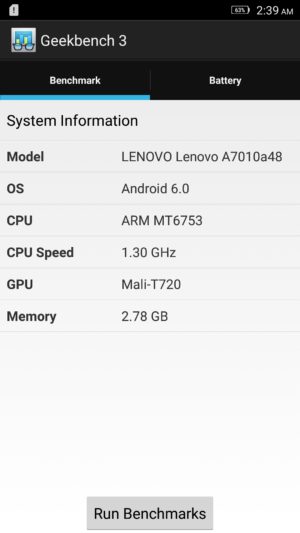
Of course, the K4 Note isn’t a performance powerhouse, and the benchmark scores reflect that, but with average usage, this phone certainly impresses. The gaming experience has been enjoyable as well, and playing games like Stick Cricket 2, UFC, and NBA Live Mobile have been a lot of fun. Games do take a bit to load, and there are some instances of stutter when navigating through the menus and settings, but when it comes to the actual gameplay, things have been smooth and lag free for the most part.
Hardware

16 GB is the only on-board storage option available here in India, but in other markets, there are 8 GB and 32 GB iterations to be found. However, something to keep in mind is that the latter two come with 2 GB of RAM, while this Indian edition features 3 GB of RAM. If storage is a concern, the device features a dedicated microSD card slot, allowing for up to an additional 256 GB of space.
You get two microSIM card slots here, and you can pre-select which SIM can be used to for calling, texts, and data. The option you select for data will allow for access to 3G/4G LTE, while the other sticks to EDGE. It’s also a nice touch that you can choose different ringtones and message tones for the two SIM cards, making it easy for you to distinguish between them. There have been no issues with voice calling, with both parties able to hear the other loud and clear.

The K4 Note comes with dual front-facing speakers – which is always the best placement for speakers – with Dolby ATMOS features. While these speakers don’t get as loud as I would have liked, you get a rich stereo sound which further enhances the video-viewing and gaming experiences.
The Dolby ATMOS settings allow you to choose between preset options like Movie, Music, Game, or Voice, and you can also set up custom settings depending on your liking. You also get additional features, including Surround Virtualizer, Dialogue Enhances, and Volume Leveler. This is buried in the Settings menu however, and is found under the “Ringtones and Volumes” section.

With headphones on, the audio is absolutely fantastic, with impressive bass that I haven’t found with other, more expensive, smartphones. Something to remember is that it can get really loud with headphones on, so much so that the default volume setting is set to 50%, and you won’t find yourself needing to go any higher than that. If good audio is one of your requirements, the K4 Note is definitely a great option.
The phone comes with a fingerprint scanner on the back, and this is another feature that was very impressive. The setup is quick and easy, and the scanner is very accurate, but while it’s definitely fast enough, it may not be as fast as other sensors out there. Using the scanner unlocks the phone and takes you directly into the homescreen, which means that you will rarely have to reach for the power button.

The scanner comes with a few extra uses when the phone is as well. You can set it up so that a single tap can have it function as a back button or take you back to the homescreen, and a long press can open the Recent Apps screen, or again, take you back to the homescreen. Finally, you can have the scanner function as a shutter button as well, which is very useful when taking selfies. These are similar to the gesture support offered by rival Chinese OEM Huawei in some of its recent flagships.

The K4 Note comes with a 3,300 mAh non-removable battery, that allows for really good battery life. I was able to consistently get up to 5 hours of screen-on time with the device, and an impressive stand-by times means that the device easily lasted through a full day of use, and sometimes even two, depending on my usage. With heavy usage however, while the screen-on time was still pretty good, it was easy to drain the battery rather quickly.


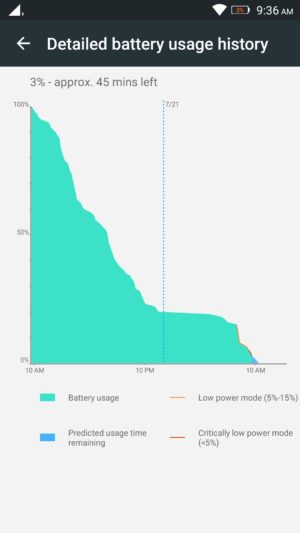

You get the standard Battery Saver mode that automatically kicks in at the 15% mark, and there is also an Ultimate Battery Saver feature, that minimalizes the UI, and allows for only calls and texts. An interesting battery feature is “Scheduled Power On and Off,” that lets you preset a time period where the device automatically switches off and turns back on again.
Camera

The Lenovo K4 Note features a 13 MP rear camera with a f/2.2 aperture, and a dual LED flash, along with a 5 MP front-facing unit, also with the same aperture.
The default camera app is very simplistic, and everything you may need can be found easily on the viewfinder. At the top left are the buttons to switch between the cameras and toggle HDR, and at the bottom is the button to toggle the flash. Only two modes are available in the menu, including Panorama and another that adds color filters to your images. Further in the settings is where you fill find the option to choose the settings for aspect ratio, photo resolution, snap mode, triaxial leveling, and guidelines.

Using the front-facing camera adds the Beauty mode, and you also have an option called “fill light,” that adds two, pink or chrome, bars at the top and bottom of the screen to light up your face in dark environments, but it doesn’t really help much, and results in a pink or bronze hue in the shot.
As far as the image quality is concerned, the 13 MP rear camera is capable of taking some nice shots, especially in well-lit situations, and the images can be crisp and clear sometimes. Not surprisingly, some noise and grain starts to creep in as lighting conditions deteriorate though. The camera doesn’t handle shadows particularly well either, with very little detail to be seen, and while HDR tends to help here, it creates an oversharpened, unnatural looking shot. The camera also tends to underexpose shots in a few situations, and when you use the tap to focus feature, it also adjusts the exposure, leading to either overblown highlights or super dark shadows.

As far as video is concerned, the camera is capable of recording at a Full HD resolution at 30 fps. Video quality isn’t particularly impressive, and with no OIS, you can get some noisy and shaky videos. The phone comes with a 3 microphone system intended to help with background noise reduction, and while it does a good job when outdoors, the sound is somewhat muted when recording audio in quieter locations.
Overall, the K4 Note camera is serviceable and will certainly get the job done in a pinch, but it’s in the little details that the camera lets you down. It’s certainly not the worst camera we’ve seen on an affordable smartphone, but it isn’t close to the best either and if the camera is important to you, this is certainly something to keep in mind.
Software
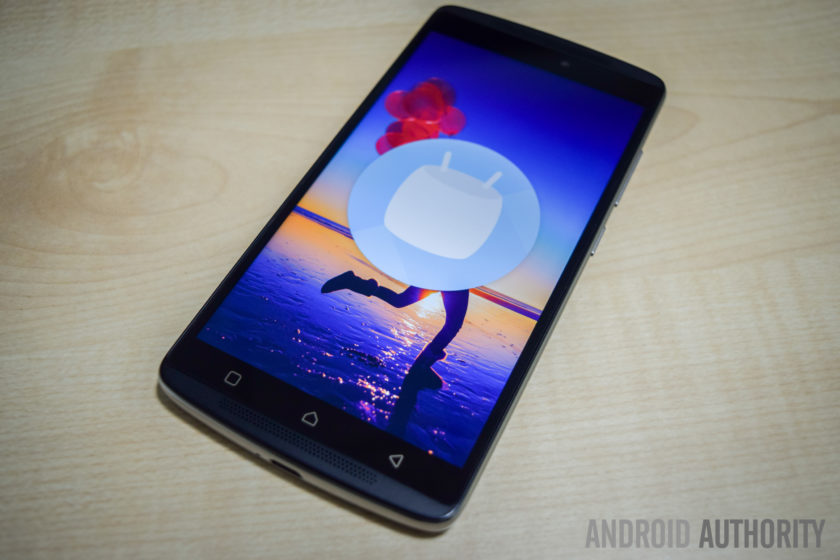
On the software side of things, the K4 Note is running Android 5.1 Lollipop out of the box, but – following the update’s release in India last month – there is now an official update to Android 6.0 Marshmallow immediately available after you first set up the phone.
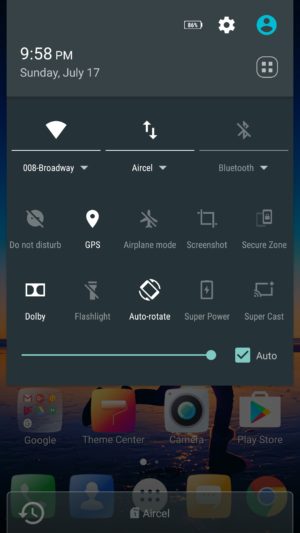
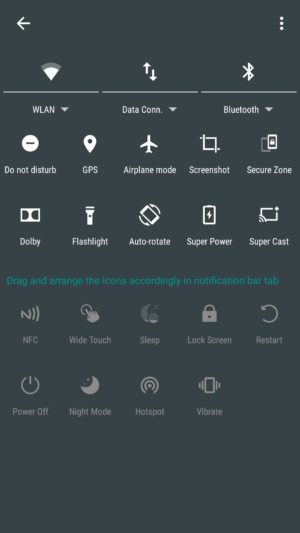
The software experience is very clean and minimalistic, at least on the surface, and while it does have significant differences, quite a lot of stock and Material Design elements are to be seen here. The Settings menu and Recent Apps screen are the same as stock, Chrome is the default web browser, and Google Keyboard is the preset keyboard of choice. The notification dropdown and Quick Settings menu are also similar in the look, but it is packed with a lot more options, with even more available when you dive deeper, allowing you to pick and choose which settings are more useful to you.


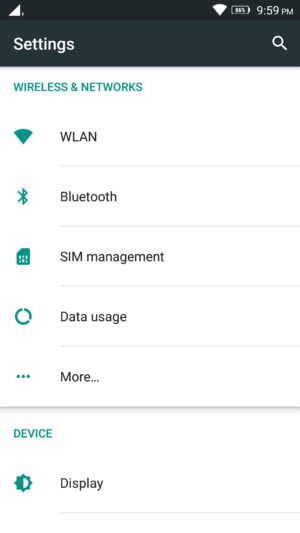


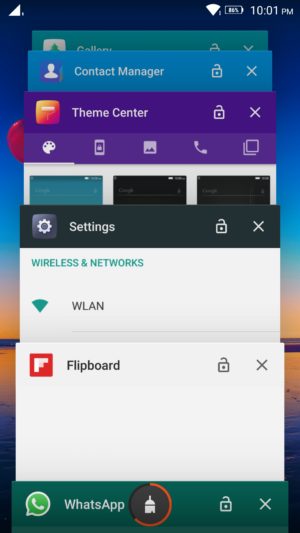

The app drawer retains the Material Design look, but is side swiping, instead of a top to bottom scroll. A nice addition here is that the app search menu up to also comes with a section that houses the most recent apps opened. There is a lot of bloatware to be seen however, with a slew of unnecessary, often redundant, apps pre-installed on the device.
Luckily you can uninstall most of these third-party applications, and the only ones that can’t be removed are Lenovo staples like ShareIT, SyncIT, and the Lenovo Companion app. There is also a Theme Center, but it isn’t particularly robust, and all you can really do is change the look of the lockscreen, icons, and wallpapers.
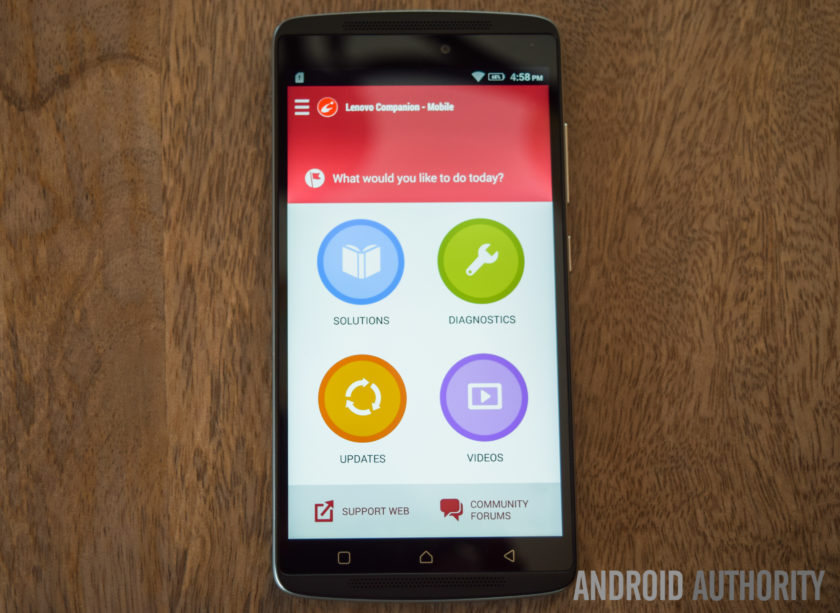
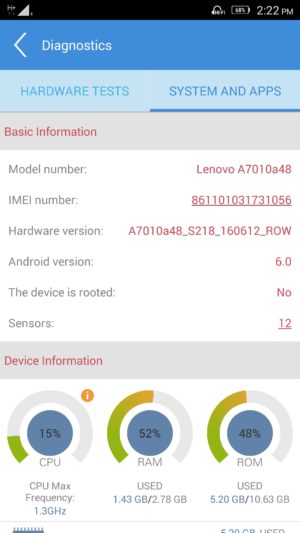
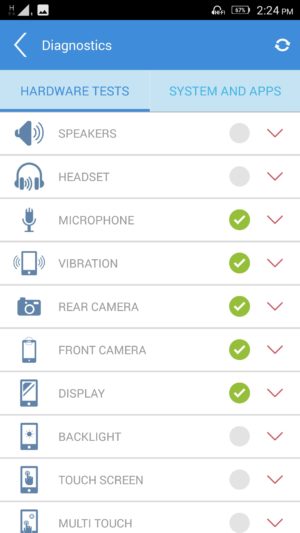
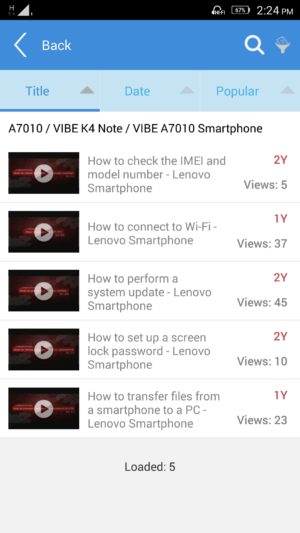
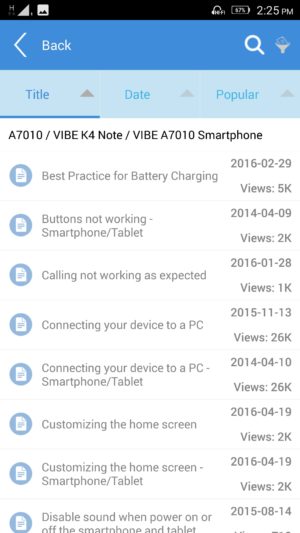
The Lenovo Companion app is a very useful tool to have, and provides a quick and easy way to set up service requests, or browse through the forums to find solutions to everyday problems you might come across. There are also video guides available, and also a robust diagnostics tool that lets you check whether all the device hardware is working the way it should be.
Finally, another feature that can be useful to some is Secure Zone; it can be toggled in the Quick Settings menu, and allows you to set up two virtual zones, that help keep your professional and personal lives separate. You can set up each zone to have their own accounts, passwords, and apps, and settings of one don’t carry over to the other.
If a notification arrives in one zone, you will know via a red dot that appears in the status bar, and you will then have to switch over to be able to check it. App data and documents are also kept apart, and if you are looking to share anything between the two, the way to do it is a via an OpenUserData shared folder. However, call logs and messages are shared between the zones.
Specifications
| Display | 5.5-inch IPS LCD display Full HD resolution, 401 ppi |
| Processor | 1.3 GHz octa-core MediaTek MT6753 processor Mali-T720MP3 GPU |
| RAM | 3 GB |
| Storage | 16 GB expandable via microSD card up to 256 GB |
| Connectivity | Wi-Fi 802.11 a/b/g/n/ac Bluetooth 4.0 GPS NFC FM Radio microUSB 2.0 |
| Camera | 13 MP rear camera, f/2.2 aperture, dual LED flash 5 MP front-facing camera |
| Battery | 3,300 mAh |
| Software | Android 6.0 Marshmallow |
| Dimensions | 153.6 x 76.5 x 9.2 mm 158 grams |
Gallery
Pricing and final thoughts
The Lenovo K4 Note is currently priced at Rs 10,999 (~$164), and the wooden back version isn’t that much more, priced at Rs 11,499 (~$171).
So, there you have it for this in-depth look at the Lenovo K4 Note! Lenovo has certainly done a fantastic job with this smartphone, and while using, it has been difficult for me to wrap my head around how affordable it is. With a solid design, decent performance, great audio, and good battery life, Lenovo checks all the right boxes.
The software package does have a lot of extras, but you always have the option to de-activate the various settings and enjoy a stock-like experience, and the only real caveat here is the camera performance, which isn’t poor by any means. There are a lot of great affordable smartphones out there, but Lenovo stands out with a great audio experience, and if that is a requirement, I would definitely recommend the K4 Note.
What do you think of the Lenovo K4 Note and do you plan to buy one? If not, what other affordable smartphone would you buy? Let us know your views down below guys!
Buy now from Amazon
Segway miniPRO by Ninebot Review
Walking on our own two feet just isn’t enough anymore for some people, there now needs to be some style behind the process – or else you’ll look very much like everyone else, exerting energy into it. While some don’t mind it all, others however are finding alternative forms of personal transportation. Over the most recent holiday season, so-called “hoverboards” roared unexpectedly onto the scene and became highly coveted amongst gift hunters, garnering huge sales in the process. Despite the sales surge, controversies surrounding safety recalls and the banning of its use in certain places, seemingly killed the hoverboard’s potential.
Long time connoisseur in personal transportation, Segway, believes that a better alternative will be achieved by the company’s latest, consumer-centric transportation vehicle in the Segway miniPRO by Ninebot. Given Segway’s history and reputation, the miniPRO is clearly distancing itself from being associated with hoverboards in general, as there’s no mention of it being one at all. Instead, Segway is selling it as being a “smart self balancing personal transporter.” This Bluetooth enabled personal transporter can be controlled via your Android smartphone, in addition to delivering vital information about its operation.
Slapped with an MSRP of $1300, it might be regarded as a pricey investment at first, but considering that commercial Segways start at $5,000 at the very minimum, the miniPRO’s cost is definitely easier on the pockets. Is it really worth getting though and is this the future of personal transportation tech?
Buy the Segway miniPRO now!
Design

First and foremost, the Segway miniPRO is a beast in terms of its size and puts to shame how those aforementioned “hoverboards” are built. Right away after taking out of the packaging, it’s tough to overlook the sense of solidness that accompanies its construction and design – one that favors an aggressive styling with its mostly dark black paint job. Meanwhile, the red accents found throughout the body help to exemplify its aggressiveness even more, making those hoverboards appear kiddy by comparison.
Top phones of 2016:
-

Alcatel Idol 4s Review -
Are Mods the future? | Moto … -
OnePlus 3 Review! -
HTC 10 Review -
LG G5 Review! -
Samsung Galaxy S7 Edge Revie…
Even though it shares the same foundation as most hoverboards, where it’s essentially a base held together by two 10.5” pneumatic, air-filled tires, which in this case are military-grade shock resistant and durable, the miniPRO is differentiated by a center column that controls its left/right steering by swaying your knees towards the corresponding direction. Again, there’s that sense of meticulousness with its design, as it incorporates an abundant set of LEDs and indicators on the platform to provide lighting while it’s on operation and relevant vehicle diagnostics without having to rely on the app – they include things like the battery level, speed limit, and Bluetooth connectivity indicators.
This isn’t a dainty, hastily put together contraption, like some of those unbranded hoverboards you might find sold at grocery stores. Building on top of its existing reputation in the business, Segway’s devotion in designing a personal transporter for the masses is evident here with the miniPRO’s outstanding design.
Balancing & Movement

Anyone who has experience in riding a hoverboard will undoubtedly have an easier time adjusting to the Segway miniPRO’s operation, seeing that its steering implementation is similar to a certain degree. Forward/backward movement is done in similar fashion by balancing yourself on the board and either leaning towards the appropriate direction. Of course, leaning a little bit makes the miniPRO move slowly, but leaning a lot will naturally make you move quicker. The skill in balancing on the Segway miniPRO might be difficult to newcomers who’ve never used a hoverboard, but once mastered, getting on/off and movement becomes second nature – it’s just finding that sweet spot with your center of gravity.
What’s different, though, is the center column that rests over the knees for left/right steering. This particularly implementation isn’t just safer for the rider, but also more logical because it aids in the balancing. In comparison, typical hoverboards rely on opposing foot tilting, wherein a left turn is done by tilting you left food forward and your right one backwards, which we feel is a more clumsy way of executing it – more so when you’re already trying to keep steady on the board. This implementation is what sets this apart from other personal transporters.
Admittedly, navigating around on the miniPRO was a breeze, even on some steep inclines. With a maximum weight limit of 220lbs, we’re able to safely traverse terrains without any issues, including some uneven areas. However, it’s best to take these types of terrains with caution, since going through them at faster speeds is a cause for some unbalancing.
We only had one minor altercation riding the Segway miniPRO, which relates to one incident when we got off it, but our shirt got caught towards the end of the center column – causing the unit to steer towards one direction, as well as the wheels grazing the bottom of our ankle.
Is it a practical form of personal transportation?

Size-wise, the Segway miniPRO offers personal transportation in a package that’s considerably less than your ordinary bicycle, but still bulkier and heavier than a skateboard or scooter. With a top speed of 10 mph and a range of 14 miles, the miniPRO clearly has some advantage over other manual forms of personal transportation, but we wouldn’t recommend lugging around a heavy backpack or other gear while using it. Instability alone, especially at higher speeds, is something we’re afraid of happening in the process. Even by ourselves, we still feel leery about pushing it to its maximum speed limit.
Using it to travel short distances is fine, say somewhere around one or two miles, but bear in mind that factors such as weight, terrain, and the incline will play a role in depleting its battery faster. Speaking of battery life, it might not have gotten close to its rated range of 14 miles from a full charge, but given out weight and whatnot, our 6 miles of usage isn’t too shabby at all. And when it comes to recharging it, the included wall adapter plugs into the port on the front section of the miniPRO, taking upwards of around 4 hours to completely charge.

The premise of the Segway miniPRO is alluring, a personal transporter that gets you from point A to point B in style. At the same time, though, its heavy weight (28 lbs) makes it almost impractical to bring along on the subway – you’ll be exerting more energy just lugging it around and carrying up stairs. Yes, there’s a steering guide at the top of the column that extends that allows us to pull the miniPRO, but it’s still a lot of work bringing it around. In fact, it’s just as heavy as some entry-level folding bikes.
Ninebot app

When it comes to its smartphone integration, the Bluetooth connection paired with the Ninebot app for Android allows us to do a host of things, ranging from customizing the LED lights, calibrating the unit, obtaining diagnostics information, and even remotely controlling it with the app. You can guide the miniPRO using the on-screen controls with the app, allowing for all the same movements available to us as if we were actually riding it. Remotely controlling is neat, obviously, but the only limitation here is the reach of the Bluetooth connection.
And as for security, the anti-theft security alarm feature is only available when the miniPRO is on and connected via Bluetooth to our connected Android smartphone – a Samsung Galaxy S7 in this case. When it’s enabled, the miniPRO will vibrate a little and flash some of its LEDs in the event it’s disturbed, as well as informing us via the app if it’s been moved or touched
 Related: Xiaomi backed Ninebot acquires Segway1
Unfortunately, there’s no way to have this feature enabled without having the Segway miniPRO turned on. Add to that, the whole security feature is rendered useless because you need to have it turned on and connected via Bluetooth for it to work properly. If we’re to grab a quick coffee from a store and leave the miniPRO outside, someone could very well snag it quickly and be a good distance away by the time we realize that the Bluetooth connection was severed.
Gallery
Conclusion

The promise of being the next step in the evolution of personal transportation is strongly evident with the Segway miniPRO by Ninebot, since its implementation is something we feel as being far more logical than the typical hoverboard. From its meticulous design, stylish flavor, smooth operation, and smartphone integration, it seems like the personal transporter that we’ve all been waiting for. Accompanied with the established reputation of the name Segway, the miniPRO seems like it’s on its way to success, right?
Now that’s a loaded question to answer, even for us, given that its sticker tag of $1300 will make it a difficult proposition for garnering widespread adoption. Over at Amazon, its price has been lowered to make it $1000, but it’s still a pricey investment for people to justify purchasing over other alternatives. Indeed, it’s a pretty cool gadget that’ll make your friends jealous, and it’s also more affordable than most commercial Segways. At the end of the day, however, it’s just too much of an expensive investment to spur adoption on a mass scale.
And herein lies the biggest issue; just like with smartphones, the tech surrounding personal transportation devices has improved dramatically but, rather crucially, battery technology has progressed at a slower rate.
For half the cost, alternatives like a decent folding bike or electric scooter, will offer more versatility for those who really need to cover distances. And of course, bikes and scooters only have to rely on the energy level of its rider – whereas the Segway miniPRO won’t be much of a help when its battery is depleted. And herein lies the biggest issue; just like with smartphones, the tech surrounding personal transportation devices has improved dramatically but, rather crucially, battery technology has progressed at a slower rate. As far as the technology goes however, the Segway miniPRO is a lot more comfortable than alternatives like a hoverboard.
What do you think of the Segway miniPRO and would you buy one? Let us know your views down below!!
Buy the Segway miniPRO now!
 AIVAnet