


Portal Home Wi-Fi System review – CNET
The Good The Portal has fast speed and far-reaching Wi-Fi coverage. The system has both a web interface and a mobile app and doesn’t require an account to work.
The Bad The web interface lacks some fairly typical Wi-Fi features and the mobile app is buggy. You can only use the app on a single mobile device. It requires you to change your settings in order for it to be compatible with all 5GHz devices. The system has terrible signal handoff.
The Bottom Line Though fast, the Portal has too many niggling issues that prevent it from being a seamless experience. Go with the Google Wifi or the Netgear Orbi instead.
When I first learned about the Portal a few months ago, it was intended to be a single Wi-Fi router. Now Ignition Design Labs has reintroduced it as a mesh system, meaning you can use a second unit to extend its Wi-Fi network.
While it works fine as a single router, it’s not a well thought-out or well tested mesh Wi-Fi system. And it certainly isn’t worthy of its current price of around $180 for a single unit or $319 for a set of two.
Why should I care about yet another Wi-Fi system?
Good question. What makes the Portal different from the most Wi-Fi routers is a dynamic frequency selection (DFS) mechanism Ignition Design Labs calls FastLanes. The router can use Wi-Fi channels that were previously only available to radar systems to boost speed at peak times (around 6-8 p.m. wherever you live). This means that FastLanes will only benefit those who’ve had speed or connection problems during peak times in the past. I personally didn’t see any improvement at home, but your mileage will vary depending your internet speed and how congested the air space in your neighborhood is.
The real problem with Fastlanes, however, is that not every product is compatible with it. Here’s a short list of those that aren’t and therefore will only connect to the 2.4GHz frequency band of the Portal (FastLanes is only available on the 5GHz band.) Since the the 2.4GHz’s airspace is almost always congested, which is why we need the 5GHz band in the first place, FastLanes will mean extremely slow Wi-Fi for certain devices.
FastLanes is turned on by default. When turned off, the Portal will support all existing devices.
 View full gallery
The Portal system includes two identical units.
Dong Ngo/CNET
OK, here’s what’s (mostly) good
Simple setup
Setting up the Portal is similar to that of the Google Wifi or the Eero. But you don’t need to create an account with Ignition Design Labs. As with most home routers, the system does not require you to connect to the vendor in order to work.
The Portal mobile app (available for Android and iOS) was buggy, however. I used it on a Pixel XL and the interface would freeze while applying changes or switching from one section to another. Still, it took me just 10 minutes to set up the first router. Basically, all I had to do was pick a name and a password for the Wi-Fi network.
Adding a second unit to create a mesh system took me much longer but most of the time was spent on waiting for the system to be ready. The process itself was still simple and relatively straightforward.
Good performance
Supporting AC2400 Wi-Fi, the Portal performed well both as a single router and a mesh Wi-Fi system. As a single router, it has a top sustained real-world Wi-Fi speed of more than 540 megabits per second. As a Wi-Fi system, when connected to the second unit, the top speed fell to just 244Mbps, due to signal loss. Signal loss is a common phenomenon of Wi-Fi systems, when the “satellite” unit needs to both receive and rebroadcast the Wi-Fi signal from the first router unit at any given time, resulting in some 50 percent efficiency reduction. Dynamic frequency selection (FastLanes) is supposed to mitigate this phenomenal but it doesn’t seem help in the Portal’s case.
The Portal has good range. As a single unit, it could cover about 2,800 square feet of a residential setting with strong a Wi-Fi signal, with two units combined into a mesh network, you now can cover easily around 5,000 square feet or even more.
Denon AH-D7200 Release Date, Price and Specs – CNET

Denon’s new reference headphone ships in January for $999.
Denon
Denon has a new high-end headphone coming this January — the AH-D7200 — and from its design and specs it seems worth keeping an eye on, if you’re in the market for a $999 headphone. (There’s no word on international pricing but we’ll add it when we get it. It converts to £800 or AU$1,400.)
Designed for “discerning audiophiles,” it’s got a classic reference headphone look with real walnut housings and Denon’s FreeEdge nano-fiber drive units. The earpads use Japanese-developed soft synthetic leather covers that have been designed for maximum comfort, according to Denon.
We’ll let you know how the AH-D7200 sounds and feels and soon as we get our hands on a review sample.
The AH-D7200 at a glance:
- 50mm FreeEdge Driver Technology made from nano-fiber material
- Real wood earcups
- 385 grams (13.6 ounces) excluding cable
- Ultra high-quality connection with 7N oxygen-free copper cable
- Earcups are suspended on ergonomically curved, diecast aluminium hangers
- Headband is finished in real sheepskin leather
- Memory-foam ear-cushions are trimmed with artificial leather chosen for its softness and durability
- Fit and side pressure optimized for the widest possible range of head sizes and shapes
- Price: $999
- Shipping in January 2017
2016 Jeep Cherokee Trailhawk review – Roadshow
The Good On paper it’s got the most off-road capability in its class. The Cherokee comes with the excellent Uconnect system.
The Bad No Apple CarPlay or Android Auto. The Cherokee has much less cargo space than competitors and the Trailhawk trim line suffers a bit on the pavement.
The Bottom Line If you expect to go off-road, the Trailhawk is a great choice. However, if you plan to stay in civilization, the top-of-the-line Overland trim line may be the better choice.
Many folks shopping for a midsize crossover just want a vehicle with all-wheel drive that performs well in any kind of weather, like the Mazda CX-5 or Toyota RAV4. If, however, you want a vehicle that can cross a creek and drive through a rainstorm on an unmaintained dirt road to your secluded cabin in the woods, let me tell you about the 2016 Jeep Cherokee Trailhawk. Just be prepared for a few on-pavement concessions.
The Cherokee, around in some form or another since 1974, debuted as a full-sized SUV. Over five generations it morphed into its current midsize crossover platform, and it currently keeps pace in sales with both the popular Wrangler and Grand Cherokee.

The Cherokee is available with a four-cylinder engine, but at 4,000 pounds I was glad for the extra grunt of the 3.2-liter V6 power plant. It’s an extra $1,745 but produces 271 horsepower and 239 pound-feet of torque. It’s definitely the better choice and well worth the extra coin.
Power goes to the pavement through a nine-speed automatic transmission. Yes, nine speeds. I was surprised at the well-behaved gearbox. It never searches for a gear and it willingly steps down two gears, and often three or four, during passing.
I took the Trailhawk on a road trip from Roadshow HQ in San Francisco to Los Angeles and averaged a dismal 22.8 miles per gallon, all while driving 70 to 80 mph for six hours at a time, a bit less than the EPA highway rating of 24 mpg. However, that’s much less than the EPA highway rating of the Subaru Crosstrek, at 33 mpg, and the Toyota RAV4 at 28 mpg.
Take a gander at the 2016 Jeep Cherokee…
See full gallery


1 – 6 of 10
Next
Prev
The Cherokee is available in nine different trims, but only the Trailhawk goes through Jeep’s rigorous off-road testing and wears the Trail Rated badge. I was hoping to get the thing on the dirt, but alas our busy schedule worked against us. We hope to revisit the Trailhawk, as it’s got all kinds of off-road goodies that the adventurous will appreciate. At minimum you need two things to make a vehicle off-road-worthy: a locking rear differential and a low range. The Trailhawk has both, plus more features that make it the most dirt-worthy option in its class.
The Cherokee has 8.7 inches of ground clearance and is outfitted with skid plates on the underbody, fuel tank and front suspension. The Selec-Terrain system lets you pick from auto, snow, sport, sand/mud or rock driving modes. High approach, breakover and departure angles help get the Cherokee Trailhawk up and over obstacles and it can ford up to 20 inches of water. The cherry on top is the 56:1 low gear ratio, perfect for high-torque, slow-speed rock crawling. It’s not a Wrangler, but it certainly is approaching one and on paper it kicks butt over other soft-roaders like the Subaru Forester or Crosstrek.
A grown-up Cherokee
The interior of the Cherokee Trailhawk belies its go-anywhere capabilities. The seats are comfortable and there is plenty of leather, with the added bonus of the excellent
Uconnect
navigation head unit. The optional 8.4-inch screen may seem crammed with information, but it’s all thoughtfully laid out and easy to navigate. Included with Uconnect are Siri Eyes Free compatibility, a new drag-and-drop menu bar and a Do Not Disturb function that sends phone calls straight to voicemail and can generate an automatic reply to text messages. It’s not as good as having Apple CarPlay and Android Auto, but it’s a good start.
Divoom Voombox Travel 3 review – CNET
The Good The Divoom Voombox 3 is an inexpensive mini Blueototh speaker that’s splash- and shock-resistant and sounds decent enough for its low price and small size. It also has speakerphone capabilities and a built-in carabiner for clipping onto a backpack or belt loop.
The Bad You get what you pay for: It distorts at higher volumes, and the bass is limited.
The Bottom Line For its ultralow price, the Divoom Voombox Travel 3 delivers more than you’d expect.
Divoom’s Voombox Travel 3, a Bluetooth speaker that’s about the size of a creme-filled doughnut, can be found online for a mere $20 (this exact model doesn’t appear to be available in the UK or Australia, but versions of the Travel are available in the UK for around £20).
No, this little guy didn’t blow me away with its sound, but I don’t expect that much for 20 bucks, and the Voombox Travel 3 slightly exceeded my low expectations. I noticed an uptick in sound quality from the original Voombox Travel I reviewed a few years back, but it’s not a big leap.

What you get in the box.
Sarah Tew/CNET
Like all these micro speakers, it’s strongest in the midrange, so it sounds best with your favorite soft rock and acoustic material (it did well enough with several tracks from Sting’s “The Last Ship” album, for example). Its 5 watts of power allows it to play reasonably loud — enough to fill a small hotel room — but once you start throwing more complicated songs at it, your music will fray around the edges and distort a bit. There’s some bass but not a lot. It certainly sounds better than your phone’s or tablet’s speakers.
You can lay the speaker flat, but I found it sounded better standing vertically and pointed directly at me (I used its built-in carabiner to hang it from a hook). It’s splash-resistant and rated to deliver six hours of battery life, which is decent enough for a speaker this size. A microphone is on board for speakerphone calls.
This competes with such speakers as the now-discontinued Logitech X100, which also retails for less than $20 and is similar in shape. The Divoom speaker feels more durable, and — unlike the old Logitech — it’s splashproof. But I can’t say the Divoom sounds better than the X100 or is a definitely better choice than that speaker. It’s just a little different — and both are recommendable at their low price points if a a tiny portable speaker is what you’re looking for.
Lenovo Vibe K5 Note review
Lenovo has been on a hot streak in India, with a slew of great smartphones on offer that cover everything from entry-level to high-end. The company has found particular success with its K Note series, while both the K3 Note and the Vibe K4 Note proving to be quite popular.
Also read:
Lenovo K4 Note review
July 25, 2016
Lenovo is hoping to find the same success with the latest addition to the series, the Vibe K5 Note, that was launched in India in August. With upgraded hardware and a premium design, does the latest affordable smartphone from Lenovo prove to be a worthy successor? We find out, in this comprehensive Lenovo Vibe K5 Note review!
Buy now from Flipkart
Design
The Lenovo Vibe K5 Note features a beautiful, all-metal unibody design
More and more manufacturers are starting to include all-metal designs in their mid-range and entry-level smartphones, so it’s not surprising that the Lenovo Vibe K5 Note features a full metal unibody construction. Admittedly, it doesn’t feel like the highest quality metal when compared to its more expensive and higher-end counterparts, but the construction is sturdy, and the device feels solid in the hand.
Taking a look around the device, the headphone jack sits on the top, while the microUSB port can be found on the bottom. The hybrid dual-SIM card and microSD card slot are on the left side, and on the right is the power button and volume buttons. The buttons are definitely an improvement when compared to its predecessor, with a good amount of travel and a nice click to them.
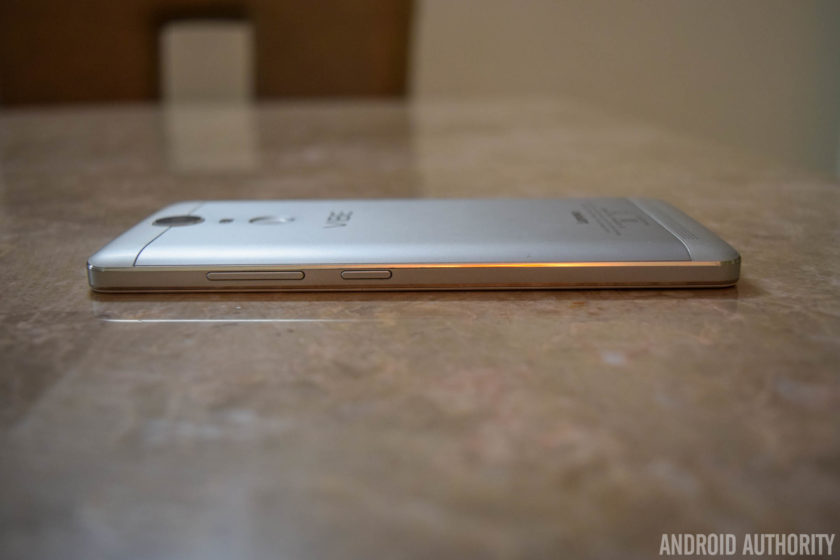
Below the display are capacitive navigation keys, and unlike its predecessors, the keys do light up, which is a nice upgrade. It’s not particularly bright though, and you won’t really notice it unless you are in a dark environment, but that is when having back-lit navigation buttons is the most useful anyway.
The fingerprint scanner is on the back, below the camera unit and the dual LED flash, and at the bottom is the single speaker unit. During the launch event, Lenovo made a big deal about how the camera, the flash, the fingerprint sensor, and the Vibe logo were perfectly aligned and symmetrical. It’s a nice design touch that you don’t really appreciate day to day, but has led me to taking a lot more notice of what other phones look like.
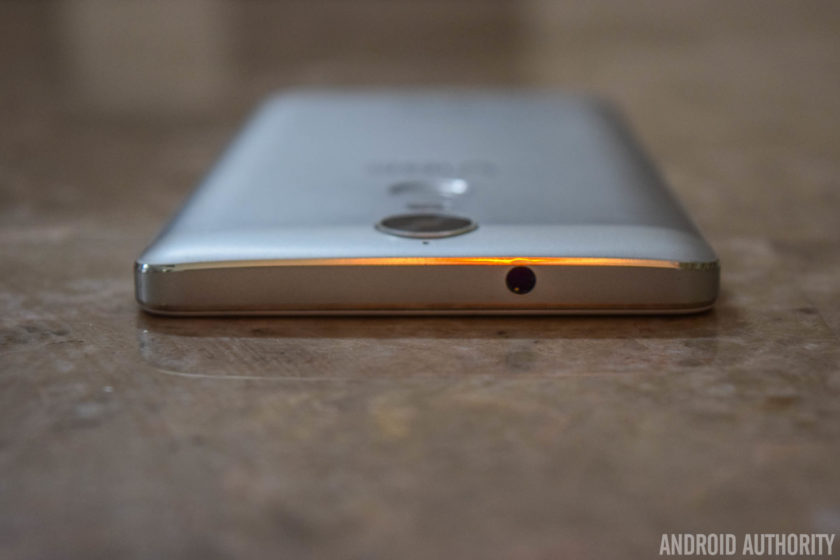
With a 5.5-inch display, the K5 Note is a large device, but Lenovo has done a good job with keeping the bezels along the sides of the display relatively thin. The subtle curves all around the back contribute positively to the handling experience as well. However, the metal body makes for a very slippery device, which can take some getting used to. If you have had issues with dropping your phone, you are definitely better off using a case that adds some grip.
Display

The Vibe K5 Note’s display is a huge improvement over its predecessor
The Vibe K5 Note comes with a 5.5-inch IPS LCD display with a Full HD resolution, resulting in a pixel density of 401ppi. This display is a huge improvement over its predecessor, particularly when it comes to the brightness. Color reproduction and viewing angles are better as well. 1080p allows for plenty of sharpness, and reading text, watching videos, and playing games are all enjoyable on this large display.
The default settings are good enough, but you do have the option to change the color balance and temperature to better suit your needs. There is a manual mode that gives you granular control over these aspects, and a few preset options, like Comfort Mode, that helps protect your eyes when browsing the phone for long periods of time.

One point to keep in mind here is that the glass panel protecting the display isn’t of the Corning Gorilla Glass variety, which is definitely a step back, considering it was available with the K4 Note. It’s difficult to judge how sturdy the panel is without actually scratching it or dropping the phone, but if that is a worry, a regular or tempered glass screen protector is certainly recommended. That said, I haven’t had any issues with scratches on this screen yet.
Performance

The Vibe K5 Note is powered by the octa-core MediaTek Helio P10 processor, clocked at 1.8GHz and backed by the Mali-T860MP2 GPU. This particular review unit comes with 4GB of RAM, but there is also a slightly cheaper version of the phone available with 3GB of RAM. The benchmark scores may not be very impressive, but the overall performance has actually been really good.


Opening, closing, and switching between apps has been a breeze, and the device handles everyday tasks very well. The gaming performance is excellent as well, and there have been no instances of lag or stutter when playing games like NBA Live Mobile, Stick Cricket 2, Modern Combat 5, and Riptide GP: Renegade. That is as heavy as my gaming requirements go, and the K5 Note did a wonderful job with all of them.
Hardware

32GB is the only option as far as on-board storage is concerned, regardless of whether you pick the 3GB or 43GB of RAM version. Expandable storage via microSD card is available, up to an additional 256GB. However, the second SIM slot doubles as a microSD card slot, so users will have to make the choice between expandable storage and dual-SIM capabilities.
Users will have to make the choice between expandable storage and dual-SIM capabilities
While the K4 Note featured dual front-facing speakers, the single speaker unit of the K5 Note has been relegated to the back. Lenovo mentions that the curve along the bottom near the speaker directs the sound better, and it does help to some extent, but front-facing is definitely the better way to go. The sound quality itself is pretty good, and the speaker gets decently loud without sounding tinny.

The Dolby ATMOS features do return however, where you can choose between preset options like Movie, Music, Game, or Voice, or set up custom settings depending on your liking. You also get additional features, including Surround Virtualizer, Dialogue Enhances, and Volume Leveler. As before, access to this feature in buried in the Settings menu, and can be found at the end of the “Ringtones and Volumes” section.
Speaking of ringtones and volumes, Lenovo’s software has a few interesting additions here. You have the ability to set up different ringtones and message tones for the two SIM cards, which is a nice and easy way to distinguish between the two. There is also a feature called “Pocket Enhancer,” that boosts the ringtone volume when the device is in your pocket. However, that only really works if your default volume setting is less than all the way up already.

The fingerprint scanner on the back is really fast, but not as accurate as before, with the sensor often requiring a second try to unlock the device. The speed more than makes up for the slight lack of accuracy however, and you don’t even have to lift your finger for the sensor to read it the second time and get it right. It’s fast enough that the only reason I know it took another try is because of the vibration when it gets it wrong.
The fingerprint scanner on the back is really fast, but unfortunately not as accurate as before
The sensitivity and speed of the scanner did prove to be a problem in some instances though. For example, when pulling the phone out of a pocket, accidentally touching the scanner with the wrong finger would result in the device attempting to read it multiple times. This would result in the fingerprint scanner failing, which means the phone would then resort to requiring a PIN or pattern to unlock the phone. This would happen so fast that by the time I’d hold the phone up to actually unlock it, I would see an error message that reads “Too many attempts.”

As we’ve seen with the devices from other Chinese OEMs, this fingerprint scanner is capable of more than just unlocking the phone. There are a few different functions that it can be set up to perform. For example, a single tap can be set to work as a back button, or to take you back to the home screen. A long press can open the Recent Apps page, and finally, you can use the scanner as a shutter button, which is very useful when taking selfies.
The Vibe K5 Note comes with a large, non-removable 3,500mAh battery, and the battery life it provides has been excellent. With average to heavy usage, the device has consistently managed at least 4.5 to 5 hours of screen-on time, and there have been a few days where I’ve managed to push the screen-on time to close 6 hours. With fantastic standby times, the K5 Note will comfortably allow for a full day of use, and can easily be pushed to a day and a half to two days with lighter usage. There is no fast charging or wireless charging capabilities to be had though.
See also:
Screen-on time: Why is it important, and how can I extend it?
2 weeks ago


If you are looking to get even more juice out of the battery, there is the standard Battery Saver mode that automatically activates at the 15% mark. There is also an Ultimate Battery Saver feature that makes the UI much more minimal, and allows for only calls and texts. Another useful battery feature is “Scheduled Power On and Off,” which lets you select a time period where the device automatically switches off and turns back on again.
Camera

The Vibe K5 Note comes with the same rear camera as its predecessor – a 13MP shooter with a f/2.2 aperture and a dual LED flash. The front-facing camera has been updated however, now sporting an 8MP sensor.
Taking a look at the camera app, it is quite simplistic and easy to use. Everything you need can be found on the viewfinder, including the toggles for HDR and flash, as well as the button to switch between the front and rear cameras. The menu houses just the Panorama mode and a slew of color filters, and diving deeper into the Settings is where you can play around with features like aspect ratio, photo resolution, snap mode, white balance, ISO, triaxial leveling, and guidelines.

There isn’t a whole lot of improvement in terms of image quality with the K5 Note when compared to its predecessor. The camera is still capable of taking some really nice shots outdoors and in good lighting conditions. The color reproduction isn’t very accurate though, and images lack saturation, making them appear quite dull. HDR mode just brightens the shot completely, which works well in certain situations, but is certainly not something you can use all the time.
Unsurprisingly, noise and grain starts to creep into the images when lighting conditions deteriorate. That said, the camera performs particularly poorly in low-light situations. The shutter speed is extremely slow, requiring a very steady hand to avoid blurry shots. Even then, highlights are blown out, and pictures lack detail.

The 8MP front-facing camera allows for more detail in the shot, but generally suffers from the same issues faced by the primary shooter. There is a nifty “Beauty” mode that you’ll be able to use with the front camera too, as well as an option called “fill light” that adds pink or chrome bars at the top and bottom of the viewfinder to provide some light for your selfies in darker environments.
Software

On the software side of things, the Vibe K5 Note is running Android 6.0 Marshmallow out of the box. The default launcher is very clean, minimalistic, and features a lot of stock Android elements – especially when it comes to the Settings menu, notification shade and app drawer. However, for those who have used Lenovo smartphones in the past and prefer the company’s different take on Android, you also have the option to easily switch to the company’s Vibe UI.
See also:
Android 6.0 Marshmallow updates roundup
7 days ago
This offers a completely different look and feel, and elements like the app drawer are no longer available, leaving users dependent on folders to keep things organized. My personal choice is the former, but people who are already used to it from the experience they enjoyed with their previous smartphones may prefer the latter. Overall, it’s great to see Lenovo leave the choice up to the user.

There are still a few pre-installed apps, but certainly not as many as what you’d get with its predecessor. All third-party apps can also be uninstalled easily, and the only ones that cannot be removed are Lenovo staples like ShareIt, SyncIt, the Lenovo Companion, and a Themes store that isn’t particularly robust. The Companion app is useful, and provides a quick and easy way to set up service requests, and a features a slew of guides and solutions to address common, everyday problems that you may come across.
A software feature that can be very useful for a lot of people is Secure Zone, which provides a simple way to create two virtual zones, which, as an example, can be used to keep your professional and personal lives separate. The feature can be toggled in the Quick Settings menu, and each zone can be set up to have their own accounts, passwords, and apps, with the setup of one not carrying over to the other.

If you get a notification from an app in the other zone, you will know via a red dot that appears in the status bar. You’ll then have to switch to the other zone to check it. App data and documents are also kept apart, but there is a way to share information between the two zones as well, via a common shared folder. However, call logs and messages can be accessed from either zone.
Finally, we come to a feature that is very unique to the Lenovo K series, and that is the VR Mode. This mode can be triggered by simply long pressing on the power button, and after the shutdown and restart options, there will be an option to launch VR Mode. On the phone, it looks like the screen has been duplicated, and once you put the phone into a VR headset, you can enjoy a virtual reality experience regardless of which app you are using.


Lenovo recommends the ANT VR headset that has been designed specifically for these phones. It can also be paired with a Umido Remote Controller for basic navigation around the user interface while in VR mode, or the Amkette Evo Gamepad Pro 2, which is what I used. It is a fun way to enjoy videos, movies, and games, so we’d definitely recommend trying one of these headsets out if you can.
However, a Quad HD display is definitely better to enjoy a VR experience, with the 1080p screen of the K5 Note not exactly up to the mark here. The headset isn’t the most comfortable either, and watching a movie or playing a game for a long time can become quite stressful on the eyes. I wasn’t able to use the VR mode for more than 20 minutes at a time, for instance. It definitely is a nice feature to have and proved to be quite the conversation starter, but is unfortunately nothing more than a novelty at this point.
Specifications
| Display | 5.5-inch IPS LCD display Full HD resolution, 401ppi |
| Processor | 1.8GHz octa-core MediaTek Helio P10 processor Mali-T860MP2 GPU |
| RAM | 3/4GB |
| Storage | 32GB expandable via microSD up to 256GB |
| Camera | 13MP rear camera, f/2.2 aperture, PDAF, dual LED flash 8MP front camera |
| Connectivity | Wi-Fi 802.11 b/g/n/ac Bluetooth 4.1 A-GPS FM Radio microUSB 2.0 |
| Battery | 3,500mAh Non-removable |
| Software | Android 6.0 Marshmallow |
| Dimensions and weight | 152 x 75.7 x 8.5mm 165g |
Gallery

Pricing and final thoughts
The Lenovo Vibe K5 Note is priced at Rs 11,999 (~$180) for the model with 3GB of RAM, while the higher-end model with 4GB of RAM will set you back Rs 13,499 (~$202). The ANT VR headset can be picked up for Rs 1,299 (~$19), and the Umido ESoul DH2 Remote Controller and Amkette Evo Gamepad Pro 2 are priced at Rs 999 (~$15) and Rs 2,599 (~$39) respectively.

So, there you have it for this in-depth review of the Lenovo Vibe K5 Note! This is yet another fantastic offering from Lenovo that provides an experience that goes far beyond what its price tag would suggest. Of course, this smartphone isn’t as powerful or packed with features as as the more expensive flagships out there. That said, the Vibe K5 Note handles day to day tasks very well, features an impressive gaming experience, provides impressive battery life, and comes with a clean and smooth software package.
And that is all that some users really need from their smartphone. The camera is a bit of a let down, but can take some nice shots in ideal lighting conditions, and that is the only negative in what has been a very positive experience overall. At this price point, the Lenovo Vibe K5 Note is definitely a phone that I would recommend.
Buy now from Flipkart
Huawei Mate 9 review – CNET
The Good The Huawei Mate 9 has more power than you’ll need, a camera that’s great for arty shots and a battery that won’t quit on you by dinner.
The Bad Its screen is only full HD and its design is utterly forgettable.
The Bottom Line It doesn’t have the flame-prone Note 7’s beautiful lines and curves, but if you’re after a high-performance big-screened phone that won’t set your pants on fire, the Mate 9 is a great option.
Visit manufacturer site for details.
So you’ve got to send back your Galaxy Note 7 before it explodes, but you still want a high-performance giant phone in your pocket. Come and check out the Huawei Mate 9.
It’s a beefy thing, with a 5.9-inch display that edges out the 5.7-inches of the now-dead Note 7. It’s wrapped in an all-metal body, packs two cameras on the back and is stuffed with powerful components.
Apart from the lack of a stylus, it’s got pretty much everything you’d expect from the Note, but without the risk of your pocket bursting into flames.
Do hold on before you draw money from your bank account though — while the phone was initially scheduled to be on sale globally by November, at the time of writing Huawei has yet to make it available to buy through official channels. The company still says it’s aiming for this side of the new year, but I’d be surprised to see that happen.
 Andrew Hoyle/CNET
It’s also worth bearing in mind that Huawei snuck out an even better-sounding version of the Mate 9, called the Mate 9 Pro. With a curved-screen design that looks identical to the Note 7, the Pro packs a meaty 6GB of RAM, up to 256GB of built-in storage and a fingerprint scanner set into a physical home button on the front. It’s really the phone that the Mate 9 should be.
Huawei told me that this supercharged variant is only for China, but the product does appear on the UK website, so I can’t say for certain that the UK, US and Australia won’t see this model at all.
There is also the Mate 9 Porsche Design, which has the same high-end internal specs as the Pro, but has a different aesthetic, thanks to the hands at the Porsche Design house. It’s available now in Europe, but it will set you back 1,395 euros (about £1,180, $1,485 or AU$1,980). I’d suggest simply waiting for the Pro, which I imagine will cost about half that.
I’ve asked Huawei for a full rundown on when the Mate 9 will be available to buy and whether the Pro version will hit shelves outside China and will of course update this review with information as we get it.
Full metal jacket
- 156.9×78.9×7.9 millimetres (6.17×3.1×0.3 inches)
- 190g (6.7 ounces)
- USB-C charging port
- 64GB storage
- MicroSD card slot
Squashing in such a big display has made the Mate 9 a big guy to hold. If you’ve got hands the size of moons then holding it in one hand won’t be an issue, but even then, it’s tough to stretch your thumb across to type. Bashing out a long email? Use both hands.
The metal body feels sturdy and has none of the flex in the back that you’d find on cheaper handsets. That said, it lacks the luxurious, slick design of the curved glass and metal Note 7. It may be an alternative in specs, but in looks, the Mate 9 is no match for Samsung’s phone.
 Andrew Hoyle/CNET
The back of the phone is home to a fingerprint sensor, which works quickly and rarely misreads your prints. It charges through a USB-C connector at the bottom of the phone and there’s a 3.5mm headphone jack on the top — ideal if you’re not willing to give up your headphone cable for the iPhone 7 Plus.
The phone comes with a generous 64GB of storage as standard, which you can expand further with a microSD card.
A vibrant display that needs more
- 5.9 inches
- 1,920×1,080-pixel resolution
- 373 pixels per iinch
The display’s large size helps it show off images and movies well, but I’m disappointed to only see a full HD resolution here. While full HD is sufficient for everyday tools like Twitter, Whatsapp and so on, it doesn’t have quite the same clarity as you’ll find on higher resolution panels, like the Note 7 with its 2,560×1,440-pixels.
Indeed, the Mate 9 has a pixel density of 373 pixels per inch. The Note 7 packed more pixels into a smaller space, resulting in a much more impressive 515ppi and Google’s Pixel XL beats them both with 535ppi. High resolutions are particularly important if you ever want to use your device with a VR headset like Google’s Daydream — when the screen is right in front of your eyes, you’ll really notice the extra pixels.
The Mate 9’s screen is at least bright enough to counter the worst of CNET’s overhead office lights, and its colours are rich and vibrant. Colourful games like Riptide GP look great. If you don’t care a bit about VR then a full HD display like this one will suit you just fine.
 Andrew Hoyle/CNET
A powerful beating heart
- Octa-core Kirin 960 processor
- 4GB RAM
- Android 7.0 Nougat with Huawei Emotion skin
The phone runs on Huawei’s latest octa-core Kirin 960 processor, which is backed up by 4GB of RAM. It’s a potent processor that blitzed through our benchmark tests (see results chart below) and it’s helped along by a handful of software tweaks. At the phone’s launch, Huawei explained that a whole host of behind-the-scenes software changes help the phone manage its memory and background tasks more efficiently.
How much work Huawei has really done is impossible to say, but regardless I’m happy to report that the phone is indeed buttery smooth to use. It has none of the lag and stuttering when swiping around the Android interface as I’ve seen on many of Huawei’s previous phones. Apps load quickly too, and rarely crash while in use — something I can’t say about the previous Mate 8.
Huawei Mate 9 benchmark scores
Huawei Mate 9
27,832
6,158
1,941
Samsung Galaxy Note 7
29,332
3,845
1,699
Google Pixel XL
28,256
4,201
1,556
Samsung Galaxy S7 Edge
28,896
4,062
1,724
Legend:
3DMark Ice Storm (Unlimited)
Geekbench 4 (Multi-core)
Geekbench 4 (Single-core)
Note:
Longer bars equal better performance
The powerful processor was able to tackle photo editing in Adobe Photoshop Express and Snapseed, Netflix streamed without any problem and demanding games like Riptide GP: Renegade and Asphalt Xtreme had consistently high frame rates for smooth gameplay.
I’ve not enjoyed Huawei’s software in the past as it changes so much of the stock Android interface that it ends up feeling bloated and clunky to use. The changes have been toned down a touch this time round, though. Most notably with the return of the Android app tray. While previous versions removed the app tray, forcing you to keep your apps scattered across the homescreens, the Mate 9 gives you the option of putting it back. It’ll help experienced Android users feel more at home.
The software still isn’t perfect though. The settings menu is needlessly complicated and while you can change the themes on the phone, I can’t figure out how to download others beyond the pitiful six “local themes” that come preloaded. Huawei’s custom skin has been tweaked just enough to make it that bit more pleasant to use overall.
Asus ZenPad 3 8.0 Release Date, Price and Specs – CNET
Unlike last year’s 8-inch ZenPad S, the Asus ZenPad 3 settles for a more plasticky build. But don’t be fooled, the tablet features specs as good as those on Apple’s iPad Mini 4. This gives you an option to sacrifice on build quality if your budget’s tight, while keeping decent performance.
It retails in Singapore for S$499, which converts to about $350 in the US, £280 in the UK and AU$470 in Australia respectively. It’s currently not available in the US, but there’s a cheaper 2GB RAM version being sold in Europe.
While I’m not a fan of the less than luxurious plastic rear, the textured surface does make for a very good grip. This tablet will not easily slip out of your hands, compared with say the smooth metal rear of the iPad Mini. The 7.9-inch, 2,048 x 1,536 pixel screen is bright and crisp, which makes watching videos on it a treat.
Powered by Android 6.0 Marshmallow, the tablet runs a heavily customized version of Google’s mobile operating system. Asus has loaded plenty of its own tweaks into the system, which can result in a very frustrating experience if you prefer the stock Google OS. Right from the get go, I was prompted to update a total of at least 18 Asus apps, which doesn’t sound very fun.
Asus ZenPad 3 8.0 is an affordable premium…
See full gallery


1 – 4 of 6
Next
Prev
The power button is located on the right side along with the volume controls, and is easy enough to reach. On the rear you’ll find an 8-megapixel camera, and if you like taking selfies, there’s a front 2-megapixel shooter just for this.
Key Specs
- Qualcomm Snapdragon 650, 1.8GHz
- 4GB RAM
- 4,680mAh embedded battery
- 4G support
- USB Type-C port
Meant as an entertainment device, the ZenPad’s dual speakers are located at the front towards you, so you’ll get a pretty good audio experience when playing games or watching videos. While I was initially worried about blocking the speakers with my fat palms, that wasn’t the case.
The ZenPad 3 8.0 is a pretty good tablet to grab if you want a value tablet, but bear in mind it’s currently only sold in select countries in Asia. If you’re traveling to this part of the world and want to buy gadgets, this could be something worth considering.

The front-facing speakers are located at the edge, but your hands aren’t likely to block them.
Aloysius Low/CNET
Jabra Elite Sport review – CNET
The Good The Jabra Elite Sport is a set of totally fully waterproof wireless sports earphones with a built-in heart-rate monitor that sounds quite good if you can get a tight seal. Works very well as a headset as single or stereo buds. Compatible with leading third-party fitness apps as well as Jabra’s companion fitness app. Charging case delivers two full charges.
The Bad May be a tad bulky for some people’s ears; pricey; battery life between case charges is only three hours.
The Bottom Line Despite some small drawbacks, the Jabra Sport Elite is one of the stronger early entries in the totally wireless headphone arena.
No, the Apple AirPods aren’t the only “true wireless” headphones you can buy. Several other competitors have trickled into the market for standalone left and right earbuds in recent months, including the Motorola VerveOnes, Samsung Galaxy Gear IconX, Erato Apollo 7, Earin and the upcoming Here One. And now Jabra has entered the zero-wire fray with its Elite Sport wireless sports earbuds. They’re available in the US ($250), UK (£230) and the EU (€250), with an Australian launch slated for later in the year (pricing not yet announced, but US price converts to approximately AU$330).

The Jabra Elite sports comes with a variety of eartips and fins to help you get the right fit.
Sarah Tew/CNET
What makes the Elite Sport so elite? For starters, the ‘buds are fully sweat- and waterproof. There’s also an integrated heart-rate monitor that provides “in-ear fitness analysis” and, as you’d suspect from a Jabra headphone, they work quite well as a headset for making calls, with built-in noise reduction technology. According to Jabra, the earbuds analyze external sounds and automatically switch to the earbud with least background noise. I had no problem making calls from the noisy streets of New York, which is a feat.
What also impressed me about these guys was their ability to maintain a steady, hiccup-free connection and stay in my ears while running. They also sound quite decent, though with in-ear noise-isolating headphones such as these, it’s crucial that you get a tight seal to get the best sound quality, and you’ll have to try out a few of the various tips and fins that Jabra provides before you settle into a fit you’re satisfied with.
Once again, none of the included eartips allowed me to get a tight seal. But I dug up an extra large silicone tip from the myriad tips I have lying around the office and — voilà — the sound improved by 25 percent, particularly the bass. The only problem was that with those larger tips, the earbuds didn’t quite fit in their charging case (I couldn’t snap the lid completely shut).

The earphones are fully waterproof.
Sarah Tew/CNET
Of course, there’s a good chance one of the tips will fit you perfectly and you won’t have this problem (my ears are admittedly tough to fit, but there are plenty of people out there with ears that are tough to fit with in-ear sports headphones).
Another downside is the earphones are somewhat beefy. And while they should fit most people’s ears pretty well — and fairly comfortably — due to their size and the shape of my ear, I didn’t find them supercomfortable, though I felt better about them once I found the right tip.
Like competing products, battery life isn’t great — they’re rated at just three hours of music listening — but it’s easy to get extra juice by slipping them into their charging case, which has an integrated battery that gives you two additional charges.
You can use the headphones with your favorite iOS and Android running and fitness apps, including Endomondo, RunKeeper, MapMy Fitness, Runtastic, and Strava, but Jabra has its own training-management app called Jabra Sport Life that’s good, too, and gives you in-ear coaching and feedback.
 AIVAnet