


Fuzion V-1000 Electric Scooter Release Date, Price and Specs – CNET
Cars get stuck in traffic. Buses and trains don’t get you all the way to your destination. Walking is slow, and bikes take up too much room. If you need to get from A to B in a hurry, a folding electric scooter can kick some serious ass.
I’ve been testing out folding electric scooters for nearly a year, and the Fuzion V-1000, a customized I-MAX model, is a pretty decent pick. It’s for strong people — due to its hefty weight — who need to commute over bumpy roads and don’t mind plugging in nightly. This $1,100 (roughly £900 or AU$1,450) scooter isn’t the fastest or lightest ride, but it’s built like a tank, with cushy handlebars and one of the best suspension systems I’ve tried yet. You can buy it direct from Fuzion here.
Why might you buy or avoid the Fuzion V-1000? Let’s go in-depth.

11
Up close with Fuzion’s V-1000 folding electric scooter
Pros
- A comfy ride: A front shock and a rear coil spring, plus soft scalloped rubber handgrips and air-core tires keep things smooth on moderately bumpy roads. My teeth didn’t chatter at all.
- Durable build: Extremely sturdy all-metal construction, with a beefy folding mechanism that completely eliminates any play in the handlebar column. (It feels like it could survive a bomb.)
- A wide deck gave me plenty of room for both feet, even side by side (instead of one in front of the other).
- Grippy tires make it easier to slow down and stop than its rival from EcoReco, and they’re big enough to easily clear shallow driveway bumps.

This beefy locking mechanism keeps the handlebar column completely stable during use.
Josh Miller/CNET
Cons
- It weighs 36 pounds. It’s way too heavy and bulky to bring on the bus, and I’m always afraid I’ll smack someone when I get off the train. It can be a pain to lift, or to kick when you run out of battery.
- Relatively slow top speed. Fast bicyclists would usually pass me, as would scooters from EcoReco (the fastest) and Uscooters (aka e-TWOW). Fuzion says the top speed is 18 mph, but it felt slower.
- Short range. Fuzion quotes 13 miles on a charge, depending on riding conditions. I’m a heavy guy, riding up gentle hills maybe a quarter of the time, and I only get about 7 miles on average.
- Rear brake only. It’s very hard to stop in an emergency without skidding — extremely hard when the streets are wet. (Rear brakes are less efficient.)
- Slow to fold. You need to stoop down to disengage the locking mechanism, and it takes a while to untwist and twist the ring to bring the handlebars down. Tough if you’re in a crowd trying to make your train.
- Too-big bike-style brake lever reduces grip. I’ve got normal-size hands, and couldn’t reach for the brake without losing most of my grip on the left handlebar.
- Not great at climbing hills. It slows down significantly, and eats a chunk of battery life when you try. Other scooters did better.
- The three-dot battery life indicator is wildly inaccurate. A single red dot can mean anything from “I will carry you for miles at top speed” to “It’s faster to get off and push.”
- Long charging time. Fuzion quotes 4-6 hours, some others can charge in half that.
- Weak kickstand. Step on the scooter with kickstand engaged, and you might break it. (I did.)
Tradeoffs
- Wide handlebars provide easy control and offer a bit of extra room for mounting accessories, but also make it tougher to weave around pedestrians and cars.
- Smooth acceleration: While many electric scooters can be jerky to start and stop, the Fuzion keeps it under control with smooth throttle control. But that means getting up to top speed can take a while.

Front and rear suspension make for a smooth ride, while fenders keep water on the ground.
Josh Miller/CNET
Bottom line
The Fuzion V-1000 definitely isn’t as good as I could ask for, but it gets the job done. It’s a comfortable, durable ride that feels like it’ll last for years to come. If you have a short commute, can handle the 36-pound weight and don’t plan to ride in the rain (it’s tough to stop), it’s not a bad pick.
But if you stay tuned to CNET.com, I’ll be reviewing some other folding electric scooters you might like even better.
Plantronics BackBeat Pro 2 Release Date, Price and Specs – CNET
Premium wireless noise-cancelling headphones from Bose, Sony, Sennheiser, Parrot and others tend to cost at least $350 (about £285 or AU$455). But not everybody wants to pay that much for a headphone, which is where Plantronics’ BackBeat Pro 2 comes in.
Priced at $200, £230 or AU$250, the BackBeat Pro 2 is being positioned as a premium headphone for less. The original BackBeat Pro was, too — and it was a good headphone for the money, despite being pretty bulky and not all that stylish. Nevertheless, it had a strong following among techie types who cared more about how it performed than how it looked.

What you get in the box.
Sarah Tew/CNET
With this new model Plantronics has slimmed the headphone down by about 35 percent, reduced its weight by about 15 percent, and made it more attractive. It also sounds great for a Bluetooth headphone, with relatively clean, dynamic, well-balanced sound that rivals the quality of its higher-priced competitors.
It’s comfortable, too, and has sensors that pause and resume your music when you take the headphones off or put them on. And while the noise-cancelling isn’t as effective as the Bose QuietComfort 35’s, it does a decent job muffling ambient noise without creating an audible hiss.
I’ve been using it in the office for the past few days and haven’t suffered any listening fatigue — from either the sound or the fit. It’s definitely a good work headphone and is ideal for an open-office environment if you want to shut out noisy co-workers. And it also played well outside — in the streets of New York in my case — though it will make your ears steamy on warmer days.

The controls on the left ear cup.
Sarah Tew/CNET
The control buttons, including a ring for adjusting volume levels, are on the left earcup, along with a button that you can switch on to activate an open microphone mode that allows ambient noise into the headphone and lets you hear your surroundings better.
As you might expect from a Plantronics product, the headphone is designed to receive calls. It works very well as headset, with a sidetone feature that lets you hear your voice in the headphone as you talk.
Battery life for music playback is rated at a healthy 24 hours at moderate volume levels. There’s an included cable so you can use this as a wired headphone, and it comes with a nice cloth carrying case. Plantronics also makes a special-edition model that costs $50 more and includes a hard carrying case. It also has NFC tap, so you can pair the headphone with devices that support it.

22
Plantronics BackBeat Pro 2 (pictures)
All in all, this is a significantly improved headphone over the original BackBeat Pro. It’s an excellent alternative for those who don’t want to spend $350 or $400 on full-size noise- cancelling wireless headphones from Bose, Sony or Sennheiser.
I’ll have a full review after testing it for a little longer.
Specs and features
- The headphone can connect to two devices at once
- Battery lasts for 24 hours of continuous listening time and up to 21 days on standby
- It’ll hibernate for up to 6 months if it’s left on by mistake
- 100-meter (328-foot) range if you pair it with a Class 1 Bluetooth device
Google Pixel XL review – CNET
The Good The beautifully designed Google Pixel XL features a superb camera, an expansive display and the robust Google Assistant.
The Bad The XL is Google’s priciest phone yet. The camera Lens Blur feature needs improvement and it’s not as water resistant as its top-tier rivals.
The Bottom Line Get Google’s fantastic Pixel XL if you can cough up the cash and simply want more pure Android goodness on a bigger screen.
Visit manufacturer site for details.
It’s the Google Pixel XL’s time to shine. With Samsung’s $3 billion, exploding Galaxy Note 7 fiasco painfully out of the picture, the 5.5-inch Pixel XL is the premier high-end large-screen phone to get.
Its overall excellent camera and deep integration with Google’s new Assistant software give it an edge over the OnePlus 3. And though we’re waiting on LG to formally release its premium V20, preliminary benchmark tests and battery times on the V20 are already giving the XL a lead.
Samsung’s Galaxy S7 Edge remains an outstanding 5.5-inch phone as well, but the Pixel XL (and smaller, somewhat cheaper Pixel) compels us with that pure, unadulterated Android experience.
I can (and do!) heartily recommend the Pixel XL for large-screen users who want a top-notch camera and pure Android with prompt updates. To save a little cash, opt for the smaller Pixel.
This review answers your major Pixel XL questions, but because both Pixel phones are so incredibly similar, you should read my complete Pixel review for all the nitty-gritty details.

25
Google’s Pixel XL serves up more pure Android goodness
Wait, what happened to the Nexus?
For the past six years, Google partnered up with other phone makers like Motorola, Samsung, and most recently Huawei and LG, to make its Nexus phones. But Google is ditching that sub-brand and starting over. Now, it’s folding these two phones into its family of in-house designed products, known as Pixel (which already includes a tablet and laptops). And though HTC assembled the Pixel phone and Pixel XL together, Google designed and engineered it.

Goodbye Nexus, hello Pixel.
Josh Miller/CNET
What’s the difference between the Pixel and Pixel XL?
Google’s two new phones are nearly identical. The only hardware differences are the XL’s larger, sharper display (with a higher pixel density) and bigger battery. It’s also pricier, at about $120, £120 and AU$190 more than the Pixel. Everything else, including the processor, camera and design, are the same.
Because there’s so little difference, choosing between the two really comes down to size — if you like a larger phone, get the Pixel XL. Otherwise, the Pixel’s just fine. Unlike the case of the Apple iPhone 7 and dual-camera iPhone 7 Plus, you won’t miss any features by going smaller.

The Pixel (left) and the scaled up Pixel XL (right).
Josh Miller/CNET
Google Pixel vs. Google Pixel XL
| 5-inch; 1,920×1080 pixels | 5.5-inch; 2,560×1,440 pixels |
| 441 ppi | 534 ppi |
| 5.66×2.74×0.34 (at its thickest) | 6.09×2.98×0.34 (at its thickest) |
| 143.84×69.54×8.58 (at its thickest) | 154.72×75.74×8.58 (at its thickest) |
| 5.04 oz; 143g | 5.92 oz; 168g |
| Android 7.1 Nougat | Android 7.1 Nougat |
| 2,770mAh | 3,450mAh |
| $649 (32GB); $749 (128GB) | $769 (32GB); $869 (128GB) |
| £599 (32GB); £699 (128GB) | £719 (32GB); £819 (128GB) |
| AU$1,079 (32GB); AU$1,229 (128GB) | AU$1,269 (32GB); AU$1,419 (128GB) |
What’s so special about Google’s Pixel phones?
Two things. First, it comes with “pure” versions of the Android 7.1 Nougat software out of the box, and will be the first in line for future updates. Second, the Pixels have Google Assistant, an AI bot that uses machine learning and Google’s vast search database to answer all kinds of questions. It can look up facts and places to eat, schedule reminders, translate phrases and more.
Misfit Phase Release Date, Price and Specs – CNET
How many fancy fitness watches can the market sustain?
Building the basics of fitness tracking into everyday watches has been happening for several years now. The Withings Activite, Garmin Vivomove, and several of Fossil’s watches already do it, and higher-end watches from others are getting into the same game.

The Misfit Phase and some of its color variations.
Sarah Tew/CNET
Misfit announced the Phase, its latest fitness tracker, and it’s going for the same idea. A roughly 42mm-size round watch with analog hands has automatic step and sleep tracking (no heart rate, though). The watch is water-resistant to 50 meters, and uses a replaceable coin battery to last six months. It syncs automatically via Bluetooth to your Android phone or iPhone. The watch straps snap out from the back and can be replaced with any NATO-style 20mm field band.
 Sarah Tew/CNET
To check fitness goal status, one of the two buttons on the case makes the hands spin around to show your percentage (on other competing watches, a second, smaller dial is often used). Another button triggers Misfit’s smart-button controls for connected devices, just like its other trackers.
The Phase vibrates, and it also has a notification indicator of sorts: a small cut-out hole that turns various colors. Called a “color window,” it’s not an LED light. It’s literally a mechanical part that swaps out color discs. Odd, yes? Eventually, these will be able to be customized in Misfit’s app to correspond to different sources. If one of three contacts calls, the minute hands will spin to one of three locations, and the color eye will turn a certain color. It’s like something out of a weird ’60s spy movie.

The “color window” is a little hard to see, and it’s not a light.
Sarah Tew/CNET
The Phase will cost $175 when it debuts in November. But the problem is, there are already so many watch-like fitness trackers being released lately — including some from Fossil, which acquired Misfit — that unless you’re smitten with a particular design, you’re better off passing. The Phase has a clean design, and a thick but nicely built watch case. But it’s also more expensive than many alternatives like the Withings Activite Steel and Garmin Vivomove. We’ll review one when we get one later this fall.
Google Pixel review – CNET
The Good The Google Pixel has a fantastic camera, especially in low light. It’s elegantly designed. Google Assistant takes one of the most natural, human approaches to answering your voice.
The Bad The phone’s display is dim in outdoor sunlight and its camera’s Lens Blur feature is shoddy. It’s splash-resistant rather than dunkable, and it’s pricey compared to previous Google Nexus devices.
The Bottom Line If you’re wary of Samsung or looking for a worthy iPhone alternative, the Google Pixel is the high-end Android phone to get.
Visit manufacturer site for details.
With the Pixel, Google stepped up to bat, called its shot and knocked it out of the park. And the timing couldn’t be more fortunate with Samsung in the midst of an explosive crisis.
After six years of partnering up with device makers to create its Nexus phones, for the first time Google has stepped out on its own. The Pixel and Pixel XL are the latest additions to its line of in-house products. And while HTC may have put the phones together, it was Google that designed, engineered and branded them.
The gamble paid off. Starting at $649 in the US, £599 in the UK and AU$1,079 in Australia, the Pixel is fast, with an elevated, smooth design. Heavy investments in its camera resulted in a nimble shooter too. Though its special portrait mode is poor, it otherwise takes amazing shots that rival the Apple iPhone 7 Plus.

29
Google Pixel: Quite, really and very good looking
It’s also the first phone to have the search giant’s new, thoroughly robust voice and search service, called Google Assistant, built in. It’s the most natural voice assistant I’ve experienced, and comes closest to giving me that Jarvis from “Iron Man” experience all these assistants appear to be chasing.
The Samsung Galaxy S7 and S7 Edge are still the best overall Android phones, but if you’re wary of Samsung, this is the premium Android phone to get.
Why the Pixel is one of the best Android phones right now
So what’s so great about the Pixel? Aside from the premium hardware, like the camera and processor, it packs new software features that are handy to use day-to-day. Read on to find out more.
The camera is (mostly) awesome
As you can tell from its name, Google makes a big deal about the Pixel’s camera, and it is superb. It takes even better shots than the already stellar iPhone 7 Plus, which I consider to be the reigning champion of camera phones. If you want the full scoop on how these two compare, check out CNET’s feature, Google Pixel vs. iPhone 7 Plus: Which camera is better?
The camera is fast, images are in focus and colors look vibrant. Close-up shots appear especially sharp and refined. Landscape scenes retain an impressive amount of detail and depth, even with objects that are far away.

The phone’s 12.3-megapixel shooter.
Josh Miller/CNET
Photos taken in dim lighting understandably weren’t as sharp and had more digital artifacts. But the camera did a good job at capturing available light and brightening up scenes. The flash made skin tones looked natural as well, and if it hadn’t been for a few reflections in eyes, it would’ve been hard to tell in the photos that it was even used.
The front-facing camera is excellent too. It has a wide enough lens to fit a lot of content (read: faces) in each frame, and it softened skintones enough to look appealing without appearing too airbrushed. To see the images I captured, check out the slideshow below.

25
Just how good is the Google Pixel’s camera?
The camera can shoot 4K video and though it doesn’t have optical image stabilization, it uses a combination of the gyroscope and software to steady your videos all the same. This feature works well and it’s useful when you’re moving while recording footage. But it does give your videos a sort of surreal, almost drone-like quality.
Google Assistant helps organize your day
The Pixel is deeply integrated with Google’s search services and it’s the first hardware device to have Google Assistant baked in. Assistant is an AI bot that uses machine learning and Google’s vast search database to answer all kinds of questions you throw its way. It can schedule reminders, look up facts and places to eat, set alarms, give directions, translate phrases and more. And the more you use it, the more it’s supposed to learn about you and become more personalized.
Unlike Google Now (the company’s previous iteration of a digital assistant), Apple’s Siri, Amazon’s Alexa and Microsoft’s Cortana, Assistant is genuinely conversational. You can use your voice to speak to it in a natural, back-and-forth way, and it has a chat-like interface. After every interaction, there are suggested follow-up queries you can tap on to keep the conversation going.

Firing up Google Assistant (left) and asking Assistant where to find Japanese tapas nearby (right).
Lynn La/CNET
Like with most voice assistants, you forget that they’re there. But when you do remember, Assistant can be useful. It doesn’t hear every question correctly every time, but when it does, it works relatively fast. Compared to Siri, which sort of checks out after it finishes each task, Assistant builds upon my previous queries, so it made me interact with it longer.
Android Nougat packs some sweetness:
- The device runs a pure version of Android 7.1 Nougat. It’s the first to have Google’s messaging service Allo and its video calling app Duo preloaded (you can uninstall them if you want).
- Launcher shortcuts, aka Google’s take on Apple’s 3D Touch, lets you long-press on some apps to call up additional menu options.
- You can send gifs inside Google Keyboard, for all your giffy delights.
- To reduce eye strain from viewing a bright, bluish display at night, there’s a Night Light setting that tints the screen yellow. (Other Android phones and the iPhone already do this.)
- On the back is a fingerprint reader for added user security and services such as Android Pay. It works quickly, and as a bonus you can use it to slide down notifications on the screen.
It looks and feels great
The Pixel and Pixel XL are nearly identical, but the latter has a bigger, sharper display and a bumped up battery. Other than that, they’re the same. Both are polished and well crafted, and their sleek, one-piece aluminum design make them more elegant than previous Nexus devices.

The Pixel is one sleek piece of tech.
Josh Miller/CNET
Granted, the Pixel does sort of look like the iPhone, but it has chamfered edges and it’s wedge-shaped, which likely keeps the camera flush and avoid an unsightly bump. I also have to agree with what CNET’s Stephen Shankland wrote about the Pixel earlier: it hits a Goldilocks area of weight and heft. While the Nexus 6P was too heavy and the 5X felt too hollow, the Pixel feels just right.
Pixel and Pixel XL review: What happens when Google designs phones?
Google’s fascination with hardware stretches back years. Remember the early days of Android and the G1? The rise of the Nexus line? Those ill-fated Android@Home light bulbs and those beautiful Chromebooks? It took Google a while, but that fascination turned into a sort of experimental hobby, and now into something far more serious. Software is Google’s art, and the company has been working for a long time to craft the right canvases.
That’s where the new Pixel and Pixel XL come in.
Google has more control over the development — and destiny — of these two smartphones than it ever had with any Nexus phone. It’s not surprising, then, that the company has turned to close friends to help chart this new course. Former Motorola Mobility CEO Rick Osterloh is back at Google heading up hardware after the search giant sold his company to Lenovo. HTC, which most recently worked with Google on the Nexus 9 tablet, is handling the Pixel phones’ production and assembly. There’s a palpable sense that Google wanted to round up its A-Team for this project.
It shows. These Pixel phones are a culmination on Google’s part of years worth of experimenting with hardware, and they’re unsurprisingly great.
Hardware
In case the names didn’t tip you off, the Pixel ($649+) and Pixel XL ($769+) are identical — one’s just bigger than the other. Both phones are hewn from the same blend of aerospace-grade aluminum and Gorilla Glass, and they’re put together with the sort of attention to detail HTC is famous for. The Pixel and the XL feel lighter than they look, which is the sort of thing that could throw old-school HTC fans for a loop; the trademark density of the company’s metal designs is noticeably absent.
Don’t worry, though: Both versions of the Pixel feel reassuringly sturdy, and comfortable too — their curved backs nestled nicely into my hands. After years of getting used to bigger and bigger smartphones, I personally prefer the Pixel XL’s balance of comfort and usability. The XL is a little shorter and narrower than the iPhone 7 Plus too, which means more people should be able to comfortably use it.
Both phones also have excellent 12.3-inch rear cameras (much more on that later), paired with a way-above-average 8-megapixel camera for selfies. Our review units came with 32GB of non-expandable storage, of which 24GB was available from the get-go; needless to say, you should definitely consider the $100 upgrade to the 128GB model. It’s worth it.
Moving on, you’ll find a USB Type-C port on the bottom edge of either phone, flanked by a microphone and a surprisingly clear speaker. A microSIM slot rests on the phones’ left edges, while the headphone jack lives up top. Ready for the sad part? While other flagship phone makers have figured out how to make their devices more life-proof despite those holes, the Pixels will only partially resist dust and water. The exact rating is IP53, but the big takeaway is that these pricey new phones can’t deal with dirt or submersion as well as the new iPhones or Samsung’s most recent Galaxy devices.
Meanwhile, the differences between the two Pixels are exactly what you’d expect. The Pixel XL has a 5.5-inch Quad HD AMOLED display, a step up from the 5-inch 1080p panel on the regular Pixel. At 3,450 mAh, the Pixel XL’s battery is among the largest we’ve seen in a flagship Android phone this year, and it’s a clear leap over the 2,770mAh battery used in the smaller model. That’s really it. Unlike, say, the iPhone 7 and 7 Plus, which have significantly different camera setups, there’s no exciting difference between the Pixel and the Pixel XL.

With all that said, I wish the Pixels looked a little more distinctive. The iPhone comparisons are inevitable and not out of line, but even beyond that, there’s a distinct lack of character on display here. As I’ve said, though, Google’s true art is software, and one could argue this low-key design was meant to let that software really own the spotlight. That, or Google just doesn’t have a great grasp on what beautiful hardware looks like yet.
That would explain why the Pixels’ faces are mostly empty except for the front-facing cameras, earpieces and infrared proximity sensors that sit above the screen. You’ll find that same amount of space below the display too, except it’s totally empty — there’s just a big helping of bezel that serves no purpose. The whole thing feels kind of austere, but things start to change when you turn the phones over. There you’ll find a pane of very slightly curved (aka “2.5D”) sheet of Gorilla Glass covering the top third of the phones’ backs, with one of Google’s excellent Nexus Imprint fingerprint sensors sitting near the bottom of the glass.
That glass panel is an… interesting design choice, to say the least. The reflective glass makes it easy to tell which side is up when you pick the phone without looking, and it also acts as a window to let RF signals move more easily through the phone. (Think of it as the evolution of the Nexus 6P’s trademark black bar.) The glass feels nice and has so far resisted scratches, but the look just isn’t for me. A shame, considering it’s the one truly distinctive thing about the Pixels’ design language. At least the Nexus Imprint sensor does a great job picking up my fingerprints; the Pixels very rarely bugged me for another attempt.

Oh, and while we’re still on the subject of looks, the finish that Google calls Quite Black isn’t actually black at all. It’s more of a gunmetal gray, and while that probably isn’t a dealbreaker, it would’ve been nice to get a Pixel that was properly black like the gorgeous Note 7. (The Pixels are also available in Very Silver and Really Blue, which are meh and kinda nice, respectively.)
Are you picking up on a theme here? For the most part, the components Google and HTC have stuck in the Pixels are first-rate — my inner 90’s child would even say they’re primo. They’re just sort of let down by their sense of style, or lack thereof. (It doesn’t help either that they can’t deal with water very well), Those are things Google could fix for next year’s Pixels (assuming they make any), but the promise of future improvement doesn’t do anything for the phones we have here.
Display and sound

If you were worried that Google would skimp on the screens, relax — both Pixels have great displays. There aren’t any gimmicks here . No curved edges or tiny secondary panels; just crisp, bright AMOLED screens with the sort of punchy, vivid colors these kinds of displays are known for. In fact, I could see colors perhaps being a little too punchy for some people. While the iPhone 7 Plus and its wide color display rendered a mountain scene at twilight with periwinkle skies, the Pixel and Pixel XL made those same skies look bright aqua. Google and HTC’s approach is more viscerally pleasing, but whether or not it’s better is mostly a matter of taste. Both screens also offer great viewing angles, though you’ll notice a little color distortion if you’re looking from too oblique an angle.
I’ve been talking about the Pixel and Pixel XL’s screens in the same breath, but it’s worth noting once more that they aren’t strictly identical. Beyond the extra detail made possible by its higher resolution display, the Pixel XL’s screen seems a little brighter and its color temperature comes off a touch cooler. That makes all of the stark white found throughout Android and your apps seem crisper, which I actually really like. Don’t get me wrong: the smaller Pixel’s screen is really quite good, but the XL’s blend of Quad HD detail and more pleasant colors make it the one to own if you’ve got the cash.

I was pleasantly surprised by the speakers tucked into the Pixel and Pixel XL, though maybe I shouldn’t have been. These phones were built by HTC, after all. Alas, though, you won’t find any crazy stereo speaker setups here — just a single, loud driver wedged into the bottom of each Pixel. These days my diet consists of electro-crooners like CHVRCHES and Lemaitre, and their respective vocals came through crisply and clearly. Even songs that focus heavily on drums — like Caravan from the Whiplash soundtrack — fare well, though you’ll probably pick up on some muddiness when there are lots of highs and lows banging around at the same time. These speakers certainly won’t replace an external set, but they’re more than enough to listen to podcasts or sing along with new tracks without feeling like you’re missing something.
Software

The Pixels are the very first phones to ship with Android 7.1 Nougat, and obviously, the first to offer Google’s new Pixel Launcher experience. There’s a lot to unpack, so let’s talk about the core first: Android 7.1. Google was quick to call this new build an “incremental update” that builds on the progress made with the still-new Nougat update. (You can sift through our full Android 7.0 review here.) Incremental is right. Beyond the usual batch of bug fixes and system optimizations, there are only a handful of new features to play with.
Funnily enough, the most notable addition is also the one you’re most likely to discover by accident. Long-pressing certain app icons now brings up a list of actions you can jump straight into, much like how Quick Actions work with 3D Touch as of iOS 9. The thing is, Apple’s approach is more elegant. In iOS, you have to physically press the screen to access those shortcuts, a step that makes accidental actions unlikely. Here, though, you can’t tell which apps have shortcuts until you long-press them; if there aren’t any shortcuts, Android thinks you want to move that app icon to your homescreen.

Since the Android 7.1 developer preview won’t go live until later this month, the only apps that have these shortcuts enabled are ones made by Google — long-pressing the Gmail icon offers a “compose” option, while doing that to the Calendar icon lets you quickly create a new appointment. All told, 17 of the preloaded Google apps have shortcuts for you to play with, and they’re useful if you remember they’re there. Thankfully, you can grab those shortcuts and drag them to your homescreen for even quicker access.
Android 7.1 also brings the ability to send images straight from keyboard apps, so it’s easier than ever to harass your friends with GIFs. Developers can build support for GIFs, stickers and other image formats into their keyboards, but Google’s approach is already pretty damn useful. When pecking out a message in a compatible app — like the stock Messenger — tapping the emoji icon also reveals a GIF window you can use to search for the perfect animation. And yes, there’s some naughty-ish stuff to be found. Google has blocked most of the really vulgar images but you can definitely get more crude than you can on iOS. Throw in support for round app icons (like the ones on the Pixels), along with Daydream support (which I wasn’t able to test yet), and we’ve already covered the biggest changes to Nougat.

Now, about you Verizon customers. You can buy Pixels straight from a carrier store, but you’ll have to deal with a little software meddling in the process. I tossed a Verizon SIM into one of my review units during the setup process, and wouldn’t you know it — the phone started downloading three Verizon apps from the Play Store. Verizon’s Messages+ and the Go90 streaming service got the uninstall treatment immediately, but the My Verizon account management app can be pretty helpful. I’m still curious to see how Verizon does with its promise to keep big software updates rolling out to Pixels in a timely fashion, but at least it took a light touch with bloatware this time.
The Pixel advantage

Google wants you to feel special for buying into its vision of mobile computing — that’s why it’s sweetening the deal with features you won’t get on any other Android phone. Some of them are mostly cosmetic, like the redesigned setup flow and a calendar icon that shows you what the date is. Others, like the revamped Pixel Launcher interface, take a little more getting used to. All your Google Now cards still live to the left of the main homescreen, but the conspicuous app launcher button is gone.
You can tap a tiny arrow above the favorite apps tray to open the launcher if you really miss the old-school button; otherwise, the easiest way to go is to just swipe up from the bottom of the screen. That new swipe gesture feels natural because it thematically mirrors how you pull down the notifications shade, and as far as I’m concerned, there’s no going back. That persistent search bar is gone as well, which has thrown off just about everyone I’ve shown these phones to. The wallpaper picker has changed too, and Google has seen fit to trick out the Pixel and Pixel XL with some of the sweetest options I’ve seen on an Android device. Seriously: Thank you.

The rest of the Pixels’ exclusive features are pretty damn valuable. These phones come with unlimited full-resolution backups of photos and videos to Google Photos; everyone else can only store downsampled versions of photos for free. Since all that media can be backed up to the cloud automatically, you probably don’t need it on the phones themselves. That’s where the Pixels’ exclusive Smart Storage feature comes in — when you’ve blown through your 32GB or 128GB of storage, Android automatically clears up space by deleting photos and videos that have already been backed up. Feeling desperate for more space? You can manually force a clean-up, though your photos, videos and apps have to have gone untouched for a while before the system will let you trash them en masse.
Pop into the settings menu and you’ll also see a new tab for support — in case something goes awry, you can reach out to a Google rep to help you walk through things. During my testing, I managed to contact a technician in just a few minutes. They can be surprisingly helpful, too; you can even share your screen with them so they can see what’s going on. I just hope this level of service doesn’t drop off when more people start using these phones.
Google also made it surprisingly easy to migrate data from your old phone to your new Pixel, even if that old phone was made by Apple. I tried hooking up an iPhone 7 Plus to the Pixel XL during the initial setup process, and after about seven or eight minutes of chewing, my contacts and SMS threads appeared in their respective Android apps. Google didn’t have to do this, but building a near-seamless way to help someone give up his or her old phone is seriously savvy.

And then, of course, there’s the Google Assistant. If you’ve installed Allo, Google’s new cross-platform messaging app, you’re probably already acquainted. If not, it’s dead-simple to start chatting with it. Just hold down the home button or run through the voice training process and say “OK Google.” Familiar, no? From there, just start gabbing away. The Assistant can launch apps, find restaurants and points of interest nearby, translate things you say into different languages, and even just get answers to random questions. (As it turns out, Vladimir Putin is 64 years old.) I’ve been consistently surprised at how accurate its voice recognition has been too, since I tend to get a little mumbly from time to time.
Also impressive is how the Assistant can “remember” the context of a line of questioning, so you can speak to it the way you would to a person. Let’s go back to that weird Putin example: after asking how old he is, I asked the Assistant “Is he married?” The Assistant didn’t skip a beat and confirmed that he was until 2014. Machine learning has grown sophisticated enough for these interactions to become common — Siri started tracking context with the launch of iOS 9 — but it’s still terribly neat to see in action.

All told, Google’s Assistant is a surprisingly thoughtful system as long as you play within the range of prescribed actions. When it can’t figure out a more appropriate way to respond, the Assistant just defaults to reading web search results. More often than not, though, those little tidbits read aloud were at least enough to point me in the right direction. Unfortunately, many of the third-party integrations Google showed off at its Pixel launch event don’t work yet, so you won’t be hailing Ubers or reserving a table at The Smith using just your voice.
Camera

Google didn’t pull any punches at its Pixel unveiling — VP Brian Rakowski proudly proclaimed that the cameras in these smartphones are the best anyone has ever made. And the kicker? A review from the independent mobile camera testers at DxOMark giving the Pixel and Pixel XL the top spot in its photographic rankings.
While not perfect, Google’s pair of Pixels can indeed capture fantastic photos — detailed and crisp, with mostly correct colors. It shouldn’t surprise you to hear that the Pixel and Pixel XL excel in bright conditions, but their cameras are actually remarkable in dim situations too. That’s partly due to the optics Google ran with here. The 12.3-megapixel cameras have a f/2.0 aperture — that’s not quite as wide an opening for light as on the iPhone 7, but still pretty good. The pixels on those sensors are pretty large too at 1.55μm — a trait this Sony sensor shares with last year’s Nexus 6P.
That’s just part of the story, though: Google’s HDR+ mode is back and works much better than it has in the past. Remember, many HDR camera modes capture one long exposure and then process that image to crank up the clarity and dynamic range. The Pixels’ HDR+ modes, meanwhile, capture briefer exposures and basically stitch them together, reducing the likelihood of hand-induced blur. Thanks to the extra horsepower afforded by the Pixel’s beefy chipset and a Hexagon coprocessor, that process is much faster now, resulting in more appealing shots in both dim and bright conditions without delay. It doesn’t always work when you’re shooting rapid-fire, but in general this is the first HDR mode I’ve wanted to leave on all the time.
Like I said, though, the Pixels’ cameras aren’t perfect. I occasionally noticed the hybrid laser-and-phase detection autofocus system got skittish while trying to lock onto a subject. Neither camera has optical image stabilization either, though the included electronic image stabilization does a good job keeping blur from becoming an issue. This is especially apparent when you’re shooting video, as long as you’re not expecting miracles. There’s still some jitter to be found from time to time, alas.
The beauty of everything I just mentioned is that it generally happens behind the scenes. Google’s Pixel camera app is more than happy to let you shoot in Auto (and get some impressive photos in the process), but persnickety photographers will appreciate the ability to lock exposure and focus and overlay grids over the live image to more easily frame up shots. If that’s not you, well, you’ll probably still enjoy Google’s Smartburst feature, which lets you hold down the shutter button to capture a slew of shots in one go. From there, the phone stitches those frames together into a GIF(!) and lets you choose the best individual stills to keep.
Performance and battery life

Here’s an interesting tidbit to chew on: Qualcomm says the Snapdragon 821’s clock speed tops out at 2.4GHz, but the version used in both Pixel models is capped at 2.15GHz. In case you haven’t been keeping track, that’s as fast as the trusty Snapdragon 820s we’ve seen in just about every other flagship smartphone this year. Despite that, the Pixel and the Pixel XL feel snappier and more responsive than most of the other flagship phones I’ve tested this year. What gives? As far as Google was concerned, the real trick here was balancing sheer horsepower with battery life, so using a slightly slower version of the chipset seemed like the way to go. Google wasn’t willing to sacrifice the sensation of speed, though, so it optimized how things were rendered on-screen, reduced touch latency and improved app launch times.
That said, you’d be wrong to think the Pixels were lacking in sheer processing power. My days include lots of frenzied multitasking — think: Slack, Outlook, YouTube, Spotify, Twitter, Instagram and more — along with games like Mortal Kombat X and Brothers: A Tale of Two Sons. Nothing, and I mean nothing during this testing period managed to make the Pixel or Pixel XL break a sweat. Sure, they got a little warm from time to time, but their performance left me with no complaints.
Samsung Galaxy S7 Edge
HTC 10
AndEBench Pro
14,941
16,164
13,030
16,673
Vellamo 3.0
5,343
5,800
4,152
4,876
3DMark IS Unlimited
28,645
29,360
26,666
26,747
GFXBench 3.0 1080p Manhattan Offscreen (fps)
46
48
47
48
CF-Bench
30,997
39,918
46,290
49,891
Neither did the Pixels’ batteries, as a matter of fact. Consider Engadget’s standard rundown test, wherein we loop high-definition videos with the phone connected to WiFi and the screen brightness fixed at 50 percent. The more capacious XL was the obvious stand-out here — it lasted 14 hours and 12 minutes, beating out the Galaxy Note 7 by just seven minutes. The smaller Pixel, meanwhile, managed 12 hours and 26 minutes before finally needing a trip to a power outlet.
Thankfully, both phones proved to be serious contenders in day-to-day use as well. After a full day of work, the XL would typically hover around 46 percent, and then, when my schedule quieted down, it just sipped on its remaining power. All told, I could reliably squeeze a day and a half of use out of it on a single charge, or closer to two workdays, even, when I played things safe.
The smaller Pixel fared well too, sticking around for a full day and clinging to life the next morning. You shouldn’t feel too bad about forgetting to charge your Pixel before crashing, though: Google says the included fast charger will give you seven hours of usage after just 15 minutes plugged in. Your mileage may vary, but in general, I found leaving the Pixel and XL plugged in for 15 minutes added a 15 and 20 percent charge, respectively.
The competition

Now that the Galaxy Note 7 has been permanently discontinued, Samsung’s heirs apparent to the Best Smartphone crown are the Galaxy S7 and S7 Edge. Before using the Pixels, I liked to think of these phones as the best all-around mobile cameras, and even now the race is closer than Google would like to admit. Beyond photography, they’re impeccably built, gorgeously designed and powerful enough for just about anyone’s daily routine. Still, having to deal with TouchWiz — even in its improved form — probably wouldn’t sit well with the kind of people who would be drawn to the Pixel line in the first place.
The HTC 10 also runs a tweaked version of Android in the vein of TouchWiz, but you’d wind up with a device that shares some traits with the Pixels. Incredible build quality? Check. Speedy performance and almost no touch latency? Yep. A stunning camera? Well… about that. The 10’s 12-ultrapixel camera sensor has pixels just as large as what you’ll find on the Pixel and Pixel XL, but Google’s phones have a distinct edge.
Finally, for people not strictly married to Android, there’s the iPhone 7 and 7 Plus. Apple basically recycled their design from last year, but looks are deceiving — they’re actually the company’s most technically impressive phones to date. Apple’s improved camera game puts the 7 and 7 Plus right up there with the Pixels and the Galaxy S7s when it comes to photography, but anyone itching for a truly “new” iPhone might want to wait a year anyway.
Wrap-up

As the story goes, Google only really got to contribute to Nexus phones once they were 90 percent done. That’s crazy, isn’t it? I loved the Nexus line from day one, but it always felt clear that Google was just experimenting with things while its hardware partners took on most of the risk. Now, Google is sticking its own neck out there, and the market — no, the people — won’t stand for mediocrity.
Thankfully, the Pixels are much, much better than that. They certainly have their share of shortcomings, like a drab design, wimpy water resistance and some hefty price tags. The thing is, Google had to start somewhere, and the foundation it built with these two phones is a surprisingly strong one. These aren’t just great first attempts at smartphones; these are great smartphones, period, and every other Android device maker out there should be a little worried.
Roku Express+ review – CNET
The Good The Roku Express+ has an analog audio/video output, allowing it to connect to older TVs. It’s cheap, easy to use and loaded with streaming apps, including the latest version of Netflix.
The Bad It’s slower, especially with Netflix, than other HDMI-only devices that cost just a few bucks more.
The Bottom Line With its affordable price, analog video capability and access to Roku’s best-in-class platform, the Express+ is a no-brainer buy for people who want to bring streaming video to an older TV.
These days just about everything you connect to a TV has an HDMI output. Those little connections deliver pristine digital audio and video in a single cheap cable, with better fidelity than any analog jacks. If you have the choice, you should always connect your AV gear via HDMI.
But thousands of people don’t have that choice. They own and watch TVs every day, some 20 years old or more, that don’t have HDMI inputs. They might consider these televisions perfectly good and be loath to upgrade to a new HDTV.
The $40 Roku Express+ is made just for them. This little box, smaller than its own remote control, is packed with streaming apps including Netflix, Hulu, Amazon Video, YouTube and thousands more. Numerous other devices can do the same thing, but unless you buy an adapter, none of them work with analog video, so none can connect directly to older TVs.
 View full gallery Sarah Tew/CNET
The Express+ is basically an analog-capable version of the $30 Roku Express, complete with Roku’s best-in-class app selection, simple interface and comprehensive search. If the TV you’re going to connect has an HDMI input, there’s little reason to get the Express+.
On the other hand the Express+ also has HDMI, so it might be worth grabbing if you anticipate needing the analog outputs at some point — for example, that trip to Grandma’s house. Of course, Grandma’s house will need good Wi-Fi to stream video.
The only physical difference between the two tiny Rokus is the Express+ has a little minijack port on the back labeled AV out, into which you plug the included red, white and yellow cable that in turn gets plugged into the TV. It even includes a sticker you can use to affix the little box to a TV or AV cabinet, and avoid having it get dragged around by cables. A short HDMI cable comes in the box too.
Acer Aspire S 13 review – CNET
The Good Acer’s Aspire S13 has a touchscreen that resists glare, a thin, light body that resists fingerprints and more solid-state storage than the competition — plus a fast Intel Core processor, impressive audio and exceptional battery life.
The Bad This 13-inch Acer is saddled with a stiff, shallow keyboard, and the touchpad’s poor palm rejection means the cursor jumps around in documents. Uneven keyboard backlighting and a thick screen bezel detract from the appeal.
The Bottom Line This Acer Aspire S13 isn’t the most inspiring thin notebook, but it’s a remarkably practical and cost-effective choice.
Technically, you can buy an Acer Aspire S13 in the United States for just $580, and the laptop typically comes in black.
Realistically, just forget about both of those things. I’m reviewing the Acer Aspire S13 in white — which starts at $800, £650 or AU$1,399 — because it’s the one doing something particularly neat.
Many laptops this thin don’t have great performance. Many laptops this powerful don’t have great battery life. Many laptops this price skimp on the storage and memory you need. And the ones that don’t — our favorite laptops — typically are made of smooth metal and glass that attracts loads of glare and gobs of oily fingerprints.
The 13-inch Acer Aspire S13 — the white one — doesn’t suffer from any of those weaknesses.

The Acer Aspire S13. Also pictured: an amazingly photogenic cushion.
Josh Miller/CNET
At 3.0 pounds and 0.57 inche thick, with a dual-core 2.3GHz Intel Core i5 processor, 8GB of RAM, 256GB of solid-state storage and a crisp 1,920×1,080-pixel resolution IPS touchscreen, it’s as thin, fast and spacious as the competition. (I tested the $1,000 Core i7 model with 512GB of storage — impressive specs for the price.)
In fact, the Aspire S13’s battery life is better than most. We got 9 hours, 45 minutes in our standard streaming video drain test, and I found I could typically work 6 to 7 full hours before needing to recharge. That’s just a stone’s throw away from the battery life we get with a MacBook Air, only this Acer has a far better screen and speakers.
But the white Acer Aspire S13 also does something I’ve never seen before. It’s a thin metal touchscreen laptop that doesn’t trap light and grease. The pure white matte aluminum surfaces simply don’t pick up fingerprints. (Aside from a fine coating of dust, our S13 looks just as good today as when we took it out of the box weeks ago.) And where most every single laptop manufacturer covers their touchscreens in sheets of mirrorlike glass, the S13 has an antiglare coating.
HP Elite X3 Release Date, Price and Specs – CNET
What if there was one device to replace them all? What if you no longer needed a laptop or a desktop to get work done? That’s what HP is trying to provide with the new Elite X3 phone.
The phone features high-end specs that put it head-to-head with the iPhone 7 and top Android phones, but that’s only half the story. This isn’t your typical phone. For one, it’s running Windows 10 Mobile, an operating system most people don’t even know exists.
It’s also designed for business, specifically for people who travel a lot. The phone can be placed in a desk dock and connected to a laptop dock, which transforms it into something that resembles a traditional Windows computer, albeit one with severely gimped features.
The Elite X3 is available now for $699 (£575 or AU$1,100 converted — UK and Australian pricing is yet to be announced). HP is also offering the phone bundled with the desk dock for $799 (about £710 or AU$1,200) while a bundle with the phone, Desk Dock and Lap Dock will be available from October 21 for $1,299 (around £1,070 or AU$1,700).
Hands-on with HP’s new Windows phone
See full gallery


1 – 4 of 18
Next
Prev
Why it’s a cool idea
The idea of transforming a phone into multiple devices with different functions isn’t a new one. Asus attempted something similar with the PadFone, as did Motorola with the Atrix. Both products, however, didn’t have Windows 10, which happens to be both the key and the Achilles’ heel to HP’s potential success.
The Elite X3 includes support for Continuum, a feature that allows the phone to connect to an external display and act more like a traditional Windows 10 computer. HP’s Desk Dock and Lap Dock are what makes this possible.
 Sarah Tew/CNET
The Desk Dock features an Ethernet adapter, two USB ports, a USB Type C port, and a DisplayPort. There’s no HDMI port, but you can buy a DisplayPort-to-HDMI cable if you want to connect to a hotel TV (for instance) and use it as an external monitor.
The other option is to use the Lap Dock, which is essentially a laptop with no internals. It features a 12.5-inch Full HD display, full keyboard, a Micro-HDMI port and three USB Type C ports. Connecting the phone to either accessory will also charge it.
 Dan Graziano/CNET
Once you connect the phone to the dock you will see a familiar Windows interface. You can then run multiple apps at the same time and have the convenience of a mouse and keyboard. I actually used the Elite X3 and Desk Dock to write this article. It was an enjoyable experience at first and I didn’t want to let go of the phone. At first, I was convinced this could be the perfect travel companion, but the more I used the phone the more it frustrated me.
Why I wouldn’t buy it
On paper, the Elite X3 is a great phone. It has a 5.96-inch Quad HD display with a quad-core Snapdragon 820 processor, 4GB of RAM and 64GB of storage. Also on board is a 16-megapixel rear camera, 8-megapixel front camera, dual front-facing speakers, a rear fingerprint sensor, a USB Type-C port, and a microSD card slot for up to 2TB of additional space. There’s also an iris scanner (like we saw on the Galaxy Note 7) and wireless charging. If it were running Android, it would be a compelling device.
 Sarah Tew/CNET
What hurts the phone is the fact that it’s running Windows. Out of the 20 apps I use on a weekly basis, the Elite X3 has only six: Facebook, Instagram, Uber, Slack, Spotify and Twitter. There’s no Venmo, Snapchat, Nest, Lyft or any Google apps. Sure, a lot of these wouldn’t be important for enterprise customers, but it prevents the Elite X3 from replacing your personal phone.
Even the flagship Continuum feature became frustrating once I ventured outside of Microsoft’s ecosystem of apps. While Word, PowerPoint and Outlook worked perfectly, there are still some apps that don’t support the feature, such as the collaboration tool Slack. To get around this I was able to use the web version of Slack, which worked fine, but this didn’t work for Google Docs and I was forced to do all of my typing in Microsoft Word, which isn’t ideal given CBS Interactive uses Google Apps for Work.
While the Elite X3 is an interesting concept, you’re better off using an iPhone or Android phone with a Surface Pro or another portable laptop.
If HP can get Android running on the X3, however, I’d love to give it another look.
Lenovo Yoga Book review – CNET
The Good This is a very slim, very light hybrid laptop, available in both Windows 10 and Android versions. The backlit touch keyboard vanishes at the touch of a button and the included stylus works well on both the Wacom surface and with an ink tip on actual paper.
The Bad The keyboard isn’t suited for more than minimal typing, there’s only a single Micro-USB port for accessories and charging, and the Atom processor is slower than mainstream laptops. The hefty pen, extra tips and paper pad are a lot of additional gear to carry around.
The Bottom Line Lenovo’s slim Yoga Book two-in-one is great with a pen, but its faux keyboard keeps it from being a practical laptop.
Right out of the gate, the Lenovo Yoga Book gets credit for offering one of the most unusual designs we’ve ever seen: This superportable two-in-one laptop/tablet hybrid includes a Wacom sketching pad that can instantly transform into a QWERTY keyboard. The result is a fun, highly portable device that instantly appeals to creative professionals — but one that’s not nearly as practical as Lenovo makes it out to be.
That doesn’t mean it can’t be an option for your secondary or travel computer, instead of a Chromebook, iPad or other small-screen budget laptop. But that largely depends on your creation versus consumption patterns, and — for creators — what you’re actually working on.
 View full gallery
Instead of a keyboard, the Lenovo Yoga Book has a completely flat space that can be a keyboard when you want it to be.
Sarah Tew/CNET
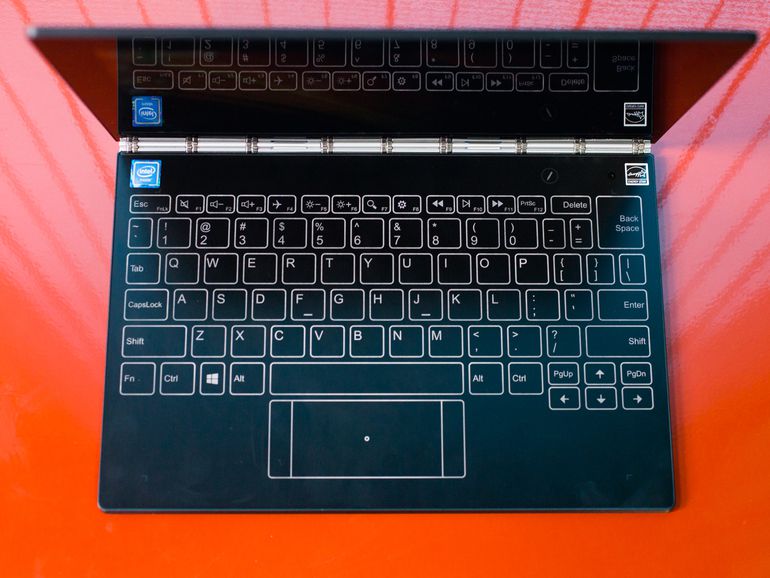
The most striking feature of this slim 10.1-inch hybrid (available in both Windows and Android versions) is its keyboard, or at least the space on the clamshell body where the keyboard would normally be. Instead, there’s a completely flat, button-free surface that alternates between a drawing tablet and a touch-powered backlit keyboard. It’s a bit like an iPad’s on-screen keyboard, except that it doesn’t actually take over part of the screen.
Vanishing keyboard aside, the Yoga Book includes a pretty standard set of components for a budget laptop, with an Intel Atom x5 processor, 64GB of solid-state storage and 4GB of RAM. The price reflects these lower-end internal components, at $499 in the US for the Android version and $549 for the Windows 10 version. They’re £449 and £549 in the UK, and AU$799 and AU$999 in Australia, respectively. Both versions have the same internal components, but the Android model has a few keyboard/touchpad changes, some Android-centric software tweaks, and comes with a grey lid, versus the black lid in the Windows version.

View full gallery
When not serving as a keyboard, the flat space can also be a drawing pad.
Sarah Tew/CNET
Lenovo Yoga Book
| $549, £549 and AU$999 |
| 10.1 inch, 1,920×1,200 touch display |
| 1.44GHz Intel Atom x5-Z8550 |
| 4GB DDR3 SDRAM 1600MHz |
| 128MB Intel HD Graphics 400 |
| 64GB SSD |
| 802.11ac wireless, Bluetooth 4.0 |
| Windows 10 Home |
The overall shape and size of the Yoga Book can’t be beat. It’s 0.9 mm thick and weighs a hair over 1.5 pounds (680 grams). This is the only laptop I can recall taking to a coffee shop without a case, bag or anything to carry it in. I just tucked it under my arm like a slim paperback.
If Lenovo made a system roughly the same size and shape, but with a physical keyboard (even a very flat one, as in the 12-inch MacBook), it might be my favorite laptop.
The keyboard that wasn’t there
One messes with the traditional design and functionality of the classic QWERTY keyboard at one’s own risk, however. Many have tried in the past to prove that an on-screen, or zero-travel, keyboard is as good as having physical keys, and all have failed to one degree or another. There are dozens of add-on keyboards for Apple’s iPad, all predicated on the idea that the on-screen keyboard just isn’t good enough. Phones probably come closest to hitting the mark, especially with one-thumb swipe-based typing such as what is offered in Swype and SwiftKey, but that’s not how you want to write anything more than a quick email or a social media status update.

View full gallery
You will be looking at the keyboard often when typing on this flat surface.
Sarah Tew/CNET
Typing on a flat faux keyboard surface has been done before. My favorite example is a long-forgotten Acer laptop, called the Iconia 6120, from 2011. It was essentially two 14-inch LCD screens clamshelled together. Both were standard laptop touch displays, but the bottom one could show a large, touch-sensitive on-screen keyboard, as well as media transport controls and other widgets. There was never a second generation of that, which should tell you something about how well the concept worked in real life.
The keyboard here — called the Halo Keyboard — isn’t an image overlay on an LCD, but instead a backlit outline against a Wacom digitizer surface. It’s the kind of low-feedback experience that requires you to look down at your hands while typing, which may be a deal-breaker to some, but it’s also how many of us actually type.
View full gallery
The keyboard lights up on the surface.
Sarah Tew/CNET
While the Halo keyboard lacks the physical feedback of pushing a key down, there are two forms of feedback built in. One works, the other is awful. There’s a small haptic kick from typing, and that makes it easier to tell if a keystroke has registered, which is especially important while typing long sentences. That works fine, although it’s a general all-over kick, not localized to the area of the backlit keyboard you’re trying to hit.
The second is a loud beep with every keystroke. At least it’s every keystroke as long as you pause a few beats between each letter. Otherwise, your typing quickly outpaces the audio cues, and you end up with a trailing series of beeps, which totally throws off any typing rhythm. It makes the very minimal keyboard lag feel much worse than it is.

View full gallery
The Windows and Android Yoga Book keyboards differ slightly.
Sarah Tew/CNET
Fortunately, you can turn one or both of these effects off via a control panel, as well as adjust the brightness of the backlit keyboard icons. With the haptic feedback on but the beeping off, the keyboard feels much more exact, with just a tiny bit of lag under fast typing. I trained my fingers to adjust to the quirks of this system quickly, but this isn’t a device for longform typing.
The small touchpad below the keyboard is wide but very short, and it’s easy to misread exactly where it starts unless you’re staring directly down at it. Two-finger scrolling on long web pages and documents works surprisingly well, but the pad lacks the ability to tap-and-drag, or tap-drag-and-select, which are both common moves for standard physical touchpads. Instead, you’ll have to use the faux left and right mouse buttons on either side of the touch pad, which leads to some awkward two-hand maneuvers just to highlight some text.
 AIVAnet