


Nexus 5X review: is the “all-around champ” back?
Another year, another Nexus. Except this time around, Google has released two Nexus phones. One of which is the phablet sized Nexus 6P, the all-metal Huawei smartphone that packs a punch in nearly every way possible. The other is the LG made Nexus 5X, marketed towards those looking for affordability and a smaller sized phone. Plenty of attention and anticipation has been given to the Nexus 5X this year, as it is the successor to the top sold Nexus phone back in 2013, the Nexus 5. The 5X attempts to fill the big shoes of its predecessor by bringing the year’s high-end specifications into a minimal, rectangular slab of plastic that’s around half the price of most premium flagship phones. Do Google and LG succeed this time around?
Before I start the review, a point must be made. Ever since last year, the smartphone market has taken a new direction. Many smartphone manufacturers now realize the potential of more affordable handsets, and have begun offering stellar hardware for almost half the price of the competition. We’re seeing more and more consumers purchasing these more affordable unlocked smartphones rather than the subsidized versions offered by many carriers.
High-end smartphones are entering into the “mid-range” price point, which is around $200-$300 less than they use to be a few years ago. Mid-range smartphones are going for price points between $100-$300 unlocked, and budget phones can be found for less than $100 outright, a la Moto E.
What’s my point? Compared to a couple years ago when the Nexus 5 came out, the current Nexus line has some heavy competition when it comes to price unlocked. No more can we say, “this is an amazing phone… for the price.” because there are currently a plethora of amazing phones… for the price. This leads me to the first category of the review, the overall design and build quality.
Design and Build Quality
My daily driver before the 5X was the Moto X 2014, another 5.2 inch phone, which currently goes for $299 unlocked. My immediate impressions of first holding the 5X left me with no excitement. I was holding a phone that felt lighter, cheaper, and more uncomfortable to hold. The first thing I noticed about the Nexus 5X design was how tall it was. Google went with an HTC kind of style that gives the phone a giant top and bottom bezel, making it look tall and narrow. I would be okay with this if there was a solid reason for how tall these bezels are, especially compared to the much more compact feeling Nexus 5 of two years ago. So far, I can’t seem to find one.
Sure, the 5X includes what looks like top and bottom front-facing speakers, but similar to the Moto X 2nd gen., only the bottom speaker provides sound for audio, while the top is merely there for voice calls.

“Who cares? At least the speaker is facing the right direction!” Well, while that statement is very popular, you won’t be very impressed with the sound coming out the 5X’s speaker. I usually love turning my phone speaker up to full volume to listen to music and for YouTube videos, but the 5X is almost painful to hear at that volume. It gets loud, louder than my Moto X, but the quality is just not there and not worth listening to at high volumes.
It’s just a bit of a bummer that the smallest Nexus offering from Google is still barely qualified to be held and used with one hand. I don’t have the biggest hands on the block, which is why I use smaller handsets and loved the original Nexus 5, but I feel betrayed that even by holding the 5X with my pinky on the bottom for support, I can barely reach the notification bar of the screen, thanks to the giant bottom chin of the phone.
As for the build quality, I have mixed feelings. The device is very light at 136 grams, but it almost feels hollow. As I tap the front or back of the phone, I feel a “springing” reaction inside, as if there is a lot of empty space. This makes me even more confused as to why Google would add so much space to the top and bottom of the phone. I cannot accept the excuse that the phone’s build quality and materials resembles the price asked, because it doesn’t. There are numerous phones that feel twice as solid and premium for the same price if not less.
Not to point out specific devices, but believe when I say the 5X build quality could be better for the price.
Negatives aside, I like the feeling of the matte plastic on the sides and back of the phone, mainly because of how smooth the backs feels when I hold it. The buttons on the right side feel great and durable, however I’ve gotten used to barely using the power button thanks to the addition of a fingerprint scanner on the back, AKA Nexus Imprint.
Nexus Imprint
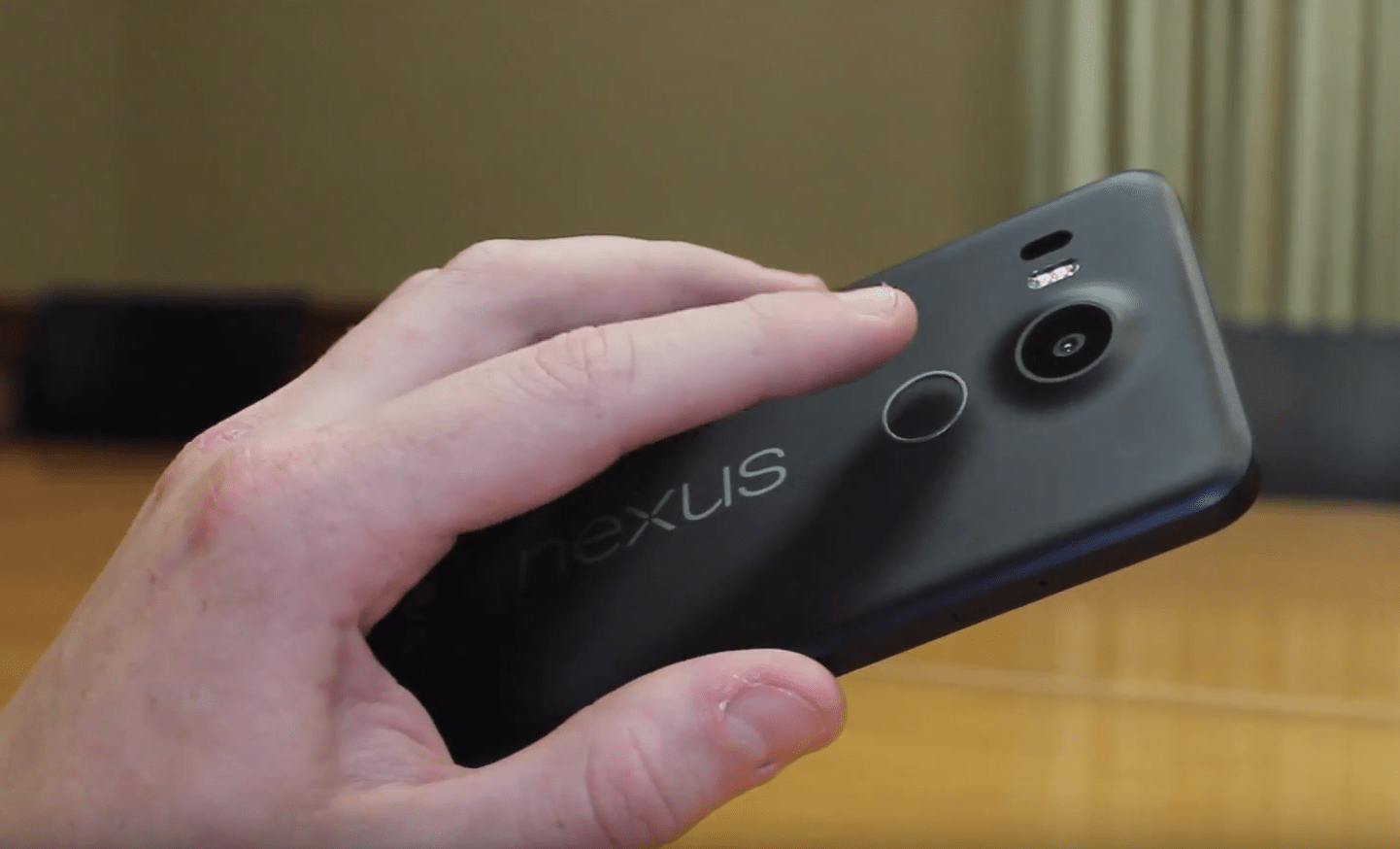
One of my favorite features of the 5X is the new fingerprint scanner that Google calls Nexus Imprint. It’s placed on the back of the device right beneath the camera, and performs amazingly. The best part about it? It wakes the device without even needing to press the power button. Just place your finger on the scanner for a split second and your phone is awake. I did a quick test with my roommate’s iPhone 6 to see which scanner is faster at going to the homescreen from the unlock screen, and while it was extremely close, the Nexus 5X definitely unlocked faster. LG and Google nailed this part of the phone.
Performance
The Nexus 5X uses the Snapdragon 808 hexa-core chip capable of 64-bit computing. While this isn’t the fastest Snapdragon chip offered by Qualcomm this year, every day performance of it is incredibly close to the more powerful 810 chip. Apps launch quickly, animations are very smooth, and overall navigation of the device is easily one of the smoothest experiences of any phone out there.
The only downside to the Nexus 5X in terms of performance is multitasking, but only slightly. When using both my Nexus 5X and 6P and switching between apps, it was obvious which device had 3GB of RAM and which one only has 2GB. On average, I found that I could switch back and fourth between 5-7 regular apps (not games) before they were closed by the system and had to relaunch. If I kept the device on without powering it off for almost a week, the amount of apps the phone could keep running shrunk down to around 3-4 before closing them.
Gaming on the device is also quite smooth, as I played Modern Combat 5 Blackout, Contre Jour, Smashy Road, and Asphalt 8. Modern Combat wasn’t a very smooth gameplay experience, averaging about 25 frames per second, but other games performed just fine. From the one second launch of Google’s camera app, to scrolling through Google Now, Google+ and Chrome, the Nexus 5X is a solid performance upgrade from the original Nexus 5 and many other phones.
Battery
For a phone with a 5.2 1080p display and 2,700mAh battery, I was expecting a bit more from the 5X. My day starts at around 9:00 when I take the phone off the charger, and typically I was getting till about 8:30 pm. when the battery reached about 10% and I made the move to plug it back in. I consider myself a moderate smartphone user. I watch a couple YouTube videos (especially now that it’s holiday video game season), text using Google’s Messenger app, install and app or two and browse reddit quite a bit.
I have about three one hour long classes a day that I don’t use the phone at all either, so the 5X seems to have a heavy battery drain when the screen is on. I think this is because LG is still using some pretty old LCD technology that’s not very battery efficient, but I’ll talk about that in the display section of the review. However, when the screen is off and the phone is sleeping, that’s when the real battery saving magic happens. Doze, which is one of Android 6.0’s newest features, is a battery saving software optimization that restricts heavy app activity when the phone is sleeping. With my Moto X ’14, I lose about 3-5% battery when my phone is off during my hour class. With the 5X, I didn’t lose a single percent.
So, if you’re a user that doesn’t have the screen on all the time and keeps the phone asleep a lot, you’re going to be getting great battery life.
Software
The premier feature of Google’s Nexus phone are the promise of the latest and greatest Android updates before any other phone. The Nexus 5X ships with Android 6.0 AKA Marshmallow. Marshmallow is a much more polished and speedy version of Android 5.0 Lollipop. Performance of Android 6.0 on this phone flies through anything you throw at it, and because this phone will be updated for quite some time with newer version of Android, you should not expect this software to slow down anytime soon, especially compared to other smartphones on the market that weigh themselves down with heavy UI skins.

Android has needed better battery management for a long time, and Google’s finally taking steps to improve this with Doze. Doze has eliminated my fear of not plugging in my phone overnight, risking the loss of 5-15% battery life. Now, I’ll be surprised if I lose more than one percent overnight. Doze works fantastically.
Google Now on Tap is a new feature exclusively for Marshmallow that allows the users to hold the home button on any screen to scan all words present to provide an overlay of Google search results right on top of the screen pertaining to information you need. It’s a really neat feature that works almost flawlessly, and I can’t wait to see what Google does next with it.
Overall, the software of this phone leaves me with the impression I’ve never experienced before with Android. I no longer feel like I’m beta testing Android. I feel like I’m using an incredibly polished software that does just what I need it to and more.
Display
The Nexus 5X sports a 5.2 inch 1920x1080p display using IPS LCD technology. If you have any worry that images won’t look as sharp as a 1440p display, ditch that thought now. The 1080p display on this phone is incredibly crisp and you’re not going to be noticing any pixels. The only problem with this display is the fact that LG is using the same screen tech that the original Nexus 5 had, which was considered cost-effective even in 2013. The only difference is this screen is .2 inches bigger. When you compared this screen against the Nexus 6P or most newer AMOLED panels, you’re definitely going to prefer the latter.
Colors are a bit washed out and don’t pop as much as AMOLED panels. What’s most troubling is the fact that LG is capable of making LCD panels look amazing, such as their Quantum Dot displays on the G4 and V10 smartphones. Yet they still use dated LCD panels for the 5X because it’s considered a “budget phone”. Overall, I consider this screen average for today’s offerings, and wasn’t made to “wow” anyone.
Camera

Nexus devices have always lacked an impressive camera, but Google aims to change that this year. The Nexus 5X and 6P share the same 12.3 megapixel camera with laser auto-focus and dual flash. While this doesn’t sound as impressive as other camera offerings on paper, such as the Galaxy S6 and G4’s 16 megapixel camera, the real world results are exceptional.


“The best all-around camera we’ve ever put into a Nexus shines in low-light conditions.” Google was not kidding when they stated this on the device page.
The camera on the 5X captures the perfect amount of detail and is the best camera I’ve ever used in low light situations. As I took a walk through campus at night, I was amazed with the clarity the 5X was able to capture. Take a look at some of the pictures below. I wouldn’t dare attempt these with my beloved Moto X 2nd gen.


Switching to the front of the phone, the 5X offers a large 5 megapixel camera, and it performs just as it should. I use my front-facing camera mainly for Snapchat, and I was very impressed with the camera capturing low-light selfies without much noise.
I don’t record very much video with my phones, but my judgement on the Nexus 5X’s video recording capabilities are average. The detail and focusing abilities are great for me, but I really wish they included optical image stabilization, something the original Nexus 5 included. Even with the software image stabilization enabled, the videos were shakier than I would have liked. The new Sony Xperia series, as well as LG and Samsung flagships provide much better stabilization in their cameras.
Conclusion
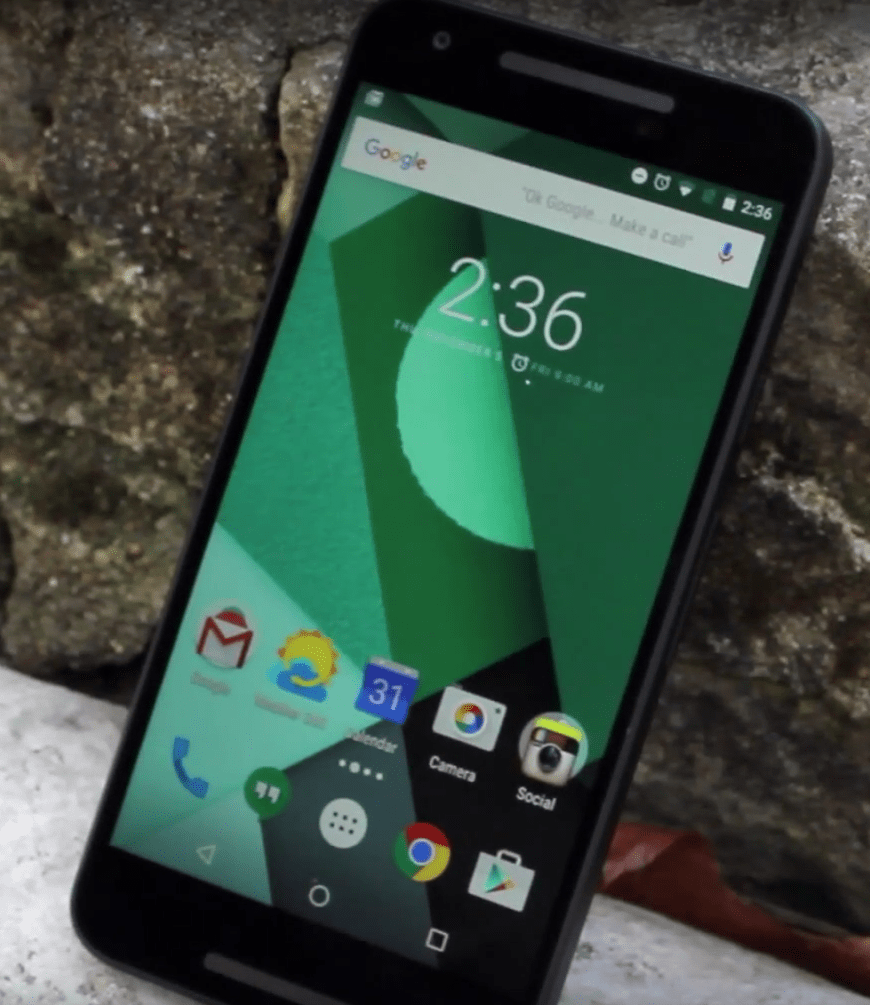
The Nexus 5X is almost everything I wanted for the successor to Google’s 2013 flagship phone, but it’s not enough for me to keep as my new daily driver. The build quality feels cheaper than it should be considering other options in the same price range with better build materials, such as the new Moto X, OnePlus 2, OnePlus X, and more. I also don’t see why Google couldn’t have included the Snapdragon 810 instead of 808, considering they used the latest and greatest Snapdragon 800 in 2013’s Nexus 5. Google also skipped out on higher RAM memory, and it definitely shows when multitasking slows down when not powering the phone off after a few days.
However, the Nexus 5X offers a camera that competes heavily for best smartphone camera of 2015, the best battery life of any Nexus phone, and zippy performance that bests just about any high-end Android phone today. On top of this, you’re getting the latest Android updates before any other phone, and monthly security updates from Google, keeping this one of the most secure phones available today. Google currently offers this phone for $299, but that will go back up soon. For that price, I heavily recommend this phone. But once the price goes back up to the original offer, that recommendation is a lot harder to make.
The post Nexus 5X review: is the “all-around champ” back? appeared first on AndroidGuys.
Inateck Lacerta earphones review
With such a saturated earphone market, companies have to work to make their products stand out. Inateck is one such company who seeks to stand out amidst the crowd with their Lacerta earphones. Do they succeed?
Design
The area that Inateck seeks to make their earphones stand out most is in the design area. The Lacerta earphones have a premium feel that does not typically come with earphones at this price.

The earphones themselves have full-metal-housings that feel very nice to the touch. The only issue this brings is that the earphones often fall out of your ear if they are even slightly out of balance in your ear. Also, if you use them while laying your head against something, the earphones are not the most comfortable. Still, the premium feel is nice and out of the ordinary. That outside of each housing also has a giant “R” or “L” to help tell the difference between each side.
The cord on the earphones is covered in a braided plastic that not only helps with the premium feel, but also helps keep the cord not tangle as much. Above the plug on the earphones is more metal, which is especially nice, since that will help the cord not fray there, something that occurs often with earphones.
 Partway down the cord on the __ side of the cord is the mic, along with volume buttons and an answer/end call button. It also has a switch with an “A” and a “B” on it that supposedly allows the earphones to work with both iPhones and Androids, but more on that later.
With the earphones you receive the usual different fittings for the rubber pieces that go in your ear, but you also get a carrying case, an airplane adapter, a clothing clip, and a manual. The addition of the case, adapter, and clip are all nice touches, and go a long ways in helping the Lacerta earphones feel premium.
Function
The earphones worked well, with the correct stereo playing through its respective earpiece. The mic worked whenever I used it to make calls. The case is nice, and the clothing clip is good. The only other place in terms of function are the buttons I mentioned previously, and the Lacerta earphones seem to drop the ball here.
On my Moto X (2014), the controls don’t work at all, even when I switch the A/B switch. I tried it with my Nexus 7 (2013), and it sort of worked – on one switch the answer/end call button could pause if you pressed it once, and go to the next track if pressed twice; on the other switch, it did the same thing but for all three buttons.
Essentially, whether or not the buttons will work the way they’re supposed to is slim, and how they will work at all seems to be a gamble. If you’re looking for earphones because of their playback/phone controls, these are not what you need.
Sound Quality
 The sound quality of the Lacerta earphones are nice. Inateck says the Lacerta earphones feature a dual dynamic driver that helps bring the sound together. As I’ve mentioned in other reviews, I’m not an audiophile by any means. However, I tend to have a better ear than the average person.
To be honest, the Lacerta, while having good sound, doesn’t really stand out a whole lot to me. Sure, the bass is full, the mids come through clearly, and the volume goes all the way without trading out sound quality. But the sound quality isn’t going to blow anyone away. Still, perhaps that the point. These earphones are reasonably priced, and as such deliver good sound. Something you don’t always get with earphones in this price range


Conclusion
Overall, the Lacerta earphones bring a premium package in an affordable price range, without compromising sound. Using these earphones feels like more than just the typical earphones – it feels like earphones that will last. The controls don’t work at all, but if you’re not too worried about that (and still want a mic on your earphones anyways) then the Lacerta earphones will be a great purchase.
The post Inateck Lacerta earphones review appeared first on AndroidGuys.
TIDAL review: sweet HiFi to my ears
If you’re familiar with TIDAL’s streaming service, you’re probably also familiar with the frequent cold shoulder that it receives. I would argue that a lot of that stems just from the fact that people choose a service and stick with it, seeing no reason to switch. It also doesn’t help TIDAL’s case that it’s not the cheapest service out there.
But TIDAL does have something that no other music service has – HiFi streaming. “So what?” I can see most people saying. That makes me chuckle a bit because of the fact that pricey headphones are mainstream now. Okay, maybe the extra fidelity isn’t as apparent as lower quality content on a HD TV, but I can argue (from experience) that it can be discernible over time if we start to listen to the music instead of just hear it.
So in the respect of the extra enjoyment that TIDAL can provide to our ears, we’re gonna check out all that the Android app has to offer and if everything about TIDAL is as refined as it should be for its top-dollar subscription cost.
Design
If you’ve visited TIDAL’s website then I’d say you got a glimpse of what the app looks like. It follows a similar, dark theme throughout. Upon launching, you’re greeted with “What’s New” in TIDAL’s world.


You’ll see featured content at the very top and then newest videos, playlists, and albums (in that order) as you scroll downward. Nothing too mind-blowing here. I think it’s a bit odd that videos are shown first, but I figure it’s so the company makes sure you know that there is other content offered than just music.
At the very bottom is the current list of most popular tracks. You can just click the first track and it’ll play through them all. I think it’s a pretty good idea to have this list front and center, as it changes everyday.
What I particularly like in the UI of the app is that it honors Google’s slider menu method. Swiping from the left side presents you all the navigation options in the app.
Features

There are a few unique features here that helps TIDAL stand out from the crowd. Two of these are TIDAL Rising and TIDAL Discovery. Cleverly, these services benefit both the listeners and artists:


In case you don’t know much about TIDAL’s background, it has a strong stance to provide artists with the royalties that they’ve rightfully earned – something that other music streaming services are said to sidestep. Therefore, seeing these two programs in place makes me glad that TIDAL is thinking about the little guys as well as the big-name artists. Regardless, for the end-user, it means a chance to discover new music that you may have not otherwise – which is fantastic.
The Playlists feature is also a great option when you don’t know what specifically to listen to. The categories cover moods, activities, classics, holidays, or a tie-in with current events. Within each category, there are tons of relevant, pre-made playlists. You’ll never feel like there aren’t enough options.


There is of course a menu for music genres with all the categories you’d expect. When you choose one, the top of the page shows the genre you’re in and a Play button to start playing TIDAL’s compiled list of new tracks for that genre. The rest of the presented content follows the app’s launch page layout, albeit a slightly different order (playlists, videos, and then albums).
Continuing down the line, we have a dedicated areas for just music videos. TIDAL doesn’t just want to be an audio source; it has tons of relevant videos to share. The layout of the video section displays New, Recommended, Top 20, or Exclusive (to TIDAL) content.
Lastly, we get to the meat of the service – the music library. In the My Music section, you can organize your favorite content by Playlists, Artists, Albums, or Tracks. To get content in here, TIDAL uses a Favorite system (signified by a star within content you find). Click something as a Favorite and it’ll populate in this area.


Additionally, TIDAL allows you to save selected music in Offline Mode. Within the settings, you chose what fidelity you want the downloaded music to be. Only, when saving HiFi tracks, be conscious of how much storage space your device have.
Usability
As I’ve implied, navigating through the app is pretty intuitive. However, there are some particulars that need to be discussed when you go in to tailor the app specifically for you. One of these has to do with setting up playlists in the My Music section.
 Being that TIDAL refers to its pre-made music sets as Playlists, it kind of interferes with the traditional definition of a “Playlist” – a user-built music compilation. Fortunately in TIDAL, you can throw in both kinds into that Playlists area under My Music. However, because there is a discrepancy between them, there is a toggle to allow the user to filter what’s displayed (All, Own, or Favorites).
Adding in TIDAL’s playlists are just like how you add in albums, by favoriting them. However, creating a self-built playlist is not as obvious. You have to long-press on content, then you’ll be shown a menu to add it to an existing playlist or create a new one for it. This is no problem once you realize it, but it’s a potential frustration for new users.
Another peculiar thing on the subject is from the fact that you can Favorite the playlists you create (so that they’re the only ones displayed when you filter the section to “Favorites” only). However, this creates an interference with saved TIDAL-made playlists, because you have to Favorite them to save them. In other words, you cannot separately display your own favorite playlists apart from the TIDAL-made playlists you’ve saved.
You can bypass this by long-clicking on a TIDAL playlist and selecting “Add to Playlist”, then creating a playlist with the same name. However, that playlist will then show up as your “Own” playlist when you go in to filter what’s displayed. In my opinion, TIDAL needs to either re-think the Playlist system or call its own mixes something else…like “Mixes”!
Once you realize the long-press options, the rest of the sections in My Music work just fine. This is how you place favorite Albums and Tracks in their respective spots. To build your personalized Artist list, just mark them as a favorite when you find them.

In case you were wondering, there is in fact a Radio function in TIDAL. You can initiate it via the popup menu when long-pressing on content. Alternatively, there’s a Radio button on the launch pages of artists.
Next up is the Player controls. Music that is currently playing is always shown on the bottom of the app. This is a standard affair, which shows the relevant song details (artist and album) and buttons to play/pause or move to the next track.
Clicking it pops up the full player. You’ll see the album art front and center and buttons for the previous track, play/pause, and next track.


Pressing on a space in the player will drop down a menu with shortcuts to that artist’s page, to that album, or to initiate the radio based on that track. Here, you can also set the Shuffle or Repeat functions, as well as favorite the track, share, or add to a playlist. For some reason there is no way to like/dislike music from what I can see.
On the top right corner, you’ll see another menu button. This takes you to your music queue. From here you can long-press on a track for interactions (remove track from queue, add to favorites or a playlist, start radio, etc.). Alternatively, you can add stuff into the queue via the popup menu when you long-press on content. Something to know is that the queue doesn’t restart when you select something else to play. It compounds everything you play. I don’t particularly like this, as the queue list grows lengthy with no purpose.


There’s a three-dot menu in the queue which lets you turn the queue into a playlist, empty the queue, or edit the queue. The queue editor is pretty nifty – where you can move the order of tracks around or trash them. But I’ll argue that this functionality should just be a part of the queue. Menu options like these are often unrealized because of their hidden-nature.
On last thing about the player is that there is a little “HIFI” light on the bottom right corner. Not to forget that one of TIDAL’s big selling points is HiFi streaming, this notification tells the user if they’re actually streaming the extra fidelity or not.
I’m really glad that TIDAL added this notification. By default, HiFi streaming isn’t toggled on in the settings, and the grayed out “HiFi” notification helped me realize this.

Also, in the settings, there’s a way to make the stream adaptive to the network connection. Therefore, if you don’t see “HiFi” lit, then you’ll know to go assess the problem with the connection. However, I must mention that there were a couple times that I didn’t see it lit when I had a great, reliable connection. It looked stuck, and I wasn’t sure if the bug meant that I wasn’t streaming HiFi or if the notification wasn’t working. Restarting the app fixed the issue. But this has only occurred a handful of times.
Saving content to use offline is pretty straightforward. You can either save playlists or albums for offline use. Within each playlist or album you’ll see a toggle to start downloading it. Alternatively, you can long-press on content and request to “Add to Offline”. And because you’ll potentially be storing loads to high-res data, TIDAL was kind enough to throw in a setting to offload the downloads to an SD card.
Practicality
I felt the need to create this section to discuss something very important when it comes talking about HiFi on a mobile device. We must understand that the practicality of using TIDAL at all highly depends on our hardware. In other words, you cannot use TIDAL with stock equipment (a phone’s DAC or inexpensive headphones) and expect results worth the price of paying extra for more detailed music samples.

Fortunately, phones with thoughtful DACs are beginning to surface (like the LG V10 and HTC A9), but they are still too few. Therefore, in order to really benefit from TIDAL on a mobile device, you’ll need an external DAC.
There a multitude of portable DAC solutions, of which the functionality is made possible by Android’s ability to audio out via OTG of the microUSB port. But the reality behind TIDAL is that the user must be willing to put forth the cost and inconvenience of extra gear.
If you’re cool with all this, then the benefit of the service is unrivaled. No other streaming service even gets close to offering this amount of audio detail. With the right gear, the experience of 1411 kbps audio data is staggering in comparison to the compressed rate that other music streaming services max out at – 320 kbps. HiFi music is richer, fuller, and more impactful and engaging.
Also, if you’re like me and don’t have a collection of Lossless audio files (and love the convenience of streaming), then that makes TIDAL your only option for getting the most out of your gear.
Final Thoughts
I hope that this review served as good insight into TIDAL’s world. The app itself is laid out well and has the asthetics and functionality to back the high-end image that the service conveys. You get all the features you’d expect from a music streaming service and some nice extras (videos, tons of pre-made playlists, and a great artist-discovery system).
Only, I emphasize the importance of having the right gear to make the experience worth the extra cost – a fact that’s stressed even further when speaking about a mobile version of the service. Phone DACs are generally not yet good enough to output the extra detail. But if the hardware is addressed appropriately, then outstanding capability should be recognized. As a music streamer, it is because of TIDAL that I can be an audiophile.
The post TIDAL review: sweet HiFi to my ears appeared first on AndroidGuys.
Secure your connection simply with Supernet VPN (Review)
Online privacy is becoming more of a priority for people every day, and they are constantly searching for ways to secure their online information. Some of these people are searching for a security solution with tons of options to tweak their experience to the fullest, but others are looking for a simple and easy to use way to keep themselves private online.
Supernet VPN from the developers at Supernet is attempting to appeal to the latter group by creating an extremely simple VPN to protect their users while they are online.
Setting Up Supernet VPN
 Supernet VPN’s focus is on simplicity, and the experience of setting up the app shows this. There are no strange permissions or logins to get through. Instead, there are a few screens that discuss some of Supernet VPN’s features, and then you are taken directly to the app.
The only actual step to setting up is selecting a location from the drop-down menu in the app. You are given the choice between the United States and the United Kingdom, and since the only other words on the screen were “Select Location,” I assumed that I was meant to select the country where I lived. I quickly learned that this is not the correct thing to do. I selected “United States” and could not get the app to secure my connection even after waiting for 5 minutes.
On a fluke, I switched the location over to “United Kingdom,” and my connection was secured within seconds. While the setup is fairly simple in itself, it would be nice to have some sort of instructions or steps at the beginning to let users know what location they should select.
Using Supernet VPN
 Once I actually had Supernet VPN setup correctly, using it was extremely easy. Aside from the location selection, there is only one other button in the entire app. Tapping the shield will secure your connection within seconds and change your IP address to the country of your choosing. I checked before and after turning on the VPN, and my IP address changed from Louisiana to London so I would say it works quite well.
Aside from just changing your IP address, Supernet VPN also lets you access content blocked in your country, protects you when connecting to public WiFi hotspots, and keeps your online information private. After finding a YouTube video that was blocked in the United States, I turned on SupernetVPN and could immediately watch the same video without any problems. You are given unlimited browsing with this app so there is no need to pay extra to get more protected data.
Supernet VPN is free, but it is supported by ads. Most of the time, these ads are totally unintrusive and are only at the bottom asking you to download a sponsored app. Since I have been using this app, I have only had one video ad popup after I tapped on the shield to turn the VPN on. While the video was not bad, it started with sound already playing which was annoying since there was no way to mute it or exit until the video was done. That being said, a couple of ads here and there is a small price to pay for your online security.
I love how simple Supernet VPN is to use because there are no extra features or buttons that could cause users difficulty. In fact, there is not even a settings menu in the app. What you see is exactly what you get. The location setup was somewhat confusing, but it is no reason for me to not recommend this app. The ads are mostly unobtrusive, and the app is free with no paid version with extra features.
If you are a power user, you will probably be looking for a VPN app with more features, but for those of you who are simply looking for an easy way to gain some protection online, Supernet VPN’s simplicity is hard to beat. You can download Supernet VPN for free from the Play Store.
The post Secure your connection simply with Supernet VPN (Review) appeared first on AndroidGuys.
Shine Bluetooth headphones will light up your world
We at AndroidGuys don’t typically cover things on crowdfunding sites unless they are particularly interesting or we’ve been able to secure a pre-funding prototype. It helps a lot with the confidence of a crowdfunding campaign to know that the thing already exists and it helps people to know whether they want to help fund the project. Today’s instance is rather interesting in that it’s a Kickstarter campaign that is being done by an established company called IEC Technologies to do the pre-orders for the launch of their new Bluetooth headset, Shine.
The Fit/Feel
I have to admit, these are some of the best fitting/feeling Bluetooth earbuds I’ve ever used. Most of the time earbuds are really loose and they fall out of my ears, or they are really tight and become uncomfortable after a while. Even with the variable size buds, I’m never satisfied, but the Shine headset is different.
Shine not only has the regular earbuds and the hook for the inside part of your ear, it also hooks to the outside part of your ear and secures in place. You would think all of this extra equipment tacked on would make it uncomfortable, but it doesn’t and it doesn’t feel tremendously heavy, either.


Design
Design is actually one of the highlights of these earbuds. Admittedly, the huge rectangles protruding from the side of your head aren’t the most flattering, but the design strengths aren’t in the buds themselves, it’s in the wire that connects them. The wire that runs between the two earbuds has a clear casing, as opposed to normal black or braided casings. It then uses a colored LED to light up the wire in a spectacular of color, which is where Shine gets its name! You can set it to either surge to the rhythm of your music or your movement, which would be cool when you’re running.

The only real problem with this is that you don’t actually see it when you’re wearing them, so the show is for everyone else. It’s also not very bright, so you are better off showing them off at night.

Sound
My experience with these headphones is that they sound pretty good, maybe even above average. They aren’t an audiophile’s dream or nightmare, they’re just middle-of-the-road headphones, and that’s honestly what you should expect at the $60-80 price point that they’re selling it for on Kickstarter. Throughout the entire range, I would say that the sound is “good” – but it definitely favors the mid-to-high end and I would say that those are better than the sounds on the low-end.
What I would note, though, is that they do get rather loud while maintaining the same level of clarity and that’s definitely a huge plus.
Controls/Other Features
With most Bluetooth speakers, you get some sort of on-board audio controls and the case with Shine is no different. Across the top of the right ear you get four buttons: power/play/pause, vol+/music advance, vol-/music reverse, and shine control. On the side of the same earpiece there is a touch-sensitive area that also allows you to quickly play/pause music playback.
I think it’s a nice touch and I love having easy ways like that to control playback without having to feel around for the button. That’s actually the problem with this touch-sensitive area, though – it’s only a single (unmarked, not that it matters when it’s on your head) circle left of center of the earpiece and I found myself batting around trying to hit it with my finger.

Pro tip: you can smack the whole thing with your open palm to activate it pretty consistently, but that’s awfully cumbersome and makes me feel like I’m starring in a V8 commercial.
They also built an app to complement the entire experience with Shine and it’s supposed to be what makes the Shine shine. Unfortunately, and I’ve tried it on multiple phones, it basically doesn’t do anything. It’s an unreleased app, so you would expect it to be buggy but I literally can’t make it do anything of value and all of the main pages are in a foreign language. The app is supposed to help you keep track of your runs like an app such as Runtastic would do and give you granular control of the lights in the headset, but it just doesn’t. I wouldn’t let that take away from the overall experience provided by the headphones, because it isn’t necessary to enjoy all of the features of the headphones, but it’s still a disappointment.
Other notes/conclusion
The battery life on these headphones seems to be really good. I never actually wore them down and I used the headphones for at least 3-4 hours. I can’t speak for the seven hours that are advertised, but as big as the earpieces are, it wouldn’t surprise me if there’s a lot of battery packed in there. The flip side of that is that you won’t have to charge it often, because getting the rubber protection cover off of the charging port is next to impossible. I ended up prying the cover off with a screwdriver and subsequently throwing it into the trash because I never wanted to deal with that again. Back to the bright side: it uses a standard micro-USB plug to charge, and you probably have about 30 of those lying around your house.
Shine appears to be a good set of headphones for a reasonable amount of money. It’s definitely cool that it lights up in the dark and if they get the app working properly before release, that’s just value added. More than anything else, these aren’t just a half-baked project that will never come to Kickstarter backers – it’s already here. The Kickstarter campaign has about two weeks left at this point and you can still nab a pair for $60 – it wouldn’t be a bad gift (and according to their timeline it might be here in time for Christmas!)
If you’re interested in Shine, take a look at their Kickstarter campaign and help them bring it to the world!
Source: Kickstarter
The post Shine Bluetooth headphones will light up your world appeared first on AndroidGuys.
Sony Xperia Z5 Premium review
We’ve seen display technology make some dramatic jumps over the years with some of the biggest milestones being the arrival of 720p, 1080p, and QHD mobile displays. Now that QHD has become the standard for flagship devices, we were all wondering when the next evolution in resolution would arrive, and what company would be behind it. As it turns out, the answer to the question comes from an unlikely source, with Sony and their new Xperia Z5 Premium.
.rvs_wrapper
width: 350px;
.rvs_wrapper.align_left
float: left;
.rvs_wrapper.align_right
float: right;
.rvs_wrapper.align_center,
.rvs_wrapper.align_none
width: 100%;
.rvs_wrapper.align_center
text-align: center;
.rvs_wrapper.align_center.cbc-latest-videos ul li
float: none;
display: inline-block;
vertical-align: top;
.rvs_wrapper.cbc-latest-videos:not(.align_none) ul li:nth-child(2n+1)
clear: both;
.rvs_title
font-weight: 600 !important;
margin: 0 !important;
font-size: 24px !important;
.rvs_wrapper.align_right .rvs_title
padding-left: 20px;
.rvs_title a
font-family: ‘Roboto Condensed’;
color: #3a3a3a;
.rvs_wrapper.cbc-latest-videos ul
padding-top: 10px;
.rvs_wrapper.align_left.cbc-latest-videos ul li,
.rvs_wrapper.align_none.cbc-latest-videos ul li
padding: 0 15px 0 0;
.rvs_wrapper.align_right.cbc-latest-videos ul li
padding: 0 0 0 15px;
float: right;
.rvs_wrapper.align_center.cbc-latest-videos ul li
padding: 0 7px;
.rvs_wrapper.cbc-latest-videos ul li > a
font-weight: 400;
.rvs_wrapper.cbc-latest-videos ul li > a .yt-thumbnail
margin-bottom: 0;
@media only screen and (min-width : 480px)
body #page .rvs_wrapper.cbc-latest-videos ul
width: 100% !important;
@media only screen and (max-width : 480px)
body #page .rvs_wrapper.cbc-latest-videos
width: 100%;
float: none !important;
overflow-x: auto;
overflow-y: hidden;
body #page .rvs_wrapper.cbc-latest-videos ul
overflow: auto;
max-height: none;
body .rvs_wrapper.cbc-latest-videos ul li
float: left !important;
clear: none !important;

Despite a reluctance to embrace QHD in previous flagships, Sony’s “premium” variant of the Z5 makes a massive leap forward to 4K, but do we really need a 4K display on a smartphone? How does it impact battery life? Also – is 4K set to become the new standard for smartphone panel definition? Let’s find out in this full review of the Sony Xperia Z5 Premium.
Design

The Sony Xperia Z5 Premium looks much like the Xperia Z5 and Xperia Z5 Compact… and pretty much every other Xperia phone, really! Sony’s design language has changed very little in the past years, which means Sony fans will feel right at home. The rounded corners, glass back and weight will also provide a comfortable, yet solid experience.
The front of the device is dominated by that 4K display, which happens to be flanked by a couple stereo speakers. The bezels on the side are small, but Sony balanced that out with much thicker bezels on the top and bottom. And there’s a well-sized LED light on the top-left corner, letting you know whether there is a reason to turn your display on or not.

On the right-hand side we can find all the buttons. Sony sure found a way to pack as much as possible on the bottom half of one edge of the phone, but that effort proved to be worthless, at least if you have big hands. Maneuvering the device can prove difficult in this case. Not only is there a dedicated camera button and volume rocker, there’s also the now larger power button that has a fingerprint sensor hidden inside of it.

The left edge houses a microSD card slot and a SIM tray under a single flap. I happen to like this set-up, as there is no need for silly pins or weird tools in order to reach any of these components. It’s very handy and keeps everything well protected. And of course, the bottom houses the microUSB port and a 3.5 mm headset jack.
At 7.8 mm of thickness and 180 grams, the Sony Xperia Z5 Premium is definitely not the lightest or thinnest, but it doesn’t really aim to be. Sony makes up for this in plenty of ways. The phone feels and looks elegant, especially with the inclusion of the gorgeous glass back.
Display

As you would expect, that 4K display is definitely the biggest selling point of this phone. But it’s also the most controversial aspect of the Sony Xperia Z5 Premium. We’ll start by saying it was an accomplishment, and Sony does deserve mad props for being a first, but it’s certainly not perfect.
We don’t only mean that in the usual way we complain about unnecessary specs. There is a real flaw here! It turns out all the pixels in that 4K panel are taken advantage of only when there is a 4K video playing. Android Lollipop doesn’t yet support 4K definition natively. And get this, Sony is running this thing at 1080p (not even QHD) whenever there isn’t 4K content to be played. To make matters worse, when 4K content actually is playing, it’s not running natively, it is being up-scaled. This translates to lower quality. Isn’t that confusing?

The Sony Xperia Z5 Premium comes with a 5.5-inch 3840×2160 screen. This happens to be an exact multiple of 1920×1080, which is the reason why Sony has opted for 1080p, as opposed to QHD (2560×1440) when it comes to everyday tasks. Regardless, you will just have to use local 4K content, so either record it or download it.
At 806 PPI (Pixels Per Inch), most people would argue that there’s no way you can see a difference, but recent studies would disagree. Apparently the human eye can notice up to 700 or 800 PPI, depending on how good your vision is. We tested the same soccer video in this screen and a 1080p one. The results were clear: there is definitely a difference, even if both looked great.

There’s also the fact that Sony is using LCD instead of the more popular AMOLED panels. What is the difference? Well, the key factors are that LCD panels require the entire screen to be turned on and filters blue light to be turned into white back light. On the other hand, AMOLED panels use individual LEDs that display an array of colors. As a result, colors can be a bit more washed out in LCD panels.
But what about the colors in the Sony Xperia Z5 Premium? We tested these and can tell you the phone has very accurate color reproduction… except for when displaying white, which had the largest delta error in our testing. White comes off with a blue tint, which can explain why colors may appear a bit washed out.
Sony has done a great job making a 4K display that fits in a 5.5-inch panel, but it doesn’t come without compromises. One is that it had to be an LCD panel and the other is the lack of 4K content. Neither are deal breakers necessarily, but definitely something to keep in mind.
 See also: Sony Xperia Z5 Compact review
Hardware and performance

Without a doubt, the Sony Xperia Z5 Premium comes with all the necessary specs to offer premium performance. Packed inside is a powerful Qualcomm Snapdragon 810 processor and 3 GB of RAM, which places it right in line with other high-end smartphones in the market. The Z5 Premium also features 32 GB of internal storage and a microSD slot (which happens to be a rare thing nowadays). With the ability to expand storage by 200 GB, you can have up to 232 GB of total storage, which will definitely be enough to keep plenty of 4K videos around.
A key feature that sets Sony apart is definitely waterproofing. The Z5 Premium takes advantage of an IP68 rating, which allows for 1.5-meter submersion for up to 30 minutes. And maybe you don’t need that much protection, but a regular phone could get damaged by simply being used in the rain. The Sony Xperia Z5 Premium negates this issue and brings forth the peace of mind you need.

On paper, the front-facing dual speakers should translate to much better sound, right? We put this to the test through measured testing and found out sound quality is on par with the Samsung Galaxy Note 5. It is also below the LG V10 and ZTE Axon, though. That’s just numbers and stats, though. We decided to also let our resident audiophile Rob take the phone for a spin. He says it’s a sound bass lovers will definitely be fans of; it thumbs on kicks, but isn’t over-bearing, and it provides great mids, as well as highs.
The Sony Xperia Z5 Premium also comes with a whole array of connectivity, including Bluetooth 4.1 with apt-x, WiFi n/ac, NFC and FM radio.
This is all powered by an ample 3430 mAh battery. Now, that may sound like a very large battery, but the phone certainly needs it. Our tests show the phone can last up to about 8 hours doing web browsing on a single charge. And because this phone is all about the screen, we also tested it playing video continuously. The Z5 Premium can last about 5 hours and 38 minutes playing 1080p video, while upgrading to 4K takes that number down to 3 hours.
#gallery-1
margin: auto;
#gallery-1 .gallery-item
float: left;
margin-top: 10px;
text-align: center;
width: 20%;
#gallery-1 img
border: 2px solid #cfcfcf;
#gallery-1 .gallery-caption
margin-left: 0;
/* see gallery_shortcode() in wp-includes/media.php */


I was able to make the phone last almost two days, but only sometimes. And that’s the disappointing part – it seems to be a hit-or-miss type of deal. Some real-life scenarios seemed to make very little sense. Take video calling as an example: the other day I did a 90-minute call, which took the battery from 88% to 2 percent.
#gallery-2
margin: auto;
#gallery-2 .gallery-item
float: left;
margin-top: 10px;
text-align: center;
width: 25%;
#gallery-2 img
border: 2px solid #cfcfcf;
#gallery-2 .gallery-caption
margin-left: 0;
/* see gallery_shortcode() in wp-includes/media.php */


But at least there is Quick Charge 2.0 for the times when the Sony Xperia Z5 Premium can’t hold a charge. The only caveat is that a compatible charger is not included, so you must get a Quick Charge 2.0 charger separately. If you do have it, though, it only takes about an hour to get to 60%, and around 90 minutes to hit the 100% mark.
Software

The phone runs on Android 5.1.1 Lollipop, with a planned upgrade to Marshmallow. I can say the overall experience is effective, but lacks that wow factor we all look for. The system has its own tweaks, including some changes to the home screens, app drawers, settings and more.
Sony’s interface has always been quite pleasing to the eye, but I have also realized it can be a bit sluggish. The UI looks sleek, but apparently that’s only a facade. There are noticeable delays when opening games or operating some apps, particularly the camera (slow picture-taking).

Overall, Sony’s interface on the Xperia Z5 Premium is identical to the one found on the Xperia Z5 and the Xperia Z5 Compact, and while it’s definitely functional, the Marshmallow update is when the Xperia Z5 Premium will really shine. It’s unknown whether support for 4K resolution in Marshmallow will mean the Z5 Premium runs natively in 4K all the time, but either way, 4K support should mean a larger array of mobile optimized content.
Camera

One of the biggest changes in the Xperia Z5 line is the camera. The new 23 MP sensor has auto face detection, HDR and a plethora of camera features, as well as the ability to record in 4K. But we have already covered all this in the Xperia Z5 and Xperia Z5 Compact reviews. Instead, we will walk you through some of the images we have taken with the phone.

There’s no denying Sony’s camera can produce some impressive results, but I personally wouldn’t say it’s the best of the best. How would I know? Well, we did put the phone directly against the very best camera phones out there and it seems to be close to them, but definitely not in the top 3.
For me, the biggest issue was inconsistency. In some instances the results were stunning, while in others images were over-processed and seemed to lack detail. There’s not much room for wildlife and landscape photographers here, but it does well for snapshots to share on social media.
All of our pictures were captured in Sony’s Superior Auto mode, which is the default mode, and the one that most people will use the camera in. For those who need more customisable options, Sony has also included a manual mode that allows you to tweak the white balance and ISO. It doesn’t come with the full array of manual controls found on other smartphones, but it should be good enough for most people, save for professional photographers.
#gallery-3
margin: auto;
#gallery-3 .gallery-item
float: left;
margin-top: 10px;
text-align: center;
width: 25%;
#gallery-3 img
border: 2px solid #cfcfcf;
#gallery-3 .gallery-caption
margin-left: 0;
/* see gallery_shortcode() in wp-includes/media.php */


Specifications
| Display | 5.5-inch 4K display with 808 PPI |
| Processor | 1.9GHz Qualcomm Snapdragon 810 |
| RAM | 3 GB |
| Storage | 32GB with microSD |
| Network | LTE, LTE Cat6, GSM GPRS/EDGE (2G), UMTS HSPA+ (3G) |
| Connectivity | Wi-Fi 802.11 a/b/g/n/ac, Bluetooth 4.1, NFC, A-GPS / Glonass, USB 2.0 |
| Camera | Main cam: 23MP cam with Exmor RS sensor, fast autofocus, 4K video capture and output, 23mm wide-angle G Lens, 5x clear image, HDR, ISO 12800 photo / 4000 vide, Steadyshot tech
Front: 5MP |
| Software | Android 5.1 with Sony UI |
| Battery | 3430 mAh |
| Dimensions | 154.4mm x 75.8mm x 7.8mm, 180 grams |
Gallery
#gallery-4
margin: auto;
#gallery-4 .gallery-item
float: left;
margin-top: 10px;
text-align: center;
width: 20%;
#gallery-4 img
border: 2px solid #cfcfcf;
#gallery-4 .gallery-caption
margin-left: 0;
/* see gallery_shortcode() in wp-includes/media.php */


Final Thoughts

Innovation certainly doesn’t come cheap. As you might expect, the world’s first 4K smartphone comes with a hefty price tag, but it’s not too far out of reach. The Sony Xperia Z5 Premium is priced at £600, and while not officially sold in the US just yet, you can find it on Amazon for just a little under $700. This will probably price it out of range for most people, but for those willing to spend this much, is the phone worth it? In comparison, the Xperia Z5 costs about $150 less, and the Samsung Galaxy Note 5 is a couple of hundred dollars less.
That’s a great question. As far as flagship smartphones go, the Sony Xperia Z5 Premium is definitely up there with the best. Whether it’s worth it or not depends on why you want to buy the Z5 Premium. If you are doing it purely for the 4K display, I would honestly say you should not… or at least give it more thought. After all, it is running at 1080p around 90% of the time. You are probably better off getting a QHD screen that is running a higher definition at all times. However, if you are in the market for other features, such as waterproofing, a good battery life and a great build quality, this is a phone that ticks all the boxes. That said, pretty much all other current Sony devices do, as well.
The real winner in the Xperia Z5 premium specs is the larger display, which some of you may prefer. Just make sure you understand the compromises that the 4K display has to make. Not to mention the fact that you are paying a much higher price for it.
We’ll leave you with this – innovation spurs further innovation. While the 4K screen on the Xperia Z5 Premium is first-generation technology, the world of Ultra HD and beyond on your smartphone is certainly looming, and Sony can safely say it was the first.
Next – Sony Xperia Z5 review
TYLT ENERGI 6K Smart Charger: a neat little battery companion
In case you’ve missed our past coverage on TYLT accessories, we’re a pretty big fan of its products. They aren’t cheap, but TYLT is a sure bet if you’re willing to put more moo-lah down for quality.
Most recently, we were provided the ENERGI 6K smart charger for our thorough run-through and opinion for you guys.

External battery packs are aplenty in the market, overwhelmingly-so. If you know TYLT, you can probably guess that there is something unique in the design. You’d be right, and this thing isn’t called a “smart charger” for no reason. Let’s see what the ENERGI 6K is all about.
Design
The design of the ENERGI 6K is fairly basic. This is no surprise. How interesting can a charger be? Also, TYLT typically focuses on a solid build rather than a flashy design. Therefore, when I pick up the 6K, it feels sturdy. TYLT’s devices always have a heft to them (in a good way) that makes them feel worth the price.

The build is plastic, but with a very nice-feeling finish. It’s soft to the touch – a quality that gets carried throughout TYLT’s lineup.
One of the things unique about this charger is that you don’t refill it with a separate AC adapter plug; it’s internal. There are embedded prongs that flip in and out, which means that the entire unit hangs off the power outlet when it’s time to charge.


And for those of us who don’t like carrying around a cable in addition to the charger, the 6K fortunately has an attached cable (this unit uses microUSB, but there’s also a variant with a Lightning connector for Apple users).

When not in use, it is nicely concealed within a groove along the sides. There’s a cutout where the microUSB connector is housed that lets your finger easily scoop it free.

The cable isn’t very long – only about 3″. There is also a full USB port on the side for charging other devices you have a cable for.
On the top, we only have a subtle TYLT logo and a small button with a smaller light next to it. As you can probably guess, this gives you an indication of the battery level.

Functionality
Speaking of the build, I love how sturdy the ENERGI 6K feels. It’s meant to handle your travels, and the robust-feel certainly implies that it can take the inevitable abuse.
And since the prongs are on the top of the device, you don’t have to worry about it blocking the other port on the wall outlet.

When the 6k is on the wall, you can use it like you would AC adapter to charge a device (recall that it has a USB port for power output to a mobile device). TYLT says that it gives priority to charging the attached device before it goes to charge the battery pack.
“The Intelligent Charging Technology prioritizes the charge to your device until your device is fully charged. It then charges the 6,000mAh battery onboard.“
One criticism is that I wish TYLT made the power output Quick-Charge compatible. All flagship phones these days have some form of fast charging, so when we’re reminded of the yesteryear charging rate, it’s somewhat annoying.
The 6K’s battery capacity is a modest 6,000 mAh. This is a decent amount (roughly twice the capacity of batteries in flagship phones). However, being that power banks are commonplace these days, there are tons of others with much more capacity for less money.
The battery indicator is a standard affair. An LED light essentially tells you if the charger’s battery is low (orange) or has a significant capacity (green).


I would’ve liked to see a more informative battery indicator. For instance, the larger ENERGI 10K uses five LED dots to give the user a better idea of the status.
Final Thoughts

I love TYLT’s little ENERGI 6K charger. It’s a no-fuss and efficient approach to a travel charger. The only issue I see is when putting the 6K up against a market that offers considerably larger batteries for less money. 6,000 mAh isn’t a lot of capacity for the asking price.
However, if you like to splurge for the extra quality and a well-thought design, I would definitely recommend this. It’s fantastic not having to deal with cables at all. Just throw this in your bag and you’re set. And being a TYLT product, it will hold up on your travels.
The ENERGI 6K comes in either a blue or gray color and goes for $69.99.
The post TYLT ENERGI 6K Smart Charger: a neat little battery companion appeared first on AndroidGuys.
Starbucks full featured app makes coffee easy to order(App review)
I know almost all of you have heard of Starbucks. I love coffee and drink it on a regular basis, and one can argue that there are many coffee shops with better brew, but Starbucks is always there for you no matter where you go around the world. And its coffee is always reliable and its mixed drinks are second to none.
There have been 5,000,000-10,000,000 installs of the Starbucks app from the Google Play Store, but many people still don’t know the latest features in the app. Let’s check it out.
Starbucks Pay
Before Android Pay and Samsung Pay were released, Starbucks already had an easy way to pay using your smartphone. All you need to do is set up a credit card or PayPal account to fund your Starbucks account. Once sufficient funds are added to your account, you could just generate a barcode and place your device in front of a scanner after you place an order. You will hear a beep, and the record of your purchase would be logged in your history. It’s very simple to pay this way and you don’t need to bring an ID or wallet with you.
I happen to walk to my nearby Starbucks at night with my dog and grab a hot chocolate or eggnog latte for dessert. It’s really convenient not to have to carry my wallet around with me late at night.
Even though Starbucks doesn’t use Android Pay, I wish other places I frequent, like the grocery store, would allow me to make purchases the same way. Wallets are usually filled with back-up cards, reward cards, receipts, insurance cards, etc. It’s nice to leave my chunky wallet behind.
Mobile Order and Pay
From the Starbucks app you can look over the entire menu from your phone, and place an order before you pick it up. The menu at Starbucks is HUGE. Who knew you could order a strawberries & creme Frappuccino? There are teas, Refreshers, fresh juice, iced teas, iced coffees, espressos, Frappuccinos, hand-crafted sodas, smoothies, oh yeah, and fresh brewed coffee.

Rather than being rushed in line to pick what you want, you are free to take your time from the privacy of your own home or car to peruse the entire menu from the app. It’s worth looking over the entire menu because you might want to try something new. The strawberries & creme Frappuccino could be your new favorite drink that you never knew existed. Or if you’re in a rush and on a road trip, just place an order at a Starbucks on your route, run in and grab your order, and get back on your merry way.
Again, this is another feature I would love to see in more apps for other restaurants I frequent so I don’t have to wait in line.

Rewards – from the reward page
More than great drinks. Great rewards.
Enjoy all this and more with your membership to our Loyalty Program:
- Free drink or food rewards (some restrictions apply)
- Custom offers on items you enjoy when you opt in to receive My Starbucks Rewards email
- Early access to new products
- Easy payment with our mobile app

Here’s how it works
To enjoy free drink and food rewards, you’ll need to earn Stars. Get Stars when:
- You pay at a participating store with your registered Starbucks, Teavana or La Boulange Card or the mobile app
- You buy specially marked Starbucks products where you buy groceries
- You buy coffee or tea products at Starbucks Store online
Most of you frequent Starbucks already so why not take advantage of the free reward program? You can get free refills on coffee for a year just for earning five stars. If you earn 30 stars within 12 months you’re promoted to the Gold Level where you can earn a free drink or food item. You’ll also get a personalized Gold Card so your barista will know you are special.
App Usage
Using the app is as simple as it gets. Once you load credit onto your Starbucks app, ordering, paying and earning rewards are simple. Starbucks left out annoying advertisements, and click bait from within the app, and made a clean and simple user interface. Simplicity wins in this case. There’s nothing you don’t need to make the app more confusing than it really needs to be. You can even send gift cards through the app for your friends and family.

Summary
If you haven’t tried the Starbucks app yet, or if you haven’t used it in awhile, now is the time to download it again and start earning rewards. You don’t have to expose your credit/debit cards with the automated barcode generator within the app, and you don’t need your chunky wallet when you walk into the coffee shop. Better yet, you can order and pay in advance from the app so you can avoid waiting in line for your order.
The loyalty system is a great way to earn free food and coffee from Starbucks as well. I highly recommend the Starbucks app for you coffee lovers.
Download the Starbucks app at the Google Play Store.
The post Starbucks full featured app makes coffee easy to order(App review) appeared first on AndroidGuys.
My Nexus 6P looks better than yours thanks to my dbrand copper skin
dbrand seriously hooked me up with some sweet skins for my Nexus 5X and 6P. Many of you tech enthusiasts are similar to the writers here at AndroidGuys, in that you love your devices and want to make sure they look good too. Looks are becoming more important as we grow more attached to our devices.
A great way to prevent scratches, cover up existing scratches and to completely customize the look of your smartphone is to use a skin from dbrand. Yesterday I wrote about a gorgeous carbon fiber skin that I put on my Nexus 5X that looks awesome. dbrand sent me a carbon fiber skin for my Nexus 6P as well, but I didn’t want to give you guys the same look. Instead I went with the brushed copper skin with a cutout for the X in Nexus.

Nexus 6P in copper and the Nexus 5X in carbon fiber.
Design
With the Nexus 5X skin dbrand I was most impressed with the high-quality materials. Those high-quality materials are sourced from 3M, and dbrand guarantees its products meet the highest standards. dbrand also make precision a primary feature, and I can say the skins I have used are so perfectly cut, that they must have been cut with space age lasers. The cutout for the microphone and fingerprint reader on the back of the Nexus 6P are so perfect that it looks like my phone was made from copper straight from the factory. The proof is in the images below.
Our Variety, Your Choice (from the dbrand website)

Installation
Installation is so easy even I could do it without making a mistake. And that really speaks volumes because I am far from a perfectionist. I typically rush through projects like this, and dbrand was ready for my shaky hands. After installing the Nexus 5X skin, the Nexus 6P installation took me all of five minutes.

1. Get a hair dryer or heat gun and pull out your skin materials.

2. Wipe your Nexus 6P to remove oil and dust.

3. Install the top portion of the skin first by aligning the microphone cutout and fingerprint reader. No extra metal from the Nexus 6P should show.

4. After completing the bottom installation and wiping down the edges with the included cloth, the X is ready for its inserts. Yellow goes on the bottom left, blue top left, red top right and green on the bottom right. You could make your X all green, blue, red, or yellow as dbrand does provide you with four of each color for the X.

Complete. Time to show off my one and only copper Nexus 6P.

Even C3PO is awestruck.
Summary
The look and feel of my Nexus 6P has dramatically changed for the better, all for less than $12. dbrand’s skins are unique, great looking, reasonably priced and easy to install. It makes my wonder why manufacturers of smartphones just don’t offer skins direct since customers do love choice. Many of us really are tired of the same old gold, silver, white and black colors that our smartphones come in.
As you can see from the images above, the skins on both the Nexus 5X and the Nexus 6P are so perfectly cut that they look like they came in actual carbon fiber and copper from the assembly lines. I was even stopped by three people today, while I was out, asking what phone I was using because they had never seen a copper phone before. I love the skins from dbrand as they do protect my all metal Nexus 6P from scratches, and gives it a nicer feel too.
And one last thing, and I really do mean this, if I can install these skins there is no doubt in my mind you can too. My eyes are not quite perfect anymore and my hands are shaky. dbrand offers a huge range of skins so check out their website to see if they have a skin for your device. They even have skins for laptops, smartwatches, tablets and game consoles.


The post My Nexus 6P looks better than yours thanks to my dbrand copper skin appeared first on AndroidGuys.
OnePlus X vs Nexus 5X
Buy the Nexus 5X
Sign up for a OnePlus X invite
While there is no shortage of premium flagship smartphones out there, this year has also seen a larger focus on affordability without a compromise in quality. Two smartphones that fall in this ever-growing category are the Nexus 5X and the OnePlus X.
In the former, we get the spiritual successor to the extremely popular Nexus 5, while the latter is OnePlus‘ attempt to offer the best features of the flagship OnePlus 2 and its predecessor in a beautiful package. How do these two affordable smartphones compare? We find out, as we take an in-depth look at the OnePlus X vs Nexus 5X!
.rvs_wrapper
width: 350px;
.rvs_wrapper.align_left
float: left;
.rvs_wrapper.align_right
float: right;
.rvs_wrapper.align_center,
.rvs_wrapper.align_none
width: 100%;
.rvs_wrapper.align_center
text-align: center;
.rvs_wrapper.align_center.cbc-latest-videos ul li
float: none;
display: inline-block;
vertical-align: top;
.rvs_wrapper.cbc-latest-videos:not(.align_none) ul li:nth-child(2n+1)
clear: both;
.rvs_title
font-weight: 600 !important;
margin: 0 !important;
font-size: 24px !important;
.rvs_wrapper.align_right .rvs_title
padding-left: 20px;
.rvs_title a
font-family: ‘Roboto Condensed’;
color: #3a3a3a;
.rvs_wrapper.cbc-latest-videos ul
padding-top: 10px;
.rvs_wrapper.align_left.cbc-latest-videos ul li,
.rvs_wrapper.align_none.cbc-latest-videos ul li
padding: 0 15px 0 0;
.rvs_wrapper.align_right.cbc-latest-videos ul li
padding: 0 0 0 15px;
float: right;
.rvs_wrapper.align_center.cbc-latest-videos ul li
padding: 0 7px;
.rvs_wrapper.cbc-latest-videos ul li > a
font-weight: 400;
.rvs_wrapper.cbc-latest-videos ul li > a .yt-thumbnail
margin-bottom: 0;
@media only screen and (min-width : 480px)
body #page .rvs_wrapper.cbc-latest-videos ul
width: 100% !important;
@media only screen and (max-width : 480px)
body #page .rvs_wrapper.cbc-latest-videos
width: 100%;
float: none !important;
overflow-x: auto;
overflow-y: hidden;
body #page .rvs_wrapper.cbc-latest-videos ul
overflow: auto;
max-height: none;
body .rvs_wrapper.cbc-latest-videos ul li
float: left !important;
clear: none !important;
Design

When it comes to the design, we get the metal and glass unibody design of the OnePlus X, compared to the entirely plastic build of the Nexus 5X, While the former is the cheaper of the two smartphones, you certainly won’t think that to be true when comparing their respective build qualities.

With their first mid-range smartphone offering, OnePlus decided to employ a design and build quality that is usually reserved for devices that are far more expensive. The metal frame features some micro cuts that are not only aesthetically pleasing, but contribute to the grip as well. With the display off, a look at the front gives the illusion of the device not having any side bezels at all, which makes the device look even better, and taking advantage of this design element is the Dark Mode that is activated by default (more on that later).

On the other hand is the Nexus 5X with its soft touch plastic back plate that has been retained from the Nexus 5. While not particularly premium-feeling, the Nexus 5X is still a sleek and elegantly-designed smartphone that feels really nice in the hand. Despite the plastic build, the device certainly doesn’t feel cheap, and LG has done a great job in maintaining the feel of high quality.

With the Nexus 5X featuring the larger display of the two, it’s understandable that it is slightly taller and wider than the OnePlus X. The X is also thinner than the Nexus device, and there is a negligible difference in weight between these two surprisingly light smartphones. In either case, users will have no complaints with regards to the handling experience with either smartphone, and their relatively compact sizes allow for comfortable one-handed use as well.

Taking a look around these devices, the power button and volume rocker are found on the right side with both. The metallic buttons on the OnePlus X comes with a ridged texture, and feel much better than the plastic buttons of the Nexus 5X. The charging ports are found at the bottom, and while OnePlus decided to go back to the old microUSB standard with the OnePlus X, the Nexus 5X features the newer USB Type-C standard. The headphone jack of the OnePlus X is placed up top, while it is at the bottom in the case of the Nexus 5X, and which placement you prefer comes down to your individual taste.

The Nexus 5X is not lacking in terms of design and build quality, but does fall short when compared to the OnePlus X. The premium build of the OnePlus X goes far beyond what its price point would suggest, and design is definitely one of the biggest positives of this mid-range affordable offering from OnePlus.
Display

When it comes to the display, the OnePlus X features a 5-inch AMOLED display with a Full HD resolution, resulting in a pixel density of 441 ppi. The Nexus 5X comes with a slightly larger 5.2-inch IPS LCD screen, also with a 1080p resolution, resulting in a slightly lower pixel density of 424 ppi – a difference that you will be hard-pressed to notice.

What is noticeable however is the difference that is a result of the dissimilar underlying technologies. AMOLED allows for the deep blacks, high contrast, and saturated colors that you’d expect. Taking further advantage of this tech is the system-wide Dark Mode that is enabled by default, and the presence of a lot of dark elements on the screen let colors and text pop even more.

The colors aren’t as saturated on the display of the Nexus 5X, the backlight is more noticeable when trying to display black elements, and even the whites have a greenish tinge to them. However, the display of the Nexus 5X has its positive points over that of the OnePlus X in terms of viewing angles and brightness, with the former definitely being easier to view in broad daylight. While the display of the Nexus 5X isn’t bad, the OnePlus X does manage to offer the more immersive viewing experience.

Even though the Nexus 5X has the slightly larger display, a part of the screen real estate is used with on-screen navigation keys. In the case of the OnePlus X, users have the option to switch to capacitive navigation keys as well, which make the display feel as big as the one found on the Nexus 5X.
Performance

Under the hood, the Nexus 5X comes with an hexa-core Qualcomm Snapdragon 808 processor clocked at 2GHz and backed by the Adreno 418 GPU and 2 gigabytes of RAM. The OnePlus X is powered by the older quad-core Qualcomm Snapdragon 801 processor clocked at 2.3GHz, and backed by the Adreno 330 GPU and 3 gigabytes of RAM. While the processing package of the Nexus 5X may not be the latest and greatest, it is still found with a few other current generation flagships. Though the Snapdragon 801 may be showing its age, it was the 2014 flagship standard, and remains very capable. Also making a difference is the availability of an additional gigabyte of RAM with the OnePlus X.
 See also: Battle of the minis: OnePlus X vs Xperia Z5 Compact vs Moto G

The OnePlus X may not be the fastest performer out there, and the processing package certainly shows its age. You will likely see choppy animations while moving through the various elements of the UI, and there will also be occasional instances of lag and stutter, which can prove to be annoying. Of course, you do have the option to select how fast the animations play, or disable them entirely to help in this regard. The OnePlus X can handle most games easily, but you will start to see and increasing amount of dropped frames and lag with the more processor-intensive games, which is disappointing. Overall, the performance of the OnePlus X is consistently okay, and while it may not fly, there aren’t any major issues that really detract from the experience.

On the other hand, the Nexus 5X features a very smooth and snappy experience for the most part, and the device handles everything very well, from everyday tasks to processor-intensive gaming. That said, the device does suffer from glaring performance issues on occasion, even if they do occur rarely. Tasks that are usually smooth, such as loading applications, will suddenly take a long time, and some apps, like the camera application, are prone to crash rather consistently. With only 2GB of RAM, multi-tasking isn’t the best either, and power users may be disappointed in this regard. The good news is that some of the performance issues can be fixed with software updates, and that will hopefully allow for the snappy experience that is seen most of the time, to then be possible all of the time.
 See also: Nexus 5X – Second opinion
Hardware

The Nexus 5X is available in 16 or 32 gigabyte storage iterations, but with no expandable storage possible, most users will be better off opting for the higher storage version. On the other hand, the OnePlus X is available only with 16GB of on-board storage, but does come with expandable storage via microSD card by up to 128 gigabytes. However, keep in mind that the second SIM slot also doubles as the microSD card slot, so you will have to make a choice between expandable storage or dual SIM capabilities.

The most notable addition with the Nexus 5X is the fingerprint scanner on the back, placed ideally to be within easy reach of your index finger when holding up the phone. The scanner is very fast and reliable, and rarely fails to read the fingerprint accurately. Given that using the scanner lets you wake and unlock the device in one go, it is also one of the fastest unlocking experiences around. A well implemented fingerprint scanner is definitely very useful, and it is unfortunate that this feature did not make its way over to the OnePlus X from its flagship sibling. What is retained from the OnePlus 2 however is the Alert Slider, which proves to be a really easy way of silencing the phone.

When it comes to the speaker setup, the Nexus 5X comes with a single front-facing speaker found below the display. And despite appearances, the OnePlus X also comes with only a single bottom-mounted speaker that is housed under the left grill. While front-facing speakers are usually what is preferred, in this case, the speaker of the OnePlus X is actually better, even though the speaker is facing away and towards the ground. Not only is the Nexus 5X speaker not as loud, but actually seems more muffled compared to the more emphasized treble of the OnePlus X speaker. Both speakers aren’t the best however, but will get the job done for the most part.

Both devices come with a standard suite of connectivity options, but NFC is found only with the Nexus 5X. This will let users take advantage of features like Android Pay. NFC is something that OnePlus, once again, decided to leave out of their smartphone because “not enough users were using it.” One aspect that needs to be addressed is with regards to mobile connectivity in the US. The OnePlus X lacks a couple of key bands, one required for AT&T, and the other for T-Mobile, which will result in restricted high-speed internet access on these networks. Basically, if you want to use one of these phones on AT&T or T-Mobile, you should get the Nexus 5X.

In battery, the Nexus 5X comes with a larger 2,700mAh battery, compared to the 2,525mAh unit of the OnePlus Xw. While the OnePlus X allows for an average of 3 hours of screen-on time, you do get more with the Nexus 5X, which allows for around three and a half hours of screen-on time. Providing a further boost in the battery life of the Nexus 5X is Doze, a battery saving feature baked into Android 6.0 Marshmallow. Doze puts the device in a very low power state when it isn’t moved for a while, and results in impressive standby time, with a drop of maybe one or two percent overnight. Finally, the Nexus 5X also comes with fast charging, that lets the device charge in almost half as long as it takes for the OnePlus X to fully charge. It should be noted that neither one of these smartphones take advantage of wireless charging.
Camera

One of the more disappointing aspects of most affordable smartphones out there has to do with the camera experience, but both the Nexus 5X and the OnePlus X seem to buck that trend with their respective camera packages. The OnePlus X comes with a 13 megapixel rear camera that uses phase detection autofocus, along with a 8 megapixel front-facing shooter which allows for some detailed selfies. The Nexus 5X features a new 12.3MP sensor with a pixel size of 1.55 microns, f/2.0 aperture, and a laser autofocus system. It also has a 5MP front-facing camera. Unfortunately, neither smartphone cameras feature optical image stabilization.

As far as image quality is concerned, the OnePlus X does tend to have the softer image, while shots with the Nexus 5X camera seem to be a little sharper. Images are a lot more saturated with the OnePlus X camera though, and while the color reproduction is more accurate with the Nexus 5X, some users may prefer the images possible with the former. Both phones do have a habit of overexposing, but that is where HDR comes in.

However, HDR mode on the OnePlus X does almost nothing, with there hardly being a difference when turning the feature on. On the other hand, the Nexus 5X comes with HDR+, which performs a lot of image processing in the background depending on the photo. HDR with the OnePlus X works much better in low light conditions, and while HDR+ is not required with the Nexus 5X to get a brighter picture, though it certainly still helps. HDR+ found with the Nexus 5X makes a big difference in most situations, and helps pull this camera ahead of that of the OnePlus X.
OnePlus X camera samples
#gallery-1
margin: auto;
#gallery-1 .gallery-item
float: left;
margin-top: 10px;
text-align: center;
width: 20%;
#gallery-1 img
border: 2px solid #cfcfcf;
#gallery-1 .gallery-caption
margin-left: 0;
/* see gallery_shortcode() in wp-includes/media.php */


When it comes to video capture, the lack of OIS means that both phones create some shaky videos. That said, things are much clearer and sharper with the Nexus 5X, while on the OnePlus X, we have a more smooth rendering of objects that isn’t very flattering. The Nexus 5X is able to capture video in the 4K resolution, and is also capable of slow motion video recording at 120fps, which are two features that aren’t available with the OnePlus X.
Nexus 5X camera samples
#gallery-2
margin: auto;
#gallery-2 .gallery-item
float: left;
margin-top: 10px;
text-align: center;
width: 20%;
#gallery-2 img
border: 2px solid #cfcfcf;
#gallery-2 .gallery-caption
margin-left: 0;
/* see gallery_shortcode() in wp-includes/media.php */


When it comes to the front-facing cameras, despite the shooter of the OnePlus X featuring a higher megapixel count, selfies taken with the Nexus 5X offer a lot more detail. Pictures are clearer, colors are better, and exposure is a little better as well. The OnePlus X selfie cam does come with a beauty mode, but it isn’t something that a lot of people will use regularly.
Overall, while the OnePlus X is capable of taking good shots in certain situations, the Nexus 5X does offer the far better camera experience overall.
Software

On the software side of things, the Nexus 5X comes with Android 6.0 Marshmallow out of the box, while the OnePlus X ships with the latest version of OnePlus’ Oxygen OS, based on Android 5.1.1 Lollipop.

The obvious advantage with owning a Nexus smartphone, apart from the promise of timely updates, is the availability of the purest version of Android. With the software being controlled by Google, what you get is a simple and worry-free experience. Stock Android doesn’t come with a whole lot of bells and whistles, and apart from a few aesthetic changes, such as the now vertically-scrolling app drawer, the most notable additions with Android 6.0 Marshmallow are Doze, more granular control over app permissions, and Google Now on Tap.
 See also: Android 6.0 Marshmallow updates roundup – December 4, 2015

On the other hand, the OnePlus X comes with the latest version of the Oxygen OS, which is aesthetically very similar to a stock iteration of Android Lollipop. Users are given the choice between on-screen navigation keys or capacitive keys with the OnePlus X, which will help save a bit of screen real estate. Having double tap to wake functionality is pretty nice as well. Finally, there is Shelf, where frequent apps, favorite contacts, and user-defined widgets can be stored, allowing for a way to save space on the homescreens.
If having the latest version of Android is important to you, the Nexus 5X is the best way to make that happen. But if that isn’t particularly important, the OnePlus X does offer a slew of interesting and useful features which may be what some users are looking for.
Specifications
| Nexus 5X | OnePlus X | |
|---|---|---|
| Display | 5.2-inch IPS LCD display 1080p resolution 424 ppi |
5-inch AMOLED display 1080p resolution 441 ppi |
| Processor | 2 GHz hexa-core Qualcomm Snapdragon 808 Adreno 418 GPU |
2.3 GHz quad-core Qualcomm Snapdragon 801 Adreno 330 GPU |
| RAM | 2 GB | 3 GB |
| Storage | 16/32 GB not expandable |
16 GB expandable via microSD up to 128 GB |
| Camera | 12.3 MP rear camera 5 MP front-facing camera |
13 MP rear camera 8 MP front-facing camera |
| Connectivity | Wi-Fi 802.11 a/b/g/n/ac Bluetooth 4.2 GPS+GLONASS NFC USB 2.0, Type-C 1.0 reversible connector |
Wi-Fi 802.11 b/g/n Bluetooth 4.0 GPS+GLONASS FM Radio microUSB 2.0 |
| Software | Android 6.0 Marshmallow | Android 5.1.1 Lollipop |
| Battery | 2,700 mAh | 2,525 mAh |
| Dimensions | 147 x 72.6 x 7.9 mm 136 grams |
140 x 69 x 6.9 mm 138 grams |
Gallery
#gallery-3
margin: auto;
#gallery-3 .gallery-item
float: left;
margin-top: 10px;
text-align: center;
width: 25%;
#gallery-3 img
border: 2px solid #cfcfcf;
#gallery-3 .gallery-caption
margin-left: 0;
/* see gallery_shortcode() in wp-includes/media.php */


Pricing and final thoughts

Price is a big factor with these smartphones, and is what makes these devices so special. The Nexus 5X is priced at $379 for the 16 GB version, requiring an additional $50 for the 32GB iteration. On the other hand, the OnePlus X is priced at an aggressive $249, and while you still have to deal with the dreaded invite system, that will likely not last for too much longer.
Buy the Nexus 5X
Sign up for a OnePlus X invite
So there you have it for this comprehensive look at the Nexus 5X vs OnePlus X! At first glance, the cheaper OnePlus X does seem to offer more value, with its premium design and build quality, and better display. However, when you dig a little deeper is where the Nexus 5X starts to shine, with it coming with a fingerprint scanner, and better performance, battery life, and camera, which are all essential factors for a good smartphone experience. If you are a casual user in the market for an affordable but premium looking smartphone, the OnePlus X is a great choice, but the better experience is to be had with the Nexus 5X.
 See also: Best cheap Android phones (October 2015)
What are your thoughts? Be sure to let us know what you think in the comments below!
Next:
 AIVAnet