


Sony PlayStation VR Release Date, Price and Specs – CNET
Sony’s got its own virtual-reality hardware for the PlayStation 4, and it’s called the PlayStation VR. And now we know it costs less than the Oculus Rift or HTC Vive, and isn’t arriving until later this year. But it could be the most accessible high-end VR hardware of all. The PlayStation VR costs $399, £349 or AU$550, and will arrive on October 13 2016.
You still need a PS4 to use it: All you get for that price is the headset, and necessary connector hardware and cables. While it works with the PS4 and its DualShock 4 controllers, the motion-tracking Move controllers and PlayStation Camera ($60, £39, AU$75) don’t come packaged in. You need the camera, so expect to pay for one, and you’ll probably want the controllers, unless you still have them lying around from the PS3.
Sony promises that the PSVR will come with up to 50 games at launch. Many that Sony teased are familiar from other VR demos we’ve seen, such as Job Simulator and Eve: Valkyrie. A good handful, like a newly announced Star Wars Battlefront game, look like exclusives, at least for now.
The PlayStation VR headset still looks similar to what we tried below during previous sessions with it. While wearing the headset you’ll be able to access the PS4’s menus and features. You can even enter “cinematic mode” and play any game or app in a simulated 16:9 screen.
So far, what we’ve seen looks pretty good.
Up close with Sony’s PlayStation VR headset…
See full gallery


1 – 4 of 12
Next
Prev
The headset
- 5.7-inch 1080p OLED display
- 100-degree field of view
- 120Hz refresh rate
Sony’s PlayStation VR is a different type of VR headset. Some VR headsets run off phones. Others use high-end PCs. By connecting to a PlayStation 4 — 40 million of which have been sold around the world — PSVR could be an instant option for people who just don’t have and will never buy an expensive PC for games. And what we realized, after playing more of the PSVR’s games, is that it’s really good at what it does.

The PSVR headset feels pretty comfy.
Josh Miller/CNET
Like the Oculus Rift and HTC Vive, the other two high-profile virtual-reality systems you should expect to see in 2016, the PlayStation VR is a tethered headset that uses special curved lenses to magnify and stretch a 5.7-inch screen across your field of vision.
Like those other headsets, it also uses a host of sensors to tell which way your head is pointing at all times. That way, no matter where you look (even if you turn around and look behind you), you see the portion of a virtual world that you’d expect to see if you were actually there, looking at it with your own eyes.
No, the PSVR isn’t as high-res or graphically superpowered as the top-end Oculus Rift and HTC Vive. But we’re not sure you’ll notice. Games run smoothly and look crisp on the headset’s clear, bright display. You can see pixels, yes, and sometimes games or videos can look blurry, but for many games it just works, like the Nintendo Wii used to just work. Forgive that analogy, because it’s meant in a good way. The PSVR seems like a more family-friendly kind of virtual reality than its more serious competitors.
The PSVR’s headset fits better than the tight scuba-goggle designs of Vive or Rift. A simple headband, and gentle rubber eyepieces fit over glasses easily. The display doesn’t fog up, and while the porthole-style field of view can sometimes seem narrow, you forget about it and take in the games, and suddenly become immersed.
Sony’s PlayStation VR headset will cost you…
See full gallery


1 – 4 of 18
Next
Prev
Sony has far more experience building consumer electronics (including earlier headsets) than its competitors, and it shows in the PlayStation VR’s comfortable design. The well-padded headset easily and securely cinches up to your head, just by turning a clicky, bike-helmet like dial on the back of the device.
The front section, the part that goes over your eyes, can slide toward your face or away from it with the press of a button. That means it can easily accommodate people who wear glasses, or allow you to briefly peek at the real world around you without fully removing the headset from your skull.

Adjusting the headset to fit.
Nate Ralph/CNET
The PlayStation VR plugs into your PS4 with a breakout box that includes an HDMI splitter, so you can hook up the headset and a TV at the same time. That way, friends and family can see a portion of what you’re seeing, and play certain kinds of games together.
The controllers
- DualShock 4 gamepad for many games
- PlayStation Move wand controllers to simulate hands
- PlayStation Camera to track everything
How do you control yourself while using the PlayStation VR? So far, Sony’s been showing the headset off with some controllers you might already be familiar with: The PlayStation Camera, DualShock 4 gamepad and the wand-like PlayStation Move motion controllers that were designed for the last-generation PS3 console nearly five years ago.
The camera can track the bright blue LEDs on the headset and the ones in the gamepad as well as the Move wands simultaneously: We’ve seen up to one headset and two controllers at a time.

A pair of PlayStation Move controllers in use.
Nate Ralph/CNET
The wands mean you can not only turn your head in a virtual world, but also have a pair of basic hands to pick up and drop virtual objects, fire virtual guns or manipulate all kinds of virtual tools. Problem is, at least in the demos we’ve tried, the Move controllers haven’t been particularly great at that job.
While the HTC Vive’s controllers are responsive enough to let you literally juggle virtual pots and pans (no kidding) and the Oculus Rift’s upcoming Oculus Touch controllers feel pretty fantastic, too, we’ve frequently failed to pick up virtual items with the Move.
$399, but you won’t get everything
The PSVR sounds affordable, maybe, at first: It undercuts the $600 Oculus Rift and $800 HTC Vive. But hang on, all you get with PSVR is a headset and cables. You don’t get any controllers, including the PlayStation Move wands that PlayStation’s VR uses for many of its games. You can use a DualShock 4 controller, yes, but that’s not included either. But more importantly, you need a PlayStation Camera. That’s another add-on. Sony hinted it will offer bundles that include these accessories, but there’s a good chance that package will creep back towards at least $500.
You can use it as a second screen for your PS4
The PSVR can run any PlayStation game on its screen, or show your movies or apps, in a cinematic 2D big-screen mode. It may sound silly, but it also means you could use it to play games while someone else has the TV on, like the Wii U and its gamepad.
The PSVR can also play 360-degree videos and show panoramic photos. I looked at a sample video, but it looked pretty blurry. A better, professionally made 3D 360-degree video of Joshua Bell playing a violin solo looked much better, but was shot with Sony’s own rig of action cameras and produced solely as a tech demo.
The games look good
PlayStation VR will have 50 games by launch, according to Sony, and hundreds of developers working on titles. The biggest game announced so far is Star Wars Battlefront, but there are other exclusives peppered throughout Sony’s announced games so far. Others are games debuting for Oculus Rift and HTC Vive.
We tried a lot of games we’d never seen. And mostly, the games were really good.
Rez Infinite updates the classic, trippy cyberpunk music game to feel like you’re slipping along through a neon dream concert. Rigs, a multiplayer mech-suit sports game where you throw yourself through a metal hoop and blast your opponents, was full of lag last year but now plays silky-smooth and nausea-free. Weird puzzle games like Gnog feel like the types of strange but wonderful PSN games we love, but in 3D VR. Sony’s own collection of game franchises, plus a stable of developers, could make a huge difference.
In our experience though, there are already two VR games pretty far along in development that you won’t want to miss: Eve: Valkyrie and Job Simulator. They could be killer apps for virtual reality — reasons you might run out and buy a VR headset to begin with.
Eve: Valkyrie is an incredibly immersive space dogfighting game, one that puts you in the cockpit of a fast-moving fighter and does it damnedest to convince you that you’re actually there. Your armed-to-the-teeth space capsule is filled with holographic user interfaces and physical controls that float right in front of your eyes, looking pretty darn realistic.
You can turn your head, look up, down and even over your shoulder to keep a bead on your foes as they whiz past. Wheel your ship about to engage them, and you can lock onto enemy craft with guided missiles as long as you keep your gaze fixed for long enough. Perhaps the most impressive touch is how your in-game body mirrors your actual body, even leaning when you lean in the real world. (You use a gamepad to steer your ship, not your head.)
Job Simulator feels like the polar opposite of Eve: Valkyrie, with no fast-paced dogfighting among the stars. Instead, you’re an office drone in the year 2050, tasked with performing jobs that even robots find too menial to bother with (or so we presume). Mostly, though, the game is about messing with as much stuff as possible using the Move controls.
You can grab just about anything in the office, throw it anywhere you like, and just enjoy the zaniness of using your real hands in a virtual world. There’s a red Swingline stapler that shoots staples clear across the room, a working computer that plays an Angry Birds clone — if you plug in the power and find the right disc — and a dunking bird that’ll drink from your coffee mug, just to give an idea of some of the things you can do.
PSVR could also be used to play more experimental storytelling apps and experiences, just like on Rift and Vive. Allumette, from Penrose Studios, is a storybook world telling a tale of a sad girl in a floating city that looks like it’s made of stop-motion physical objects. A concept social app threw three of us at CNET into a weird cartoon playground where we threw balls at each other and danced badly, waving giant emoji-like hands.
Would we buy the PSVR?
It’s still hard to tell. This is expensive stuff, even if it’s cheaper than the Rift or Vive. Sony promises 50 games when the PlayStation VR launches in October. That’s plenty, and Sony is also promising entertainment and social apps too. The bar is being set high. But so far, PSVR delivers in its demos, and its games and comfortable headset could be its greatest strengths.
Apple iOS 10 Release Date, Price and Specs – CNET
Apple spent the bulk of its annual Worldwide Developer Conference (WWDC) talking up iOS 10, its new software for the iPhone and iPad — and for good reason. The exhausting list of new features takes in the Siri voice assistant, photos, maps and my personal favorite, the ton of new ways to interact with friends using the Messages app.
Any iPhone 5 and newer will run Apple iOS 10 (sorry, iPhone 4 and 4S) — check out the complete list here. Features that use 3D Touch for pressure sensitivity will only work on the iPhone 6S, 6S Plus and forthcoming iPhone 7.
iOS 10 is available to developers now (so they can start taking advantage of the new capabilities) and due out to everyone else in the fall (the public beta drops in July). Some of the additions are admittedly more interesting than others, but they’ll all help build on Apple’s OS empire. Here they are in order of my favorites.
1. Incredibly interactive messages
Disco balls! Invisible ink! Emoji out the wazoo! This is Apple jumping on the zeitgeist of social messaging with the new Messages app in iOS 10. This is Apple’s most developed change to the sprawling software, and also its broadest-reaching and most light-hearted. You’ll get:
- Rich links that show photos and video when you paste a URL
- Better access to the camera and photo gallery
- Emoji appear in your predictions list (and you can tap words to replace with emoji)
- Emoji appear 3 times larger in the chat dialog
- Text bubbles paste in sizes ranging from extra-small to extra-large
- Double-tap a bubble to send a reaction
- Invisible ink message you scrub with your finger to unveil
- Animated stickers (like from JibJab)
- Pay friends using Apple Pay, right in the message
Messages for iOS 10 is now open to developers, so expect a dizzying amount of options by launch.
Here are the coolest new features of iOS…
See full gallery


1 – 4 of 11
Next
Prev
2. Lock screen becomes more of a hub
You’ll be able to:
- Raise the phone to wake the lock screen
- Use 3D Touch to jump into a notification
- Respond to messages from the lock screen
- Slide right to open the camera
- Slide left to open widgets
- Access to the new Home app
This, too, will work with third-party apps, which means that you may be able to take care of much of your business without even needing to unlock the phone (we expect this to be optional, in case you’re worried about others messing with your lock screen.)
3. Voice-command Siri to do stuff in your favorite apps
Expanding on the theme of newfound openness, Apple is letting app-makers latch on to Siri, so you can dictate Apple’s voice assistant to do your bidding in other apps. Example: “Siri, use WhatsApp to tell Andy I’m running 5 minutes late.”
You’ll then be able to preview the message within the Siri app before sending it on its way.

Press here, pay somewhere else!
CNET
4. Buy stuff from your Mac, but pay from your iPhone
You could already answer iPhone calls on your Mac, but a change to Mac and iPhone software means you’ll be able to pay for things as well. Let’s say you’re shopping on your laptop. Come checkout time, you can place your thumb on the iPhone home button and use TouchID to authenticate the purchase taking place on a totally different device (with an Apple Pay partner). Genius.
Also, Apple Pay is coming to Safari on iOS.
5. New keyboard tricks spare your tired, typing hands
While you’re typing, Siri can now anticipate what you might want to do or say and suggest information you may need, like a contact’s phone number, or an action, like put your dinner reservations on the calendar.
6. Control your smart home from any screen
A quick swipe to call up the Control Center gets you quick access to gear in your house that works with Apple’s HomeKit, like a doorbell camera. In addition, the brand-new Home app groups controls for all your HomeKit-enabled appliances into one screen for you to adjust one at a time or as part of a “scene,” or profile. (Bonus! You can say “Good morning, Siri” — or tap it on the Home app — to launch the morning scene.)
7. Paste iPhone URLs on your Mac, and vice versa
As part of the same set of iPhone/Mac bridging software called Continuity, you’ll also have a universal clipboard that will let you paste URLs and other text on either your Mac or your iPhone or iPad. As a Mac user who has access to an iPhone (and a million other phones as well), the convenience factor is going to be huge.
8. Find photos more easily
iOS 10 uses facial recognition software to automatically build albums of people, places and events. This takes a lot of organizing work out of your hands, and also makes photos a heck of a lot easier to search.
9. Better mapping for your phone and car
I’m a Google Maps kind of gal, but Apple is making a big effort to catch up. It’s refreshed Maps app starts with suggestions when you slide up. It also bakes in alternate routes, traffic information along the route, as well as gas stations and restaurants — the app will also tell how you much time a fill-up will take. You can order an Uber from the app (and track it), and even book a dinner reservation with OpenTable and pay with Apple Pay, all without leaving the app.
If you have Apple Car Play, turn-by-turn directions read out on your car’s instruments.
10. Music app redesign lets you rock and rap along to lyrics
You can sum up the completely redesigned Music app like this: Lyrics, discovery and recommendations. For music lovers who don’t use a third-party service, this one makes music easier to find than before. But the best part of the app was still the way it was announced on stage.
11. Automatic photo albums and videos
Click the Memories tab in your iOS 10 photo reel to see auto-organized albums (see #8) and video highlights, like of a family vacations. You’ll also see a map of all your locations, and other related content, like another event where Grandpa and Grandma also tagged along.

You’ll be able to easily reach contacts that use third-party services.
Tyler Lizenby/CNET
12. More ways to contact friends from the address book
I suffer from having contact information spread out across all my chatting platforms, so I love the idea of Apple making it easy to contact friends on third-party apps (like What’s App, for example) directly from their contact card.
Likewise, a VoIP call from this service or others can integrate into the lock screen and your list of recent calls. iOS 10 will also include voicemail transcription, and you can use a third-party app to suggest if an unknown caller is spam (Apple demoed Tencent.)
13. Reading subscription magazines in the News app
You can already see newsfeeds laid out in snazzy ways, but in iOS 10, you’ll be able to also see spreads for content you already subscribe to, like The Wall Street Journal. Breaking news notification also make the cut. This is how the old Newsstand should have always been.
14. Delete unwanted Apple apps
You know those apps on your home screen that you never use and don’t really want? You can yank ’em out in iOS 10. Here’s how.
15. Collaborate in a Note
I use Notes all the time to write stories and to-do lists, so the option to collaborate is pretty welcome.
Samsung Galaxy S7 Active review
For the past few years, Samsung has introduced a rugged version of their Galaxy S flagship a few months after the former launched so it came as no surprise to see the Galaxy S7 receive the same treatment. With the original Galaxy S7 already sporting water and dust resistance despite its glass finish, the need for an Active variant was diminished, yet Samsung clearly sees demand for a rugged flagship.
- Galaxy S7 Review
- Galaxy S7 Edge Review
- Galaxy S7 Active vs Galaxy S7 Quick Look
In past years, the Active range has always differentiated heavily from the Galaxy S flagship with diminished specs the compromise for a more durable offering. Yet this year, it shares many of the same specs as its flagship sibling meaning there’s very little to differentiate the two handsets.
Is the Galaxy S7 Active an after-thought or is it the final piece in the jigsaw of the perfect smartphone? Is brawn more important than beauty? Our Galaxy S7 review called the handset refined, polished and possibly the best smartphone ever but does this also apply to the Galaxy S7 Active? Find out in this, our Galaxy S7 Active review.
Buy the Galaxy S7 Active now!
Design

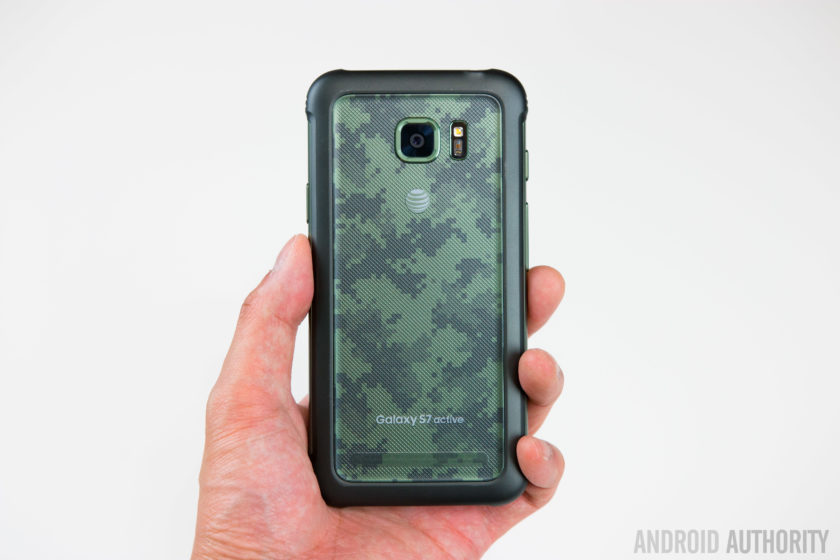
The biggest difference between the two handsets is in the design; the original Galaxy S7 features an all glass and metal design but the Galaxy S7 Active swaps this out for a more rubberized body. Like previous Active devices, the rubber build does result in quite a thick phone that is honestly a little bit bulky but this trade-off is certainly not new to the Galaxy S7 Active.
Most people who drop their phone find the handset can break (often beyond repair) when it lands on a corner or leading edge and to prevent against this, Samsung has reinforced the corners in a bid to ensure the Active doesn’t suffer the same fate as other less durable handsets. Naturally, you do lose the sleek curves and corners of the original Galaxy S7 but the compromise is certainly worth another look when you consider this phone is much more likely to survive a hefty drop.

The rugged exterior means the Galaxy S7 Active conforms to the MIL-STD-810G military standard for protection against extreme conditions. As a result, the phone is rated as being resistant to drops from heights under 5 feet and being able to survive harsh conditions including salt, dust, humidity, rain, vibration, solar radiation, transport and thermal shock. Like every rugged smartphone, the Galaxy S7 Active does have a limit and you will be able to break it if you try hard enough but it’ll survive a lot more knocks than most, if not all, other current flagships.
Build quality aside, the Galaxy S7 Active also trades the capacitive navigation keys of the Galaxy S7 Active for physical hardware buttons for the recent apps and back keys. Instead of the simulated vibration-based feedback provided by the original’s capacitive keys, the Galaxy S7 Active’s keys provide real tactile feedback and although they take getting used to, they are certainly very easy to press.
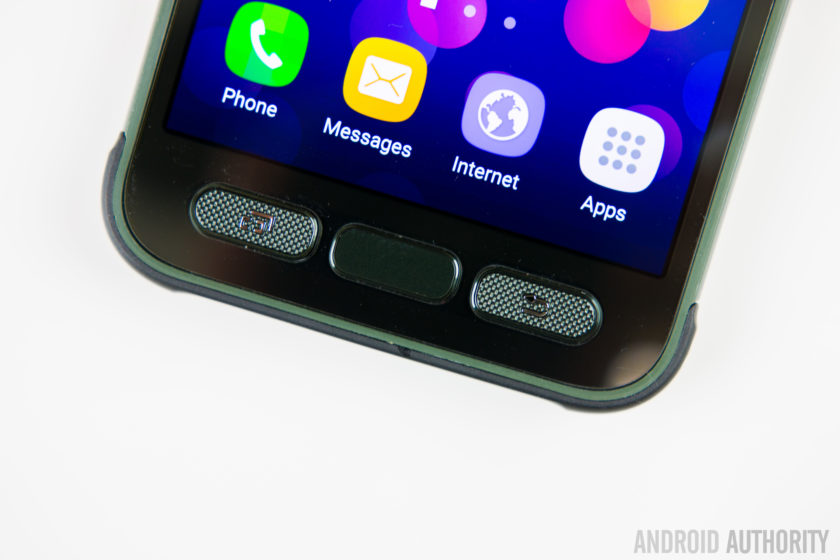
The home button is no different to other Samsung devices but unlike last year’s Galaxy S6 Active, you still get the home button which means the Active range now supports authentication-based features such as Samsung Pay.
The majority of other buttons and ports are in the same place as the Galaxy S7, with the exception of the headphone jack which is moved to the top of the phone. The Galaxy S7 Active does gain the ‘Active key’. The key is completely user definable and can be configured for three different actions – your standard short press, a long press and a double press – which can be used to open any application you choose, with a further option to allow the app to open when the phone is locked.
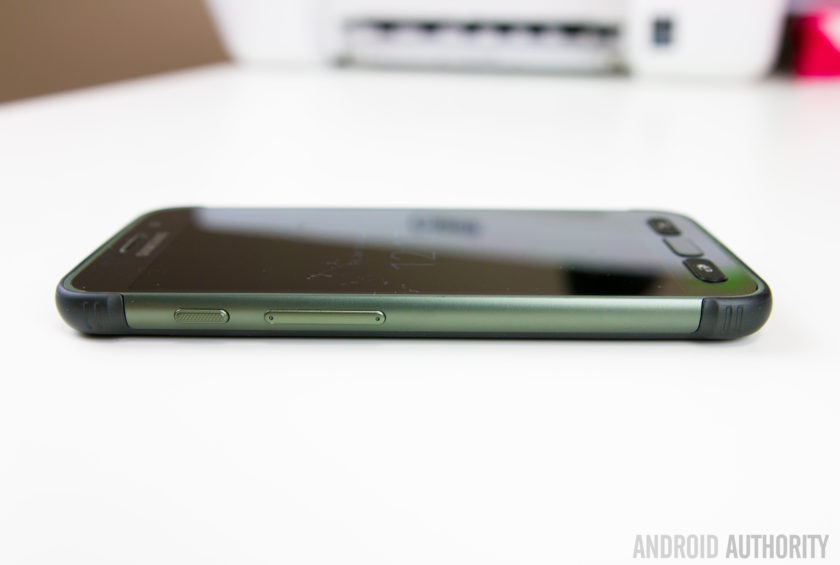
How does it feel to go from the sleek and slender Galaxy S7 to the larger and beefier Galaxy S7 Active? The simple way to explain it is that the Active very much feels like the Galaxy S7 inside of a case, which comes complete with the front lip to protect against any damage. Yes, it doesn’t have the sleek finish of the Galaxy S7 but the rugged features mean this smartphone can withstand more than most and if the fragileness of the Galaxy S7 is a concern for you, the Galaxy S7 Active certainly addresses these.
Display
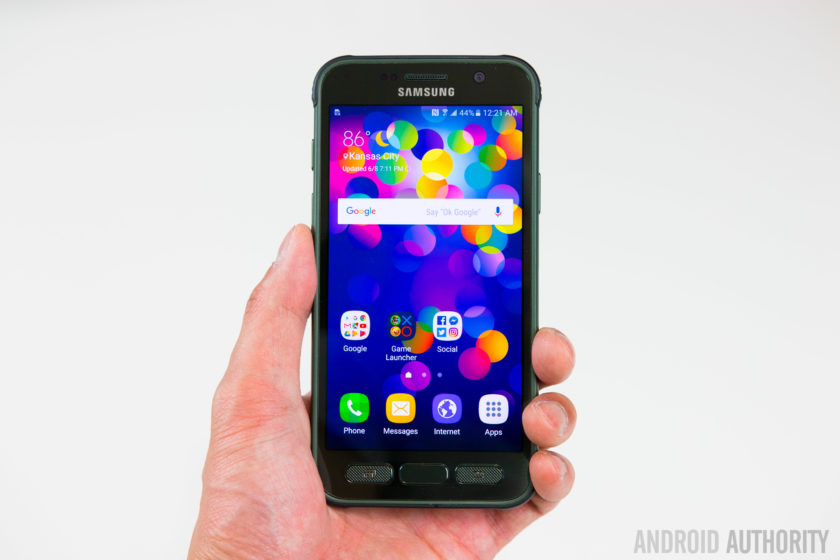
While the Galaxy S7 Active shares the same 5.1-inch QHD Super AMOLED display as the Galaxy S7 – which offers 2560 x 1440 pixels resolution – it does gain one very crucial feature: shatter resistance.
The display is shatterproof up to 5 feet meaning the handset should survive a drop from shoulder height for most people, or so Samsung claims. The display is protected by a Corning Gorilla Glass 4 panel – which we know is susceptible to shattering – with a plastic protector on top so shatter resistant, not shatterproof, is the more applicable word to describe the display.
A problem with screen protectors or devices that use a plastic panel on top of the display is that often it can detract from what could be a very good display. Luckily, with the Galaxy S7 Active, this is not an issue but the plastic panel does scratch easily, which may eventually detract away from the Active’s appeal.
Battery Life
The last major change between the Galaxy S7 and Galaxy S7 Active is the size of the non-removable battery. Last year’s Galaxy S6 sported quite a small battery (at 2560mAh) and this year, Samsung beefed it up by 18% to a more acceptable 3000mAh in a bid to provide improved battery life.
 Related: Samsung Galaxy S7 battery life review99
The Galaxy S7 Active raises the bar yet again, with a 4000mAh battery that is 33% larger than its sibling, and even bigger than the excellent 3600mAh unit inside the Galaxy S7 Edge. On occasion a larger capacity battery doesn’t always translate to exceptionally better battery life but Samsung clearly has the formula figured out, with the Galaxy S7 Active proving to excel in the battery department.
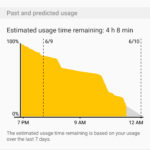


Despite heavy usage that included hours of gaming and YouTube streaming, the Galaxy S7 Active’s battery proved to be stubborn and very difficult to drain completely in one day. During our testing, screen on time often exceeded 7 hours despite resource-intensive tasks throughout the day and there’s no doubt that the Galaxy S7 Active offers the best battery life in the Galaxy S7 family.
Performance & Hardware

Aside from the key differences outlined above, the rest of the Galaxy S7 Active is very much the same as the Galaxy S7. Under the hood, this is powered by the Qualcomm Snapdragon 820 processor with 4GB RAM and with the Active being exclusive to AT&T in the USA, it’s unlikely we’ll see an Exynos-powered version launched in the near future.
On paper, the thought of AT&T’s additions to the software would lead to the assumption that performance will be inferior to a device that doesn’t have this additional load but in actual performance, the Galaxy S7 Active shows no signs of having carrier apps added. In regular use, there’s no lag of note and generally performance is almost identical to the Galaxy S7.
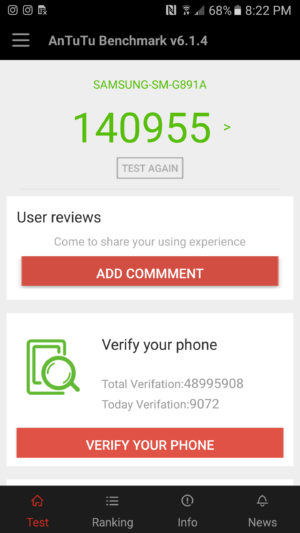
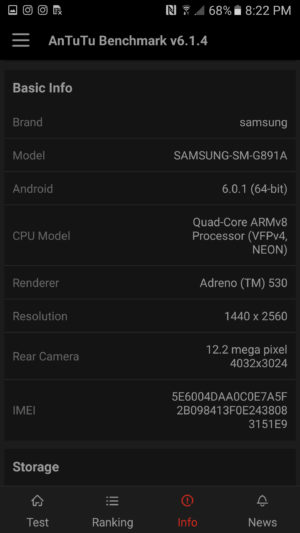
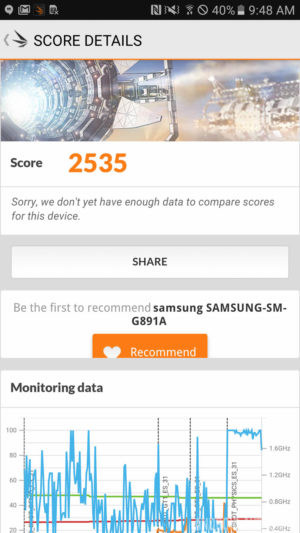
Running the usual benchmarks also corroborates this theory, with the Galaxy S7 Active proving to be on-par with, if not better, than the Galaxy S7 and S7 Edge. In AnTuTu’s benchmark test, the S7 Active scores 140955, whereas the regular S7 scored 129375. Moving on to GeekBench 3, the S7 Active scores 2282 in the single-core test and 5201 in the multi-core test, which is almost identical to the 2269 and 5156 scored by the Galaxy S7. Our last benchmark result comes from 3DMark, where the Galaxy S7 Active scores 2535 while the regular Galaxy S7 scores 2528.
Overall, there’s no denying that the performance of the Galaxy S7 Active is certainly one of the best on the market and unlike previous years, keeping mostly similar internals to the regular Galaxy S7 family has meant the Galaxy S7 Active offers performance on par with, if not better, than the best flagships on the market.
Camera
The camera on the rear of the Galaxy S7 Active is the same 12MP sensor with f/1.7 aperture and lightning fast dual autofocus found in the regular Galaxy S7. The images produced are sharp, vibrant and contrasty and the camera excels in most lighting conditions.
 Recommended: Camera shootout: Galaxy S7 vs the best flagships339
Like the regular Galaxy S7, you can still double press the home button to quickly launch the camera and the camera software remains mostly the same, with features such as selective focus and live broadcast to YouTube also present.
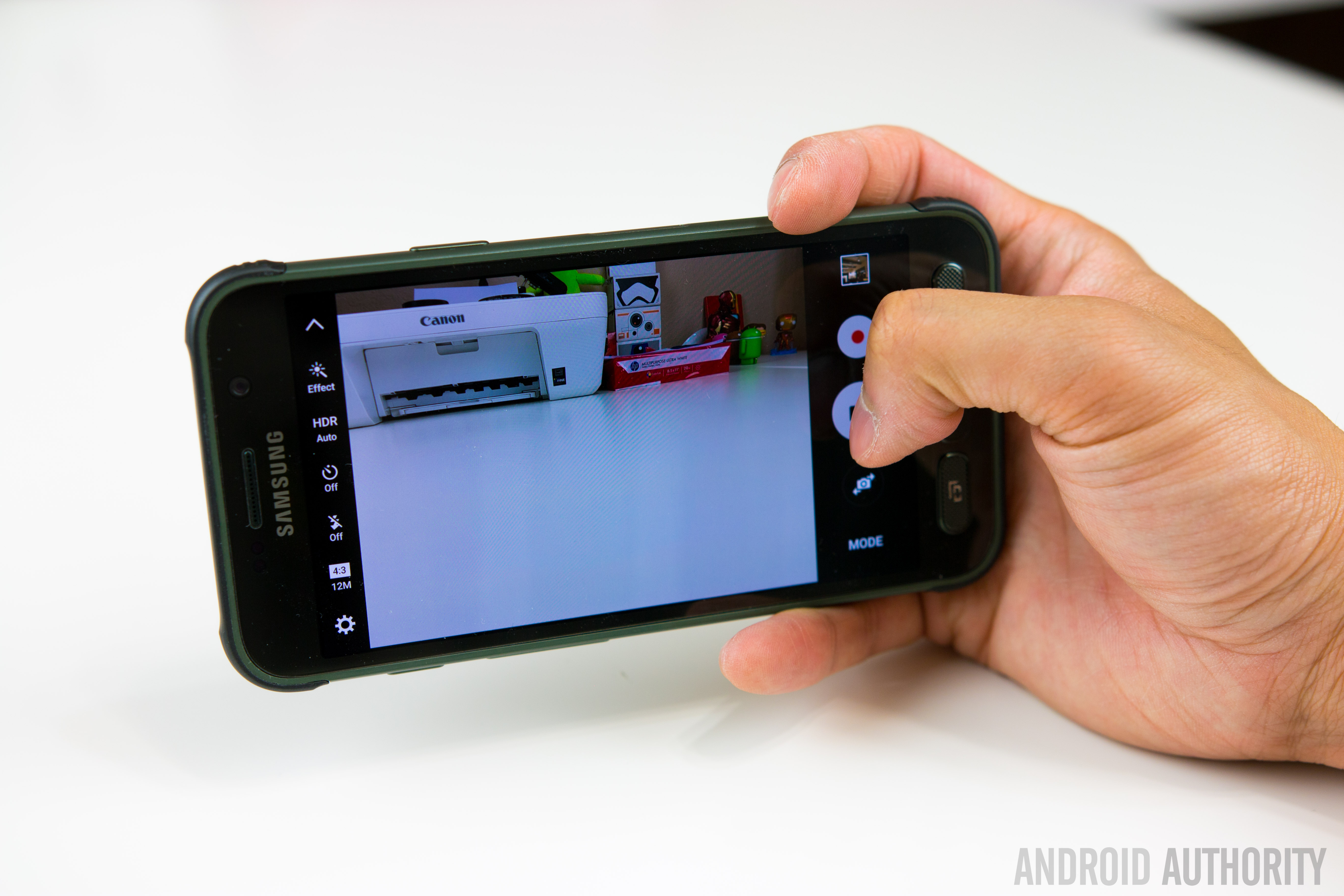
One new feature that does set the handset apart is the Aqua mode which has been made specifically for the S7 Active and it lets you use the active key to take photos and the volume keys to record video when you’re using the S7 Active underwater.
Galaxy S7 Active Camera Samples:

With the Galaxy S7 offering an excellent camera experience and the Galaxy S7 Active sporting the exact same camera offering, it comes as no surprise that Samsung’s latest rugged flagship has an excellent camera. The addition of an aqua mode arguably makes the camera better than the Galaxy S7 but whatever the condition, you can certainly rely on the Galaxy S7 Active’s camera.
Software

The Galaxy S7 Active is running on Android 6.0.1 Marshmallow with Samsung’s TouchWiz interface on top. Generally, the Galaxy S7 family sports a heavily refined user experience that has been optimised and streamlined to offer the best performance possible and, for the most part, the S7 Active certainly continues this trend.
Where the issue arises however is in the handset’s exclusivity with AT&T in the USA, which inevitably leads to the addition of carrier apps and bloatware to the software. From the Galaxy S5 to the Galaxy S7, Samsung worked hard to make its software bloat-free and as streamlined as possible while keeping the company’s targets in mind but the AT&T bloatware undoes a lot of Samsung’s positive move.


That being said, the benchmarks and real-world usage reveal that the carrier bloat doesn’t have a big effect on the performance, which is not typical of the normal effect carrier bloat has on a smartphone. Yes, none of the apps can be uninstalled and you’re unlikely to use some of the preloaded apps – which include AT&T’s own services, Lookout security, the Yellow Pages and Direct TV – but they don’t seem to have a marked effect of any kind on performance.
For some users however, non-removable carrier bloat can be a deal breaker and that’s really the biggest downside to the Galaxy S7 Active. For more on the overall software experience, check out our TouchWiz Feature Focus video below:
Specifications
Here’s the key specs for the Samsung Galaxy S7 Active:
| Display | 5.1-inch Super AMOLED display 2560 x 1440 resolution Shatterproof display |
| Processor | Quad-core Qualcomm Snapdragon 820 2x 2.15GHz, 2x 1.6GHz |
| RAM | 4GB |
| Storage | 32/64GB |
| MicroSD | Yes, up to 256GB |
| Durability | IP68 rating
MIL-SD-810G certified (dust, salt, humidity, rain, vibration, solar, transport, thermal shock resistant) |
| Cameras | 12MP rear camera with f/1.7 aperture, 1.4-micron pixels, OIS 5MP front camera with f/1.7 aperture |
| Battery | Non-removable 4000mAh battery |
| Fast charging | Yes |
| Wireless charging | Qi and PMA |
| Software | Android 6.0 Marshmallow |
| Dimensions | 9.9mm thick 185g |
Gallery
Conclusion

There’s no denying that a rugged smartphone with the capabilities of the Galaxy S7 Active will appeal to a lot of users but AT&T’s exclusivity, coupled with the effect on software, does mean a lot of users won’t be able to acquire the Galaxy S7 Active even if they wanted to. In fact, a few years in with proven interest in the Active range, it remains surprising that Samsung hasn’t struck deals to bring the Active range to other carriers and markets.
If the Galaxy S7 were a sports car, the Galaxy S7 Active could only be considered a tank; both will get you to your final point but only one will handle whatever you throw at it.
The Galaxy S7 Active is certainly not the best looking phone but the more rugged design and better battery life are more than worth the compromise. In fact, considering the more fragile build of the Galaxy S7 and its susceptibility to damage, the S7 Active is arguably the better smartphone. If the Galaxy S7 were a sports car, the Galaxy S7 Active could only be considered a tank; both will get you to your final point but only one will handle anything you can throw at it.
- Galaxy S7 Review
- Galaxy S7 Edge Review
- Galaxy S7 Active vs Galaxy S7 Quick Look
The Galaxy S7 Active shows that sometimes, brawn really is more important than beauty.
With comparable performance and hardware, an excellent camera and much better battery life, the Galaxy S7 Active is arguably what the Galaxy S7 should have been. At first glance, the S7 Active may not seem like the smartphone for you but don’t be fooled: they say you shouldn’t judge a book by its cover and the Galaxy S7 Active shows that sometimes, brawn really is more important than beauty.
What do you think of the Galaxy S7 Active and would you rather have the sleek Galaxy S7 or its rugged, more durable cousin? Let us know your views in the comments below!
Alienware Aurora (2016) Release Date, Price and Specs – CNET
When it comes to desktop gaming PCs, size matters, but bigger isn’t always better. Alienware hopes its new Aurora line isn’t too big or too small, but instead just right.
For PC gamers who want a no-compromise desktop with room for three graphics cards and up to five hard drives, no matter how much floor space it takes up, there’s the massive Area 51. If space is tight, there’s the smaller X51 or Alpha models, which are closer in size to a game console, but offer fewer options and lack the easy access to the system interior for upgrades. With the Aurora, a resurrected name in use on other Alienware products from the mid-2000s until a few years ago, the company now has a mid-tower desktop that fits right in the middle.

Sarah Tew/CNET
This new Aurora is a relatively svelte 14 inches deep by 18 inches tall by 8 inches wide, and the chassis takes a good deal of its design DNA from the Area 51, with three side lights on the angled case echoing the pyramid-like design on that larger desktop. The company says this is its smallest system yet that can handle dual graphics cards, and it’s the easiest to access the interior of, thanks to a new tool-less design that allows for quick upgrades of the GPU, CPU, storage and practically any other component. Liquid cooling is also an available option.
Processors up to the Intel Core i7-6700K will be offered (some with factory overclocking), along with dual Nvidia GeForce GTX 1080 graphics cards, although you can start as low-end as the Nvidia 950 and upgrade later. The most powerful GPU options will allow the system to power three 4K displays at once.

While tightly packed, interior access is simple thanks to a tool-free outer door.
Sarah Tew/CNET
Alienware says this system is “designed for VR,” although even the smaller X51 desktop can be configured to work with the Oculus Rift and HTC Vive headsets.
The new Alienware Aurora should be available by summer, and prices will vary widely by configuration.
Alienware Alpha R2 Release Date, Price and Specs – CNET
Alienware’s Alpha gaming desktop is getting a series of major upgrades, including new graphics and processor options, making for the biggest hardware changes since the system launched in 2014.
The Alpha has always been an unusual gaming PC. This console-like box started as a Steam Machine, a stripped-down gaming PC intended to run Valve’s SteamOS software, offering inexpensive access to games in the Steam online game store, but little else.

Sarah Tew/CNET
But SteamOS and the Steam Controller that went along with it experienced several long delays, so Alienware’s parent company Dell decided to retool this machine slightly and it became a Windows-powered box called the Alienware Alpha. For under $500, it offered good-enough performance in games from The Witcher 3 to Fallout 4, thanks to a custom Nvidia graphics chip that was about as powerful as a mid-level gaming laptop (albeit one from 2014).
Since then, we’ve had new generations of both Intel processors and Nvidia graphics cards, and the hardware inside the Alpha has started to feel more than a little old. The processor and RAM were upgradable, with some effort, but the graphics were not.
The new Alpha, called the R2, now offers CPUs from Intel’s current sixth-gen line, from Core i3 all the way up to a Core i7-6700T. There’s only one Nvidia GPU option, but it’s a full desktop-level Nvidia GeForce 960 card, which is more than powerful enough for most current games at very high detail levels and frame rates. (The AMD Radeon R9 M470X is also available as an option.) Storage options run from standard platter hard drives to new, faster PCIe solid-state drives.

Connect the Alpha to the Graphics Amplifier accessory (and a graphics card) to use a VR headset.
Sarah Tew/CNET
But wait, there’s more. If you want to use the Alpha to power the current generation of virtual reality headsets, the Oculus Rift and HTC Vive, it doesn’t have the required hardware to do that, at least on its own. Another of the newly added Alpha features, however, is compatibility with the sold-separately Alienware Graphics Amplifier, a toaster-sized box that can accommodate a full-size desktop graphics card and funnel its power to a handful of compatible Alienware systems.
Of course, this requires you to bring your own graphics card to the mix as well, which can run anywhere from $300 to $700 for a VR-ready card, plus $200 for the Graphics Amplifier box. Put it all together, and you’ve already spent more than enough for one of our VR-ready desktops. Still, it’s a useful option to have available, and one of several external GPU products being pitched as VR-ready this year.
The updated Alienware Alpha R2 should be available this summer, starting at $599 in the US. International price and availability details were not yet available, but that price converts to around £420 or AU$810.
Huawei P9 Review – an iPhone by any other OS would still taste of Apple
Since I own and use a Huawei Nexus 6P as my daily driver, I find myself in the unique position of being able to compare these two phones – one crafted with direct input from Google, and one the result of Huawei when left to its own means – side by side. Many of my observations in this piece will be comparisons between the two, despite the piece as a whole being a review of the Huawei P9, specifically.
Build
The aluminum frame feels great in the hand. It’s got a slim profile and weighs next to nothing – a stark contrast to the Nexus 6P, which is bigger and noticeably heftier in-hand. Oddly, the P9 is only 0.3mm thinner than the 6P, but feels much smaller – perhaps because the 6P is 38 grams heavier. The P9 is so light, in fact, that when it slipped out of my pocket when I sat down and embedded itself in the couch cushion, I never noticed until I went to check it.
The downside to that all-aluminum body is that when the phone gets hot, it gets hot. A video call with my sister for a mere 15 minutes made the thing nigh-unholdable (that is not a word), lest I burn the fingerprints from the tips of my fingers.
Time to acknowledge the elephant in the room – the P9 looks just like an iPhone. From the shape, to the dimensions, to the random Torx screws on the bottom of the phone, it reeks of Apple design. I understand that people think Apple is the pinnacle of build quality, but ripping Apple’s aesthetic while using Google’s operating system seems so very wrong on so many levels.
Aside from looking like an iPhone, the rest of the phone is structured like a Nexus 6P – volume buttons and power button on the right side of the frame, fingerprint sensor on the back, Type-C USB on the bottom (although the headphone jack is on the bottom as well, not the top).

Screen
Quantitatively, the Nexus 6P is a superior screen – 0.5″ bigger on the diagonal (5.7″ AMOLED), a higher pixel density, and an oil resistant coating on top of corning Gorilla Glass 4 all work in the 6P’s favor. In practice, though I’ve found the P9’s display (5.2″ IPS LCD) to be equal or better in nearly every way.
The pixel density difference is not immediately obvious to the eye, and the supposed oleophobic coating on the 6P didn’t prevent it from picking up fingerprints at the same prodigious rate as the P9. The latter’s display is every bit as gorgeous as the former’s, despite the 6P’s AMOLED screen. In certain side-by-side instances, the colors on the P9 are even more vibrant. Either way, the P9’s screen is pretty damn good. I took a side-by-side shot of the two screens to show the difference – presented without comment.

Cameras
I’m gonna do this quick; like a bandaid, just tear it off – the P9’s camera blows the 6P out of the water. Badly. In all of my (amateur, highly unscientific and purely subjective) head-to-head comparisons, I preferred the P9 – both in terms of how easy it was to get the desired shot, and how the shot looked on its screen and on my computer. I’ve uploaded a gallery of images taken with the two phones for your perusal.

The P9’s camera software more robust than Google’s, and it seems more responsive. The options list for the P9’s camera is extensive, to say the least: Photo, Monochrome, “Beauty” mode, Video, HDR, Panorama, Nighjt Shot, Light Painting, Time-Lapse, Slow-Mo, Watermark, Audio Note, and Document Readjustment. Wow.
This software also features a pretty nifty feature that turns off the camera if you leave it open for too long without doing anything with it – this would undoubtedly save some accidental battery loss.
The focus of the P9 is far superior to the 6P’s, making taking close-up shots way easier to capture; take a look at the Lego closeup and the closeup of the gaming miniature to see what I’m talking about. Additionally, the shutter speed on the P9 seemed a lot snappier than the 6P, which was sluggish by comparison.
In terms of front facing cameras, the P9’s really picks up insane amounts of detail – to the point where I saw my own selfie and thought “ugh, dat skin tho.” In short, the P9’s selfie cam is straight up better. I video chatted a few times with the P9 as well to get a feel for if the quality was any better on the receiving end, but my partner in crime for those calls didn’t seem to notice a difference.
Battery Life
In terms of battery, the P9 performs about how you’d expect with a 3000mAH battery; I got less than a day of my usage, which is to say about 3 hours of screen on time streaming music, refreshing Twitter like mad and texting like crazy. For comparison, my Nexus 6P manages about 4 hours of screen-on time before I need to charge it. The P9 doesn’t quite have the same lasting power, but it’s also no chump. With some battery saving considerations, there’s no reason the battery couldn’t last most people until bed time.
The P9 does not support the 6P’s 3A charging speeds, but the smaller battery and Type-C USB port mean it still charges pretty quickly compared to other devices.
Data, Coverage, Etc.
It’s important to note that the P9 does not support CDMA bands, only GSM – which means Sprint and Verizon customers are out of luck in the US (note that it does support HSPA and LTE, however). My reception with my T-Mobile nano SIM was pretty flawless, with no connection drops and very good quality calls.
WiFi performed as expected – in my case, lots of drops and lag, because the internet in my neck of the woods is awful, and I need to yell at the AT&T guy again. At Starbucks, however, the WiFi was just fine.
Features
The fingerprint reader is arguably faster than the Nexus 6P’s, but I feel like the 6P’s registers my finger correctly more often – note that this may be because of the way I set up my fingerprint on the two devices, which has a margin of human error.
The speaker placement on the P9 isn’t ideal, especially in comparison to the front-facing dual speakers of the Nexus 6P. Holding the phone one-handed in my typical left-handed grip – index finger bracing the left side, middle finger supporting the back, pinky under the bottom of the frame – actually blocks the speaker, muffling the volume. When unimpeded by fat fingers, the volume can compete with the best of them, but the overall sound quality seems a bit hollow to me.
Firmware
Long story, short: if you like iOS’s launcher, or MIUI, this phone is for you. It eschews Google’s signature app drawer in favor of spreading each and every single icon of each and every single app you install on your homescreen. This, to me, results in way too many icons – especially if you start adding widgets.There are a number of cute options within the launcher: transition animations, auto-align icons, shake to align, and homescreen looping are among them.
In terms of performance, I ran into a number of jitters and hesitations when running around in the menus, but to its credit the P9 ran Android 6.0 admirably, and didn’t lag a whole lot; buttery smooth, for the most part. One area the P9 does struggle with, though, is the keyboard – I ran into a bunch of occasions where it would hesitate to input my keystrokes, resulting in many, many backtracks.
Final Thoughts
I had a really great time with this phone. It often felt as good, if not occasionally superior, to my Nexus 6P, especially in terms of how it felt in the hand. The launcher – and, indeed, Huawei’s modified OS in general – was not my bag, for I’m an AndroidGuy (I’m ashamed of that plug), not an Apple Guy.
Basic Spec Comparison
Phone: Huawei P9
Android Version: 6.0
Screen: 5.2″ IPS LCD
Resolution: 1080×1920 (401ppi)
CPU: HiSilicon 2.5ghz Octa-core
RAM: 3GB
Storage: 32GB internal (expandable)
Camera: 12mp duo camera
Battery: 3000mAh, Type C Charging
Price: 599.99 at Amazon
Phone: Huawei Nexus 6P
Android Version: 6.0
Screen: 5.7″ AMOLED
Resolution: 1440×2560 (518ppi)
CPU: 2Ghz Qualcomm Snapdragon 810
RAM: 3GB
Storage: Up to 128gb (nonexpandable)
Camera: 12.3mp
Battery: 3450mAh, Type C Charging
Price: 419.99-569.99 at Amazon
Jaybird Freedom Review!
This article originally appeared on our sister site SoundGuys.com. For the full review & ratings, check out their Jaybird Freedom Review!
After being announced at CES, the Jaybird Freedom wireless headphones are finally here. They have a new design, a new way of charging, and Jaybird even released a new app to go along with them. But are they everything we hoped for?
What’s inside?
In the box you’ll get a soft carrying pouch, instruction manual, the headphones, 3 sets of wings tips (L, M, S), and 6 pairs of ear tips as well in either silicone or comply memory coming in small, medium, and large. Then you’ll get a short charging cable, 2 wire clips for cable management (super important), and a small clip to secure it to your shirt. Not so important. Finally you’ll get the charging cradle that you’ll need to recharge the headphones.
Build & Design
![Jaybird Freedom[3]](https://www.aivanet.com/wp-content/uploads/2016/06/1465768211_3439705274999.jpg)
Right off the bat you’ll notice that these look pretty different from the originals. The earbuds are way slimmer now and have a rounded off design that looks really sleek. If you’re not familiar with the X2s, the earbuds used to house the battery which made them big and bulky. And since the earbuds are slim now, the battery had to go somewhere. Which means that the control module is now big, bulky, and not too pretty.
When I first saw the new Freedoms I thought ,”Man, that’s bulky”, and now that I have them I can confirm: it’s big. So big that if you don’t use the wire clips, the extra slack in the cable will definitely force them to fall out of your ear while running. These also don’t have a micro-USB input on the headphones themselves. Instead Jaybird opted for a charging cradle that you need to connect to the headphones in order to plug them in. They also can clip to the control module while you’re wearing them for a boost in battery life.
![Jaybird Freedom[2]](https://www.aivanet.com/wp-content/uploads/2016/06/1465768212_1708438284695.jpg)
When you attach the cradle it gets even bulkier, but I still think that it is a good idea. After going for a run I just came back to the car, snapped on the charging cradle, and let them charge back up. Overall, the biggest issue that I had with the Freedoms was the fit. I had a really hard time getting these to stay in my ear and I actually had to rewrite this entire review because when I finally found the right combination of tips and cord length to get them to fit decently, it changed the experience.
Still, no combination helped during running. The bulky control module easily gets pulled out of my ear due to its weight and only the wire clips were able to help after a lot of adjusting. If I need to use two clips for the wire and a third to keep it clipped to my shirt just to go on a quick run, maybe the design needs a little rethinking. On the bright side these do feel pretty tough and don’t seem like they’d snap under stress.
Connection
![Jaybird Freedom[6]](https://www.aivanet.com/wp-content/uploads/2016/06/1465768212_5266403499991.jpg)
One aspect of the headphones that were never an issue during testing was Bluetooth strength. Regardless of where my phone was during my runs I experienced no skipping at all. Even around my house the connection was easily reliable up to 30 feet. Fresh out of the box I wasn’t too impressed with sound quality, but the new Jaybird MySound app is pretty handy. Not only does it keep you up-to-date with how much battery is left, but it also lets you fine tune the EQ settings to your liking.
You can also browse through presets and preview how they sound, including ones made by athletes. The presets then get synced to the Freedoms themselves and not to the source device. So if you switch between devices as often as I do, at least you can count on your music to sound the same. Unlike wired headphones, Bluetooth headphone controls aren’t switched or disable depending on your operating system. So whether you use Android or iOS the playback controls work the same. You can pause and play music, skip between tracks.
Battery Life
![Jaybird Freedom[4]](https://www.aivanet.com/wp-content/uploads/2016/06/1465768213_8427600555122.jpg)
The battery life on the Freedoms are really only about 3 to 4 hours, but you could technically use them with the charging to cradle to get up to 8 hours. However, in my usage that was really unrealistic unless I was sitting at a desk. As I alluded to before, I preferred to use the cradle as a portable battery to charge the Freedoms up while I’m not using them instead of a charging case that needs to be attached at all times.
Sound Quality
![Jaybird Freedom[5]](https://www.aivanet.com/wp-content/uploads/2016/06/1465768213_3935741815716.jpg)
When it comes to sound quality, one thing that I noticed that really made a difference was the volume. These get really loud which is great for fitness, but not so much for sound quality. For testing I created a flat EQ profile in the app just so I can see how the headphones sound without any enhancements.
Lows
Even with a flat EQ profile the Freedoms still have a good emphasis on bass, which is expected considering they’re intended for fitness. That said, they weren’t overdone and even though they’re stronger than I prefer, they were contained to the low end.
Mids
Mids really seemed to take a hit this time around. Vocals and instruments don’t have a huge amount of detail and almost sounds like they have a sheen over them. Especially in songs like “Life is Wonderful” by Jason Mraz where it starts off acoustic and brings in more instruments halfway throuhg.
Highs
Again, these get loud. And purely because of that the highs tend to be somewhat piercing unless you dramatically lower the volume. There’s a bell synth in “Ember” by WhoMadeWho that is almost painful at some points.


Conclusion
Overall, the Jaybird Freedom do look way sleeker than the X2s, but they also don’t fit as well. The bigger ‘buds of the X2s wedged themselves in your ears and even though it was bulky and looked weird, they fit great. With the Freedoms you have to rely completely on the little accessories like the cable clips and wing tips. It’s not impossible to find a great fit (and maybe it’s just me) but it’s definitely way harder than something like the UA Headphones Wireless which just stay in your ears no matter what you do.
The sound quality is okay even with the help of the app, but lets be honest — you’re not getting these for the audiophile quality. You’re getting them for fitness. But unless you can get them to fit perfectly they’re not too great in that aspect either. After getting the right fit I really like the Freedom Wireless, but I think I’m just going to wait for the X3s and hope that they’re easier to use.
Buy from Jaybird
This article originally appeared on our sister site SoundGuys.com. For the full review & ratings, check out their Jaybird Freedom Review!
2016 Mini Cooper Convertible review – Roadshow
The Good The 2016 Mini Cooper S Convertible offers open-top driving for you and a few friends. Its handling feels more nimble than most cars, and its eco and sport modes make a real difference. An optional Harman Kardon audio system is a must for music lovers.
The Bad With the top up, the Mini Convertible’s blind spots get large, and with the top down the rear view becomes compromised. The brakes feels a little weak for sport driving. The infotainment system lacks support for Apple CarPlay or Android Auto, and the destination and music search interfaces are needlessly tedious.
The Bottom Line With its unique design and fun handling character, it’s easy to forgive some of the 2016 Mini Cooper S Convertible’s flaws, but wise buyers should take a close look at the non-sport Mini Cooper Convertible, which will likely offer equal satisfaction.
I steal glances at the full, green canopy of the forest overhead when I deem it safe to take my eyes off the road. Unadulterated by a roof, pillars or side windows, the 2016 Mini Cooper S Convertible affords a truly panoramic view of the scenery.
But as the next twist in the road comes up, I remind myself that I’m here to test handling. Braking and downshifting, feeling the suspension tilt slightly and the tires bite into the pavement as I turn the wheel, the Cooper S Convertible sounds off with a delightful little exhaust snort when I upshift at high revs to third for the ensuing straight.

Mini reengineered its standard Cooper hardtop a couple of years ago, and follows with the new Cooper S Convertible, also on a new platform.
Wayne Cunningham/Roadshow
Combining sport driving character and a gloriously open top seems like a perfect mix, but not all is rosy in Mini-land.
The Mini’s top, folded down behind the rear seats, obstructs my rear view. Racing up to a turn, the brakes feel like they took a nap, and only groggily get to work when I put the pedal down hard. The car itself still exhibits fun handling, but this generation has grown substantially since BMW bought the brand and re-engineered the classic Mini cars in 2002. The new grown-up Cooper S Convertible may offer better interior room than its predecessor, but it lost that earlier ultra-nimble driving character.
New
generation
Mini
Cooper
S
Convertible…
See full gallery


1 – 6 of 41
Next
Prev
New generation
This latest Cooper S Convertible represents a new generation for the iconic anglo-car, following the new Mini hardtops launched last year. The traditional Mini look is here in full effect, and most people won’t be able to distinguish this generation from the previous. But an additional 5 inches of length makes this one less mini, although additional cabin space may seem like a reasonable trade-off.
The power-operated convertible top will be the real draw for fans of open-air driving, and the Cooper S Convertible holds a distinction for being one of the few four-seater convertibles on the market, especially with a base price under $30,000. Driving with the top up, the cloth overhead looked sturdy and didn’t flap or make more noise than I would expect. As a bonus, at mid-position the top rolls back just enough to uncover the front seats, serving as a sunroof.

With four seats, it takes a lot of cloth to cover the Mini’s cabin.
Wayne Cunningham/Roadshow
As a Cooper S, this Mini convertible comes with a 2-liter four cylinder engine using a twin-scroll turbocharger, making 189 horsepower and 207 pound-feet of torque. Drop the ‘S’ from the Mini Cooper Convertible, and you get the three cylinder turbocharged engine that reasonably impressed me in the Mini Cooper hardtop.
A six speed manual transmission comes standard in the Cooper S Convertible, but my example had the optional six speed automatic, with paddle shifters and a sport setting. Fuel economy rates at 25 miles per gallon city and 34 mpg highway, although in my mixed course of driving I only squeaked above a 25 mpg average.
Rectangle in a circle
Those new to Mini might wonder at the big, circular frame in the center of the dashboard housing a wide, rectangular LCD. In past years that frame held the speedometer, and Mini retains it for love of legacy.
The LCD itself shows navigation, app integration and digital audio, with sources such as Bluetooth streaming, satellite radio and a single USB port for iOS devices or drives. The maps on the navigation screens show excellent detail, including buildings rendered in perspective view. Route guidance works well, especially with the optional head-up display showing turn-by-turn directions.

Mini’s maps look nicely detailed, but the destination interface is frustratingly out-of-date.
Wayne Cunningham/Roadshow
However, destination entry still relies on the old paradigm of entering city, street and number separately, or choosing a different screen for point-of-interest searches. Now that Ford’s Sync 3, Apple CarPlay and Android Auto have brought single-box destination entry to in-car navigation, the Mini’s interface feels very outdated and clumsy. The Mini infotainment system doesn’t support Apple CarPlay or Android Auto, either, although the Mini Connected app enables online destination search in the system if you cable your smartphone to the car.
On a similar note, searching for music on a connected device using Mini’s infotainment interface involves a ridiculously tedious and complex interface. A single-box search here would be very nice, especially considering the hand-writing recognition touchpad atop the dial controller for the infotainment system.
The highlight of the Cooper S Convertible’s electronics was its optional Harman Kardon audio system, which creates very detailed sound and will be a worthwhile upgrade for music lovers.
Apple iPod Nano review – CNET
The Good The Apple iPod Nano has a sleek aluminum design, FM radio, Bluetooth and long battery life.
The Bad With no Wi-Fi, you’re stuck syncing music via USB from a PC or Mac running iTunes. It doesn’t work with Apple Music subscriptions, and the low-res screen is tiny.
The Bottom Line The iPod Nano is an aging music player that’s hurt by its outdated reliance on iTunes and lack of subscription music compatibility.
Yes, the iPod Nano still exists. It’s one of the last MP3 players standing in Apple’s lineup, next to the gym-friendly, small-as-a-button iPod Shuffle and the basically-an-iPhone-with-no-cell-service iPod Touch.
The current seventh-generation Nano was introduced way back in 2012, but still lists for $150 (£tk, AU$tk). Even with Apple’s built-in pricing premium, it feels like it should cost about 40 percent less at this point.
On the surface, there’s a lot to like here. The Nano is like a shrunken-down iPhone with 16GB of storage, a touchscreen and a little home button. And while it doesn’t have a full app store, it does offer far more than music: you can also listen to podcasts, watch videos and scroll through photos. There’s an FM radio and Nike+ fitness tracking too, and the Nano offers Bluetooth support for streaming audio to all of the latest wireless speakers and headphones. (One snag: that radio requires wired headphones, which double as the antenna.) It’s battery also averaged well over a day in our CNET Lab battery test. Can you say that about your phone?
GE GTW860SPJMC review – CNET
The Good The $1,200 GE GTW860SPJMC is an attractive washer with plenty of features, including a companion app for Android and iPhone and an IFTTT channel.
The Bad It isn’t a top performer when it comes to stain removal and you can’t actually initiate a cleaning cycle from the app.
The Bottom Line GE’s GTW860SPJMC definitely has curb appeal, but other high-end models offer a better overall value.
This $1,200 top-load washing machine seemingly has it all — good looks and a relatively intuitive instrument panel. It’s also packing a long list of features, including a related GE Laundry app for Android and iPhone and even an IFTTT channel. $1,200 is high-end luxury when it comes to top-load machines, but the GE GTW860SPJMC seems worth it on paper.
When you factor in performance, though, the impressiveness starts to flag. It does a decent enough job removing stains, but the results don’t stand out much in comparison to other models we’ve reviewed. That doesn’t mean you should immediately rule out this GE washer, but it would be worthwhile to look at the competition closely before you buy.
Meet the GE washing machine that works with…
See full gallery


1 – 5 of 7
Next
Prev
Getting to know GE’s high-end washer
With 13 wash cycles, a handsome metallic gray finish and a transparent lid so you can watch your clothes whir around inside (if you so desire), the GTW860SPJMC is strikingly similar to the $1,199 Samsung WA52J8700. The main difference, of course, is that the app-enabled GE version doesn’t have a built-in sink for pre-soaking or hand washing delicates, and the sink-equipped Samsung version doesn’t have an app.
Check out this comparison chart of the two top-load washing machines for more details:
| GE GTW860SPJMC | Samsung WA52J8700 |
| $1,200 | $1,199 |
| 5.1 cubic feet | 5.2 cubic feet |
| 13 | 15 |
| 28×44.5×29 inches | 27x46x29.3 inches |
| 166 pounds | 147.8 pounds |
| 1 year, parts and labor | 1 year, parts and labor |
| 152 kWh per year | 165 kWh per year |
| Yes, Android and iPhone | No |
GE’s GTW860SPJMC is also competitive with other premium top-load models in terms of its specific wash cycles. They include:
- Basket Clean
- Bulky Items
- Dark Colors
- Delicates
- Drain + Spin
- Heavy Duty
- Jeans
- Normal/Light Colors
- Quick Rinse
- Sanitize with Oxi
- Speed Wash
- Towels & Sheets
- Whites
But its most interesting feature is a bit more hidden, an inconspicuous “Wi-Fi Connect” indicator on the bottom left corner of the display panel. This means that the GTW860SPJMC works with GE’s smart laundry app as well as GE’s laundry channel on the connectivity service IFTTT.
In other washer news:
- This Samsung washer has everything, including the kitchen sink
- This cool, uncomplicated washer performs well under pressure
- A simple LCD screen makes this smart washer shine
- GE smartens up its large appliances with IFTTT support
While the app looks nice and is simple to configure — just download the GE Laundry app on your Android or iPhone and follow the instructions to connect — the software is a little disappointing. It’s nicely designed, but you can’t actually initiate a cleaning recycle remotely like you can with Samsung’s $1,399 WF457ARGSWR or Whirlpool’s $1,399 Smart Cabrio. Instead you can track a cycle, get an alert when the cycle ends, download a few additional cycles, and monitor how much detergent is left in the SmartDispense soap reservoir. It’s somewhat useful, but not essential.
 AIVAnet