


Sony PS VR Aim Controller Release Date, Price and Specs – CNET
I’ve always loved light gun games. Arcade classics like Time Crisis, Police 911 and Silent Scope — with its realistic sniper rifle — were my favs. Now, an ugly grey plastic tube is poised to blow them all away.
The new PlayStation VR Aim Controller looks more like a balloon animal than a weapon of war. But as soon as I placed the PlayStation VR headset on my head, it morphed into a futuristic assault rifle so easy to aim, it almost felt like it could read my mind.

The PlayStation VR Aim Controller.
Sean Hollister/CNET
In Farpoint, the initial PlayStation VR shooting game that will arrive alongside the Aim controller (at some point in the future for an undisclosed price), I traversed a desolate, dusty alien landscape shooting space spiders. They lept through the air like Half-Life’s infamous headcrabs in an attempt to eat my brains, or shot huge globes of noxious acid to melt my flesh and bones. But with the Aim, I could pick them off with precision before they even hit the ground.
Mind you, I’ve played some fantastic shooting games on the HTC Vive and with the upcoming Oculus Touch controllers, too. This was different. Nothing I’ve played for the Rift or Vive’s two separate controllers (instead of a single two-handed gun) has felt quite this intuitive.
Physically, the Aim is pretty much what you’d expect from a modern PlayStation controller. If you look for them, you’ll find pretty much all the same controls as the standard DualShock 4: two analog sticks, four face buttons, two bumpers, two triggers, a directional pad, Share and Options buttons and even a button mapped to the DualShock’s touchpad button (though no actual touchpad on top.

Sean Hollister/CNET
Of course, those triggers are in rather different places to take the form of a gun. And in a nod to lefties, the peripheral is totally ambidextrous, with a R1 button mounted on either side of the trigger, under your index finger, to help you reload. “We didn’t want you to have to reach for anything,” says Seth Luisi, who helped prototype the controller for his game Farpoint.
Isn’t the Aim the same as Sony’s Sharpshooter, which turned a PlayStation Move and Motion Controller into a two-handed gun back in 2010? Not at all. Though they look similar, the Aim is far more accurate and with far less of a delay before your motions are reflected in the game world. In fact, it works in tandem with the PlayStation VR headset to bring your wrists and arms into VR, too — with the extra sensor data, it seems pretty good at estimating where they are.

The PlayStation Move Sharpshooter, from 2010.
Sony
The PlayStation VR Aim Controller is effectively a replacement for the Sharpshooter, by the way. Farpoint won’t support the Sharpshooter at all. You’ll need an Aim (or a standard PS4 gamepad) to play the game once it eventually comes out.
Now here’s hoping Konami likes the controller enough to start working on a new Silent Scope.
Sony STR-DN1070 review – CNET
The Good The Sony STR-DN1070 proves itself a worthy all-arounder with a dynamic performance in both music and movies. Its six HDMI ports offer compatibility for the latest 4K sources. Useful features include multiroom streaming, three separate powered speaker zones and wireless support for AirPlay, Google Cast and Spotify Connect.
The Bad Unlike many receivers at its price, the Sony doesn’t support Dolby Atmos or DTS:X surround formats. Sony’s wireless multiroom system isn’t as compelling as Yamaha’s.
The Bottom Line Lack of Atmos is more than eclipsed by excellent sound quality, making the Sony STR-DN1070 one of the best receivers at this price.
How hot are you on “the latest and greatest” versus “tried and tested”?
The Sony STR-DN1070’s feature list is prodigious, but one glaring omission is support for the newest object-based surround formats, Dolby Atmos or DTS:X. Other midpriced receivers, like the Onkyo TX-NR646, are careful to check those boxes, but Sony ignores them. If you’re OK with that — and we certainly are — it’s an excellent choice, anchored by superb sound quality for the money.
Of course, the Sony can still do plenty of other cool stuff like stream AirPlay, Google Cast and Spotify Connect, offer a generous three powered zones, and handle 4K/HDR video. That good-enough feature set, along with great sound, makes it one of our favorite receiver recommendations so far.
The STR-DN1070 is available for $599 and a prickly $1,399 in Australia (June) but UK pricing and availability is yet to be confirmed.
Design
 View full gallery
Sarah Tew/CNET
The poor old receiver: it’s difficult to make a big rectangular box “sexy,” and most designers don’t even try. The DN line has remained unchanged since 2012, but as receivers go, the 1070 is still relatively modern, with an uncluttered face and pleasing LED display strip through the middle.

View full gallery
Sarah Tew/CNET
On the right hand side of the receiver go the control knobs for volume and source selection and across the front are scattered a few other controls, though frustratingly there’s no Menu button. The fascia also includes an HDMI port and headphone jack.

View full gallery
Sarah Tew/CNET
The receiver’s menu system is just as friendly as previous iterations and should be very familiar to users of other Sony gear including televisions. It offers a clean Settings page and a logical, easy-to-read menu system once you drill down further.

View full gallery
Sarah Tew/CNET
The remote control is button-packed but reasonably ergonomic, with big, convenient keys.
Features
Though sound quality has changed, in other ways the STR-DN1070 is only an incremental update on the STR-DN1060. It shares many of the same features, including six HDMI inputs (five on the rear and one on the front). These ports are able to deliver the benefits of this year’s 4K Blu-ray players, and 4K streaing devices like the Roku 4, with support for HDCP2.2 and HDMI 2.0a/HDR content from the major studios. The Sony comes with 4K upscaling too, if you think you need that (but really no one does — your TV often does a better job).

View full gallery
Sarah Tew/CNET
Despite boasting nine channels rated at up to 175W/ch (up from seven last year), the receiver still doesn’t offer the immersive formats Dolby Atmos or DTS:X. Instead it offers the option of up to three powered zones, which is one of the few receivers we’ve seen to do this at this price.
The lack of X and Atmos is not a deal-breaker in my opinion, since there’s still less than 60 discs for both formats so far. On the other hand if you want as much future-proofing as possible, or you’re interested in “immersive audio” and the extra speaker hardware it requires, you should probably choose a receiver that supports those formats.

View full gallery
Sarah Tew / CNET
Microsoft Xbox Wireless Controller 2016 Release Date, Price and Specs – CNET

Nic Healey/CNET
While Microsoft lead with the already-leaked Xbox One S console, the new look Xbox Wireless Controller also raised a few eyebrows at the Microsoft press conference at E3 2016.
While Microsoft hyped the customisation — over 8 million different ways of making it all your own, apparently. — there’s a lot of difference to be found.
Bluetooth: Currently gamers who want to use a controller with their PC have to get a dongle, and quite frankly it can become a hassle. But this long setup process is no more, as the updated Wireless Controller has Bluetooth connectivity built in. Not only will this let you easily connect the controller to the Xbox One S, but it can connect your PC and many other devices. By going with Bluetooth you get an increased range of connectivity as well.

Nic Healey/CNET
Textured grip: The new controller has a subtly streamlined design, with a textured grip on the rear. It certainly doesn’t have the premium feel of the Xbox Elite Controller, but it also doesn’t have the price tag either: it’s starting at $79.99 (Australian and UK pricing still undetermined) but it’ll go up based on the customisation you want. It’s light, but not so much so that it feels tacky and cheap. The thumbstick action is smooth, and the textured areas are actually quite noticeable and very welcome.
Headphone jack: The new controller also has a 3.5mm jack so you can plug your headphones straight in. The original controller needed an adapter, so that’s a nice touch thanks to the Bluetooth.

Nic Healey/CNET
The One S will ship with one of the new Wireless controllers but you can get your own separately starting late August. The Design Lab customisation, sadly, is US and Canada only to start off with but will expand out to new regions soon after, according to Microsoft.
More from E3
- Xbox One S official: 40 percent slimmer, $299 this August
- Ubisoft E3 2016 press conference: Watch live today, 1 p.m. PT/4 p.m. ET
- Everything Microsoft announced at E3 2016
- E3 2016: Complete coverage on GameSpot
- E3 2016: Complete coverage on CNET
Microsoft Xbox One S Release Date, Price and Specs – CNET
Microsoft cut straight to the chase at its E3 press conference, officially announcing the Xbox One S the moment the event began. (It had leaked the previous weekend.) As both Sony and Microsoft have done with previous game consoles, the One S isn’t a “next-gen” successor to the Xbox One. Instead, it’s a smaller version that corrects many of the mistakes of the big, brutish Xbox that first debuted in November 2013 — and adds some notable new features, too.
More from E3
- PlayStation VR arrives October 13 with 50 games
- E3 2016: Complete coverage on GameSpot
- E3 2016: Complete coverage on CNET
In fact, while we haven’t spent any real time with the Xbox One S (it doesn’t become available until August), the photos and the spec sheet point to a product that’s a hands-down improvement on its predecessor.
Among the most notable:
Better pricing (eventually)
The Xbox One S will start at just $299 in the US, but that 500GB model won’t be coming till later this year. In the meantime you can get the 2 terabyte Xbox One S launch edition for $399 (£350 or AU$549) in late August. A third 1TB model will also be available for $349 in the US. Note, however, that the price of the existing Xbox One model has already been cut to as low as $279.

All-new design
The new One S console comes in at 40 percent smaller than the original One, which is a full-on beast of a box. That should put it much closer to the slim enclosure of the PlayStation 4 — and free up quite a bit of space in your home entertainment center. It even includes a vertical stand in the box, if you’d prefer to mount it vertically.
No more power brick
In addition to being physically gigantic, the original Xbox One also had an internal power brick the size of a Buick. The One S, however, is following the lead of the PS4 and going with an internal power supply.
More storage
The top of the line Xbox One S will have 2 terabytes of storage. That’s double the capacity of the current top-end Xbox and PS4, and plenty of storage for all of your games.
The Xbox One S: A closer look (pictures)
See full gallery


1 – 4 of 25
Next
Prev
4K and HDR Support
Expect improved video on the Xbox One S, with support for 4K (3,820×2,160) resolution and HDR (high-dynamic range). (Just note that 4K support is reserved for video, not games.) That means — on compatible titles, and with compatible TVs — you can expect colors to be more vibrant and blacks to be darker.
4K Blu-ray compatibility
That 4K and HDR support isn’t just for Netflix and Amazon streams: The Xbox One S will also play those new, top-of-the-line 4K Blu-ray discs, too. So it should be able to do everything that players such as the Samsung UBD-K8500 do for the same price or less — in addition to playing great games.
Controls other devices via an IR blaster
Microsoft dumped the Kinect motion sensor from the Xbox One package long ago, which lowered the price by $150. The Kinect remains an optional add-on for the One S (its absence of a dedicated port means you’ll need a USB adapter), but the new console includes a Kinect feature built-in: An IR (infrared) blaster can control your TV and cable box like a universal remote.

Updated wireless controller
The One S overhaul doesn’t stop with the console, as the controller is getting a refresh, too. This variant of the wireless controller has a new textured grip and better range. Even better, it adds Bluetooth wireless (in addition to Xbox’s proprietary wireless control scheme), which will allow you to use it with Bluetooth-ready PCs and tablets (and maybe phones?) without needing Microsoft’s annoying USB dongle. Read our full hands-on: The new Xbox Wireless Controller offers more than just custom colors
It still does (nearly) everything the old Xbox One does
With the exception of needing the adapter if you’re adding a Kinect sensor, the One S still does everything the current Xbox One can, and plays all of the same games. It also includes all of the positive software improvements Microsoft has made over the past few years, including the redesigned interface, support for the Cortana digital assistant, compatibility with the Windows Store, backwards compatibility with a growing list of Xbox 360 games and more.
But before you preorder…
The Xbox One S is available for preorder at the Microsoft Store, but keep a couple of caveats in mind before you whip out your credit card. First off, Microsoft has already confirmed that supercharged version of the Xbox One, dubbed Project Scorpio, will be hitting in late 2017 with support for gaming at 4K resolutions and VR add-ons. And Sony is also getting into the console upgrade game in the near future with its PS4 Neo, which will also amp up 4K video chops.
And, of course, there’s always Nintendo, which will be releasing its Nintendo NX console in March 2017.
So while the Xbox One S looks great, just know that a lot of other new and improved game consoles will be hot on its heels.

OnePlus 3 review – CNET
The Good The OnePlus 3’s sharp camera, powerful processor and enduring, quick-charging battery make a knockout combo when you factor in its low price.
The Bad The camera has a distinct bulge. Power users may be disappointed that the phone doesn’t have a swappable battery or expandable storage.
The Bottom Line At $400, the OnePlus 3 is the best budget Android phone you can buy, with a premium look and feel, and performance fast enough to go head-to-head with any high-end handset on the market.
Last year, my idea of a fantastic “high-end” budget phone was something like the Google Nexus 5X — a bit smaller than your usual flagship with a decent-but-not-mindblowing camera and a processor that, while not at the top of the class, still made gameplay and movie streaming fun. But for less than $400, that was about the best you could get.
The OnePlus 3 changes everything. For $399 or £309 (which converts to about AU$590), you get a top-of-the-line processor, a nimble 16-megapixel camera and a long-lasting battery. You also get a speedy performance that rivals reigning (and more expensive) Android champs such as the Samsung Galaxy S7 and the LG G5.
Like all OnePlus phones, the handset only works with carriers using GSM technology. That’s everyone in the UK and Australia, but in the US that means AT&T and T-Mobile (it won’t be compatible with Verizon and Sprint users, unfortunately). But unlike previous launches, you won’t have to wait for an invitation to get your hands on it. OnePlus is releasing it to the masses right at launch and you can order it from the OnePlus website. This is great news for anyone in the market for a new handset, because the OnePlus 3 hits enough high marks to be your next phone.
OnePlus 3 flaunts its premium design to the…
See full gallery


1 – 5 of 14
Next
Prev
Design: High-class metal looks
With a new aluminum unibody design, the OnePlus 3 looks better than all of OnePlus’ past devices (which either had a plastic or glass backing). It still looks similar to the HTC 10 and other smartphones, but that isn’t necessarily a bad thing — after all, the 10 is a pretty handsome phone. If you’re not into the metal look of this slim and attractive device, OnePlus offers snap-on covers made of wood, bamboo and other materials.
On the right edge is OnePlus’ familiar toggle. You can not only slide this to turn notifications on and off, but also to turn on priority notifications. Below the display, the home button doubles as a fingerprint sensor, and on the bottom edge are the speaker, headphone jack and USB Type-C port for charging.

With an aluminum-clad body, the OnePlus 3 features polished looks.
James Martin/CNET
On the back is the rear camera, which bulges outward from the surface of the handset. Many well-known phones do this too, including the iPhone 6S. It doesn’t damage the camera or hinder your use of it, but OnePlus 3’s camera bulge is quite thick and a bit unseemly.
Despite all that, there’s much to like about the phone. The 5.5-inch,1080p resolution display is bright and sharp, and I like the way its edges smoothly curve down into the bezel. There are also chamfered details around the display and charging port, which catch and reflect light in interesting ways.
All in all, the OnePlus 3 has a truly elevated aesthetic compared to its predecessors, and it’s good-looking enough to beat most budget phones. Not only does it have premium specs on the inside, but with its aluminum construction and subtle detailing, it now flaunts a premium exterior to match.
Software and other features: Keeping it clean and simple
The device features OnePlus’ own OxygenOS interface that runs on top of Google Android 6.0.1 Marshmallow (though it will be able to updated to Android N at a later date). Aside from a few choice Google services, the handset barely has any pre-installed (read: potentially annoying and unneeded) apps. And you can download and install anything you’re missing from the Google Play Store.
You’ll also get OnePlus’ signature Shelf feature. Shelf is an extra homepage that gives you access to your recent apps, favorite contacts and any other widgets you want to add. I found it can be useful when I wanted to quickly check email or jot down a to-do item, but if you’re not a fan you can disable it.

OnePlus’ signature Shelf home page (left), and the various ways you can customize the homescreen (right).
Lynn La/CNET
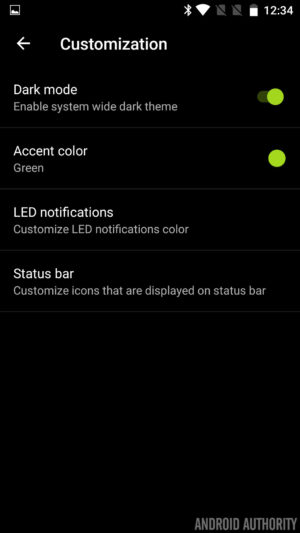
With OxygenOS, there’s plenty of room for you to customize the interface. You can choose different accent colors for the menu items and change the color of the LED notifications light. You can also load your own icon packs and turn on on-screen control buttons. There are also plenty of gesture controls, such as double tapping to wake up the screen (a feature included on many LG phones), or drawing an O shape to launch the camera.
One of my favorite goodies is Night mode, which will tint the display to reduce eye strain when you look at the screen in the dark. This feature just arrived natively to Android N and was introduced in iOS 9 as Night Shift. And lastly, the OnePlus 3 will see the return of the Near Field Communication chip (it was missing from the last two OnePlus flagships). These days, NFC is considered a standard among smartphones, and it allows them to communicate wirelessly with other NFC-enabled objects — it’s critical for mobile payment services such as Android Pay.
Camera: Capture great photos without really trying
Photo quality on the device’s 16-megapixel camera was solid, and I was impressed by how bright and clear images turned out. In well-lit situations, colors were true-to-life (especially the white hues), and objects were sharp and in focus. In dimmer settings or environments with tricky lighting, photos still turned out clear and evenly exposed. Check out the picture quality of the sample photos over the page. And be sure to click on each image to see it at its full resolution.
OnePlus 3 review
Making a splash in the increasingly-homogenized smartphone industry often involves breaking away from the norm, and upstart OnePlus did just this back in 2014 with the launch of their first smartphone, the OnePlus One.
Fast forward a year and the OnePlus 2 and OnePlus X somewhat failed to excite consumers as much as the first two handsets did – mainly due to some very questionable product-related questions – so the company has been forced to revisit the drawing board somewhat with the OnePlus 3.
- OnePlus 3 announced: everything you need to know
- Flagship spec showdown: OnePlus 3 vs the competition
- OnePlus 3 vs OnePlus 2 quick look
- What would you change about the OnePlus 3?
Is the third time really the charm for OnePlus, and can the OnePlus 3 prove itself to its biggest critics? Or is it more of the same with the OnePlus 3 ticking some boxes but failing to tick others? Let’s find out in this, our in-depth OnePlus 3 review.
Buy the OnePlus 3 now!
Design
Traditionally, OnePlus has tried to stray away from conventional smartphone design in a bid to keep its handsets unique, but with the OnePlus 3, the company has almost done the opposite.
Rather than keeping the plastic and/or glass finishes of previous handsets, the company has now moved to a full metal unibody smartphone. As a result, a key differentiator for its handsets is no longer quite the same: StyleSwap covers.
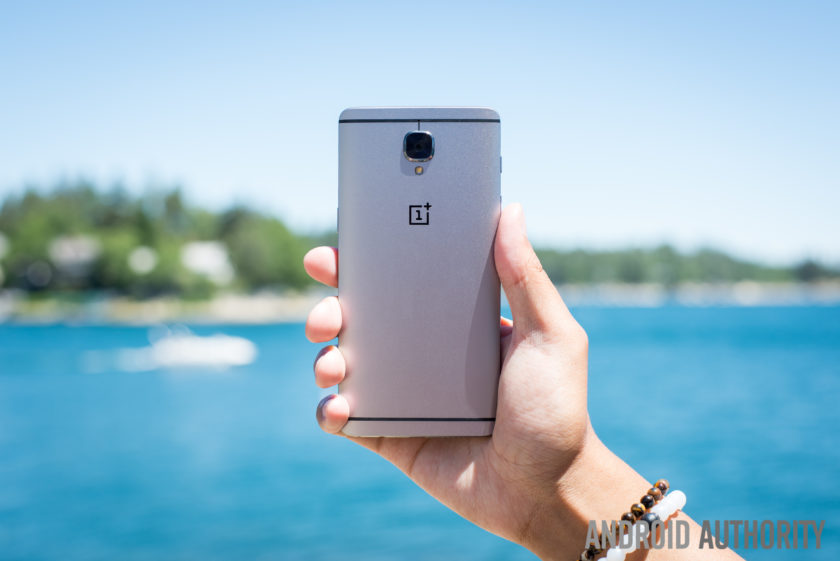
With a display that measures 5.5-inches, the OnePlus 3 is actually quite a large phone, especially considering the bezel itself is quite minimal. Although the bezel on the sides of the display could be considered minimal, the overall size of the OnePlus 3 can largely be attributed to the bezels above and below the screen, which are quite large.
Beneath the display, the bezel is largely forgivable thanks to the home button which is flanked by the capacitive navigation keys. The fingerprint sensor itself is similar to other handsets in that it allows you to unlock the phone in a fraction of a second (.3 seconds, to be exact) without needing to wake the phone from standby. The capacitive keys have a very neutral design, no doubt due to the customization options available in OnePlus’ latest OS (which we’ll cover in more detail below).

Moving around the rest of the phone and the usual OnePlus elements also make a return; the very bottom of the phone houses the USB Type-C port which sits adjacent to the single speaker and the headphone jack. The power button is on the right side of the handset while the volume keys are on the left. Above the volume keys, the traditional activity slider also returns, and lets you easily change the notifications profile, even without looking at the handset.
On the rear, the biggest change from past OnePlus devices becomes apparent – the choice of material for the build. By adopting a full metal unibody design, OnePlus has also made the conscious decision to do away with StyleSwap covers as we know them. In previous devices, the StyleSwap covers would have replaced the back of the phone but with the metal build on the OnePlus 3, they now act just like traditional cases for a smartphone.
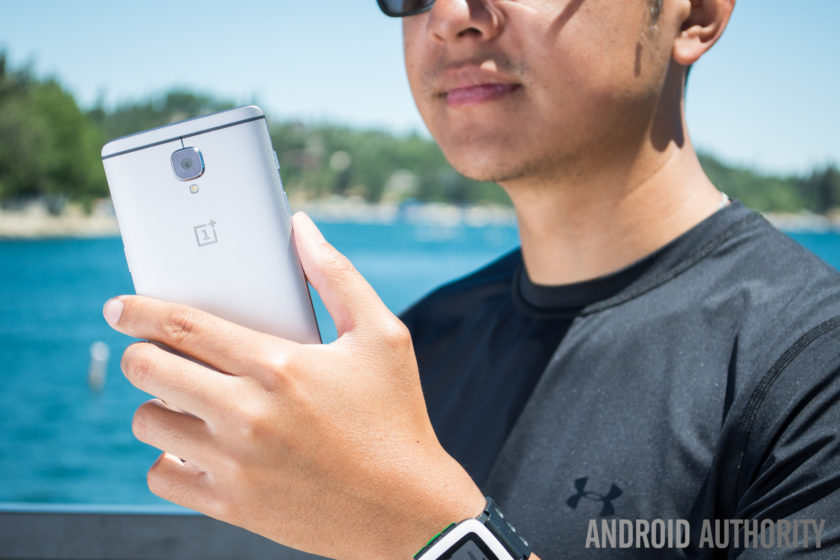
Handling for a phone of this size and stature is as expected and for the most part, it’s no different to any other smartphone. Reaching side-to-side across the phone is more than possible but given the phone itself is quite tall, its likely some users might face difficulties trying to access all areas of the display.
The metal finish is quite slippery as well, which further compounds the problem of handling and means that StyleSwap covers are almost a necessity. Although they are a consolation prize versus the total customization offered by the covers on past OnePlus devices, the sandstone material helps to reduce the size of the camera bump and vastly improve the grip offered by the handset.
 OnePlus 2 StyleSwap cover hands-on comparison, availability and more25
For fans of the original OnePlus StyleSwap covers, the compromise with the OnePlus 3 may prove to be a disappointing implementation – especially as the OnePlus 3 is very much a smartphone that adheres to the convention of 2016 flagships rather than aims to break the mould. All things considered however, the OnePlus 3 is still a very sleek and good-looking phone, even if it is does employ a more atypical smartphone display this time around.
Display

Prior to the launch of last year’s OnePlus 2, rumors suggested we would see OnePlus go with a Quad HD display, but the company ended up sticking with Full HD. This time around, there’s no change as a 5.5-inch Full HD panel makes its way to the OnePlus 3. OnePlus did opt for an Optic AMOLED panel with the 3, which we must say is quite nice.
Although most flagships have moved towards Quad HD displays in 2016 (and arguably for the most part in 2015), the Full HD panel in the OnePlus 3 still performs well and the larger size of the display provides a good amount of real estate. Of course, Full HD doesn’t live up to the current standard of flagship displays and although the OnePlus 3 screen is certainly nice, it’s definitely not on par with current flagships.

Employing AMOLED display technology in the OnePlus 3 does allow the company to offer a couple of welcome flourishes. A feature that is seemingly a necessity for a 2016 flagship is an always-on display. Although it is very similar to the iterations on the OnePlus X and other smartphones, the Ambient Display on the OnePlus 3 can be trigged by waving a hand near the proximity sensor, which is a nice touch.
The OnePlus 3 also lets you customize and tweak the color temperature of the display via a slider in the settings, which can be useful for those worried about the emission of blue light. A night mode in the Quick Settings dropdown makes for much easier viewing in darker conditions by increasing the warmth of the color temperature, and as a result, this makes the overall experience much easier on the eyes in dark conditions.

Viewing angles are mostly acceptable and legibility in bright daylight is about average, although OnePlus claim the dual-polarizing layer does help to increase sunlight legibility. Overall, the OnePlus 3 display is certainly not a superstar like certain other flagship devices, but considering the price of the handset (and everything else it offers), it’s certainly no slouch.
Performance
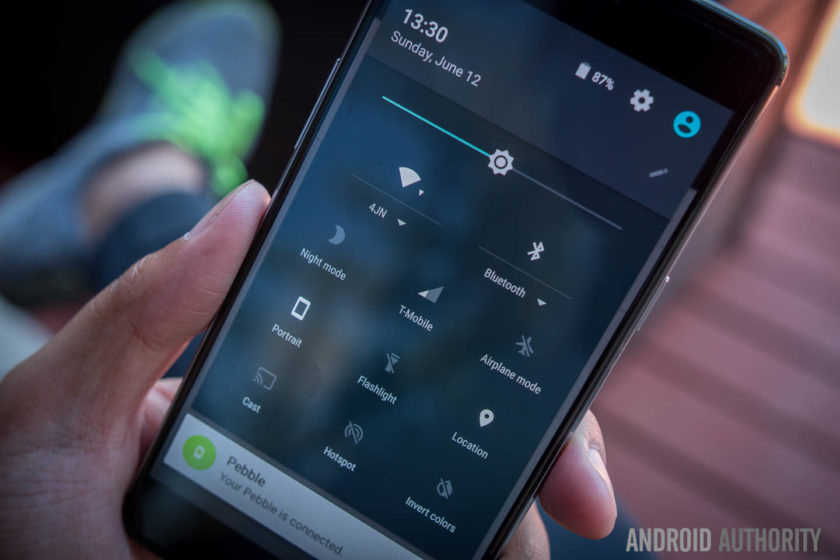
In previous years, OnePlus has sought to help its handsets stand out through the use of flagship specs without the flagship price point, and this year is no different. The OnePlus 3 delivers the very best internals on the market at the moment and offers them at a price which shows it is possible to obtain flagship performance without breaking the bank.
Under the hood, the OnePlus 3 is powered by the latest Qualcomm Snapdragon 820 processor coupled with an Adreno 530 GPU and 64GB of non-expandable storage. As such, performance has been very smooth and while some of this is down to the refined and polished Oxygen OS, there’s no denying that using the latest processing package certainly helps.
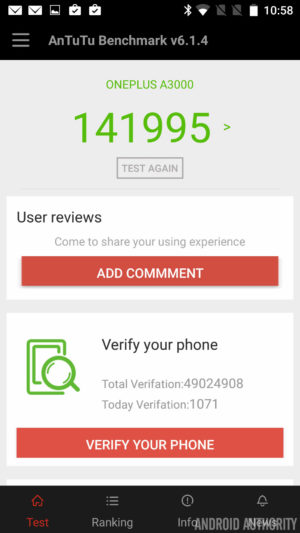

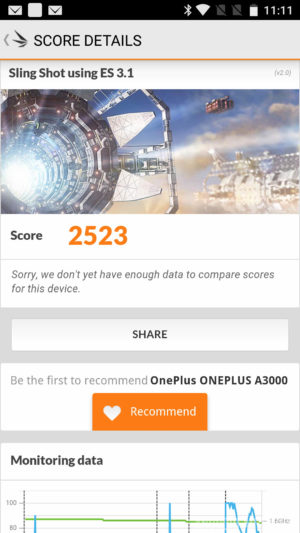
How does the processing package compare to other flagships? Running the usual benchmarks, we can see that the OnePlus 3 scores 141955 in the AnTuTu Benchmark, which is higher than the 140955 and 129375 scored by the Galaxy S7 Active and Galaxy S7 respectively. Moving on to GeekBench 3, it scores 2378 and 5465 for the single core and multi score scores respectively, which is again higher than the 2269 and 5156 scored by the Galaxy S7. Lastly, a 3D Mark score of 2523 shows the Adreno 530 is no slouch and is on par with the 2528 and 2535 scored by the Galaxy S7 and Galaxy S7 Active respectively.
A common problem in Android devices is also being addressed here, as apps don’t slow down even when there’s heavy loads working in the background. Why so? It’s simple: OnePlus has equipped the OnePlus 3 with 6GB of RAM, making it one of the only handsets to offer this.
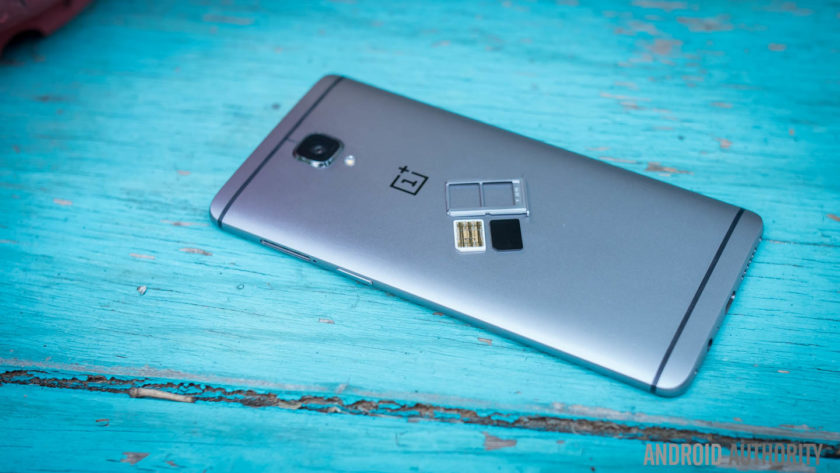
Adopting the highest RAM available on a smartphone to-date means performance is silky smooth and there’s plenty of RAM available to offer breathing room for users. Far too often, manufacturers will offer 4GB of RAM but only make 1GB available with no apps running (as the rest is taken up by background processes), but the OnePlus 3 leaves enough free RAM to ensure its always able to perform any task you ask of it.
From gaming and media consumption to browsing apps and webpages, the OnePlus 3 sails through anything you ask of it and there’s no question that the OnePlus 3 is a very viable addition to the flagship market when it comes to overall performance.
Hardware

For the most part, OnePlus handsets have always offered the usual array of internal hardware specs that we’ve come to expect from flagship smartphones, with the exception of one feature: NFC.
Yes, NFC proved to be a very costly assumption by the company in the OnePlus 2 as the mobile payments industry was thrust into the limelight and the omission of NFC – as no-one uses it, according to Carl Pei – meant the OnePlus 2 was left out of this wave. Fast forward a year and the company has clearly learnt from its mistakes, with the OnePlus 3 now supporting NFC and the payment and transfer opportunities the feature affords.

NFC aside, the OnePlus 3 brings the usual array of connectivity options including dual-SIM capabilities which are an out-of-the-box feature. For those who want a dual-SIM experience, the OnePlus 3 could even be one of the best options available. Throughout our testing, there were no issues with dropped calls or call quality.
On the subject of audio, the OnePlus 3 sports a bottom-mounted single-firing speaker which is an average performer. The speaker is loud – which is nice to have – but there is little body to the sound, which is expected from a single bottom mounted speaker. That being said, audio through a good pair of headphones is definitely above average. And while the experience is short of the one offered by an audio-centric device like the HTC 10, it’s definitely better than some more expensive handsets.
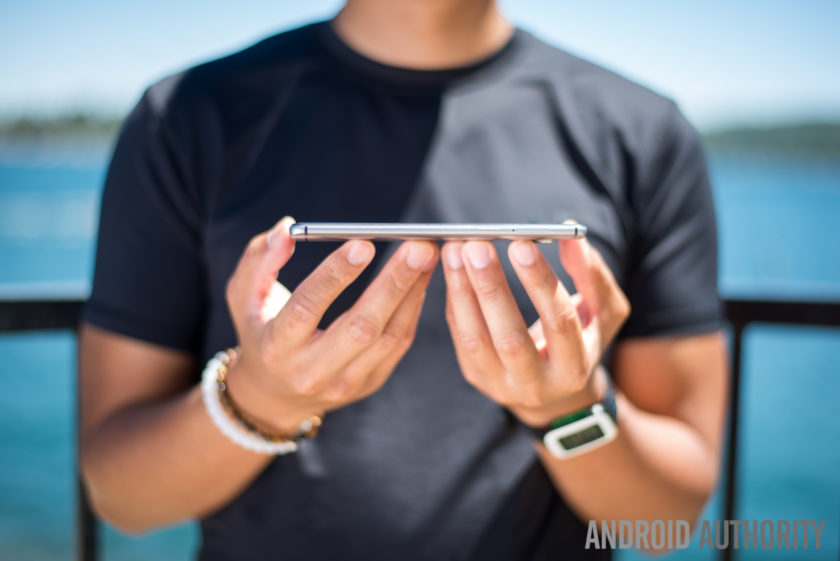
The home button beneath the display sports a fingerprint sensor, and just like most flagships, it can wake the phone from standby and unlock the phone in just .3 seconds when you place your finger on the sensor. Setting up the fingerprint sensor is a breeze and overall, it certainly performs like a flagship fingerprint sensor. The positioning may not to be to everyone’s taste, but it’s definitely a flagship-worthy feature.
The alert slider is also present on the OnePlus 3 and, just like previous devices, it lets you quickly swap between all notifications, priority notifications or no notifications. In the past I’ve never used this much as I wear smartwatches all the time, though I do find myself reaching in my pocket to make sure the phone is muted whenever I need it to be. With a textured design on the key, it also means it’s easy to locate and differentiate between the slider and the volume buttons.

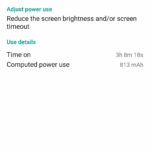
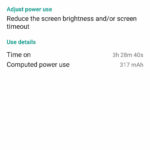
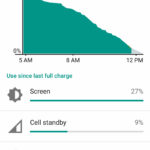
The OnePlus 3 is powered by a 3000mAh non-removable battery, which couples with Dash charging to power the entire experience. With quite a few days of heavy usage that included GPS navigation and plenty of music consumption, the OnePlus 3 was able to achieve 3 and a half hours of screen-on time. For the most part, the handset usually ended the day with a single digit of battery life remaining but it never quite drained completely.
Dash Charge is OnePlus’ take on fast charging technology. The company claims the OnePlus 3 can now charge the phone to 60% from empty in half an hour. In our testing, the claims are certainly true and the addition of fast charging is definitely a boon for the OnePlus 3, meaning if the battery is running low, it’s very easy to get the power needed to finish off the day.

Overall, the hardware inside the OnePlus 3 is certainly premium. While the display and design may not stand out too much, it’s under the hood where the OnePlus 3 shows its true flagship-worthiness. NFC makes a return, 6GB of RAM keeps everything running smooth and Dash Charge means you’ll never be without a charge; whichever way you look at it, these are definitely specs worthy of any premium flagship smartphone.
Camera
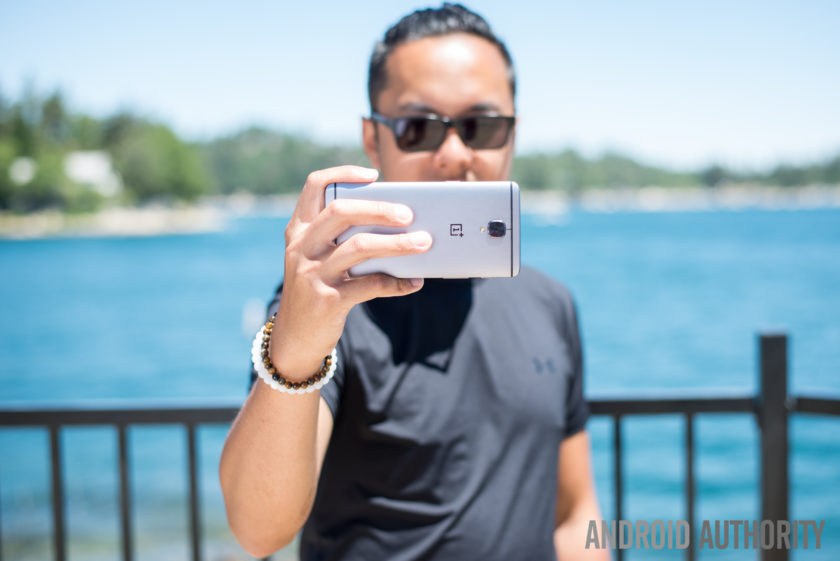
On the rear of the OnePlus 3 is a 16MP camera equipped with f/2.0 aperture, Optical Image Stabilization and phase detection autofocus. On paper, the camera is certainly on par with some flagship devices but as we all know, good camera specs on paper don’t necessarily translate to a great camera experience.
The camera app is still quite simplistic but it has been refined and polished to make it even easier to use. That being said, there is on area of the UX which I just can’t quite understand; when swiping on the viewfinder to get to the different modes, getting to the panorama mode puts the phone in portrait orientation, meaning you have to swipe differently to get back to the other modes.
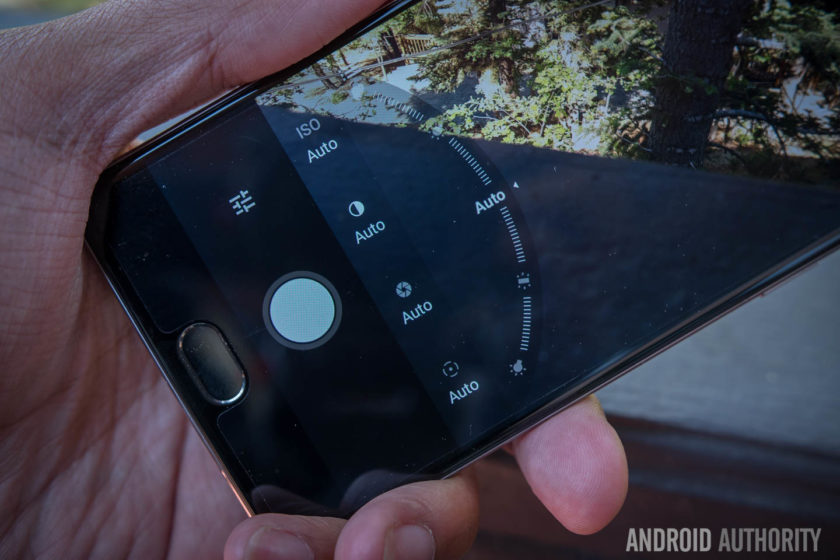
Manual mode in the camera app features some very nice sliders for changing the focal point of the image, the shutter speed and the white balance and tweaking images in manual mode is as easy as adjusting the slider. By far the best feature in manual mode is the ability to first set the exposure point and then drag the middle to find a proper focal point: it’s an intuitive way of catering the shot to your liking and it works perfectly in Auto mode.
Despite the positives in the camera interface, the actual camera performance is a let down thanks to some of the typical pitfalls. Color saturation in photos is rather inconsistent as while some shots result in good looking photos, others fail to capture the colors in vibrant scenes. E.g. in the eccentric scenes of Hawaii, we were left disappointed by the lack of vibrancy captured by the images.

HDR can traditionally help smartphones in this regard but with the OnePlus 3, it doesn’t seem to be quite as effective. On the OnePlus 3, HDR seems to be working ineffectively, by increasing the shadows rather than bring down the highlights and add in more color. The camera woes continue in the panorama mode, where issues with the stitching make parts of the photo look really choppy.
For most smartphones, low light performance is the biggest challenge and this is also true of the OnePlus 3, where slower shutter speeds compromise the exposure. Although it has Optical Image Stabilization, the shakes produced by long shutter speeds are still readily apparent and this means you’ll need very steady hands if you don’t want blurry photos more often than not.
OnePlus 3 camera samples:

The same issues are apparent in video where OIS does a good job of stabilizing the footage, but noise and a lack of color saturation plague all the video recording modes, including 4K. Considering that 4K video recording is growing in popularity, the poor footage captured by the OnePlus 3 is certainly a concern, especially for users who rely on shooting footage on their phone.
Though it may not come as a huge surprise, it’s still very disappointing to see that OnePlus haven’t quite figured out the camera on its smartphones. Without doubt the camera is one of the most important parts of a smartphone and it’s disappointing to see that the OnePlus 3 is bogged down by one of the most important features that a 2016 flagship needs to perfect.
Software

Just like its past devices, the OnePlus 3 runs on OnePlus’ Oxygen OS, and the latest version is based on Android Marshmallow with some polish and streamlining that makes the overall experience better. In the past, OnePlus has been criticized for providing an experience that’s too akin to stock Android without any extra features that differentiated it. This time around, the features have been ironed out to provide an overall experience that feels like it has its own identity.
Customization is a large part of the overall OnePlus experience and to that end, the Dark Mode is a great addition to the Oxygen OS. In adding the Dark Mode, OnePlus have added a feature that’s still not available in beta versions of Android N and the feature enables a dark interface with customizable accent color that’s likely to appeal to a lot of people who have wanted a dark theme for Android.
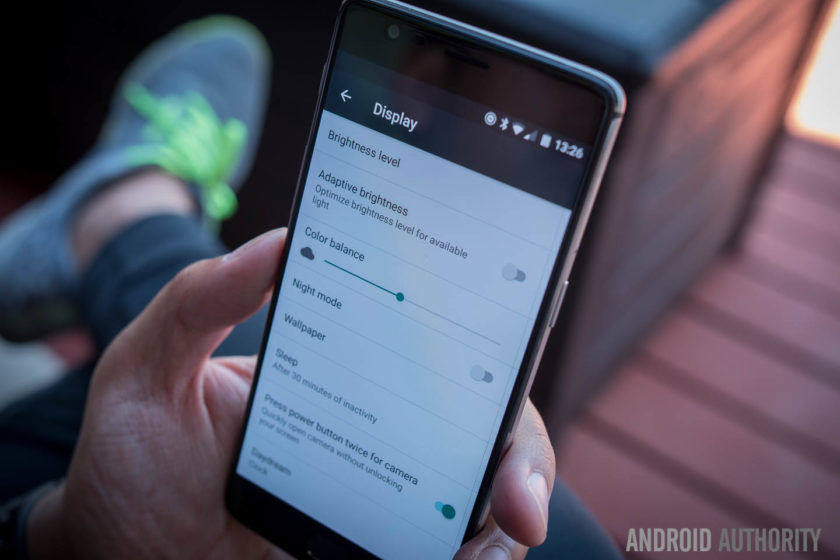
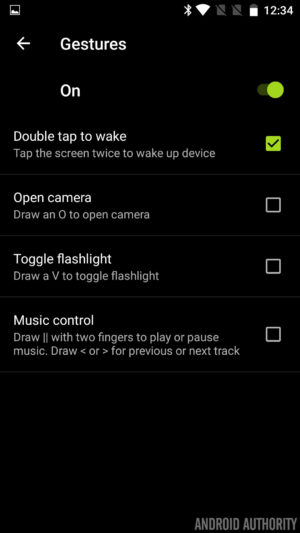
OnePlus devices have been known to come with gestures to launch apps and actions but with the addition of the fingerprint reader in the home button, you can now also launch the camera by double pressing the home button. This renders the gestures somewhat less needed but they are still present for those who are used to them.
The capacitive buttons that flank the home button are now dots rather than bars, and this is particularly good because they don’t have to adhere to the particular function that they indicate. Indeed, Oxygen OS provides the ability to customize the behavior of the keys – with different actions for long or double presses – as well as the option to disable them altogether in lieu of a bar of soft keys.
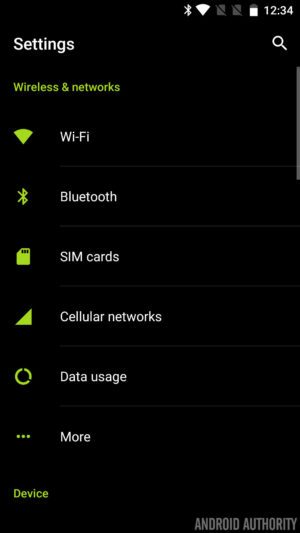
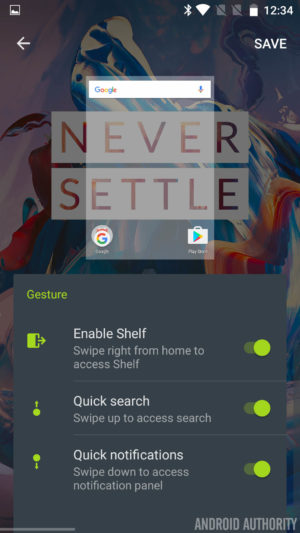


Finally, the Shelf returns and is still a bunch of boxes in which to add some widgets for safe keeping, but now widgets are scrollable. The Shelf also has a new dialog box which allows you to create quick memos and this makes it easy to take notes very quickly. It’s really the small flourishes that make this version of Oxygen OS a pleasure to use and whether it’s little icon indicators – for turning off the background, Dash charging and more – or the ability to quickly swap lockscreen and homescreen wallpapers, the tweaks help enhance the Oxygen OS experience.
In fact, whereas Oxygen OS once felt like stock Android attempting to replicate the feature set once offered by Cyanogen on previous OnePlus devices, it is now starting to feeling like a user interface all of its own.
Specifications
| Display | 5.5-inch Optic AMOLED display 1920 x 1080 resolution, 401ppi Gorilla Glass 4 |
| Processor | Quad-core Qualcomm Snapdragon 820 Kryo: 2x 2.2 GHz, 2x 1.6 GHz |
| GPU | Adreno 530 |
| RAM | 6GB, LPDDR4 |
| Storage | 64GB |
| MicroSD | No |
| Cameras | Rear camera: 16MP Sony IMX 298 sensor with PDAF, 1.12μm, OIS, EIS, f/2.0 Front camera: 8MP Sony IMX 179 sensor with 1.4μm, EIS, f/2.0 |
| Software | OxygenOS based on Android 6.0.1 Marshmallow |
| Sensors | Fingerprint, Hall, Accelerometor, Gyroscope, Proximity, Ambient Light and Electronic Compass |
| Ports | USB 2.0, Type-C Dual nano-SIM slot 3.5 mm audio jack |
| Connectivity | GSM: 850, 900, 1800, 1900 MHz North America model: WCDMA: Bands 1/2/4/5/8 FDD-LTE: Bands 1/2/4/5/7/8/12/17 CDMA EVDO: BC0 Europe/Asia model: WCDMA: Bands 1/2/5/8 FDD-LTE: Bands 1/3/5/7/8/20 TDD-LTE: Bands 38/40/41 |
| NFC | Yes |
| Audio | Speakers: Bottom-facing speaker Microphones: Dual-microphone with noise cancellation |
| Battery | Non-removable 3,000mAh Dash Charge (5V 4A) |
| Materials and colors | Materials: anodized aluminum Colors: Graphite, Soft Gold (Available shortly after launch) |
| Dimensions and weight | 152.7 x 74.7 x 7.35mm 5.57oz (158g) |
Gallery
Final thoughts

The OnePlus 3 is available to buy now for $399. The biggest news around the handset is that OnePlus has finally dropped its dreaded invite system. In previous years, you had to wait weeks or months and go through a lot of steps to acquire an invite before buying the phone, but now you’ll be able to buy one directly from OnePlus. Of course, it’s likely you’ll end up waiting a few weeks for delivery but it’s definitely easier than waiting for an invite.
What happens when a manufacturer puts together the best features of flagships for an affordable price point? That phone is called the OnePlus One. Unfortunately, the OnePlus 2 tried to bring a few forward facing features but didn’t fully flesh them out.
To make a success out of their third phone, it almost feels like OnePlus had to bend to convention.
That misstep has been rectified in the OnePlus 3, where the philosophies of the previous two devices have come together to make an incredibly solid device for a good price. In order to do that however, and appeal to the masses, OnePlus had to make a couple compromises – the camera is still not where a flagship should be, and the design takes a step back from uniqueness. To make a success out of their third phone, it almost feels like OnePlus had to bend to convention.
Buy the OnePlus 3 now!
Overall, the OnePlus 3 is still a great device that hits almost all the right notes – exactly what would be needed to make a ‘flagship killer.’ Perhaps now the phrase to look closer at is ‘Never Settle’ – where OnePlus once made a splash was in being bold, taking changes, and requiring invites to make the phone feel more exclusive. Without all of that, the OnePlus 3 feels just like an almost-flagship device for a midrange price. Though that in and of itself is great for most users, it also simply isn’t as exciting as before.
- OnePlus 3 announced: everything you need to know
- Flagship spec showdown: OnePlus 3 vs the competition
- OnePlus 3 vs OnePlus 2 quick look
- What would you change about the OnePlus 3?
What do you think of the OnePlus 3 and are you planning to buy one? Let us know your views in the comments below!
OnePlus 3 review: The best phone you can get for $399
OnePlus has been trying to craft a full-blown, “flagship killer” of a smartphone since day one, but how successful it’s been is up for debate. From my perch, the company’s first phone proved that a relatively unknown startup could build a high-caliber handset and a die-hard fanbase around it. Its second-generation device pushed it even further into the big leagues. And now there’s the $399 (£309) OnePlus 3, which launches today.
Make no mistake: The competition is even fiercer than ever, but OnePlus is trying to meet the challenge. Best of all, that pain-in-the-ass invite system is finally gone. Suffice to say, this year’s launch is a big deal for OnePlus, and it’s only fitting that the OnePlus 3 mostly represents this young company at its best. Indeed, right now you’d be hard-pressed to find any other phone this good for this price.
Hardware

There’s no denying that last year’s OnePlus 2 was a well-constructed device, but it now looks like the days of sandstone polycarbonate are over. This year’s version is milled from a single block of “space-grade” aluminum, and the 5.5-inch 1080p AMOLED display up front is swathed in a very slightly curved pane of Gorilla Glass 4. It’s beautiful. More than that, its trim waistline — 7.35 mm — makes the OnePlus 3 feel sleeker and more elegant than you might expect from a phone with this big a screen. Think of it as a larger, much better OnePlus X and you’re on the right track. Oh, and in case you were worried, you can still purchase a sandstone case or an authentic bamboo case for old time’s sake; or you can go for the fancy black apricot version, rosewood version (both using real wood veneers) or Kevlar version.
The move might have been an obvious one — OnePlus wanted a cohesive design across its devices — but who cares? The result is a handsome, impeccably well-built smartphone. A few of my colleagues even mistook it for an HTC device, which I took as a compliment, considering how insanely devoted that Taiwanese company is to build quality. (Obviously, that statement is open to interpretation.) Anyway, yes, OnePlus has really upped its game this year. By the way, our review unit was attractive graphite gray, but a “soft gold” option will follow not long after launch. Seriously, does every company need to make a gold phone?
What’s inside the OnePlus 3 is pretty impressive, too. Just about every flagship Android phone released this year packs one of Qualcomm’s quad-core Snapdragon 820 chipsets and an Adreno 530 GPU. The OnePlus 3 does too, but there’s a twist here: It also comes with 6GB of RAM. In fairness, the OnePlus 3 isn’t the first smartphone we’ve seen that packs that much RAM — that would be the ZTE Axon 7 — but it’s still nice to see a scrappy startup go somewhere most major manufacturers haven’t.
Speaking of, the OnePlus 3 also accepts two nano-SIM cards for multiple lines of service. It’s rare to see dual-SIM phones in the US, and the feature makes the OP3 a lovely travel companion, but that second SIM card takes up the space one might expect a microSD card to occupy. I’m not sure whether the team specifically gave up on expandable memory to accommodate another SIM; either way, you’re stuck with 64GB of storage. I’m a bit of a digital pack rat, though, so having more storage options would’ve been nice. Oh, and the physical alert slider is back, making it easy to manage your notification sounds without mashing on the volume buttons. I loved that little thing when it debuted on the OnePlus 2, and I love it just as much this year.
The rest of the spec sheet is pretty typical of modern flagship phones. There’s a USB Type-C port for charging and data transfer on the bottom, a 3,000mAh battery inside, a snappy and accurate fingerprint sensor that doubles as a home button and a pair of capacitive navigation buttons on either side of it. Above the screen sits an 8-megapixel camera for selfies, paired with a 16-megapixel main camera around the back. Oh, and unlike last year, the OnePlus 3 has an NFC radio for all those sweet, sweet Android Pay transactions.
Display and sound

I was half-hoping this was the year OnePlus would trick its flagship out with a Quad HD display, but that just wasn’t meant to be. After all, building a phone like this for just $399 (£309) means trade-offs were inevitable. That doesn’t mean the screen hasn’t been improved. Rather than use an IPS LCD like it did last year, the company went with a 5.5-inch, 1080p Optic AMOLED display (the better to see VR content with a Loop headset, my dear). The switch leaves us with the same pixel density (401 ppi) and thus the same sharpness, but also punchier, more vivid colors. Blacks are especially deep, and whites are pretty crisp by default, but you have the option to make the display warmer or cooler depending on your preference.

Not enough? You can also turn on a proximity wake feature similar to what Motorola offers, where you can wave your hand over the screen to activate parts of it to display the time and notifications. Too bad it’s not as accurate or as elegant as what Motorola has built; the feature works best with slow, deliberate waves, while a Moto X will wake up with even quick waves.
Alas, the OnePlus 3’s single bottom-mounted speaker doesn’t fare much better than the one we got last year. Audio is generally pretty clean, and you can crank up the volume surprisingly high, but things can get a little muddy if you do. The MaxxAudio equalizer we got with the OnePlus 2 is conspicuously absent, so you can’t tweak audio levels right out of the box, but I can’t imagine too many people used it in the first place.
Software

If you spent only a few minutes with a OnePlus phone, you’d be forgiven for thinking it ran a stock build of Android 6.0.1 Marshmallow. Well, not quite. The OnePlus 3 again runs OxygenOS, a modified version of Android I like to refer to as “stock plus”; there are plenty of additional features that don’t cross the line into bloat. The overall effect is more subtle than other companies’ approaches, and I think it’s more valuable as a result.
The most obvious addition is the so-called Shelf, and you’ll catch wind of it first because you’re asked if you want it during initial setup. When you swipe right from your home screen, you’re treated to the date, local weather, recently used apps and contacts you’ve been in touch with lately. There’s a memo function too, for leaving yourself quick notes (with the option to create reminders from them), and the space serves as a neat place to add widgets without cluttering up your home screens. The Shelf first appeared on the OnePlus 2, and I’ve mostly ignored it since then, but some will certainly find it handy. Throw in some perfectly adequate Gallery and Music apps and you’ve got the most obvious additions to the usual Android formula.
The fun stuff, however, can require a keener eye. There’s an option to invert colors and enable a Night mode in the quick-settings tray; the latter is meant to reduce eyestrain and preserve the sanctity of your sleep cycle by giving the display an orangey cast. It’s a good idea in theory, but the execution leaves much to be desired. You’re supposed to be able to tweak how warm you want the Night mode display to be from the device’s settings, but sometimes that doesn’t work and the phone does whatever it wants. Bummer. By the way, if your eyes just don’t like light colors, you can toggle a Dark mode that replaces Marshmallow’s bone-white menu and app-launcher backgrounds with stark black.
Customization options go even further: You can modify Android’s accent color, icons packs, the notification LED’s color, what the home and capacitive buttons do when long-pressed and double-tapped. And if you don’t like those capacitive buttons, you can turn them off completely and use on-screen buttons instead. Drawing gestures on the screen while it’s off works the same this year; when the function is enabled, tracing a circle launches the camera, and doodling a V fires up the flashlight. I’ll admit it: I totally forget about them at first, but it wasn’t long before I was whipping the OnePlus 3 out of my pocket and launching the camera with a swipe of my thumb.
Ultimately, that’s what I really dig about OxygenOS: if you want a more traditional, stock Android experience, it’s there for the taking. But if you’re a power user, or just want a little extra control over your phone, there’s plenty of extra functionality waiting for you.
Camera

Smartphone makers agonize over their cameras, and with good reason — chances are it’s going to get plenty of use, and it’s easy to let people down. OnePlus was limited by cost, so it went with a 16-megapixel sensor with an f/2.0 aperture lens from Sony, and you know what? It’s perfectly adequate. Colors were bright and mostly well saturated (they occasionally came out a little weak), with a more than respectable amount of detail. You can get a little more nuance out of shots if you use an included HD mode, or output them as unprocessed RAW files.
I was concerned at first that the OnePlus 3 would fare worse than last year’s model in low light because the size of the sensor’s pixels has shrunk from 1.3 microns to 1.12 microns, but it’s basically a wash. In the end, the OnePlus 3’s main camera is a solid utility player; it’s pretty good in every situation, but it certainly won’t open your eyes the way other smartphone cameras can.
That said, a few additions make shooting photo a pleasant than before. In addition to having optical image stabilization, the OnePlus 3’s camera also has phase-detection autofocus (like the OnePlus X), which makes locking on to subjects nearly instantaneous. It’s too bad, though, that OnePlus did away with the laser autofocus module from the OnePlus 2 — the cost of the 3’s other components probably made the team cut it. The phone also ships with a manual mode that offers access to ISO, shutter speed, exposure and focus settings. Thankfully, shooting in full auto is just about always good enough.
The same can be said for the 8-megapixel front-facing camera, which consistently produced handsome selfies. Even better, there’s an option for a smile detection mode that usually does a fine job detecting grins on your face and initiating a selfie countdown. It’s not as good at noticing subdued, coy smiles, so just grin and bear it for a moment until the countdown begins.
Performance and battery life

As you’d expect from a phone with a first-rate list of specs, the OnePlus 3 just flies. My week of testing involved putting the phone through my usual workday routine, plus lots of extracurricular time playing Real Racing 3, Mortal Kombat X and Hearthstone. None of that stuff managed to faze the OnePlus 3 — not even the sort of frenzied multitasking that only ever happens when I’m trying to break a phone.
Really, the best compliment I can pay the OnePlus 3 is that after a while, I stopped noticing how fast it was; everything just worked. It’s still not the quickest-feeling phone I’ve used recently, though. That honor goes to HTC’s 10 because of its super-low-latency touchscreen; it’s so good, it feels like you’re pushing the pixels around yourself. By comparison, there’s just the faintest hint of latency when swiping around the OnePlus 3’s interface, though I’m probably being a little picky here. After all, that’s the sort of distinction that’s apparent only if you’ve spent time playing with loads of new phones; few will take issue with what OnePlus brought to the table.
HTC 10
Samsung Galaxy S7
OnePlus 2
AndEBench Pro
13,841
16,673
14,168
9,945
Vellamo 3.0
5,202
4,876
4,285
3,025
3DMark IS Unlimited
30,058
26,747
28,529
23,598
SunSpider 1.0.2 (ms)
699
608
1547
1,516
GFXBench 3.0 1080p Manhattan Offscreen (fps)
48
48
45
25
CF-Bench
41,653
49,891
51,227
N/A
SunSpider 1.0.2: Android devices tested in Chrome; lower scores are better.
Same goes for the battery, mostly. It’s never fun to see a company use a smaller battery in the next iteration of its flagship device, but that’s exactly what happened here: There’s a 3,000mAh cell in the OnePlus 3, down from 3,300mAh in the OnePlus 2. Normally that’d be cause for much wailing and gnashing of teeth, at least in my house. Fortunately, the shift hasn’t really changed much here. In our standard video rundown test (looping a video with the screen brightness set to 50 percent and WiFi connected), the OnePlus 3 stuck around for nine hours and 56 minutes, or about 50 minutes more than what its predecessor could muster. That’s not much less than the HTC 10 and LG G5, but flagships like the Galaxy S7 siblings pack enormous batteries that last more than 13 hours in the same test.
Day-to-day use is a different story, though. The OnePlus 3 typically finished a 12-hour workday with about 25 percent charge left, and even if I forgot to charge it, I could usually count on it to see me through an early lunch the next day. On the occasions you’ll need to charge the OnePlus 3 mid-slog, be sure to use the included Dash charger and cable — the company says they can take the device from bone-dry to about 60 percent full within 30 minutes.
In fact, Dash is actually Oppo’s VOOC tech rebranded. In this case, it uses a fast 4A current but with the regular 5V voltage, which keeps the device cooler than those based on other fast-charge technologies that use higher voltages; plus VOOC’s charging speed remains the same when the device is being used, unlike others which require lowering the voltage then. The downside of this is you need to use the bundled 7-pin USB cable to make full use of the Dash charger. As I write this, I have the OP3 connected to its original charger with a Nextbit USB Type-C cable, and it’s not charging even close to the advertised speed.
The competition

I’ve spent a decent chunk of this review comparing the OnePlus 3 with the HTC 10 and the Galaxy S7 siblings, but that’s not terribly fair. While they all share the same flagship ambitions, don’t forget that the OnePlus 3 only costs $399 (£309). That’s both a huge selling point and a hindrance; the former doesn’t need much explaining, but component and feature restrictions because of price mean the OP3’s competitors can bring more to the table. Ultimately, here’s how I’d break it down: If money is no object and you need a tremendous camera, get a Galaxy S7. If money still isn’t an object and you’re a sucker for great multimedia chops and build quality, get an HTC 10.
If you want an experience that gets awfully close to what those two devices can offer, and can live with a few trade-offs, the OnePlus 3 is a tantalizing choice for the price. The performance gap between these phones basically doesn’t exist, which frankly is sort of crazy when you think about it. The lone, seemingly direct competitor to the OnePlus 3 is ZTE’s Axon 7, with the same Snapdragon chipset paired with a Quad HD screen and 4GB of RAM for $449. That’s not a bad premium to pay for a higher-res screen, but it’s unclear whether the Pro version with 6GB of RAM will even make it to the States. Hopefully we’ll get a chance to see how these two devices stack up soon.
Wrap-up

At the end of the day, no phone is perfect, and the OnePlus 3 doesn’t try to be. What it does try to do is capture the essence of a flagship smartphone — impeccable performance, smart software and top-notch build quality — and squeeze it all into an affordable package. Guess what? The company succeeded. You can certainly do better if you’re fine with spending more money, and there are better deals to be found if you’re not a stickler for high-end performance. The careful balance OnePlus has struck here is impressive, though, and while the OnePlus 3 isn’t for everyone, anyone looking for high quality without the corresponding price should start their search here.
Richard Lai contributed to this story.
Motorola VerveLife headphones Release Date, Price and Specs – CNET
If you’re finding your regular headphones aren’t sturdy enough to handle your pavement-pounding, leg-flailing fitness regime, these orange-hued headphones might be up your alley.
If you’re wondering why a company primarily concerned with mobile phones has made some headphones, well, you’re right to wonder. In fact all these products are manufactured by Binatone, which owns the right to use the Motorola name on accessory products. In recent years we’ve seen Binatone build Motorola-branded pet trackers, among other things. This new slew of tech, however, is concerned with funnelling music into your ears when you’re working out.
VerveOnes and VerveOnes+

Andrew Hoyle/CNET
These chunky earbuds are completely wireless, not even attached to each other. Once secured in your ears, they offer Siri and Google Now support, and 12 hours of battery life. Arriving in a curious column-shaped storage device, prices for the VerveOnes start at a wallet-bruising £200. (We don’t have confirmed US or Australian prices yet, but that translates to around $285 or AU$385.) The VerveOnes+ variant is exactly the same but adds water and sweat resistance — ideal for those summer afternoon laps around the park.
VerveLoop+

Andrew Hoyle/CNET
These sweat-protected headphones consist of two earbuds, a connecting cable and an in-line remote. You’ll need to remember to charge them, but the touted 10 hours of battery life should be enough to get you around the track a few times. Prices start at £60, which translates to about $85 or AU$115.
VerveRider and VerveRider+

Andrew Hoyle/CNET
These earbuds are strapped to an orange collar that rests around the back of your neck. Expect 12 hours of battery life, and a built-in microphone for conducting important business calls on the go — nailing your 10-kilometre personal best is no reason not to win the big Henderson account, after all. As before, the “+” option includes water and sweat protection. Again, expect to pay from £60, which converts to $85 or AU$115.
All these headphones are compatible with Android phones and Apple iPhones.
Focal Listen Release Date, Price and Specs – CNET
You may not have heard of French company Focal, but it makes some very good sounding headphones, and this is its new Listen closed back over-ear headphone, which retails for $249. No word yet on an international launch, but that price roughly translates to £175 or AU$340.
Although this is a full-sized headphone, it’s designed for mobile use and works just fine with phones — it has a one-button remote and microphone integrated into the cord, which is detachable. The single button remote allows you to skip tracks forward and back, pause and play music, and answer and end calls.

Focal’s Listen headphone is an excellent sounding and comfortable full-size over-ear headphone that’s fairly affordable.
Sarah Tew/CNET
Although there are no volume controls on the cord, I like that Focal separated the microphone (a decent quality omnidirectional mic) from the one-button remote, which sits lower down on the cord and is easy to access.
The Listen may not look superstylish, but it is very comfortable, and is a better designed headphone than Focal’s earlier Spirit One, which we reviewed back in 2012. With plush earpads that do a good job sealing out ambient noise, it folds up to fit into an included neoprene case.
Focal Listen headphones (pictures)
See full gallery


1 – 4 of 9
Next
Prev
Both Steve Guttenberg, who writes CNET’s Audiophiliac column, and I really liked the way this headphone sounded. It offers well-balanced sound with excellent detail and potent, tight bass. It also sounds pretty open for a closed-back headphone, so the sound doesn’t get stuck inside your head.
I’m still comparing it to a few competing models and will deliver a full review soon, but my early impression is that it’s a strong contender in the sub-$300 price class.
No it isn’t cheap at $250, but Focal does make some very high-end models, including the new $4,000 Utopia and $1,000 Elear, and the Listen certainly is cheap by comparison. It’s a good deal for what it does offer at its price.
Specs:
- Price: $249 (£175 or AU$340 converted)
- 273 grams (0.6 pounds)
- Closed-back, around-ear design
- 40mm (1.6-inch) Mylar/titanium drive
- Impedence: 32 ohm
- Sound pressure: 122dB SPL at 1kHz -/1Vrms
- 15Hz-22kHz
- Cord length: 1.4 meters (4.59 feet)
- Carrying case included
- Microphone and one-button remote integrated into detachable cord
Zeiss Exolens review – CNET
The Good The Zeiss ExoLens series delivers excellent photo quality (for the iPhone), with no artifacts and great sharpness.
The Bad The screw mount can be awkward for quick swaps, the bracket mount blocks the camera’s flash and you’re bound to lose the tiny back caps. And they’re pretty expensive.
The Bottom Line The three Zeiss ExoLens’ for iPhone are fun to use and will improve your photographs, but not everyone will think they’re worth the money.
Visit manufacturer site for details.
Zeiss and Apple always seemed like a natural pairing, and now you can pop a Zeiss lens on your iPhone for a little variety in your angle of view. Like a lot of third-party lenses, they’re fun to shoot with, and they certainly deliver the build quality and clear, sharp photos and video you expect from Zeiss. But I’m less enamored with the little details.
Zeiss Exolens photo samples
See full gallery


1 – 5 of 13
Next
Prev
The product of a partnership between Zeiss and Fellowes — you know, the office supply company — Zeiss’ solution consists of the Fellowe’s mounting bracket and three of its own lenses: a 0.6x wide-angle, a variable angle-of-view macro, and a 2x telephoto.
The kit with the wide-angle lens is available now, though only through Apple’s online and brick-and-mortar stores. And it’s Zeiss, so expect to pay a princely sum: in the case of the wide-angle kit with mounting bracket, $200 (€250, AU$300). The other two lenses are slated to ship later this summer, with as-yet unknown prices.
As with a lot of add-on lenses, these are fun. Phone cameras have to compromise and pick a single focal length that will work in most settings; add-on lenses let you break out of the “normal” wide-angle view. The Zeiss’ are all sharp, with no light loss or color artifacts.
 AIVAnet