


Review: Kanex’s GoPower Watch Battery Provides Six Full Apple Watch Charges in a Small Package
Although Apple remains conservative regarding the battery life of the Apple Watch, many users have noted that the wearable device makes it through one day with plenty of charge left over in its 18-hour estimated life. Still, third-party power banks and portable chargers have been popular mainstays in the Apple Watch accessory line, and recently Kanex launched its own charging device for the Apple Watch, called the GoPower Watch.
Kanex’s charger is packed with a 4,000 mAh battery and a claim that, on a full charge, it can recharge the Apple Watch up to six times with an integrated inductive charger. As a bonus, the GoPower Watch also includes a USB port, letting you charge your iPhone (or any USB-powered device) simultaneously with the Apple Watch. There’s also priority charging, so your devices charge first and the battery pack second.
Design
Kanex’s GoPower Watch meets the form and function that any successful portable battery pack needs to be used on a daily basis. Its small 3-inch square will fit comfortably in a backpack, and the quartered LED lights — surrounding the only button on the housing — provide quick and easy reminders of how much juice is left in the pack.
The slightly raised inductive charger is surrounded by a smooth Space Gray material (admittedly, a few shades darker than Apple’s definition of Space Gray), that feels sturdy despite the small frame of the GoPower Watch. Interestingly, the actual inductive charger on Kanex’s device is a bit larger than Apple’s own inductive charger, but its added 1/4 of an inch appears negligible and doesn’t affect the charging of the device.
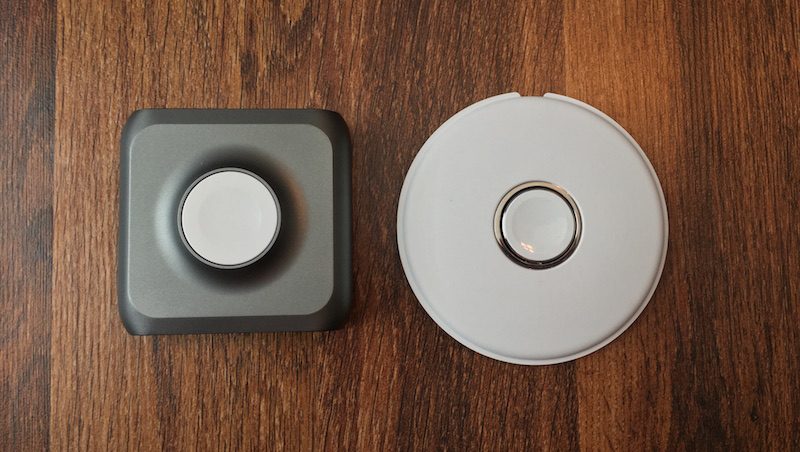 GoPower Watch compared with Apple’s Magnetic Charger
Otherwise, the design is no-frills. The front and rear of the pack are made up of a black, plastic-type material that’s a bit more fingerprint-attractive than the Space Gray of the rest of the device. On the back users will find the micro-USB port to charge up the battery pack, and the USB Type-A port for smartphone charging. Anyone opposed to large branding on their products probably won’t like the prevalent Kanex logo on the front of the unit, however.
Charging the Apple Watch
After using Kanex’s GoPower Watch battery for a week, I found that the company’s claims of six full recharges on an Apple Watch to be right on the money. The battery pack uses a simple circle of lights, cut into four quarters, to display the remaining charge in its 4,000 mAh battery. The GoPower Watch lost its first quarter of battery in the middle of the third charge of my Apple Watch, and then finally lost the second quarter in the sixth Apple Watch charge.
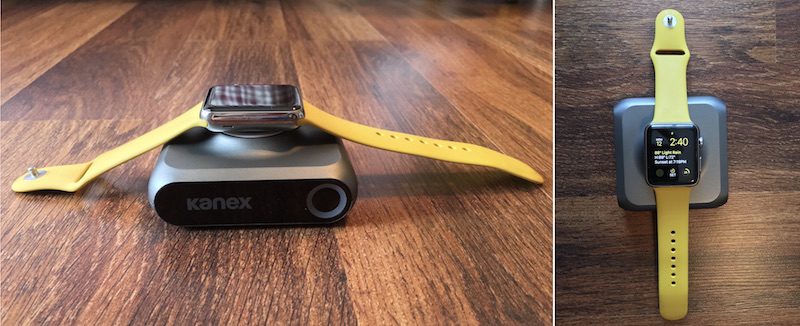
From there the battery status declined quickly, and after the pack filled my Apple Watch up to 100% life for the sixth time, the final portion of the ring began flashing and the battery quickly died. During these tests I didn’t charge my iPhone, focusing first on the company’s own Apple Watch-heavy marketing for the accessory. And in that sense, the GoPower Watch delivered on its promises. The average charging time of all the tests was about 90 minutes.
If used solely as a power bank for an Apple Watch, Kanex’s device will easily provide its intended six full recharges on Apple’s wearable, although the larger battery on the Apple Watch Series 2 means those models might get slightly fewer charge cycles. Although that might be a bit of overkill for most casual Apple Watch wearers, the combination of the integrated inductive charger and deep well of battery life could justify the $99 price tag for those who find themselves away from a traditional power source on a consistent basis.
Charging the iPhone
After depleting the GoPower Watch during my Apple Watch tests, I topped off the battery pack again — a lengthy process that takes the large part of an afternoon, which is the case for most battery packs — and focused on the iPhone. With the GoPower Watch fully charged, I managed to recharge my iPhone 6s Plus from 10 percent to 99 percent charge over the course of about two hours, after which Kanex’s battery was down to 50 percent.
In a subsequent test, to see how much percentage I could add onto my iPhone with the rest of the GoPower Watch’s battery, the battery pack swiftly whittled down to 25 percent and then died, adding on about 15 percent charge to my iPhone. Considering the 2,750 mAh within the iPhone 6s Plus, one full charge with a little left over makes sense coming off of the GoPower Watch’s 4,000 mAh battery.
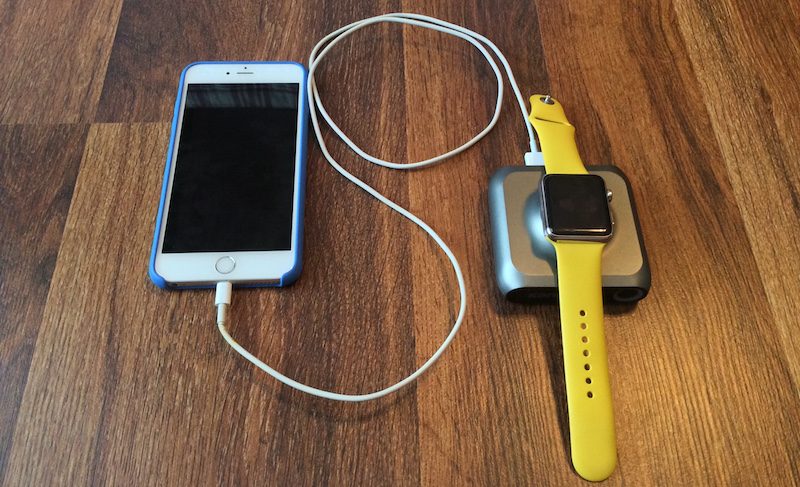
Although smaller smartphones could get more out of it, like the iPhone SE (1,624 mAh), iPhone 6s (1,715 mAh) and iPhone 7 (1,960 mAh), the GoPower Watch is simply not an iPhone accessory; it’s an Apple Watch accessory that could potentially recharge your iPhone in a pinch, with very little left over for your watch. Simultaneous charging of each device also negates the portability such battery packs allow for smartphones, since the Apple Watch needs to remain on a flat surface to stay attached to the inductive charger.
For iPhone battery packs, similarly priced accessories, like Mophie’s powerstation XXL, give users upwards of 20,000 mAh for around $100. Other brands, including Anker, offer similar battery capacities at even cheaper prices. As such, it’s hard to harp on GoPower Watch’s clear intent to focus on Apple Watch over iPhone, but it’s an aspect of the accessory that should still be noted.
Bottom Line
Overall, GoPower Watch’s solid design and integrated induction charger make it one of the most enticing charging solutions on the market for Apple’s wearable device, if you’re an Apple Watch power user and in need of one, that is. Lack of Nightstand Mode and closed-loop band support could, however, be deal-breakers for some.
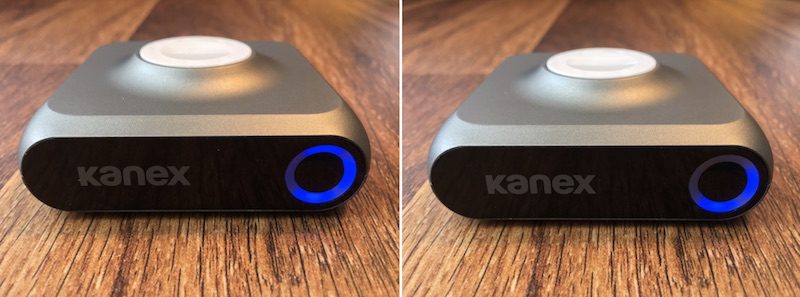 The display shows the GoPower Watch’s dwindling battery
Compared to other Apple Watch battery packs, Kanex’s solution is a slightly steeper monetary investment, but its higher-capacity battery justifies the price. Nomad’s Pod, for comparison, costs $29.95 but provides an 1,800 mAh battery, or the ability to keep your Apple Watch “powered all weekend,” according to the company.
If you repeatedly find yourself scrambling for a power source for your Apple Watch when not at home, and want to invest in something you won’t have to constantly remind yourself to charge all too often, the GoPower Watch makes a reliable case for itself. Just remember that it won’t provide much in the way of repeat charges to a smartphone, especially any larger-screened models with higher-capacity batteries.
Pros
– Clean design with soft, attractive Space Gray material
– Integrated inductive charger
– Charging Apple Watch as quickly and reliably as first-party accessories
– Meets Kanex’s claim of six full Apple Watch charges
Cons
– Dies quickly when charging bigger devices through USB-A port
– Doesn’t support Nightstand Mode or closed-loop bands
How to Buy
Anyone interested can purchase the Kanex GoPower Watch from the company’s website for $99.95. Kanex also sells a line of other accessories, including a USB-C battery pack for the 12-inch MacBook, a Thunderbolt 3 adapter, and a Bluetooth Mac keyboard that can sync with up to four devices and includes Apple’s long-gone numeric keypad.
Related Roundups: Apple Watch Series 2, watchOS 3
Tags: Kanex, GoPower Watch
Buyer’s Guide: Apple Watch (Buy Now)
Discuss this article in our forums
Spigen Style Ring Review: The ultimate phone accessory

Spigen’s Style Ring is a multipurpose minimalist phone accessory you may just fall in love with.
So many smartphone accessories claim themselves to be a must-have accessory, but rarely do they actually live up to the advertised hype. More often than not, they end up in some drawer after a month or two for one reason or another — you’ve upgraded to a new phone that’s not compatible with it, or you just got bored with using it.
The Spigen Style Ring may just be able to buck that trend. By incorporating so many handy features into one universal smartphone accessory, it basically become more and more essential the longer you use it.
And if you’re also among the millions of folks swept up in Pokémon Go mania, you’ve spent countless hours running through your city trying to catch ’em all. During our own hunting adventures, we’ve come to realize the Style Ring is also the perfect Pokémon Go accessory.
No more death-gripping your phone

If you’ve own a smartphone for long enough, drop damage is inevitable. If you’re lucky, it falls the “right way” and doesn’t cause any permanent scuffs or cracks. With the Style Ring, you get an added layer of security when your phone is in hand. Slip your finger in the ring and you really don’t have to worry about dropping your phone.
For Pokémon, the idea of not having to death grip your phone as you weave your way down streets and through parks tracking an elusive Pokémon is pretty novel. The Style Ring gives you the confidence and freedom to take off running when you hear someone yell about a wild Vaporeon — without ever having to worry about dropping your phone.
Perfectly car compatible

Another simple accessory included with every Style Ring is the Hook Mount, a little rubberized-plastic nub with mounting tape on the back. Wipe down a spot on your car’s dashboard, adhere the Hook Mount, and you just installed one of the most minimalist car mounts for your phone on the market.
To mount your phone, you simply extend the ring, hook it on the mount, and push until you feel it pop into place. BAM! Your phone is secure and accessible to you as you drive. Perfect for controlling your music on the go, following along with turn-by-turn directions from Google Maps, or a quick swipe if you’re near a PokéStop at a red light.

For Pokémon players who love to play while being driven around, the Style Ring lets you confidently lean out the window like a dog and really stretch your phone to get into range of distant PokéStop. As long as you’ve got the Style Ring on your finger, your phone is secure. We’re definitely not recommending such behavior, we’ve just seen people doing it and it’s only a matter of time before someone’s phone slips and shatters on the pavement below.
Also works great on bike

If you’re more of a Pokémon purist, maybe you prefer to bike around as you hatch and catch. With the Style Ring, you’re able to maintain much better control of your bike while still managing to keep your phone literally on hand. This allows you to conveniently swipe PokéStops as you bike past, or pop off your bike at a moment’s notice when you feel that vibration informing you a Pokémon is around.
This goes without saying, but as the game warns on load up, always be careful and alert when you’re out and about. Heed the words of Professor Oak who frequently scolded you — there are time and places where you simply shouldn’t be on your bike. Be considerate to your fellow trainers!
Better range for one-handed Pokéball throws

So we’ve talked about how the Style Ring can help you keep a better grip on your phone, but let’s talk about how the Style Ring might help with some Pokémon Go fundamentals: catching Pokémon!
Spigen highlights how the Style Ring grants you a wider reach across larger smartphones. This added range will give you more control over your Poké Ball throws.
Once you’re on that XP grind to to level up your trainer, every little addition helps. That means maximizing every Pokémon catch with a throw bonus. One of the coolest (and often frustrating) techniques is the curveball throw. It nets you an extra 10 XP, which should become automatic when you get the curveball down pat.
If you need to work on your curveball throws, we’ve got a guide for that!
And it’s got other uses beyond Pokémon Go, too

On top of everything previously mentioned, the Style Ring also doubles as a kickstand, which is awesome. With the ability to tilt and swivel the ring 180 and 360 degrees respectively, you have the freedom to set up your phone any which way you want. Prop it up in portrait orientation on your work desk, or flip it to landscape for watching YouTube videos or Netflix.

There are many other clever uses for the Style Ring — you just need to use your imagination. Mobile Nation’s own Kevin Michaluk is a huge fan of the Style Ring. On top of all the awesome functionality of the Style Ring mentioned above, he enjoys using it as a spin-the-phone game for determining who’s going to pick up the cheque when out for dinner with friends.

Because of how the Style Ring secures to the back of your phone, removing it does takes some elbow grease. Best practise is to wedge something thin such as a guitar pick under a corner then slowly peel it back. But you can swap the Style Ring to another phone, which is great. Take care of your Style Ring and it may just outlive your device.
Oh, and if you’re wondering, it doesn’t quite work as a beer bottle opener. We tried.
Get it to match your phone

Spigen offers the Style Ring in five familiar colors — Space grey, Champagne Gold, Black, and White — so you should be able to find the right color to match your phone.
If only they came in Valor red, Mystic blue and Instinct yellow. (Psst! Spigen, you listening?)
An essential accessory, for average phone user, or the ultimate Pokémon Go fan!
See at Amazon
Review: QuietComfort 35 Headphones Prove Bose Won’t Miss the Headphone Jack
With the controversial absence of a headphone jack on the iPhone 7 now a reality, accessory companies are busily churning out wireless alternatives, and that’s as true of Bose as it is of other big audio brands.
Its latest QuietComfort 35 over-the-ear headphones ($350) are a wireless version of the company’s flagship premium QC25 cans ($300), seen by some as offering the best active noise-cancelling in the business.
The QC35’s retain the same established design and patented ANC smarts, so as an owner of a pair of original QuietComfort 25 headphones, I was interested to see how the new Bluetooth model compared.
Design and Features
The box that the QC35’s come in is reminiscent of the QC25’s, and the included compact travel case that the cans fold up into boasts the same assured sturdiness. You get a thinner 1.2 meter lead for wired connections, a micro-USB to USB-A charging cable, and the same airline adapter is also included.
Taking the QC35 cans out though and weighing them against the wired model, it’s clear the transition to Bluetooth meant the QC35’s had to put on a little weight – 115 grams’ worth, to be exact, for a total of 309g. So what brings the added heft?

As you can see from the pictures, cosmetically there’s very little difference between the two models. The steel headband has been marginally widened, and the single AAA battery compartment has been replaced by an integrated, non-replaceable battery (rated up to 20 hours in wireless mode and up to 40 when wired), with a micro-USB port for recharging.

Hidden inside the metal-capped ear cups is a dual-microphone system that filters out ambient noise with equal opposing audio waves generated by two proprietary ANC signal processors, which help to pick up your voice during calls, too.
Also new is a dynamic volume-optimized EQ, built-in voice prompts, and a trio of physical controls along the edge of the left can: set between two volume buttons is a larger multi-function button that controls playback, takes and ends calls, and can also initiate Siri with a long press.

The Bluetooth pairing mechanism has been integrated into the original power switch and is activated by sliding and holding the switch until the power LED flashes blue. Wireless range is stated as 33 feet (10 meters), which bore out in subsequent tests.
Equalizers and sound profiles don’t feature in the Bose Connect app, presumably because Bose is satisfied that the integrated digital EQ takes care of all that. It leaves the software options extremely basic, limiting you to manage paired devices, select an auto-off timer, update firmware, disable voice prompts, and change language.

Performance
The QC35’s paired easily with my iPhone 6s, iPad mini 4, and MacBook Pro, and the only time the connection dropped was when I was listening to music in the kitchen and the microwave was on. The cans had no trouble pairing with two devices and switching dynamically between them, and all my devices were remembered later and re-paired automatically.
The controls felt well placed, if not as intuitive as the QC25’s inline remote, and a couple of phone calls were taken while walking along the street, with the new ANC-microphone pairing doing a good job of minimizing ambient noise without detracting from voice clarity during conversation.
Despite the extra weight, the QC35’s never felt uncomfortable to wear, even when I did so for long periods. The widened headband seems to be the masterstroke here, offsetting that extra weight equally between the pivots and cups, while undoubtedly being helped by the soft synthetic leather cushioning that surrounds each ear. In terms of comfort, these headphones really are up there with the best.

Audio-wise, the QC35’s didn’t disappoint either, delivering well-heeled bass and excellent sound separation, especially with instrumental music. They do lose a bit of oomph in the mid-range when listening in wired mode when the ANC is off, but the Bluetooth battery life was long enough for it not to be a significant concern. Plugged into a MacBook Pro, a full charge took about two hours – fine.
The entire listening experience really benefitted from the always-on ANC – effectively silencing the drone of jet engines during a domestic flight, for example – while the low-level hiss characteristic of noise-cancelling systems was barely audible, even at low volume. Whether sat in my living room or stood on a sardine-can commute, I was left with the overriding sensation of being pleasantly cocooned in a private bubble of sound.
Bottom Line
I’ll miss the QC35’s. The cans’ interchangeable, dynamic pairing between my iPhone and MacBook quickly became second nature as I switched between devices, leaving my wired QC25’s feeling positively passé in comparison. Besides the practicality of Bluetooth though, there’s very little between them.
The superior quality of Bose’s patented noise cancelling is so well established these days that casting judgement on it almost feels redundant. Having said that, I don’t consider Bose’s ANC untouchable, with similar systems on cans like the Parrot Zik’s and Sennheiser PXC-550’s now offering almost-as-good if not equal performance in recent tests. I didn’t notice any real improvement over the QC25’s ANC either, so you could make the case that Bose has stood still while its rivals have caught up.
That’s not to take anything away from the QC35’s, though. In terms of marrying comfortable sound isolation with quality audio reproduction, they’re still the complete package. Does the $50 hike on an already premium-priced set of headphones justify the transition to wireless? Maybe not, but it’s less a matter of ‘courage’ than it is one of convenience.
There are a couple of other caveats. The rechargeable battery isn’t replaceable like the Parrot Zik 3.0’s (for instance), which could put off some. The powered ANC doesn’t work in wired mode when the battery is dead either, but the passive isolation offered by the seal of the ear cups does provide a decent buffer against noisy environments.
Pros
- Luxuriously comfy over-ear design
- Excellent battery life
- Dynamic pairing between two devices
- Signature active noise-cancelling
Cons
- Threadbare app
- Lower audio quality in wired mode
- Non-replaceable battery
- $50 premium for Bluetooth
How to Buy
The Bose QuietComfort 35 headphones cost $349, are available in black or silver, and can be ordered on the Bose website.

Note: Bose loaned the QC35 headphones to MacRumors for the purposes of this review. No other compensation was received.
Update: The Bose QC35’s come with a micro-USB port, not mini-USB, as originally stated in error.
Tag: Bose
Discuss this article in our forums
Review: NewerTech’s NuPower USB-C Power Adapter Charges MacBook and iPhone
Cables and adapters outfitted with USB-C have been becoming increasingly popular as smartphones and computers alike have adopted the standard, including Apple with its 12-inch Retina MacBook that launched in the spring of 2015. Accessories such as USB drives that make file transfers easier and larger docks have proven for users dealing with Apple’s decision to include just two ports on the MacBook: USB-C and a headphone jack.
NewerTech’s NuPower 60W USB-C Power Adapter is less flashy than some of the new feature-intensive products, but that’s largely a positive. The Power Adapter replaces Apple’s bundled 29W USB-C adapter to charge the MacBook, with the added bonus of a 12W USB-A port to simultaneously charge any traditional USB-powered device — like an iPhone or iPad — from the same adapter.
As a replacement to Apple’s power adapter, NewerTech’s accessory has a slight edge in providing simultaneous charge to a second device, making it a potentially compelling alternative for Retina MacBook owners. The added visual clutter of thicker cables, however, might not be worth the $59.99 price for some people.
Design
The NuPower adapter comes in three pieces: a main body containing the USB-C, USB-A, and power ports, as well as a power cable and a USB-C cable. The main device is 4.2 inches long, 2 inches wide, and about 0.8 inches thick, so it’s not that much of a cumbersome addition to a charging regimen, although obviously more so than Apple’s bundled-in cable. The material on the body of the power adapter has a soft-to-the-touch matte finish that shouldn’t hold fingerprint smudges, and has a nice weight to it (4.8 ounces, according to NewerTech).

Although I didn’t put it under too much of a strenuous test, it feels like it could survive the bumps and bruises of a backpack, bag, or anywhere charging cords usually end up thrown without thought. An understated NewerTech logo resides on the top of the adapter and is the only marking on the top of the device, while on the front the company has made it easy to find the USB Type-A and USB Type-C ports with accompanying text. The bottom of the adapter is a bit of a text dump, with all of the cautions, warnings, and specifications written in bright white text, buffeted in between soft silicone bumpers that help everything stay in place when on a solid surface.
On the cable side of things, NuPower’s power cable is about 8 inches short of Apple’s 6.5 foot USB-C charge cable, providing plenty of clearance room for plugging up your MacBook. More length is added thanks to the 18.5 inch USB-C cable, not to mention the 4.2 inch adapter itself, adding up to a charging solution that’s nearly 8 feet long.

The power cable is one of the more frustrating parts of the NuPower adapter, with its thick, corded material that never really lost the bundled-up curves from the initial packaging it was in. Visually and functionally, it’s just a noticeably non-Apple design, and that could bother people who are willing to spend the money on the Retina MacBook in the first place. The 18.5 inch USB-C cable is a better in this regard, but it is much thicker than Apple’s white USB-C cable.
Charging a MacBook and iPhone
NewerTech’s claim that its adapter can charge “your USB devices up to 2X faster than comparable chargers,” is evident only in computers that can accept the NuPower adapter’s high-powered charging speeds (with voltage up to 20V at 3A). The Retina MacBook isn’t one of those devices, so speedier charging shouldn’t be a purchasing factor for anyone looking at advantages of NewerTech’s adapter.

During my tests, the NuPower adapter fueled my MacBook up from 29 percent to 99 percent in 88 minutes, and my iPhone from 20 percent to 97 percent in just over 100 minutes. On the MacBook side of things, this makes the NuPower adapter essentially in line with the charge time of Apple’s 29W USB-C first-party adapter, and some other third-party options, like Griffin’s BreakSafe USB-C cable.
I only used the NuPower adapter within my house, but its bisected design could go against using it in a travel situation, where simpler options usually take precedent. Otherwise, daily use of the accessory is largely unobtrusive, as any decent cable should be.
One big leg up NuPower has over Apple’s adapter is consistency. As many reviews on Apple’s website confirm (myself included), its USB-C charge cable can have a mind of its own. In my own experience, the worst of this is hearing the cable lose and reconnect power to my MacBook, which subsequently dings in affirmation of a charge source. This is something that’s woken me up in the middle of the night a few times, with no power outage or funky wall adapter excusing the occurrences.
 Apple’s charger (left) and NewerTech’s charger (right)
I’ve only had the NuPower adapter for a week, but in that time I haven’t had any similar experiences. Even with the middle brick hanging off of an ottoman or desk, the cables remained plugged and in place. It’s still recommended to have the power brick on a solid surface, however, so keep in mind the 18.5 inch USB-C cable and 4.2 inch long brick that will occupy space on your desk or whatever location you charge up the MacBook. Adding a second device will only add to the visible cable clutter near a MacBook, so anyone who likes to keep a clean desk might find qualms with the NuPower adapter, as well.
Bottom Line
For anyone happy with Apple’s charging system (or who finds it less of a deal-breaker and more of a slight annoyance, like I did), the NuPower USB-C Power Adapter is a bit of a tough sell. The charging is identical, if potentially more reliable, and the addition of USB-A charging might be negligible to anyone with a smartphone or mobile battery pack, or even another nearby wall outlet. In my personal experience, when I’m charging my MacBook, I divert to my iPhone, and vice-versa, so the requirement of charging both at once isn’t really a contingency I need to plan for.

But if you’re frustrated with Apple’s own inconsistent USB-C charging cable and power adapter, NewerTech’s $59.99 option is a valid substitute to charge up your Retina MacBook, especially if you find yourself charging an iPhone or iPad at the same time and have limited wall outlets available. The interconnected cable system may take some getting used to — and those who prefer Apple’s clean white cables will be disappointed by NuPower’s bulky and bendy cords — but otherwise NewerTech has made a device that’s functional and reliable.
Pros
– No cuts or disconnects while charging
– Can charge a second device through USB-A
– Durable power brick
Cons
– With three cables when in full use, it can lead to clutter
– Speedier charging feature is incompatible with Retina MacBook
– Doesn’t carry Apple’s minimalist design
How to Buy
The NuPower 60W USB-C Power Adapter will go on sale in early October on MacSales.com and Amazon for $59.99.
Note: NewerTech provided the NuPower 60W USB-C Power Adapter to MacRumors free of charge for the purposes of this review. No other compensation was received.
Related Roundups: iPhone 6s, Retina MacBook
Tag: NuPower
Buyer’s Guide: iPhone (Buy Now), MacBook (Neutral)
Discuss this article in our forums
FIIL Diva Pro Review: The Bluetooth headphones from the future
Thanks to Apple’s war on the headphone jack, wireless headsets are about to blow up in a big way – and the FIIL Diva Pro has the specs to stand out from the crowd. With touch-sensitive controls, active noise cancellation, 4GB of onboard storage and a stylish illuminated logo, the Diva Pro blends beauty with brains. (It’s even smart enough to pause your music when you take it off your ears, and resume when you replace it.)
But at almost $300 before discounts, the Diva Pro is entering a space heretofore reserved for more established players like Bose. Does this futuristic headset live up to the challenge? Find out in MrMobile’s FIIL Diva Pro review!
PRODUCTS FEATURED IN THIS VIDEO
- FIIL Diva Pro at Kickstarter
- Bose QuietComfort 35
Get social with MrMobile
- YouTube
- Le web
- Snapchat
Apple Watch Series 2 Reviews: ‘The First Real Apple Watch’ Thanks to Fitness and Processor Upgrades
Following the publication of reviews for the iPhone 7 and iPhone 7 Plus yesterday, now the first official reviews for the Apple Watch Series 2 have begun hitting the web. Apple announced its second-generation Apple Watch alongside the iPhone 7 last week, and both devices will launch this Friday, September 16.
While there are varying opinions among reviewers, the consensus on Apple Watch Series 2 is epitomized in TechCrunch’s straightforward headline, calling it “the first real Apple Watch.” Reviewers think that the 50 percent faster processor, improved durability in water, and fitness-focused features have elevated the second generation of Apple Watch to become a more sensical purchase option, going beyond its previous status as a simple luxury item and into functional usability.
Image via The Wall Street Journal
The Wall Street Journal refers to Series 2 as a product you still don’t “need,” but it may now be something you “want.” As many have focused on when testing Series 2, the site spent a lot of its review on the fitness features of the Apple Watch, referring to the new on-board GPS as the device’s “greatest strength and greatest downfall.” This is because while being able to leave an iPhone behind while running is a major plus, it comes at the cost of battery life.
This new wireless freedom is the Apple Watch’s greatest strength and greatest downfall. A 20-minute run with music playing knocked out 20% of my watch battery’s juice. While there is a bigger battery inside this slightly thicker watch, those who plan to use GPS for a daily jog won’t get longer battery life. (Apple says it designed the GPS on the Apple Watch to last through a marathon.) On days where I didn’t use GPS, I went to bed with nearly 40% of the battery left. That’s strong, though the Fitbit Blaze lasts four days, so you can even wear it to track sleep.
The Series 2 is what the first Apple Watch should have been—a more advanced Fitbit with the good looks and features to justify wearing it all day, every day. It’s speedy, helpful and able to go where you can’t—or won’t—take your smartphone.
TechCrunch’s reference to the Series 2 as “the first real Apple Watch” comes from the site’s idea that a wearable should be able to accomplish little tasks throughout the day in 1-3 seconds, which the original Apple Watch struggled with due to long app loading times. But thanks to the additional processor speed, and bright display, TechCrunch Editor-in-Chief Matthew Panzarino says he has “already found myself using the Watch for interactions more often.”
The Apple Watch Series 2 is the first real Apple Watch. It delivers on the promise of a mostly passive device that can accomplish simple tasks in 1-3 seconds. There is now built-in GPS which allows for exercising without having to lug along a comparatively heavy iPhone just to get accurate tracking. And it’s completely waterproof, as any decent sport watch should be.
The screen is noticeably brighter now, making text, especially on activity summary screens, much easier to read. Because of the speed and brightness, I have already found myself using the Watch for interactions more often. This had already started happening a bit with Apple’s WatchOS 2 update last year, which improved performance significantly, but it’s incredibly apparent now with the faster processor.
While a similar fan of the new fitness abilities, The Verge reminded potential buyers that “familiar hassles remain” with Apple Watch Series 2. These include raise to wake not working consistently, troubles with syncing music into the 2 GB of storage, and the consistent fact that you have to charge the Apple Watch every day, particularly if you use it during workouts.
Although these are all qualms that can be dealt with for most people, the site argues that any professional athlete, or someone more serious about fitness, might become frustrated with the device.
But for all of the improvements, some of the hassles from the original Watch remain. Apple still has a lot of work to do. I’ve noticed the display still doesn’t wake every time I raise or twist my wrist, which is annoying. For whatever reason, I’ve had trouble syncing my iTunes to the Watch, which can support up to 2GB of music.
Finally, the battery life: the new Watch has a bigger battery in it to compensate for the GPS and the brighter display. And it’s definitely better than the first Watch: a couple days ago I put the Watch on first thing in the morning, popped the display up to full brightness, went through a day of notifications, used GPS during an hour-long bike ride, and still had 20 percent battery left later that night. But it’s still a charge-every-day kind of thing if you work out, which is one of my least favorite aspects of smartwatches.
Early adopters of the Apple Watch Series 2 will be able to check out the wearable device for themselves beginning this Friday, September 16, when it launches to the public. On that day, the iPhone 7 and iPhone 7 Plus will also debut, and so far reviews for the smartphones have generally noted that while the devices might not be essential upgrades, they are nice advancements and form an important foundation for the iPhone’s future.
Check out more reviews for the Apple Watch Series 2 at these websites:
-Mashable
-The Independent
-USA Today
– BuzzFeed
– Daring Fireball
– The Loop
– Pocket-lint
Related Roundups: Apple Watch, watchOS 2, watchOS 3
Buyer’s Guide: Apple Watch (Buy Now)
Discuss this article in our forums
iPhone 7 Reviews: ‘Terrific Phones’ That Offer a ‘Foundation’ for the Future, But Not an Essential Upgrade
The official launch of the iPhone 7 and iPhone 7 Plus is still three days away on September 16, but the first reviews of the new smartphones have started showing up online this morning. Some of the sites have been quietly testing out the new handsets for around a week, and general impressions have been positive, despite the lack of a radical design overhaul compared to last year’s iPhone 6s and 6s Plus.
The Verge offered perhaps the most balanced perspective on the iPhone 7 series, which it called “terrific phones” but also “incomplete”, given that the wider color gamut, and the real potential of the Taptic Engine and the iPhone 7 Plus’s dual-lens camera – which rely on software updates – won’t be realized at launch.
The Verge said non-adopters “won’t actually be missing out on much” if they don’t get an iPhone 7, which it described as a “transitional step to a vision of the future” and a “foundation” for how the next generation of iPhones will integrate into our lives.
The entire time I was using the iPhone 7, I felt like I had a prototype of next year’s rumored drastic iPhone redesign disguised as an iPhone 6. All those bold bets on the future are legitimately exciting, but here in the present using the iPhone 7 in a case feels a lot like using a iPhone 6S with a weirder home button and more adapters.
Meanwhile, Mashable offered a more enthusiastic line of thinking for early adopters, calling both devices “worthwhile upgrades” that “inch us ever-closer to the completely sealed, moving-parts-free ideal of a smartphone slab”. The review notes that both phones are “fast” and the stereo speakers “really shine” when it comes to gaming, while battery life was impressive, with the larger handset closing in on two days with moderate use.
It also put the phones through some underwater ordeals, the result of which was “pretty awesome” and offered peace of mind for those prone to dropping their phones in the toilet, but it didn’t recommend going for a swim with the devices.
I had a good time placing the iPhone 7 and 7 Plus under running water and dropping them into water-filled containers and sinks. Not only did they hold up, but both phones continued to function in the drink.
Each time I tried this, the iPhone 7 and 7 Plus were unharmed. I fished them out of the water and dried them with a cloth and then continue using them. One thing you cannot do right after submerging your phone, though, is charge it. Apple recommends letting the Lightning port dry out for five hours before attempting to charge either device again.

TechCrunch got hold of a glossy black iPhone 7 and remarked that it definitely showed scratches and abrasions after a weeks’ use. It also mentioned that the home button’s Taptic Engine feedback makes it feel as if the whole bottom half of the phone is clicking, yet it called the implementation a “flawless transition” from the physical home button that prepares users for when the button disappears entirely. It said Apple’s new flagship devices are “fast, capable, and functional” and “probably the best portable cameras ever made”.
This is quite simply the most sophisticated camera and image processor pairing ever seen in a smartphone or any camera period. There have been a couple of other applications of dual camera setups in phones, but the execution is crude by comparison.
The optical zoom works great, and the 56mm lens naturally adds that nice compression of facial features and slight blurring of background that a standard lens gives, especially up close.
It won’t be long before Apple customers begin to receive the iPhone 7 and 7 Plus handsets themselves, as the September 16 launch date approaches. Images have emerged online of iPhone 7 shipment batches ready to leave factories in Zhengzhou, China, while some customers have already received shipping confirmation.
Other reviews: Business Insider, BuzzFeed, The Wall Street Journal, Daring Fireball, Wired, Ars Technica, The Loop.
Related Roundup: iPhone 7
Discuss this article in our forums
Anker PowerHouse Review: UNLIMITED POWER (kinda)
Usually when I refer to portable power packs, I’m talking about the kind of battery you slip in your pocket to power your Pokemon hunt. The Anker PowerHouse … is not one of those.
With a theoretical capacity of 120,000mAh / 400Wh, the PowerHouse is hours and hours of energy in a nine-pound box. But the laws of physics are fickle things, and even such brute-force power density doesn’t guarantee this battery bank will give you the endurance you’re looking for. Join me as I take the biggest power pack I’ve ever seen for a spin in MrMobile’s Anker PowerHouse review!
Get social with MrMobile!
- YouTube
- Le web
- Snapchat
Review concludes UK bulk surveillance powers are necessary
Prior to the UK’s Investigatory Powers Bill being voted through the House of Commons in June, the surveillance legislation faced criticism from several top Labour MPs. Former Home Secretary and now Prime Minister Theresa May was able to get the Labour Party on board, due in large part by agreeing to an independent review of bulk powers provided in the bill. These allow security and intelligence agencies to collect large amounts of data in various, untargeted ways — putting the haystack before the needle. David Anderson QC, a respected authority on this type of legislation, has now published his review, providing the opinion that bulk powers are useful and fundamentally necessary.
Anderson and his team were tasked specifically with looking at the operational case for bulk powers. This is a document outlining specific use cases and is intended to justify the necessity of such powers. The key takeaway of his over 200-page report is that bulk powers are vital for security and intelligence agencies.
Having looked at “some 60 case studies,” other sensitive documents and fielding the advice of various experts, Anderson was satisfied that the kind of intelligence bulk powers are capable of providing can’t be matched by alternative and often more targeted means. “In many cases, there was simply no realistic alternative to use of the bulk power.”

While the report finds bulk powers have been crucial in combating terrorism and serious crime, Anderson does recommend the creation of a Technology Advisory Panel to support the government and the Investigatory Powers Commission (IPC) — the latter being a new independent body that would oversee (and potentially scrutinise) the use of surveillance powers. As Anderson describes it, the panel would be a group of technical experts that will advise “on the impact of changing technology on the exercise of investigatory powers and on the availability and deployment of techniques to use those powers while minimising interference with privacy.”
This panel would not be involved in oversight or regulation, nor would it comment on specific investigations. Rather, it would keep the government and IPC up to speed on issues that could/will affect the use of powers, such as the “trend towards universal encryption” and new hacking techniques, while also considering how to use powers effectively in the least intrusive way.

Anderson’s report will now be digested by the House of Lords as it nears the end of its own debate on the Investigatory Powers Bill (before it potentially becomes law). Initial reactions to the report have been mixed. The government has welcomed Anderson’s conclusions, but as Shadow Home Secretary Andy Burnham notes, remains mute on the recommendation for a Technology Advisory Panel to be established. He asserts that the government “must accept the report in its entirety and deliver on the separate concessions extracted by Labour in the Commons — tougher restrictions on the use of Internet Connection Records and stronger protections for journalists and lawyers.”
Alistair Carmichael of the Liberal Democrats has also said: “The government must table amendments to give effect to Anderson’s recommendation to create a Technical Advisory Panel…” Furthermore, he isn’t happy that the retention of Internet Connection Records wasn’t reviewed in this report, “despite it being one of the most intrusive powers.” His party “continue to be utterly opposed to this excessive and authoritarian measure that not only erodes our privacy but will likely prove to be a waste of money and fall foul of our courts.”
He isn’t alone in the opinion that the report had too narrow a focus, though human rights group Liberty have condemned the report for failing to even adequately review the operational case for bulk powers, among many other criticisms. “This was an opportunity to properly consider the range of targeted methods that could be used as effective alternatives to indiscriminate and potentially unlawful powers. That chance has been wasted.”
[Inline image credits: Counter-terrorism police – Flickr/Reuters & Houses of Parliament – Liam Bailey via Getty Images]
Via: Ars Technica
Source: UK government (1), (2)
Review: Deus Ex GO for Android
Deus Ex GO’s futuristic puzzles are challenging — but sometimes, so is just trying to get the game to work.

The Google Play Store is overflowing with puzzle games, so it really takes a special game to rise above the noise and demand attention. Deus Ex GO has potential to be one of those games, but it wasn’t an entirely smooth experience out of the gate.
Deus Ex GO is the latest mobile release from Montreal-based developer Square Enix. It’s the third title in their “GO” franchise, which jumps into an established action-adventure franchise (see: Hitman GO and Lara Croft GO) and spins off a challenging turn-based action-puzzle adventure.
For those unfamiliar with the Deus Ex franchise, the story takes place in the not-too-distant future — set against a cyberpunk dystopian backdrop — where humans and computers have become one thanks to augmentation technology. You play as Adam Jensen, a mechanically augmented security agent on a mission to hunt down terrorists.

And that’s exactly where the game begins, with Jensen breaching the walls of a compound under terrorist attack. Stylistically, the game does a great job from start to finish of keeping with the Deus Ex futuristic, hacker motif. The graphics are sharp; Square Enix blends their simplified “GO” art style with the Deus Ex digital themes to create a fully immersive experience. The kill animations are both varied and smooth, leading to some very satisfying moments when you finally figure out how to take out that guard and progress through to the next level. The story is simple yet intriguing, and unfolds as you play via popup dialog boxes.
Square Enix blends its simplified ‘GO’ art style with the Deus Ex digital themes to create a fully immersive experience.
Gameplay starts off simple — move here, take out unsuspecting guard, progress to finish — but as you progress, the game slowly layers on new mechanics. Hacking stations, marked in yellow, allow you to activate certain floor tiles and control enemy turrets. Augmentation powerups are strategically scattered throughout, giving you the ability to slip past enemies or, in later stages, control hacking stations at a distance. With no punishment for failure and typically only one correct path through each level, the game rewards trial-and-error gameplay. When you feel you’re truly stumped, you have the option of using a solution, which walk you through the level move-by-move. You are given three solutions at the start of the Story Mode with a menu available for buying via in-app purchases — but where’s the fun in that?

If you’ve played the previous “GO” titles and are fearful that Deus Ex Go is more of the same, fear not. Square Enix has shifted from the square grid pattern found in Hitman GO and Lara Croft GO, opting for a hexagonal grid here that adds another dimension to the puzzles and also just seems like a natural fit with the game’s theme. The puzzles are challenging but not impossible — the few times I did use a solution to get past a level, I felt stupid learning I was only off by one move.
Beyond the Story Mode (which features 54 challenging levels), Deus Ex GO also includes Weekly Challenges. Considering the relatively short length of the campaign, this is a great feature to justify the $4.99 price. The promised addition of a Puzzle Maker mode in a future update should also greatly up the value and replayability.
The game ended up crashing and forcing my phone (Nexus 6P) to reboot four times. FOUR TIMES.
But for all the great things I have to say about this game, I would be remiss if I didn’t mention the issues I battled with trying to complete it. Having bought and downloaded the game from the Google Play Store, the game ended up crashing and forcing my phone (Nexus 6P) to reboot four times. FOUR TIMES. Progress was always saved, and it may well have been a issue related to my hardware. Regardless, I’m here to report my experiences, and it caused my frustration to grow every time it happened.
Often times a new level would load but not allow me to move, forcing me to back out to the level-select screen and restart the level. These glitches were annoying, but never dissuaded me from continuing the campaign. I’ll chalk them up to first-release technical issues that should hopefully be addressed in future updates.
Overall, I had a lot of fun playing Deus Ex GO, despite it’s relatively short Story Mode and the times where the game started bugging out. I would recommend it to both fans of Deus Ex, and puzzle gamers alike.
 AIVAnet