


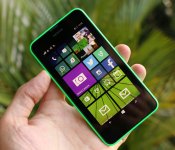
Nokia Lumia 630 review: An affordable phone you can live without

The Nokia we used to know is no longer. In late April, the handset maker was finally folded into Microsoft’s Devices and Services business after more than six months of courtship. Nokia wasn’t ready to be assimilated without once last hurrah, however: It announced a trio of new devices at its new owner’s developer conference, Build. The Finnish company had always tried to cater to every demographic, so it was fitting that its last in-house handsets were the top-end Lumia 930 (a global version of the Icon) and the entry-level Lumia 630/635.
The 630 and 635, 3G and 4G variants of the same device, are joining an already-crowded lineup of affordable Lumias. They’re distinguished somewhat by launching with Windows Phone 8.1, the latest version of Microsoft’s mobile OS, but in the coming months, other WP8 handsets will catch up. That’s if curiosity hasn’t already driven you to update manually using the developer-account loophole. The 635 is yet to be released, but for now we have the almost identical Lumia 630. Other than offering the newest software, then, is the 630 Nokia’s best budget device? A worthy sendoff for the company? A save-the-best-’til-last-type deal? Spoiler’s in the headline.
Hardware
You’d be forgiven for confusing the Lumia 630 with the iPhone 5c. They’re similar in size and shape, although it might seem a crooked comparison considering Nokia’s been doing colorful plastic for much longer than Apple. Up close, the 630 is more like a mash-up of the 620 and 520 that came before it. Slightly larger than both, it combines the rounded corners of the 620 with the more sharply tapered back panel of the 520. It’s blockier than both, however, with the flat edges meeting a flat back.
Nokia really hit a sweet spot with the size and weight here: 129.5 x 66.7 x 9.2mm and 134g. Those are agreeable numbers for anyone, and with sides that angle inward from the display, it rests nicely in the hand. None of the sharp edges dig in where they shouldn’t. The build quality might not look like much given the majority of the handset is covered in plastic, with a sheet of glass covering the face as the only other material. It creaks under pressure, but given its weight and the thickness of polycarbonate that fits snugly to its back, it doesn’t feel like a toy even if it looks a little like one.

The device itself is pretty plain apart from the colorful mass of plastic, though for the moment, you only have the choice of green, orange or black. You’ll eventually be able to buy additional shells, and when the Lumia 635 launches, the dual-color covers we first saw on the 620 will be making an appearance. Since the 635 is identical in design, you’ll be able to commandeer those for the 630, too. The back of the device is home to a small Nokia logo, rear camera lens up top and tiny loudspeaker grille in the bottom right-hand corner. On the top and bottom edges are the headphone jack and micro-USB charging/data transfer port, respectively, and the right edge carries the volume rocker and power button. There’s no dedicated camera shutter key on this device; Microsoft removed that requirement in 8.1.
Another major difference from other Windows Phones can be found on the face of the device. WP 8.1 no longer demands capacitive keys on the bezel, and the Lumia 630 is the first handset to scrap these in favor of on-screen navigation buttons. Indeed, it looks plain, with the earpiece and Nokia logo up top, display in the center and a small hole for the mic on the bottom edge. The effect is a design that’s slightly unique and a little less cluttered.
Display

Like other budget Lumias, the 630 doesn’t have a whole lot of pixels to play with. Its 4.5-inch display sports the rare FWVGA resolution (854 x 480), which is essentially 800 x 480 with a little extra length to accommodate the on-screen navigation keys. I’ve never cared too much about pixel density on affordable handsets (if your’e curious, the 630 works out to 221 ppi). The Lumia 625 pushed even my tolerance boundaries, but even then, I’m more interested in the quality of the panel than the quantity of pixels. Alas, the 630 has little to offer in either respect.
Nokia incorporated its ClearBlack technology into the LCD display; not that the term really means anything here. In fact, the display has a lovely color temperature, with excellent whites, but it’s let down by the black range. They’re almost fake, like smothering a lamp with black fabric and calling it darkness. Along the same lines (but not as noticeable), the display on my device is unevenly lit along the top edge, with alternating patches of light and dark as if a row of tiny spotlights was hidden under the bezel.

Despite its failings, the display is guarded well by a sheet of Corning’s Gorilla Glass 3. Unfortunately, Nokia seemed unable to afford the final coat, as it’s very sticky and a serves as a magnet for all the oil and grime you wouldn’t believe came from your fingertips. Aside from the Xperia SP, it’s the worst I’ve seen on this front. Whatever’s not quite right with the glass, it has additional side effects, including hampering sunlight readability. Assuming you can actually see through the layer of skin on top of the glass, there’s a nice helping of glare that’ll have you squinting at the display on a bright day. Its reflectiveness significantly reduces viewing angles, too.
Luckily, the panel can kick out a lot of light, meaning the 630 isn’t completely useless when the sun’s about. Strangely, there’s no auto-brightness setting, so it’s good that Windows Phone 8.1′s new “Action Center” offers a quick way to make changes. Despite these issues, the display still works. That said, the 630 is definitely not for videophiles. The Lumia 620 came out well over a year ago, so the fact that the 630 has a worse panel is disappointing.
Software

The Lumia 630, 635 and 930 are the official Windows Phone 8.1 launch devices, not that it’s hard to install the developer preview of the new OS on older models. Several of the most important changes in the latest version have little to do with the immediate user experience (think: wider support for different hardware configurations). In the same vein, Microsoft’s also relaxed its handset design requirements. Capacitive navigation keys and a dedicated camera button are no longer mandatory, for example, and indeed, the 630 has neither.
There are plenty of pre-installed apps on the Lumia 630, but PayPal, Skype and Line are the only ones you’d call bloatware. In addition to these, you’ll find a slew of apps that aggregate news, track stocks, check the weather, recommend places to eat and drink, keep you up to date on the world of sports and so on. Luckily, all nonessential apps can be uninstalled if you want to trim the fat. Nokia and Microsoft have cooked in some of their own software, of course, like the global satnav app Here Drive+, and productivity tools like Office, OneDrive and OneNote.
I’ve always been a fan of Windows Phone’s Live Tile UI, in terms of both looks and functionality. In the latest OS release, you can now set a background image for this home screen, which is essentially invisible. Tiles for many of the stock apps, however, act as a transparent window, which is a nice visual touch that also allows for deeper personalization. Additionally, you can add another column of Live Tiles to the home screen by shrinking their footprint, but I found that bigger was better on the 630′s 4.5-inch display. The keyboard now supports swipe-based typing, and apps can be installed to SD cards for the first time — an important change for handsets without much internal storage. WP 8.1 also grants users better access to their storage with a new file manager available on the app store.

The big changes in Windows Phone 8.1 are the addition of a notification drawer and the virtual assistant, Cortana. Through the Action Center, as it’s called, you view notifications and access them within their respective apps, as you’d expect. There are also four slots to customize with quick access to settings (WiFi, etc.) and apps, like the camera. It’s certainly a welcome addition to Windows Phone, but it still feels like a poor imitation of the same feature on Android. Cortana isn’t supposed to be available in the UK until later this year, but you can access it by changing your region and language settings to trick the phone into thinking it’s American. Once Cortana was up and running, I spent a few minutes asking it silly questions and a few more testing the limits of its contextual responses. Since then, I’ve been using it just as much as I do any other voice-controlled assistant: Never.
Overall, I’m underwhelmed by Windows Phone 8.1. If anything, the new version highlights how behind other mobile platforms it still is. Some really simple things still don’t work the way they should. The screen-timeout setting, for example, will ignore most apps, leading to frustrating situations where the phone locks up and kills the current process because you weren’t paying attention for 30 seconds. Also, the automatic time setting is as broken as it’s ever been, so you’ll have to set it manually (and again every time you run out of battery). Seeing as email syncing is linked with the internal clock, you’ll stop receiving new messages if the time is set incorrectly. Even when it comes to the bigger new features, Cortana and a notification center do not a good OS make.
Camera

There’s not much to say about the front-facing camera on the Lumia 630 because, as with the 520, there isn’t one. The only camera is a modest five megapixels with no companion flash. Thankfully, Nokia knows a thing or two about imaging, and the 630′s camera is one of its redeeming features. You have two options when it comes to stock camera apps, and not much separates them. Microsoft’s offering loads up instantly, with normal camera, video and a low-resolution burst-capture mode to choose from. You can also select different Lenses straight from the viewfinder, but all the finer settings like white balance and exposure compensation are buried in the full menu.
In contrast, these settings are accessible from the viewfinder in Nokia’s camera app, albeit using a small, fiddly toolbar. Lenses, on the other hand, are found in the deeper menu, and Nokia’s app takes a few seconds to boot up, so not the best choice for opportunistic shots. The burst-capture mode of Microsoft’s app is replaced by “Smart Sequence,” which is more or less the same thing, but with the option to select your favorite shots after the fact.
On full auto, the 5MP camera does its best work in sunny conditions. No surprise there. Color temperature is spot-on and the focal range is broad. I’ve also nothing to complain about when it comes to focus and shutter speeds, although manually tapping to focus on different areas of the viewfinder was sometimes required to get the correct exposure. As lighting conditions worsened, I was impressed by how the camera held up. I did notice that pictures tended to adopt the hue of artificial lighting, so the auto-white balance setting isn’t as good as it could be. I’d say better an image look the same as it does through the human eye, however, than one that’s been crudely adjusted. Low-light performance is better than I expected, too, with snaps coming out considerably lighter than you’d think they would.
Video performance at 720p is much the same, although audio quality isn’t a highlight. The camera is my favorite thing about the Lumia 630, mainly because it’s above acceptable considering the price point. I’m only talking about the normal camera modes, as well, so there’s even more fun to be had with Nokia’s extra Lenses, such as Cinemagraph, Blink and Refocus.
Performance and battery life

Like earlier, lower-end Lumias, the 630′s spec sheet is no trump card, but at least it’s working with the current generation of Qualcomm chips. That would be a 1.2GHz quad-core Snapdragon 400, to be exact, paired with a miserly 512MB of RAM and 8GB of internal storage. Finding enough space for all your apps and media is no trouble, as the handset’s microSD slot supports cards of up to 128GB — and remember that WP 8.1 now allows apps to be installed onto expandable storage. That Snapdragon 400 SoC is by far the stand-out spec from that selection, and I’ve seen it ace performance tests on several Android smartphones of late, such as the Moto G and UK-only EE Kestrel.
I find myself questioning its place inside the Lumia 630, though. One of the pros of Windows Phone as a platform is that it’s not resource hungry, which has meant Nokia could produce phones like the Lumia 520 and 620 at such compelling price points without sacrificing much in the way of user experience. The Lumia 630, as you’d imagine, feels just as slick as either of those handsets do. Popping in and out of menus or core apps happens as fast as you’d ever need it to, but it’s the lack of improvement in performance that stands out.
The difference in app-loading speeds on the 630, compared with older Lumias, is negligible. Only when you put them side by side to test the disparity will you notice the 630 is a millisecond quicker. Asphalt 8: Airborne is one of the most graphically intensive mobile games on any platform, but the problem is that it’s scaled to be friendly to all Windows Phone hardware. On Android handsets with a quad-core Snapdragon 400, you can see how capable the chipset is by pumping up the graphics settings to max. You can’t change such settings on the Windows Phone version, but even at a low visual standard, I experienced dropped frames and jittery music. I can’t remember the last time I noticed a phone’s temperature rising, other than when using the 630. Anything you would consider hardware-intensive, from gaming to streaming video, quickly drove the thermostat up to alarming levels.

Having been impressed with the same SoC on Android devices, I imagine it’s a case of poor optimization. While the processor upgrade doesn’t seem to have made much of an impact on performance, it’s a burden on the 630′s 1,830mAh battery. With fairly moderate use, I could barely get through half a day on a charge. If you want to do something a little more processor-intensive than checking your emails, be prepared to watch the charge melt away before your eyes. When I wasn’t out or using the handset, it was permanently on charge. That’s no way to live. Annoyingly, the battery indicator is misleading, too — the icon will have you believe you have around three quarters left, but if you look in the notification tray, you’ll find it hovering just above 50 percent.
Internet Explorer is your window to the web, and it’s not the fastest mobile browser. Regardless of your connection, sites can take a good few seconds to pull up (they load completely, rather than piecemeal). After they’ve loaded, the only other curiosity is some tiling, which can be caused by rapidly zooming in and out. For connections, you’ve got WiFi, Bluetooth, GPS and HSDPA 3G (21.1 Mbps max download speeds). WiFi connects quickly, but doesn’t hold a consistently strong pairing, at least according to the signal icon. The speed and accuracy of GPS location is superb, and a nice companion to Windows Phone’s excellent mapping options.
Audio quality is also worth a mention. Through headphones, the range is better than quite a few smartphones, but that’s let down by kind of a vapid, clinical tone to the sound. Under the polycarbonate shell of the 630 sits an abnormally large loudspeaker that pumps through an abnormally small grille. Realistically, this is for making hands-free calls, not getting the party started. It’s just strange that audio quality through this speaker is actually better with the case off. Reverberations inside the cover give a greater sense of bass, but really it’s just distortion from the grille bottleneck.
The competition

Normally this section would be about comparing the smartphone to what else is out there. This time, though, it’s an exercise in proving why there is no need for the Lumia 630. Let’s start with the price. We know the 630 and 635 are expected to cost under $200 in the US, with the single-SIM 630 said to be $159, assuming it’ll even launch there — the 635 will definitely have some presence on T-Mobile, possibly in July if everything plays out as planned.
I’m not sure where the price of the 630 was lost in translation, but Nokia’s UK press release that pre-empted the device’s launch said it would be available for £90 unlocked. In reality, the cheapest you can get it for is £99 on a locked, pay-as-you-go basis. SIM-free, that rises to £109 from one retailer, and Microsoft’s even selling the handset through its online store for an insulting £129. Last year’s Lumia 620 may have a lesser processor, but it’s a better phone in every other respect. Also, given its age, it’s comparable on price at £100 on pay-as-you-go or £110 unlocked. Even the Lumia 520 is a better option at £60 on pay-as-you-go or £85 unlocked.

If you’re dead-set on Windows Phone, the Lumia 630 is not the right decision. That’s if you would even consider any of the handsets I’ve mentioned over affordable Android offerings from the likes of Motorola. The amazing Moto G is £110 on pay-as-you-go or £130 unlocked, whereas the Moto E is even cheaper at £79 on pay-as-you-go or £89 unlocked. Better handsets, better mobile platform — better forget about the Lumia 630.
The Lumia 635 will be more relevant when it launches, thanks to that LTE radio, and the only other affordable Lumia with 4G is the depressing 625. I dread to think what a 4G radio will do to the already-poor battery life, and the 635 will still have to face off against the LTE version of the Moto G (not yet released). Unless Microsoft intends to give the 635 away for free, I don’t see my opinion being any different with the addition of LTE.
Wrap-up

I can’t help but feel that the Lumia 630 was thrown together to be a Windows Phone 8.1 demo device, and then someone decided it was suitable for a retail release. I couldn’t disagree more. Forget that Microsoft still has come catching up to do before its mobile OS is considered on par with others; the hardware itself is lacking. The display is poor, and even the glass covering it is missing whatever coating most other handsets have to repel fingertip grime. There’s no noticeable performance improvement over previous budget Lumia devices despite a newer, more capable chipset, and battery life is nothing short of atrocious. It’s even missing basics like a front-facing camera or HSPA+ 3G radio.
To its credit, the 5-megapixel camera is better than you might suspect, and it has the Lumia line’s signature fun, colorful stylings. If the handset cost £50, I’d probably feel differently about its shortcomings, but the truth is there are better and comparable phones available for less. I have no choice but to issue a stern warning to avoid it, as there are several attractive and more affordable alternatives.
Daniel Orren and Edgar Alvarez contributed to this report.
Filed under: Cellphones, Mobile, Microsoft, Nokia

Nokia and Korean carrier demo LTE fast enough to transfer 5GB of data in just 11 seconds

File this under “science for science’s sake.” At least for now. A team of researchers at Nokia and Korean carrier SK Telecom have demonstrated a super-fast LTE network running at 3.7Gbps — that’s speedy enough to transfer a 5GB file in just 11 seconds. To put that in context, most LTE networks deliver up to around 150 Mbps, and even the most cutting-edge of cutting-edge LTE-Advanced networks tap out at 300 Mbps. Sounds like a pretty big improvement, eh? Well, this is where that proof-of-concept thing comes in: No phone on earth is currently capable of these speeds, nor are most modems, for that matter. So, it could be a while before your handset is actually capable of downloading a full-length movie in 11 seconds. Still, good to know the technology’s there, right?
Image credit: Shutterstock
Filed under: Wireless, Mobile, Nokia
Via: Pocket-lint
Source: Telecom Lead

Nokia Lumia 1320 comes to the US through Cricket, sales begin June 13th

It’s been so long since Nokia announced the Lumia 1320 that we just sort of assumed it wasn’t headed to the US. Heck, even when the 1320 showed up in an FCC filing we weren’t convinced — after all, it was impossible to tell then what carrier would even support the phone. Well, now we know: Cricket Wireless has just announced that it will start selling the 1320 on June 13th, making it the only US operator to offer the 6-inch Windows Phone. If you’re not already a Cricket customer, this might not be reason enough to switch; the device’s cumbersome size and patchy call quality are already knocks against. But for Cricket customers, at least, this could be interesting: The 1320 is the closest thing the carrier has to a phablet, and it’s only the second Windows Phone device on offer (the other is the much-smaller Lumia 520). In any case, if you happen to be a Cricket user who loves WP8 and wants a bigger-screened handset, this thing’s going on sale Friday for $300 after a $50 mail-in rebate.
Filed under: Cellphones, Mobile, Nokia
Source: Cricket
Microsoft’s next big Windows Phone may use Kinect-like motion gestures

Yes, the Lumia 930 and 1520 are fine Windows Phones, but where’s the sequel to the fan favorite, the 1020? Apparently, it’s coming — and it’s bringing a clever control scheme along for the ride. Sources for both WPCentral and The Verge claim that Microsoft’s future Lumia hardware, nicknamed McLaren, will incorporate both a giant camera and “3D Touch” that uses motion gestures (some of them Kinect-like) to control the phone without poking at the screen. We’ve seen some of the rumored concepts elsewhere; you can cover the phone to mute it, or bring it to your ear to answer. Others, however, are unique. McLaren will reportedly react to your grip, and will let you see features ‘hidden’ inside a Live Tile (such as messaging in the Facebook app) by making a tapping motion that doesn’t touch the glass.
If WPCentral‘s leak is accurate, McLaren will show up in November alongside a few third-party apps that use 3D Touch. For many, though, the big news may simply be widespread availability. While Nokia previously shot itself in the foot by regularly agreeing to US’ carriers demands for exclusives, that might not happen on Microsoft’s watch. Both WPCentral and @evleaks hear that McLaren will be available on multiple American networks — few people would have to switch providers just to get the Windows Phone du jour.
Filed under: Cellphones, Mobile, Microsoft, Nokia
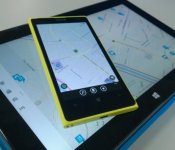
Nokia’s Here Maps acquires an AI firm to build you a virtual travel agent

Ever used Nokia’s Here Maps on your Windows Phone? If so, you’ll agree the platform has an impressively comprehensive vault of travel data to pull from. Today, the Finnish company hopes to make said data more personal by acquiring Desti, a travel-planning AI app based out of the same research center as Siri and Nuance.
So, what can Desti bring to the table? Since its software is based on natural language processing, it can peruse the metadata and customer reviews of online travel listings (hotels, hotspots, nearby attractions) based upon what you, the happy vacationer, are looking for. Want a more romantic rather than family-oriented getaway? No problem. Desti’s AI can gather such context from your request and summarize its recommendations in a friendly dialogue.
Nokia hasn’t outlined any real details on what future integration looks like, but Here VP of Search and Places Don Zereski did drop a small hint, saying the company wants to “create a new class of location services that implicitly understands who you are and what you’re looking for, sometimes even before you ask.” Sounds a little bit like Foursquare‘s check-in prompts and Google Now, doesn’t it?
Filed under: Cellphones, GPS, Nokia

Microsoft’s UK Store will now sell you a Windows Phone

It’s weird to think that before Microsoft spent a few billion euros to acquire Nokia’s smartphone division, it didn’t sell Windows Phone handsets directly on its online UK store. Now that Nokia is officially part of the mothership, Redmond has begun getting its house in order and has made three Nokia smartphones available to buy direct. This means you can order the Windows Phone 8.1-powered Lumia 630 for £129, the Lumia 1320 for £329 and Nokia’s current flagship, the Lumia 1520, for £549. A quick shop around might let you pick up the two older smartphones for less, but if you’re looking to get a new Windows Phone direct from the source, Microsoft’s got you covered.
[Image credit: sonson, Flickr]
Filed under: Cellphones, Mobile, Microsoft
Source: Microsoft Store UK
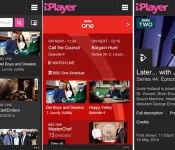
Revamped iPlayer app for Windows Phone adds live TV but drops radio

Windows Phone users typically have to wait longer for apps and updates than their iOS and Android counterparts, but the latest BBC iPlayer rollout tips things back in Microsoft’s favour. As part of its ongoing iPlayer revamp, the Beeb has pushed live an new version of the Windows Phone app, delivering up-to-date channel pages, themed programme collections and clearer categories. On top of that, the app has a new media player that automatically delivers the best quality streams depending on a user’s connection. Windows Phone users will also be able to watch live TV for the first time, but the feature comes at a cost. Radio content will no longer be available after the BBC decided to cut the option in order to offer “the best TV viewing experience in iPlayer.” The good news is that the iPlayer Radio team expects to release a new app with “an optimised listening experience,” meaning users won’t have to go too long without access to The Archers.
Filed under: Cellphones, Internet, Software, Mobile
Via: BBC Internet Blog
Source: BBC iPlayer (Windows Phone Apps)
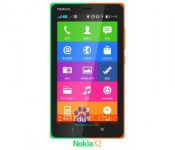
Nokia X2 will be slightly bigger, slightly more powerful

When the Nokia X, originally known as the Nokia Normandy, was announced, most were disappointed by its entry-level specs. The device rocks a 4-inch 800 x 480 display, 1GHz dual-core Snapdragon S4 processor, 512MB RAM, 4 GB internal storage, 3-megapixel rear camera with fixed focus and dual-SIM cards while running a heavily-skinned version of Android with no sign of Google services.
According to Digital Trends, a mystery device listed as the Nokia X2DS (RM-1013) recently showed up on the AnTuTu benchmarking site along with a spec sheet. The device they’re calling the X2 seems like a slightly updated version with a 480 x 800 pixel resolution 4.3 inch display, dual-core MSM8x10 processor clocked at 1190MHz, an Adreno 305 GPU, 1GB RAM, 4 GB storage onboard, a 5-megapixel back camera and a 0.3-megapixel front-facing camera and still offers dual SIMs.
With an AnTuTu score of 11,827, the X2 will be no flagship device, but may be a little bit better option for emerging markets, although you may want to consider the Moto E or G instead.
VIA Digital Trends
The post Nokia X2 will be slightly bigger, slightly more powerful appeared first on AndroidGuys.
[Deal Alert] Nokia DT-901 Fatboy Qi Enabled Charging Pillow Up For $29
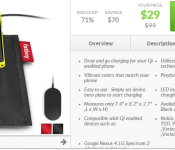
Don’t go getting all anti-windows and Nokia on me here just because of the image. Regardless the device in the image, the Nokia DT-901 Fatboy is pretty cool looking little Qi wireless charger. If your device can charge with Qi the you are good to go with this. The drop and go pillow is up on Daily Steals right now for $29 and comes in black or red.
 Personally I like the looks of it, assuming it works of course. It gives your phone a comfy place to charge. Anyone out there have any experience with the DT-901? Would be good to hear if it is any good. If you like to through caution to the wind, head over to Daily Steals and just order one and find out.
//<![CDATA[
ord = window.ord || Math.floor(Math.random()*1E16);
document.write('’);
//]]>

Apple just hired one of Nokia’s PureView camera experts

Today will be my last day working for the amazing #Lumia family. In June I will start a new chapter in Cupertino, California. Much love!
– Ari Partinen (@Partinen) May 9, 2014
@bharadc23 Thank you for great discussions and feedback! (And it is the company you are thinking assuming you are thinking Apple) =)
– Ari Partinen (@Partinen) May 9, 2014
Filed under: Cellphones, Mobile, Apple, Nokia
Source: Ari Partinen (Twitter)
 AIVAnet