


Some new Windows Phones won’t let you change your web search provider

If you’re picking up a shiny new Lumia 630 or 930 in the near future, you may be in for an unwelcome surprise. The Verge has discovered that at least some unlocked versions of either Windows Phone won’t let you switch Internet Explorer’s default search provider to Google; it’s either Bing or nothing. Some European models of the same phones do let you change the provider, though, so this clearly isn’t a platform-wide policy. We’ve asked Microsoft if it can share more about what’s going on, and we’ll let you know if it has more to add. The move likely won’t cause that much consternation given that many Windows Phone users are inclined to use Bing, but it’s bad news if you like to use Google services on Microsoft platforms.
Filed under: Cellphones, Internet, Mobile, Microsoft, Nokia, Google
Source: The Verge
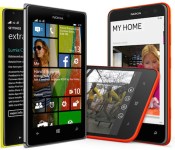
Nokia’s exclusive take on Windows Phone 8.1 is rolling out now

After months of waiting, Nokia (the part now owned by Microsoft) has begun rolling out its Windows Phone 8.1 update to Lumia handsets. Dubbed “Cyan,” this software refresh delivers a plethora of new features to existing Nokia devices, including Microsoft’s gesture-capable World Flow keyboard, greater customization options (both for Live Tiles and the new-look People Hub), new Nokia photo apps, Office app improvements and, if you live in the US, access to Microsoft’s new digital assistant, Cortana.
While the company doesn’t state which of its handsets will get the update initially, it does note that the Lumia 1520, Lumia 930 and Lumia Icon will receive support for Nokia Rich Recording and Dolby Digital 5.1 sound. All Lumia handsets will receive a number of camera updates too, which deliver improved color reproduction, better low-light performance, continuous autofocus and improvements to RAW photo capture.
Lumia handsets will get improved Bluetooth 4.0 low-energy support, allowing them to work with fitness wearables and other Bluetooth accessories like Nokia’s Treasure Tag. The update also includes a new fitness platform that collects locations, real-time fitness data and other “advanced features” and feeds that information to other Windows Phone apps. Although the update begins rolling out today, Nokia expects its Cyan update to reach all Lumia devices “in the coming weeks.” In the meantime, check out the Cyan update page to find out when the update will come to your handset.
Filed under: Cellphones, Software, Mobile, Microsoft, Nokia

How would you change the Lumia 720?

Just like the Star Trek movies, we’ve mostly preferred the even-numbered ranges of Nokia Lumia handsets to the odds. We heaped praise on the 620, for example, with equal vitriol being poured onto the 520 that nestled beneath it. The Lumia 720 suffered the same fate when we reviewed it, finding that no matter how gussied-up the outside was, the low-power internals were an instant turn off. But what about you? It’s likely that plenty of you only had room in your budget for this device, so was the experience as bad as you’d expected? Why not hop into our forum and talk yourself some Lumia.
Filed under: Cellphones, Mobile, Microsoft, Nokia
Source: Engadget Product Forums

Two weeks with PulseOn’s heart-rate monitoring wearable

Heart-rate monitoring chest straps won’t be with us for much longer, as wrist-worn devices are offering optical sensors that do exactly the same job. PulseOn is the latest, and having spun out of Nokia back in 2012, is now offering its first entry into the market, the, uh, PulseOn. Confusing nomenclature aside, the company is now accepting pre-orders through Indiegogo, which was used to help raise awareness as well as cash for the small outfit. We’ve spent some time with the first model to roll off the production line, so if you’re curious if it’s worth splashing $170 out on one, read on.
Open the box and the first thing you’ll notice is how small the actual hardware is, the chunky bezel actually makes it appear a lot bigger than it is around your wrist. The PulseOn has a knitted elastic strap which is either cheap or elegant, and looks like the sort of thing a diver would wear on their off-days. Despite this, the watch isn’t waterproof beyond being able to resist a meter’s worth of the stuff.

The other striking hardware feature is how the PulseOn charges. You need to connect the PulseOn to a microUSB-connected bulldog clip, ensuring that the two exposed electrodes on the clip match up perfectly with the corresponding points on the watch. It’s pleasingly different, which I have to commend, but that doesn’t make it an easy thing to use on a day-to-day basis, and if you found the original Pebble’s magnetic charger to be a tad frustrating, you may feel similarly here.
There are two buttons, one on each side, and unfortunately the control system is a tad on the opaque side. More than a few days in and we were still referencing the manual to work out which set of timed button presses got the hardware to do what we wanted. For instance, it’s a five-second press on the right key to activate and a seven-second press to turn it off again. Entering sport mode requires you to double-hit the left button, something we’ve not yet managed to get the knack of properly.
Once you’ve overcome this, however, life becomes reasonably easy. It’ll monitor your vital signs accurately when you take it out for a run. The only downside is that it’s almost useless without your phone riding shotgun. As much as it’s possible to use this hardware as a watch — albeit not that enjoyable — it’s really more specifically something designed as something you’d pull out of a drawer when you’re off on a run.

So, is it worth it? The problem is that the PulseOn sits in an awkward zone — well below fully featured alternatives, but also so far above casual wearables that it’s tough to recommend. The hardware’s really only designed for run tracking, but since it leverages your phone, what you’re really paying for is the sensor. If you’re a hardcore runner who is trying to up your fitness level and track your recovery time, then perhaps there’s some interest, but if you are that dedicated, why not just spend that little bit extra on dedicated hardware?
Source: Indiegogo
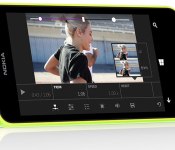
Microsoft’s Video Tuner outfits Windows Phone 8.1 with easy clip editing

Windows Phone 8.1 users have been rather strapped when it comes to video editing apps straight from HQ, but now Microsoft is looking to lend a hand. With Video Tuner, Redmond serves up a new app that wrangles smartphone clips with the ability to apply filters, add music (non-DRM protected MP3s, natch) and apply a range of corrective adjustments — including speed tweaks. As you might expect, once the finished product is ready, footage can be broadcast directly to various social channels, with the exception of Vine. The software can save videos in the proper format for Twitter’s video stream, but there’s no direct sharing at this time. Video Tuner supports MP4 files and allows editing of video captured from the same device on which it is installed. You’ll need a Lumia handset running Windows Phone 8.1 to nab up the new offering, but it’s already available free of charge from Microsoft’s app repository for those who qualify.
Filed under: Software, Mobile, Microsoft, Nokia
Source: Windows Phone Store
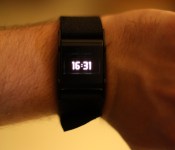
PulseOn early look: Making heart rate monitoring easier than ever

While smartwatches and fitness trackers are taking the tech world by storm, PulseOn aims to put a dent in the competition’s numbers.
Smartwatches and wearable fitness trackers are relatively new to us, though the idea has been around for quite some time. Something you can wear on your wrist that tracks your data while exercising is a great idea, especially if the price is right. We’ve seen watches that gravitate more towards notifications, telling time, being readily available in all weather conditions, or fitness and heart rate tracking.
The entire goal of PulseOn is to focus on heart rate monitoring, while offering fitness tracking functionality and the occasional telling of time. PulseOn was born out of Nokia back in 2012 with one main goal: to offer an easy way to check your heart rate. We got our hands on one a few weeks ago, and we have a pretty good idea as to whether or not you should buy one.
Overview
Before we give it a final score, we have some stuff to talk about. First and foremost, this isn’t a final copy. It’s a beta release, and it has a good amount of bugs in the hardware and software (most of which are being addressed before the final models are for sale). We’ll let you know which will be fixed later in the review.
PulseOn isn’t like other fitness trackers. Sure, you can track your run through the PulseOn app and check how many calories you’ve burned, but it aims to be the best at one thing: monitoring your heart rate. This isn’t a new idea, though. We’ve seen other fitness trackers monitor heart rate, but much of the time it’s inconvenient or inaccurate. We’ll take a look at a the performance and accuracy of PulseOn a bit later.
Hardware

The look and feel of the device is simple, no-frills, and light. It offers a small square display with metal hinges that attach to the strap. The left side houses a start/stop button, while the right side holds a scrolling button. Around back, you’ll see the heart rate monitor and two charging pins on the right.
To charge the device, you’ll need to plug in the charging clip that’s included in the box. It’s a bit difficult to find the connectors, but once it’s secured, it’s pretty sturdy.
The strap is made from a stretchy cloth material that allows for easy removal. It’s comfortable, doesn’t irritate the skin, and is a whole lot better than a runner band. The one main downside to the strap, however, is that we’ve had to re-tighten the strap multiple times while exercising. The band comes a bit loose, pretty often – something we’d never see with a more conventional fitness tracker band.
Other than the quick look at the hardware features, we’d say the overall design could use a bit of work. It’s certainly not the most attractive device, but it’s far from the worst. It works well, and I suppose that’s all that matters.
Software

Let’s begin the software section by talking about the application. It looks really great from a design standpoint. The functionality, not so much. At least not yet. This is one of those problems that PulseOn is working on to be improved by launch date. It’s extremely slow, jittery, and just not that fun to use.
When you boot up the app, you’re whisked into a tutorial on how to use PulseOn and the app together. Once you complete the tutorial, you’ll see three main screens: one to show your latest event, the next to show your recovery time and fitness level, and the last to show your complete history. If the app ran smoothly, I wouldn’t have any complaints, whatsoever. And I’m pretty certain this will be completely ready for everyday use on launch date, especially because I’ve already gotten an update about once a week. But the app is where you’ll spend the least amount of time.
Once strapped on, the PulseOn has two main modes: standard and sport. Hit the right button to scroll through time, current heart rate, and a few statistics that have been previously recorded. There’s no shake to wake the device, so if you’re wearing it as a watch, be prepared to press a button every time you’d like to see the time.
Sport mode is activated by pressing the left button to begin recording your workout. This is where you can check out the timer, heart rate, distance, time, and training effect. These are all pretty useful while you’re exercising, given that you’re in a low-light situation. More on that later.
Overall, PulseOn works the way you’d want it to. It’s extremely easy to begin a workout, though a little annoying to do something as simple as check the time.
Performance

Most importantly, we need to talk about the screen. It’s small, and offers all of its useful information in a light-orange color. It’s great to look at while indoors, but if you try to look at anything while outdoors (where you’ll be using it most), it’s barely there. Text is faded to the point where I needed to put the watch up directly to my face to read anything. Especially while working out, I couldn’t check the correct time I was at during my run. This is mostly due to the poor screen and the small seconds counter in the timer. Unfortunately, there’s no way around that. You’ll need to squint to read anything outdoors, which isn’t really ideal at all.
The heart rate works absolutely great. It doesn’t stutter or give any false information. We tested it against a traditional chest heart rate monitor, and the results were spot-on.
Let’s move on to battery life. PulseOn is quoting up to ten hours of sport mode use before the battery goes completely dead. In my experience, I couldn’t make it an entire day without needing to throw it on the charger while in standard mode. Since this is a pre-production model, though, I’m withholding my reservations for now. We’ll have to see when the final units ship.
One great thing about PulseOn is the ability to record data without a phone. If you go for a run, just enter sport mode and go. Once you pair your device after the run, the info will sync straight to your PulseOn app. This is especially handy when you don’t feel like taking your phone with you for a super long run. Of course, it won’t track any distance information without a paired device, but it can give you the other vital information you’re looking for.
Overall, PulseOn works great for fitness tracking, and the ability to store data temporarily without a paired device is a huge plus. However, the screen and strap could use a bit of work.
Should I buy?
This is a difficult question. Since this isn’t a finished model, I can’t really say. But what I can say is that PulseOn is headed in the right direction. They’re working hard to get some hardware and software features ironed out before launch date, which is quite respectable.
It’s available as an IndieGoGo campaign, though the product is completely funded. This is essentially a way to manage preorders, something that many startup companies struggle with. If you’d like your own PulseOn, you can preorder one for $169, while waiting for launch date will cost you $200.
Though this isn’t completely finished software/hardware, what do you think? It’s certainly difficult to pick this over something like Samsung’s Gear 2, which also offers a heart rate monitor. PulseOn is most likely more accurate, so that’s also something to take into consideration.
If you’d like one of your own, head to the IndieGoGo page to pledge!
The post PulseOn early look: Making heart rate monitoring easier than ever appeared first on AndroidGuys.
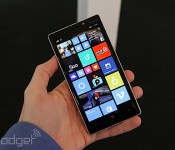
Nokia Lumia 930 hits the UK on July 17th with free wireless charging pad

Before being swallowed by Microsoft, Nokia had one last flagship up its sleeve: the Lumia 930. Smartphone aficionados might be familiar with the combination of 5-inch 1080p display, quad-core Snapdragon 800 chip and 20-megapixel camera, given the 930 already exists in the US as the Lumia Icon. This international edition comes with Windows Phone 8.1 right out the box (no developer loophole required), and we’ve just learnt it’ll be available in the UK from July 17th. We don’t have a SIM-free price to report currently, but you should be able to pick one up on contract from most major carriers and retailers from around £33 per month. Each handset will come with a wireless charging pad included in the box, and until the end of July, each purchase will also come with a special starter pack including a portable wireless charger, Bluetooth speaker and £20 app voucher.
Filed under: Cellphones, Microsoft, Nokia
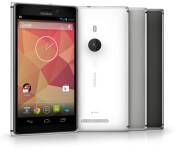
A proper Nokia Lumia device running Android is coming our way, report says

We’ve all heard this rumor before, we’ve heard it numerous times in fact. All that hope and then we get Nokia X which is an abomination of sorts, not an Android device, hence the use of “proper” in the title. Abomination might be a strong word, but Nokia X is neither a Windows Phone nor an Andriod device. It looks like a WP and it is run by extremely limited Android platform which lacks some basic Google apps and it’s an entry level phone. Anyhow, we’re not here to talk about Nokia X.
When Microsoft bought Nokia it was hard to believe they’d ever release an Android powered handset. You might recall that Nokia X was also launched before that deal closed, although Microsoft did introduce Nokia X2 afterwards, so that did leave us some hope I guess.
Well, a known leaker @evleaks shared something rather interesting with us today. @evelaks is usually right so we decided to give this leak some attention. He teased us with the following sentence:
“Big news: Android-powered Lumia incoming, from Nokia by Microsoft”
Unfortunately we don’t get any more details when it comes to this leak, but this is still something. You might notice he mentions “Lumia” in that sentence, which leads us to believe this won’t be another Nokia X-like device but a proper Android offering by Microsoft-owned Nokia brand.
I don’t know about you, but we’re very, very excited about all this. As I said, this leaker has an amazing track record, so he definitely did get our hopes up. How about you, do you think this will ever happen and would you buy an Android-powered flagship Lumia device, presuming they don’t mess with Android on a core level?
Source: @evleaks
The post A proper Nokia Lumia device running Android is coming our way, report says appeared first on AndroidGuys.
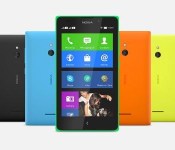
Nokia by Microsoft may have an Android-powered Lumia device on the Way
 Remember when we thought the Android-powered Nokia X was going to be Nokia‘s last hurrah before being completely consumed by Microsoft? Well, it looks like Android may still be playing a big part of Nokia’s ongoing future under its new omnipotent leader. Everybody’s favourite leaker, @evleaks, has today suggested that there will be a Android-powered Lumia device to come from the newly branded Nokia by Microsoft division.
This is probably most surprising as it was assumed that Microsoft had let Nokia continue with the Nokia X line of devices as an entry level package to help pull people towards Windows Phones, but having an Android-powered device among its most premium devices would be a revelation. It would likely be yet another forked version of Android, utilizing Nokia’s slowly growing Nokia Apps marketplace, though that does open up the possibility of being able to root and flash custom ROMs onto hardware that would otherwise be impossible to access for Android users. Just imagine a Nokia 1020 running Android…
Still, we still have to see whether this actually comes to pass, but it’s definitely something to look out for in the future. What do you think about the possibility of an Android-powered Lumia device? Would you be interested?
Source: @evleaks
//<![CDATA[
ord = window.ord || Math.floor(Math.random()*1E16);
document.write('’);
//]]>
The post Nokia by Microsoft may have an Android-powered Lumia device on the Way appeared first on AndroidSPIN.

Could future Lumia handsets come with Canon lenses?

As smartphone imaging gets better, the market for point-and-shoot cameras has evaporated. Perhaps sensing this shift in the wind, Canon has signed a patent-licensing deal with Microsoft where both companies will have easy access to each other’s technological secrets. Dour-minded individuals may say that this is just some legal mutual arse-covering which is commonplace in these litigious times. That’s probably true, but wouldn’t it be great if we saw Canon’s imaging technology wind up in a future generation of PureView device? After all, the company does need some new expertise after its last expert defected to the other side.
Filed under: Cellphones, Cameras, Mobile, Microsoft, Canon
Via: Pocket-lint
Source: Photography Blog
 AIVAnet