


LG could be making the next Nexus phone
The next Nexus phone faces a bit of a naming dilemma – where do they go after the Nexus 6? Can’t go Nexus 7 because that already exists, and any reduction in number would seem like a step back in generation. Whatever Google decide to call the next Nexus, a new report suggests that the manufacturer behind the device is LG.
Codenamed ‘N000′, sources report that Google engineers recently visited LG headquarters in South Korea to discuss the device, which also reportedly carries the name ‘Nexus 7′, but take that with a pinch of salt.
If true, this would be the third Nexus device made by LG in the lineup. Would you like to see a third LG Nexus device?
The post LG could be making the next Nexus phone appeared first on AndroidGuys.

Android 5.1 factory images are live for Nexus 5, Nexus 7 (2012), and Nexus 10
 Google has posted brand new Android 5.1 factory images for several Nexus devices, including the Nexus 5, Nexus 10, and the slightly older 2012 version of the Nexus 7. If you’re ready to start flashing them on your device, hit the right link below and follow our guide to flashing factory images on your Nexus device.
Come comment on this article: Android 5.1 factory images are live for Nexus 5, Nexus 7 (2012), and Nexus 10

Huawei confirmed to make the next Nexus phone

Last week we told you that not one, but two Nexus phones could get launched this year,and it was rumored that LG and Huawei would be the makers. Today we are getting further confirmation on Huawei as the Director of China Research at iSuppli, Kevin Yang, has confirmed it.
If you look at this in hindsight, it can’t be a surprise since Huawei is so up and coming right now, it’s ridiculous. They are sitting as the 3rd phone manufacturer in the world in terms of market share and they made a huge splash with a very nice looking Android Wear smartwatch. It will be interesting to see if Huawei utilizes their own Kirin processor in the phone.
It still hasn’t been officially confirmed if there will indeed be two Nexus handsets, but as I said before, it makes the most sense to offer new versions of the Nexus 5 and Nexus 6 since Google cannot offer a Nexus 7 phone for obvious reasons.
source: Weibo-iSuppli
via: GizmoChina
Come comment on this article: Huawei confirmed to make the next Nexus phone
Serious talk: What is the next Nexus smartphone going to be named?
The Nexus 6 is a great, but flawed, device. It had every hallmark of being a standout, but lack of availability has relegated it to the realm of guilty pleasures. For Google, it appears that the Nexus 6 filled a logical hole in its Nexus device line-up, perching its new ‘phablet’ device squarely between the […]
The post Serious talk: What is the next Nexus smartphone going to be named? appeared first on AndroidSPIN.

5 of the best camera apps for the Nexus 6
Today, many people only own one camera and they always keep it in their pocket. It is their smartphone. This has caused phone manufacturers to constantly improve the cameras and camera software on their phones with each new generation, and developers focus on making camera apps that improve photo quality and add features to make smartphone cameras as useful as possible. Motorola put a great 13 megapixel camera in the Nexus 6, and today we are looking at the 5 best camera apps you can get on the Nexus 6.
A Better Camera

A Better Camera brings several great features to the Nexus 6 that other apps do not. It also takes advantage of Lollipop’s Camera2 API, but you do not have to be running Lollipop to download this app. A Better Camera offers both HDR photos and HDR video; however, the latter is not working on the Nexus 6 but is coming with the next update. Multishot allows you to take a group picture and choose the best face for each person, take a sequence shot, and remove unwanted objects from a picture. Preshot takes pictures before you press the shutter button to ensure you will not miss the shot. Best shot takes several pictures and automatically chooses the best one and deletes the rest. A Better Camera also includes a Burst mode and Night mode plus many other modes and options to fine tune your photo. For more experienced photographers, it also includes exposure bracketing, a live histogram, and the option to shoot in RAW. Of course, A Better Camera is not without its flaws. You cannot shoot video in 4K resolution, the time-lapse feature is not available in the Nexus 6, and the interface is not as appealing as other apps on this list. A Better Camera is free in the Play Store, but there are in app purchases that unlock other feature that some might find useful which can be purchased these individually or buy them all for $7.99.
Camera FV-5

Camera FV-5 is an app that gives you almost full manual control over your phone’s camera, but it also has some other goodies baked in. You have the option to adjust shutter speed, ISO, focus distace, and white balance. For those looking for a more professional experience will be glad to see the inclusion of light metering, exposure bracketing, and a live RGB histogram. One of the coolest features in Camera FV-5 is the ability to assign a camera function to the volume keys. In other apps, you can use the volume keys to take a picture, but in this app you can use them to control different setting in the camera. You can assign you most used setting, such as shutter speed, to the volume keys to that you can raise or lower it by simply pressing the buttons. Another feature that some will find appealing is the option to do a time-lapse. While Camera FV-5 has some great features, it also has its downsides. While there is a video camera icon in the app, video recording is not available. Touching the icon will simlpy give you the option to install a separate video app. Also, the Lite version will only take pictures up to 640×480 resolution. To unlock higher resolutions, you have to buy the Pro version. Camera FV-5 has the ability to shoot in RAW, but the Pro version is also required for that. It is also not the most visually appealing camera app out there. However, if you want a plethora of options and are up for shelling out a few bucks, you can pick up Camera FV-5 Lite free and Camera FV-5 Pro for $3.95 in the Play Store.
Google Camera

Google Camera is the stock camera app that comes preloaded on the Nexus 6, but that does not mean that it is bad. Google Camera has several cool features that you simply will not find on the other apps in our list. One is Lens Blur which allows you to blur the background around an object in the center of the photo. Photo Sphere is another feature that allows you to take a full 360-degree photo in the shape of a sphere. Google Camera also has one of the best panorama modes out there. It gives you the option to shoot video in 4K resolution and take HDR pictures. The shutter is extremely fast with almost no time between touching the shutter button and taking a picture. While Google Camera has several great features, it is also missing many features that other camera apps include such as control over white balance, shutter speed, ISO, burst mode, scene modes, and full camera control. If you are looking for an easy to use, beautiful camera app that just works, you do not need to look further than Google Camera which you can get free in the Play Store.
L Camera

L Camera is different from the other camera apps on this list because it is not available on the Play Store. You have to download the APK from their website and install it from there. Also, L Camera is an experimental app that demonstrates and tests the new features in Lollipop’s Camera 2 API which means you have to be running Lollipop to use it. With L Camera, you are given the option for manual control over focus distance, shutter speed, and ISO. You can take pictures in RAW format and record in 4K which are both useful options. You also have the option to record video at 60fps in 1080p. One of the most appealing features of L Camera is its use of Material Design. The app looks amazing and takes Google’s new design language into account with every detail. Since this app is experimental, there are several functions that are simply not there. You do not have the option to control white balance, there is no photo review, there is no flash control, and no portrait orientation. Since the developers are constantly working to sort out every bug and bring new features to the app, it will definitely be updated to include more options. Unfortunately since it is not on the Play Store, you will have to go check their website periodically to check for new updates. All that being said, L Camera is still a fantastic looking and operating camera app that takes full advantage of the Camera2 API even though it may be lacking some features. You can get L Camera free from their website.
Manual Camera

Manual Camera is currently my favorite camera app out there. This app takes advantage of Android Lollipop’s new Camera2 API which causes photos to look even better. The best part about Manual Camera is that it give you full manual control over your camera’s settings. You can control exposure, shutter speed, ISO, focus distance, and white balance. White balance is not working on the Nexus 6, but that should be fixed in a later update. You are also given the ability to capture pictures in RAW format which many will find extremely useful. On of the best features of this application is the selection wheel. When you choose a setting you want to change such as shutter speed or focus distance, you can change them by rotating a wheel in the bottom right. This is extremely well implemented and makes the app fun and easy to use. Overall, the app looks and functions very well, but there are some downfalls. As I mentioned, white balance is not working yet on the Nexus 6. Also, there is no video mode so you will need a separate video app if you want to record any. The app also requires Lollipop and, according to the description, only the Nexus 5 and Nexus 6 work well with this app. That being said, if you are using the Nexus 6 and want full control over your camera and a great looking camera app, you should pick up Manual Camera for $2.99 in the Play Store.
These 5 camera apps give you the best control of your new Nexus 6’s camera and several take advantage of the new Camera2 API that was introduced with Lollipop. Give one or all of them a try and leave a comment telling us your favorite one. If we missed your favorite camera app, tell us down below in the comments, too!
(function() var script = document.createElement(‘script’);script.src = ‘https://stacksocial.com/widget.js?publisher=androidguys&type=editorial_post_widget_preferences’;script.async = true;var entry = document.getElementsByTagName(‘script’)[0];entry.parentNode.insertBefore(script, entry);)();
http://www.androidguys.com/pubgalaxy/728×90.html
The post 5 of the best camera apps for the Nexus 6 appeared first on AndroidGuys.

Nexus 6 listed as ‘coming soon’ on Verizon’s website

The Google Nexus 6 smartphone has been available for over two months through carriers like T-Mobile, Sprint and AT&T. However, the nation’s largest carrier, Verizon Wireless has been somewhat absent from the action. It seems like that could change over the coming weeks, with the smartphone going up on the carrier’s website with a “coming soon” sign.
Unfortunately, there’s still no word on when the smartphone will actually arrive on the carrier’s shelves. But we like to think that the day is not far away now. At this point, users can’t do much apart from signing up to receive updates on the smartphone.
The Nexus 6 is Google’s latest flagship smartphone and its arrival on Verizon will certainly be welcomed by the fans.
The device packs a 5.96 inch QHD display, a 2.7 GHz Snapdragon 805 chipset, a 13-megapixel camera with OIS, a 2-megapixel front camera, 3GB of RAM, 32 or 64GB of internal storage, Android 5.0 Lollipop with the promise of latest updates and a 3,220 mAh battery.
Source: Verizon
Via: Droid Life
Come comment on this article: Nexus 6 listed as ‘coming soon’ on Verizon’s website
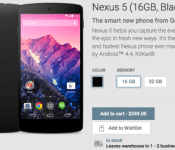
Google Play selling black Nexus 5, both 16GB and 32GB storage sizes

Never got around to purchasing the Nexus 5? Then rush over to Google Play right now because the device is in-stock, albeit in a limited way. Only the black color option in both 16GB and 32GB storage sizes is now available. The 16GB version costs $349 with 32GB adding $50 to that price. Both will leave the warehouse within 1-2 days of ordering.
Source: Google Play
Come comment on this article: Google Play selling black Nexus 5, both 16GB and 32GB storage sizes

AMOLED Burn-in Fixer for Nexus 6 and other AMOLED display devices
Burn-ins on your AMOLED screen are the worst. They are just absolutely terrible. There is nothing worse than seeing a ghost on your phone for all eternity. The good news is that you don’t have to site idly by while your OCD goes crazy.
One Brendon Sled has taken it upon himself to fix your devices unfortunate screen. AMOLED Burn-in Fixer is an app designed to be effective and easy to use.
The basic idea behind the app is to invert the colors of your status bar and/or navigation bar (depending on which location is showing signs of burn-in) to reverse the eye sore.
There are three easy steps to fixing these burn-ins. Install, Test and Fix. It is that simple.
1) Install
Step one, install the app from the Google Play Store for free. You can either search “AMOLED Burn-in Fixer” or make use of the widget at the bottom of this post.
![Screenshot_2015-01-26-16-04-54[1]](https://i1.wp.com/www.androidguys.com/wp-content/uploads/2015/01/Screenshot_2015-01-26-16-04-541.png)
![Screenshot_2015-01-26-16-05-00[1]](https://i0.wp.com/www.androidguys.com/wp-content/uploads/2015/01/Screenshot_2015-01-26-16-05-001.png)
2) Test
Step two, test your screen for signs of burn in. You just follow the yellow brick road on this one. Tap the “Test Burn-in” tab, then select “Hide UI”. You will be presented with a solid gray background that will reveal any burn-ins to you. This will most likely be around the status bar and navigation bar areas as previously stated.
![Screenshot_2015-01-26-16-05-28[1]](https://i2.wp.com/www.androidguys.com/wp-content/uploads/2015/01/Screenshot_2015-01-26-16-05-281.png)
![Screenshot_2015-01-26-16-05-32[1]](https://i1.wp.com/www.androidguys.com/wp-content/uploads/2015/01/Screenshot_2015-01-26-16-05-321.png)
3) Fix
Step three, fix all the things! Once you determine the areas that require doctoring, go back to the “Fix Burn-in” tab and select the locations you require. Then, follow the instructions on screen. Enable inverted colors in your system settings and hide the app settings.
![Screenshot_2015-01-26-16-05-51[1]](https://i2.wp.com/www.androidguys.com/wp-content/uploads/2015/01/Screenshot_2015-01-26-16-05-511.png)
![Screenshot_2015-01-26-16-06-04[1]](https://i0.wp.com/www.androidguys.com/wp-content/uploads/2015/01/Screenshot_2015-01-26-16-06-041.png)
Everything is simple and painless. You just have to leave the inverted screen up until the signs of any burn-in are reduced to your satisfaction.
Unfortunately, the app only installs on Lollipop devices.
The post AMOLED Burn-in Fixer for Nexus 6 and other AMOLED display devices appeared first on AndroidGuys.
Google releases Android 5.0.2 factory images for Nexus 10 and 2013 Nexus 7

Google has just posted Android 5.0.2 Lollipop factory images for the Nexus 10 and 2013 Nexus 7. Until now, the only images that were available were for the 2012 Nexus 7. The build number on today’s images is the same as last month’s LRX22G. Google hasn’t posted any change log, but we aren’t expecting big changes in the new firmware.
The images are available on Google’s developer site and should begin to rollout over-the-air soon. If you don’t want to wait, however, you can check out our guide on installing factory images here, and download the image via the source link below.
Source: Google Developers
S
Come comment on this article: Google releases Android 5.0.2 factory images for Nexus 10 and 2013 Nexus 7

New concept renders for Nexus 5 (2015)

Hey folks, we’ve got a while off until another Nexus phone shows up anywhere, but a lot of talk and predictions are that there will be a refreshed Nexus 5 phone rather than another Nexus 6. This is only talk of course, but for your enjoyment and imagination, we’ve got some fresh concept pictures of what I hope the upcoming Nexus phone will look like.
With aluminum sides, dual front-facing speakers and a clean, minimal front and back, this was designed to have Motorola and HTC qualities combined. The back is meant to look and feel like the plastic on the Nexus 6 back. The IR blaster is what you see on the top, and dual-flash located on both sides of the back camera.


Also, here’s a picture of customizable back covers, “Material Style”

Again, this is just a fan-made concept only to be taken as so.
The post New concept renders for Nexus 5 (2015) appeared first on AndroidGuys.
 AIVAnet