



Nexus 6 international giveaway!
Welcome to the Sunday Giveaway, the place where we giveaway a new Android phone or tablet each and every Sunday.
A big congratulations to last week’s winner of the OnePlus One giveaway: Raymond T. (Phillipines).


Ilay – Winner of our first Nexus 6 giveaway!
This week we are giving away a crowd favorite, the Nexus 6!
Illay from India just received his new Nexus 6 from our very first Nexus 6 giveaway. Maybe this week you will be the lucky winner of a Nexus 6.
You can earn entry tickets into the giveaway by completing the following tasks in the RaffleCopter widget located below.
- [1 Ticket] 1 Free entry!
- [1 Ticket] Follow AA on Google+.
- [1 Ticket] Follow AA on Twitter.
- [1 Ticket] Download the AA App.
- [1 Ticket] Subscribe to the AA weekly newsletter.
- [10 Tickets] Refer friends to the giveaway. You will be given a unique URL to share with your friends or social networks. You will receive 1 bonus entry (up to 10 max) for every person who you refer to the giveaway using your unique URL.
Join Now!
In case you haven’t heard, we have a new Android Authority podcast called the Friday debate. This week Josh talked with Joe, Andrew, and Jonathan about the HTC One M9 design rumours. You can find the AA podcast on iTunes, stitcher, pocket cast and RSS, we hope you tune in.
Related links
- Nexus 6 vs Nexus 5
- Nexus 6 vs iPhone 6 Plus
- Nexus 6 most common problems
- Is the Nexus 6 too large?
- Is the Nexus 6 really too expensive?
- Download Android 5.0 Lollipop wallpapers and sounds
- Nexus 6 vs the competition
- A history of the Nexus smartphone line
Nexus 6 forums | Nexus 9 cases
Terms & Conditions
- The giveaway is an international giveaway (Except when we can not ship to your Country.)
- If we can not ship to your country, you will be compensated with an online gift card of equal MSRP value to the prize.
- We are not responsible for lost shipments.
- You must be age of majority in your Country of residence.
- We are not responsible for any duties, import taxes that you may incur.
- Only 1 entry per person, do not enter multiple email addresses. We will verify all winners and if we detect multiple email addresses by the same person you will not be eligible to win.
- We reserve all rights to make any changes to this giveaway.
- The prize will ship when it is available to purchase.
Full terms & conditions and FAQ | Past giveaway winners [Gallery]
Extend your Nexus 6 battery life with these tips
The Nexus 6 has a huge 3,220mAh battery and combined with Android 5.0 Lollipop’s battery optimisation thanks to Google’s Project Volta, provides pretty decent battery life, but there’s always room for improvement, especially when compared to the battery life of the Xperia Z3 or OnePlus One for example.
That’s why we’ve compiled a few tips you can use on your Nexus 6, and pretty much most Android smartphones, to stretch the battery life just a little bit further. These may be common knowledge to the technically gifted of us who know our devices inside-out, but will perhaps prove useful for someone who is not necessarily familiar with such techniques.
Turn off Ambient Display
To benefit from a longer standby time, head on into Settings -> Display -> Ambient Display to turn it off. Ambient display allows you to see notifications without having to fully wake the device, but at the cost of battery life.
Optimise Location Settings
Google allows for different location modes when it comes to the accuracy and method of obtaining your location for various apps. Often certain apps, especially social network apps, can request a GPS location quite frequently putting a strain on your battery.
If you’re not running the Maps application and can cope with a less refined location, then it’s worth setting your location to only be requested by using your geo-location through WiFi or Cellular network. Alternatively, to fully save battery, you can turn location services off completely.
Enable automatic brightness
It should come of no surprise that usually the biggest culprit of battery drain is the screen itself, and with the huge 6-inch qHD display on the Nexus 6, having the wrong brightness settings can significantly affect battery life.
Android 5.0 Lollipop has a feature called adaptive brightness, which automatically adjusts the brightness of your screen to suit the environment. This means that firstly you don’t have to manually adjust the brightness and also ensures permanent maximum brightness isn’t killing your battery. You can check adaptive brightness is still enabled in Settings -> Brightness.
Check what is using your battery
Even having every battery optimisation under the sun turned on, all it takes is one erroneous app to be maxing out your processor to absolutely kill your battery life, so be sure to check what is using the most battery under Settings -> Battery.
You should notice the usual culprits like ‘screen’ and ‘Android OS’, but if you see an app that you haven’t used in a while clocking up the %’s then chances are it’s doing something funky in the background and needs to be force closed or uninstalled.
Do you have any other tricks that you’ve found gives you the few extra hours of battery life on the Nexus 6, or any other Android device? Let us know in the comments below.
The post Extend your Nexus 6 battery life with these tips appeared first on AndroidGuys.

6 common problems with the Nexus 6 and how to fix them
With the Nexus 6, Google has attempted to provide a worthy competitor in the phablet space dominated by Samsung. Packed with top of the line specifications, a sharp display and the best iteration of Android yet, you’re bound to find something impressive in this larger than life phone. Unfortunately, there isn’t a smartphone in the market without its flaws, and that is true with the Nexus 6 as well. Today, we’ll be taking a look at some of the most common problems with the Nexus 6, and offer potential solutions on how to fix them.
Disclaimer: Not every user of the Nexus 6 will face these issues, and it is quite likely that you won’t come across any of the problems listed below.
Problem #1 – Issues with random rebooting

A number of Nexus 6 users have reported that their phone suddenly reboots with no apparent reason. Sometimes, this can happen multiple times in a row, with the phone booting to lock screen, and then rebooting the moment a PIN or lock-code is entered.
Potential Solutions:
- Corrupt or fragmented data in your phone could be causing an issue. Back up any important data and perform a factory reset.
- Disable active notifications – this is sometimes helpful.
- Disable the primary messenger application and try using hangouts instead.
- Enable Google Play Services and GPS high accuracy.
- Make sure your device is charged fully.
- Wipe the cache partition on your phone, as this can remove any fragmented data.
Problem #2 – Bugs with Bluetooth connection

A number of Nexus 6 users have struggled with problems regarding Bluetooth connectivity.
Potential Solutions:
- Start by turning the Bluetooth on your device off and back on again.
- If the problem continues, clear the cache for Bluetooth by going to Settings – Apps – All – Bluetooth Share – Clear Cache.
- Go to Bluetooth Share and tap Clear Data
- Restart the phone after clearing the data and cache, if this doesn’t work, try booting the phone into safe mode using the directions below.
Problem #3 – Abnormal battery drain

Though its large battery suggests that the battery life of the Nexus 6 should be quite good, a number of these devices have been affected by abnormally fast drain despite normal usage.
Potential Solutions:
- Third party applications could be causing excess battery drain, so disable any power-heavy applications that are running in the background unless they are used frequently.
- Ensure all applications are updated to the latest version.
- Try uninstalling power-hungry applications one by one to see if the problem can be isolated.
- Turn off vibrations, and reduce screen brightness if possible.
- Try rebooting the device with all third-party applications uninstalled, or factory resetting the phone. This should help to clear out any damaged files in your data.
Problem #4 – Cloud Print errors and force closing

Some users have reported that on the Nexus 6, it is difficult to keep the Cloud Print application running.
Potential Solutions:
- Update your Cloud Print application and ensure that the device is fully up to date.
- Go into Settings – Apps – All – Cloud Print and select both Clear Cache and Clear Data
- Attempt a factory reset to get rid of any fragmented data.
Problem #5 – Screen isn’t bright enough outside

An issue that has plagued many users of the Nexus 6 is that when outside, the screen brightness seems too low, especially on bright or sunny days.
Potential Solutions:
- Go to Settings – Device – Display and change your settings.
- You should be able to alter the brightness level of set auto-brightness on the device.
- Turn on adaptive brightness to automatically optimize the level of brightness on your phone screen in regards to the light around you. This setting is generally on as default, and still allows for brightness settings to be altered when needed.
Problem #6 – Slow charging

Slow charging is one of the problems that many Nexus 6 owners have complained of since buying the phablet.
Potential Solutions:
- If the phone is charging slowly, disable any unwanted applications
- Press the back button twice when exiting an application, instead of simply tapping “Home”, this closes the app from the background and prevents the excessive drain of power.
- Don’t play games when the Nexus 6 is charging, as they require extra processing power.
- Check the charger cable is working by attempting to charge using another cable, or charging a different device with the same cable.
- Try charging through direct connection to a laptop or computer.
- A malfunctioning application could be causing the problem, boot the phone into safe mode and see if it charges faster. This will imply a faulty app. If an application is the problem, perform a factory reset and reinstall apps selectively.
These are some of the most common issues that users of the Nexus 6 have been suffering. If you have struggled with one of these problems yourself, or have experienced something that we haven’t mentioned above, make sure to get in touch through the comment section. We’ll be working to keep this list updated as more solutions and problems appear.
SEE ALSO: Nexus 6 Review
Following are the guides on how to delete data, factory reset, and boot your Nexus 6 into safe mode.
Related Videos
.rvs_wrapper
width: 335px;
.rvs_wrapper.align_left
float: left;
.rvs_wrapper.align_right
float: right;
.rvs_wrapper.align_center,
.rvs_wrapper.align_none
width: 100%;
.rvs_wrapper.align_center
text-align: center;
.rvs_wrapper.align_center.cbc-latest-videos ul li
float: none;
display: inline-block;
vertical-align: top;
.rvs_wrapper.cbc-latest-videos:not(.align_none) ul li:nth-child(2n+1)
clear: both;
.rvs_title
font-weight: 600 !important;
margin: 0 !important;
.rvs_wrapper.align_right .rvs_title
padding-left: 20px;
.rvs_title a
font-family: ‘Roboto Condensed’;
color: #3a3a3a;
.rvs_wrapper.cbc-latest-videos ul
padding-top: 10px;
.rvs_wrapper.align_left.cbc-latest-videos ul li,
.rvs_wrapper.align_none.cbc-latest-videos ul li
padding: 0 15px 0 0;
.rvs_wrapper.align_right.cbc-latest-videos ul li
padding: 0 0 0 15px;
float: right;
.rvs_wrapper.align_center.cbc-latest-videos ul li
padding: 0 7px;
.rvs_wrapper.cbc-latest-videos ul li > a
font-weight: 400;
.rvs_wrapper.cbc-latest-videos ul li > a .yt-thumbnail
margin-bottom: 0;
@media only screen and (max-width : 480px)
.rvs_wrapper
width: 100%;
text-align: center;
#page .rvs_wrapper.cbc-latest-videos ul li
padding: 0 7px;
display: inline-block;
float: none;
vertical-align: top;


Deleting Data:
- Go to Settings – Personal
- Tap Backup and Reset
- Choose Factory Data Reset
- Confirm with Reset Phone
- Enter your PIN or pattern code.
- Tap Delete everything
Hardware Factory Reset:
- Turn off the phone
- Hold the volume down button and Power button simultaneously until the device switches on.
- You should see “Start” with an arrow
- Tap volume down twice and the power button to enter Recovery Mode
- Hold the power button then press and release the volume up button
- Use the volume buttons to select wipe data/factory reset
- Choose “Yes – erase all data” with the power button
Safe Mode:
- Hold the power button after ensuring the screen is on.
- Tap and hold the Power off selection in the menu
- Tap OK to initiate Safe Mode
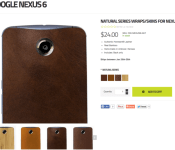
Slickwraps’ Natural Series lets you bring some Moto X flair to your Nexus 6

Google’s Nexus 6 may offer a similar design language to Motorola’s Moto X (2nd Gen.), though the exclusion of Moto Maker support for Google’s giant handset makes the choice between the two smartphones a difficult one to make. If you want the big form factor of the Nexus 6, but still want to take advantage of the leather or wood backplates Moto Maker has to offer, you may want to try out a skin. Unlike customizing your device with Moto Maker, a smartphone skin easily goes on the device with the ability to be taken off at any time.
One company that’s trying to produce similar products to that of the leather and wood backplates is Slickwraps, and more specifically, the company’s recently-launched Natural Series. The Natural Series provides a premium leather or wood feel to the device without the need to have a Moto X. The series comes with four different options out of the gate: authentic bamboo, dark brown leather, tan leather and a football-style leather. All of the leather options are made from Horween leather (the same Motorola uses on their handsets) and are handmade in Andover, Kansas.

Now, we know this won’t give your device the same feel that Moto Maker will provide, but this is the closest you can get without having the real thing. Each Natural Series wrap costs $24. Keep in mind that these skins will completely cover up the Motorola and Nexus logos on the back, so if you don’t want those covered up, you may want to pass on these. Additionally, Slickwraps offers Natural Series skins for many more devices, so pretty much anyone with a modern smartphone can try them out.
Do you want a skin for your device but don’t want to cover up the Nexus logo? We’d recommend dbrand Skins for the job, since they give you the option to cover up the logo, keep it showing or just show the ‘x’ in Nexus. dbrand Skins are significantly cheaper, though they don’t offer the same natural feeling that Slickwraps’ do.
If you’re interested in grabbing the Natural Series skins for your Nexus 6, head to the Slickwraps website here.
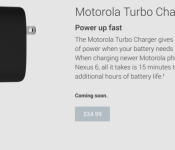
Google lists the Motorola Turbo Charger as “coming soon” in the Play Store

Devices like the Nexus 6, Motorola DROID Turbo, and HTC One (M8) are capable of enhanced charging with Qualcomm Quick Charge 2.0 technology. The special chargers, when paired with supported devices, powers them much quicker than ordinary chargers. Both Motorola and HTC have released their own Quick Charge 2.0 chargers, but availability has been somewhat limited. The Motorola Turbo Charger will soon be available in the Play Store. When? No one is sure. It is a good sign, however, that its status reads “coming soon.” The price listed is $34.99.
In the meantime, you can purchase the Turbo Charger directly from Motorola.
Source: Google Play
Come comment on this article: Google lists the Motorola Turbo Charger as “coming soon” in the Play Store
Owners reporting issues with the Nexus 6 back cover popping off and battery swelling
On paper, the Nexus 6 is one of the most alluring devices out there for Android enthusiasts, but that’s only if you can get your hands on one. Lack of stock has rendered it almost as rare as the abominable snowman, however it looks like what few of them are out there could be suffering […]
The post Owners reporting issues with the Nexus 6 back cover popping off and battery swelling appeared first on AndroidSPIN.
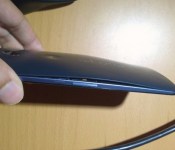
Nexus 6 owners try to hold it together amidst new problem with devices

Reports are starting to trickle out onto the Internet about Nexus 6 devices that are falling apart. Owners are reporting the back covers are coming off of the units although the reason has not yet been identified. In some cases it appears to be a problem with the glue that Motorola used to affix the back covers. However, others are reporting their batteries are swelling to the point they cause the covers to pop off.
The reports that have come in so far have varied as to how soon owners of the Nexus 6 are experiencing problems. Some buyers report their devices were showing signs of separation out of the box when they received their new device. Others are reporting the problem takes some time to develop. In an unfortunate turn for Motorola, reports of similar problems have also started to surface for the Moto X 2014 and the Motorola DROID Turbo.
Motorola appears to be aware of the problem even though they have not come out with a public statement. In response to a tweet directed to Motorola Support, they did acknowledge they are “seeing a few” devices being returned with defective back covers.
If you do notice the problem with your Nexus 6, you can try to contact the retailer where you bought your device and see if you can get a refund. Choosing a replacement may result in a refurbished unit being provided to you if you go that route. In either case, it is not clear whether the replacement unit may be subject to the same issue.
source: Phandroid
Come comment on this article: Nexus 6 owners try to hold it together amidst new problem with devices
Defect watch: Some Nexus 6 owners reporting back cover coming unglued

If you’ve been lucky enough to get your hands on Google’s Nexus 6, be weary of a defect that’s been happening to a few owners of the handset. Multiple users around the web have been reporting that the Nexus 6’s back cover is coming unglued. Under further investigation, a Reddit user experiencing this problem checked under the back cover to find that the battery was expanding, causing the cover to come undone. Motorola commented on one Twitter user’s post saying that they’ve been “seeing a few” devices come unglued. Some users are commenting that the battery is, in fact, expanding over a few weeks’ time, while others are saying that they’ve noticed it right when they take the device out of the box.
Since this is obviously a manufacturing defect, if you or anyone you know have been experiencing this problem, we suggest you contact Motorola’s Customer Care team to get the device replaced. But be careful if you’ve been seeing this problem on your handset, as defective batteries are a big safety hazard. If it helps at all, it seems as though Motorola and the carriers involved have been very good about replacing the defective units so far. So, you’ll likely have your new replacement phone up and running in no time.
Do you know anyone who’s been experiencing this defect? Let us know if you’ve had any problems.
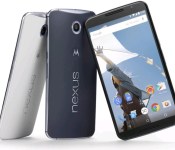
[Deal] Expansys has the Nexus 6 (32 GB) in Cloud White for $605 today

If you have been eyeing a Nexus 6, we have good news for you. Expansys not only has it in stock, but it’s also at a very good price. For today only, you can grab the Cloud White 32 GB version for $604.99, which is a savings of $44.01 off of the normal price. Even better news, shipping is free to anywhere in the U.S. (5 to 10 day arrival) and no sales tax will be assessed unless you live in Illinois. Depending on where you live, that could be another $40 to $50 in savings.
According to the website, the sale price is for today only so don’t hesitate on this one. Hit the source link to get your order in.
source: Expansys
Come comment on this article: [Deal] Expansys has the Nexus 6 (32 GB) in Cloud White for $605 today
Nexus 6 may have inbound call problem for Sprint customers

It has generally been viewed as a positive development that the Nexus 6 is available on all major U.S. carriers and a simple swap of a SIM card is all that is needed for users to switch networks if they are in a position to do so. That doesn’t come without some risk though and Sprint customers seem to be suffering the ill effects at the moment as several Nexus 6 owners are having trouble receiving calls.
The issue has been identified by users for well over a month already, but neither Sprint nor Google has found a solution. The inability to come up with something may be because of the sporadic nature of the problem that does not seem to be connected to location. Some users have indicated the issue does seem to only crop up when connected to Wi-Fi.
When the problem does come up for users, they will find that they do not receive inbound phone calls. To make matters worse, when the phone gets in this state of not accepting calls, it functions like a phone that has been turned off and does not pop up a missed call notification. Unless the caller leaves a voicemail or the Nexus 6 user checks their call history, they may never know they missed a call.
Anyone out there experienced this problem with the Nexus 6 on Sprint not receiving inbound calls?
source: Sprint
via: Android Police
Come comment on this article: Nexus 6 may have inbound call problem for Sprint customers
 AIVAnet