


Have a Nexus or GPE device? Download the Google Now Launcher OFFICIALLY from Google Play
When the Nexus 5 was announced the launcher looked a bit different from what people are used to seeing on a stock Android device.We’re used to seeing the same launcher on basically every Nexus device, so it was a bit of a shocker when Google unveiled the new look.It was running the Google Now Launcher with a few more features than the original “stock” look.
Well, Nexus and Google Play Edition device owners rejoice – the Google Now Launcher is finally official! You can grab it from the Google Play Store today, but only if you have a Nexus or GPE device running Android 4.4.
With the GNL, you can swipe left to access Google Now from your main homescreen. Long press on a blank space to access wallpapers, widgets, and settings. And the app drawer is now only used for apps.
No word yet as to whether or not they will release it to non Nexus/GPE devices, but I couldn’t see that happening.
The post Have a Nexus or GPE device? Download the Google Now Launcher OFFICIALLY from Google Play appeared first on AndroidGuys.

Do you really need a 4K smartphone screen?

See those two screens up there? Pretty soon the smartphone will have the same resolution as the much bigger panel (a 27-inch Dell U2711 monitor with 2,560 x 1,440 pixels). While the snappiest CPUs, more RAM, better cameras and other frills are a must for the latest handsets, the current marketing pièce de résistance is a higher-resolution screen. In four years, we’ve passed from a norm of 800 x 480 to 960 x 540 and up to 720p, 1080p and soon — likely on Samsung’s upcoming Galaxy S5 — 2,560 x 1,440 Quad HD (QHD). That works out to a borderline-insane 500-plus pixels per inch (depending on screen size) and manufacturers aren’t stopping there. But is more resolution worth the extra expense if you can’t even see the difference? Well, it’s complicated.

Are higher pixel counts worth the manufacturing cost and effort?
The first smartphone with Quad HD, the 6-inch Vivo Xplay 3S (pictured above), has already been announced. Others that could have that pixel count, like Samsung’s Galaxy S5 and the Oppo Find 7 are rumored to be launching at Mobile World Congress next week. As a reality check, that’s the maximum supported by most 27-inch and larger pro monitors, apart from several recently announced 4K models. While such screens pack a pixel density of about 110 ppi, the Vivo Xplay 3S handset clocks in at a whopping 490 ppi, more than four times as much. Most people (according to Apple) hold their phones about 10 inches from their eyes, but sit only a touch more than twice that distance from their monitor — around 24 inches on average.
Are higher pixel counts worth the manufacturing cost and effort? In justifying the Retina display on the original iPhone 4, Apple famously said that the human eye could only resolve about 300 ppi from 10 inches. That seems to have merit considering that most glossy magazines are (effectively) printed at 300 ppi, and no one complains about the resolution of magazines. Others have said that it’s possible to distinguish pixels up to about 480 ppi or even more, but that requires closer viewing distances and perfect, youthful eyesight. Most of us fall somewhere between those extremes, depending on our age and the state of our orbs.

You might be sacrificing a lot of your smartphone’s other capabilities in exchange for pixels that are (arguably) imperceptible.
If you’re willing to allow that 480 ppi or so is the maximum resolution the best of us can see, then guess what? We’re already there, pretty much. LG’s Nexus 5 (above) for example, has 1,920 x 1,080 pixels jammed into its relatively petite 4.95-inch screen. That works out to 445 ppi, far in excess of Apple’s first Retina display and, for this editor, completely artifact-free at eight to 10 inches, even on fine fonts. You could make the case that Vivo’s much larger 6-inch phone is deserving of its 490-ppi Quad HD screen. But then again, six inches is pushing into tablet territory, and you’d probably hold such a phone farther from your eyes — Apple figures on 15 inches for an 8-inch iPad mini with Retina, for example. From that distance your eyes will resolve less (again, assuming you can even see that close), negating the need for more pixels.
At about 3.7 megapixels, a Quad HD screen has nearly twice the resolution of a 1080p model (2.1 megapixels). Those extra pixels aren’t going to push themselves around, meaning you’ll need beefier graphics if you want to keep the whole “butter” thing going. Of course, Samsung’s upcoming flagship will likely be powered by a state-of-the-art Snapdragon 805 or Exynos 6 CPU if the rumors pan out. However, with the extra resolution, you may not get a corresponding performance boost. On top of that, unless the Korean company’s pulled off some coup, battery life may be the same or worse than the current Galaxy S4. All that means you might be sacrificing a lot of your smartphone’s other capabilities in exchange for pixels that are (arguably) imperceptible.

Despite our reservations, pixel progress marches on.
Despite our reservations, pixel progress marches on. Japan Display announced 5.4- and 6.2-inch Quad HD panels; LG has at least a 5.5-inch screen incoming (above); and Qualcomm showed off a 5.1-inch 2,560 x 1,440 model. Along with Vivo’s 6-inch display, that covers a wide gamut of screen sizes, most of which are bound to show up in new models this year. And if the rumors are true about Samsung’s Galaxy S5, it’ll be QHD with a 5.2-inch screen size — that’s 560 ppi, if you’re keeping score at home.
It seems that’s not enough, because Samsung has already said that it’ll have 3,840 x 2,160 (4K) screens out by 2015 with 700 to 800 ppi, depending on screen size. Even the most ardent pixel-lovers would have to agree that’s crazy, passing the limits of human acuity and matching 110-inch 4K home theater panels pixel-for-pixel. Naturally, we want our tech dripping from the bleeding edge and we love us some 4K. But after Quad HD becomes the gold standard later this year, manufacturers should focus on more important things like battery life, user experience and design. Don’t hold your breath, though, because smartphone marketers love bigger numbers — even if, like the emperor’s clothes, you can’t actually see the extra pixels.
Filed under: Cellphones, Mobile, Samsung, LG
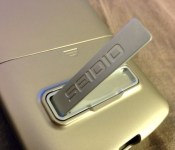
SEIDIO SURFACE Case With Metal Kickstand Review – Almost Too Snug

As a smartphone user who is admittedly not fond of using cases, it takes a lot to impress me, and even more to convince me to use your product for more than a week or two. I’m very selective and particular in what I look for. Unlike most case users, protection of my device is the last thing I worry about. I look for something sleek, unobtrusive, functional, and, above all, minimal. I took the SEIDIO SURFACE for the Nexus 5 in Gold for a spin, to see if they could convince me to become a case user again.

The first thing that struck me about the SURFACE case was the similar feel in material to the actual back of the Nexus 5. The soft touch matte back was very reminiscent of holding the phone bare, and that was how SEIDIO gained their first point from me. Not only did I feel like I was just holding my phone, but SEIDIO’s choice to go with a matte case also minimized the appearance of fingerprints, and resulted in a firm, non-slippery grip that made you sure of your handling. The inside of the case is lined with a velvety felt, protecting the back of your Nexus 5 from an scratches from the case itself. A very important touch, here, given the snugness of the SURFACE case. It slides on as two separate pieces that snap together. And boy, was that a feat. Pushing it together took a moment or two, during which I tried to loosen up the case by snapping it together and apart several times. Taking off the case is a bit of a challenge, and requires tugging quite hard on either end, making me worry whether my phone would go flying when it finally came apart.

The SURFACE case doesn’t add too much bulk to the phone, as seen in the comparison photo above. A small lip goes around to the front display, providing a bit of a buffer between your display and a flat surface. Be warned – if you happen to have a skin or decal on the front and/or back of your Nexus 5, the SURFACE may be a little more snug than your liking. Another heads up as well: white Nexus 5 owners may run into a problem similar to mine, in that my white decal was smudged with some sort of residue from the inside of the case, which I have still not been able to remove after cleaning it several times. This could just be bad luck, or could be because of the carbon fiber nature of my decal, which collects dirt and grime more easily than a flat surface, but I felt it worth the acknowledgment.

This is a tight fit, and even the smallest amount of added bulk to your Nexus 5 may cause some issues getting the case on and off. I had a Spigen tempered glass screen protector that began to lift along the edges and bottom when the case was on, and eventually cracked due to the prolonged pressure, so this won’t be the phone case for you if you have or are considering something along those lines. Surprisingly, Seidio claims that it’s own VITREO tempered glass screen protector is compatible with the SURFACE case. I’m not sure if this is something I’m inclined to believe, given it lifted and broke my Spigen GLAS.tR which is 0.23 mm thick, pulled up my Anker, which is measured at 0.38 mm, and the VITREO itself sits at 0.55 mm, over double that of the Spigen. It could be that the VITREO doesn’t extend to the very edge of the phone, or more gradually rounds off, giving it more room for a case, but I can’t speak on its performance in conjunction with the SURFACE case. I imagine normal PET-type screen protectors would behave just fine, however.

You can see in this image where my new tempered glass screen protector is starting to lift on the edges. I didn’t even attempt to use the case again fully after getting my first one replaced.
There are ports cut out of the case for the power button, volume rocker, headphone jack camera and flash, charger and speakers, as well as the noise cancellation mic at the top of the phone, but not for the SIM card tray. However, the top portion of the SIM card tray can be seen from the cutout for the power button, which was a cosmetic overlook that bothered me just a bit. It does make the power button easier to press, though, which is likely more important to most users. I will say that I greatly appreciated the fact that the case protected the camera lens from any direct contact with a surface.

I tested both NFC and wireless charging while using the case, and didn’t have a problem. Pictures and files beamed to other devices without hesitation, and placing the phone on my Tylt wireless charger didn’t require any fiddling or moving it about. Given that the SURFACE isn’t a very thick case, this shouldn’t be surprising, but it’s nice knowing it’s not a concern. The kickstand on the back of the case, probably the biggest selling point, reclines the phone at a very comfortable viewing angle from every table and surface I rested it on. It’s also very sturdy, and even while shaking a table, it remains upright. The kickstand is held in place by a magnet, meaning there aren’t any clips that you need to worry about breaking or wearing out. It’s easy to pop out, but also not prone to opening when you don’t actually want it to. Unfortunately, you are limited to landscape orientation for viewing, which is great of course for videos, games, and other media. However, I read books quite often on my phone, and would have loved a kickstand that could function in portrait orientation as well.


In closing, I’d say that the SEIDIO SURFACE case is one of the few that I would consider using on a daily basis, except for the fact that it negates the use of a tempered glass screen protector. Unfortunately, the most important feature of a case for myself – a snug, slim fit – is exactly what stops me from enjoying it. However, the snug fit will be great for the vast majority of users, the feel of the case in the hand is wonderful, and the kickstand is the most excellent executed on the market. SEIDIO has spent the last few years perfecting the SURFACE line of cases, and I think the Nexus 5 case is an amazing example of this. The SURFACE case used in this review is the Gold version, but it is also available in Black, Glossed White, Garnet Red, Amethyst, Royal Blue, and Turquoise for $34.95. If you’re prefer something a little more rugged to protect your Nexus 5, SEIDIO also offers the DILEX and CONVERT cases, as well as a wallet flip cover-style case, LEDGER. You can find the SURFACE and all of Seidio’s other offerings on their website for the Nexus 5, and various other popular smartphones. As usual, you can save some money on all other colors of the SURFACE if you purchase through Amazon vs directly. The links to some of the various colors are down below.
Photo Gallery


— — —
SEIDIO Product Description
The SURFACE™ with Metal Kickstand is the right case for those who want a slim case with functional features, such as a metal kickstand. Familiar features, such as our soft-touch coating and slide-in design, enhance the look and protect your LG Google Nexus 5.
The built-in metal kickstand can be used in landscape orientation for a hands free experience when viewing multimedia, managing photo slideshows, and displaying clocks and calendars. The SURFACE™ with Metal Kickstand does not support the device in portrait orientation.
– Sleek and slim case that provides scratch protection
– Case raises the camera away from a flat surface in order to protect your lens
– Magnetic kickstand provides convenience by easily snapping back in when not in use
– Precision cut-outs for access to the controls, ports, speakers, and camera
– Unique slide-in design makes putting on and removing your case easy
– Compatible with SURFACE™ Holster (not included)This product does not interfere with NFC. It is compatible with most wireless chargers, including the Nexus Wireless Charger (2013).
For those that read this far, be on the look out for a upcoming giveaway for the gold version of the SURFACE. We will be giving some away for the Nexus 5, Galaxy S4 or Note 3. Also, the SEIDIO Dilex Gold
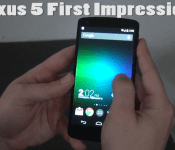
Nexus 5 First Impressions

The Nexus 5. Google’s new offspring flagship that came out, well…4 months ago, but I finally jumped the HTC ship. The ship I’ve been riding on since the Android adventure began. This seemed like the right choice to make with a new phone, because I would always inject those HTC phones with pure android. Never was a fan of Sense.
The Decision
Making the decision to walk away from the HTC One was no easy decision to make. The gorgeous piece of mobile technology that was deemed the best smartphone ever designed by many top tech sites, made me think I was making the wrong choice in going with a new phone. But I did it, and I am glad I did.
The Sexy
The appeal of the Nexus 5 for me was the fact that it was Android at its purest. Running the current version of KitKat with a 2.26 GHz quad-core Snapdragon 800 processor under its hood, I’ve never had a phone run this fast and silky smooth. Navigating through apps is without a hitch, and I think we have finally reached the level iPhones have (or had) when it comes to creamy smoothness.
The Design
The design of the Nexus 5 is something that made all of our mouths water when the first official press render hit the interwebs. I went with the Darth Vader version instead of the storm trooper, because the matte black just looks prettier in my eyes. The phone is made of plastic which is a step down from the HTC One’s metal body, but I actually considered that a good thing. When using my HTC One naked, it felt delicate, and it was, in a sense. I dropped the One off my desk one night and it landed right on my printer giving it a nice little scar in its butt. The fall wasn’t that drastic at all, yet as tough as the phone is built, you will see more battle scars than you will see on the Nexus 5. The weight of the Nexus 5 was another aspect I had to get used to, because at first, and coming off the One’s “good weight”, I feared maybe the phone would launch out of my hands when pulling out of my pocket. I got used to it right away though, and now when I hold it, it was like my hand was meant to hold it. That being said, talking on the phone felt comfortable when placed against my face.
The Display
The display is another downgrade from the One, and it is noticeable. Although the Nexus 5’s 445 ppi screen looks beautiful, the One’s 468 ppi display was noticeably sharper. The speakers of course bring another check in the win column for the HTC One, because that BoomSound is fantastic. Who needs a Bluetooth speaker when you have BoomSound? This was probably the main reason I was hesitant in breaking up with the One. At first, I did have a brain fart moment and thought, “there’s two speakers on this thing, sweet!” I immediately smacked myself in the head and knew there was only one. This is probably my biggest grievance when it comes to the Nexus 5 though, because the way I tend to hold my phone at times, I end up covering that speaker. Laying in bed with the phone standing up on my chest completely blocks the sound, so it has been quite an adjustment coming from two blaring front-facing speakers.
The Camera
Then we come to the camera, and I have heard many complaints about the 8 MP shooter. You won’t hear that from this guy, simply because a phone’s camera has never been my favorite attribute, so as long as it takes relatively quick, and sharp pictures, than I am happy Android camper. The Nexus 5 takes great pictures, as well as video when I do my random vlogs of me talking about absolute nonsense.
Conclusion
So was it a good choice to jump from the HTC One to the Nexus 5? I am going to say yes on that, because I needed to personally own a phone that wasn’t from the HTC factory. I needed to wash the stamp of HTC fanboy that had been branded on me by audience members and Android colleagues. I love the pure Android experience and it doesn’t get anymore pure than a Nexus device. Unless the HTC M8 really brings on the WOW factor, I can’t really see myself getting off this Nexus 5 magic carpet ride until we start hearing about the Nexus 6.
Tip: Call mom (or your wife) quicker with Google Search
Do you ever have trouble finding numbers in your address book? Why not just ask Google Now to place the call for you?
If you’re not in the know, today Google dropped a little tip that can help you save time while keeping in touch with loved ones or help when you have your hands full.
Instead of desperately searching your contact list for that number, use the new functionality in the Google search app to pull up the contact information. While on the home screen (if you have a Nexus 5 or are running the Google Experience Launcher) or are in Google Now, simply say “Ok Google, call mom.” You can also send a text the same way such as by saying, “Ok Google, text mom” or “Ok Google, text Marissa.”
One last thing, if you don’t have mom or your wife setup in your phone, Google Now will help you with that as well so it works the next time.
The post Tip: Call mom (or your wife) quicker with Google Search appeared first on AndroidGuys.

Check Out the ‘Evolution of Nexus Devices’ Inforgraphic

The Nexus line. What can we say about it? It is truly the core of the Android Community. Pure stock Android on a sleek, sexy designed phone, that top OEMs have a shot at creating. With rumors that the Nexus line ending in 2015, let’s look back at the 5 Nexus phones that have graced their presence to us.
The infographic below is a very detailed description of each Nexus phone, and then it ends with comparing each one of them when it comes to size and design. It is pretty great to se the evolution of the Nexus phone, and just like any Android enthusiast; you got to wonder what the next one will look like. Enjoy the infographic.
Source: Android Me


Daily Roundup: Rugby on an Oculus Rift, Sony sells its PC business, and more!

You might say the day is never really done in consumer technology news. Your workday, however, hopefully draws to a close at some point. This is the Daily Roundup on Engadget, a quick peek back at the top headlines for the past 24 hours — all handpicked by the editors here at the site. Click on through the break, and enjoy.

Experience Rugby with an Oculus Rift
Virtual reality may still be in its infancy, but its influence on entertainment is sure to grow. And to prove it, the UK mobile network O2 and English rugby team combined nine GoPro Hero 3s and an Oculus Rift for the ultimate immersive experience. Click on through for more.

A peek at Firefox’s adaptive homescreen
Mozilla’s trying its hand at a Firefox launcher / homescreen for Android that’s based on its mobile browser. Though it’s just a sneak peek for now, we know the software utilizes EverythingMe’s context-sensitive app search. Click through for details.

Sony sells its PC business
Sony announced it’s shifting focus toward post-PC products, and unfortunately, part of that decision means the company letting go of its VAIO business. Click through to read more about the sale.

Google Chromebox for meetings
Earlier today, Google made a play for corporate offices everywhere by unveiling Chromebox for meetings. The $999 bundle combines an ASUS-made Chromebox with an HD camera, microphone / tabletop speaker and keyboard-equipped remote. Follow the link for more about this Hangout-esque conferencing setup.
Filed under: Misc
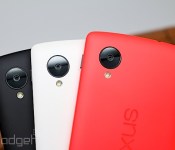
This is the red Nexus 5 (hands-on)

Valentine’s Day is coming up, and ’tis the season for special red versions of well-established phones to magically pop out of the woodwork. It seems to happen at least once or twice this time of year, and the first one to make an appearance this year is the Nexus 5. Just like its black and white counterparts, the collaboration between Google and LG is now available in the Play Store for $350 (16GB) and $400 (32GB) and comes with all of the same specs.
The red Nexus 5 showed up at the door, so we wanted to take the opportunity to snap a bunch of shots for those of you who may be on the fence about whether or not to buy one. Is it any better than the other colors? Not really, but it all comes down to personal preference. The red version has the same smooth matte finish as the white model (in contrast to the black model, which has a soft-touch plastic feel). As you can see, LG and Google opted for red sides and edges, as well as a red-earpiece to go along with it. As there is more to look at than to actually say about the new hue, head straight down to our gallery below, which offers a perspective from nearly every angle.
Filed under: Cellphones, Wireless, Mobile, Google, LG
Galaxy S5 at the Unpacked Event?! Red Nexus 5 Arrives in the Play Store! – The ManDroid Show

It’s Tuesday! Or…Wednesday! Yes, I am a little late getting the ManDroid Show up today, but it’s been one of those busy days. The Red Nexus 5 finally hit the Play Store for those of you that like a little variety in your life. Samsung annouced an Unpacked Event, so we may possibly see the Galaxy S5 there. The event should be live-streamed, so we will see. Enjoy the show!
News Topics
Red Nexus 5 arrives in the Play Store
Samsung Unpacked Event Episode 1
HTC M8 on-screen buttons
HTC evleaks rumors
Unknown Sony device with thin bezels
Red Nexus 5 officially in the Google Play Store
There have been more than enough rumors regarding the release of the Nexus 5 in bright red. Well, it’s officially official, beginning today in the Google Play Store.
There isn’t much more to say here. Just that there is a bright red color option for the Nexus 5. It’s the same price as the others, and the same storage options are available.
The only thing that gets me is that they chose a bright pink wallpaper to put on the bright red Nexus. Weird. But I guess that’s why I don’t work for Google.
Get the bright red Nexus 5 here!
The post Red Nexus 5 officially in the Google Play Store appeared first on AndroidGuys.
 AIVAnet