


Beoplay H5 Review: B&O’s Bluetooth Earbuds Sound Great, but They’re Pricey
With the controversial removal of the headphone jack from Apple’s upcoming iPhone range a seeming inevitability, audio companies are already ramping up Bluetooth headset options ahead of the devices’ launch in the fall.
In June, premium audio heavyweight brand Bose debuted a wireless version of its flagship over-the-ear headphones with the QuietComfort 35’s. Not to be outdone, last month Danish audio big hitter B&O entered the fray with its Beoplay H5 Bluetooth buds, a pair of high-end magnetized earphones designed “for music lovers who live to move.”
Design and Features
As with most products bearing the Bang & Olufsen moniker, the Beoplay H5 buds aren’t exactly cheap at $249, but apart from the luxury brand cachet that comes with them, they promise premium performance in a compact package whatever your lifestyle, designed to segue seamlessly between a fitness routine and a daily commute, for example.
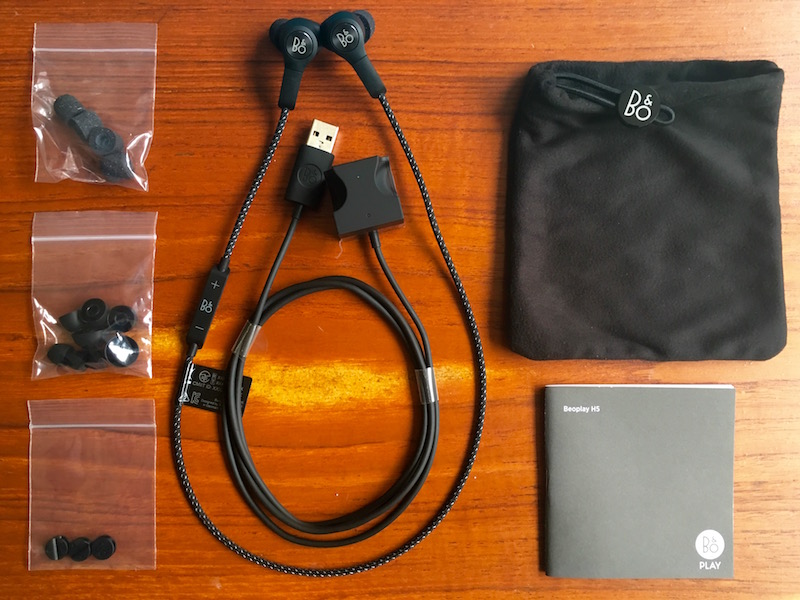
The dust and sweat-proof earpieces are made of a featherweight polymer-rubber compound with a branded aluminum disc on the rear, and each bud has a neck about an inch in length, with the power/pairing LED on one ear.
The buds are connected by a 52 cm (~20 in) cord sheathed in a soft braided textile that sits over the nape of your neck during wear, with an inline remote on the left-hand side and a hidden omnidirectional mic built in for taking calls.
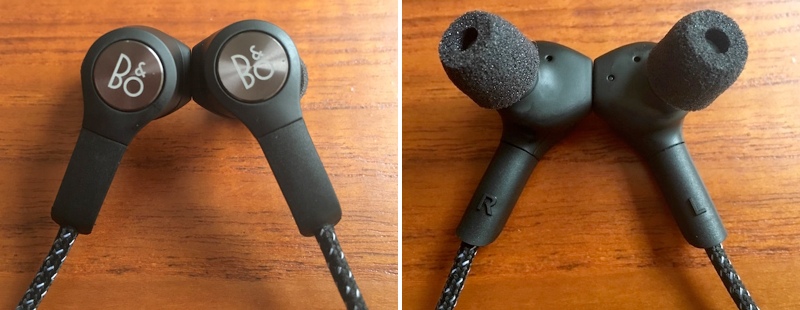
Each earpiece contains a magnet, so you can clasp them together securely for them to rest around your neck when they’re not in use. In another neat design feature, clicking the magnets together also auto-powers down the earphones to save battery.
Seven pairs of eartips come supplied – three sizes of Comply Sport memory foam tips offering a malleable seal, and four sizes of standard silicone molded tips.
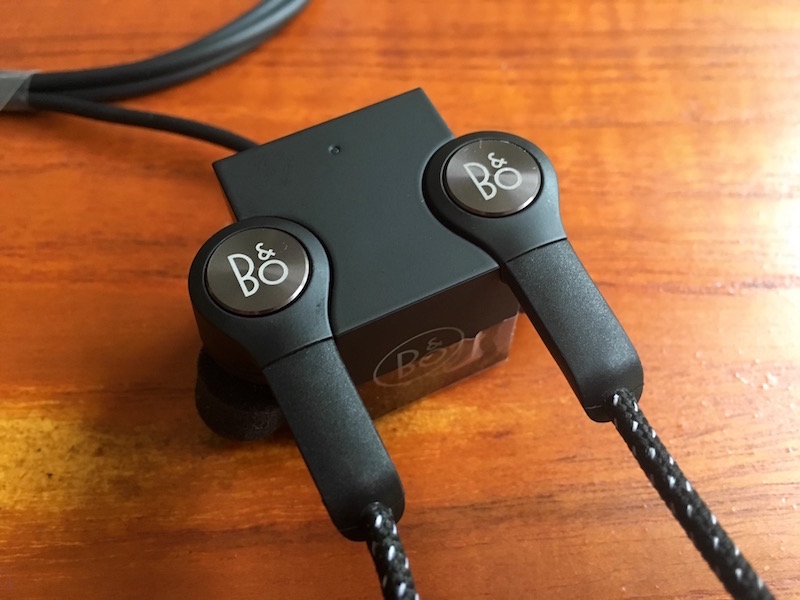
Also included in the box are cable clips, a carry pouch, a quickstart guide, and a unique magnetized “cubic charger” with two molded recesses that the earpieces snap into, with a cable running out the rear with a USB connector attached.
The earbuds connect to a source device using the latest version of Bluetooth (4.2) and support high-quality AAC and aptX codecs – only newer MacBooks, not iPhones, support the latter as of writing.

Audio output can be adjusted via the easy-to-use Beoplay iOS (or Apple Watch) app, which offers four presets for different activities (workout, commute, clear, podcast) and a ‘Tonetouch’ graphical equalizer to customize the sound further.
Once you’ve adjusted the output to your liking, you can save the audio profile directly to the earbuds, allowing you to set and forget. If you’re an Apple Watch wearer, you can choose between presets from your wrist, too.
Performance
Pairing the buds was a one-click affair of the power button on the inline remote, and the volume buttons proved to have the typical dual-functionality for moving between tracks, with the power/pair button also taking and ending calls.
Out of the box, the H5’s sound decent enough, offering a flat, natural reproduction and a close, friendly soundstage. Treble was a tad too crisp at times, but with a bit of adjustment via the accompanying app it was easily dealt with, and once I had a custom profile set, they really came into their own.
The controlled bass and clearly defined mid- and high-range detail of the H5’s serve rock, hip-hop, and instrumental genres extremely well, with jazz tracks reminding me of Vibe’s eminently balanced Brass Ba11 buds and their intimate, inclusive sound. As for the mic, it had no trouble picking my voice out over the din of a typical commute on public transport.
The earphones remained comfortable to wear, whether I was working out or casually listening to music, although the left earpiece had a habit of slowly loosening when I was on the move which broke the insulating seal and let sounds leak in from outside.

That got annoying after a while, so I switched to the Comply eartips and chose a larger left tip (I have odd-sized lugholes, apparently) which solved the problem.
I loaned the H5’s to a friend who complained that the left bud kept flying out of her ear during a high-intensity exercise routine due to the added weight of the inline remote, even after she swapped the tips for a bigger size. I couldn’t replicate the issue myself using the memory foam tips and the buds stayed securely in place whatever I was doing, but this should serve as a warning to potential buyers.
I was underwhelmed by the stated five-hour battery life of the H5’s (confirmed in my own tests) given that buds in Jaybird’s wireless range offer up to eight hours’ listening time, but in practice I only wore the H5’s two hours a day on average and it wasn’t a huge inconvenience to charge them for a couple of hours every other night – your mileage may vary.
Bottom Line
$250 earbuds will be a hard sell for many people. Personally I couldn’t justify it, but if you have the spare cash and are fond of luxury kit, then I suppose it’s not a deal breaker. Overall, the Beoplay H5 earphones are a lovingly designed, solid bit of kit. To be fair, it’s the least I’d expect at this hefty price, and happily they deliver.
The magnetized buds and auto-off feature are signature B&O design wins, as is the supplied charging cube – it’s just a shame the charge doesn’t last a few hours longer. I’d also advise to be careful not to lose the charger; it’s not like you’d be able to replace it with a standard micro-USB cable, as with some other wireless buds.
My only real design gripe was with the inline remote – its surface smoothness made it hard to find which was which volume control when out of my line of sight. After a while though, I became familiar with the layout and it became a non-issue.
Sonically the H5’s are rich, well-balanced, and pack a satisfying punch, and with some subtle audio profile manipulation you can easily adjust the output to your musical taste. Still, this is a significant investment, and for that reason I’d recommend you try the buds before you buy, even if that’s just to see if the tips play nice with your earholes. If they sound great and sit securely – and you can live with the middling battery life – then this luxury wireless headset could be an ideal match for your iPhone, headphone jack or no.
Pros
- Slick, comfy, considered design
- Plenty of supplied eartips to choose from
- Decent built-in mic and excellent audio output
- App presets that make a difference
Cons
- Battery life isn’t spectacular
- Inline remote mold unhelpfully smooth
- Achieving a secure eartip fit may be an issue for some
- Very expensive for earbuds

How to Buy
The Beoplay H5 earbuds cost $249, are available in black or dusty rose, and can be ordered on the B&O PLAY website.
Note: B&O PLAY provided the H5 earphones to MacRumors free of charge for the purposes of this review. No other compensation was received.
Tag: Bang & Olufsen
Discuss this article in our forums
Apple Acquires Machine Learning and AI Startup Turi
Apple recently purchased Seattle-based machine learning and artificial intelligence startup Turi, reports GeekWire. Apple is said to have paid around $200 million to acquire the company, which was known as “Dato” until earlier this month.
Turi is designed to help developers build apps with artificial intelligence capabilities that automatically scale. It has developed the Turi Machine Learning Platform, GraphLab Create, and Turi Predictive Services, used for functions like recommendations, fraud detection, sentiment analysis, and more.
Turi toolkits simplify development of machine learning models. Each incorporates automatic feature engineering, model selection, and machine learning visualizations specific to the application. There is no faster way to build performant models.
Citing people familiar with the acquisition, GeekWire says Turi employees will remain in the Seattle area, where Apple has been establishing a presence over the past few years.
Apple confirmed the acquisition with the standard purchase statement it gives to media outlets: “Apple buys smaller technology companies from time to time, and we generally do not discuss our purpose or plans.”
It is not known what Apple will do with Turi’s technology, but Apple has made several AI-related purchases in recent months including VocalIQ, Perceptio, and Emotient.
Tags: Apple acquisition, Turi
Discuss this article in our forums
Apple May Build $1 Billion Research and Development Center in Vietnam
Apple may be planning to build a research and development center in Vietnam, reports Vietnamese site BizLive. Work on the R&D center, which will be located in the Vietnamese central province of Da Nang, was uncovered following a local government meeting on foreign direct investment.
Da Nang, image via VnExpress
Rumors earlier this year suggested Apple would invest up to $1 billion to build an Asia-focused research and development center in Vietnam, designed to “enhance its competitiveness over major global electronic manufacturers present in the country.” Last October, Apple also established an Apple Vietnam LLC in Ho Chi Minh City, led by Gene Daniel Levoff, Apple’s VP of corporate law who is also in charge of international operations.
Companies like Microsoft, Intel, and Samsung have had investment projects in Vietnam for several years, but the R&D center will be Apple’s first major project in the country.
A final decision on whether the research center plans will move forward is expected in late August.
Discuss this article in our forums
Score a free Samsung phone from T-Mobile with the purchase of another on August 6
T-Mobile has announced that it will be running a promotion this Saturday, August 6, that will score you a free Samsung phone with the purchase of another. That’s right, if you purchase a Galaxy S7, Galaxy S7 edge, any of the Galaxy S6 line or a Galaxy Note 5 you can get another for free with the addition of a new line to the account. If you have a few lines that need upgrading, this is a great way to get more for your money.

The carrier detailed some of the rules of the promotion. They include:
- Get a free Samsung Galaxy superphone when you buy a Samsung Galaxy superphone with T-Mobile’s Equipment Installment Plan (EIP), and add a line of service
- Customers will be credited on their monthly bill over the 24-month EIP term for the full amount of the 2nd eligible device of equal or lesser value, after paying any down payment (they’ll be credited for that, too!)
- Qualifying devices: GS7, GS7 edge, GS6, GS6 edge, GS6 edge+, Note5
Remember, this deal is only good for Saturday, August 6, so don’t let the day pass by without taking advantage of it.
Alcatel Idol 4 with free VR goggles now available at Cricket for $200
AT&T’s no-contract subsidiary Cricket Wireless has started selling the Alcatel Idol 4 for $199.99. The phone comes bundled with free VR goggles.

The 5.2-inch Alcatel Idol 4 has Android 6.0 Marshmallow installed. Inside there’s a Qualcomm Snapdragon 617 processor, along with 16GB of internal storage and a 2,610 mAh battery. It also has a 13 megapixel rear camera and an 8 MP front facing camera, Owners can access VR content with the goggles via the phone’s Alcatel VR Store or from VR content pioneer Littlstar. The Alcatel Idol 4 is available with all of Cricket’s smartphone plans.
See at Cricket Wireless
Verizon is taking online orders for the HTC Desire 530
Verizon Wireless is the latest carrier in the U.S. to sell the HTC Desire 530. Orders are being taken at Verizon’s website and the phone will also be available in its retail stores starting on August 11.

Verizon states that it will offer a variety of prices and payment plans for the phone:
The HTC Desire 530 in Blue Lagoon is available for $6 a month for 24 months (0% APR; $144 full price). For a limited time, customers who activate a new line of service can purchase the Desire 530 on device payment for just $2 a month for 24 months (0% APR; $48 full price). Looking to upgrade? Get the Desire 530 on an existing line and, for a limited time, receive $50 off the $144 retail price when ordering online with device payment. If prepaid service better fits your lifestyle, get the Desire 530 in Stratus White for $99.99 with Verizon’s prepaid plans.
The Desire 530 was one of number of smartphones that were first revealed by HTC during the 2016 Mobile World Congress trade show in February. The 5-inch Desire 530 has an interesting “micro-splash” design for its case that is supposed to give each phone a completely unique pattern of dots. Inside there’s a Qualcomm Snapdragon 210 processor, 1.5GB of RAM, 16GB of onboard storage, an 8 megapixel rear camera and a 5 MP front facing camera. Audiophiles can experience the phone’s “BoomSound” enhancements.
Check out our hands-on impressions of the HTC Desire 530
See at Verizon
Get your bad guy on with these Suicide Squad themes!

‘Don’t forget: we’re the bad guys.’
We’ve featured themes for a lot of good guys, from Iron Man and Spider-Man to Batman and Superman to Deadpool — “I’m no hero!” Get out, Wade! — but it’s good to be bad sometimes, too! And while we all prepare to let our bad selves out attending a Suicide Squad screening, we can put some of that delicious badness on our home screen.
Harley Quinn Theme

Harley Quinn is bright, perky, and unbalanced, and so, too, is her theme! This theme is based around not one, but two icon packs, two custom KWGTs and a little Nova (or Action Launcher) magic. Here’s everything you’ll need:
- Harley Quinn wallpaper by sherill018
- Harley-tinted Material Music Komponent-based KWGT preset
- Twisted Harley Quinn time/date KWGT preset
- KWGT Pro ($3.50)
- UIcons blue (Free)
- UIcons red (Free), which should really be relabeled UIcons pink.
- File manager app such as Solid Explorer to move KWGT presets to Kustom/KWGT folder in device storage
- A home screen launcher that supports icon packs, individual custom icons, and re-sizeable home screen grids. The ability to recolor folders and drawers is a bonus, but not required. These instruction were written for Nova Launcher but the theme could easily be enacted on Action Launcher, Apex Launcher or dozens of other capable launchers out there.

Download Harley Quinn wallpaper by sherill018 from deviantart by long-pressing the image on mobile and selection Save image (right click image on desktop and Save image as…).
Long-press a blank space on your home screen and select Wallpapers. Pick image and navigate to your downloaded Harley Quinn wallpaper.
Position the wallpaper so that Harley is on the left side of the screen with the butt of her bat almost touching the edge of the screen and Set wallpaper.
In Nova Settings, open Look & feel, the set UIcons Blue as your Icon theme.
Go back to the main Nova Settings menu and open Folders.

Set Background to Pink (second row, second column). I like to keep the Transparency around 40%, but you can crank it up or down to your preference.
(Optional) In Nova Settings, open Desktop settings and set Page indicator color to either Pink (second row, second column) or Holo Blue (third row, third column).
(Optional) In Nova Settings, open App & widget drawers settings and set Background to Pink (second row, second column).

Return to the home screen and long-press the first shortcut in your dock and Edit it.
Tap the icon to edit it and select UIcons Red as the source for your new icon.
Find the corresponding icon for your shortcut. It should hopefully be at the top.
Confirm the change by selecting Done.
Repeat steps 7-10 on the third, fifth and if applicable seventh icons on your dock. For the app drawer shortcut scroll down in UIcons to SYSTEM icons and look for a skull under an X icon.

Harley Quinn Kustom Widgets

Download the Harley-tinted Material Music Komponent-based KWGT preset and Twisted Harley Quinn time/date KWGT preset and copy them into Kustom/widgets in your file manager. Note: if you don’t see the Kustom folder in your internal storage, it’ll show up once you install KWGT.
Long-press a blank space on your home screen and select Widgets. Add a 2×2 KWGT widget to the top right side of your home screen by pressing and dragging the widget into place from the widget list.
Tap your KWGT widget to configure it.
Swipe from the Installed KWGT presets page to Exported and select harley-clock-widget.
Save the widget using the floppy disk icon at the top of the screen.
Return to the home screen and resize your KWGT to your preferences.

Long-press a blank space on your home screen and select Widgets. Add a 4×1 KWGT widget to the bottom row your home screen by pressing and dragging the widget into place from the widget list, and stretch it to cover the bottom row or two of the screen.
Tap your KWGT widget to configure it.
Swipe from the Installed KWGT presets page to Exported and select harley-music-widget.
Save the widget using the floppy disk icon at the top of the screen.
Return to the home screen.
Deadshot theme

Deadshot’s theme is a straight-shooter, just like him. It’s got some simple icons and a simple KWGT that hides in Deadshot’s sights. Here’s what we need for it:
- Deadshot poster wallpaper
- Deadshot Clock KWGT preset
- Deadshot-tinted Material Music Komponent-based KWGT preset
- KWGT Pro ($3.50)
- Zwart – Black Icon Pack (Free)
- File manager app such as Solid Explorer to move KWGT preset to Kustom/KWGT folder in device storage
- A home screen launcher that supports icon packs, individual custom icons, and re-sizeable home screen grids. The ability to recolor folders and drawers is a bonus, but not required. These instruction were written for Nova Launcher but the theme could easily be enacted on Action Launcher, Apex Launcher or dozens of other capable launchers out there.

Download Deadshot poster wallpaper by long-pressing the image on mobile and selection Save image (right click image on desktop and Save image as…).
Long-press a blank space on your home screen and select Wallpapers. Pick image and navigate to your downloaded Deadshot wallpaper.
Zoom in and position the wallpaper to that #SuicideSquad fits across the top of the screen and the Deadshot tattoo taking up the center of the screen, then Set wallpaper.
In Nova Settings, open Look & feel, the set Zwarte as your Icon theme.

Return to the home screen. Long-press the app drawer shortcut in your dock and Edit it.
Tap the icon to edit it and select Zwart as the source for your new icon.
Head down to S for Sniper and tap the sniper scope icon.
Confirm the new icon by selecting Done.
Go back to the main Nova Settings menu and open Folders.
Set Background to a custom color by pressing the the three dot option in the fifth row fifth column of the color presets. Set the color to #90680800.

(Optional) In Nova Settings, open Desktop settings and set Page indicator color to a custom color by pressing the the three dot option in the fifth row fifth column of the color presets. Set the color to #680800.
(Optional) In Nova Settings, open App & widget drawers settings and set Background to a custom color by pressing the the three dot option in the fifth row fifth column of the color presets. Set the color to #90680800.

Deadshot Kustom Widgets

Download the Deadshot-tinted Material Music Komponent-based KWGT preset and and Deadshot Clock KWGT preset and copy them into Kustom/widgets in your file manager. Note: if you don’t see the Kustom folder in your internal storage, it’ll show up once you install KWGT.
Long-press a blank space on your home screen and select Widgets. Add a 4×2 KWGT widget to the bottom row your home screen by pressing and dragging the widget into place from the widget list, and stretch it to cover the bottom row or two of the screen.
Tap your KWGT widget to configure it.
Swipe from the Installed KWGT presets page to Exported and select deadshot-music-widget.
Save the widget using the floppy disk icon at the top of the screen.
Return to the home screen.

Long-press a blank space on your home screen and select Widgets. Add a 1×1 KWGT widget right on top of the sights on Deadshot’s forehead by pressing and dragging the widget into place from the widget list.
Tap your KWGT widget to configure it.
Swipe from the Installed KWGT presets page to Exported and select deadshot-clock-widget.
Save the widget using the floppy disk icon at the top of the screen.
Return to the home screen. If you need to re-position the date and time to better line up with the crosshairs, tap the widget to edit it, then tap either the time or date item and edit its Position. Remember to always Save before exiting the Kustom editor.
Best cases for Moto Z Force

What are the best cases you can get today for the Moto Z Force Droid Edition?
The Moto Z Force Droid Edition was just recently released, but that’s not going to stop you from getting a case that’s perfect for your new phone. And it needs a case; the Moto Z Force is less than 7mm thick and it’s on the slippery side. A good case, paired with the Moto ShatterShield that’s exclusive to the Moto Z Force, will keep your phone safe and ding-free for a long time. We’ll update our list once the phone’s been in your hands for a little while, but for now, we have some excellent contenders for best cases.
- Moto Style Shell
- PLESON ultra slim crystal clear case
- LK ultra scratch resistant protective case
- Cimo shockproof heavy duty case
- LK luxury wallet flip case
Moto Style Shell

The Moto Style Shell is a magnetic attachment, just like the Moto Mods, that snaps onto the back of your Moto Z Force. They’re an easy add-on to your pre-order and they range in price from roughly $20 to $25.
These shells come in fabric, wood, and leather options that add a little extra texture to the back of your phone, and they offer some protection for the raised camera edges. They also help to keep fingerprints and other gunk off of your nice new hardware, and dissipate the heat that has been known to radiate from the back of the Moto Z Force.
The downfall of the Moto Style Shell is that none of the shells wrap around the edges of the phone, they only protect the back. The ShatterShield will do its part to protect the Moto Z Force from drops and bumps, but you may want some extra protection for the rest of the body. Nonetheless, these shells do offer a unique look for your Moto Z Force and won’t add any bulk to the slim frame.
See at Motorola
PLESON ultra slim crystal clear case

To show off the hardware of your Moto Z Force, a clear case is the perfect choice. This is especially true if you decided to go for the white and fine gold or black and rose gold combinations that are just too beautiful to hide.
The PLESON ultra slim crystal clear case is ideal for keeping the phone’s slim profile while adding on some grip and drop protection. The soft TPU bumper offers raised edges and corner protection to keep the screen and camera extra safe when you’re having a busy day or a clumsy moment, and the precise cutouts don’t sacrifice ports or button usage.
The clear case from PLESON is also anti-watermark and anti-fingerprint so you won’t get that foggy, muddied look on your case over time.
See at Amazon
LK ultra scratch resistant protective case

Add a touch of something formal or fanciful to your Moto Z Force with a scratch resistant case from LK. The five color varieties are on the inexpensive side; grab more than one and have a case that matches every occasion! The solid black version pictured here goes with everything.
The smooth, flexible TPU case easily snaps on and off when you’re looking to pop on one of the Moto Mods. The button covers (rather than cutouts) are responsive and provide some extra protection against daily dust and dirt. The non-slip TPU won’t let your phone go sliding off of an uneven surface, either.
LK’s protective case also resists stains and marks that are bound to happen during your day or night, so it’ll last you for as long as you need it.
See at Amazon
Cimo shockproof heavy duty case

Planning on being a little hard on your brand new Moto Z Force? Whether it’s a rough commute or you just plan on being outdoorsy and unpredictable, the Cimo shockproof heavy duty case should be in your case repertoire.
The dual layer shock and drop protection is paired with a textured back surface that provides lots of extra grip without adding a ton of weight and bulk to the phone; just enough for some added padding. Unlike a lot of cases, Cimo’s offers a cutout for the back speakers so sound won’t be compromised a bit during those spontaneous dance parties you’re always throwing (or is that just us?). The raised bezels front and back protect the screen and the camera to boot.
For a more rugged and sporty look for your Moto Z Force, Cimo is a great pick. You can also grab it in seven different colors, like the armor gray pictured here.
See at Amazon
LK luxury wallet flip case

You usually grab your phone and your wallet when you head out the door, right? Get a case for your Moto Z Force that carries the phone, some cash, and three credit cards with the LK luxury wallet flip case. The synthetic leather comes in five colors, from the sleek and subtle black to the vibrant sky blue pictured here. The magnetic closure is secure and the TPU inner shell is shock resistant, covering the edges and corners of the Moto Z Force.
LK’s wallet case also folds into a sturdy kickstand for hands-free operating. You’ll still have access to all the buttons and ports, including your camera, without removing your phone.
See at Amazon
Which one’s for you?
Which case do you have ready and waiting for your new Moto Z Force? Shout it out in the comments below.
Moto Z and Moto Z Force
- Our Moto Z review!
- Moto Z specs
- Moto Mods custom backs
- Moto Z and Moto Z Force will be Verizon exclusives until the fall of 2016
- The latest Moto Z news
- Discuss in our Moto Z forums
Motorola
Verizon
Best replacement bands for Samsung Gear S2

Which are the best replacement bands for the Gear S2?
When it comes to smartwatches, the Samsung Gear S2 stands out as a fantastic device, even if it isn’t Android Wear. One of it’s biggest pulls is that it’s a fairly small, and stylish computer for your wrist. What if you aren’t a big fan of the watch bands that come with it, or if those bands break?
Thankfully, there are options if you need to replace your Gear S2’s watch bands. While you could take a waltz through the internet to search them out, we’ve put together the best watch band replacements for your Gear S2. Just keep scrolling to check them out.
- Samsung
- V-MORO
- Skylet
- Getwow
- Moretek
- MoKo
- Tevies
- FanTEK
- Henoda
Samsung watch bands

When looking for a replacement Gear S2 band, your first option is to go right through Samsung.
The company has seven different bands that are available for purchase through their website, from leather to stylized plastic, ranging from $39.99 to $59.99. Samsung has also partnered with Atelier Mendini on some unique patterns that are certain to turn heads.
See at Samsung
V-MORO watch bands

If you’re a fan of giving your technology a bit of personal flair, then the V-MORO watch bands should certainly pique your interest. There are over a dozen different bands available, from multiple colors, floral patterns, leather, and even solid stainless steel links.
Depending on the style, these bands are available from $49.99 to $59.99, but you can often find them on sale for a good deal.
See at Amazon
Skylet watch bands

For another dash of personality, Skylet watch bands for the Gear S2 may catch your eye. Each silicon band has its own pattern, from the Fleur de Lis to a rainbow of colors. They’re affordable as well, starting at just $15.
There are currently 24 different bands that you can choose between and each one can add some serious personality to your Gear S2.
See at Amazon
Getwow watch bands

Another great place to look is at the watch bands from Getwow. These rubber watchbands are each unique in their design. Though you won’t find anything particularly flashy in these rubber options, they do sport a number of different patterns.
Each one can be bought for around $40, with bright colors that are sure to catch the eye.
See at Amazon
Moretek watch bands

If you want a watch band that will work well for fitness, or keep you from having a sweaty wrist under the rubber, the Moretek bands might do the trick.
There are four color combinations that you’ll be able to choose from, and each sports a design with cutouts throughout the band, and a two-tone color scheme. These watch bands are available for around $40.
See at Amazon
MoKo watch bands

If you want to avoid clasps, the MoKo band for Gear S2 is a magnetic option that adheres to itself. This means that if you have a wrist larger, or smaller, than the norm you don’t have to worry about it not fitting correctly.
You can pick one up for around $35.
See at Amazon
Tevies watch band

Sometimes when you really want to make a statement with your watch band. If that’s the case then check out these steel link watch bands from Tevies.
There are ten different bands currently available in an array of colors to pick from. A steel watch band doesn’t have to break the bank either; these ones start at around $20.
See at Amazon
FanTEK watch bands

Not everybody can afford to shell out $30 or $40 for a new watch band. Thankfully, FanTEK comes through with affordable watch bands that sport muted designs. Unlike the bright designs on many other watch bands, you’ll find dark colors and simple designs that draw your eye to the Gear S2 without being overwhelming.
Even if you’re not on a budget, the $7.88 price tag is a sweet deal.
See at Amazon
Henoda

Not everybody is looking for a flashy design, or really a design at all, for their watch bands. If all you’re looking for is a watch band with a splash of color, check out the Henoda watch bands.
Available for around $50 these silicon replacement bands come in a solid color. You can choose from one of ten colors to make your smartwatch pop without looking audacious.
See at Amazon
How to replace your Gear S2 watch band
Once you get your Gear S2 replacement band, it’s easy to change it out. Just follow along with our how-to video!
What caught your eye?
These are just 9 of the watch bands for the Samsung Gear S2 that caught our eye. There are hundreds more available online in places like Amazon. Did any of these watch bands have you making grabby hands? Let us know about it in the comments below!
Amazon makes it easier to build audio adventure games for the Echo
If you grew up in the early age of computing, you likely encountered text-based adventure games. That ancient form of gaming got a new lease on life thanks to the Amazon Echo — you can play some audio-based adventure games (including a Batman one) in which you talk to the Echo to move forward in the narrative. Amazon is now making it easier for developers to build more interactive audio games by releasing a tool that lets you graphically design audio adventures for the Echo.
The tool provides a graphical interface to let you map out the various decision trees and narratives that you’ll need in making such a game work with the Echo; it also contains a handful of templates to make it easier to get started. Those templates work for trivia games or ones with a decision tree, and you should be able to just plug in questions and edit the sample to get a simple game going without much fuss.
Amazon’s blog post has plenty of more in-depth detail for interested developers. While these types of games are probably never going to be a major use case for Echo, Amazon has clearly shown over the last year or so that it wants to add a huge variety of features to capture the attention of buyers — this one might do the trick if you want to distract your kids for a few minutes here and there.
Source: Amazon

