


How to format the microSD card in the Galaxy Note 7

The SD card slot is back with the Galaxy Note 7 — now here’s how you get started when you first pop it in.
microSD cards are hardly new to Samsung phones, but after the feature was removed in Note 5 we wouldn’t blame you if you’d forgotten the basics of using one in your phone. But Samsung has changed the software a bit in the Galaxy Note 7 as well, hiding a few basic features — chief among them being the ability to format the SD card after you insert it.
Want to know how to get it done? We have the steps right here.
How to format your Note 7’s SD card
Open your phone’s Settings.
Tap on Device maintenance.
Tap on Storage at the bottom of the screen.
Tap the Menu button in the top-right corner.
Tap Storage settings.
Tap on SD card in the middle of the screen.
Tap Format and confirm by tapping Format again.


Formatting your SD card is important if you’ve ever used the card in a different device for an extended period, as it cleans out the card and makes sure that the Note 7 is starting with a clean slate. It can also be useful if you’ve filled up your SD card and would like to start fresh — just remember that there isn’t going to be an automatic backup or recovery mechanism, so if you format your SD card, consider all of its data to be lost.
Samsung Galaxy Note 7
- Samsung Galaxy Note 7 review
- The latest Galaxy Note 7 news!
- Here are all four Note 7 colors
- Complete Galaxy Note 7 specs
- Join the Note 7 discussion in the forums!
Verizon
AT&T
T-Mobile
Sprint
What would you change about Android Auto?

Android Auto is a much better experience than most in-car infotainment systems — but could it be made better?
With Android Auto, Google was able to safely bring your favorite Android experiences into the car, but it came with a number of sacrifices. From weird compatibility issues to limited voice navigation while driving, using Android Auto can be equally as frustrating as it is awesome. Google has done a great job of bringing Android’s core interface tenets to the dash, but there are some areas that could be changed.
So here’s the big question: Is there anything that annoys you daily, or something that you wish the system would do a bit better?
Here’s our list:
- Get rid of the touch limits
- Allow some customization of the “home screen”, with the ability to add widgets
- Fix weird compatibility issues that prevent some phones from working
- More navigation options, like Waze, for those who don’t rely only on Google Maps
- More third-party head unit options
- Ability to connect wirelessly
- Multi-window view, so you can have maps and a music player or app of choice open at the same time
Since its release, Android Auto has not changed very much, but Google could do some innovative things here to take it to the next level. We’ve seen more app developers take advantage of the platform and make their apps compatible with it, and hopefully that continues. What are some of the things that you wish you could change about Android Auto? Let us know what you think in the comments.
More: Participate in the Android Auto forums
All About Android Auto
- Getting started with Android Auto
- List of compatible phones and cars
- Android Auto news
- Apps that work with Android Auto
- Join the Android Auto discussion!
PowerEgg is a £1290 drone offering gesture controls
PowerVision has officially launched PowerEgg, a rethinking of consumer drones, offering a dramatically different design, along with some innovative features.
The PowerEgg itself has a design that explains the name, with the legs and arms folding to the egg-shaped form for storage, giving a refreshing alternative to the squared design that’s so common.
However PowerVision isn’t only showing off a clever design, it’s also aiming to deliver a consumer-friendly experience, offering gesture control.
The idea is to allow one-handed control to position the drone, allowing up, down, left, right and near and far movements. The PowerEgg has an optical positioning system allowing for indoor flight, using ultrasonic sensors to detect the ground.
Flight time is said to be 23 minutes.
There’s a stabilised 4K camera included, on a three-axis gimbal, allowing photo and video, with support for live video streaming up to 5km.
There are a range of flight modes to aid capture of the photos and video you want, so you can have the drone follow you, take selfies, orbit and so on.
The PowerVision PowerEgg is now on pre-order over at https://store.powervision.me, with delivery expected in October 2016.
PlayStation Now comes to Windows PC, with wireless DualShock adapter in support
PlayStation Now, the service that will let you play PS3 games on other devices, has made a big move to Windows PC, meaning you can play games like Uncharted and The Last of Us on your computer.
PlayStation Now offers over 400 titles to subscribers for a price of £12.99/$19.99 a month, with unlimited playtime on other older titles. The new Windows PC app makes it possible to play these PlayStation exclusives.
Supporting the move to PC, you can now buy a DualShock 4 wireless adapter to give you a link to your computer (you can use a USB cable if you prefer). That means you’ll be able to get all those PlayStation controls on your PC.
The adapter will also work with Mac, so you can use the DualShock controller for PS4 Remote Play and it will cost you $24.99.
The recommended minimum specs for PS Now on your PC are as follows: Windows 7 or higher, 3.5GHz Intel Core i3, 3.8GHz AMD A10 or faster, 300MB storage, 2GB RAM, sound card and USB connection.
The minimum recommended 5Mbps broadband connection remains the same as it was before.
The PS Now app for Windows PC launches in UK, Belgium and the Netherlands on 24 August, followed by North America soon after.
LG V20 design possibly revealed by case manufacturer
The timeline of a device leak follows a predictable path. In the case of LG, it’s no secret that the V20 is coming: there have been invites to a launch event, a few early details about the sound quality and the fact it will run Android Nougat.
When it come to design though, we’re often at the mercy of either leaks, or case manufacturers. Some device designers release details of their devices to accessory manufacturers so that the accessories can be designed and made, and, most likely, leaked through an online store.
It’s perhaps in the accessory manufacturers interest to leak such things, as it garners attention from the wider media, exposing the brand as enthusiast fish for details on new devices.
That brings us back to the LG V20. These cases from Petra purport to show the forthcoming V20 and the rendered device within the company’s cases bear a passing resemblance to that revealed by @OnLeaks and Android Authority.
It might be that they come from the same source, it could easily be that this case company has used the details revealed in that previous render to give an idea of what the phone will look like.
There are two apertures on the front of the handset.: this could be two front-facing cameras as found on the V10. There are also two cameras on the rear, and we suspect a pairing like the G5.
There’s also a question over modularity on the V20. Will it follow the design of the G5 and offer connections to modular accessories? There’s button on the lower right-hand side that could do that: equally, it could be dedicated camera button.
We’ll know more on 6 September, when the LG V20 is due to launch at a New York event.
- Want to follow the full story of the LG V20? We’ve been tracking the rumours, leaks and all the official announcements right here.
- LG V20 is the first confirmed Android 7.0 Nougat phone, coming in September
Explore indie puzzler ‘The Witness’ on Xbox One in September
“Ideally we want the game to be in as many places as we can get it, but since we are a small developer and it’s a complicated game, we can only do so much at once.” That’s The Witness developer Jonathan Blow describing to us his desire for the indie puzzler to be available on more than just PlayStation 4. All the way back in February 2013. Now those dreams are coming to fruition as The Witness will make its way to Xbox One on September 13th — two and a half years after that interview with my coworker Jessica Conditt and six months after its debut on PS4 and PC. In a post on Xbox Wire, Blow lays out what new players should do when they get their hands on it.
Basically, if you get stuck on a puzzle, don’t look up solutions on YouTube or from a text-based walk through. Instead, explore another part of the island and you might find the solution while you’re at it. If you’ve avoided the game’s spoilers since January, it shouldn’t be too hard to resist the urge for a few more weeks, should it?
Source: Xbox Wire
Google Drive for Android now creates file and folder shortcuts
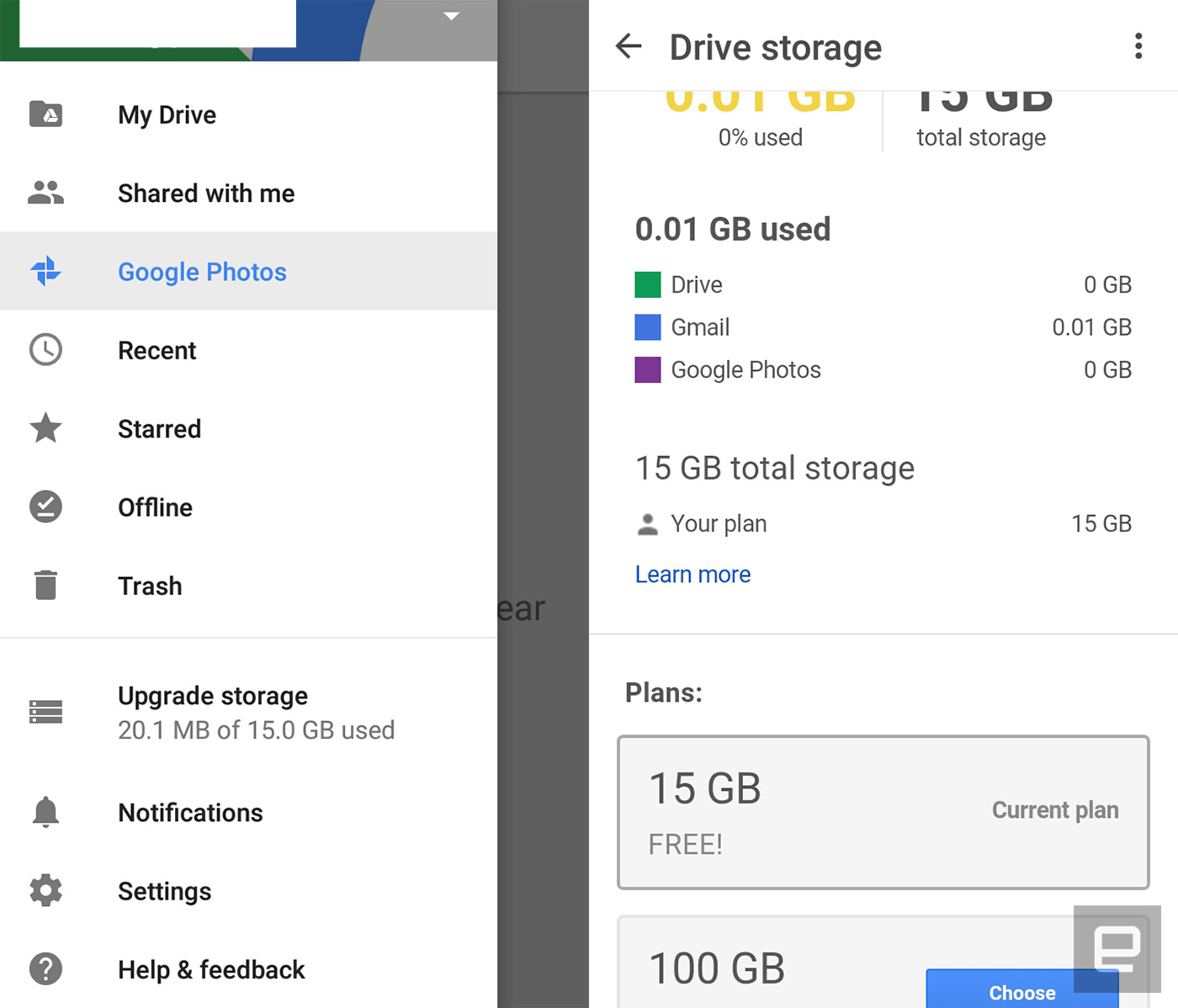
Google’s latest Drive update makes it easy to access your favorite files on Android. It adds the ability to add file and folder shortcuts to your homescreen, so you don’t need to launch the app every time there’s something in there you want to open. You can do that by going to your device’s Shortcuts menu and choosing Drive shortcuts, which could be next to the Drive scan and toolbar options. That might sound minor, but it could help you become more productive if you use the app as your primary cloud storage.
Besides the ability to add shortcuts, the latest version also adds an “Upgrade storage” option in its menu drawer. It shows your current plan and makes it a cinch to upgrade if you need more space. While the update comes a couple of small but useful features, it also serves as the bearer of bad news if you’re stuck on Android Ice Cream Sandwich. This is the last ICS-supported update, which means you won’t be getting any more new features after these.

Via: 9to5google
Source: Google Drive
Amazon now offers unlimited cloud storage for £55 per year
One of the benefits of being an Amazon Prime member is unlimited cloud storage for photos, as well as 5GB of space for other file types. If you own any of the retailer’s Fire devices, too, you get unlimited storage for photos taken with that product, as well as 5 gigs for whatever else. Amazon’s latest offer is altogether more simple: For £55 per year, you can get unlimited cloud storage, full stop.
Amazon Drive’s unlimited plan first launched in the US last year, not long before iOS and Android apps arrived to make the service a serious competitor to the likes of Dropbox, Google Drive, Box and others. It’s also accessible through browsers and dedicated Mac/PC programs. There’s no Prime favouritism here — anyone with an Amazon account can sign up for the £55 yearly unlimited plan, and most will be able take advantage of a three-month free trial to get themselves settled in.
Source: Amazon
Thunderbolt Device Promises Desktop-Class GPU Performance For MacBooks
A Kickstarter project for a high-performance desktop GPU that can plug into a MacBook via Thunderbolt and is compatible with the Oculus Rift VR headset has raised its backing target of $50,000 in less than 24 hours.
The Wolfe is a portable box that contains an Nvidia desktop-class graphics card and connects to a MacBook or other laptop via Thunderbolt 2 (or potentially Thunderbolt 3), and promises vastly improved performance for gaming, virtual reality, graphic design, and video editing.
The team behind the Wolfe claims owners of newer laptops can expect performance increases up to 500 percent when using a Wolfe box, or up to 1000 percent with the Wolfe Pro, while older computers are said to see even more dramatic performance gains.
- The Wolfe contains an NVIDIA GTX 950 GPU – 768 cores operating at 1024MHz, for a peak compute power of 1.57 TeraFLOPS.
- The Wolfe Pro runs on an NVIDIA GTX 970 GPU – 1664 cores operating at 1050MHz, for a peak compute power of 3.49 TeraFLOPS.
What about NVIDIA’s 10-series GPUs? As of right now, The Wolfe Pro includes an NVIDIA GTX 970. However, it’s more than likely that Wolfe Pro level backers will be able to opt for the new GTX 1060 in our post-campaign survey for even better performance.
The box runs off a 220W PSU and has three DisplayPort 1.2 connections, one HDMI 2.0 and one DVI-I port. The Thunderbolt connection also offers the potential for more than one Wolfe box to be used with one laptop, for building a render farm or for a multi-monitor setup, say the makers.
Kickstarter early-bird pledges of $399 or more get backers a Wolfe box powered by a GTX 950 with the option of Thunderbolt 2 or 3 connectivity, while a standard pledge costs $449. An early-bird pledge for the Wolfe Pro is $549 ($599 for a standard pledge). A Wolfe DIY pack for modders who want to use their own GPU costs $269.
The makers note that while the Wolfe will increase laptop display performance, the best results are expected to come with using an external monitor or VR headset, due to the inherent bandwidth restrictions in Thunderbolt 2.
The project was conceived by a group of Harvard computer science graduates and Mac-owning gaming enthusiasts, after they hacked together a prototype GPU box in a DeWolfe dorm room at Harvard.
The team has continued to improve the hardware and software at the Harvard Innovation Lab, with the aim of making Macs “performance powerhouses” and “to stop big companies from charging outrageous prices for minuscule upgrades” by letting users take control of their computer’s performance. The Kickstarter project page quotes a shipping aim of February 2017.
The project comes five months after Oculus Rift founder Palmer Luckey suggested VR headset support for the Mac was “up to Apple,” and that the company needed to “prioritize higher-end GPUs.” If Apple builds a machine that can handle the hardware, Oculus VR would “love to support Mac,” said Luckey.
Tags: Kickstarter, Wolfe
Discuss this article in our forums
Photo Editing App ‘Prisma’ Now Supports Offline Picture Processing
Popular photo manipulation app Prisma has been updated to allow offline processing of images for the first time.
The photo app recreates images in the style of famous artists and gives shots a painterly aesthetic using neural networks, but up until now users needed an internet connection and had to wait for the app’s Moscow-based servers to process their pictures.
The latest update doesn’t bring offline mode to the whole collection of Prisma’s filters, but the developers say more is to come on that front, and the change means server-side video manipulation is just around the corner.
“Now that we’ve implemented neural networks right to the smartphones, we have enough server capacity to run full videos on them in the near future,” said the Prisma team.
Prisma Labs says “repainting” times have been reduced to five seconds on Apple’s latest iPhones and that there should be no increase in handset battery usage.
Prisma is a free download on the App Store for iPhone and iPad. [Direct Link]
Discuss this article in our forums

