


How to opt out of WhatsApp sharing your information with Facebook

How do I stop WhatsApp from sharing my information with Facebook? There are two ways!
In 2014, Facebook bought WhatsApp for a whopping $21.8 billion. WhatsApp users everywhere went, “Oh, no. This can’t be good.” That feeling has finally come to fruition in that WhatsApp will now start sharing your information with Facebook – including your phone number.
If you don’t want Facebook getting ahold of your WhatsApp info, you can opt out in one of two ways.
Here’s how!
Note: If you have already agreed to the terms of service, you have 30 days to use the second method below to opt out.
How to opt out of sharing your WhatsApp information with Facebook in the WhatsApp terms of service
When WhatsApp updates, you’ll have to agree to its terms of service all over again, but before you tap agree, you can read more and opt out of sharing your information.
Launch WhatsApp from your home screen or the app drawer.
Tap the upward arrow in the bottom right corner to read more.
Tap the checkbox to opt out of sharing your information with Facebook.

If you go looking for the Share my account data option in your settings afterward, it won’t be there, since you’ve already opted out.
How to opt out of sharing your WhatsApp information with Facebook if you’ve already agreed to the new terms of service
If you’ve already tapped “Agree”, you can still opt out:
Launch WhatsApp from your home screen or the app drawer.
Tap the more button in the top right corner. It looks like three vertical dots.
Tap Settings.

Tap Account.
Tap the checkbox next to Share my account info.

Now you’re opted out and Facebook isn’t getting your phone number, and won’t share any information with its parent company to influence the ads you see.
Questions?
Let us know in the comments below!
Reigns: a beginner’s guide
Rule over your kingdom for as long as you can in Reigns.
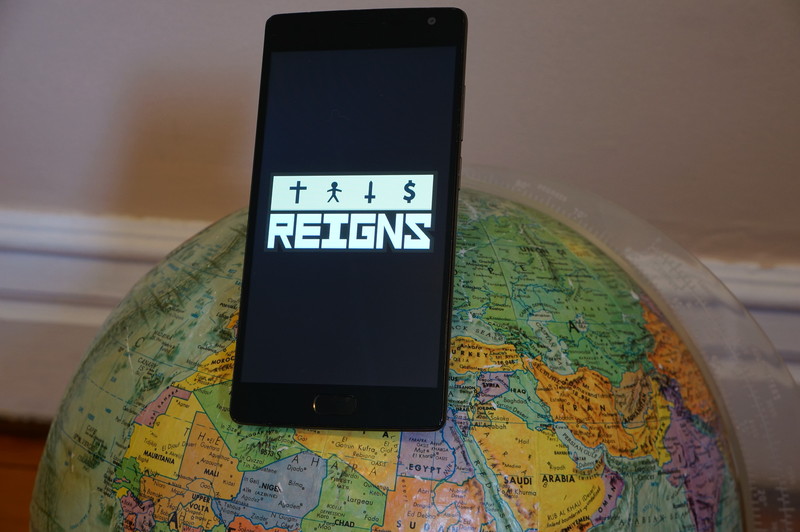
If you’ve never heard of the game Reigns before, allow us to introduce you to one of the most popular games of the year. Available for $2.99 in the Google Play Store, Reigns is a game that will likely have you playing for not only for hours on end, but over years and generations — more on that in a bit.
The game is formatted sort of like those Choose Your Own Adventure books you probably remember from your childhood. Load up the game and you’re instantly thrown in. You start out as a young king taking control of his kingdom in the first year of his reign. Advisors, citizens and animals appear as cards, coming to you with issues and questions that require a ruling — swipe right for yes, swipe left for no.
But choose wisely, because your decisions will affect one of four aspects of your kingdom: the church, the people, the army or the treasury. They are tracked with meters at the top of the screen, and your goal as king is to ensure no meter becomes entirely empty or full — allow that to happen and your fate is sealed.
It may sound complicated, but it’s really not. Your goal is simply to keep things balanced and reign over your land for as long as possible. If — or rather when — you die, the game doesn’t end. Instead, you simply take on the role of your successor and take over where the last king left things. But remember, everything is occurring on a linear timeline. Every decision you make is logged by the game, and may well come back affect your fate down the line, so choose wisely.
If we’ve convinced you already to check out the game, great! Hit up the Google Play Store and get your hands on this game while avoiding any of the spoilers to follow. If you still need some convincing before dropping money on the game, or have some questions regarding the gameplay mechanics, we’ve broken out this handy guide to maximize the length of your reign.
- A guided tour through your first reign as King
- How to duel
- Completing objectives
- Effect cards
- Mistakes will be made
A guided tour through your first reign as King
To explain Reigns’ gameplay mechanics, which is sort of a meshing between Choose Your Own Adventure storytelling and Tinder-style controls, there’s no better way than to simply showing a progression through the very first reign, as King Edward the Young. I’ll be including commentary along the way to explain my rationale.
Spoilers ahead: No matter how early the content I’m showing you is in the overall arc of the game, if you want the full, going-in-blind experience (highly recommended), stop reading now and just buy this game from the Play Store. It’s absolutely worth it.
Still reading? Let’s go!
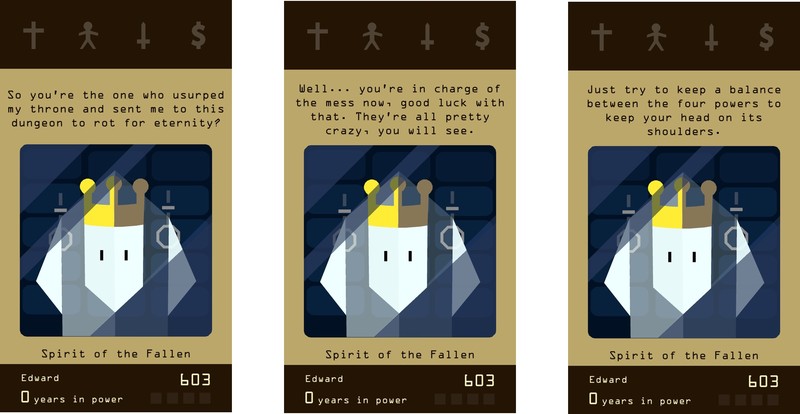
The game opens with you speaking to the “Spirit of the Fallen” who accuses you of usurping his throne. He gives you a heads up about keeping the four powers (marked with the cross, stick figure, sword and dollar sign) balanced to survive. Again, you simply swipe to the right or left to move on to the next card.
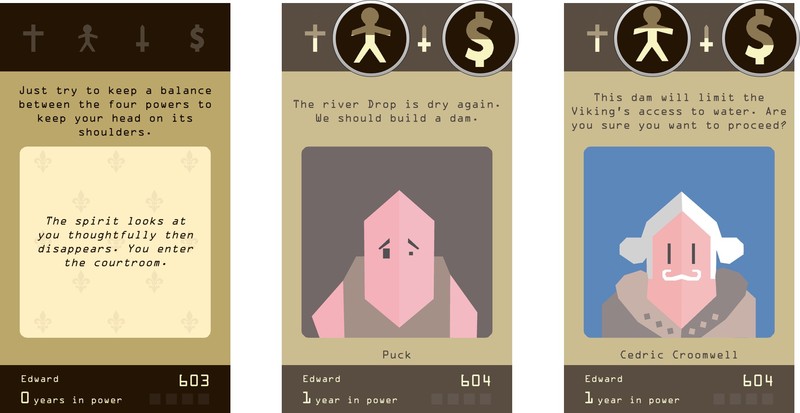
So, when I first started playing Reigns, I figured I’d try and be a nice king to my people. When my first card introduced me to Puck the peasant telling me we needed to build a dam, I figured “that’s a no brainer” and just went ahead and had it built.
Note the callouts on the screens above. In my haste, I didn’t even bother to see how that decision might affect the kingdom’s power balance. The people’s power went up a bit, but the treasury went down as well, given I had spent the royal family’s wealth. This early on in a king’s reign, one hasty decision won’t have too major an impact on how things play out. But as you progress through different reigns, things do tend to add up or disappear quite quickly if you’re not smart.
What’s more, the very next card called into question the decision I had just made! And we’re just getting started, folks!
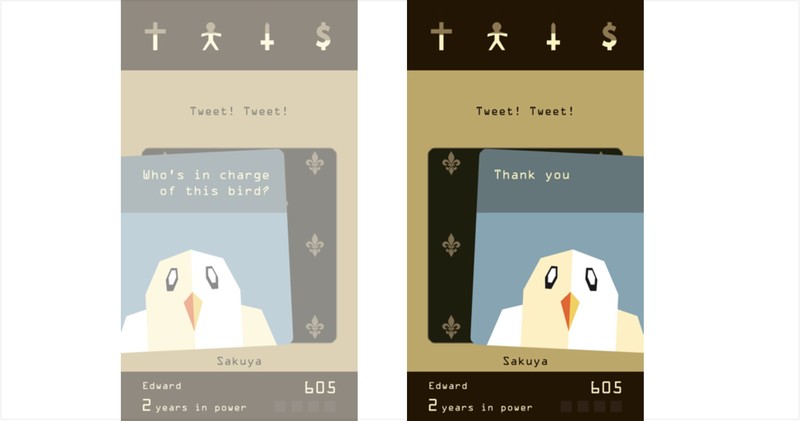
“Tweet! Tweet!”
So, the next visitor was… a bird. Not knowing what to make of this, and not seeing any markings above any of the power balances (more on that shortly), I decided to opt with politeness. Again, as you’ll discover, this game loves to delves into absurd, or go off on delightfully Non Sequitur tangents.
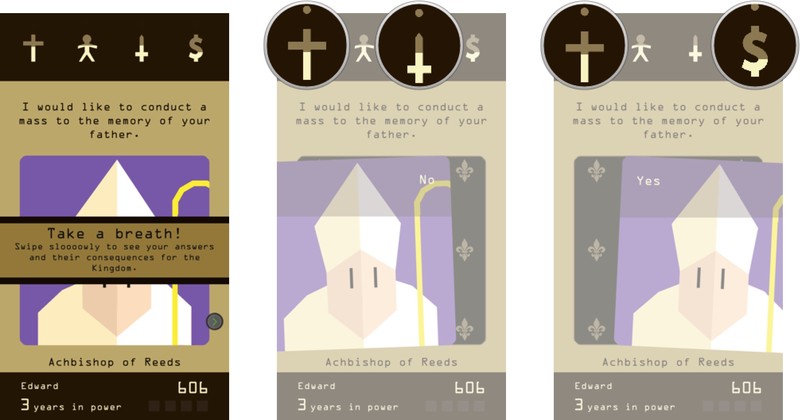
After slowing down and seeing what the options were for responding to the bird, the game does remind you to take your time and swipe slow to read both responses and see the consequences of your decisions on the kingdom.
Next up, the “Achbishop (sic) of Reeds” asked if he could conduct a mass to the memory of my father. Having not known who exactly my father was in this context, and also noticing that saying ‘No’ would have an effect on the church and military — you’re almost never outright told whether it will be positive or negative — while saying yes would have an effect on the church and the treasury, signified in the call outs above by the dot above each signal. I opted to be fiscally conservative and forgo the mass.

So uh… about that absurdity again. You quickly learn how twisted and dark the humor gets in this game. From determining how to best handle a plague of meowing nuns, to playing fetch with the royal dog for, as I learned, as long as you would like to with seemingly no consequence, to then immediately deciding whether to call in the army to help execute citizens — every new card is a potential twist down a bizarre path. Just another day as a monarch, I suppose.

“There are too many people to execute! I need help from the army.”
To the issue of whether to call in the army to help executing citizens… Uh, how about no? Again, looking at the effects on the power balance I noted that saying ‘No’ would affect the people’s power, while saying ‘Yes’ would affect both the people’s power and the army’s power. The king decrees ‘No’.

“The estuary of the river Drop is a dangerous swamp for travellers. We should sanitize the whole area.”
The next card jumps back to the decision to dam the river. It has created a swamp that’s apparently dangerous for travellers. I care about people’s safety, so sure. Let’s sanitize the whole area. No matter the cost.
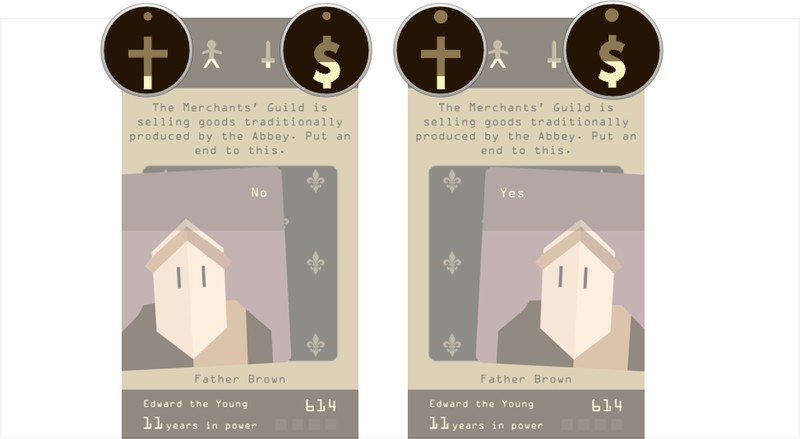
“The Merchants’ Guild is selling goods traditionally produced by the Abbey. Put an end to this.”
OK, so here’s another important note. The size of the dot above each power category determines how big the effect will be — either positively or negatively. See the callouts in the screen above to see the difference between ‘Yes’ and ‘No’ here. I went with ‘Yes’.
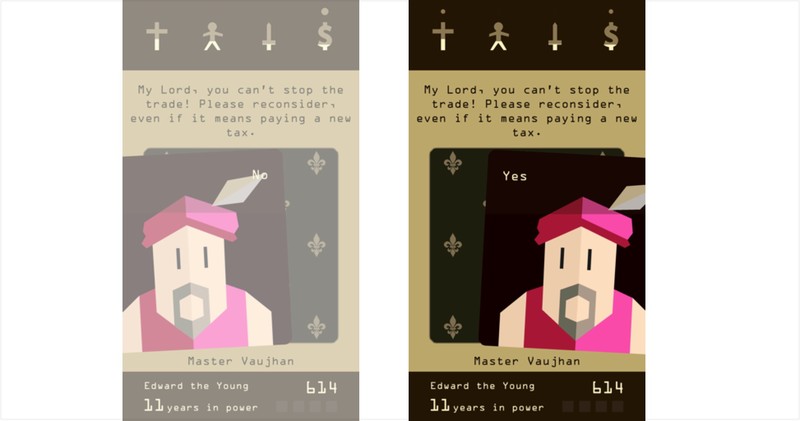
“My Lord, you can’t stop the trade! Please reconsider, even if it means paying a new tax.”
Whoa. My treasury took a major hit, but the church was also pretty low, so good call, right?
But now I’ve annoyed the merchants. Okay, well some damage control via taxation should help my treasury a bit.

“The miners are refusing to dig in the mine. They want a raise.”
Again, I’ve decided to be a man of the people here, so give them a raise!
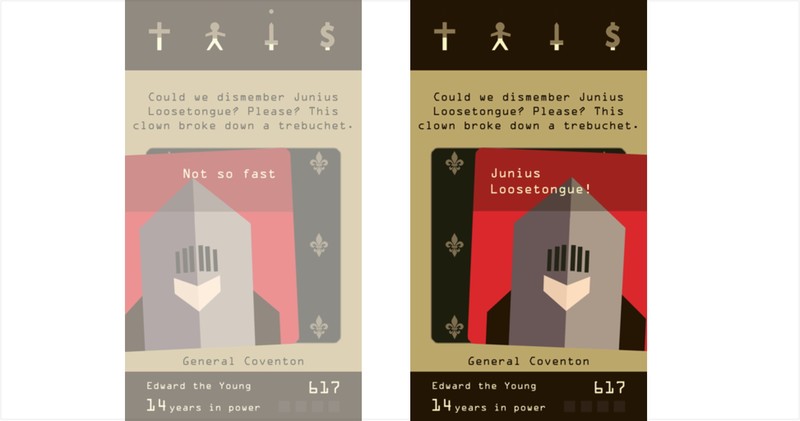
“Could we dismember Junius Loosetongue? Please? This clown broke down a trebuchet.”
Man, this guy again? Always with the killing and dismembering. That said, we are too low on money to be messing with our weapons… Bring him to me now!

“I was playing tennis with a giant. He won”
Haha, oh he’s the jester? That’s pretty funny. Sure let’s just pay the army.
But wait. My treasury…
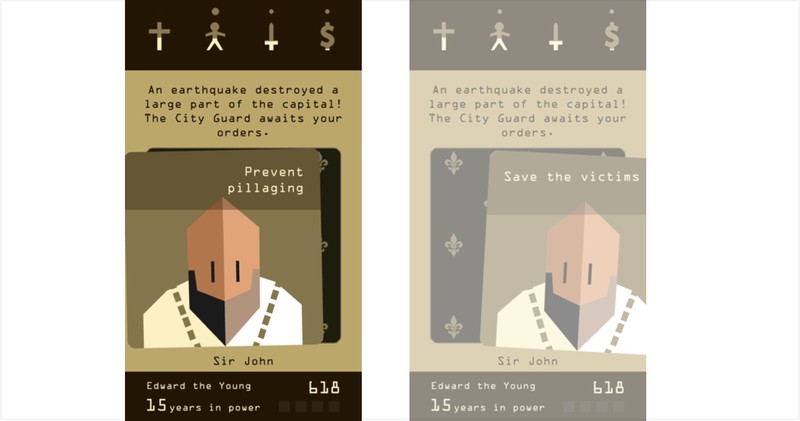
“An earthquake destroyed a large part of the capital. The City Guard awaits your orders.”
An earthquake? Uh-oh. That sounds expensive. Both options show an effect on my treasury.
This might be the end. I guess let’s prevent pillaging?
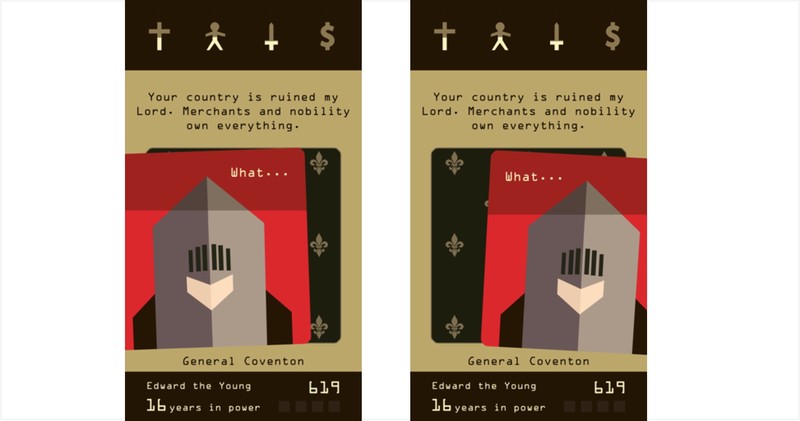
“Your country is ruined my Lord. Merchants and nobility own everything”
So we’ve reached the end of my first reign, as my treasury has been depleted. You know your king is about to die when both the ‘Yes’ and ‘No’ responses are both ‘What…’ or something similar.
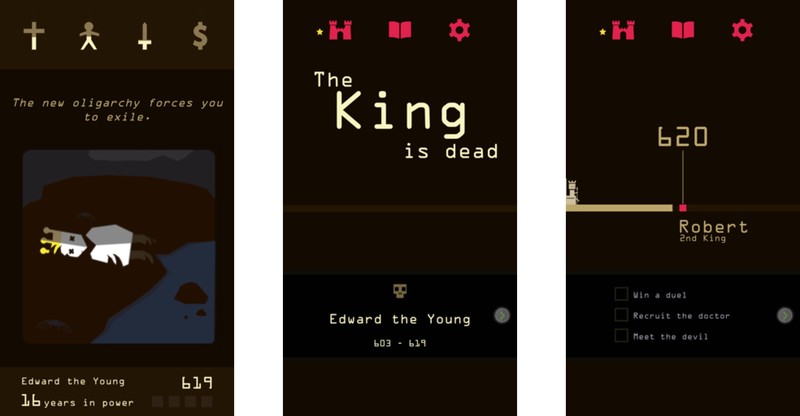
Well, it was a good run while it lasted. Your final card shows how the king died. 16 years for my first reign, not too shabby — I think? And hey, maybe King Robert will do a better job than his predecessor.
How to duel
As you progress through the game, occasionally you will be challenged to a duel. The gameplay itself doesn’t change much at all, as you’re still either swiping right to attack, or to the left to retreat/dodge. The four trackers at the top are replaced by a rudimentary battle arena, where your attacks and retreats are previewed by swiping and holding the card. Take time when considering your next move.

After completing your first duel, you can ask General Conventon to explain the duel mechanics. Here’s what he says:
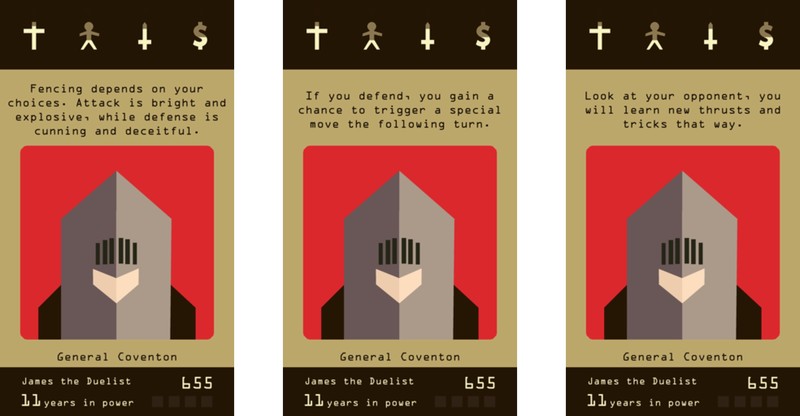
In other words, it’s typically best to mostly be aggressive in duels and swipe to the right. However, if the card hints at your duelling partner planning a nasty attack, you might want to opt for a defensive swipe to the left. If you guess wrong, you might meet an untimely end, but time your defensive move right and you’ll get an attack bonus on the next round. Ultimately, duelling seems like a 50/50 mix of strategy and luck.
Completing objectives
Every time a king dies, a new king rises to take his place — with three objectives you should aim to complete during his next reign.
These objectives really range in variety and, occasionally, seem quite absurd. But as you quickly discover once you dive into Reigns, it’s a game that’s full of wonderful surprises. Occasionally it will come down to your intuition and close reading for clues to figure out when you might be able to complete an objective. Other times, the game will simply throw you down a random path and you’re taken on a wild ride towards the conclusion of an objective. All told, there are currently 40 objectives in Reigns.

A common example of an objective you will see is seeking out a new character. Occasionally a card will hint at introducing a new character advisor, so it’s typically worth responding affirmatively to such cards. Once you’ve unlocked a new character, you’ll start to regularly hearing from them, signified by new cards being added to your deck. Every new character adds a new layer to the overall game, and not all characters are to be trusted — but on the other hand, you may also earn the opportunity to have certain characters executed for one reason or another. Reigns features 37 unlockable characters.
Effect cards

Occasionally as you play through Reigns, you will trigger an effect. These will affect the game in a multitude of different ways. See the screens above for just a few examples I’ve run into so far. Once you uncover an effect card, you’ll see its icon in one of the four boxes in the bottom right corner for as long as they are in effect. I really don’t want to give away too much on them because they are really some of the most surprising and hilarious parts of the game. Given there are four effect slots, they will also stack on top of one another if you let them. They may reset whenever a king dies, they may run out after a set amount of time, or they might remain in effect for as long as you keep playing.
Mistakes will be made

Here’s the thing: while your goal in Reigns is to survive for as many years as possible, there might be some Kings that serve for pitifully short reigns. This may be due to your own poor decision making, or it could just be the game throwing you for a loop. In the example section above, looking back, I made some pretty costly mistakes that significantly shortened my reign.
But it’s okay! Not every king you play as is going to have a long and fruitful reign. Besides, if you’re struggling being a fair and just ruler, maybe it’s time to try being a ruthless tyrant. There’s no wrong way to play Reigns.
Have you played Reigns?
What have been your favorite moments playing the game? Got any tips we should include in our guide? Let us know in the comments!
Watch Fox Sports Go on Apple TV, if you have cable
The start of both NFL and college football seasons are imminent and Fox Sports is giving viewers another option for streaming the action. The network announced today that its Fox Sports Go app is now available on the 4th-gen Apple TV. Yes, you’ll need a cable subscription in order to stream events spanning NFL, MLB, UFC, NASCAR, Big 12 and Pac-12 Football, Big East Basketball, FIFA World Cup and UEFA Champions League soccer. Though they aren’t specifically listed in the announcement, a MLS and Bundesliga soccer match are part of the weekly lineup during their respective seasons as well.
All of that action is spread across streams from FOX Sports, FS1, FS2, FOX Sports regional networks, FOX College Sports, FOX Deportes and FOX Soccer Plus, hence the pay-TV plan requirement. In fact, your cable plan must include those channels to unlock streaming access. Fox says that the move to Apple TV also adds in some new features that weren’t previously available elsewhere. First, you can stream up to four games (or shows) at once thanks to a Multiview Display tool. All of the action is streamed at 60 frames-per-second as well which should improve views of high-speed action across that range of sporting events. Both of those features are items Apple discussed last fall as part of its tvOS software.
Fox Sports Go is also available on Roku, Android TV and Sony smart TVs in addition to apps for Android, iOS, Kindle Fire and Windows. The network has said that Chromecast support is coming this summer, but it has yet to be added to the app.

Source: Fox Sports
Sprint offers ‘Unlimited Freedom Premium’ for heavy video users
Not long after introducing its “Unlimited Freedom” option, Sprint has announced a new plan called “Unlimited Freedom Premium,” which offers high-definition video for $20 more than the vanilla plan.
Users will pay $80 for a single line for the HD video access and $140 for two lines. Previously when the original Unlimited Freedom plan was announced, we lamented the lack of option for special data plans like this one, so it’s an interesting move to offer it now after already rolling out a new plan so recently.
This likely comes in response to T-Mobile’s recent launch of T-Mobile One, which offers unlimited calling, texting and data for $70 a month in exchange for throttling video bandwidth for lower-quality video. It’s a cheaper plan, but it’s likely not tolerable for anyone looking to consistently stream HD video.
The Unlimited Freedom Premium plan includes HD music and streaming in addition to HD video at up to 8 megabits per second, and right now if you sign up for a new Unlimited Freedom account you can get Premium for free through October 31st to take it for a test drive and see if it’s worth the extra $20 for you.
Source: Sprint
Twitter is working on a keyword tool to combat harassment
Harassment is one of the biggest problems facing Twitter right now. Some of the company’s most popular and influential users have been driven off the platform because of some truly horrific, hurtful tweets. The problem hasn’t gone unnoticed. Twitter has promised to do more to combat trolls, making it simpler to flag abusive tweets and banning controversial figures such as the conservative writer Milo Yiannopoulos. Now, according to Bloomberg, it’s working on a keyword filtering system that would allow users to hide tweets containing specific terms and phrases. If you’ve muted keywords before on TweetDeck or Tweetbot, you’ll get the idea.
Twitter has been weighing the new feature for “about a year,” Bloomberg claims, and would “screen out” any keyword specified by the user, including swear words and racial slurs. Instagram introduced a similar feature for photo and video comments last month, giving people word filters and the ability to turn off comments entirely. My colleague Dana Wollman wrote an excellent piece about why these tools should have been introduced years ago — I’m sure many feel the same way about Twitter.
The platform’s public and open nature is why it’s become such an important utility. But it’s also fostered a community which, at times, can feel toxic and uninviting. That’s dangerous, because if people feel they can’t use the service without receiving an avalanche of abuse, they’ll leave, diluting Twitter’s user base and the amount of thoughtful, beneficial Tweets being published every day. It’s a big problem for Twitter — the company has long-struggled to explain the service’s purpose, and bad press regarding celebrity departures isn’t helping. To reverse its stalling user growth, Twitter needs a feature like keyword filtering, and fast.
A spokesperson for Twitter declined to comment.
Source: Bloomberg
Amazon to open bookstores in Chicago and Portland
For an independent bookstore, few threats are bigger than Amazon. With its e-book store and brutally competitive print book prices, it can be hard for a family-run business to compete. Well, it’s only going to get tougher now that Amazon is expanding its footprint of physical stores. The company has confirmed it’ll be setting up shop in Chicago and Portland — these locations will be joining Seattle, which opened in November, New York and San Diego. The details of each store is under wraps, but it’s safe to assume they’ll be packed with Kindles and Kindle Fire tablets.
Amazon has built its business online, but seems to be learning that there’s value in having a physical presence too. Sales assistants can explain the advantages of a particular product or service — something that’s increasingly useful as it builds a whole range of Prime perks and premium, quick-turnaround delivery services. As for books, well, there’s something to be said about visiting a store and plucking an interesting novel off the shelf. Gazing at the cover, reading the blurb and flicking through the pages. (Sigh.) It’ll be a while before Amazon’s stores have that old, musty feel to them, but hey, they beat looking around a website for hours on end.
Source: Financial Times
Mind-controlled nanobots release drugs inside cockroaches
Stay with me here — scientists from Bar-Ilan University and the Interdisciplinary Center in Israel created nanobots, injected them into cockroaches, and released fluorescent drugs into the insects using mind power. While that sounds insanely convoluted, the aim is to actually help humans. If a schizophrenia patient is about to have a violent episode, for instance, an EEG could trigger the release of powerful drugs. That way, they’d only get them when needed, minimizing harmful side effects.
It’s also pretty cool. The nanobots injected into the roaches are made from so-called DNA origami that’s natural and easy to program. They’re also fitted with iron oxide nanoparticle “locks” that open and release drugs when exposed to an EEG-controlled electromagnet. When EEG-wearing users increase their brain energy (by doing math), it powers up the magnet, which in turn activates the nanobots. The team can measure the fluorescence inside the bugs to confirm that it’s working.

DNA Origami (Karolinska Institute)
The EEG could be programmed to detect psychotic episodes, ADHD or other brain issues, according to the team. The drug release could also be tightly controlled using molecules that only attach to certain cell types. For instance, the medication could be released only into cancer cells if attached to the right kind of molecule.
As with all things nanobot, the research isn’t ready for human trials. There’s no EEG portable enough to wear all the time and still practical, for one. And even though we’ve written about drug-releasing nanobots many, many times, they’ve never been tried in humans. The team that performed the cockroach research may have an edge, though. One of the scientists, Ido Bachelet from Bar-Ilan University, plans to trial nanobot cancer treatment on a terminally ill patient as early as this year.
Source: PLOS One
Spotify adds a full list of tour dates to artist pages
Spotify has been providing concert info for a while, but now those listings are getting a bit more detailed. Late last year, the company teamed up with Songkick to serve up a list of nearby concerts based on your listening habits. That same partnership will now display full list of upcoming shows on artist pages under the “Concerts” tab. Just like before, there’s a “Details” button beside each date that links to the event page on Songkick.
In addition to recommendations, Spotify also already provided users a list of upcoming concerts based on their location. With the addition of full listings, the service displays the same dates as an artist’s website, but you don’t have leave the app to browse it. The new concert dates tab is rolling out today in Spotify on the desktop, so if you don’t see them yet they should show up soon enough.
Via: Hypebot
Source: Spotify
iPhone 7 Facing Supply Shortages as Production Ramps Up Ahead of Launch
Following tradition, a new report out of Apple’s supply chain is hinting that the company “may need to contend with a supply shortage” for the iPhone 7 and iPhone 7 Plus, citing vague issues with “faulty components” as the central problem (via Nikkei). Similar stories have emerged before the launch of the new iPhone nearly every year, stemming from Apple’s annual late-summer production ramp-up ahead of the September iPhone reveal.
“If Apple sticks to its launch schedule from last year, there may not be enough supply at the beginning, as some suppliers are still trying to fix low yield rates of their components,” an industry source familiar with the issue said.
Apple is said to be staying close to its launch schedule from last year, which could lead to low supply “during the first round of the rollout,” resulting in low yield rates, higher costs for manufacturers, and subsequently less volume to deliver to customers. Yuanta Investment Consulting analyst Jeff Pu believes total iPhone 7 builds to be 10 million less than that of the iPhone 6s last year.
Pu cut his forecasts for iPhone production to 114 million from 120 million, including both new and old models, in the July-December period, due to defects in the waterproof speaker and dual-camera module, which have yet to be resolved.
“We estimate total iPhone 7 builds to be 74 (million) in 2H16F, compared to 84 (million) for iPhone 6s in 2H15. Together with pricing pressure, we expect most Apple food chain suppliers to see (year-on-year) revenue decline for the rest of the year,” Pu wrote in a note dated Aug. 23.
Continuing the usual doom-and-gloom sentiment regarding Apple’s 2016 iPhone sales, the new report points to “weakening demand” for the iPhone 7 and iPhone 7 Plus as a contribution to manufacturing numbers falling as well. Apple’s own orders are said to be “conservative” this year compared to years past, with individual components dropping precipitously year-over-year. According to various sources, core processor chips “may drop up to 15 percent,” and panel orders “are dropping around 20 percent,” both compared with the company’s 2015 supply chain orders.
Although it’s true that the iPhone 7 will be a modest update on the iPhone 6s, like every model before it, the 2016 iPhone is expected to see a heavy influx of pre-orders the day it goes live on Apple’s website, currently rumored for September 9. Users will then have to wait a few weeks to get their hands on the smartphone, with a launch either on September 16 or September 23.
Related Roundup: iPhone 7
Tag: nikkei.com
Discuss this article in our forums
Twitter Working on Anti-Harassment Tool With Keyword Blocking Abilities
Following a recent string of high-profile stories centered around cruel tweets, Twitter is said be gearing up to launch a new tweet moderation feature that will let users filter content they see by using keywords (via Bloomberg). Any subsequent tweet with the specifically designated harmful words would be blocked from the user’s timeline and invisible to them, but still posted for anyone else to see.
The anti-harassment tool is said to have been in production “for about a year” at the company, and is still not quite ready for a wide rollout yet. The news comes from a group of people close to the project, and is most likely gaining traction after a particularly public year of unfortunate incidents surrounding the social network, where both reporters and celebrities were attacked on the service.
Twitter needs to attract and retain users as the growth in their numbers slows. The company has spent the past few months consulting with an outside council of anti-harassment groups about its strategy for addressing the issue, which has become one of Chief Executive Officer Jack Dorsey’s top priorities.
Twitter took some small steps this year, such as making it easier for people to report abuse by letting them identify multiple offending tweets while filing their complaints. But the keyword tool, if implemented, would be the first to give users more control over what they see instead of blocking individual users after they attack.
Twitter and CEO Jack Dorsey have attempted to make inroads towards creating a less harmful atmosphere on the social network, but as yet haven’t created an in-depth feature that could help prevent bullying on a wider scale. The potential keyword blocking solution sounds similar to one that Instagram is also reportedly planning to launch soon, which will let users filter out the comment section on their photos because “different words or phrases are offensive to different people.”
The news comes after Twitter reported its slowest revenue growth since 2013, thanks to the growing popularity of rival companies Snapchat and Instagram. To turn things around, Twitter plans to focus on five key areas within its network, one of which will focus on keeping users safe from online abuse: core services, live-streaming video, the site’s “creators and influencers,” safety, and developers.
Eventually, the new anti-harassment tool could become a universal filtering feature for content not just potentially harmful, “for example, users could block a hashtag about an event they don’t care to read about.” If true, the Twitter desktop and mobile apps would be playing catch-up to features currently implemented in popular third-party clients, like Tweetbot on iOS and OS X. That app has a feature-rich “Mute Filters” section that allows users to silence any user, keyword, hashtag, and client, all packed with settings to add contingencies like mute locations and duration.
Note: Due to the political nature of the discussion regarding this topic, the discussion thread is located in our Politics, Religion, Social Issues forum. All forum members and site visitors are welcome to read and follow the thread, but posting is limited to forum members with at least 100 posts.
Tag: Twitter
Discuss this article in our forums

