


Sony adds two more notches to its X Series bed post with Xperia XZ and X Compact
Sony Mobile has announced another two devices at consumer electronics show IFA, bringing its 2016 smartphone total to six-strong. Yes that’s right, there are now that many new Sony smartphones to choose from.
The Xperia XZ and Xperia X Compact are the latest additions to the Xperia X portfolio, joining the Xperia XA, Xperia X, Xperia X Performance and Xperia XA Ultra. And breathe.
The Xperia XZ is the company’s newest flagship, sitting at the top of the “X” range. It takes over from the Xperia Z5 and goes up against the likes of the Samsung Galaxy S7 and S7 edge, LG’s modular G5 and HTC’s 10 with a few extra months of development under its belt.
So what does an extra six months mean in the smartphone world? The three standout features of the Xperia XZ are USB Type-C connectivity, IP68 water and dust resistance and its cameras.
A 23-megapixel rear snapper with two supporting sensors, one for colour and one for depth of vision are on board, along with a 13-megapixel front camera. The rear camera has a sensitivity of ISO 12,800 that can be manually controlled with shutter speed, and it offers a 0.6-second capture, while the front camera has a wide-angle lens and a sensitivity of 6400.
Sony
Aside from that, it’s a familiar metal OmniBalance design for the Xperia XZ that measures 146 x 72 x 8.1mm and weighs 161g. A 5.2-inch Full HD display and the Qualcomm Snapdragon 820 processor are also both present, along with a fingerprint sensor within the power button, 3GB of RAM, 32GB or 64GB of internal storage, microSD support and a 2900mAh battery.
Then you have the baby X – the Xperia X Compact. This little guy has a 4.6-inch 720p display and it features a similar design to the larger device, but with a more plasticky finish. It too has a fingerprint sensor within the power button and a 23-megapixel rear camera with triple sensing technology, but it doesn’t offer IP68 water and dust resistance.
The front-facing snapper drops its resolution to 5-megaixels and the battery drops capacity to 2700mAh, but you’ll still find 3GB of RAM, 32GB of storage and microSD support. Unlike previous Compact devices though, the processor isn’t the same as the larger flagship, with the X Compact seeing the Qualcomm Snapdragon 650 in place of the SD820.
The Xperia X Compact measures 129 x 65 x 9.5mm, weighs 135g and launches on Android Marshmallow, like the Xperia XZ. Both will see an update to Android Nougat at some point, though it is currently not known when.
The Sony Xperia XZ will come in Forest Blue, Midnight Black and Platinum, while the Xperia X Compact will come in Mist Blue, Universal Black and White. They will arrive in October but no pricing has been detailed as yet.
- Sony Xperia XZ preview: Sticking to what it knows
- Sony Xperia XZ: Release date, specs and everything you need to know
- Sony Xperia X Compact: It’s Compact, Jim, but not as we know it
- Sony Xperia XZ vs Xperia Z5: What’s the difference?
- Sony Xperia XZ vs X vs X Performance: What’s the difference?
Sony Xperia XZ preview: Sticking to what it knows
Sony’s latest flagship goes by the name Xperia XZ and it takes its seat at the top of the Xperia portfolio.
The new device is the fifth Sony smartphone to launch this year, following the Xperia XA, Xperia X, Xperia X Performance and Xperia XA Ultra, and it launches alongside the Xperia X Compact, making for quite the choice.
Question is, what does this new flagship have above its siblings and what is it like in relation to Sony’s last “flagship”? Here are our first impressions.
Sony Xperia XZ: Design
The Xperia XZ is a Sony smartphone through and through. It offers the OmniBalance and flat slab design, along with large bezels at the top and bottom of the display, all of which are distinguishable Xperia features.
There are a few changes here and there but overall, the Xperia XZ is recognisable as a Sony smartphone, and more specifically as an Xperia X smartphone, mainly thanks to the brushed metal finish.
The Xperia XZ will come in three colours comprising Forest Blue, Midnight Black and Platinum and it adds an additional anti-fingerprint coating to the metal to stop mucky paws leaving marks behind. There were still a few, but nothing compared to the mess the Z Series and its tempered glass rear used to create.
Pocket-lint
In terms of size, the XZ will feel no bigger to those with an Z5 or Z3. The new device has the same footprint as the Z5 at 146 x 72mm, along with a similar weight at 161g. It is a little thicker than the previous flagship at 8.1mm but the XZ remains comfortable to hold and it reintroduces IP68 water and dust resistance, something many of the X series devices left off their spec sheets when they launched earlier this year.
The top and bottom of the Xperia XZ are where some of the biggest changes in design can be seen, offering a much flatter, squarer appeal than preceding Xperia flagships. The headphone jack sits at the top, while USB Type-C makes its Sony debut at the bottom.
As we mentioned, those large bezels unfortunately still remain at the top and bottom of the display, but Sony has made things more interesting at the sides. The Xperia XZ doesn’t offer an edge-to-edge display as such, but it might as well have done.
Pocket-lint
A new design feature called Loop has been introduced to the XZ instead. The feature makes it appear like the screen is wrapping around towards each side, leading nicely into the curved edges. The bezels on the sides are therefore almost non-existent and it looks great, even if it does make those bezels at the top and bottom stand out even more.
The right-hand side of the XZ features the oblong power button with built-in fingerprint sensor, volume rocker and camera launcher button, while the left side sees the SIM and microSD tray. That’s nothing new to the Xperia Z5, X and X Performance but if you flip the XZ over, you will see a different camera layout on the rear.
The Sony logo remains in the middle, though it was blacked out on our device as it was a prototype. The camera lens is situated in the left corner, as it always was, but the LED flash has moved from the side of the sensor, to underneath, and there is another small grey circle above the flash. More on the camera and what that grey circle is in a minute.
Pocket-lint
Sony Xperia XZ: Display
The Sony Xperia XZ features a 5.2-inch display, meaning it adopts the Z series size rather than the X series. The XA, X and X Performance all have 5-inch displays, while the Xperia Z series all had 5.2-inch screens.
In true Sony style, the Xperia XZ also sticks with a Full HD resolution, meaning the new flagship has the same pixel density as the Z5 at 424ppi, and less than competing flagships from the likes of Samsung, LG and HTC.
Sony has always said the increase in pixels isn’t worth the trade off in battery life so the Full HD resolution doesn’t come as too much of a surprise. As you might expect, the Xperia XZ also offers Sony’s display technologies, including X-Reality and Triluminos, as its predecessors have done.
The Xperia XZ’s display appeared to offer good, vibrant colours, as well as good brightness and viewing angles but we will leave our final judgement for when we’ve spent a little longer with the new device. We’re expecting much the same as what we experienced with the Z5 though.
Pocket-lint
Sony Xperia XZ: Camera
Camera is always an area Sony places a heavy focus on and the Xperia XZ is no different, even if the main sensor resolutions are the same as the Xperia X and X Performance, meaning a 23-megapixel rear camera and 13-megapixel front camera.
It’s not all about megapixels though, as we all know. The Xperia XZ has therefore made a few changes and software enhancements. It comes with five-axis image stabilisation, which is said to help those of you with shaky hands and the new device will also offer manual control of shutter speed and ISO sensitivity.
Additionally, the Xperia XZ has another two supporting sensors on top of the main 23-megapixel Sony sensor. One is to help deliver more vivid colours, while the other is to help with depth of vision. That’s where that grey circle above the LED flash comes into play.
How well the three sensors work together remains to be seen, but it’s good to see Sony not standing still when it comes to the camera. It has some pretty stiff competition out there so new features and functions are essential.
Pocket-lint
Sony Xperia XZ: Hardware
The Sony Xperia XZ features almost identical specs to the Xperia X Performance. It has the Qualcomm Snapdragon 820 processor on board rather the latest SD821 and it is supported by 3GB of RAM rather than 4GB, both of which might come as a disappointment to some.
It ran smoothly enough during our brief time with it, delivering a slick performance with no lag, but we will of course test it properly when we get it in for review. It has the option of 32GB or 64GB internal memory, both of which offer microSD expansion up to 256GB.
As we mentioned, there is a fingerprint sensor built-in to the power button and USB Type-C for charging the 2900mAh battery and data transfer. Battery is another area Sony focuses heavily on and it’s worked well for the company in the past.
The Xperia XZ has a new feature called Smart Cleaner on board that not only shuts down apps automatically, but it also clears the cache automatically too. Based on Sony’s previous flagships, we’d expect good things from the Xperia XZ when it comes to battery life, especially with the enhanced software.
Pocket-lint
Sony Xperia XZ: Software
Speaking of software, the Xperia XZ launches on Android Marshmallow with the Sony software over the top.
The company did recently announce it will be upgrading the Z5, XA, X, X Performance and XA Ultra to Android Nougat so no doubt the Xperia XZ won’t be far behind but it doesn’t launch with it straight from the box. Shame.
The software experience is familiar and Sony fans will recognise many of the features. There are a couple of extras on the new device, such as the ability to manually control the camera as we mentioned, as well as the battery optimising software, but overall, it’s the same Sony experience.
First Impressions
The Sony Xperia XZ seems to marry the Z series and the X series together, which is what its name suggests, even if that wasn’t the reasoning behind it.
There are a few changes here and there like the Loop feature which is lovely and the inclusion of USB Type-C but overall, the XZ’s design is familiar, as are many of the hardware specs. It’s pretty much the X Performance with a few tweaks in design and some camera and battery enhancements.
Sony has focused on some key areas rather than make any radical changes like Samsung did a couple of years ago. Some might be disappointed as the Xperia XZ isn’t ground-breaking in comparison to some of its competition, but it should do enough to deliver a good upgrade option for the Sony fans out there.
- Sony Xperia X Compact: It’s Compact, Jim, but not as we know it
- Sony Xperia XZ vs Xperia Z5: What’s the difference?
- Sony Xperia XZ vs X vs X Performance: What’s the difference?
- Sony Xperia XZ vs Samsung Galaxy S7 edge vs S7: What’s the difference?
HP Elite Slice is a stylish modular PC that is far from beige, while Pavillon Wave PC looks like a speaker
HP has announced the launch of a very cool looking new modular based mini computer that can be adapted and changed depending on your needs and a home desktop computer that looks like a Bluetooth speaker.
The modular based PC, called the HP Elite Slice, it is the first of its kind and can be simply snapped together allowing users to pick and choose stackable options to add functionality depending on their needs.
Stackable modules currently include options such as an Audio Module audio tuned by Bang & Olufsen and the option of an Optical Disk Drive Module.
The Elite Slice will also offer a number of covers and accessories to allow to you to turn the top into a wireless charging station for your phone, the ability to add a Skype for business phone, or to bolt it to the back of a TV via a VESA plate. The HP Collaboration Cover for example, will let you run calls and conferences at the touch of a finger via the dedicated array of touch buttons on the top, although HP does say that you have to chose the cover at point of purchase rather than swapping it out later.
The ultra-small and sleek looking device comes in a black finish with gold accents to match the company’s Spectre range of laptops and measures 6.5- x 1.38- x 6.5-inches and weighs just over a 1kg.
Keeping things cleaner still, there is no power cable as the entire machine can be powered from a display via only one USB 3.1 Type-C cable. HP hopes to be able to offer other “modules” in the future.
The unit will be powered by an Intel Core-i3/i5/i7 processor and come with up to 32GB of memory. Other features include an optional touch fingerprint sensor for improved security and easy authentication.
The HP Elite Slice starts from $699 in the US and is expected to be available in September 2016. The HP Audio Module price is $109 and the HP ODD Module price is $99.
The company is also offering a dedicated meeting room version as well called “HP Elite Slice for Meeting Rooms that is designed specifically to be used to power conference calls and presentations. It will cost $949 when it goes on sale.
HP
HP Pavillion Wave: A computer that looks like a speaker
HP has also announced a desktop for the home user too. Called the HP Pavilion Wave, the computer has been designed to look like a speaker rather than a traditional PC.
The HP Pavilion Wave sits on top of the desk featuring a compact, space-efficient 360-degree design and is built around the central audio system that has been finished with acoustic fabric.
A parabolic reflector on top of the PC reflects the sound coming from the speaker grille in parallel from all directions and acts as an outlet vent for hot air to come out.
Tuned by B&O Play the machine offers a 6th Generation Intel Core i7 quad-core desktop processors4, ample storage up to 2 TB HDD5, an optional dual drive with 128 GB SSD5 and up to 16GB of DDR4 system memory. There is even room for an optional AMD Radeon R9 M470 discrete graphics for photo and video editing or light gaming card.
HP Pavilion Wave starting price is $549.99 and is expected to be available at select retailers and HP.com on September 23, 2016.
Sony FDR-X3000R action cam offers OIS across all modes, including 4K and slow-mo
Sony announced a top-of-the-range compact action camera during its IFA 2016 press conference and it is sure to become a favourite for serious extreme sports enthusiasts.
Not only is the Sony FDR-X3000R capable of shooting 4K and high-speed recordings (for slow motion playback), it does so with Sony’s proprietary B.O.SS optical image stabilisation technology.
That means it potentially provides smoother video, even when strapped to a helmet or bicycle. It compensates for strong camera shake too.
A live-view remote is include, that’s 30 per cent smaller than previous models. You can wear it on your wrist or attach it to your bike’s handlebars, for example, to see the point of view footage in real time.
The FDR-X3000R has an 8-megapixel Exmor R CMOS sensor, which shoots video in 16:9. Processing is handled by Sony’s own BIONZ X chip.
A Zeiss Tessar wide-angle lens is attached to the front, while the whole camera set-up is waterproof to 60 metres if you use the support underwater housing.
Sony will release the high-end action cam in November, priced at approximately £500 in the UK, 660 euros for mainland Europe.
There will also be accessories available, including the AKA-FGP1 finger grip and AKA-MCP1 MC Protector to add further protection against dust and scratches for the lens. They will cost 25 euros and 35 euros respectively.
Rosetta 3D images comet dust before it bids farewell
Rosetta’s scientists are doing every bit of science they can before the European Space Agency crashes the probe into the comet it’s been studying. In fact, the spacecraft’s Micro-Imaging Dust Analysis System (MIDAS) has just analyzed dust samples Rosetta collected from Comet 67P/Churyumov-Gerasimenko from November 2014 to February 2015. Mark Bentley, MIDAS’ principal investigator, explained that “we need to understand the structure of the smallest grains and how they are built” to understand how comets are formed. Comet dust could also shed light on the beginnings of our solar system.
The results from the analysis proved what scientists believe — that a speck of comet dust thinner than human hair and smaller than a red blood cell is made up of smaller grains. Four out of the five samples had particles that were tightly packed together, while one had a looser, fluffier structure similar to the dust found in Earth’s upper atmosphere.
Bentley said that fluffier dust aggregates could gather more and more particles until they become as big as 3.3 feet wide. In the early days of our solar system, these could have been the planetary seeds that gave rise to the planets we know today. Since the scientists plan to spend the 30 days Rosetta has left using MIDAS to scan as much dust as they can, we can expect more details in the future. The probe has also recently witnessed a burst of light on 67P that was triggered by a landslide, so some of its last images show us a pretty dramatic view of the comet.
Via: Space
Source: ESA
Bjork avatar appears in London via Icelandic mocap
Björk is continuing her “Vulnicura” exhibition at London, but the fact that she’s in Iceland didn’t stop her from appearing at Somerset House cultural center. In glorious Björk fashion, she beamed into the press conference as a colorful digital avatar to take questions alongside Somerset Director Jonathan Reekie. Meanwhile, she was back at the Icelandic Media College in Reykjavik wearing a motion capture suit, with her movements transferred to the Avatar digitally via Autodesk and Unity tech.
The avatar, a multi-hued, veil- and ribbon-bedecked digital embodiment of the singer, will also appear in a fifth VR Vulnicura video for “Family” directed by Andrew Thomas Huang. On Facebook, Björk explains that “technology is enabling women to work outside the already formed hierarchical systems … VR is helping [me to make] a new stage free of politics where sound and vision is swirling free in 360, fully liberated.”
She adds the heartbreaking stories in Vulnicura were difficult to tell, so virtual reality was the perfect way of “2016-ing it.” Suffice to say, if you love technology and art, the “Björk Digital” exhibition, coming to cities around the US and Europe, is a can’t-miss.
Via: Papermag
Source: Bjork (Facebook)
Sony’s new noise-cancelling headphones block out the world
Sony unveiled its newest flagship set of high-end, noise-cancelling wireless headphones at IFA in Berlin today. They’re called the MDR-1000X and aim to block all outside sounds until you’re ready to let them in.
The headphones boast an upgraded filtering process that relies on a pair of noise sensors and sound deadening ear pads. What’s more, these headphones offer a noise cancelling optimizer that “tunes” the sound to your specific head. So if you’ve got long hair, wear glasses or have a lumpy noggin that prevents normal over-ear cups from sitting properly against your skull, this NC optimizer will account for that.

As conventional headphones, the MDR-1000Xs deliver high-resolution audio — assuming you’ve got them hardwired to a high-fidelity source. When using Bluetooth to wirelessly connect them to your source device, these headphones use LDAC technology to transmit high-resolution audio. And even when listening to compressed music formats, the 1000Xs use Sony’s Digital Sound Enhancement Engine to upscale the audio quality to near high-res quality.
At $400, the 1000Xs are a bit more expensive than other noise-cancelling headphones with similar specs but they do offer a novel means of interacting with the world around you without having to ever take them off. The “Quick Attention” mode enables the wearer to instantly cut the audio and noise cancelling functions simply by placing their hand over the right ear cup. This way you can take part in short interactions — such as ordering coffee or listening to an announcement over the PA — without actually removing the cans.
Conversely, “Ambient Sound Mode” allows you to hear the ambient conversations around you but not enough to impede the enjoyment of your music. What’s more, these headphones use a touchpad on the right ear, allowing you to tap to play/pause tracks, swipe up and down to adjust volume or left and right to skip or repeat tracks.

I recently had an opportunity to listen to the 1000Xs at a demo and was very impressed by their performance. They dutifully shut out all conversation in the room, even when I wasn’t listening to music. They nixed the low level drone of a white noise machine in the room and even quieted the traffic noise from San Francisco’s financial district while I stood seven stories above the street on an open-air balcony. The headphones themselves were surprisingly light and fit snugly over my ears. Even without the noise cancellation, they managed to drastically reduce outside sounds. After customizing the noise-cancelling system to my ears, you could hear a veritable pin drop inside my head, it was so quiet.
$400 is pretty pricey for a pair of headphones, even for those as capable as these. But if you travel a lot, have extra-noisy neighbors, or just really, really like your auditory privacy, I can see the value in them. The MDR-1000Xs will be available in October, though they’re up right now for pre-order on Sony’s website. The headphones will come in standard black and grey-beige and include an airplane adapter, carrying case and various cables.
The Xperia XZ is the 2016 flagship phone Sony should’ve made first
Let’s not mince words: Sony’s smartphone might be on the upswing, but the company still needs a hit. With any luck, the new, unlocked Xperia XZ can change all that. It runs with the same Snapdragon 820 and 3GB of RAM as the earlier Xperia X Performance, but Sony squeezed that horsepower into a new beautiful new body and added a few tricks for good measure.
I have to hand it to Sony — the XZ feels incredible. It retains the sort of monolithic look and water resistance of other Xperia smartphones, but the edges of its metal-and-glass body are much rounder. The design is almost reminiscent of Nokia’s old Lumias, which is one of the highest compliments for a phone’s design I’ve got. If nothing else, I hope this take on the Xperia design language sticks around for a long time. The rest of the XZ is a little more prosaic: familiar chipset aside, it has a 5.2-inch 1080p display that looks just as good as Sony’s screens usually do, along with a 2,900mAh battery that Sony says is “optimized for all day use”. Throw in 3GB of RAM, 32GB of storage, a microSD card slot and a USB Type-C port and you’ve got the Xperia XZ in a nutshell.
Exactly how interesting people will find that nutshell is the big question. If there’s a standout feature here, Sony is convinced it’s the camera. The XZ is fitted with a 23-megapixel Exmor RS sensor, not unlike the one in the X Performance. Rather than just transplant that camera from one device to another, though, Sony added a laser autofocus system to help the XZ find its targets faster and a sensor that simultaneously captures RGB and infrared images to make sure we’re getting consistently accurate colors and white balance. Meanwhile, there’s a 13-megapixel camera sitting above the display, which captured frankly great-looking selfies even in a room with bad lighting.
The improvements don’t end there, either. The camera now shoots 4K video, a feature that was conspicuously absent from the X Performance. Sony’s mobile team also worked with the people behind the company’s Alpha SLRs to improve the image stabilization here too, though we’ll see how well those claims bear out soon.

At the end of it all, I’m still pretty skeptical. Sony basically made the phone the X Performance should have been, and there’s really nothing wrong with that. This new industrial design is amazing. The camera is shaping up to be pretty impressive. Sony’s software is… well, that hasn’t changed much, but it has its fans. There’s a lot to like here, but whether or not lots will like the XZ is up in the air. (Hopefully its price tag isn’t quite as absurd — the X Performance was a fine phone but a terrible deal.)
What really concerns me is that with the XZ, Sony’s philosophy seems more focused on fixing oversights than pushing envelopes. For what it’s worth, the Sony staffers I spoke to while playing with the XZ seemed scrappy and bullish on their work — they know it’s going to be an uphill climb, but there was no indication that anyone had given up the fight. Between that and the XZ’s overall quality, Sony fans should feel (very) cautiously optimistic.
We’re live all week from Berlin, Germany, for IFA 2016. Click here to catch up on all the news from the show.
Sony’s mid-range Xperia X gets a smaller spin-off
The new Xperia XZ might be the flagship phone Sony loyalists have been waiting for, but Sony’s still hasn’t given up on making small smartphones. That’s where the Xperia X Compact comes in — it’s more enticing a package than you might think given the company’s recent batch of love-em-or-hate-em devices, and it’s set to land the United States on September 25.
Now, if you’re anything like me, you’ll have forgotten what it was like to hold a phone this small. The X Compact packs a 4.6-inch 720p display, and the rounded body that surrounds it is, in a word, charming. Adorable, even. Holding one of these things is sort of like holding a thinner, longer iPod mini, which I’m certainly not complaining about. It even has a satisfying sort of density to it, thanks in part to the 2,700mAh battery tucked away inside. The rest of the hardware tour will sound familiar: this pint-sized device has 32GB of storage, a microSD card slot, a USB Type-C port and a water-resistant chassis, just like the XZ.

As it turns out, the display is a real pro in bright daylight too — it’s bright and vivid without seeming oversaturated, and I never really found myself missing the added resolution of a 1080p screen. Performance seemed just as respectable during our brief bit of playtime. The X Compact runs with one of Qualcomm’s hexa-core Snapdragon 650 chipsets, 3GB of RAM and an Adreno 510 GPU. That’s the same setup as — what else? — the original Xperia X, and for the most part, it seemed just as responsive. I was half-hoping to see even smoother performance because of Sony’s modified software and because the phone has doesn’t have to drive as many pixels on that smaller display, but we’ll see how things pan out when final hardware makes the rounds.

Around the back, you’ll find the same 23-megapixel, “triple-sensing” camera Sony built into the high-end XZ. Basically, in addition to the predictive autofocus that came as part of each Xperia X series smartphone, the XZ and Compact also have laser autofocus modules and an RGB/IR sensor for more accurate white balance. I was surprised for a moment to see that Sony didn’t skimp on the camera here, but that was silly of me. If nothing else, Sony gets credit for not dramatically watering down their more compact devices. That dedication to a very specific subset of smartphones is part of what I like about Sony’s mobile operation so much, and the Xperia X Compact leaves a great first impression.
We’re still not sure how much it’ll cost when it starts shipping later this month, but stick around — we’ll give this thing the full review treatment as soon as we can.
We’re live all week from Berlin, Germany, for IFA 2016. Click here to catch up on all the news from the show.
Huawei MediaPad M3 review
Huawei is best known for making smartphones at a variety of different price points from entry to high-end, but over the last few years the company has also worked to build itself a name in the tablet space with its MediaPad range. The MediaPad M2 may have been an arguably forgettable device but the company is hoping its new MediaPad M3 has a very different fate.
The Huawei MediaPad M3 offers a somewhat familiar design, updated specs, and, at least on-paper, seems to offer impressive performance and audio. But the big question is whether or not Huawei’s latest tablet truly delivers.
You may also like…
Honor 8 Review
1 day ago
Honor 8 vs Honor 7: First Impressions
4 days ago
Huawei P9 Plus review
7 days ago
ZTE Axon 7 vs Honor 8
1 week ago
10 interesting facts about Huawei
2 weeks ago
Huawei unveils honor Note 8 and honor 5 in China
August 1, 2016
With fewer Android tablets being released each year, can Huawei stake a claim for the best Android tablet with the MediaPad M3? Let’s find out in this, our Huawei MediaPad M3 review.
Design
At first glance, the Huawei MediaPad M3 could be mistaken for a product from another manufacturer as, Huawei logo in the top left corner aside, the design is rather generic with no core identifying features. Huawei traditionally have added a few design elements to make their devices stand out – the MediaPad M2 offered a luxurious body after all – but the MediaPad M3 drops this to focus on the core experience.
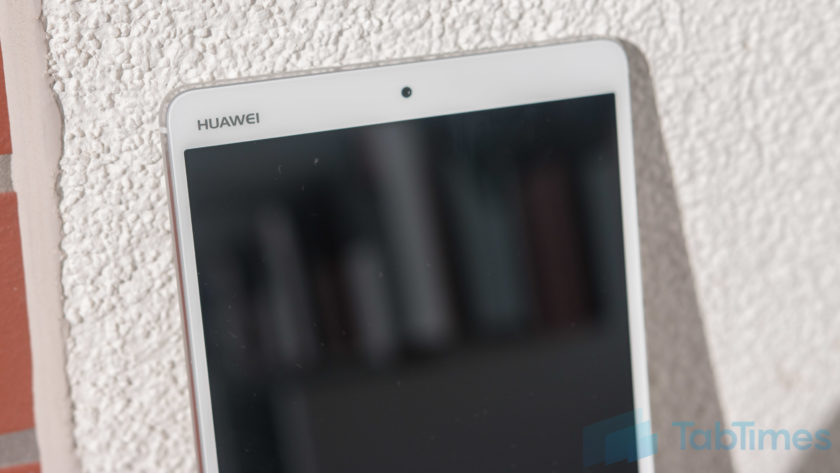
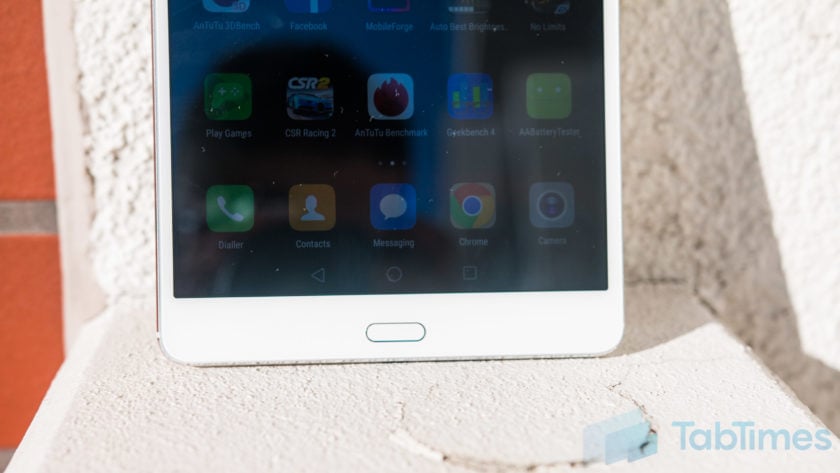
The front is of course dominated by the large 8.4-inch WQHD+ display with a fingerprint sensor below and a front facing camera up top. Alongside the display are the bezels and it’s clear that the MediaPad M3 isn’t meant to win any design awards as the bezels are large and somewhat clunky.
The fingerprint sensor itself proves to be somewhat confusing as it doesn’t act like a home button, rather it supports a multitude of gestures. A single tap takes you back a step while touch and holding takes you to your homescreen, sliding left or right opens recent tasks and sliding up opens Huawei’s HiVoice assistant. To navigate the OS, Huawei has adopted on-screen keys which can be customised but confuse the overall experience, not unlike the Moto Z Force’s fingerprint sensor.
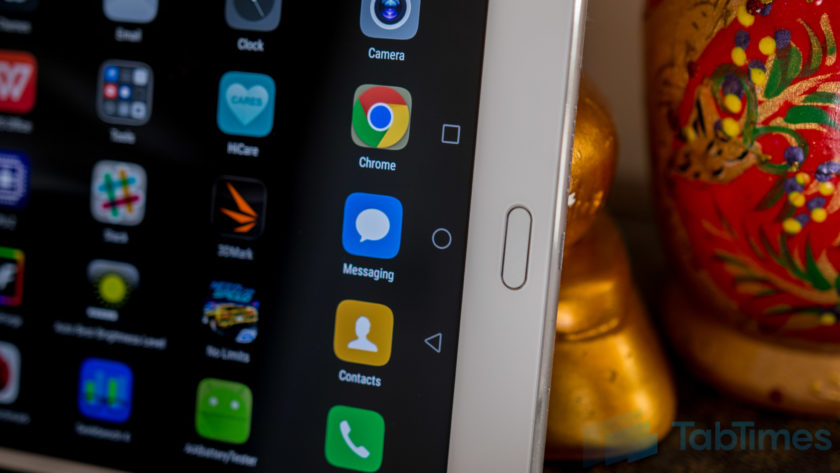
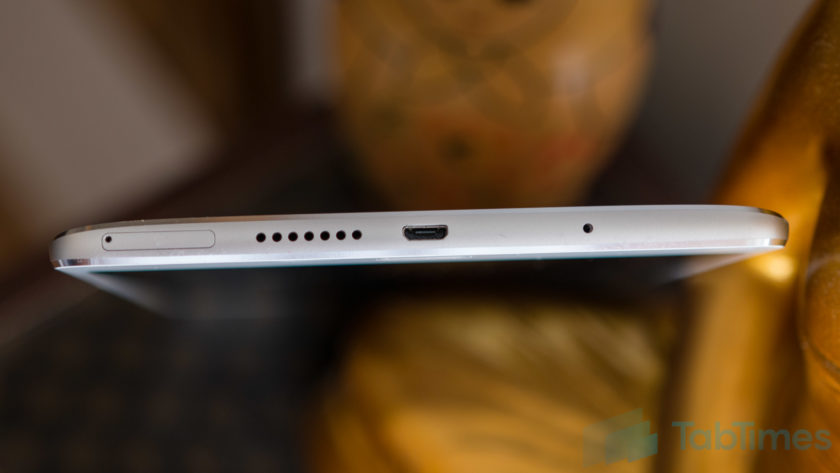
On the bottom, the MediaPad M3 sports a microUSB port – with Quick Charging built in – alongside one of the speakers and a SIM card slot. Yes, the MediaPad M3 lets you use a SIM card and comes equipped with Huawei’s phone application but, without an earpiece, you’ll need to use the speakerphone or a Bluetooth headset.
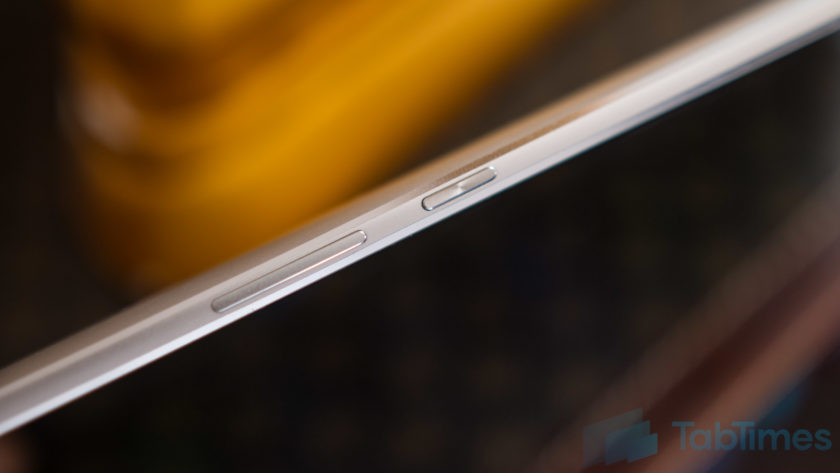
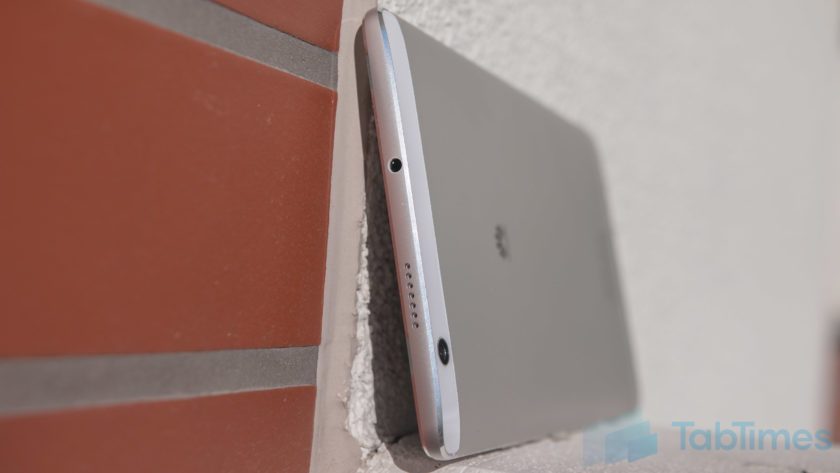
Up top, the Huawei MediaPad M3 sports the secondary speaker alongside a headphone jack. Audio through headphones is acceptable but the MediaPad M3’s audio really comes into its own when the speakers kick in (more on this below). On the left, Huawei has opted to keep the experience bare while on the right, there’s the power and volume keys which are metal, not quite recessed and provide fantastic tactile feedback.
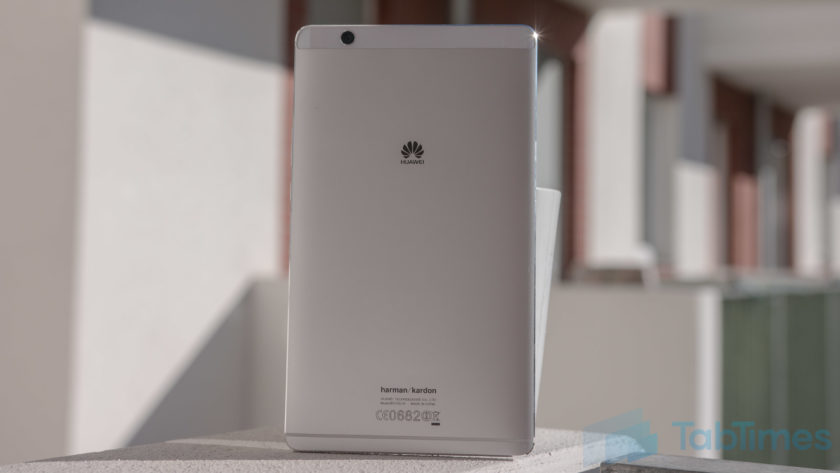
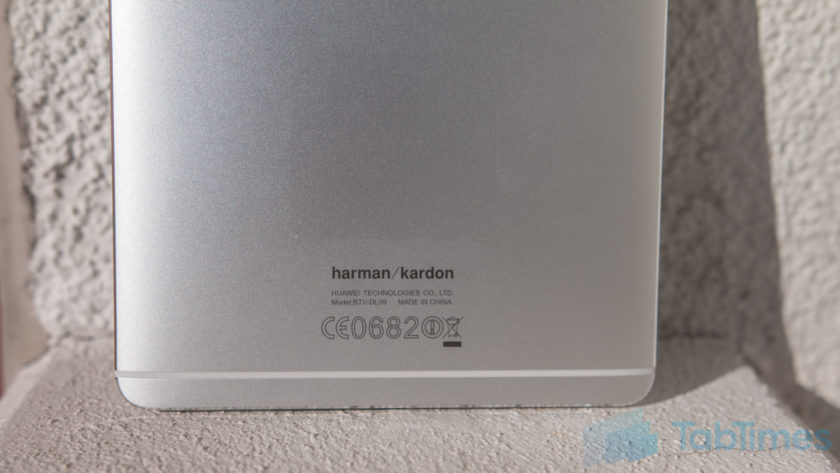
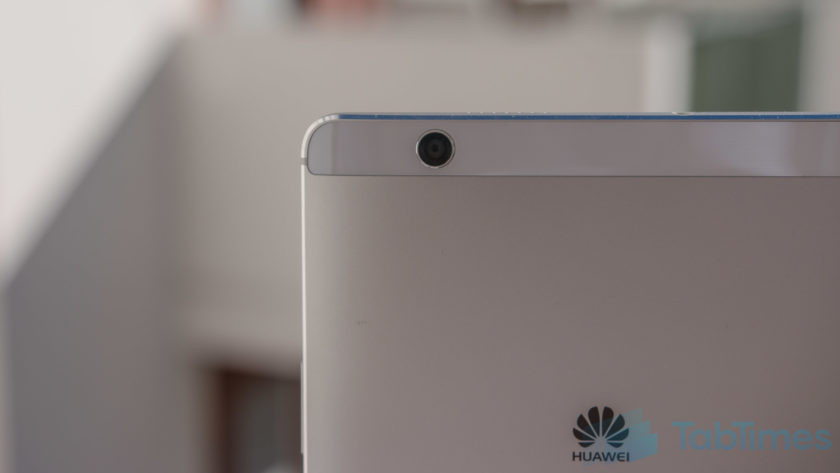
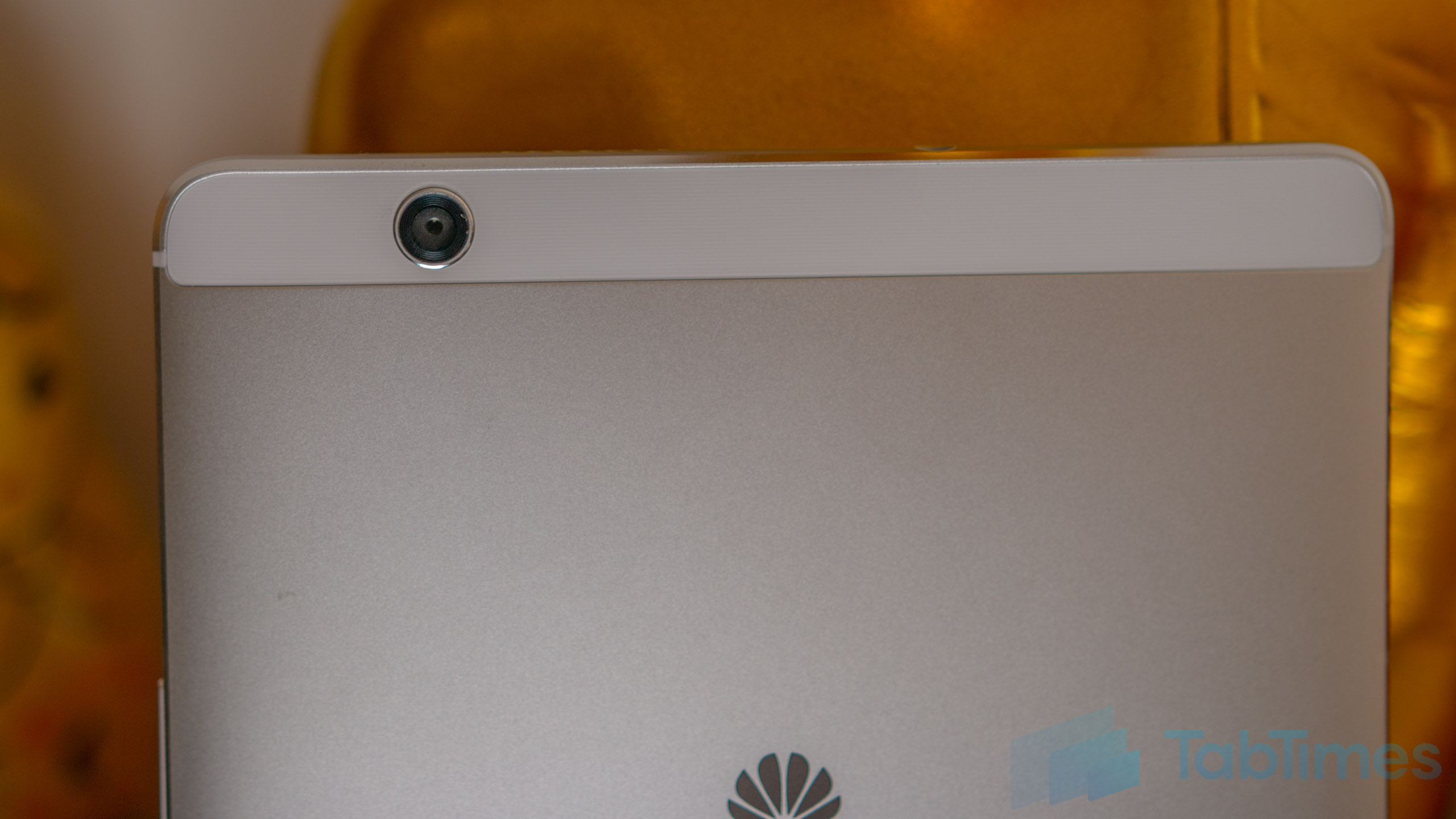
On the back, the MediaPad M3 sports a camera along with a brushed metal finish emblazoned with the Huawei logo (and at the bottom, the Harman Kardon logo). There’s also a single antenna line beneath the Harman Kardon logo, while the camera is placed within a small plastic trim at the top.
Measuring 215.5mm tall, 124.2mm wide and 7.3mm thin, the Huawei MediaPad M3 is surprisingly comfortable in the hand, no doubt thanks to its chamfered edges which improve the ergonomics of the tablet and make it surprisingly comfortable to hold. At a weight of 310 grams, it’s relatively light considering its form factor and, for those who feel inclined to do so, I can confirm that the MediaPad M3 fit comfortably in the back pocket of my jeans, making it easy to carry as well.
Display & Sound
Most people who buy a tablet are interested in the media experience and this is where the Huawei MediaPad M3 starts to shine. The display is an 8.4-inch IPS panel with a 2560×1600 resolution, which offers a pixel density of 359 pixels per inch.
Running the display through a display profiler reveals the MediaPad M3 has an average color temperature of 8666 Kelvin (versus a target of 6500 Kelvin), which means a white screen appears to have a bluish hue. However, Huawei does give you the option to tweak the display colors in the settings and setting the display to normal colors, as opposed to the vivid default setting, also improves the color accuracy, with a secondary test resulting in an average color temperature of 7563.
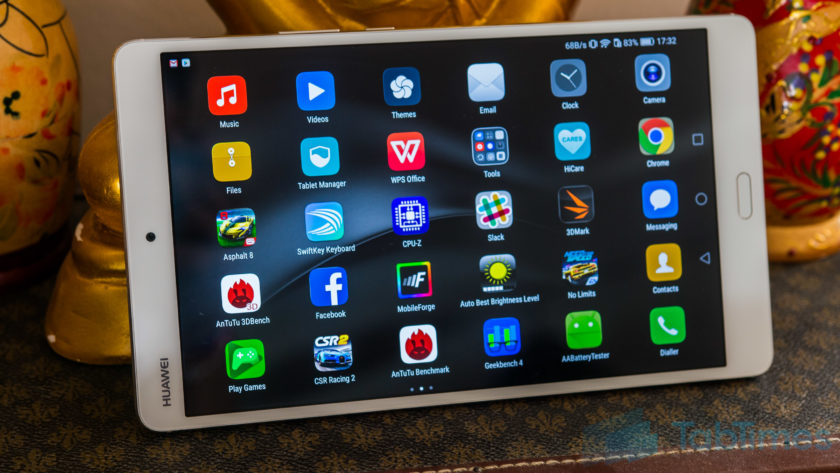
Either way, the display itself is vibrant, colors are punchy and blacks are quite deep, although maybe not quite as rich as you’d find with AMOLED displays. At its lowest brightness, the MediaPad M3 display is just 4-nits so it won’t blind you when you use it in bed, while a blue light filter is also onboard, which will reduce the effect of harmful blue light just before bed.
The display is certainly on par, if not better, than other tablets in this category but, while using it has been a joy, it’s worth noting that the viewing angles are average, although this won’t affect you unless you plan to share the screen with other people. The audio experience is where the MediaPad M3 truly stands out, however as the dual 1-watt speaker system co-engineered with Harman Kardon offers rich, immersive audio. If a great audio experience is crucial to you, the Huawei MediaPad M3 definitely doesn’t disappoint.
Huawei also says the tablet is able to intelligently recognise whether it is being used in portrait or landscape mode and adjust the audio profile experience and, based on our experience, this certainly seems to be the case. Built in support for 192KHz 24-bit files, thanks to a dedicated ESP, means even the most hardened audiophile should be satisfied by the Huawei MediaPad M3 and from my not-so-expert experience, the audio definitely doesn’t disappoint.
Performance & Hardware
Under the hood, the MediaPad M3 comes powered by Huawei’s own Kirin 950 processor coupled with 4GB RAM and either 32GB or 64GB storage, which can be expanded by up to 128GB using a microSD card. Like smartphones running the Kirin 950, there are no signs of lag and performance is a breeze.
For everyday tasks, the MediaPad M3 is capable of keeping up with most devices on the market and as we’ve found, the Kirin 950 is certainly no slouch, with performance on par with the latest processors from both Qualcomm and Samsung. Given that we’re testing pre-production hardware and software, we expected a few glitches but there have been none and – the inability to install AnTuTu and GeekBench aside, which was fixed in the latest update – you’ll find no performance concerns here.
How does the Huawei MediaPad M3 stack up to the competition in the benchmark stakes? Putting it through AnTuTu reveals a score of 90393, while running GeekBench reveals a single core score of 1751 and a multi-core score of 4755. Meanwhile, the 3DMark score of 759 reveals a couple of typical issues we’ve come across with Huawei processors in smartphones, and this is in regards to gaming.
One of the things I use a tablet for more than anything is gaming, as the large screen real estate makes it the perfect gaming device. With the MediaPad M3, Huawei’s chipset comes equipped with a Mali-T880 GPU, which is certainly more than capable of playing most games but does lag compared to the Adreno GPU used in the Snapdragon series of processors.
Running both Asphalt 8 and Need for Speed No Limits as tests, reveals that while the MediaPad M3 is more than capable of playing these games, there are a few dropped frames and gameplay is limited to 30 frames per second or less, especially for the latter title.
Looking past the GPU, the overall gaming experience is actually pretty solid, in large part thanks to the snappy performance of the Kirin chip inside. In fact, we noticed that it is around a second faster at launching Need for Speed than the Snapdragon 820-powered Galaxy Note 7, which is certainly no slouch either.
Processor aside, the MediaPad M3 hardware isn’t quite as extensive as we’ve come to expect from Huawei smartphones, but that’s unsurprising considering this is a tablet. There’s no NFC but the presence of a SIM card slot means the MediaPad M3 is LTE enabled with a theoretical max download speed of 150Mbps on the go. Overall, the Huawei MediaPad M3 delivers everything you could expect from tablet hardware and the addition of a SIM card that lets you make calls is a nice bonus.
Battery Life
One of the benefits of a large screen device is a large battery to go with it and the Huawei MediaPad M3 doesn’t disappoint, with a 5100mAh unit that’s rated as offering more than 2 days’ worth of battery life. In actual usage, it’s more than capable of doing so but with heavy usage such as gaming, it does drain considerably faster than you might not expect.
With light usage such as browsing, using apps such as Slack, Skype or more, the battery lasts around 2-3 days with approximately 8 to 9 hours of screen on time. However, with gaming, this can drop to just over a day with around 4 hours of screen on time and while this isn’t overly surprising, we’d still liked it to have lasted a little longer.
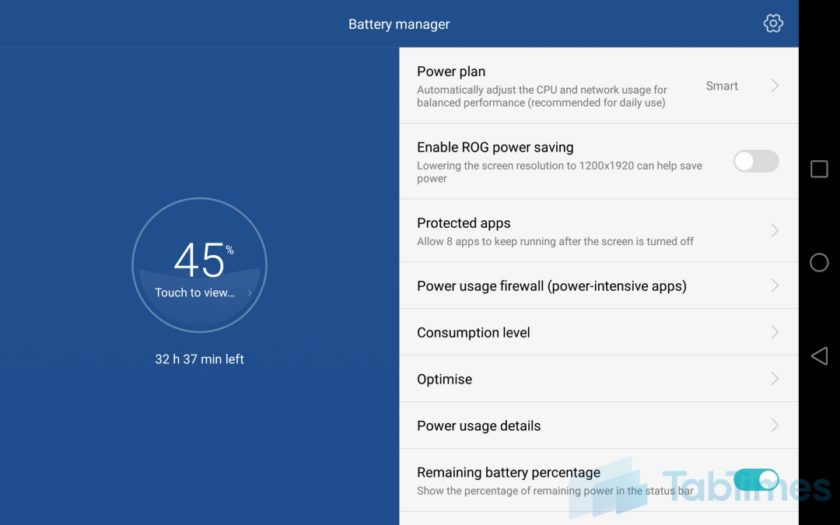
At its max brightness, the Huawei MediaPad M3 display measures 400 nits while at its lowest, it is just 4 nits and we’ve found that reducing the display brightness and/or the screen resolution (to 1080p) in the settings can improve the battery life even further. Dropping to 1080p resolution helped us achieve another 45-90 minutes of screen on time depending on the tasks involved and it’s certainly worth considering if you’re on a long flight where you won’t necessarily want or need the higher resolution or brightness.
Putting the Huawei MediaPad M3 through our quick custom battery benchmark tool with the display set to full resolution, reveals an expected screen on time of 9 hours with a combination of web browsing, video playback and gaming. While this is only indicative of screen on time, as it’s a quick test that runs for 90 minutes and extrapolates the final result, it’s accurate enough to suggest that you can expect between 8 and 10 hours of screen on time, depending upon your actual usage.
Both of these figures show you should have no issues with the battery life on the Huawei MediaPad M3, which should be good enough to get you through most journeys where you might want to watch a movie and/or game a little. Of course, there are other tablets with better battery life but considering the overall package on offer, the battery life on the MediaPad M3 is more than satisfactory.
Camera
Before we get into the Huawei MediaPad M3’s camera, let’s just put this out there; tablets were not designed with picture-taking in mind. That being said, there are a few use cases for using cameras on tablets, so are the MediaPad’s cameras any good?
On both the front and the back, the MediaPad M3 has an 8MP sensor with very little else to offer. There’s no stabilisation, no flash and no fancy gimmicks, but the camera app does have a lot of the software features you can find on other Huawei phones. The pictures produced leave a lot to the imagination and like most tablet cameras, you’ll probably be left wanting something more. There’s a fair amount of noise in the images and, whether it’s the front camera or the rear, you can expect images to be lacking in detail and clarity.

For video calls and/or quick snaps, either camera is more than acceptable but if you want anything more, we’d highly recommend you use a smartphone camera, especially if you want to share these memories with other people.
Software
The Huawei MediaPad M3 runs on Android 6.0 Marshmallow with Huawei’s EMUI 4.1 running on top and the software experience is very similar to that found on other recent Huawei devices such as the Honor 8 and Huawei P9. EMUI has certainly improved in the past couple of years but with EMUI 4.1, there’s still nothing to differentiate the tablet experience from a phone. In fact, with the ability to make phone calls, the MediaPad M3 does somewhat feel like an oversized handset.
While EMUI doesn’t offer an app drawer, it’s not so much of an issue with the MediaPad M3 although you may find having tons of apps across various home screens makes it difficult to find the app you’re looking for. At times like this, Huawei’s various gestures throughout the interface come to the forte and swiping down from any home screen opens up the universal search menu, which lets you search through your contacts, files, apps and more.
As we mentioned earlier, the fingerprint sensor beneath the display supports gestures, and while the swiping to accept recent apps or tapping to go back a step work fine, the others aren’t quite as smooth. Tapping and holding to go back to the home screen only works occasionally, while the swiping up to access HiVoice actually launches Google Now on Tap. Given that this is a pre-production unit, we’ll give Huawei the benefit of the doubt especially as the company’s fingerprint and gestures implementation is usually flawless.
Overall, EMUI is certainly an interesting interface and while it’s not everyone’s favourite interface, it’s certainly more than usable. Huawei has made some major improvements to EMUI in the past 12 months and it is really starting to show. It’s also nice to see that the Huawei MediaPad M3 comes with a relatively clean software experience that’s free of any significant bloatware and this is a welcome change, one that is hopefully an indication of where Huawei devices are going in the future.
Gallery
Conclusion
When it comes to tablets, the factors that determine whether it’s a success are different to say, a flagship smartphone. While the latter focuses on the overall experience being excellent, a tablet is arguably focused on fewer key areas such as the design, display, audio, performance and battery life.
Considering these factors, the Huawei MediaPad M3 definitely delivers, but we can’t help but think that it’s indicative of the tablet industry as a whole that we’re not overly excited by an Android tablet. On paper and in person, the Huawei MediaPad M3 definitely delivers on what Huawei set out to do: create an affordable tablet with few compromises.
If you’re in the market for an Android tablet, there’s not a lot of choices and with the MediaPad M3, Huawei has certainly shown it’s a force to be reckoned with as far as Android tablets go. Should you buy the Huawei MediaPad M3? If you’re looking for a no-compromise tablet that delivers on the key areas its meant to, you can look no further, as the MediaPad M3 is one of the best Android tablets currently on the market.
You may also like:
- Huawei P9 Plus review
- 10 interesting facts about Huawei
- Huawei unveils honor Note 8 and honor 5 in China
- Honor 8 Review
- Honor 8 vs Honor 7: First Impressions
You may also like…
Honor 8 Review
1 day ago
Honor 8 vs Honor 7: First Impressions
4 days ago
Huawei P9 Plus review
7 days ago
ZTE Axon 7 vs Honor 8
1 week ago
10 interesting facts about Huawei
2 weeks ago
Huawei unveils honor Note 8 and honor 5 in China
August 1, 2016
What do you think of the Huawei MediaPad M3 and do you plan to buy one? Do you use an Android tablet or any tablet for that matter? What do Android tablets need to offer to be able to truly compete against the Apple iPad? Let us know your views in the comments below!!

