


Best HTC 10 accessories
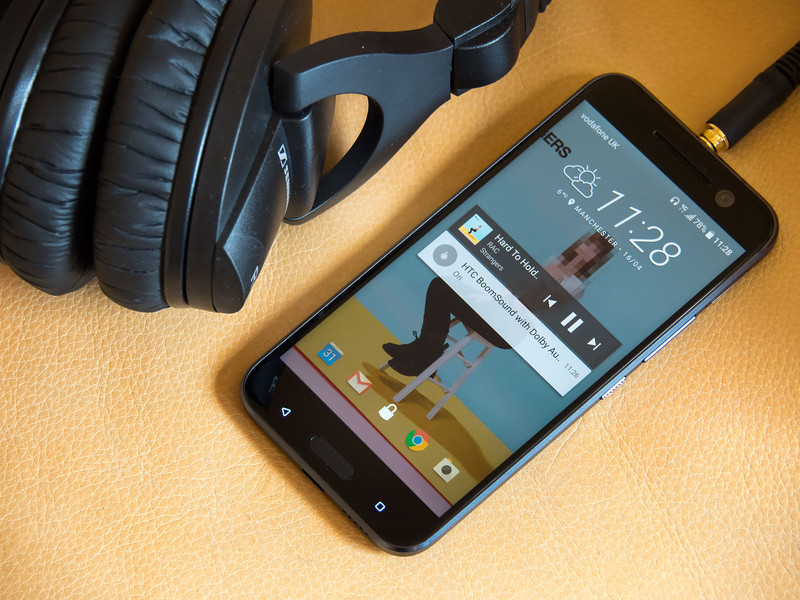
Get the most out of your HTC 10 with these great accessories.
The HTC 10 is one of the best Android phones you can own. If you’ve got one or are planning to get one, you’ll also want to get some accessories to compliment your new device. We’ve outlined some of the best options — from cases and screen protectors to car mounts and microSD cards — to protect and enhance your HTC 10 experience.
- Ice View Case from HTC
- G-Color Tempered Glass Screen Protector
- Samsung EVO Plus 128GB microSD
- Belkin 6ft 2.0 USB type-A to USB type-C charging cable
- TYLT Capio 2.0 Car Mount
- Samsung LEVEL in-ear stereo headset
Ice View Case from HTC
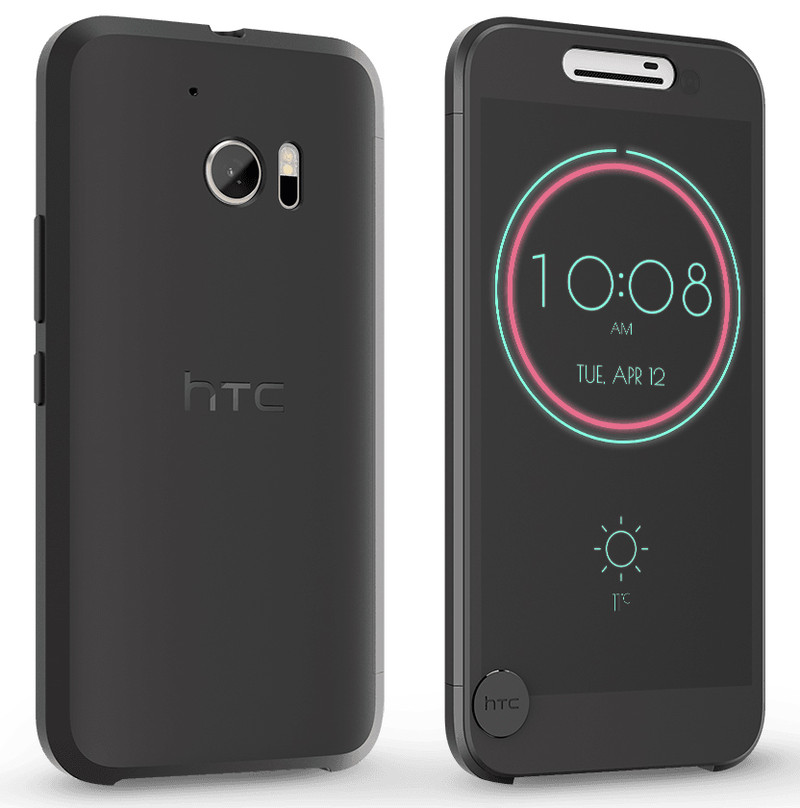
The Ice View Case is the perfect combination of protection and functionality, specifically designed by HTC for their flagship phone. With a transparent screen cover, you’re able take photos, read texts, switch between songs, and turn on the flashlight, while keeping your screen fully protected.
HTC Ice View also has support for third-party notifications, so you can keep up-to-date with social media at a glance.
See at HTC
Not quite your style? Looking for a more heavy duty case perhaps? Check out our breakdown of the best cases for the HTC 10.
G-Colour Tempered Glass Screen Protector

If you decide to forego HTC’s case with built-in screen cover, you’re still going to want protect that beautiful 5.2-inch screen. G-Color’s tempered glass offering for the HTC 10 is a great option.
It features an oleophobic coating to reduce smudges and fingerprints and, at only 0.24mm thick, you’ll know you’re protected without noticing the screen protector is there. We’ve also been keen on the Orzly’s tempered glass screen protector, which purports to address the screen’s curved edge. It’s another option to check out if screen coverage is an important factor for you.
See at Amazon
Want more options for protecting your HTC 10 screen? Check out our roundup of the best tempered glass screen protectors for the HTC 10.
Samsung EVO Plus 128GB microSD

The HTC 10 supports expandable memory up to 200GB, via microSD — a feature you’ll definitely want to take advantage of. One of the best options out there is the Samsung Evo Plus 128GB.
With write speeds of up to 80MB/s, this waterproof, magnet-proof microSD card will work great for storing your HD video, photos, music and games, and is a great choice if you’re considering adoptable storage. It’s an investment well worth the cost, especially if you’re planning to take full advantage of the HTC 10’s impressive cameras.
See at Amazon
Looking for more microSD options for your HTC 10? Check out our list of the best microSD cards for the HTC 10.
Belkin 6ft 2.0 USB Type-A to USB Type-C charging cable

The HTC 10 has a new USB-C port, and uses Type-C cables for charging, so unless you’ve owned other devices that use this newer charging cable, you’ll probably want to stock up on another for your car or office. With a length of 6 feet, this option from a trusted brand such as Belkin should give you all the versatility you require.
See at Amazon
TYLT Capio 2.0 Car Mount

The TYLT Capio 2.0 is a universal car mount that looks almost identical to the one HTC sells specifically for the HTC 10 — except at half the price. With a micro-gel suction cup that should securely adhere to any solid surface and a fully-adjustable swiveling arm, you should be able to set it up as you like in your car and be on your way.
See at Amazon
Still looking for another option for mounting your phone in your car? We’ve rounded up the best universal car mounts just for you.
Samsung LEVEL in-ear stereo headset

The HTC 10 features Boomsound technology, which means you’ll enjoy fantastic audio quality when listening to your favorite music through the built-in speakers or through headphones.
This recommendation comes from our own Jerry Hildebrand’s guide to choosing the best headphones. Samsung’s LEVEL earbuds are perfect if you want good quality in a small, portable package, and they come with a hard zip-up case for storage and travel.
See at Amazon
Have your say
Got an accessory you love that didn’t make our list? Mention it in the comments below!
HTC 10
- HTC 10 review
- HTC 10 specs
- All HTC 10 news
- These are the HTC 10 colors
- Join our HTC 10 forums
HTC
Best Buy
Verizon
Sprint
How to use Inking in Microsoft Office for Android

Create notes, sketches, drawings, and annotations in Microsoft Office using the Inking feature.
The new Inking feature on Microsoft Office apps – Word, Excel, and PowerPoint – for Android allows you to draw or write in documents using a pen or stylus – or even a finger.
The apps pack in a powerful feature that automatically senses the approach of an active pen and immediately let users start drawing, making inking intuitive and relatively easy.
The inking features work across all Android devices, both smartphones and tablets, across Microsoft’s suite of Office apps. Of course there is a slight difference in the experience on devices with Pen and without Pen – the former offering better experience , obviously.
Here’s a quick rundown of what you need to get started with Inking in the Microsoft Office apps.
- How to get Microsoft Office on Android devices
- What are key features of Inking
- How to turn on Inking mode on your pen device
- How to turn on Inking mode on your pen device
- How to turn on inking mode on touch device with no in-built pen
- How to use pen as a writing tool
- How to use highlighter and eraser

How to get Microsoft Office on Android devices
The Office apps for Android – Word, Excel, and PowerPoint are available from the Google Play Store and Samsung’s Galaxy Apps store, as well as popular app stores in China: Tencent, Baidu, Xiaomi, 360, Wandoujia, 91 and CMCC.
To use them, you’ll need an Android device running at least version 4.4 (KitKat) and 1GB of RAM.
Premium features
The Office apps allow reading of documents without signing in. You’ll need to sign in with a free Microsoft Account to create, edit, and save documents. And you’ll need an Office 365 subscription to unlock premium features mentioned below.
Microsoft Word
- Track and review changes
- Change page orientation
- Insert page and section breaks
- Highlight table cells with custom color shading
- Enable columns in page layout
- Customize headers and footers for different pages
Microsoft PowerPoint
- Save ink annotations from slide shows
- Highlight table cells with custom color shading
- Presenter View
Microsoft Excel
- Customize Pivot tables styles and layouts
- Apply custom colors to shapes
- Insert and edit WordArt
- Add shadows and reflection styles to pictures
The key features of Inking
So why would you want to use Inking features in Microsoft Office? The short answer is that it makes a bunch of drawing-related tasks easier and more intuitive to perform.
- You can use a pen or touch to ink in Word, Excel, and PowerPoint. When the pen hovers over the screen, inking options automatically show up.
- You can use the pen as a writing tool or as a highlighter.
- You can choose the thickness of the pen or the highlighter as well as choose from a variety of colors for the pen.
- You can use eraser to erase previously drawn ink. If you’re using a pen, you can press the button on the pen to erase without switching to Eraser.
- You can also interact with drawn ink as you would interact with shapes.
How to turn on Inking mode on your pen device.
Tap on the pen icon on the top toolbar (only available on mobile devices with a pen)
You’ll see that inking mode is on, and inking options show up in the contextual command bar.

How to turn on inking mode on touch device with no built-in pen
Tap on the inking icon on the top toolbar
Tap on the arrow next to Home for menu
Tap on Draw to get inking options
Tap on Draw with Mouse or Touch to draw on the document

How to use pen as a writing tool
When in Inking mode, tap on the Color icon to bring color options for the pen.
From the color palette, tap on your preferred color.
Tap on the Thickness icon to bring weight options for the pen.
From the thickness options, tap on your preferred weight.

How to use highlighter and eraser
When in inking mode, tap on the Highlighter icon.
In inking options, choose a preferred a color for highlighting.
From the inking options, tap on Eraser to use pen/touch for erasing drawn objects.

Office users, are you using these stylus-friendly options on your phone or tablet? Hit the comments and let us know!
Samsung Galaxy Note 7 recall: How to exchange or return your phone
Samsung has recalled and halted sales of the just-launched Galaxy Note 7 due to concerns over reported battery explosions.
Here’s what you need to know about the recall, including how to determine if your phone is faulty, with details on how to exchange or return your unit as soon as possible. We will update this piece with more information over time.
Why did Samsung recall the Note 7?
Samsung has confirmed that it is in the process of recalling all 2.5 million Samsung Galaxy Note 7 devices it has sold. It also stopped sales after it found potential issues with the smartphone’s battery. Keep in mind earlier reports had claimed that phones were catching fire and exploding, and low-quality battery cells tend to overheat or fail when used heavily. Recalling the new phone, which was already on sale in the US and supposed to go on sale in the UK fully on 2 September, is likely to cost Samsung dearly.
You can read more about the recall from here.
Do you have a faulty Note 7?
Samsung is replacing all existing Galaxy Note 7 units free of charge, so there’s no reason to determine if your actual device is affected. Besides, PhoneArena said the only way to see if your Note 7 is faulty is to crack open the device and peek at the battery’s label. It’s not 100 per cent though and basically not worth your time. Samsung also hasn’t detailed how to determine faulty units.
Should you ignore the Note 7 recall?
Although Samsung is recalling every phone it has sold, not every phone is at risk. According to Samsung’s announcement of the recall, there have been 35 cases reported. Still, from a safety perspective, you should not take a chance. Plus, Samsung has already released instructions on how to return or exchange your potentially faulty phone; you have a couple options available, and you’ll get a little something for your trouble.
How do you exchange/return your Note 7?
You have two immediate options: you can return the Note 7 to the carrier or retailer at which the device was originally purchased, or you can contact Samsung directly to initiate a mail exchange by calling 1-800-SAMSUNG (in the US) or 0330 7261000 (in the UK).
Further instructions for each method are below.
Samsung
Samsung is giving Note 7 owners the option to exchange their recalled model for a new unit that won’t have any battery issues. Customers will receive a $25 gift card or bill credit for their inconvenience. If you want a different device, you can exchange the Note 7 for a Galaxy S7 or S7 Edge, complete with a refund for the difference in price. If you choose that option, you can also exchange your accessories.
US carriers and retailers
- Best Buy: You can return the device to a Best Buy store for a full refund. You will also have the option to replace it with a new Note 7 (when the fixed units become available).
- Verizon: Verizon is waiving the restocking fee for any customers who purchased a Galaxy Note 7 and want to return or exchange it.
- AT&T: AT&T will let you return your Note 7 to the store for another smartphone. It will also refund any accessories purchased directly from it.
- T-Mobile: You can return your Note 7 to a T-Mobile store for a full refund of the purchase price and any accessories you may have bought. You’ll have the option to buy another phone or receive a new Note 7 (when the fixed units become available). T-Mobile is waiving its restocking fee, too.
- Sprint: Sprint CEO Marcelo Claure posted a statement on Twitter detailing Sprint’s plan. You should visit your local Sprint store to return your Note 7. The carrier will give you a “similar device” to use until Samsung resumes sales of the Note 7.
UK carriers and retailersSamsung stopped sales before the Note 7 actually released in the UK, but British networks had promotional deals that allowed pre-order customers to get their devices early. For more information, Samsung is asking UK customers to call its customer service line at 0330 7261000. It’ll start exchanging faulty Note 7 units from September 19 in the UK and Ireland.
Samsung also has this dedicated page about its Note 7 exchange programme.
Moto Z is now available in the UK, for £499
The Moto Z, that razr thin phone that dropped the headphone socket in favour of USB Type-C, and offers endless customisation through Moto Mods is now available to buy in the UK.
Starting life as a Verizon exclusive in the US, Moto was always a little tight-lipped on when they would be available in other regions. Well that time is now, following the announcement that a lower-tier handset, the Moto Z Play, at IFA 2016.
- Motorola Moto Z Play preview: Moto Mods meet mega battery life
The Moto Z can now be ordered from Motorola.co.uk for the price of £499, which puts it up there with many of the flagship rivals, although it’s a healthy price saving over a device like the Samsung Galaxy S7 edge, currently £639.
The Moto Z comes with 32GB of internal storage and Moto Maker is offering either black/grey or white/gold as the only options.
The Moto Z offers a 5.5-inch 2560 x 1440-pixel resolution display, Qualcomm Snapdragon 820 chipset with 4GB RAM, 2600mAh battery with TurboPower charging, a 13-megapixel rear camera and 5-megapixel front.
There is the option to dive into a range of Moto Mods too, from the Incipio OffGrid Power Pack for £59.99 through to the Moto Insta-Share Projector for £249, via the Hasselblad True Zoom for £199.
- Moto Mods: Everything you need to know about the Moto Z’s snap-on accessories
- Hasselblad True Zoom preview: The 10x optical zoom Moto Mod is finally here
The delivery date given by Motorola is 13 September.
If you’re after the Moto Z Play, that handset is also listed on the UK site for £369, although it’s listed as “out of stock”.
New Snowden leaks unravel mystery behind NSA’s UK base
Just when you thought you couldn’t be shocked by the NSA’s snooping anymore, new leaked documents show the agency’s reach extends far beyond American borders. According to files obtained by The Intercept from NSA whistleblower Edward Snowden, a US base in the UK has been eavesdropping on satellite and other wireless communications around the world.
The base in question is the mysterious 545-acre wide Menwith Hill Station (MHS) in North Yorkshire, which fronts as a Royal Air Force facility to provide “rapid radio relay and conduct communications research.” It’s piqued the interest of protesters, journalists, and even terrorists for decades, and the new revelation finally sheds light on what’s been going on at MHS.
According to the documents, the NSA has been intercepting international communications at the British base in two main ways. One is called FORNSAT, which uses the giant golf ball-shaped domes housing powerful antennae to eavesdrop on transmissions between foreign satellites. The other, named OVERHEAD, employs US government satellites to find and monitor cellphone calls and WiFi signals on the ground below.
The information the NSA can glean from these systems is huge, and gets pretty specific. The Intercept noted that in a single 12-hour period in May 2011, the “surveillance systems logged more than 335 million metadata records, which reveal information such as the sender and recipient of an email, or the phone numbers someone called and at what time.”
What does the agency do with the information it obtains? It turns out there’s a whole system in place called GHOSTHUNTER that is designed to “directly aid military operations.” This lets the NSA zoom in on the specific locations of targeted people or groups, so that, and here’s the chilling quote, “they could then be captured or killed.”
It appears really difficult to evade GHOSTHUNTER, as the program is described to “locate targets when they log onto the internet,” and has reportedly enabled “a significant number of capture-kill operations.” Examples of such targets include a “suspected al Qaeda ‘facilitator’” and an “alleged al Qaeda ‘weapons procurer.’” The latter was detained a few days after location by a special task force, along with his family members and associates.
These new leaks add more weight to what the intelligence industry has suspected about the base for awhile, and is just another example of how far the NSA’s reach extends. It also raises more questions on suspected UK involvement on targeted killings, about which the British Ministry of Defence declined to respond to The Intercept. Back on the home front, the intelligence agency is reportedly investigating new ways to snoop on its citizens. To really scare yourself into never using the internet ever again, check out The Intercept’s detailed report, which has links to all the spilled classified documents.
Via: The Verge
Source: The Intercept
PayPal’s Mastercard deal brings its payments to more stores
PayPal wants to be your go-to payment option online and in stores, but it has a problem: banks and credit cards aren’t a fan of its free bank transfers and other attempts to push online payment over the conventional variety. However, it’s trying to make amends. In the wake of a Visa deal from July, PayPal has forged a partnership with Mastercard that gives the credit card firm higher prominence online in return for more of a retail footprint. PayPal will make Mastercard a “clear and equal” payment choice in its wallet (complete with an image of your card), let you set the card as a default payment method and will “not encourage” you to link a bank account if you’re a Mastercard customer. In exchange, you can use a linked Mastercard in your PayPal wallet to make in-store purchases at contact-free terminals.
It’s a gamble, to be sure: PayPal is hoping that you won’t mind the in-your-face credit card promotion in return for greater shopping freedom. With that said, it might be necessary. PayPal is facing increasingly stiff competition in the internet payment world, including from heavyweights like Facebook. This helps PayPal reduce its dependence on that more vulnerable business and get the drop on rivals that haven’t done a lot in retail.
Via: Wall Street Journal
Source: PayPal, Mastercard
Moto G4 Play joins Amazon’s ad-injected Prime phone deals
Motorola’s budget-minded Moto G lineup just got an even more affordable addition thanks to Amazon’s Prime exclusives. For a mere $99.99 unlocked, the newly announced Moto G4 Play comes loaded with Android 6.0 Marshmallow and solid specs like 4G LTE, a 5-inch 720p display driven by a quad-core Snapdragon processor, 2GB of RAM, 16GB internal storage and an 8-megapixel camera with a 5-megapixel selfie shooter.
Of course, that low price is subsidized by display ads, so users will be receiving personalized offers and product recommendations on the phone’s lockscreen. Assuming you already have a Prime membership and don’t mind dismissing the ads occasionally, you’ll save a cool $50 off the retail price. And because it comes unlocked out of the box, the Moto G4 Play will work with any major network in the US. The G4 Play is available for pre-order from Amazon today and ships on September 15th.
For a step up in specs, the slightly more powerful and highly rated Moto G4 is also available under the Prime exclusives deal. The fourth-generation G boasts a 5.5-inch full HD display with a 1.5 GHz octa-core processor and 13-megapixel camera, all for $149.99 unlocked. Finally, rounding out the Prime exclusives lineup is the BLU R1 HD for a low-low price of $49.99. While it isn’t BLU’s most powerful phone, the company has a solid reputation for dependable and feature-packed budget handsets.
Indian researchers recycle fish scales into energy nanogenerator
Indians consume a lot of fish: Data from 2014 estimated that each urban citizen consumed an average of 2.8 kg per year, or about 3.7 million kg for the whole country. That leaves a lot of leftover bones, scales and tails. As they reported this week in Applied Physics Letters, a team of researchers at Jadavpur University looked for ways to re-use this “biowaste” and pioneered a method to generate electricity from it.
First, some biophysics. Fish scales have collagen fibers containing piezoelectric properties: Stress them and you generate a charge. Considering this, the researchers collected a large volume of them and used a demineralization process to make them transparent and flexible. Then they toyed with the hierarchical alignment of these treated scales, boosting their energy yield and effectively creating a bio-piezoelectric nanogenerator.
It can scavenge several types of ambient mechanical energies like body movements, machine and sound vibrations and wind flow. Even touching the nanogenerator produced enough electricity to light 50 LEDs. The result is a big step for self-powered flexible electronics, which could one day be developed into things like pacemakers energized by heartbeats that safely biodegrade in time. While it could also find applications in transparent and portable electronics, the biocompatibility likely makes this tech more valuable to medical uses like e-healthcare monitoring, in vitro diagnostics and edible devices.
Source: Phys.org
Warner Bros. asks that its own sites be removed from Google
Warner Bros. is in the business of keeping its content from being pirated, and in the past has been working on ways to accomplish just that.
The studio has taken to Google in the past to see this lofty goal through, alleging that the search engine makes it far too simple for users to seek out and obtain pirated content. In the past, Warner Bros. has even asked that Google remove destinations for torrent fans like The Pirate Bay from its search results.
Now, Warner Bros. is taking matters into its own hands by collecting pirated content and its corresponding URLs to report to Google while requesting that it gets de-indexed. However, it looks like the studio has also flagged its own URLs for censorship via anti-piracy partner Vobile.
For example, screenshots from DMCA notices for both The Dark Knight and The Matrix note official publicity URLs for both movies located at Warnerbros.com. Recently, a DMCA takedown notice for the movie The Lucky One was submitted with yet another Warnerbros.com URL. It’s happening again and again, which only places the spotlight on the problem with automating takedowns. Warner Bros. is essentially making it more difficult for fans to visit pages related to its properties and, in some cases, purchase them according to Amazon URLs on the same notices.
Google decided to leave the URLs up, but it’s possible that may not be the case going forward forever. It looks like Warner Bros. will have to be more discerning in the future when it comes to combating piracy through means it deems necessary.
Via: TorrentFreak
Amazon Fire TV update gives you much wider voice search
Amazon’s Fire TV devices just became much more useful if you prefer to talk to your media hub. An update rolling out to the Fire TV and Fire TV Stick gives you dramatically improved search: you can now use voice to search over 75 apps and services, including Netflix and (soon) HBO Now. If the show you’re looking for is available on multiple services, you’ll see all your choices. And if you’re content with watching Amazon Video, you’re still getting an upgrade. You now have voice control of playback with Amazon’s service, so you can skip to your favorite Transparent scene without using the fast forward button.
There’s more. Much like on Apple TV, you can get game scores and other sports updates with a voice command — you’ll have to specify your favorites, but you won’t have to disrupt your show to get the scoop. And don’t worry if you’re not a fan of speaking to a set-top box, as there’s one big update for you as well. The Fire TV home screen has added personalized recommendations for both Netflix and HBO to help you find something new to watch. All told, your Fire TV gear should spare you a lot of button clicks.
Source: Amazon

