


Amazon Prime Air launches in UK: Watch the first drone delivery here
Amazon’s drone delivery fleet has crossed the ocean. Sort of.
The Seattle-based company has announced that its Prime Air drone delivery programme is now making delivering in the UK. It’s already delivered to two customers and will expand to more customers soon. This is a trial restricted to small items up to 5lbs (2.2kg), but it completes deliveries in 30 minutes or less.
On 7 December, Prime Air delivered its first order: an Amazon Fire TV and a bag of popcorn. Amazon said it took 13 minutes for the customer to get the package in Cambridge via Amazon’s own specialised drone. Although Amazon has Prime Air development centers in the US, as well as in the UK, Austria, and Israel, and it plans to test drones in multiple international locations, the company has started trials in the UK, rather than the US, because it’s received permission from regulators in the country.
In July, the UK Civil Aviation Authority (CAA) provided Amazon with permission to test drone operations in rural and suburban areas, as well as permission to test drone sensor performance essential to identifying and avoiding obstacles. It also received permission to test flights where one person operates multiple highly-automated drones. The company said it’s working with regulators and policymakers in other countries, too.
According to The Wall Street Journal, Amazon said it will expand its test in the UK from two customers in a roughly 5-square-mile area of farmland to dozens more in the coming months. As to how it works, Amazon’s drones deliver to customers located near its warehouses, and those customers must print of a QR code supplied by Amazon and stick it outside their house. It acts like a beacon, allowing the drone to locate you and land.
Amazon has a bunch of videos demoing how delivery works. In them, Amazon’s drones appear to be small with no fixed-wings, which indicates they can’t travel very far. Also, they’re much different from the original Prime Air drones that were massive with fixed wings.
First-ever #AmazonPrimeAir customer delivery is in the books. 13 min—click to delivery. Check out the video: https://t.co/Xl8HiQMA1S pic.twitter.com/5HGsmHvPlE
— Jeff Bezos (@JeffBezos) December 14, 2016
Twitter launches live videos: Here’s how to broadcast from the app
Twitter has updated in a major way: you can now broadcast live video from within the iOS and Android app.
In an effort to go after Facebook Live Video and other streaming services that offer broadcasting functionality, which is when you can hit record and show everyone what you’re doing in real-time, Twitter has launched its live video feature that’s “powered by” Periscope, the company’s dedicated app for broadcasting. But the interesting thing is you can use the feature without installing Periscope or creating an account.
Here’s everything you need to know about Twitter’s live video feature.
Twitter live video: What’s happening?
We’re making it easier for you to share what’s happening in your world. Now you can #GoLive on Twitter!https://t.co/frWuHaPTFJ pic.twitter.com/Xpfpk1zWJV
— Twitter (@twitter) December 14, 2016
Starting 14 December 2016, you can create and tweet a live video stream directly from the Twitter app. Once you’re live, anyone on Twitter and Periscope can join your broadcast, comment, and send support in the form of hearts by tapping the screen. Live videos are searchable in the Twitter app, Periscope app, and Twitter website, and it can be embedded on other websites just like tweets.
Twitter live video: How does it work?
Twitter/The Verge
Getting started with (or without) Periscope
Twitter uses your Twitter account to log in to Periscope. That means you don’t have to do anything, including download Periscope and create a Periscope account. However, if you want to take full advantage of the live video features, such as update any of your account settings, Twitter recommends installing Periscope on your iOS or Android device, though it’s not required.
You can learn more about Periscope from here. Keep in mind Twitter had previously offered a Periscope button in its Twitter app, but tapping that button redirected you to Periscope, or to an app store to download it, rather than launch a broadcast option directly within Twitter.
Going live
To go live, compose a tweet (tap the compose tweet icon), then tap the “LIVE” option (live video icon), which will bring you to pre-broadcast screen that allows you to frame your shot. When you’re ready, press “Go Live” (red button) to start broadcasting. You cannot go live from Twitter if you have protected tweets, but you can download Periscope and host a private live video through that app.
Interacting with viewers
During the broadcast, viewers who see your broadcast on their timelines can tap in, comment, and send hearts. You can also interact with other viewers by tapping on their comment to view their account profiles, respond to a comment, or block their accounts.
Ending live videos
When you want to end your live video, simply swipe down and tap the “End video” button.
Finding live videos
You can discover and watch live videos from your Home timeline, notifications, search, and trends. You can watch live videos and replays from anyone on Twitter.
Engaging with live videos
If you want to engage with a live video, you can comment or send hearts. You can comment directly in live videos through Twitter or Periscope. If you open Periscope to chat, press “Enter” to access the text input field and press “Esc” to exit the text input field. Similarly, to send hearts in Periscope during a broadcast, all you have to do is click on the heart in the bottom right corner of the screen or you can hit the space bar.
Deleting live videos
You can delete any of your live videos at any time. All you have to do is delete the tweet with your live video. This will delete it from Periscope as well. However, deleting your live video from Periscope does not automatically delete the tweet from Twitter.
Push notifications
You can opt-in to receive push notifications from accounts you follow when they go live. You can learn more about that from here.
Twitter live video: When will the feature be available?
Twitter’s live video feature is rolling out to everyone on Twitter for iOS and Android right now.
Want to know more?
Check out Twitter’s support page for more details.
Black Lives Matter site faced over 100 attacks in half a year
When you launch protests in the modern era, you don’t just have to worry about aggressive responses on the streets… you have to worry about your online presence, too. Deflect Labs has determined that Black Lives Matter’s official website was subject to over 100 botnet-based denial of service attacks between April 29th and October 15th, a large part of it coming from members of a Ghost Squad hacking collective that had vocally denounced BLM’s campaign. And it didn’t require many people, either. Just two culprits (who may be the same person) launched nearly a fifth of the attacks, one of which tried to flood the site with traffic using nearly 1 million bots.
While there’s evidence that some of the attacks were coordinated, others were “bandwagon” efforts from mobs hoping to ride the coattails of the more successful campaigns. Even the larger attacks didn’t require much effort, either. They created millions of bogus connections by “reflecting” off of innocent Joomla and WordPress blogs, taking advantage of others’ bandwidth. Many attacks only needed “bulletproof” server hosting (supposedly beyond the reach of western law enforcement) that could cost just fractions of a penny per hour.
Thankfully, these campaigns are more symbolic than they are effective. The worst bombardments were rare and didn’t take down the BLM site for long, while the piggyback attacks often had “no effect.” Denial of service attacks also aren’t intended to swipe sensitive data, either. The biggest issue is usually the aftermath. It’s very expensive for site hosts to cover the sudden spikes in traffic, and they’re known to either foist those costs on victims or force them to seek alternatives. That wasn’t a problem here, but other activist groups might not be so fortunate.
Via: Motherboard
Source: Deflect Labs
JRPG classic ‘Lost Odyssey’ is currently free on Xbox One
Here’s an easy holiday gift for all the Xbox One owners itching to relive the nostalgic days of classic Xbox 360 titles: From now until December 31st, digital copies of Hironobu Sakaguchi and Mistwalker Studios’ legendary Japanese RPG Lost Odyssey are free for download on Xbox One’s backward compatibility.
If you missed it the first go-round, Lost Odyssey follows the journey of Kaim “a mysterious immortal warrior” on a mission of self-discovery. The freebie is “our small way of saying thank you for being a fan of Xbox” Mike Nelson wrote on the Xbox Wire today, but it’s also a celebration of Xbox hitting a 300-title milestone on Backwards Compatibility. While you’ll still have to pony up $19.99 to bring back other classics like Bioshock or Call of Duty: World at War, Lost Odyssey originally spanned four dual-layer DVDs when it was released in 2008, so players will definitely have enough free content to get through a long holiday season and well into 2017.
Source: Xbox News, Major Nelson
NBC News: US intelligence has info tying Putin to election hacking
Months after US intelligence officials said top Russian officials were involved with hacking the Democratic National Committee and other political groups, a new report claims president Vladimir Putin is “personally involved.” NBC News did not specify what the evidence is, but said two unnamed senior officials have access to information showing Putin personally directed how the information would be used to affect the recent election.
There’s some disagreement on the actual intent of the operation, but the information is apparently coming from diplomatic sources and spies. So what’s next? The report goes on to say that officials are probing Putin’s financial holdings and that the Obama administration could “feel compelled” to act before leaving office.
Source: NBC News
Florida court rules police can demand your phone’s passcode
A Florida man arrested for third-degree voyeurism using his iPhone 5 initially gave police verbal consent to search the smartphone, but later rescinded permission before divulging his 4-digit passcode. Even with a warrant, they couldn’t access the phone without the combination. A trial judge denied the state’s motion to force the man to give up the code, considering it equal to compelling him to testify against himself, which would violate the Fifth Amendment. But the Florida Court of Appeals’ Second District reversed that decision today, deciding that the passcode is not related to criminal photos or videos that may or may not exist on his iPhone.
Obviously, this has implications for Constitutional protections of a civilian’s data contained behind a smartphone’s multi-digit passcode. Previously, a 2014 decision by the Virginia Beach Circuit Court found that individuals can’t be compelled to give up their phone’s code, but they could be forced to unlock it with a fingerprint, should that option be available.
The distinction? A passcode requires a person to divulge actual knowledge, while a fingerprint is considered physical evidence, like a handwriting sample or DNA. This interpretation sources back to the Supreme Court’s 1988 Doe v. U.S. decision, in which it ruled that a person may be compelled to give up a key to a strongbox, say, but not a combination to a wall safe.
The three-judge Appeals Court panel in Florida disagreed with this distinction. They also found the comparison out of step with the current state of technology, such that providing the passcode would not be as similarly self-incriminating as directly giving the authorities evidential documents. Further, the police were beyond probable cause of searching suspect Aaron Stahl’s code-locked phone, as Judge Anthony Black wrote for his fellows in the court’s decision:
“Moreover, although the passcode would allow the State access to the phone, and therefore to a source of potential evidence, the State has a warrant to search the phone—the source of evidence had already been uncovered … Providing the passcode does not “betray any knowledge [Stahl] may have about the circumstances of the offenses” for which he is charged.”
Black clarified what kind of foreknowledge authorities would need to possess to compel someone to divulge their phone’s passcode:
“In order for the foregone conclusion doctrine to apply, the State must show with reasonable particularity that, at the time it sought the act of production, it already knew the evidence sought existed, the evidence was in the possession of the accused, and the evidence was authentic … Although the State need not have “perfect knowledge” of the requested evidence, it “must know, and not merely infer,” that the evidence exists, is under the control of defendant, and is authentic.”
Via: The Daily Dot
Source: Courthouse News
Nomu S10 review

In an world where every company tries to come up with an ever thinner device than last year’s, sacrificing battery life for looks, leaving out plasic and using metal and glass instead, it’s nice to see a manufacturer like Nomu. Its whole lineup of devices is aimed at people that are normally in harsh environments.
With IP68 water resistance rating, utilitarian design and a mind-boggling 5000mAh battery, the Nomu S10 is not aimed at someone working a run-of-the-mill office job.
Specs
The specs for the Nomu S10 are very respectable for 2016 standards. And look at that battery.
- Android 6.0 Marshmallow
- 5.0-inch display at 1280 x 720 pixel resolution; Gorilla Glass 3
- Quad-core Mediatek 1.5GHz processor
- 2GB RAM
- 16GB internal storage; microSD expansion card slot for 32GB
- 8-megapixel (interpolated to 13-megapixel) rear camera
- 5-megapixel front-facing camera
- Dual-SIM
- 5000mAh battery
- 2G GSM: 850/900/1800/1900(B5/B8/B3/B2)
- 3G WCDMA: 900/2100(B8/B1)
- 4G FDD-LTE: 800/900/1800/2100/2600(B20/B8/B3/B1/B7)
- TDD-LTE: 2300(B40)
- WiFi: IEEE 802.11 a/b/g/n 2.4GHz
- Bluetooth: 4.0 BLE
MicroSD support is also nice in an era where more and more phones leave this feature behind in favor of internal storage. You’ll have to make a compromise though: it’s either a microSD or two SIM cards, but not both.
Initial Impressions and Setup
 Pretty straightforward packaging.
The packaging is pretty straightforward. It’s just a brown box with the Nomu logo on it, devoid of any other branding or indication of the phone itself. Curiously, the Nomu S30 comes in exactly the same box, even though it is much bigger.
Inside you will find the phone, a pair of headphones and a charger. This review unit came with a charger compatible with European plugs, something which wasn’t a problem for me but could be a minor inconvenience for those who live in the US.
Something peculiar about this phone is that, upon powering on, it doesn’t take you to the normal setup screen that you’re used to when booting an Android device for the first time. Instead, you’re greeted with the phone’s main screen. You can effectively use the phone without configuring. As a person who dislikes long setup processes, I like this approach.
If you actually want to use your Google account with your phone, accessing any Google-made app will take you to the configuration you’re used to. From then on, everything will work exactly as expected. As a side note, some Google apps you’re used to don’t come installed by default, including YouTube and Google Drive; you’ll have to do that by yourself.
Hardware and Build Quality
First, let me address the elephant in the room: this is the thickest phone I’ve used since my Nokia 3590 back in 2003. Probably the massive 5000mAh battery has something to do with it. But let me get something straight: this is actually not a bad thing.
Sure, Apple, Motorola, Samsung and company have us think that a thinner phone is better (which, to an extent, you can say it is), but there’s also a market for people looking to, you know, actually use their phones. What’s more, they don’t want to turn off every shiny new feature to make it through the day. Sure, there’s a trade-off, and that’s something Nomu has obviously accepted, but kudos to them for favoring function over form.
Upon holding the device, you will immediately notice its ruggedness. This is a heavy-duty phone, aimed at people who work in harsh environments, where a power outlet is not available for hours and/or water is a serious concern.
1 of 9


Corners are not rounded, but very angular and sharp instead. It tries to alleviate the thickness factor by reducing it around the edges, something which works to some extent.
Except for the Gorilla Glass 4 screen, the whole device is made of some kind of rubberized plastic. While many phones these days opt for metal and glass casings that can make the phone slippery, the Nomu S10 is almost impossible to drop by accident under normal conditions.
The device itself is black with orange accents, which, combined with its rugged elements, makes it look futuristic and it has certainly garnered attention when using it throughout my review process.
 The orange accents makes it a pretty looking device.
Its IP68 water resistance rating means that it can be submerged for 30 minutes under a maximum of 1.5 meters of water. That’s A LOT of time, so feel safe knowing that this phone will survive that drop into the toilet.
All of these characteristics and focus on ruggedness makes the phone feel incredibly sturdy. Your immediate reaction would be to think that this phone is more expensive, because it sure feels like it is.
For those wondering, the volume keys and the power key (in that order, from top to bottom) are all located on the upper right side of the device, while the speaker is at the back.
The 3.5mm headphone jack is present (thanks Nomu for not being “courageous” enough to remove it) and located at the top, while the microUSB port is located at the bottom. Both of them are covered by rubber flaps in order to achieve its water resistance rating. I actually didn’t try submerging the phone with the flaps open, but I’m pretty sure that is one of those “don’t try this at home” situations.
Screen
Being a $100 phone in this era means that some corners have to be cut. The first place where you notice this is by looking at the screen. The 1280×720 5.0″ Sharp IGZO screen does a decent job under normal conditions and you can perform your tasks without your eyeballs bleeding. However, sometimes you can see some icons and colors being displayed in a weird way. Picture an image compressed 5 times: this is how the S10’s screen displays stuff sometimes.
This was really noticeable for me while taking a closer look at the default wallpaper. At first I thought “Wow, that’s a really crappy picture,” but then I changed it to a different one and saw the same kind of artifacts. It’s a shame, because otherwise this panel would be decent enough for a $100 device.
It gets really bright (there’s almost no direct sunlight in Estonia at the moment, but trust me, the screen can get very bright) and the 720p resolution is good news for battery life. Unfortunately, in its current state, the screen leaves something to be desired.
Speakers and Audio
 Speaker is located at the back of the device.
As previously mentioned, the speaker is located at the back side of the phone. The last phone I owned that had this configuration was the LG G3, and I sure hated that speaker. I just can’t stand speakers there because you have to lie your phone on its screen for the speaker to be useful. That simply doesn’t make sense.
Anyways, the good news is that it gets extremely loud. If loudness was the only factor, then actually I would use this phone over my Bluetooth speaker. However, as we know, quality is the other side of the story, and unfortunately some distortion and loss of quality can be heard when the speaker is at its maximum. It’s not a deal-breaker, but something to note anyways.
Nevertheless, keep in mind that this may be noticeable to us who actually care about this kind of stuff. I tried the speaker with a couple of friends and both noticed the loudness first, and made no mention about the loss in quality.
When actually connecting the phone to a pair of headphones, output was good enough. Note that I’m not able to detect any significant improvements in quality since my only pair of headphones are Apple Earbuds, but I can definitely notice a reduction in said quality, something that didn’t happen while listening Epica’s latest masterpiece, The Holographic Principle, or a really nice 80’s music playlist I found the other day.
Connectivity
If you didn’t get the message when talking about the charger that ships with the S10, then you will definitely notice it here. Clearly, Nomu is not focused on the US market for now. Why? In short, it’s because its phones doesn’t have the required bands for 4G to work there. That is really a shame for our US readers; the phone will get 3G speeds at best. However, here in Estonia, Telia uses bands 3, 7, and 20 to deliver its 4G service, so I could test it.
 Be careful about the bands your carrier uses, since there’s limited support for bands in some regions.
Overall, I got good signal everywhere I went. Call quality was exactly as you might expect, so, if you have the required bands, the phone behaves exactly as you expect it to. Be sure to check this beforehand, though.
Regarding WiFi, I could achieve the same download speeds as on my other devices, so there are no surprises here either. A thing to note, though: there’s no support for 5.2GHz WiFi networks as only 2.4GHz is supported.
Software
 The launcher is not Google Now or Pixel.
Do you like stock Android? I have good news for you. Nomu has decided that Google’s implementation of Android Marshmallow is good enough for its purposes and decided to leave it partially unchanged. That is normally good news regarding updates, since it means less things to test and update for new versions, but I wouldn’t hold my breath for a Nougat update.
However, let me tell you that this Android 6.0 implementation works pretty well. Since you already know the main features of Android 6.0, I will tell you the deviations from Google’s original software.
First, there is the launcher. I know what you might be thinking: “First, he says that Android is largely unchanged and then he says that the launcher is different?” I know, let me explain. This is neither Google Now Launcher nor the shiny new Pixel Launcher introduced in Android 7.0. This is a generic launcher that has home screens, an app drawer and nothing more. It is pretty bare-bones and, frankly, not that good of an experience. Fortunately, the Play Store has a plethora of options from which you can choose, so that shouldn’t be a problem.
Also, a weird thing about this Android build is that, even though it is Marshmallow, the icons for some apps look like their Jelly Bean era counterparts. I can’t for the life of me understand the reason behind this.
Regarding other aspects, you’ll see that the quick settings has two new members: Audio Profiles and Supershot. The former lets you change your sound profile from four predefined options: General, Silent, Meeting and Outdoor. The latter lets you take a screenshot without having the Volume Down + Power Button combination.
 Many useful options have been added.
When taking a screenshot, you will get the option of editing it too. You can crop it in a rectangular shape, with a lasso tool, or with a graffiti function (the image becomes your canvas and you select parts of it by making lines over it). You can also create longer screenshots by using the scroll function.
The problem with this is that the phone doesn’t generate screenshots correctly. It compresses its height a little bit, making the image look distorted. It seems like it is a problem with the implementation of the navigation bar, since making it hide and then opening an app results in screenshots being captured correctly. I’m sure this can easily be corrected with an update, but it’s inadmissible that this kind of faults have made it through QA and into production software.
There are some really useful options in the settings screen. Stuff like tap to wake, hiding the navigation bar and turbo download (download big files using both data and WiFi) are present there for your pleasure.
Also, there’s this neat feature in which you can draw a letter on the screen while it is off, and, upon detection, the phone will open the related app. For example, I configured the C to open the camera. It works exactly as advertised, although it could benefit from opening the app faster. The current implementation wastes time making an animation based on the detected letter.
Performance
I know that benchmarks tell us nothing about the performance under daily use, but here is the AnTuTu benchmark score in case you were wondering.
 With its score of 37396 points, the Nomu S10 is ranked among devices like the Samsung Galaxy A3 (2016), Huawei Honor 5X, Blu Vivo XL and OnePlus One. For reference, the Google Nexus 5 scores 23225 and the Samsung Galaxy S6 scores 76912.
Using it for a couple of weeks, though, I can say that I could easily use this phone as my daily driver. It is really snappy when doing normal activities, like checking Facebook and Twitter, watching YouTube videos and streaming Spotify. It struggles when there’s a lot of things going on (for example, when downloading apps), but then again, a lot of phones do.
Games is a different matter, though. Stuff like Star Knight performs superbly, since it is not a graphic-intensive game. However, things change a bit when launching N.O.V.A 3. It’s likely my fault for trying to run such a game on a $100 phone, but results are decent at best. The game gets laggy in a lot of instances and skips a lot of frames. If you’re the kind of person that plays heavy-load games, then you won’t be interested in this mid-range phone.
Camera
Continuing with the list of components that were hindered in order to reduce costs, we arrive at the camera. I don’t want to blame the camera only, since the screen actually makes pictures look worse than they are, but the results are not stellar either. The 13 MP shooter with a single flash does a modest job in daylight conditions, but it is especially bad in low light.
 The camera is decent at best under conditions with lots of light, but struggles in dark environments.
Unfortunately, I didn’t have a single clear day to take pictures in which the sky was blue, but you can clearly see that colors are not bright enough on any of the samples anyways. Also, you have to move the phone as little as possible when taking pictures, because if not, the photo will turn out blurry.
Low-light images look like they were printed on sandpaper and the camera does an awful job with colors too. Also, focusing sometimes takes a really long time, something that, in my opinion, is as annoying as the quality itself. This is specially true on low-light conditions, when focusing is sometimes downright impossible.
1 of 10


The camera app is not Google Camera but a different implementation which actually has some nice options. There’s a mode in which you can capture a picture with both cameras at the same time, and the software will superimpose one on top of the other. There are also different filters like mono, sepia, negative, whiteboard and similar.
Stuff like scene modes, timers, ISO and video quality can be changed at the touch of a button. Unfortunately, it can’t aleviate the camera’s inefficiencies, which is a hardware problem that no software might be able to resolve.
Battery
 Battery life is superb on this phone, thanks to its 5000mAh battery.
The phone can easily last three days on a charge with location, several social networks constantly pinging home for no reason, some light gaming, some YouTube videos, and Amaranthe’s Maximalism looping for hours on Spotify.
There’s one small thing though: standby time could be better. Sometimes, when leaving the phone at home with WiFi and Bluetooth on, the phone discharges just a bit slower as when actually carrying it with me and using it appropriately, something that makes no sense.
Actually, the phone has a function called “Standby Intelligent Power Saving,” which I tried to turn on and off for a few days but it made no noticeable difference. Another thing, the battery screen appears to be kind of broken, since it always displays “Phone idle” as the most expensive process, with a disproportionate amount of computed power use.
Charging the phone takes a lot of time, even with the included charger. We’re talking about 4 hours easily. Also, the phone tends to get warm when charging, especially when the battery is almost depleted. This is an increasingly common thing these days thanks to Quick Charge, so you probably shouldn’t worry about it.
Conclusion
The Nomu S10 is certainly a peculiar device. It has no middle ground: its ups are superb, but its downs are almost catastrophic. On one side you have a really sturdy, rugged, Bear Grylls-worthy build, but the screen then fails to display some patterns correctly. The battery is the best one I’ve used by far (at least since the dawn of the smartphone era), but its camera is not dependable at all. Even within the same category, there are some superb stuff and some unbearable aspects. Take as an example the speaker: really, really loud but on the back of the phone, and some quality is lost at high volumes.
Recommending this phone is as hard as it gets. Do you care about a phone that will last through use and abuse? Then buy it. This is the S10’s main market, and, it is really good at that. Do you want to buy a phone that will accompany you through your son’s first years in this world? Then don’t but it. You will probably want to take pictures of his first steps into this world, and this camera will produce pictures that will leave you as disappointed as the kid will be when he realizes he has to study for the next 20 years.
There are some situations in which this phone is almost perfect, and some in which it’s not up to the task. For $100 though, this phone is good to have as a backup (which actually has longer battery life than the phone it is backing up).
If you’re looking for one, you can get it from the following shops:
- iGoGo.es
- Coolicool
- Geekbuying
- GearBest
- EverBuying
Prices vary from shop to shop, but they won’t ever surpass $130 dollars (or euros, depending on where you are). If you want more information about the phone, then Nomu’s official site has more information.
Lenovo Vibe K5 Note review
Lenovo has been on a hot streak in India, with a slew of great smartphones on offer that cover everything from entry-level to high-end. The company has found particular success with its K Note series, while both the K3 Note and the Vibe K4 Note proving to be quite popular.
Also read:
Lenovo K4 Note review
July 25, 2016
Lenovo is hoping to find the same success with the latest addition to the series, the Vibe K5 Note, that was launched in India in August. With upgraded hardware and a premium design, does the latest affordable smartphone from Lenovo prove to be a worthy successor? We find out, in this comprehensive Lenovo Vibe K5 Note review!
Buy now from Flipkart
Design
The Lenovo Vibe K5 Note features a beautiful, all-metal unibody design
More and more manufacturers are starting to include all-metal designs in their mid-range and entry-level smartphones, so it’s not surprising that the Lenovo Vibe K5 Note features a full metal unibody construction. Admittedly, it doesn’t feel like the highest quality metal when compared to its more expensive and higher-end counterparts, but the construction is sturdy, and the device feels solid in the hand.
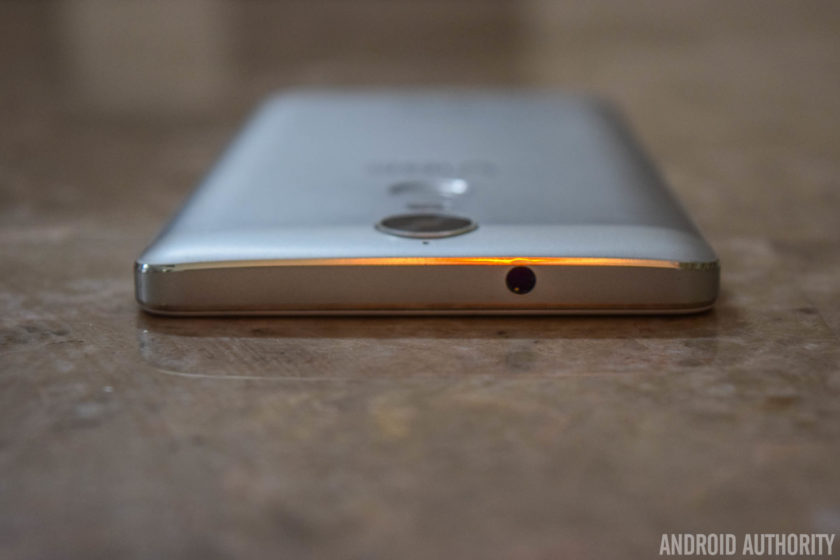
Taking a look around the device, the headphone jack sits on the top, while the microUSB port can be found on the bottom. The hybrid dual-SIM card and microSD card slot are on the left side, and on the right is the power button and volume buttons. The buttons are definitely an improvement when compared to its predecessor, with a good amount of travel and a nice click to them.
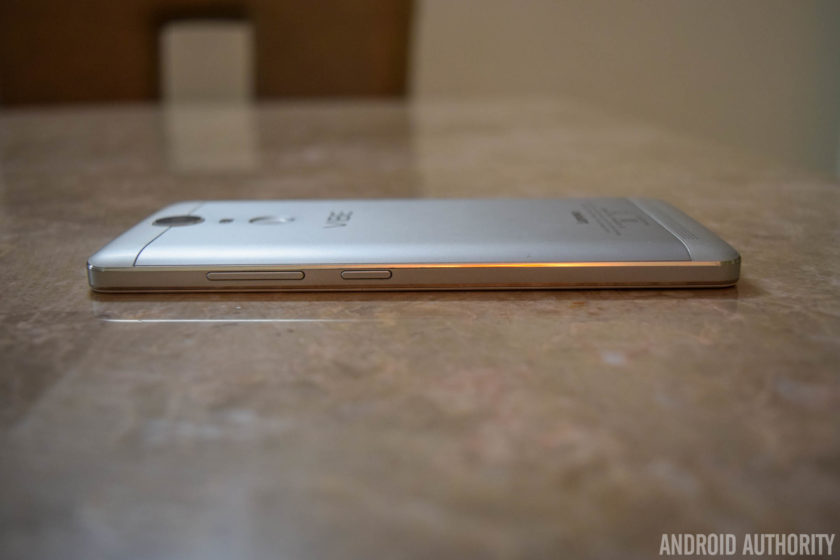
Below the display are capacitive navigation keys, and unlike its predecessors, the keys do light up, which is a nice upgrade. It’s not particularly bright though, and you won’t really notice it unless you are in a dark environment, but that is when having back-lit navigation buttons is the most useful anyway.
The fingerprint scanner is on the back, below the camera unit and the dual LED flash, and at the bottom is the single speaker unit. During the launch event, Lenovo made a big deal about how the camera, the flash, the fingerprint sensor, and the Vibe logo were perfectly aligned and symmetrical. It’s a nice design touch that you don’t really appreciate day to day, but has led me to taking a lot more notice of what other phones look like.
With a 5.5-inch display, the K5 Note is a large device, but Lenovo has done a good job with keeping the bezels along the sides of the display relatively thin. The subtle curves all around the back contribute positively to the handling experience as well. However, the metal body makes for a very slippery device, which can take some getting used to. If you have had issues with dropping your phone, you are definitely better off using a case that adds some grip.
Display

The Vibe K5 Note’s display is a huge improvement over its predecessor
The Vibe K5 Note comes with a 5.5-inch IPS LCD display with a Full HD resolution, resulting in a pixel density of 401ppi. This display is a huge improvement over its predecessor, particularly when it comes to the brightness. Color reproduction and viewing angles are better as well. 1080p allows for plenty of sharpness, and reading text, watching videos, and playing games are all enjoyable on this large display.
The default settings are good enough, but you do have the option to change the color balance and temperature to better suit your needs. There is a manual mode that gives you granular control over these aspects, and a few preset options, like Comfort Mode, that helps protect your eyes when browsing the phone for long periods of time.

One point to keep in mind here is that the glass panel protecting the display isn’t of the Corning Gorilla Glass variety, which is definitely a step back, considering it was available with the K4 Note. It’s difficult to judge how sturdy the panel is without actually scratching it or dropping the phone, but if that is a worry, a regular or tempered glass screen protector is certainly recommended. That said, I haven’t had any issues with scratches on this screen yet.
Performance

The Vibe K5 Note is powered by the octa-core MediaTek Helio P10 processor, clocked at 1.8GHz and backed by the Mali-T860MP2 GPU. This particular review unit comes with 4GB of RAM, but there is also a slightly cheaper version of the phone available with 3GB of RAM. The benchmark scores may not be very impressive, but the overall performance has actually been really good.


Opening, closing, and switching between apps has been a breeze, and the device handles everyday tasks very well. The gaming performance is excellent as well, and there have been no instances of lag or stutter when playing games like NBA Live Mobile, Stick Cricket 2, Modern Combat 5, and Riptide GP: Renegade. That is as heavy as my gaming requirements go, and the K5 Note did a wonderful job with all of them.
Hardware

32GB is the only option as far as on-board storage is concerned, regardless of whether you pick the 3GB or 43GB of RAM version. Expandable storage via microSD card is available, up to an additional 256GB. However, the second SIM slot doubles as a microSD card slot, so users will have to make the choice between expandable storage and dual-SIM capabilities.
Users will have to make the choice between expandable storage and dual-SIM capabilities
While the K4 Note featured dual front-facing speakers, the single speaker unit of the K5 Note has been relegated to the back. Lenovo mentions that the curve along the bottom near the speaker directs the sound better, and it does help to some extent, but front-facing is definitely the better way to go. The sound quality itself is pretty good, and the speaker gets decently loud without sounding tinny.

The Dolby ATMOS features do return however, where you can choose between preset options like Movie, Music, Game, or Voice, or set up custom settings depending on your liking. You also get additional features, including Surround Virtualizer, Dialogue Enhances, and Volume Leveler. As before, access to this feature in buried in the Settings menu, and can be found at the end of the “Ringtones and Volumes” section.
Speaking of ringtones and volumes, Lenovo’s software has a few interesting additions here. You have the ability to set up different ringtones and message tones for the two SIM cards, which is a nice and easy way to distinguish between the two. There is also a feature called “Pocket Enhancer,” that boosts the ringtone volume when the device is in your pocket. However, that only really works if your default volume setting is less than all the way up already.

The fingerprint scanner on the back is really fast, but not as accurate as before, with the sensor often requiring a second try to unlock the device. The speed more than makes up for the slight lack of accuracy however, and you don’t even have to lift your finger for the sensor to read it the second time and get it right. It’s fast enough that the only reason I know it took another try is because of the vibration when it gets it wrong.
The fingerprint scanner on the back is really fast, but unfortunately not as accurate as before
The sensitivity and speed of the scanner did prove to be a problem in some instances though. For example, when pulling the phone out of a pocket, accidentally touching the scanner with the wrong finger would result in the device attempting to read it multiple times. This would result in the fingerprint scanner failing, which means the phone would then resort to requiring a PIN or pattern to unlock the phone. This would happen so fast that by the time I’d hold the phone up to actually unlock it, I would see an error message that reads “Too many attempts.”

As we’ve seen with the devices from other Chinese OEMs, this fingerprint scanner is capable of more than just unlocking the phone. There are a few different functions that it can be set up to perform. For example, a single tap can be set to work as a back button, or to take you back to the home screen. A long press can open the Recent Apps page, and finally, you can use the scanner as a shutter button, which is very useful when taking selfies.
The Vibe K5 Note comes with a large, non-removable 3,500mAh battery, and the battery life it provides has been excellent. With average to heavy usage, the device has consistently managed at least 4.5 to 5 hours of screen-on time, and there have been a few days where I’ve managed to push the screen-on time to close 6 hours. With fantastic standby times, the K5 Note will comfortably allow for a full day of use, and can easily be pushed to a day and a half to two days with lighter usage. There is no fast charging or wireless charging capabilities to be had though.
See also:
Screen-on time: Why is it important, and how can I extend it?
2 weeks ago


If you are looking to get even more juice out of the battery, there is the standard Battery Saver mode that automatically activates at the 15% mark. There is also an Ultimate Battery Saver feature that makes the UI much more minimal, and allows for only calls and texts. Another useful battery feature is “Scheduled Power On and Off,” which lets you select a time period where the device automatically switches off and turns back on again.
Camera

The Vibe K5 Note comes with the same rear camera as its predecessor – a 13MP shooter with a f/2.2 aperture and a dual LED flash. The front-facing camera has been updated however, now sporting an 8MP sensor.
Taking a look at the camera app, it is quite simplistic and easy to use. Everything you need can be found on the viewfinder, including the toggles for HDR and flash, as well as the button to switch between the front and rear cameras. The menu houses just the Panorama mode and a slew of color filters, and diving deeper into the Settings is where you can play around with features like aspect ratio, photo resolution, snap mode, white balance, ISO, triaxial leveling, and guidelines.

There isn’t a whole lot of improvement in terms of image quality with the K5 Note when compared to its predecessor. The camera is still capable of taking some really nice shots outdoors and in good lighting conditions. The color reproduction isn’t very accurate though, and images lack saturation, making them appear quite dull. HDR mode just brightens the shot completely, which works well in certain situations, but is certainly not something you can use all the time.
Unsurprisingly, noise and grain starts to creep into the images when lighting conditions deteriorate. That said, the camera performs particularly poorly in low-light situations. The shutter speed is extremely slow, requiring a very steady hand to avoid blurry shots. Even then, highlights are blown out, and pictures lack detail.

The 8MP front-facing camera allows for more detail in the shot, but generally suffers from the same issues faced by the primary shooter. There is a nifty “Beauty” mode that you’ll be able to use with the front camera too, as well as an option called “fill light” that adds pink or chrome bars at the top and bottom of the viewfinder to provide some light for your selfies in darker environments.
Software

On the software side of things, the Vibe K5 Note is running Android 6.0 Marshmallow out of the box. The default launcher is very clean, minimalistic, and features a lot of stock Android elements – especially when it comes to the Settings menu, notification shade and app drawer. However, for those who have used Lenovo smartphones in the past and prefer the company’s different take on Android, you also have the option to easily switch to the company’s Vibe UI.
See also:
Android 6.0 Marshmallow updates roundup
7 days ago
This offers a completely different look and feel, and elements like the app drawer are no longer available, leaving users dependent on folders to keep things organized. My personal choice is the former, but people who are already used to it from the experience they enjoyed with their previous smartphones may prefer the latter. Overall, it’s great to see Lenovo leave the choice up to the user.

There are still a few pre-installed apps, but certainly not as many as what you’d get with its predecessor. All third-party apps can also be uninstalled easily, and the only ones that cannot be removed are Lenovo staples like ShareIt, SyncIt, the Lenovo Companion, and a Themes store that isn’t particularly robust. The Companion app is useful, and provides a quick and easy way to set up service requests, and a features a slew of guides and solutions to address common, everyday problems that you may come across.
A software feature that can be very useful for a lot of people is Secure Zone, which provides a simple way to create two virtual zones, which, as an example, can be used to keep your professional and personal lives separate. The feature can be toggled in the Quick Settings menu, and each zone can be set up to have their own accounts, passwords, and apps, with the setup of one not carrying over to the other.

If you get a notification from an app in the other zone, you will know via a red dot that appears in the status bar. You’ll then have to switch to the other zone to check it. App data and documents are also kept apart, but there is a way to share information between the two zones as well, via a common shared folder. However, call logs and messages can be accessed from either zone.
Finally, we come to a feature that is very unique to the Lenovo K series, and that is the VR Mode. This mode can be triggered by simply long pressing on the power button, and after the shutdown and restart options, there will be an option to launch VR Mode. On the phone, it looks like the screen has been duplicated, and once you put the phone into a VR headset, you can enjoy a virtual reality experience regardless of which app you are using.


Lenovo recommends the ANT VR headset that has been designed specifically for these phones. It can also be paired with a Umido Remote Controller for basic navigation around the user interface while in VR mode, or the Amkette Evo Gamepad Pro 2, which is what I used. It is a fun way to enjoy videos, movies, and games, so we’d definitely recommend trying one of these headsets out if you can.
However, a Quad HD display is definitely better to enjoy a VR experience, with the 1080p screen of the K5 Note not exactly up to the mark here. The headset isn’t the most comfortable either, and watching a movie or playing a game for a long time can become quite stressful on the eyes. I wasn’t able to use the VR mode for more than 20 minutes at a time, for instance. It definitely is a nice feature to have and proved to be quite the conversation starter, but is unfortunately nothing more than a novelty at this point.
Specifications
| Display | 5.5-inch IPS LCD display Full HD resolution, 401ppi |
| Processor | 1.8GHz octa-core MediaTek Helio P10 processor Mali-T860MP2 GPU |
| RAM | 3/4GB |
| Storage | 32GB expandable via microSD up to 256GB |
| Camera | 13MP rear camera, f/2.2 aperture, PDAF, dual LED flash 8MP front camera |
| Connectivity | Wi-Fi 802.11 b/g/n/ac Bluetooth 4.1 A-GPS FM Radio microUSB 2.0 |
| Battery | 3,500mAh Non-removable |
| Software | Android 6.0 Marshmallow |
| Dimensions and weight | 152 x 75.7 x 8.5mm 165g |
Gallery

Pricing and final thoughts
The Lenovo Vibe K5 Note is priced at Rs 11,999 (~$180) for the model with 3GB of RAM, while the higher-end model with 4GB of RAM will set you back Rs 13,499 (~$202). The ANT VR headset can be picked up for Rs 1,299 (~$19), and the Umido ESoul DH2 Remote Controller and Amkette Evo Gamepad Pro 2 are priced at Rs 999 (~$15) and Rs 2,599 (~$39) respectively.

So, there you have it for this in-depth review of the Lenovo Vibe K5 Note! This is yet another fantastic offering from Lenovo that provides an experience that goes far beyond what its price tag would suggest. Of course, this smartphone isn’t as powerful or packed with features as as the more expensive flagships out there. That said, the Vibe K5 Note handles day to day tasks very well, features an impressive gaming experience, provides impressive battery life, and comes with a clean and smooth software package.
And that is all that some users really need from their smartphone. The camera is a bit of a let down, but can take some nice shots in ideal lighting conditions, and that is the only negative in what has been a very positive experience overall. At this price point, the Lenovo Vibe K5 Note is definitely a phone that I would recommend.
Buy now from Flipkart
Study: ‘Pokémon Go’ boosts physical activity, but not for long
It was obvious when the need to catch ’em all first hit smartphones all over the world, more people were getting out of the house more to hit Gyms and Pokéstops. According to a recent study published by The BMJ (formerly the British Medical Journal), Pokémon Go increased physical activity for players ages 18 to 35 in the US, but the change didn’t last long. Researchers found what within six weeks of first installing the game, users had gone back to their pre-Pokémon activity levels based on the iPhone’s step tracking totals.
During the first week of playing the game, users took an average of nearly 1,000 more steps a day than they did in the month before downloading the game on their phones. That’s about 11 more minutes of walking in a 24-hour period. The study included 560 “avid” players and 622 users who had yet to play the game for comparison. Researchers found that sex, age, race, body weight, location (urban, suburban or rural) and walkability of the nearby area didn’t have an effect on activity levels.
While the physical benefits may not last, the game did offer real help to people who suffer from anxiety, depression and other mental health issues. You don’t have to look far to find an account of Pokémon Go encouraging someone to get out of the house and interact with others. It may sound simple enough, but it’s a big deal to those who are dealing with depression and the positive effect that a little movement can have on a person’s overall mood goes a long way.
Via: The Guardian
Source: The BMJ
Yahoo confirms new security breach affecting over one billion accounts
Yahoo just revealed that in August 2013, someone stole data linked to more than one billion accounts. Back in September, the company announced a 2014 security breach affecting some 500 million users, however, it believes these two incidents are “likely distinct.” Additionally, the company says that it believes the same hackers from the 2014 breach dug into its code and figured out how to forge cookies to target specific accounts. It has invalidated the forged cookies and notified holders of the affected accounts.
Developing…
Source: Yahoo
 AIVAnet