


Leica’s Sofort instant camera is better than it looks
A $300 Leica? An instant Leica? Strange things are afoot. We were a little taken aback by the announcement of the Sofort, a $300 instant camera from the storied German camera brand. It doesn’t look very… Leica-y, and instant cameras aren’t really known for the level of quality that the Leica dot typically signifies. Nonetheless, when the opportunity arose to spend some time with the Sofort at Photokina 2016, we jumped on it.
After roughly 30 minutes, I came away pretty impressed with the Sofort. It looks a lot better in person than the promotional images suggested, with a solid, albeit plasticky, build and decent handling. The lens, according to the representative I spoke to, is Leica made, and fixed at 60mm. That translates to about 34mm on a full-frame camera, which is a nice all-round focal length. Being a film camera, there’s no display for previewing images, meaning you need to peer through a viewfinder to frame your photos. From there, you can choose from numerous scene presets including selfie and macro modes. There’s also a mirror on the front to held you frame your face correctly.

But, and this is a huge but, the Sofort is, as far as I can tell, an (admittedly thorough) rebadge of the Fuji Instax mini 90. It takes the same film — although Leica will sell you its film for around $15 for 10 shots — has the same focal length and the same basic shape as Fuji’s camera. Leica says it’s reengineered the aperture system, lens and flash (it fires a little later than the mini 90), and the result is a superior product.
My experience with Instax has been at the low end of Fuji’s range, so perhaps it should come as no surprise that I was impressed by the quality of the shots I took with the Sofort. I used Leica’s monochrome film, and got a sharp image, with a lovely range of shades despite my subject wearing black and the background being mostly black.
I’m told that the mini 90 is a similarly strong performer, though, and that camera costs about $150 right now. So there’s really one question that you should ask yourself: Are you willing to pay an extra $150 for a Leica badge and a few tweaks?
Steve Dent contributed to this report.
We’re live all week from Cologne, Germany, for Photokina 2016. Click here to catch up on all the news from the show.
Making Karma: Behind the scenes with GoPro’s camera drone
A typical GoPro camera launch is much how you’d imagine it to be: Extreme sport athletes perform for the press at a beautiful outdoorsy location. But where I am today is not a typical GoPro launch. That won’t happen for a few weeks yet, when CEO and Founder Nick Woodman will present the company’s much-anticipated Karma drone to the world.
Karma’s reveal will be the climax to one of GoPro’s most scrutinized business moves yet. After multiple delays and much investor speculation, it’s important that GoPro get this one right. Will Karma silence GoPro’s doubters, or give them more to talk about? Engadget spent some time behind the scenes during Karma’s crucial final stages to find out.

That’s why I’m on a farm in northern California surrounded by dirt, tractors and a lone portapotty. A team of GoPro employees is working under gazebos, fiddling with wires poking out of stripped-down prototypes. Concentrated faces stare into laptops as they spew out technical readouts. Four or five quadcopters are flying in the overcast sky at any one time, often more. This is where Karma is being refined and — literally — field-tested ahead of its public reveal.
The atmosphere is upbeat, but serious. There’s work to be done. The assorted drones, controllers and batteries dotted around aren’t final hardware. Each has a version number scribbled in magic marker. The low hum of spinning rotors drowns out the nearby traffic from the Pacific Coast Highway. There’s little in the way of glamour here, until a lemon yellow vintage Porsche roars up a dirt track and into the field we’re standing in.
GoPro’s charismatic CEO Nick Woodman unfolds from the car. It’s a 1970 Carrera tweaked to match the much rarer ’73 GT “They’re basically the same,” he tells me, after greeting his staff with smiles and high-fives. It’s been a tough year for the company. It started with layoffs in January, and investors have made much about the sinking share price — a narrative that Woodman is eager to put to rest. But if Woodman is nervous about the big launch just around the corner, you wouldn’t know it.

Karma’s success isn’t just about pleasing shareholders. This is the first major GoPro launch that isn’t a camera (although the company revealed a pair of those this week too). That means the company is wading into unknown waters. Launching mainstream products is risky even when you have years of experience — just ask Apple and Samsung. Totally new ventures multiply those challenges.
So when I ask him why they made a drone, his first answer is predictably on message: “We’re always looking for new ways to help users capture new perspectives.” But Woodman’s a little more relaxed once he actually shows me the Karma bundle for the first time. “We wanted to develop an experience that people would be blown away by,” he says. “After you’re done being blown away, we want people to think ‘of course this is how GoPro did it.’”
By now the secret is out. Karma isn’t just a drone. It’s a package that includes a quadcopter, a stabilizing handheld grip (that’s also wearable) plus a touchscreen controller and a backpack (that doubles as a launch pad!). The camera stabilizer is removable and can be placed into the handheld, a party trick that makes Karma a ground-based stabilizer as well as a drone. Note that rival DJI also makes drones (obviously) and handheld stabilizers, but sells them as individual products.
Most people were expecting a drone, but GoPro actually developed Karma as a complete stabilization system. That’s why there’s a teaser video shot in a library that would have been near-impossible with just a quadcopter. Karma isn’t just about getting cameras up in the sky — it’s about improving self-shot video for every one. A much bigger strategy than just adding a radio-controlled accessory to the line up. One that will pay dividends for GoPro’s image every time a silky-smooth video gets uploaded to the internet.
Despite the promise of better video for shooters and viewers alike, the biggest surprise with Karma might be the price. The above bundle and a GoPro Hero5 Black costs $1,099 ($999 if you opt for the Hero5 Session; $799 if you bring your own). That’s not exactly cheap, but the cameras alone account for a sizable chunk of that. If you want a 4K DJI Phantom 3 or 4, things start at $999. Add an Osmo Mobile and you’re already at $1,300. Woodman tells me that after the fumbled launch of the Hero4 Session, “We did not want to make the same mistake with Karma. And so that’s why we took the extra time to make it an incredible experience and price it right so that we don’t have any question marks hanging over it.”
For a company associated with daredevil stunts and adrenaline, it feels like GoPro is playing it relatively safe with Karma. The drone eschews tricks like follow mode and obstacle avoidance, opting instead for a slick user experience. There’s a clever “Passenger” app will let friends control the camera while you fly via a smartphone, or the boring yet practical placement of the camera, that ensures propellers don’t get in your video. GoPro is hoping to appeal to consumers used to box-ready, glossy products — not the budget-conscious or hobby RC crowd. It’s a market DJI has courted with the successful Phantom series, but GoPro has specifically leveraged its experience with non-pilots to build something it thinks they’d want.

Flying Karma is simple. The controller was deliberately designed to handle like on a game console, so it feels natural. There are no dorky antennas, no protruding clip for your phone, no WiFi networks to join. Instead there’s a bright 5-inch, 720p touchscreen baked into the clamshell design. Open it and a message greets you: “Swipe up to fly.” It feels more like checking your email than running through a pre-flight rain dance.
I swipe up, as instructed, and seconds later I’m in the air. There are almost no dials and widgets on the screen; no pilot terminology (no “aileron,” “yaw” or “pitch”). Every now and then a calm voice delivers instructions and alerts — something that on other quadcopters usually involves a nagging beep or a throbbing red light. Grant McCauley, UX lead for the controller tells me why. “The last thing you want when you’re having an ‘oh shit’ moment or you’ve lost the drone is a siren like something that’s going to self destruct.” You’ll get about 20 minutes in the air per charge, and batteries recharge in an hour.
Woodman explains why they wanted to avoid the “usual” drone experience: “We’ve been consistently guilty of building products for ourselves that we really want and that’s worked really well over the years.” Basically, GoPro is its own customer. The staff I speak with don’t want to think about flying in Mode 1 or Mode 2, or care what a flight controller is. They’re probably cool with putting on a backpack and getting on with their snowboarding, though.

You only need to spend five minutes at the company’s San Mateo offices to see that GoPro’s staff live the brand. The sand-colored low-rise buildings look like any other business park, but there are no suits. The average age feels like “thirty something;” shorts and caps replace slacks and loafers. Before meeting my PR contact, she sends a message warning me not to be freaked out: A recent surfing injury had given her a black eye — an injury that anywhere else would elicit concern. At GoPro HQ it’s a badge of honor earning high-fives and kudos. These are the people who built Karma.
Leading that team is Pablo Lema, Senior Director of Aerial products at GoPro. I asked him: Other than the user experience, what problems was hoping to solve with Karma? “The analogy I like to give is that drones are in this ‘luggable’ state,” he said. “If you remember the old laptops you used to carry around they were technically portables, but they were very heavy, very bulky, very cumbersome.” Lema doesn’t name any names, but it’s hard not to think of the game’s largest player: DJI and its ubiquitous Phantom series.
Even before Karma hits shelves and faces the public jury, it has a distinct advantage. 3DR will no longer make consumer drones, pretty much guaranteeing GoPro be the biggest US player in the high street drone space from day one. DJI has a healthy head start — the Phantom 3 is reportedly the most popular drone in the world — but but doesn’t have the same brand reach GoPro does (for so-called “normals”). Other companies like Yuneec offer competitive value, but with more complex controls and (in my experience) weaker cameras. Parrot’s focus is in the department store, or executive toy section.


Karma’s simplicity is deceiving. “We started with a small team,” says Lema. “We used them to attract other people that are roboticists, we have control theory folks. We have a team that joined us in Zurich, that’s our advanced navigation team that’s working on some future product ideas.”
That last part is important. Lema is referring to Skybotix a company GoPro acquired that specializes in autonomous flight. Karma doesn’t have much in the way of autonomous flight features, which will be the biggest eyebrow-raise of Karma’s launch for most industry pundits. There are smart camera modes like “orbit” and virtual cable cam (which in my experience are actually more useful). But, unlike AirDog and the Phantom 4 (and many others), it doesn’t follow you.
Most “experts” would have bet good money that feature would have been included. I gather it’s possible/incoming, but it’s not a launch day priority — and would probably require an accessory. Likewise, unlike DJI’s Phantom 4 or Yuneec’s Typhoon H, Karma doesn’t have any form of collision detection or object recognition. Ostensibly, two large omissions — but not according to GoPro.

Lema is confident that his team has gone about things the right way. “There are many drones out there, but this one is ours,” he says. “We wanted to create something that’s first and foremost about ease of use, and related to how GoPro users will use our cameras.” That’s not to say you can’t expect a few updates in the works, or more feature-rich versions in the future. Lema hints some of these could be coming soon.
“We look at what’s happening with technologies in the industry. I think you’ll see some stuff coming out of GoPro in future products that’ll be pretty incredible,” he says, before reminding me, “We have full teams that work on collision avoidance.”
GoPro’s cameras are rare in that they are used by consumers and professionals alike. Something the company hopes will be true for Karma. When I sit in on one of the Karma promo video edits, I realize that the development of Karma doesn’t just happen on the whiteboards over in engineering. The company’s own media team has played a key role in shaping it, sneaking in selfish feature requests that might be invisible to the consumer — but could give Karma more curb appeal to lightweight professional crews.

For example, Karma’s engineers added a “dronie” mode — where the quadcopter moves up and away from the subject in a dramatic rise. Sam Lazarus, the lead for Karma’s media team, told me that it was their experiences out in the field that got the feature changed from an angular, robotic straight-line “lift” to a much slicker, more cinematic curved Hollywood-style “reveal.”
I hear about many such fine-tune details during my time in different departments. GoPro clearly hopes they all add up to something that stands out in a busy, smart drone market. This month alone, DJI is likely launching its most consumer-friendly drone yet, and cheaper competition from Yuneec or Parrot etcetera isn’t stopping any time soon. Not to mention the sheer number of cheap, unknown camera drones at the low end. With action cameras, GoPro inspired the imitations that meant it had to diversify. With drones, the bargain-priced no-name brands were already there.
One of the very first things I asked Woodman at the farm was, what he would have done differently with Karma if he had the chance to do it all over again? “The development of Karma has gone so well,” he said,” and OK, it took us a little bit longer than we’d intended, but the end result is so phenomenal, that I wouldn’t change anything about how we approached developing Karma.” He added: “If we were just developing a drone, we could have released it much sooner.”

Karma goes with you
Nick Woodman – CEO & Founder, GoPro
Perhaps Karma’s delay worked out for the best? This week GoPro also announced its most user-friendly cameras yet, along side a shiny new cloud service that aims to solve GoPro’s age old problem of getting video off of users’ memory cards, and out on the internet where it belongs (promoting the brand). Yesterday’s launch was much more than a drone — it was a mini-relaunch of the company’s whole line-up.
As such, GoPro delivered its most coherent vision of its future yet, and Karma is poised to be a huge part of that. The product lineup is more focused than ever before, the drone adds an exciting new opportunity, and the cloud platform should help glue it all together (along with improved mobile apps). All reports suggest drones will be big business, and it feels like GoPro is well placed to make them “cool.” Whether shoppers actually take to Karma is yet to be known, but GoPro’s trying to make it as easy as possible.
Having spoken extensively to people behind the scenes, the tone was clear: It’s a confident ending to bumpy two years, and it’s hard not to feel good about the new lineup. At one point at the farm, as on-brand as ever, Woodman told me “Karma goes with you” — a cheesy play on words he’s likely going to be saying a lot this week across the media. But, needless to say, with both the cameras and drone hitting stores in October, he at least hopes Karma makes it as far as the checkout.
Apple’s macOS Sierra is now available for download
If you skipped the beta releases, today’s the day you can put Siri to work on a Mac. Apple’s latest desktop operating system, macOS Sierra, is now available for download. While the new version debuted back at WWDC and followed with a public beta, this is the first time the finished product will be available to the masses via the App Store on a Mac.
In addition to the aforementioned virtual assistant hitting the desktop, the free update includes features like a universal clipboard, revamped Messages, a storage optimization tool, Apple Pay on the web and more tabs… lots of tabs. For a full rundown of the new features and our detailed impressions, consult out full review right here.
macOS Sierra review: Mac users get a modest update this year
This is almost like part two of my macOS Sierra review. I had a chance to test Apple’s newest desktop operating system at the beginning of the summer, just before it was released in a public beta. The software hasn’t changed much since, but a few of the headline features were missing from that earlier build; Apple said they wouldn’t be available until the final version shipped in the fall. As it happens, Sierra arrives today as a free upgrade, so I’m picking up right where I left off. What follows is my full review of Sierra, though if you read my earlier preview, or have been using the software yourself, you won’t find many big surprises here.
Getting started
Sierra will work on Macs up to seven years old. (If your computer is older than that, it’s probably time to replace it anyway.) To be precise, it’ll run on MacBooks and iMacs from as far back as late 2009. If it’s any other kind of Mac — an Air, Pro, Mini or Pro desktop — your machine needs to be from 2010 or later. As you’ll see too, there are some features that simply won’t work without an iOS device. Think: an Apple Pay device for Apple Pay, a Touch ID–enabled device for Auto Unlock, and an iOS 10 device to use Universal Clipboard, Memories or the new Messages on the go.
As for setup times, downloading Sierra onto a recent iMac over my office’s usually fast WiFi network took about 20 minutes, while installing it took a little more than half an hour. As always, your mileage may vary. Suffice to say, though, if this is the only computer available to you, I suggest not upgrading in the middle of a workday — you’re going to be without a desktop for a while.
Features that are finally ready to use
Auto Unlock
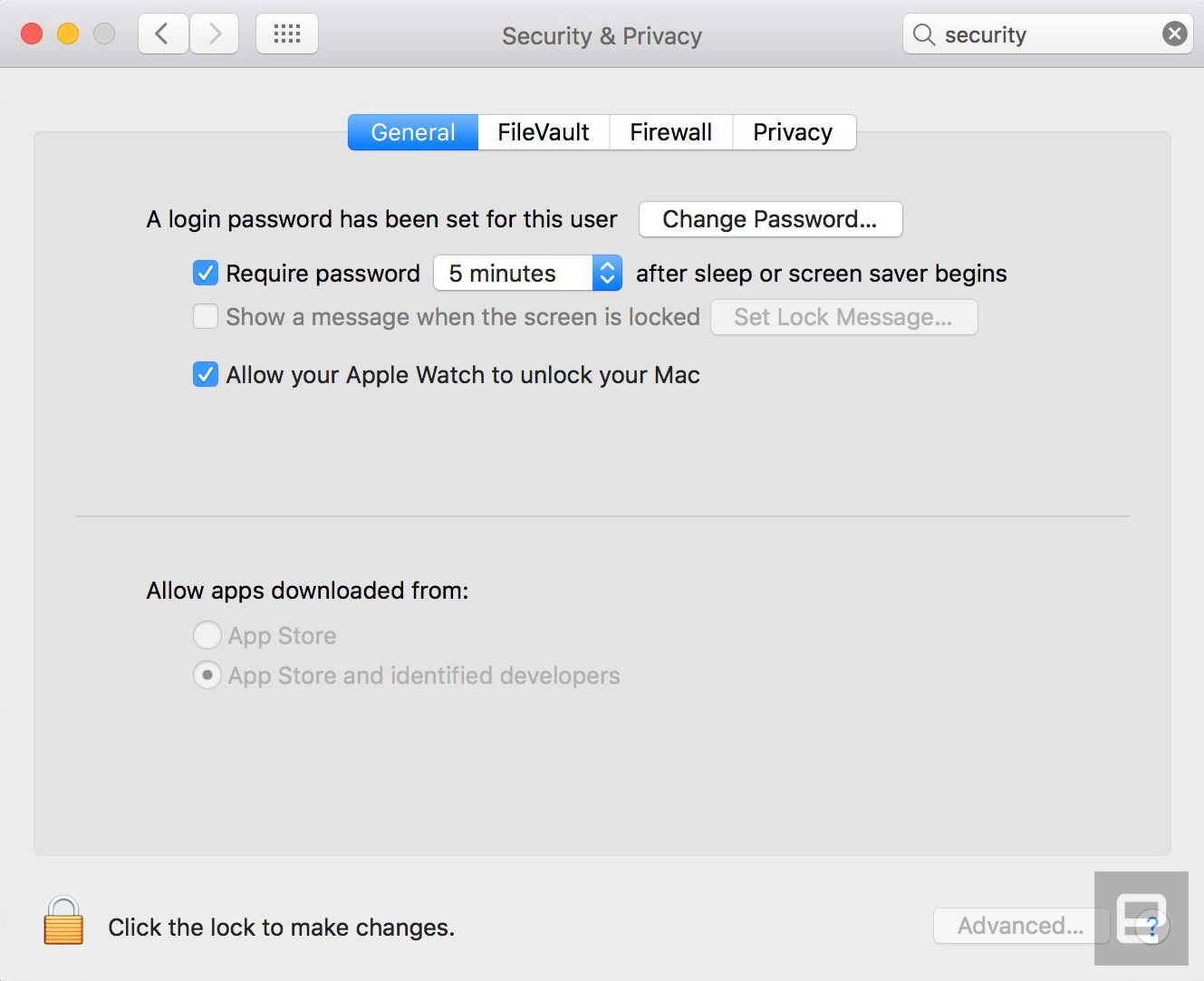
Until now, iPhones and iPads have had Touch ID; Macs have had passwords. Which is fine, but certainly not as convenient. There’s still no fingerprint sensor on the MacBook or Magic Trackpad, but a new feature promises to be similarly convenient: using your Apple Watch to unlock your Mac when you’re in close proximity. To turn on Auto Unlock, as the feature is called, go into your Mac’s Security & Privacy settings and check off the box that says “Allow your Apple Watch to unlock your Mac.” It’d be pretty troubling if this feature were enabled by default.
So it’s easy to set up — or so you’d think. When I first tried to use this feature, I would wake my sleeping Mac and see the message “Unlocking with Apple Watch,” only to be forced to enter my password anyway. Apple says you need two-factor authorization enabled on your iCloud account in order for Auto Unlock to work. But I already had that in place. What could be the problem, then? I still am not sure. What I do know is that after I signed into appleid.apple.com and reset my iCloud password, I was able to log into my machine using Auto Unlock.
Apple Pay on the web

If you already use Apple Pay on your iPhone or Apple Watch, now you can do it from your Mac too. Starting today, some 300,000 websites are expected to add an Apple Pay button, according to a company spokesperson. To actually use it, you’ll need to have the site open in Safari specifically (because of course), and you’ll also need a mobile device that supports Apple Pay — either an Apple Watch or a recent iPhone. The reason for this is that although you’ll hit “pay” from the Safari page, you’ll need to either use Touch ID or a passcode on your iPhone or double-click your (authenticated) Apple Watch to complete the transaction.
Aside from being convenient, this has security benefits, according to Apple. For starters, not having to type in your address or credit card number could feel like a blessing should the retailer ever suffer a data breach. Additionally, all transactions are encrypted, and your credit or debit card number won’t be stored on your device or Apple’s servers, or be shared with retailers. Instead, you’re assigned a unique Device Account Number that’s stored on the so-called Secure Element of your device. Lastly, Apple Pay doesn’t keep a history of your transactions, though you can choose to keep your most recent purchase details in Wallet if you prefer.

During my pre-launch testing, five sites had already added the Apple Pay button: Indiegogo, Lululemon, Spring, Warby Parker and Instacart. To test it out, I found the least expensive thing in Lululemon’s (very expensive) lineup, added it to my cart, and then had my choice of two buttons: “Add to Bag” or “Apple Pay.” Because Apple Pay already had my credit card and address stored, clicking that button meant I jumped straight to a summary box, where all I would have had to do was click another button to confirm the purchase on my watch. It was super-easy, but it also scares me how quickly I could have purchased a $12 headband I didn’t need. In real life, you’d have but one chance to reconsider that impulse purchase before pulling the trigger.
All the stuff we covered earlier
Siri

Among all the new features in Sierra, this ranks as one of the most notable: Siri finally has a home on the desktop. And it’s hard to miss: There’s a Siri button both in the system tray in the upper-right corner and in the app dock at the bottom of the screen. Additionally, there’s a keyboard shortcut you can use: command-space-hold. As it happens, this is actually one of the few things that’s changed since I tested that pre-beta build. The command used to be Fn-spacebar. Now it’s command-spacebar and hold, which is similar to the existing Spotlight search shortcut (command-spacebar). That’s good, I think; may as well tap into Mac users’ muscle memory.
Just like on iOS, you can use Apple’s virtual assistant to search the web, draft emails and texts, create calendar events, set reminders, search the web and check things like the weather, stocks and sports scores. Siri has some Mac-specific tricks too, including searching your files, adjusting your system settings and giving you information about your computer, like how much local storage you have available. Throughout, you can pin Siri’s search results, as well as copy or drag and drop them into other parts of the OS.
Ultimately, Siri on the Mac is no smarter than it is on mobile. Which is to say, Siri can handle a diverse range of requests, and understands natural language, to a point (e.g., “Show me Snowden movie times”). Over time, though, Siri’s limitations become more obvious, and you learn not to bother asking it certain things. Siri might be able to show me local Snowden showtimes, for instance, but forget about narrowing the results to evening shows, or locations in a particular neighborhood.
Universal Clipboard
Apple already has a lot of so-called Continuity features that allow you to jump between apps on iOS and macOS, picking up on one platform where you left off on the other. Now, in addition to, say, having your notes and web history synced across devices, you can copy and paste between them too. So if you spot something on your Sierra Mac, you can copy and paste into iOS 10, and vice versa. (This also works from Mac to Mac, and from one iOS device to another.)
It’s really, really easy to use too. You just have to be signed into the same iCloud account on both devices, which need to be running Sierra and/or iOS 10 specifically. Then, just copy something and it’ll appear on the clipboard across all your connected devices. To use an oft-repeated Appleism: It just works.
So far I haven’t needed this feature often, but when I do, it’s handy. In one case, for instance, I had a lengthy App Store download code waiting for me in my email, which I had access to on my iPhone but not on my test machine. (I was logged out at the time.) Obviously, without Universal Clipboard I would have had other options, including logging into my email on the laptop or dropping the code into the Notes app, which I use on both platforms. But being able to copy and paste directly is far more efficient.
Picture in Picture

New to both iTunes and Safari is a Picture in Picture view that lets you pop out video into a floating stay-on-top window, which you can then resize and drag around the screen. Apple has a developer API for this, so over time you should see the little pop-out icon appear on more websites. For now, it works on iTunes and a select few sites, including Vimeo. (I successfully tried Picture in Picture on ESPN during my earlier round of testing, but didn’t see the pop-out button there while testing the final build.)
When the pop-out button is available, the feature works well, and I particularly like that the floating window closes automatically once the video is finished. Still, it’s a shame that when viewing in Picture in Picture mode, you can’t jump forward or a back to a different point in the video.
Apple Music makeover
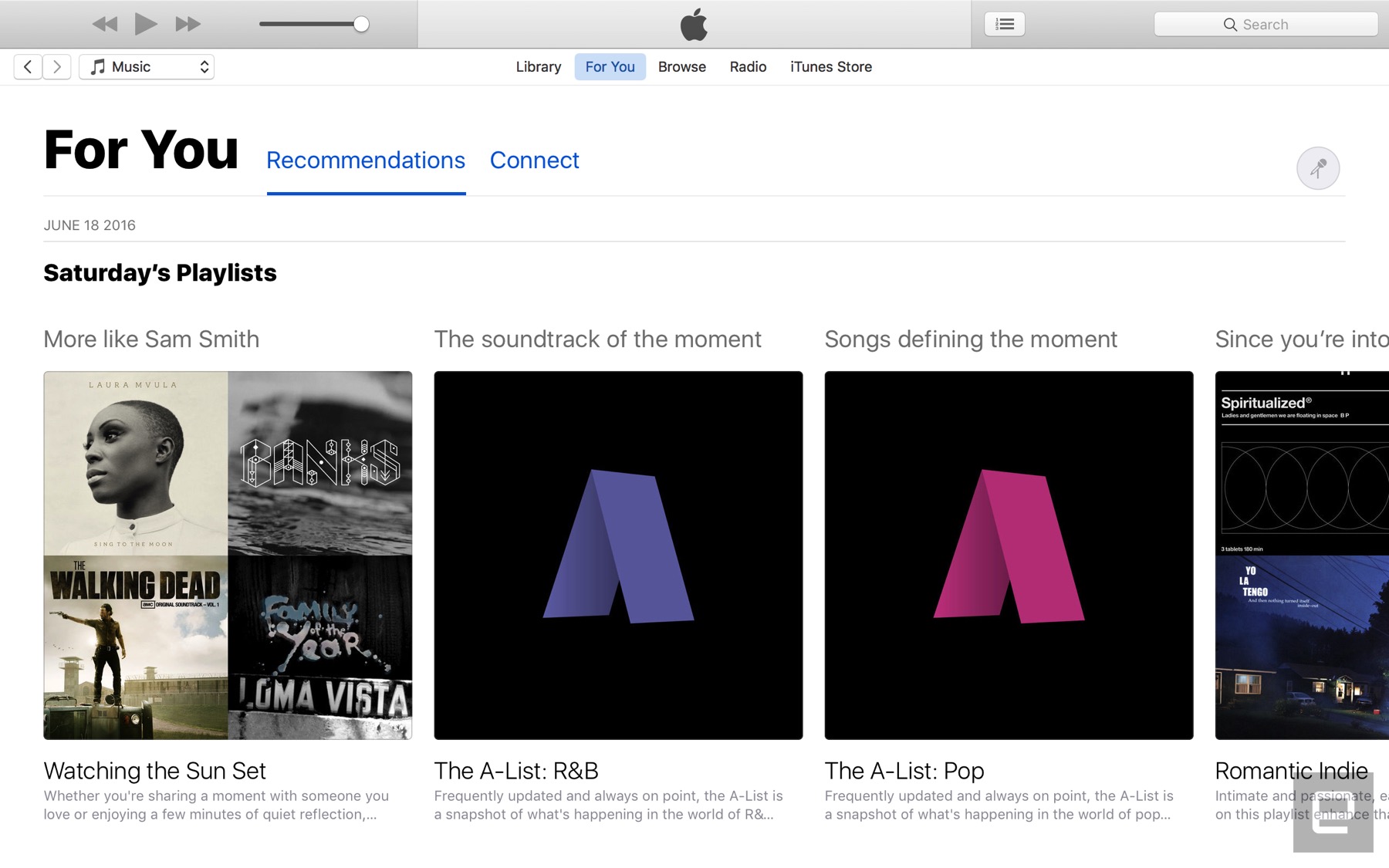
Speaking of iTunes, Apple Music has received a major redesign on both mobile and desktop. In the case of desktop (that would be the iTunes app), you’ll see three major sections: “For You,” “Browse” and “Radio.” Those last two need no explanation, but in the case of “For You,” it includes a mix of personalized recommendations and playlists, as well as updates from whatever artists you might be following. Throughout, the look is much cleaner, with large headers and oversize album art. Make no mistake: iTunes itself still feels like a bloated mess, but at least Apple Music now feels streamlined.
iCloud Desktop and Documents

If you like, you can now have your entire Desktop and your Documents folder sync directly to iCloud so that you don’t have to cherry-pick specific files for upload. Basically, then, Sierra works a lot more like Dropbox (or OneDrive, Google Drive or any other cloud storage service that allows you to automatically back up folders wholesale). As ever, you’ll find Desktop and Documents in Finder’s left-hand pane; now, though, they’re listed under “iCloud.”
Obviously, it’s up to you whether you want to take advantage of this feature (it’s not turned on by default), but personally I’ve found it very useful. Because I have an iMac on my office desk and a MacBook that I take home and into conference rooms, it’s nice to be able to quickly retrieve things like TextEdit files and know my progress was saved across devices.
Optimized Storage

While we’re on the subject of iCloud, Sierra does a bunch of things to help you better manage your large iCloud library. If you head into iCloud settings, you’ll see an option for “Optimize Mac Storage” that enables not just one feature, but a whole series of background processes that help free up space on your local drive.
By default, your whole iCloud library will be available on your machine if you have the space, but if you don’t, older files will automatically be uploaded to the cloud. Optimized Storage also moves seldom-used files and already watched iTunes videos off your local disk. You can also store Mail attachments on the server until you choose to download them. Ditto for things like dictionaries, instructional videos and special fonts, which are now available on demand instead of on the system itself.
Other low-hanging fruit include items that have been in the trash 30 days — Sierra can automatically erase that, as well as clear your cache and logs. Additionally, it flags duplicate downloads in Safari and reminds you of used application installers. Lastly, the macOS installer itself is smaller than in years past, meaning you have slightly more free space after upgrading than you might have had otherwise.
Photos

If you’re an iPhone or iPad owner, you’ve presumably updated to iOS 10, which, among other things, brings a redesigned Photos app. The new Photos makes an appearance here on Sierra too, albeit with a more sprawling, desktop-friendly design. As on iOS, Photos now uses artificial intelligence to analyze your pictures, identifying places, faces and various objects, like dogs and beaches. The app then takes all that information and puts together so-called Memories — automatically generated albums showcasing what Apple’s AI thinks are the highlights.
Though you might not always agree with the particulars (surely there was a better version of a shot Apple could have chosen?), this is a convenient way to look back on good times without having to go take on the chore of sorting and curating your photos. Scroll down and you’ll see that Apple includes “Related Memories” below the Memory you’re looking at. Be warned: This can be addictive.
Aside from Memories, you’ll also find dedicated People and Places albums. When it comes to people, Apple’s AI gets smarter over time as you tag more and more faces. To make this easier, Photos surfaces faces with a prompt to fill in that person’s name. Once you get a good backlog, you’ll notice that the People album sorts faces in descending order according to how frequently they appear in photos. That said, if you add someone as a favorite, they’ll always float to the top regardless of their ranking.
There are some UI changes here as well. There’s a search bar that can bring up pictures based on keywords — say, “cats,” “snow” or whatever else might be in the shot. As mentioned, Siri can find your photos too (try asking for photos from a certain year, or with a certain person taken at a certain place). The Albums view looks a little different as well, with rounded tiles and a view counter on videos. Also, if you’re viewing one big photo on the screen, you’ll notice that the scrubber on the bottom looks a lot like the one on iOS. (Pick “Show Thumbnails” from the View menu to make the scrubber appear in the 1-up layout.)
Lastly, Photos on Sierra ushers in some new editing tools. Among them: “Brilliance,” which applies region-specific adjustments to brighten dark areas, and “Markup” for adding text, shapes and signatures to images. You can also edit Live Photos (both stills and video), and Apple has released an API allowing third-party developers to incorporate this feature into their own image-editing apps.
Messages

Messages is yet another app that received updates on both Sierra and iOS 10. New features include larger emoji (three times bigger than before), inline previews of videos and websites, and so-called Tapbacks, which let you respond to a message by adding a thumbs-up, heart or other pictorial reaction by tapping rather than hit ‘reply.’ The fact that your reaction appears on top of the message bubble means less clutter as you scroll through a message thread.
Unfortunately, some of the most addictive new features in Messages for iOS didn’t make it into the desktop version. On mobile, for instance, you can send messages with stickers, handwriting, flashy screen backgrounds and animated text effects (think: “slam” for emphasis). Not on Sierra, though. If it’s any comfort, you can at least view these effects on the desktop when your friends send wacky messages from their iOS 10 devices. You just won’t be able to respond in kind.
Tabs

It’s not just Safari anymore — many Mac apps, including Mail, TextEdit, Maps and the iWork suite also now support tabs. So if you open a new window in Maps, you’ll see not a new window, exactly, but a neat little tab. This will automatically work across many third-party document-based apps too, without any tweaks required on the part of developers. The only apps where this won’t work are ones that didn’t already have a multi-window option. That’s why you’ll see tabs in Maps, for instance, but not FaceTime.
If you really love this feature, you can choose to always turn new windows in these apps into tabs. (That’s what I opted to do.) There are other options, though. You can elect instead to have this happen in full-screen mode only.
Odds and ends
And finally, some other miscellaneous changes that might (or might not) be of interest:
- The ability to share notes from the Notes app.
- You can now find Safari browser extensions in the Mac App Store.
- Safari automatically plays HTML5 video if the website you’re looking at supports it. If a plug-in is required to view video, you can opt to enable it just once or on an ongoing basis.
- A filter button in Mail allows you to see just unread or flagged emails, messages that are addressed to you or ones you’re copied on, or messages sent with attachments. It’s also possible to apply more than one of these criteria at a time.
- Push email support and calendar updates for Exchange accounts.
- Send read receipts for individual conversations in Messages.
- “Coordinated alerts” mean that notifications make a sound only on the device you happen to be using.
- Spotlight Search now finds files you’ve created, printed, shared, emailed, messaged and sent via AirDrop, or posted to Twitter or Facebook.
- The keyboard settings menu now has an “auto-capitalization” option.
- A new keyboard shortcut (not enabled by default) allows you to add a period by hitting the spacebar twice.
- Apple says Sierra’s autocorrect algorithm is generally smarter than it was in last year’s OS.
- Sierra adds a few new dictionaries, including Traditional Chinese and Danish. There are also two new bilingual dictionaries: Italian-English and Dutch-English.
- Japanese users are getting transit directions in Apple Maps. This includes major train, subway, ferry and national and local bus lines in Tokyo, Osaka and Nagoya.
- Right-to-left support for Arabic and Hebrew.
- Time Machine now supports the SMB protocol, making it compatible with third-party network-attached storage devices.
Wrap-up
There’s little reason to ever skip a macOS update (in fact, there are lots of reasons that’s a bad idea). But as far as annual releases go, Sierra is a fairly minor one. You probably won’t appreciate Siri on the desktop unless you already use it on mobile, and even then, Apple’s virtual assistant isn’t always as smart as we’d like. Auto Unlock is useful, but difficult to set up, and you need an Apple Watch, which many folks don’t have. Apple Pay is convenient but also conducive to impulse purchases, which is probably better news for retailers than shoppers.
Take all that away and some of the most useful features are actually the least showy. Think: Optimized Storage and the ability to automatically back up your Desktop and Documents folder to iCloud. Many people will use these features, myself included. Are these updates exciting, though? I think even the most loyal of Mac users would have to say no.
Graphene key to promising treatment for spinal cord injuries
Graphene seems to have almost limitless potential, from making better batteries to night-vision windshields and microscopic sensors. And now, a team at Rice University has shown the material could be key to a promising new treatment for severe spinal cord injuries.
Previous work has shown graphene can stimulate the growth of neurons, while polyethylene glycol (PEG) has been used with limited success to heal damaged spinal cords in animals. Building on this, researchers at the university used their chemistry knowhow to combine graphene nanoribbons (stripped from larger carbon nanotubes) with PEG to produce Texas-PEG. The amazing thing about this new material is that it acts as a much more potent “conductive scaffold,” promoting the two ends of a severed spinal cord to repair and reconnect. Importantly, this isn’t just theoretical.
In an animal study involving a rat with a severed spinal cord, treatment with Texas-PEG restored some function within just 24 hours. After two weeks, the same rat was well on its way to a full recovery, displaying “almost perfect motor control.” We’re still aways from translating this early research into an available treatment for spinal cord injuries in humans, but as the Rice release describes it, Texas-PEG’s potential “is too promising to be minimized.”
There is already a heap of incredible work being done by doctors, researchers and engineers to restore the function of paralyzed limbs and improve the quality of life of patients — implants, electrical stimulation, exoskeletons and virtual reality therapy being a few examples. And, if new treatments come along that can help repair spinal cord damage soon after injury, all the better.
Source: Rice University
Schlage Sense Smart Deadbolt Updated With Compatibility for iOS 10 Home App
Lock maker Schlage recently updated its iOS app to introduce compatibility between the company’s Schlage Sense Smart Deadbolt and Apple’s new Home app in iOS 10. Once users update the Schlage Sense app in the iOS App Store, the smart deadbolt can be added into Home, and subsequently controlled via Control Center and voice commands through Siri.
The update also brings push notifications whenever the deadbolt is locked or unlocked, and ultimately makes “it easier for users to keep an even closer eye when their lock is used,” according to Schlage. Within the Schlage Sense app, users can manage access codes, change lock settings, view the last 100 times the lock was used, receive installation help, and contact customer service.
An update to the Schlage Sense app is now available in the App Store which allows the Schlage Sense lock to work in tandem with iOS 10’s new Home app. This integration provides users with a centralized platform to access their favorite HomeKit-connected devices alongside their Schlage Sense deadbolt. Through this update, all iOS users (9.3 and above) will also receive push notifications when their deadbolt is locked and unlocked. These updates make it easier for users to keep an even closer eye when their lock is used.
The Schlage Sense Smart Deadbolt also has a touch keypad so anyone with an access code — with up to 30 storable codes available at a time — can gain entry into a home without the Schlage or Home app. The system is available on Schlage’s website for $229.00, and the Schlage Sense app can be downloaded for free from the App Store. [Direct Link]
Tags: Schlage, Schlage Sense Smart Deadbolt
Discuss this article in our forums
How to Easily Check iPhone 7 and 7 Plus Availability at Apple Stores Worldwide
While the iPhone 7 and iPhone 7 Plus launched last week, the usual trend of demand outstripping supply has resulted in limited availability of the smartphones around the world. Fortunately, prospective buyers can easily check stock at their local Apple Stores using the website iStockNow.
iStockNow uses Google Maps to visualize the real-time status of iPhone 7 and iPhone 7 Plus availability at Apple Stores in the U.S., Australia, Belgium, Canada, France, Germany, Hong Kong, Italy, Japan, the Netherlands, Spain, Sweden, Switzerland, and the U.K., likely based on Apple’s reservation system backend.
The website allows users to filter their search by iPhone 7 or iPhone 7 Plus, storage capacity, color, location, and U.S. carrier. There is also a “no CDMA” filter that narrows the search to iPhone models built for GSM networks, but note that CDMA models support both CDMA and GSM networks.
Apple Store locations with availability based on the search criteria display a green marker, while stores that are out of stock display a red marker. Clicking on an individual marker opens a window with an expanded model-by-model breakdown of availability, and the time that stock was last updated at that location.

iPhone 7 Plus availability appears to be slowly improving in parts of the U.S., particularly in the New York and Los Angeles areas. In Manhattan, for example, select iPhone 7 Plus models are currently available at Apple’s Fifth Avenue, Grand Central, Upper East Side, Upper West Side, and World Trade Center locations.
Shoppers can still use Apple’s front-end reservation system, but iStockNow provides a more convenient way to view in-store stock at a glance.
Related Roundup: iPhone 7
Tag: Apple retail
Discuss this article in our forums
Apple Music Attracting New Streaming Subscribers to Aid in Music Industry’s ‘Fragile Recovery’
The music industry is facing a “fragile recovery” at the hands of popular streaming services like Apple Music and Spotify, according to new data collected by the Recording Industry Association of America (via Bloomberg). In total, the music industry in the United States is on track to grow for the second year in a row, which would mark “the first back-to-back growth since 1998-1999.”
RIAA’s data showed that streaming revenue in the U.S. grew 57 percent in the first half of 2016, reaching $1.6 billion, and accounted for almost half of industry sales, while subscriptions totaled $1.01 billion. Altogether, the industry grew 8.1 percent to $3.4 billion in the first half of 2016, which is on track to best the $7 billion yearly average of the last six years.
Apple Music and Spotify remain the biggest forces in the streaming market, and a few label executives noted that “most of the users for Apple Music are people new to paying music, not former Spotify customers.” At the last recorded subscriber count, Spotify had 40 million paid subscribers worldwide, while Apple music had 17 million.
Nor is this the first time new technology has come along to get people to pay online. Apple Inc. co-founder Steve Jobs convinced record labels that iTunes would save the industry from piracy, only to vaporize album sales by selling singles instead.
Yet Apple is no longer the only player in the market for digital music. Spotify operates a larger paid subscription service and has showed no signs of slowing down since Apple Music began competing in that market. Most of the users for Apple Music are people new to paying music, not former Spotify customers, according to label executives.
Understandably, retail spending on physical media isn’t accounting for any of the overall industry growth. Physical music sales dropped 14 percent in RIAA’s data of the first half of 2016, while paid downloads — like those offered in the traditional iTunes store — “also shrank by a double digit percentage.” Free streaming grew 24 percent in the same data, to $195 million, but “those services aren’t doing enough to convince people to pay for music,” nor are they making enough money off free users to continue staying afloat.
That could potentially be why popular free music platforms, like Pandora, are gearing up to introduce new paid listening tiers for users. Amazon is planning to do the same, and both services are predicted to match Apple Music’s $9.99 per month cost, while offering similar on-demand singles, albums, radio, and playlists for listeners.
Tag: Apple Music
Discuss this article in our forums
Apple Releases macOS Sierra With Siri, Apple Pay, Apple Watch Unlock, Universal Clipboard, and More
Apple today released macOS Sierra to the public, making the latest Mac operating system available for free to all Mac users around the world. Apple seeded eight betas of macOS Sierra and multiple versions of the golden master before its official launch.
macOS Sierra can be downloaded directly from the Mac App Store, and Apple should begin offering it through the Software Update function shortly. It’s compatible with the following Macs:
2009 and Later
– iMac
– MacBook
2010 and Later
– MacBook Air
– MacBook Pro
– Mac mini
– Mac Pro
macOS Sierra (10.12), which follows OS X Yosemite (10.10) and OS X El Capitan (10.11), features a new name that brings it in line with Apple’s other operating systems, iOS, watchOS, and tvOS. The update focuses heavily on introducing new features to better integrate with the iPhone and Apple Watch and improve user experience.
macOS Sierra brings Siri to the Mac, allowing users to conduct voice searches to find files, look up information, and more, with the ability to pin searches to the Notification Center for continual monitoring. There are new Continuity features including an “Auto Unlock” option for unlocking a Mac with an Apple Watch, and a “Universal Clipboard” option for copying text on one Apple device and pasting it on another.
Better iCloud integration allows files stored on the desktop and in the Documents folder of a Mac to be accessible on all of a user’s devices through iCloud Drive, and there are new deep learning algorithms in Photos for improved facial, object, and scene recognition that make searching for specific photos a whole lot easier.
Subscribe to the MacRumors YouTube channel for more videos.
A “Memories” feature in Photos displays collections of pictures and resurfaces old events, while Messages features rich links, bigger emoji, and Tapback response options.
Apple Pay is coming to the web in macOS Sierra, with payments authenticated through an iPhone or Apple Watch, and new features like multiple tabs, Picture in Picture multitasking, optimized storage, and revamped emoji are also available.
More information on macOS Sierra can be found in our macOS Sierra roundup, which includes details on all major features and a list of more minor changes. Our forum members are also discussing Sierra’s new features in our macOS Sierra forum, and we encourage readers to join in with questions and new discoveries.
Related Roundup: macOS Sierra
Discuss this article in our forums
Download every wallpaper from the ‘made by Google’ Pixel website

Keep the Pixel hype going with these wallpapers from Google.
Google’s announcement of an upcoming phone launch on October 4 was scant on details. But an accompanying website, https://madeby.google.com/, added a bit of weight to the thought that we may be in for a cool treat of a new wallpaper switching app that launches with the phone.
We all love new wallpapers, so what’s better than loading up one of the handful of great photos on display in Google’s very own website teasing the new Pixel phones? We’ve compiled the group here for you to pick, choose and download. A few of the wallpapers are very high resolution, while some are squarely decent, and a handful are very low resolution. But we didn’t want to leave any out — so we’ve included all 43 in use on the “Made by Google” webpage.
Have at it, and let us know in the comments which wallpaper(s) you like most!


