


YouTube Gaming to air weekly live show with Geoff Keighley
Video game journalist and presenter Geoff Keighley is teaming up with YouTube for a new live show. It’ll be broadcast every Thursday at 8pm ET/5pm PT under the YouTube Gaming banner (presumably, you’ll be able to watch it through regular YouTube too.) Rather like Keighley’s E3 show, it’ll have trailers, gameplay footage and developer interviews, all wrapped up in a professional studio environment. Popular YouTubers Nadeshot, iJustine, MatPat and iHasCupQuake will be popping up too (this is a YouTube show, after all) no doubt to raise interest and awareness.
YouTube Gaming is far from the first to tinker with a live show format. IGN hosts Up at Noon, Gamespot has The Lobby — the list goes on and on. YouTube is in a unique position, however, because it’s a service provider first, content producer second. If nothing else, it can ensure the new show is visible to the millions of people that access its site and apps every day. Keighley is a big name, and will bring a level of credibility to the show — but it’s the YouTubers that have the biggest potential to grow its audience. That’s important if YouTube Gaming — the platform, rather than this programming push — is to ever grow into a true Twitch competitor.
Source: YouTube Gaming (Twitter)
Users Report Loss of HiDPI Scaling on External Displays in macOS Sierra
Some Mac owners are reporting problems with external monitors and the use of scaled resolutions since installing macOS Sierra earlier this week.
Several MacRumors readers using 4K displays have described the disappearance of scaled HiDPI resolutions beyond 1920×1080 since updating from OS X El Capitan, leaving their options reduced to 1080p or a non-scaled native resolution of 3840×2160. Monitors with native 1440p resolutions also seem to have had HiDPI scaling options removed.
Scaled options in Sierra (left) and OS X El Capitan (right) when holding the Option key.
Owners of larger displays often use Apple’s scaled HiDPI resolutions offered in Display preferences to enjoy increased desktop space without reducing the legibility of text. MacRumors forum member Sheza warned:
If you’re like me and you have a 1440p monitor that you like to run in 1080p HiDPI mode using a custom plist or SwitchResX, DO NOT UPGRADE TO SIERRA.
Likewise if you have a 4K display and you like a bit more space while maintaining that sweet retina look and so you run it in 1440p HiDPI, DO NOT UPGRADE TO SIERRA.
Apple seems to have inexplicably removed this ability. You’re now forced to destroy your eyesight by running… at native resolution.
Some readers have reported unsuccessfully trying alternative monitor cable connections – switching over from DisplayPort to HDMI and vice versa. Others have tried using third-party resolution utilities like SwitchResX, with mixed results.
A separate report posted on StackExchange, viewed 1,259 times, details the same issue:
I just upgraded to macOS Sierra. In El Capitan, I could have my 4k monitor (Dell P2715Q) scale so it was the equivalent of a 2560×1440 monitor, but in Sierra it only lets me do 2k/4k resolutions now.
MacRumors can also confirm that the issue appears to be software-related, since the scaled resolutions reappear when affected Macs are rolled back to OS X El Capitan. The issue does not seem to be limited to a particular monitor brand and the latest Public Beta (10.12.1) of Sierra released on Thursday does not reinstate the missing resolutions.
It’s unclear if the change is intentional or whether Apple will re-introduce the scaling options in a forthcoming update. Sierra Beta users are advised to submit feedback to Apple using the Feedback Assistant app located in /Applications/Utilities.
Related Roundup: macOS Sierra
Discuss this article in our forums
Twitter Rolls Out Algorithm-Training ‘I Don’t Like This Tweet’ Button on iOS
After announcing that it would move to an algorithm-based feed earlier in February, Twitter recently began rolling out a button to users on its iOS app that allows them to provide feedback for tweets on the social network (via BuzzFeed). Through the “I don’t like this Tweet” button, Twitter will eventually learn to showcase less tweets related to the content you flag as poor in its algorithmic feed.
Currently available for “some iOS users,” and rolling out slowly, the button can be found after tapping in the options menu on any individual tweet. Alongside options to report the tweet, block, mute, or unfollow the user, and share the tweet, you’ll find “I don’t like this Tweet.” Tapping it will immediately hide the content from your timeline and Twitter lets you know that it “will use this to make your timeline better.”
Image via Twitter Support
Reached for comment, a Twitter spokesperson pointed BuzzFeed News to a Twitter Help Center post that says the function “helps Twitter better understand the types of Tweets that you’d like to see less of in your Home timeline. We may use this information to optimize and tailor your experience in the future.”
Twitter began introducing its algorithmic timeline in February, putting its selected tweets in a prominent placement on the user timeline, atop the reverse chronological organization of regular Tweets that the social network has been known for before the update. Users can choose to turn the feature off, but according to Twitter only 2 percent of its user base has done so since the update debuted.
According to BuzzFeed, “a more expansive role for the algorithm has been discussed within the company,” so it’s likely that the new button eventually becomes part of a bigger push for its algorithmic feed in the future. Twitter for iOS can be downloaded from the App Store for free. [Direct Link]
Tag: Twitter
Discuss this article in our forums
Apple ‘Pressing Ahead’ Into Prototype Testing for Echo-Like Smart Home Device Powered by Siri
Apple is said to be “stepping up plans” for its connected smart home device powered by Siri, which would rival the technology that Amazon has made popular in its Alexa-enabled Echo speaker system (via Bloomberg). After two years of research and development, the Apple device is said to be in prototype testing, but because Apple hasn’t officially finalized any plans it “could still scrap the project.”
Similar to Echo, the Siri device is said to be able to control smart home accessories like lights, locks, and curtains all through voice activation, and would most notably be the first new piece of Apple hardware introduced since the Apple Watch, and the iPad before that. To compete with Amazon — and Google’s own similar device called “Google Home” — Apple will introduce “more advanced microphone and speaker technology,” according to people close to the project. This could potentially include an ecosystem-wide upgrade to Siri’s current functionality.
Beyond the home device, Apple is researching new ways to improve Siri on iPhones and iPads, two people said. With an initiative code-named “Invisible Hand,” Apple hopes to give users the ability to fully control their devices through a Siri command system within three years, one of the people added. Currently, the voice assistant is able to respond to commands within its application, but Apple’s goal is for Siri to be able to control the entire system without having to open an app or reactivate Siri.
For example, a user would be able to ask their iPhone to open a web page and then share it with a friend without the need to ever launch the Siri interface. Other examples from Apple’s current research include being able to print a PDF by speaking “print” while reading it or saying “help” in order for the system to help the user navigate a particular task or application. Apple has also been researching opening this ability to third-party apps, the person said.
A few prototypes in testing are said to include technology related to facial recognition, potentially fueled by Apple’s acquisition of Faceshift and Emotient, “which may help the device act based on who is in a room or a person’s emotional state.” Otherwise, the device will be able to perform all of the Siri actions expected of the personal assistant, including responding to text messages, playing music, searching the internet, and more. Apple Maps integration is a possibility, which Apple is considering so Siri could alert you exactly when to leave the house for an appointment.
Before it moved to a standalone speaker unit, Apple considered introducing Siri into a voice-activated feature on the new Apple TV, but the company decided on a more reliable button addition to the Apple TV remote over shouting commands across a room to activate Siri. In its original testing in 2014, Apple crafted a small and a large version of the Siri speaker, said to be like the Amazon Echo and Amazon Echo Dot, “but those early efforts may not translate into a final product.”
The prototype phase has advanced to the point of Apple engineers testing the device in their own homes, according to the individuals with knowledge of the project. As Bloomberg pointed out, while this is not an exact measure of when the Siri speaker might launch, Apple CEO Tim Cook was known to test out the original iPad at his home “for roughly six months before its introduction.” Apple employees also tested out the fourth-generation Apple TV about a year before its launch in 2015.
Ultimately, the Siri speaker is described as a way for Apple to “augment the iPhone,” and drive sales for the company’s devices following a year where it faced dwindling returns for its iPhone line. Its most recent device launches for the iPhone 7, iPhone 7 Plus, and Apple Watch Series 2 have all faced the expected initial shortages most Apple products encounter in their first few weeks on the market, but Apple has chosen not to reveal first weekend sales numbers for the iPhone 7 because it feels the results are “no longer a representative metric” due to demand outweighing supply.
Tags: Siri, Amazon Echo
Discuss this article in our forums
Morning brief: Allo, tout le monde, let’s talk about the price of a Pixel

Allo launches around the world, Samsung sets out a timeframe for Note 7 sales in Europe, and Xiaomi has a fancy new camera.
As we count down to the weekend, let’s mull over the next major phone launch we’re all looking forward to: Google’s Pixel handsets. There’ve been rumblings of a $649 starting price for the smaller of the two HTC-built phones (the 5-inch “Sailfish” model), which seems to suggest both will compete in the premium segment. By all accounts the phone will have the latest internals, Google’s latest OS, a unique metal design and, if the HTC 10 is any indicator, a great camera.
So a thought for a sleepy Friday morning: Vlad Savov rightly posits that the Pixels might make life really hard for anyone selling an Android phone around the $700 mark. Among the two most difficult to justify are Lenovo’s (criminally late) unlocked Moto Z (unique and modular, but with so-so battery life and camera) and Sony’s Xperia XZ (decent, but lacking in pizzaz.) Both great phones, sure, but both running an old version of Android, and both soon to be directly competing with the platform holder with $700 pre-order prices. Google’s phones are sure to have their own quirks, but you’ve got to really want Moto Mod support or a 23-megapixel camera to justify that kind of money.
With the Note 7 facing delays around the world (outside of the official replacement program), could Google’s Pixels emerge as the major high-end alternative to the iPhone? It’s clear the company is adopting a bigger, bolder marketing strategy than it ever did for Nexus phones. However the whole Pixel thing plays out, it’s going to be a really interesting end to the year.
Note 7 to go back on sale Europe-wide by late November
That’s according to Samsung Europe CMO David Lowes, speaking to Reuters. Lowes said, “We fully expect (new Note7s) to be available everywhere by the end of November […] well before the end of the fourth quarter.”
Lowes added that he expected the company to recover its momentum going into 2017. It’s worth noting that many European countries should have new Note 7 stock available to buy before then. Some retailers in the UK are listing dates in mid-to-late October. That said, it’s still a significant delay beyond the planned September 2 launch date.
Samsung ordered to X-ray Note 7 batteries in Korea
The Wall Street Journal reports that KATS (the Korean Agency for Technology and Standards) has ordered Samsung and its battery supplier to provide X-ray images of Galaxy Note 7 batteries, in order to prove that the new handsets are safe.
Meanwhile Samsung will extend the refund period for Note 7 customers (which originally expired Monday) through until next Friday. The number of Koreans taking the refund option, as opposed to a replacement Note 7 or other Samsung device, is reportedly “very low.”
Xiaomi Mi 5s will come with a dual camera setup
In the latest teaser for its upcoming Mi 5s, Xiaomi has revealed that the phone will sport dual cameras at the back. The handset will be powered by the Snapdragon 821, and will offer 6GB of RAM, up to 256GB storage, and a 3490mAh battery. Official unveil is slated for September 27.
Google Allo opens up to more countries
Google’s latest chat app is officially available on Android phones in the UK, Australia and other territories as of late last night. Previously the app worked, but users outside of the U.S., India and a handful of other places had to sideload the APK and manually install it.
It’s time to change your Yahoo password
Yahoo is saying that “state-sponsored” hackers have stolen account information from at least 500 million users. The breach occurred in 2014, and the compromised data includes “names, email addresses, telephone numbers, dates of birth, hashed passwords (the vast majority with bcrypt).” If you have a Yahoo account, it’s time to change your password. After that, enable two-factor authentication on all of your accounts.
Google’s Daydream VR SDK is now out of beta
Google announced the Daydream VR platform at I/O 2016, and the SDK is now out of beta. The Daydream platform fully supports Unity engine as well as Unreal Engine 4, making it easy for devs to create apps and games with tools they’re familiar with. The Google VR SDK 1.0 is now available for download from the Daydream developer website.
‘About half’ of recalled Galaxy Note 7s have been returned in the U.S.
Following the rollout of a recent software update which caps the potentially-explosive battery at 60 percent charge, and adds a new green battery graphic on safe Notes, Samsung has announced that around half of the million Note 7s sold in the country have been returned by customers. That’s up from around 20 percent a week ago. More
Amazon sets sights on Shutterfly with photo printing service
Amazon is back to doing what it does best: enter a new category by undercutting its rivals. This time around, the retailer is getting into photo prints with Amazon Prints. Photo prints starts at just 9 cents, and you can order photo books from $19.99.
That’s it for now. Stay tuned to AC today for more Android news and views to take you through to the weekend!
How to use copy and paste on Android
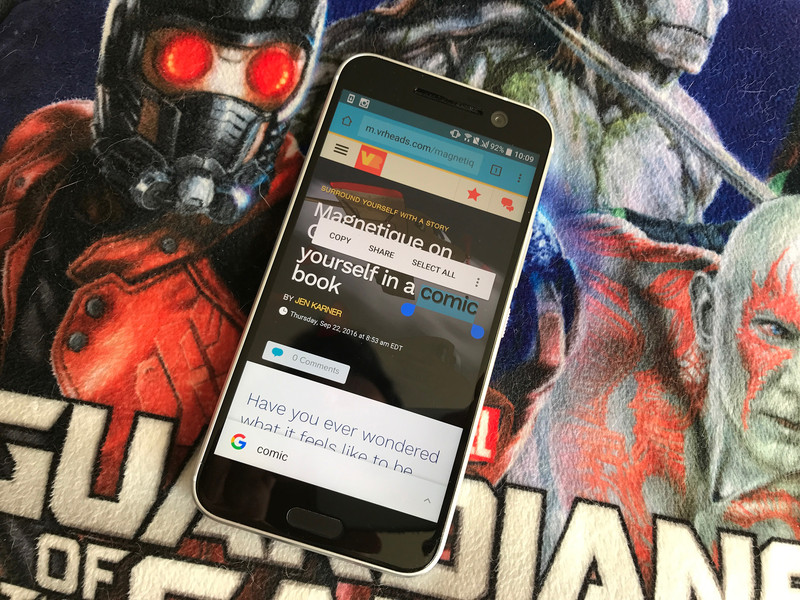
How do I copy and paste on Android?
If you think about which device you type the most on in a day, it’s likely your phone, and that’s fine. But sometimes typing on a phone can be a bit of a pain in the keister and if you’ve typed out a long tirade of a text and want to share it with someone else, typing it out all over again sucks.
Like on a computer, you can just copy and paste text on your Android phone or tablet. It’s easy peasy and here’s how to do it!
Note: This is generally how you copy and paste in Android versions Lollipop to Nougat. Some phones may have slightly different implementations.
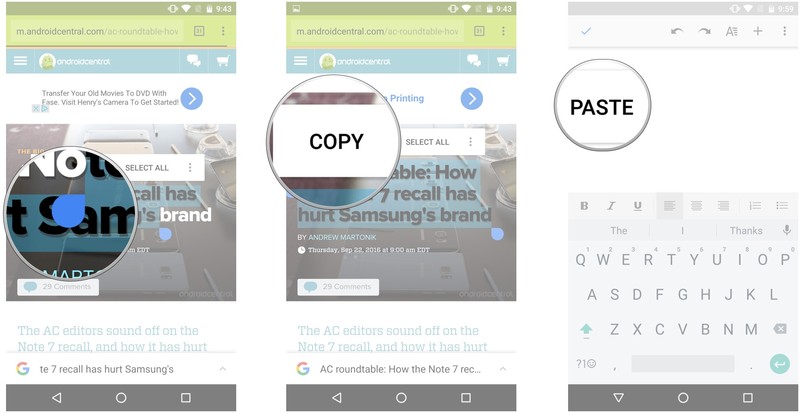
How to copy and paste text
Find the text you want to copy and paste. It can be from a website, a text message, whatever.
Tap and hold on the text.
Tap and drag the highlight handles to highlight all the text you want to copy and paste.
Tap Copy in the menu that appears.
Tap and hold in the space where you’d like to paste the text.
Tap Paste in the menu that appears.
How to copy and paste a link
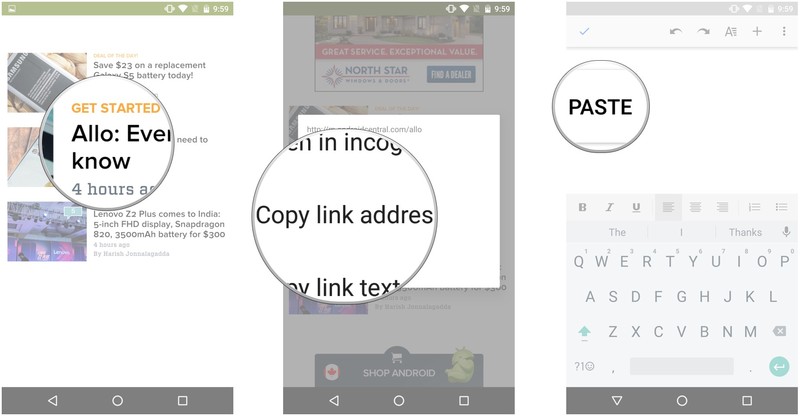
If you want to share a link with someone, you can copy the link from the address bar in your browser, or copy the link address from linked text. Here’s how:
Find the link you want to copy and paste.
Tap and hold the link.
Tap Copy link address.
Tap and hold in the space where you want to paste the link.
Tap Paste in the menu that appears.
And Bob’s your uncle.
Questions?
Sound off in the comments below!
Google Pixel and Pixel XL: What to expect from the Nexus successors
Brace yourself: Pixels are coming.
For the past seven years, Google partnered with some of the leading Android phone makers to sell co-branded handsets under the “Nexus” name. This year, the company is set to unveil two new handsets under a brand that’s new to phones, but well known to Google followers: Pixel.
On October 4, Google will hold an event in San Francisco where it’ll unveil two new phones “made by Google.” We’ll reportedly get the Pixel and Pixel XL, the regular Pixel sporting a 5-inch screen, and the XL stepping up to 5.5 inches. They’ll be manufactured by HTC, but expect the Taiwanese firm to stay out of the public eye, with the Google brand coming front and center. And when it comes to software, expect Android 7.1 (the first Nougat maintenance release) along with UI changes and a new suite of Google apps.
Here’s a breakdown of what we’re expecting come October 4.
The Pixel name
Google first used the Pixel name for its Chromebook Pixel laptops — a pair of premium notebooks made by the company. In late 2015 Google then unveiled the Pixel C convertible — a big-screened Android tablet with a keyboard dock.
Like Nexus, the Pixel brand has evolved over time. Originally it referred to the high pixel density of the Chromebook Pixel’s impressive display. Then with Pixel C it became more closely associated with hardware from Google. There’s been speculation around Pixel phone since then, and now, it seems, the time is right.
The Pixel brand has evolved over time — now it’s clear Pixel means the very best Google hardware.
The move from Nexus to Pixel represents a change in strategy for Google-branded phones. Whereas Nexus devices were created in a very public partnership with an Android manufacturer, Pixel is looking more like a traditional ODM (original device manufacturer) arrangement. HTC builds phones to Google’s spec, then Google sells them directly, pitches them to carriers and promotes them as phones “made by Google.”
As for whether the phones are truly made by Google… well, let’s remember the iPhone is technically made by Foxconn, not Apple. There’s more to it than whose factory a phone comes out of.
And as we’ll get to later, the new brand will also let Google distinguish its new “Pixel” UI — including a new launcher, color scheme and software features — from the relatively barebones Nexus software experience.
Pixel phone hardware
Mock-up renders based on Pixel hardware have been floating around the web for months, but the clearest photos we’ve seen of both phones comes via an Android Police tipster, showing both the Pixel and Pixel XL in white


The photos show a metal-bodied design with slightly angled sides and a curious glass window on the back, which extends all the way down to the rear-mounted fingerprint scanner. (The blurred-out area on the front is believed to be a security identifier, not any kind of physical button — don’t expect this in the final phones.)
There’s also been speculation of a single “G” logo around the back as the only visible bit of branding. Given what we now know about Google’s pitch for Pixel as being “made by Google,” we wouldn’t be surprised if that’s true.
When it comes to specs, information has been slowly trickling out over the past several months from Evan Blass, Android Police and others. Here’s what we’re (probably) looking at.
| Operating System | Android 7.1 with Google UI | Android 7.1 with Google UI |
| Processor | Qualcomm Snapdragon 821 | Qualcomm Snapdragon 821 |
| RAM | 4GB | 4GB |
| Display | 5-inch AMOLED 1920×1080 | 5.5-inch AMOLED 2560×1440 |
| Camera | 12MP rear, 8MP front | 12MP rear, 8MP front |
| Battery | 2,770mAh non-removable | 3,450mAh non-removable |
| Connectivity | USB Type-C, Bluetooth 4.2 | USB Type-C, Bluetooth 4.2 |
| Fingerprint | Yes | Yes |
| Storage | 32GB/128GB | 32GB/128GB |
| IP rating | IP53 | IP53 |
If these specs are accurate, the Pixels will be among the first phones to ship with Qualcomm’s new Snapdragon 821 chip — a souped-up version of the 820 we’ve seen powering many of 2016’s high-end Android phones.
The regular Pixel’s 1080p screen resolution should help it power through a day of use on a what’s a relatively small power back by Android standards, while the XL packs the same size cell as the Nexus 6P, with a smaller screen and more efficient internals.
As for cameras, there’s been speculation the Pixels’ rear camera may be the same unit used in the HTC 10. If so, we’d expect the to perform comparably to the best Android phones out there right now, given the strength of Google’s HDR+ processing and the likely inclusion of OIS (missing from last year’s 6P.)

Pixel phone software
So far, that’s all standard Android hardware. What’ll really set the Pixel phones apart is the software. Giving the timing of the launch event, in early October, we’d expect it to ship with the first quarterly maintenance release for Android Nougat, which will be Android 7.1 according to one prominent leaker.
But unlike previous years, it’s likely 2016’s Google phones will launch with a bunch of new software and UI tweaks on top of “stock” Android. Some are said to be subtle UI changes, like filled-in back, home and recents icons, and a blue hue replacing the teal used in Android’s quick settings switches and Settings app.
But there are also more substantial additions coming, according to recent reports, like the ability to double-tap to activate Ambient Display, a Night Light mode for reducing blue light emissions from the display, and a live Support tab within the Settings app for getting help directly from Google. And as part of a handy feature borrowed from Huawei’s EMUI, you’ll apparently be able to swipe down on the fingerprint reader to open the notification shade.
In short: Expect a bunch of Pixel-exclusive software features that might not make it to any other Android phones.
Google will also break away from Google Now Launcher with the Pixel Launcher, which has leaked in a couple of incarnations over the past two months. The iconic Google search bar is gone, replaced with a tab for pulling open the Google Feed (formerly Google Now). And the app drawer has returned to its roots — now a swipe up from the favorites tray shows you all your apps.
Google also appears to be building a live stream of ever-updating wallpapers into its new phones.
Besides this new Google UI, we can expect everything we loved about the software on Google’s Nexus phones to carry over to Pixel — quick updates, developer previews and minimal bloat. (At least when buying unlocked.)
Pixel phone availability, carriers and pricing
Don’t expect Nexus-level prices.
The arrival of two premium smartphones with prominent Google branding and high-end internals — along with apparent carrier involvement — has led to speculation that these phones will carry iPhone-level price tags. After all, Google is surely going after the Apples and Samsungs of the world with these phones. Android Police says the smaller of the two phones will sell for $649, with financing options available through Google. If so, prices for the Pixel XL will almost certainly start north of $700.
It’s also been suggested that at least one of the phones could be carried exclusively on Verizon in the U.S., though it’s extremely unlikely this would preclude unlocked sales through Google’s own online store.
So don’t expect Nexus-level prices here. Instead, look for Google to go all-out with a pair of high-end handsets with appropriately high-end price tags.
There’s only a couple more weeks to go before Google spills the beans on its new Pixel phones. Stay tuned between now and October 4 for all the latest developments!
New Apple TV surfaces in FCC filing, has Bluetooth and, er, NFC?
When the latest Apple TV was unveiled a year ago it raised a few eyebrows. That’s because, excellent streaming box that it is, it didn’t have support for 4K video. It seemed short sighted at the time, becoming even more so as rivals released their own Ultra HD-enabled devices.
Now what looks like a new Apple TV box has popped up as part of a filing on the Federal Communications Commission in the US and it does promise at least one added feature.
Whether 4K is one of those is still unknown though. The FCC regulates wireless communications in technology, not video signals, so all we can gleaned from the Apple application for a device named “A1844” is that it has both Bluetooth and NFC support, as revealed by tests having been carried out on both.
The latter is particularly interesting. Bluetooth is in the latest Apple TV already, with support for external games controllers and other accessories. NFC though is something Apple doesn’t usually use in the same way as other.
Usually, an entertainment box would have NFC support to pair it with a compatible phone or device (such as Bluetooth headphones). But iPhones only use their built-in NFC tech for Apple Pay, so we’re not entirely sure why the company would add it to an Apple TV box.
Apple / FCC
Of course, the device in the filing might not be an Apple TV at all. There are several clues to suggest it is, however. One diagram not hidden by confidentiality agreements shows a suggested label to appear on the bottom of the device, which has a similar shape and screw configuration as the current Apple TV box.
The electrical power ratings are similar too.
Hopefully, being positive, this all means we’ll soon see a new box soon. And being even more positive, it will have 4K HDR video streaming capabilities. Perhaps it’ll be part of a rumoured October launch event, where the company is also tipped to unveil the new MacBook Pro.
Fingers crossed.
YouTube Heroes will help keep the website’s comments clean
If you’ve ever ventured into YouTube’s comments, you know how nasty things can get. To help it purge all the bad juju the section brings, the video-sharing website is enlisting the help of volunteers called “Heroes.” It’s an expanded version of the Trusted Flaggers Program and gives users who want to help out not just the power to flag inappropriate comments and videos, but also to add captions and subtitles. Members also get a separate dashboard where they can track their contributions, see if the captions they submitted had been approved and if the content they flagged had been removed.
While YouTube will still get the last say on what to remove from the website — again, Heroes can only flag and report them — a lot of people still aren’t happy that the Google-owned entity is putting unpaid volunteers in charge. Regardless of what users think, the Heroes program is happening, and it’s now open to people from around the globe who have a history of contributing to the community.
You can apply right here if you spend a lot of time on YouTube anyway. Just take note that the program has a gamification aspect: the more you contribute, the more features you unlock. You might have to start at the very bottom and work your way up to get access to training materials and to gain the ability to flag multiple videos at the same time.
Via: CNET
Source: YouTube
Brits, say Allo to Google’s new messaging app
You might think that between your family thread on Facebook Messenger, your various friend groups on WhatsApp, and the trusted text a few acquaintances still insist on using, you’ve got all possible lines of communication covered. But spare a thought for Allo, Google’s latest attempt to be more than just a fringe player in messaging. Allo made its debut on far-flung shores earlier this week, but as of today it’s now available in the UK for Android and iOS.
Allo lets you to exchange words, images, stickers and the like in individual or group chats. Beyond the standard fare, you can increase or decrease message font size to “shout or whisper,” and there’s a smart reply option that drafts quick-responses on your behalf (with ambiguous success). You can’t turn up late to the party with just a bottle of fizzy water in hand, though. Allo’s champagne is the addition of Google Assistant, which works sort of like an eavesdropping concierge, suggesting nearby ramen restaurants if you mention you’re in the mood for noodles, for example.
It’s basically a way to access the internet from within the chat window, using conversational language. Discuss the weather, an impending flight you’re on, suggest a cinema trip, and the Assistant will pull in relevant info and links. And, if your friends just aren’t all that interesting, you can talk directly to the chatbot. It’ll surface the latest news if you ask it to, set alarms or translate a phrase, much like Google Now, Siri or Cortana, just inside a chat window.
An important thing to note, the Assistant only knows to recommend this or that restaurant because it’s listening to your entire conversation (and storing it, too). So keep it clean, or use Allo’s end-to-end encrypted “incognito” feature for that stuff. Or Snapchat. Or Telegram.
Source: Allo (Android), (iOS)

