


Android and chill: Nougat and the root question

Android is safer than ever for the people who want (and need) it to be safe. We should be happy about that.
There’s some talk about Pixel phones and root — specifically that it’s not working with any of the existing methods. All the nuts and bolts are at XDA — excellent job on that Mishaal — for those who want to dig deeper into the how and why, but I want to just talk about what it means for us.
And why it’s a really good thing. Before you grab your torches and teach me a lesson for thinking it’s good that we can’t root a Pixel phone, hear me out. I think you’ll agree when we’re finished.
This isn;t about a Pixel phone, it’s about Android 7.0 and new security methods.
Let’s start at the beginning — this isn’t about the Pixel phones, it’s about Android 7.0. There’s a very good chance this will apply to the LG V20 (nobody outside of Korea has seen the production version yet), too. It’s because of the new security methods Google has placed in Android starting with 7.0.
When Nougat boots, it checks to see if anything in the system partition has been tampered with. Google calls this Verified Boot and it’s something they also use on Chromebooks and OnHub routers. We also knew it was coming, along with a handful of other big changes on the security front. The short version of how it works — the system partitions (this is tied in tightly with Seamless Updates and Direct Boot) are verified and given a hash file. Any changes to the partition will change the crypto hash. When you boot the phone up, this hash is checked against the known “right” value, and if they don’t match your phone won’t boot. The public crypto key is stored on the boot partition and when the people who made your phone want to update (which changes the hash file) they have to verify things with their own private key to change the software. This will create a new hash file and the phone can boot. These changes also include the ramdisk (which is where systemless root worked) so modifying it is out of the picture, too. And yes, this is the short version.

What this means is new hardware designed for Android 7.0 isn’t going to boot if we try to change any files to give us root. If we change even one bit on either system partition or the ramdisk it will fail the verified boot check. There are no known root methods that will ever work with this system. Period. Very smart people will try, and if somehow they find a way Google will patch it within 30 days. And this is not an accident.
Google is always trying to beef up the security in Android. They do a pretty good job and Android, as it comes directly from the source code, is really secure. But since anyone can change any of it to their liking, much of that gets undone. One of the things this change does is fix things so that no matter what you download or what it tries to do, if it tries to inject anything that gives it elevated permissions your phone won’t start up. I love that idea, and you should, too.
Every phone that’s sold should be damn near impossible to root without custom firmware.
This means that those drive-by root exploits — both the intentional ones as well as the malware ones — all stop working if the people who made your phone update it to 7.0 or you buy a new one with Nougat installed. That means everyone who just bought their phone to chat with friends, pay for stuff at Walgreens, or even clash against other clans or catch ’em all have a lot less to worry about. The factory software (and this is the important part) is secure.
The rest of us who like to root and do “stuff” can’t do it while running the factory software, but we can still do it. With a new boot image, things can be altered so we can do whatever we want to do. Everything needed to create the Android boot image is open source and builds with no changes and little effort. Unless the Pixel phones come with a locked bootloader — and nobody thinks they will or is saying as much — you can still install your own modified software with all the root you can eat. Google truly does not care if we root the phones we bought and paid for, but they do care if we try to modify their software and make it less secure. They should, that’s the way every OEM should think. I’m sorry if that means you might have to learn how to set up fastboot or won’t be able to get an OTA, but you (and I mean the collective you which includes me, too) are not more important than anyone else who should be able to expect that the phone they bought is safe from random dumb shit they downloaded from somewhere. Get over it.

That goes for the phones that aren’t a Pixel and might not have a bootloader that can be unlocked. Yes, I mean the V20. With an unlocked bootloader rooting and everything that comes with will be trivial when all is said and done. But with a locked and encrypted bootloader, none of this applies. If the V20 ships with a dual partition setup and Verified Boot in place (and it should) with a locked-up bootloader, you might not ever be able to root it. That means LG cares about its customers more than they care about a handful of people who want to change their status bar or cheat at games or whatever we need root to do. The solution (and my advice) if you’re eyeing the V20 and will want to root it is to hold off until someone checks it out. A retail version should be in the right hands very soon. The same goes for every phone that ships with Android 7.0 or higher from now until forever.
The LG V20 should also be this secure. But will we be able to unlock the bootloader?
Getting worked up over any of it will do no good. There is no good reason why Google should make Android less secure, so us demanding it or moving to iOS (which has similar precautions in place) is silly. Adapt. If you want to root, buy phones with a bootloader that can be unlocked. Save your rage for something that deserves it, like selling phones with no headphone jack. Don’t even get me started, ’cause I’ll get stupid.
In the meantime, be good to each other. I’ll see ya next week.
ICYMI: Animals can communicate better than we’d realized

Today on In Case You Missed It: We are adding horses to the list of animals who can communicate via some form of symbolic language, now that researchers taught a group of horses how to understand three symbols related to whether they wanted a blanket covering on or not. With that, horses, primates, dolphins and birds can all communicate with us — and suddenly old masterpieces like Mister Ed and The Birds have a whole new significance.
Meanwhile Adidas is showcasing its new shoes made in a mostly robotic factory. That and the news about the purported Michelle Obama passport hacking would be great brunch conversation starters, though we also recommend reading up on the US government’s plan to address climate change with an open source, information sharing plan.
The study about fish singing at dawn is here, fyi. As always, please share any interesting tech or science videos you find by using the #ICYMI hashtag on Twitter for @mskerryd.
Samsung Galaxy S8 reportedly using powerful new GPU

ARM Mali-G71 could provide the power for a 4K display and enhanced VR.
Rumors of a 4K display in the upcoming Samsung Galaxy S8 have been swirling for some time, with a super-dense display offering a significantly upgraded VR experience in next year’s flagship. And now it’s reported that Samsung could use ARM’s most powerful GPU yet in its next Exynos processors.
SamMobile reports that the company will equip its Exynos 8895 processor with ARM’s Mali-G71 graphics chip. According to ARM’s own documentation, the chip offers “40% better performance density and 20% external memory bandwidth saving compared to Mali-T880.” The Galaxy S7 and Note 7 use a variant of that GPU, the Mali-T800 MP12.
SamMobile also claims the G71 will outperform the GPU used Qualcomm’s next gen chip, the Snapdragon 830.
The smaller Galaxy S8 could pack a whopping 864 pixels per inch.
The docs for Mali-G71 provide reference specs based on a 16nm FinFET process, but Samsung is likely to use a more efficient 10nm process in its 2017 Exynos chip — which potentially means it’ll be even faster than ARM’s reference numbers. Unusually, the news broke through the arrest of a Samsung employee in Seoul, who was accused of trying to sell details on Samsung’s 14nm and 10nm processes to Chinese rivals. The report from SBS states that Samsung will use a 10nm process for the chips in its next flagship phone.
All of that adds up to a serious improvement in graphical capabilities over the GS7 and Note 7 — a bump in pixel-pushing power that’ll surely be needed if the GS8 packs a VR-focused 4K display. With the next Galaxy S once again rumored to come in two sizes, that adds up to a whopping 864 pixels per inch — blowing past even 2015’s Sony Xperia Z5 Premium. The appeal of such a pixel-dense screen for VR is obvious, but as we discussed in an earlier article, Samsung might not opt to run its new display in 4K mode all the time.
If Samsung wanted to offset some of the performance and battery life headaches associated with 4K, it might take a leaf out of Sony’s book. With the Xperia Z5 Premium, the Japanese firm operated its 4K display in 1080p mode most of the time, except for a handful of applications — mainly video playback and photo-viewing apps.
Although this might sound counterproductive, running most apps at Quad HD on a 4K Galaxy S8 would be a smart way to ensure the hardware isn’t unnecessarily taxed running apps where you wouldn’t notice the difference anyway. Instead, the full resolution of the panel could be unlocked when you’re viewing native 4K content, or viewing photos in the Gallery app.
We’ll find out for sure when the Galaxy S8 breaks cover early next year. Following the damage caused by the Note 7 recall, several analysts are predicting an earlier launch for the phone.
iOS 10.0.2 update fixes bugs in headphones, Photos
Even if you’ve already updated to iOS 10, Apple has released its first official update for its mobile/TV operating system. Bugs that could shut down the Photos app when turning on iCloud Photo Library and disable app extensions have ben smushed, but folks with the iPhone 7 or iPhone 7 Plus may want it for another reason.
Some users complained about the new Lightning-connected EarPods timing out, which would stop their in-line playback controls from working to adjust the volume, answer calls or use Siri. This update fixes the problem, making things just like they were when your phone had a headphone jack. Of course, you’re probably beta testing iOS 10.1 already, looking forward to new features instead of stable builds with bugfixes . Either way, the current update should be accessible via your Settings menu now.
Via: 9to5Mac, MacRumors
Source: Apple
Google Hangouts adds emoticon shortcuts for easy table-flipping
The latest version of Google Hangouts for Android adds something clever to your chatting experience: 20 new hidden emoticon shortcuts so you can properly express all those shruggie feelings and table-flipping rage moments. Less exciting than a quick way to add “deal with it” guy to your chat logs, the v13 update also adds an in-app browser for web links.
Regarding those emoticons, the lineup is pretty impressive: typing things like “/shrug”, “/facepalm” or “/tableflip” into the chatbox will automatically change to (╯°□°)╯︵ ┻━┻.
Here’s the full list of commands (and don’t forget the forward slash at the front):
- algebraic
- dealwithit
- disapprove
- facepalm
- flowerbeam
- happy
- lgtm
- lit
- octodisco
- puppyparty
- shame
- shrug
- success
- sunglasses
- tableback
- tableflip
- that
- this
- wizard
- yuno
Finally, if you really hate switching apps to open links in a chat, that in-app browser can be accessed by flipping the “Browr in Hangouts” button in the settings tab. According to Android Police, however, this option doesn’t show up on every Android device. Sorry, Nexus 5 owners, guess you’ll have to /dealwithit.
Via: The Next Web
Source: Android Police
Snapchat Announces ‘Spectacles,’ $130 Sunglasses That Record 10 Seconds of Video at a Time
Snapchat has announced its first hardware product, a one-size-fits-all pair of sunglasses called Spectacles that can record 10 seconds of video at a time, reports The Wall Street Journal. The glasses will cost $130 and launch this fall in three colors: teal, black and coral. Video will sync wirelessly to a paired iPhone or other smartphone.
Snap CEO Evan Spiegel in Spectacles, Photo by The WSJ
The glasses record when you tap a button near the hinge, and each tap records 10 seconds of video footage from its 115-degree-angle lens. The lens was designed to be wider than smartphone cameras, more closely mirroring the natural view of human eyes. The video is recorded in a circular format, as Snapchat CEO Evan Spiegel argues that the square and rectangle form that photos and videos currently come in are a vestige of early photos being printed on paper.
Snapchat has been developing Spectacles for years, and Spiegel has been testing the device himself for a year. He tells The WSJ that one of the advantages of Spectacles is not having to hold a smartphone in front of your face because it’s “like a wall.” Re-watching first-person footage is like reliving a memory, Spiegel argues.
He remembers testing a prototype in early 2015 while hiking with his fiancée, supermodel Miranda Kerr. “It was our first vacation, and we went to Big Sur for a day or two. We were walking through the woods, stepping over logs, looking up at the beautiful trees. And when I got the footage back and watched it, I could see my own memory, through my own eyes—it was unbelievable. It’s one thing to see images of an experience you had, but it’s another thing to have an experience of the experience. It was the closest I’d ever come to feeling like I was there again.”
Spiegel refers to Spectacles as a “toy,” and that the best use of it would be to wear it at an outdoor concert or barbecue “for kicks.” The company is taking a slow approach to launch with limited distribution, similar to Google Glass. Spiegel says Snapchat wants to “figure out if it fits into people’s lives and seeing how they like it.” When asked why they made the product and decided to enter the hardware market, Spiegel said “because it’s fun.”
Snapchat has also changed its company name to Snap, Inc as it has expanded its portfolio past its Snapchat app, similar to how Apple changed its name from Apple Computer.
Spiegel thinks of the newly-dubbed Snap, Inc as a camera company rather than a social media company, The WSJ notes. He studied the early histories of Kodak and Polaroid and how they pitched portable cameras to the public. Spectacles gives Snap control of a physical camera, bypassing the smartphone cameras, like that of the iPhone, at the heart of Snapchat thus far. Spiegel hints to The WSJ that there could be “far-reaching implications” if Snap controlled the hardware its users take pictures and video with.
Tags: wearables, Snapchat, Snap
Discuss this article in our forums
Alcatel IDOL 4S review: Can it stay king in 2016?
When Alcatel released the IDOL 3 last year, I called it the best budget phone of 2015. This year, Alcatel has come out with its successor that is meant to improve upon the IDOL 3 in every way. Unlike last year, competition has gotten incredibly steep around budget flagships in 2016, and the IDOL 4S has to give everything its got to carry the title of Best Budget Flagship this year. Let’s see if it can claim the crown once again!
Design and Build
 Last year, Alcatel took a more subtle approach to the design of the IDOL 3. It featured a plastic back and sides that felt and looked nice but didn’t create an overall sense of luxury or precision. For its 2016 flagship, Alcatel completely ditched the plastic and opted for a killer metal and glass design. With a glass back and metal sides, the IDOL 4S is a stunner that screams quality straight out of the box. The glass on front and back is slightly curved along the side making the phone comfortable to hold for pretty much anyone.
Let’s take a look around the 4S before we dive in. On the front is the 5.5″ display that we will talk more in depth about later along with the dual front-facing speakers and selfie camera. On the left side, you’ll find the power button and SIM card/MicroSD card slot. On the right are your volume controls along with an extra button Alcatel refers to as the Boom Key. On the bottom are the MicroUSB port for charging and a microphone. Finally up top, you have your 3.5mm headphone jack (thankfully) and another microphone. Flip the phone over and you’ll find the main camera along with a fingerprint scanner.

Overall, the IDOL 4S is lightyears ahead of the IDOL 3 in terms of style and design. The glass and metal build feels incredible to hold. However, I have a love-hate relationship with the glass back because it is a fingerprint magnet. It is one of the worst phones I have ever used in terms of how quickly it picks up fingerprints. In fact, I put a case on it almost immediately just because of how often I had to wipe off the back. Also, the glass back means that any accidental drops could end up shattering it along with your screen. And trust me, this phone is slippery. Accidental drops are bound to happen.
As beautiful as the IDOL 4S is, I must recommend that you at least get a skin or a case to keep from dropping it and cracking the glass. Thankfully, Alcatel is one step ahead and includes a case and screen protector in the box.
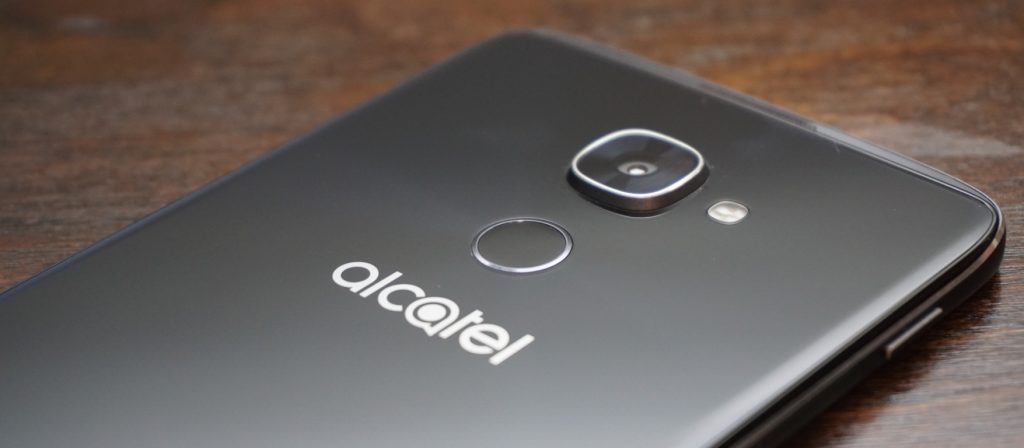
While the power button is still located annoyingly on the left side of the device, the IDOL 4S kept the double-tap to wake feature from the previous generation. But I doubt you’ll even be using that as the fingerprint scanner on the back with also turn on the phone when you go to scan your finger. In terms of speed and accuracy, the fingerprint scanner impressed me. It is not as fast as the latest from Apple and Samsung, but it is plenty fast for most people.
The only main complaint I have is that it is not set off from the back of the phone at all. This makes it hard to locate blindly and position your finger correctly, but after a while, I found that I got much more accurate.
Display
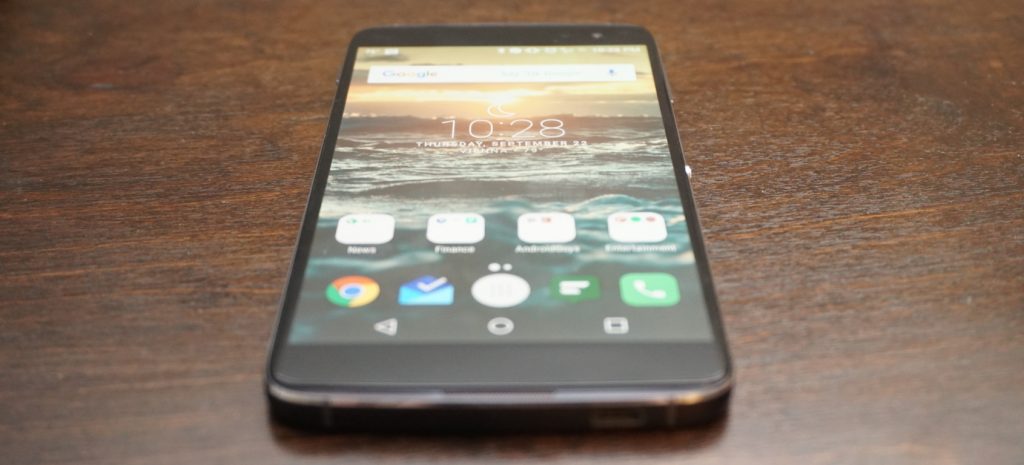
Alright, it is time for my favorite upgrade from the IDOL 3. This year, Alcatel ditched IPS for AMOLED and cranked the resolution up to 2K. All I can say is, nicely done! The increased resolution is great for gaming, video, and VR (more to come on that) and pairs nicely with the front-facing speakers.
Going for an AMOLED panel was the right choice as colors look clear and vibrant. Like the IDOL 3 before, the 4S has one of the brightest screens I have ever seen. I usually have to keep my screen at above half brightness, but I could easily turn the display on the IDOL 4S down to 30% with the same results. There is no need to worry about outdoor visibility with this display.
I would love to say that the display is perfect, but I found one major annoyance during my time using it. Even as someone who always makes sure to carry my phone is a separate pocket away from loose change and keys, the display on my IDOL 4S still picked up scratches. None are horribly obvious and cannot even be seen with the display on, but I was disappointed that the screen scratched so easily.
Performance
The IDOL 3 was a mid-ranged device that provided competitive performance at an incredible price, but that was in 2015. This year, the IDOL 4S got a price bump while other companies started focusing more on budget-friendly flagships. The 4S definitely has more competition this year so it better come with the performance to keep its high standing.
The IDOL 4S is running on a Qualcomm Snapdragon 652 with 3GB of RAM and an Adreno 510 GPU, and while the processor may not be an 800-series, it still packs quite a punch. For storage, you get 32GB of onboard memory along with a microSD card slot to add extra space when needed. Needless to say, the IDOL 4S is more than powerful enough to handle even your craziest of social media binges. I was impressed with how snappy the Snapdragon 652 was as I was able to fly through most apps without a single frame drop.

Asphalt 8 seems to be the de facto game for testing a phone’s gaming performance so that is the app I used. Ninety percent of the time, the IDOL 4S handled the game like a champ. However, there were a couple of times where I noticed a slight frame drop. I doubt that most would even notice it before it went back to normal, but there were definitely a couple of slow downs. The phone itself never seemed to get hot enough to throttle so I am assuming the hardware just wasn’t fast enough to fully handle the game. Most games will play wonderfully on the IDOL 4S, but graphically intensive games may have a couple of struggles.
Last year, this would not have been a big deal since the IDOL 3 sold for $250 and smoked basically every other phone in that price range. However, the IDOL 4S is priced at $399 which puts it right up there with phones like the OnePlus 3, which is running a Snapdragon 820.
Along with price, Alcatel heavily marketing the IDOL 4S on how well it performed with virtual reality, and while the preinstalled titles do play well, more graphically intense VR games will likely exhibit some stuttering. We will have a post coming out soon fully dedicated to VR on the IDOL 4S so keep your eyes out for that.
So what does this mean for performance on the 4S? Overall, it is incredibly fast and smooth in almost every situation. However at this price point, there are phones that beat it on the performance side.
Software
 The IDOL 4S comes running a slightly skinned version of Android 6.0 Marshmallow (no word yet on a Nougat update). As far as most Android skins go, the one on the 4S is fairly minimal. It’s not as close to stock as something like the Moto G4, but it is nowhere near as intense as Samsung’s TouchWiz.
The IDOL 4S comes with a custom launcher, custom icons for basic apps, and Alcatel’s versions of stock apps like Contacts. There are some preloaded apps, but the majority of them can be uninstalled immediately from the phone.
Even with all the uninstallable apps removed, there are still several apps unique to the IDOL 4S that remain on the phone. These include VR apps and games, an equalizer app, an FM radio app, and some video editing and live streaming apps. While some of them are needed for VR applications, I still wish that they could be removed easily or uninstalled completely.
 The custom launcher comes with a couple of neat tricks up its sleeve. The first is a parallax wallpaper effect that makes it seem like the icons are floating above the wallpaper. I am not a big fan of this effect, and it is easy to turn off from the wallpaper selector. If you are on the homescreen and push the Boom Key, there will be a visualization of the current weather in your location. While it is not particularly useful since the weather is also displayed on the homescreen widget, I cannot deny that it looks super cool, and I find myself pushing the Boom Key to trigger it all the time.
My single favorite feature from the IDOL 3 made a return on the 4S, and that is the Reversible UI. Basically, this allows the screen to rotate a full 360-degrees so that no matter what way you pick up the phone, it is always right side up. Unfortunately, I found this feature less useful now that there is a fingerprint scanner. When I hold the phone upside down and reach for the fingerprint scanner, I immediately realize that I am holding the phone wrong and flip it around.
The feature is still useful for quickly answering calls without having to spin the phone around, but I am sad to see my favorite feature become less useful.
Speakers

One of my favorite features on the IDOL lineup are the dual front-facing speakers, and the IDOL 4S does not disappoint in this area. The JBL-certified speakers pump out a loud sound that is crisp and clean regardless of the volume.
Being phone speakers, the low end does leave some to be desired, but I would challenge you to find a better sounding set of speakers on any smartphone especially in this price range. Whether you are playing a game, watching a video, or just listening to some music, the IDOL 4S speakers will do more for you than basically any other phone speaker out there.
When you lay the phone face down while playing something through the speakers, it will actually route the audio towards the back of the device so that volume and quality are not hindered.

When you are using the speakers, pressing the Boom Key activates one of the special experiences of the IDOL 4S. Alcatel claims that pressing it boosts the bass and volume of the music, and while I did notice a volume increase, an increase in audio quality is questionable. Some of my music sounded fuller when the Boom Key was activated, but other times it sounded too echo-y. It does help with some songs, but it was not something that I enabled every time I listened to music.
The best time to use the Boom Key is while gaming. When I played Asphalt 8, I pressed the Boom Key and the audio became much more immersive. It almost seemed like surround sound at times. While the Boom Key might not improve all the audio you listen to, it definitely increases the immersion while playing games.
Camera

The camera on past IDOL phones has always been pretty good but consistently left me wanting more. The IDOL 4S comes with a 16-megapixel f/2.0 main camera and an 8-megapixel front camera, and I can fully say that these are the best cameras on any IDOL to date.
Throughout my time with the 4S, I found the camera is quick to focus and takes detailed shots with good color reproduction as long as the lighting is good. Unfortunately, it looks like many of the pictures I took with the IDOL 4S suffered from oversharpening like the IDOL 3 before it. While the camera often exposes correctly, I found that it has a tendency to overexpose and highlights easily get blown out.

Thankfully, the IDOL 4S had a pretty solid HDR mode. Unfortunately, there is no option for AutoHDR, which means you need to switch it on and off as needed, which makes taking quick shots more difficult. There are a few Boom Key features within the camera app. You can press it to take a photo, or while taking a video, you can press it to immediately livestream through the preinstalled app TiZR.
If you are looking to record video with the IDOL 4S, you were probably happy to see that it supports 4K at 30fps; however, there is no OIS (optical image stabilization) on the cameras so videos come out looking shaky even with the electronic image stabilization. I think that leaving out OIS was a big mistake on Alcatel’s part.
Overall, the camera is the same story that it was with the IDOL 3. The camera is okay and capable of taking some good shots, but it still has problems that hold it back from being a truly great camera.
Battery
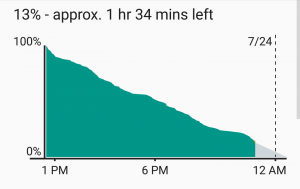 I was pleased with battery performance on last year’s IDOL 3, but I am full on impressed with what I was able to get out of the IDOL 4S. The phone is powered by a 3000mAh battery and comes equipped with QuickCharge technology for a quick fill up when you don’t have much time.
I am a fairly heavy smartphone user, and I manage to kill most phones before the day is done. My typical day includes streaming music and YouTube videos for about an hour each. I text and check social media consistently throughout the day, and I also have 3 email accounts that are constantly pulling down new emails. Other than that, I do browse the internet over WiFi and LTE along with some light gaming.
 After putting the IDOL 4S through its paces on a daily basis, I found that I consistently got over five hours of screen-on-time with some days tending closer to five-and-a-half hours. For a phone with a 2K AMOLED display, I am extremely pleased with the battery performance. I still have to charge it every night, but at least I am making it to the end of the day now.
Conclusion
There is no hiding that the IDOL 4S is a wonderful phone and a huge improvement over last year’s IDOL 3. However, the price jump of $150 dollars has put the IDOL 4S against some incredible competition. Phones like the OnePlus 3 and Nexus 6P are available close to that price and each of them comes with a beefier processor, which provides even better performance.
So is it the best budget phone of 2016? Unfortunately, I am going to have to say no, but that is simply because the competition is extremely fierce in the budget arena now. I’d be hard pressed to name any phone as the best budget flagship. That being said, the IDOL 4S is one of the best budget phones of the year. It has great build quality, a stellar screen, loud speakers, and strong battery life. I would definitely recommend the IDOL 4S to any interested, and I doubt it will leave you unimpressed.
One thing that the IDOL 4S has going for it is the inclusion of a case, glass screen protector, and VR goggles when you purchase it. Head on over to Alcatel’s website or Amazon and pick up an IDOL 4S for yourself for only $399!
iHeartRadio plays catch-up with on-demand music
Although it was born out of terrestrial radio, iHeartRadio has been working hard to go beyond just streaming FM stations to your phone or Apple TV. The company set its sights on streaming services like Spotify and Apple Music’s Beats Radio with last year’s introduction of personalized radio stations. Now, iHeartRadio is ready to announce two new on-demand subscription services of its own, coming in January 2017: iHeartRadio Plus and iHeartRadio All Access
All Access is the company’s shot at Spotify and Apple Music — a straightforward, on-demand streaming service reportedly priced at $10 per month to compete directly with the leading services. All Access will offer all the features you might expect from a streaming music service, along with iHeartRadio’s library of 30 million tracks and a few radio-oriented features like the ability to instantly save or replay songs from live stations and offline listening.
While it might seem like a late arrival to the on-demand streaming game, iHeartRadio already has 90 million registered users that CEO Bob Pittman thinks it can convert into paid subscribers. “There’s this huge piece of the population that does not spend money in any form on music,” Pittman told TechCrunch. “We think this is the kind of service that will begin to get them to spend on music.”
On the other hand, iHeartRadio Plus is a lower-priced service intended to bridge the gap between your existing on-demand music subscription and listening to terrestrial radio. If you’re the sort of person who still appreciates the human touch of a certain radio jockey or local radio station, Plus turns that into an on-demand experience so you can stream your favorite shows whenever you like.
Both services debut in January 2017 and, while there’s no official pricing yet, the New York Post reported All Access will come in at a $10 price point and Plus service will cost $5 per month.
Via: TechCrunch
Source: iHeartRadio
Oculus founder responds to ‘Nimble America’ political controversy
Last night The Daily Beast reported that Oculus founder Palmer Luckey is the “NimbleRichMan” behind a group of Donald Trump supporters pushing anti-Hillary Clinton memes, and now Luckey has responded. In a Facebook post claiming recent news stories don’t accurately reflect his views (and light on references to either shitposting or meme magic), the 24-year-old claimed his support of the Nimble America group consisted of a $10,000 donation because “because I thought the organization had fresh ideas,” and that he did not write the posts credited to the pseudonym or delete the account.
Facing claims by a number of developers (including Polytron, TomorrowTodayLabs and others) that they would not support the Oculus VR platform if he remained attached to it, Luckey apologized for the impact of his actions.
Developing…
Source: Facebook
Snapchat to release $130 camera-equipped Spectacles this fall
Yes, the Snapchat Spectacles are real, and company chief Evan Spiegel presented them to a small group of people today. According to The Wall Street Journal, Snapchat’s first wearable product comes armed with a camera that can record 10-second videos when you tap the button near the hinge. The results don’t look like typical videos shot with phones or action cams, though — not when it records circular footage that mimics our own vision. Apparently, Spiegel believes that the rectangular format is “an unnecessary vestige of printing photos on sheets of paper.” And since this is Snapchat we’re talking about, the glasses can sync with your phone wirelessly, making anything it takes easy to share.
Snapchat will release Spectacles this fall for $130, but only a limited number of pairs will be available for sale. The company wants to proceed slowly in order to get a feel of how people like it, and probably to see how well the initial stocks sell, before making more. Since he obviously doesn’t expect to make big bucks out of Spectacles from the get-go, WSJ asked Spiegel why he designed them. His answer? “Because it’s fun.” If other people find the glasses fun, as well — and, hey, unlike the Google Glass, these look like something anyone would wear — then you might have an easier time finding a pair in the future.
JUST IN: Snapchat to release first hardware product called “Spectacles” this fall; video-sharing sunglasses to be priced at $129.99 – DJ
— CNBC Now (@CNBCnow) September 24, 2016
Snapchat releases first hardware product, Spectacles https://t.co/LuY74KCorX 🔓
— Wall Street Journal (@WSJ) September 24, 2016
Source: The Wall Street Journal

