


The best ergonomic keyboard
By Melanie Pinola
This post was done in partnership with The Wirecutter, a list of the best technology to buy. Read the full article here.
Of the dozen ergonomic keyboards we’ve tested since 2014, the Microsoft Sculpt Ergo is the most comfortable model for most people. It’s the only one to meet all of our ergonomic criteria, including a separate number pad and support for both negative tilt and vertical “tenting.” The Sculpt Ergo’s manta-ray-like design puts your hands in the most natural and comfortable position for long bouts of typing, and it’s a solid wireless keyboard with keys that are crisp and satisfying to press.
Who this is for
If you type often and are concerned about your posture or experiencing hand, arm, or shoulder pain, an ergonomic keyboard can help you better position your body. Although there’s no clear evidence that ergonomic keyboards can prevent carpal tunnel syndrome or other kinds of repetitive-stress injuries, alternative keyboards can help reduce strain. If you’ve been diagnosed with carpal tunnel or RSI, consult your doctor for advice specific to you.
A primer on good keyboard ergonomics

Regular keyboards can force your hands closer together, causing your wrists to bend to the side unnaturally. This bending is called ulnar deviation, and the position puts pressure on your ulnar nerve. To counter this effect, most ergonomic keyboards split their layouts and position keys at an angle so that your hands can lie flat on the keys.
Another common issue is extension—bending your arm upward at the wrist so that your fingers can reach keys on a keyboard that’s taller in the back—which puts excessive pressure on the median nerve. You can alleviate this condition by using a keyboard with negative tilt, which prevents extension by angling your forearms slightly downward. In most cases, if you improve your posture and select a different keyboard, you can find some relief. Check out our full guide for more information on proper keyboard ergonomics.
How we picked and tested

For this update, we retested our top picks and brought in three additional keyboards based on new advice and research from ergonomics experts. Photo: Melanie Pinola
Based on advice from experts in ergonomics and keyboard design, we looked at ergonomic keyboards with a split design (whether a fixed or complete split); a low profile; clicky, responsive keys; a negative tilt; and no built-in numeric keypad, so you can have the mouse closer to you.
We researched 21 models and then tested four by using each keyboard for four days to write, email, and browse the Web, switching to a different keyboard halfway through each day so that each keyboard got equal time in the mornings, when there was less likely to be fatigue, and in the evenings, when achiness was most noticeable. Since comfort is subjective, we also consulted the opinions of a five-person testing panel to compare their opinions on each keyboard’s comfort, feel, and efficiency when typing.
Our pick

The Microsoft Sculpt Ergo meets all our ergonomic criteria, making it the best choice for most people. Photo: Melanie Pinola
The Microsoft Sculpt Ergo is the only keyboard we tested that offers both tenting—rotating the wrists properly to avoid ulnar deviation—and a negative tilt to prevent extension. The Sculpt Ergo also includes low-profile, clicky keys, plus a number pad that’s separate from the main keyboard. It meets all of our ergonomic criteria for less than half the price of our other main contenders. Most people who don’t already have consistent keyboard-related pain will likely find it more comfortable to use for hours on end compared with a traditional keyboard.
In my testing, the keyboard’s large, curved palm rest was comfortable to rest my hands on, and the keys were responsively springy and easy to press. Because the Sculpt Ergo’s keys are shallow and laptop-style, I didn’t have to bend my wrists excessively upward to type or to rest my fingers on the home-row keys. After full days of typing on the Sculpt Ergo, I felt very little, if any, increase in fatigue or achiness in my hands or elbows compared with using a regular keyboard.
The one drawback of the Sculpt Ergo is that it’s a fixed keyboard, which means you can’t adjust the angle of the negative tilt or tenting, nor the distance of the split between the left and right sections. While that design makes the keyboard easier to set up and use for most people, if you have broad shoulders, suffer from shoulder pain, or tend to rotate your wrists more, you should opt for a fully split, adjustable keyboard.
Upgrade pick
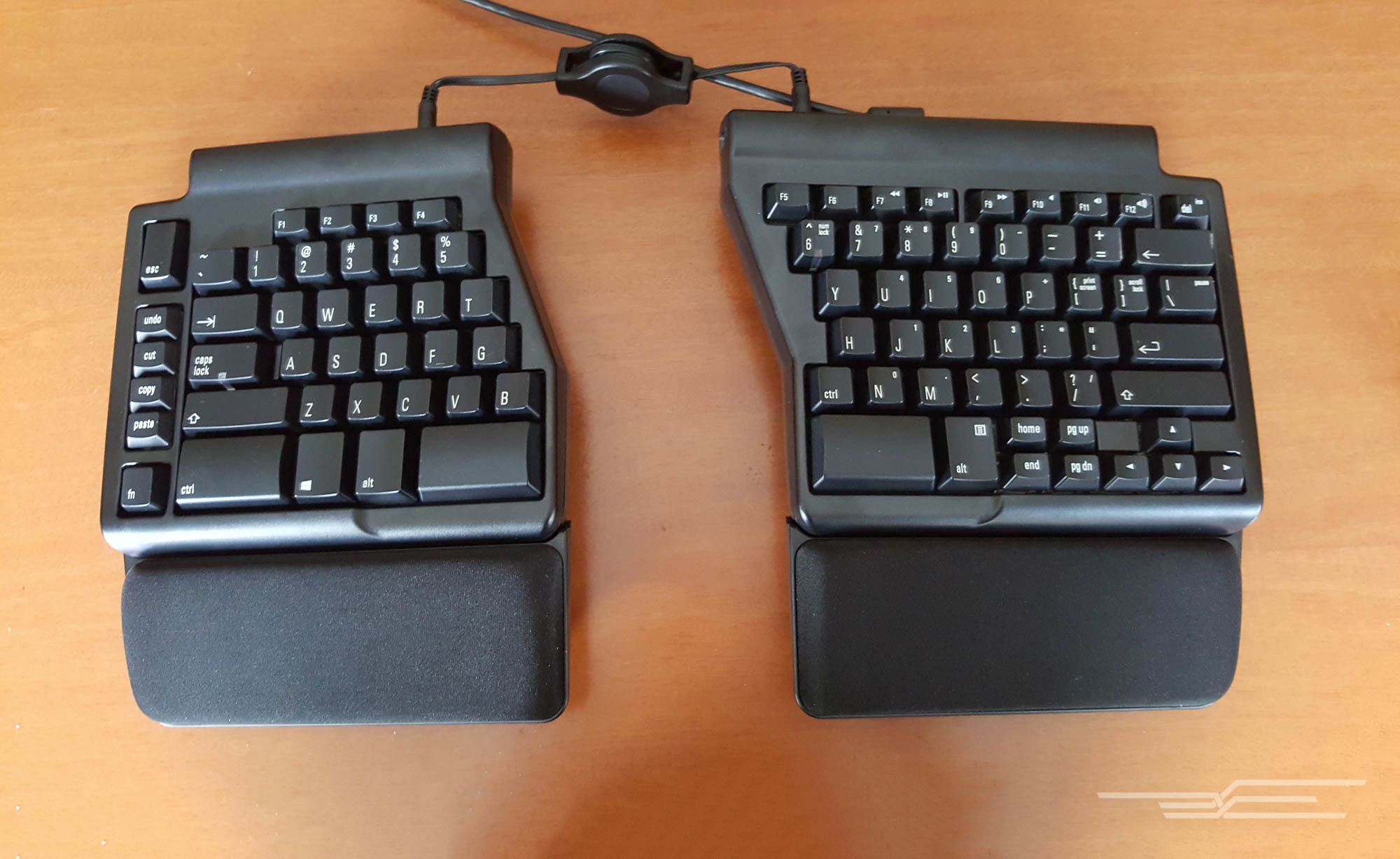
The Matias Ergo Pro is a fully split ergonomic keyboard with excellent mechanical keys. Photo: Melanie Pinola
If you have consistent aches while typing, if you need more customization, or if the Sculpt Ergo doesn’t fit your body’s ergonomic needs, the Matias Ergo Pro may be better for you. The Ergo Pro is a fully split mechanical keyboard with layouts for both Mac and Windows. You can tent the Ergo Pro’s keyboard halves or tilt them away from you, and the completely split design means you can position the keyboard halves for optimal wrist, shoulder, and arm comfort. Unlike the Microsoft Sculpt Ergo, the Matias Ergo Pro doesn’t support both tenting and negative tilt at the same time. But because it’s more adjustable than the other models we tested, the Ergo Pro is more ergonomic for a wider swath of comfort needs.
A Bluetooth option
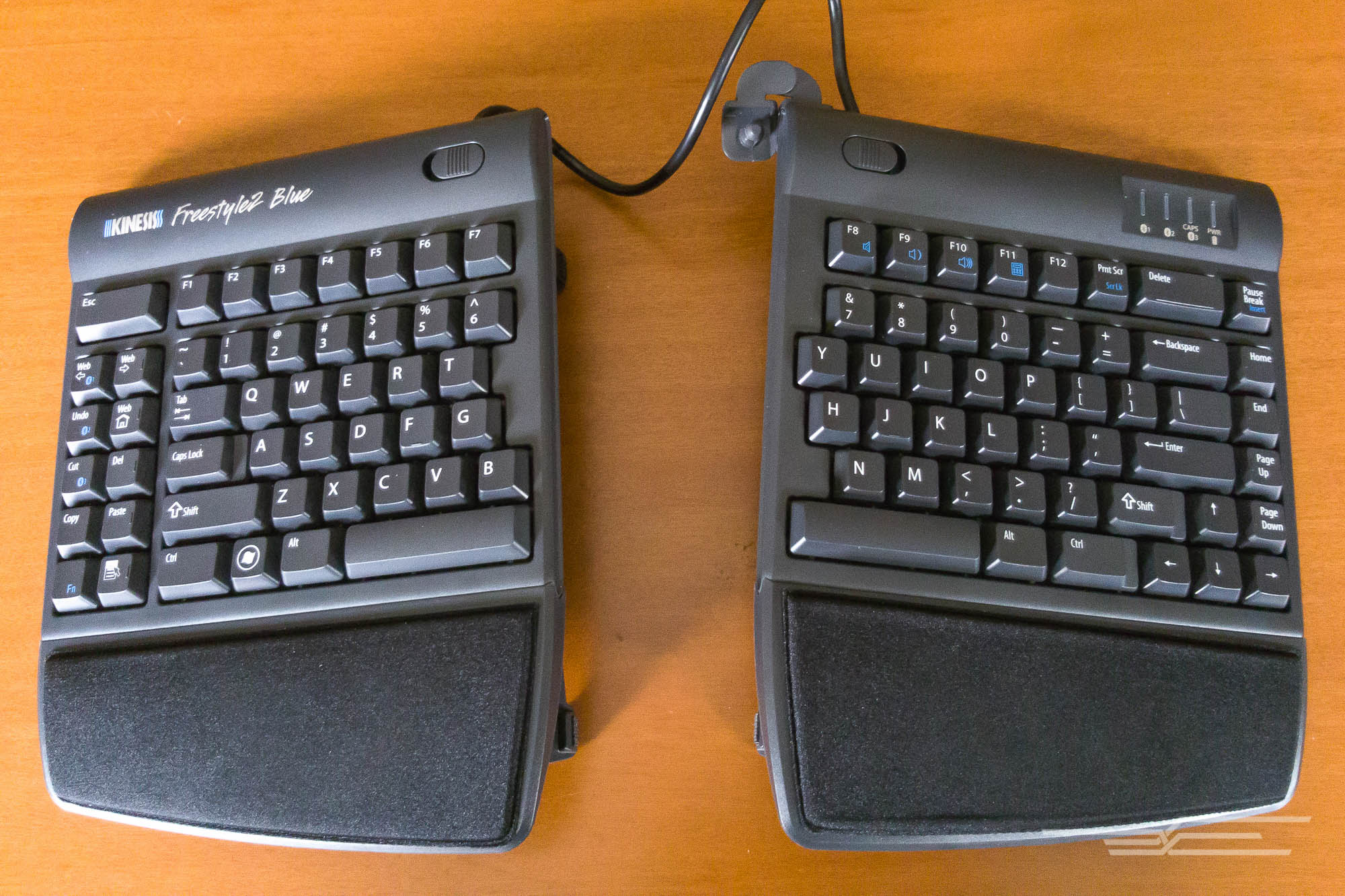
The Kinesis Freestyle2 Blue can connect to up to three devices via Bluetooth. Photo: Melanie Pinola
If you want a fully split keyboard without lots of messy wires, or if you’d like to use the keyboard for both your computer and your mobile gadgets, the Kinesis Freestyle2 Blue—available in Mac and Windows versions—is your best option. The VIP3 accessory is a must-have for getting the most ergonomic benefits from this keyboard; with it, you can tent the halves to a steeper angle than our other picks. While the Freestyle2 Blue’s keys were our least favorite among our picks, the keyboard worked flawlessly for typing on a desktop computer and on mobile devices. This Bluetooth model connects wirelessly and supports multi-device pairing, and the fully split design lets you customize the position of the keyboard halves. If you frequently switch between devices or you hate messy cables, the Freestyle2 Blue is the best wireless ergonomic keyboard we’ve seen.
This guide may have been updated by The Wirecutter. To see the current recommendation, please go here.
Watch the first trailer for ‘Black Mirror’ season three
The third season of Charlie Brooker’s dark, technology-infused drama Black Mirror is almost upon us. The show is known for its bleak but surprisingly believable depictions of the future, where society has pursued revelatory technologies — only to discover some unsettling consequences. The show started on Channel 4 in the UK, but has since been picked up by Netflix for season three. The first proper trailer dropped today, teasing some of the storylines that will play out in each of the six episodes. There are plenty of familiar faces, including Bryce Dallas Howard (Jurassic World), Jerome Flynn (Game of Thrones) and Michael Kelly (House of Cards).
The first batch of episodes will drop on October 21st. Netflix has commissioned 12 episodes, however, so a second set — which most people are now referring to as season four — will be released at a later date.
Source: Netflix
Microsoft will hold a Windows 10 event October 26th
It has been a busy few weeks for the big tech companies making major announcements and we’re not done yet. Microsoft announced today that it will host a Windows 10 event October 26th in New York City at 10:00 AM ET. The company didn’t get into specifics on the invite or social media posts, but if it’s keeping an yearly update timeline for new Surface Pros, perhaps we’ll see a new model later this month. The Surface Pro 4 was revealed in early October last year after all. Of course, there’s sure to be some discussion on the latest developments for Windows 10 as well, and we’ll be there to bring you all the news live as it happens.
Please join us Oct. 26 to see what’s next for Windows 10. #MicrosoftEvent https://t.co/mNAhcpNeso pic.twitter.com/yqRC6ZcDQ2
— Microsoft (@Microsoft) October 7, 2016
Source: Microsoft
Facebook’s Events app helps you find stuff to do
There’s no shortage of event-finding apps for your smartphone. YPlan, Eventbrite, Songkick — the list goes on and on. Facebook’s dream of being your go-to event planner is no secret, and today it’s taking a huge swipe at its specialized competitors with a new, standalone app of its own. Available first on iOS, the aptly named “Events” gives you a filtered feed with all of your friends’ activity. So if they’ve said they’re “interested” in a nearby food market, you’ll see it immediately — no need to trawl through the News Feed, or hunt for the appropriate section inside the main Facebook app.
There’s a search tab too, which lets you filter events by time or location. An image-heavy carousel sits further down with suggestions, pulled presumably from your Likes, history and geographical whereabouts. Finally, there’s a search box if you want to get specific. The calendar tab, accessible at the bottom, will give you an overview of everything you’ve signed up for. It’s not a full calendar app — but if you’re struggling to keep up with your Facebook-related engagements, maybe this can help.

Events’ utility is obvious. Facebook has a massive audience, one that’s attracted almost every type of business and event organiser. That interest has led to a huge number of listings, which could appeal to an equally huge number of people online. Facebook’s job is to pair the two groups together — a simple challenge, you might think, but one that’s grown harder as the platform’s priorities have broadened. Video, livestreaming, friendship anniversary reminders — it’s easy for events to get lost amongst the rest of the social noise. A standalone app could bring them back to the fore.
Source: Events (iOS)
NFL could fine its own teams for social media posts
Sports reputation as being DVR-proof has led some leagues to try and tightly control how and where their highlights show up online. While the NBA is relatively loose about allowing its clips on YouTube or Twitter, the NFL has gone after websites for posting video or GIFs before, and the Olympics banned outlets from posting GIFs this summer. Now, a leaked memo obtained by TheMMQB and Mashable reveals how the NFL can go after its own teams for posts by their social media accounts. Now, teams can be fined for exceeding the limits on video and any moving content (read: GIFs) posted during the 60 minutes before a game or during the game.
As noted by Pro Football Talk, these new rules actually loosen restrictions that had existed on using video from games, and recorded at the stadium on gameday. But the penalties put in place mean that for a first-time violation, a team could be fined $25,000 for an offending post, which ramps up to $50,000 the second time, and $100,000 plus the loss of rights to post league content for a third strike.
Mashable revealed that banned behavior includes tweeting video during the restricted time period, other than resharing video from official league accounts. While the ban on gametime GIFs (even for content that’s not from the game itself) could be reviewed going forward, it seems likely that your preferred team’s social media account will become a lot less personal while the game is happening. The big question however, is whether the NFL just wants more control over valuable game video and reach when the most people are paying attention, or if it’s worried about ratings that, through the first quarter of the season, have noticeable declined?
Source: TheMMQB, Mashable, Pro Football Talk
Samsung Owes Apple $120 Million in Longstanding Slide-to-Unlock Lawsuit
The U.S. Court of Appeals for the Federal Circuit has reinstated Apple’s $119.6 million award in a longstanding patent lawsuit with Samsung, after eight of twelve judges ruled it was wrong to throw out the verdict in February.
The bulk of the award, $98.7 million, was for the detection patent that the earlier panel said wasn’t infringed. The February decision also said the other two patents were invalid. […] That was a wrong decision, the court ruled Friday, because it relied on issues that were never raised on appeal or on information that was beyond the trial record.
The long-running lawsuit dates back to 2011, when Apple accused Samsung of infringing upon its now-retired slide-to-unlock feature, autocorrect, and a method of detecting phone numbers so they can be tapped to make phone calls, according to Bloomberg. The case is not to be confused with a similar Apple v. Samsung lawsuit related to accusations of older Galaxy smartphones infringing upon the iPhone’s design.
The appeals court will argue that second case, also dating back to 2011, on Tuesday to determine how much Samsung should pay for copying the look and feel of the iPhone, according to the report. Samsung was originally ordered to pay Apple damages of $548 million, but it appealed to the U.S. Supreme Court in December as a last-ditch effort to avoid paying the settlement.
In August, over 100 world-renowned designers, including Calvin Klein, Dieter Rams, and Norman Foster, filed an amicus brief in support of Apple in the lawsuit. The designers argued that a product’s visual design has “powerful effects on the human mind and decision making processes,” citing a 1949 study that showed more than 99% of Americans could identify a bottle of Coca-Cola by shape alone.
Tags: Samsung, lawsuit, patent trials
Discuss this article in our forums
Should you get Device Protection insurance for your Pixel?

Should you buy Pixel Protect with your new Google phone? For an extra $100, you’re paying for peace of mind.
You might not think you need that device protection add-on for your shiny new device, but with Google’s new Pixel smartphones, you might consider springing for it in the case of an emergency.
Google’s new device insurance program is simply called Device Protection for your Pixel. For a flat fee or $99 ($129 in Canada) for either the Pixel or Pixel XL, Google will cover accidental damage from a drop or water ingress, as well as any general malfunctions for two years.
If in the event that you do need to file a claim, Google will hook you up with a new device after you pay a deductible—$79 for the Pixel and $99 for the Pixel XL. Take heed that you can only make a maximum of two claims during the two years you have the device in hand. Because honestly, if you have a bad habit of throwing your phone at the wall in fits of anger…well, that’s not something Google can help you with.
So, is the extra $100 worth it for Pixel device protection? Absolutely. You’ll still get one year of manufacturer’s warranty even if you don’t opt for it, but try not to live life too dangerously—especially since the new Pixel smartphones already cost a pretty penny.
Google Pixel + Pixel XL
- Google Pixel and Pixel XL hands-on preview
- In pictures: Google Pixel and Pixel XL
- Pixel + Pixel XL specs
- Understanding Android 7.1 Nougat
- Verizon is the exclusive U.S. carrier for the Google Pixels
- Join the discussion in the forums!
Google Store
Verizon
Digital Offers: Learn everything you need to know about web development for only $65!
So you’ve decided on a new career in web development, but you’re unsure where’s the best place to start. You could enroll yourself in a computer sciences course at a local college, but that means putting your life on hold to go back to school, and who has the time or money for that?
The fact is if you want to be a programmer who’s in demand, you need to be proficient in a multitude of different coding languages. The more varied your experience and knowledge, the more valuable you are to prospective employers. The problem, of course, is building and maintaining your knowledge of all the latest programming languages.
Maybe you’ve seen ads for intensive coding boot camps, but thought that might be a bit overwhelming. You’d be much better off learning at your own pace via online courses.

Android Central is here to help, with this amazing deal. You can get lifetime access to The Complete 2016 Learn to Code Bundle for just $65.
This bundle includes 12 distinct courses on all the most valuable languages and web development frameworks used by programmers today — including HTML, HTML5, CSS, JavaScript, Python, and much more. Each course is broken down into digestible lessons, which have been put together by qualified and experienced experts.
All told you get access to over 100 hours of online course material, that you can always come back to when you need a refresher. This also makes it a valuable resources for those already working as a web developer, as you’ll have this well of knowledge to go back to throughout your career.
So what are you waiting for? To sign up for all these courses individually would cost over $1,000, but for a limited time you can enjoy a 94% discount with this bundle.
But again, this is only available for a limited time, so you’ll want to jump on it now and then enjoy the freedom to build out your coding skill set at your own pace.
See at Android Central Offers
RIGS: Mechanized Combat League is a bona fide PlayStation VR adrenaline rush!

In the loosest sense of the word, RIGS is a sports title destined for the grand launch of PlayStation VR. It’s set in a futuristic arena where you pilot your mechanized warrior and try to score more goals than the opposing team. Sounds simple, right?
Throw in an innovative control system for a console title and the small matter of folks shooting at you, and you’ve got a challenge that’s both enormous fun and incredibly rewarding.
Read more at VR Heads!
HTC Bolt the first to taste Android Nougat
HTC Rom developer LlabTooFeR has said the HTC Bolt, currently codenamed Acadia, will be the first HTC branded phone to come running Android 7.0 Nougat out of the box.
You may think that the Google Pixel and Pixel XL actually claim that title since they’re probably being made by HTC too. However there’s no actual HTC branding on those phones, so they don’t count. And, in fact, they go one better anyway, with Android 7.1.
LlabTooFeR says the Bolt will have Nougat 7.0 with HTC’s Sense 8 UI, the very same that can be found on the HTC 10, a phone that the Bolt appears to share much of the same DNA with. Leaked renders of the Bolt show a similar metal body, front-mounted fingerprint scanner and a rear-facing camera with dual LED flash.
It was also reported for some time that the Bolt would be a US-bound phone only, but that appears to have changed, as it should now arrive in Europe, Asia and Africa. The US will still get the phone first though, as it’s due to go on sale there in a few weeks, with Sprint appearing to bag exclusive rights to sell it.
- When is Android 7.1 Nougat coming to my phone?
While no other specs have been leaked, the HTC Bolt is shaping up to be an exciting phone. Hopefully we’ll have more details soon.

