


Smartwatch shipments dropped ahead of new models
The smartwatch market isn’t quite as red-hot as it looked in recent months. IDC estimates that smartwatch shipments fell by just shy of 52 percent year-over-year in the third quarter of 2016, with the biggest names often being the hardest hit. Apple was still the top dog, but its shipments fell almost 72 percent to 1.1 million. Samsung’s shipments were virtually flat, while Lenovo and Pebble saw their unit numbers drop sharply. Interestingly, the only company in the top five to see a big surge was Garmin — the relative newcomer’s shipments more than tripled to 600,000. Should the industry be worried? Not necessarily.
The problem, appropriately enough, is timing. The periods aren’t strictly comparable — many manufacturers had just launched new watches last summer, but had nothing new to show (or had barely started deliveries) a year later. The original Apple Watch was widely available in Q3 of 2015, for instance, but Series 1 and Series 2 models didn’t arrive until the last two weeks of this past quarter. Samsung has yet to ship the Gear S3, there was no third-generation Moto 360 and Pebble only started shipping its newest watches in September.
This doesn’t mean that you can expect a year-over-year recovery in the fourth quarter. It’s possible that the enthusiasm for smartwatches has cooled off, and that we’re seeing what the market is really like now that early adopters have devices on their wrists. There should at least be a season-to-season improvement, however, thanks to both new hardware and the usual holiday rush. And the smartwatch field is still young. Even veterans like Pebble and Samsung are still trying to figure out what works, and the technology is still new enough that features like GPS and LTE data are still big deals whenever they show up.

Via: TechCrunch
Source: IDC
I used a Pixel XL for 4 days and all I want is a Note 7

In many ways, Google Pixel is the best phone I’ve ever used. However…
Google Pixel is priced at a point where people expect a premium experience — and in many ways, Google has delivered. The aluminum body looks and feels nice, the software is incredibly smooth and capable, the camera is out of this world excellent almost every time, and the battery life is on the higher end of functional. This is a great phone, and when you factor in security updates this is going to be the phone I recommend to people for a long time.
That said, over the last few days I found myself missing the kitchen sink of features that comes with owning a Galaxy Note 7. Before it was the laughing stock of the world for occasionally turning into a heap of molten slag, the Note 7 had some lessons to teach every other phone.
“Pro” camera mode

Google’s camera app for the Pixel couldn’t be easier to use, and the shots you get from this phone are incredible, but I want more. Specifically, when I took a trip out to the middle of nowhere to play with light painting I was reminded that there’s no way to do that in Google’s stock camera. You can install other apps to accomplish long exposure shots, but you’d think a phone trying to offer a premium experience would bake something like that in right?
Samsung’s camera app isn’t the easiest to use, but the ability access Pro mode and gain remarkable control over your photography is one of the things that makes the S7, S7 edge, and Note 7 so great. It’s a fairly small thing overall, but useful when you need it.
Expandable storage

Especially now that Google has made it possible to add storage to your phone in a permanent fashion, WHY hasn’t Google seen fit to add removable storage to their big flagship phones? Why bother with the feature if you’re not going to use it?
Samsung doesn’t offer Adoptable Storage by default on their phones, but there’s so much you can use the SD card for now that cameras are recording in 4K and taking enormous photos with RAW support baked in. It’s there if you need it, which is what you expect from a premium phone!
Wireless charging

I don’t fault Google for not including wireless charging in a phone with a metal body, because no one has fully implemented that feature yet and I personally prefer the metal body on the Pixel to the slippery glass on Samsung’s lineup, but it’s still a great feature. Google’s lack of wireless charging in the last few phones has been a bummer, and something a lot of people were hoping would come back with the Pixel phones.
Samsung, on the other hand, has been crushing it with wireless charging. Not just regular wireless charging, but fast wireless charging that really makes a difference. There’s a big part of the wireless charging experience that is greatly improved with the newer rapid chargers, making it much easier for people to consider adopting with new phones.
Waterproof body

Welcome to 2016, where IP53 is not acceptable in a phone with a premium price tag unless the Google logo is on the back? That seems odd, right? HTC was slammed for this same water and dust rating on their most recent phone, and despite being a great piece of hardware no one bought it because it was so expensive. The mental gymnastics require to praise the Pixel without talking about water resistance but slam the 10 for being too expensive for what you get are impressive.
Meanwhile, on Samsung’s phones you can watch Alec Baldwin in what is probably the best performance of his career on SNL while sitting in a hot tub. While not something you should do every day, it’s the kind of thing you should expect on a phone with one of the highest price tags on the market.
Is this a premium phone?

I’ve been beating up on the Pixel here a little, but it’s important to point out the things you get for “free” on this phone contributed to the seemingly inflated cost. Unlimited lifetime storage for full res photos and video is insanely great. Free 24/7/365 phone support with live video mirroring is a big deal. You get these things on top of a phone that offers a ridiculously good fingerprint scanner, one of the better displays you can buy in a phone, an insanely good camera, and a battery that will easily get you through the day.
This is a fantastic phone, but there’s clearly room for improvement and it’s important to remember that as we place this phone on its pedestal. And yeah, I miss the Note 7. I can’t have a Note 7 though, and the S7 edge isn’t nearly as comfortable to hold and use. So it’s a Pixel for me for now, in hopes that Google figures out how to really push for premium next time.
Google Pixel + Pixel XL
- Google Pixel and Pixel XL review
- Google Pixel XL review: A U.S. perspective
- Google Pixel FAQ: Should you upgrade?
- Pixel + Pixel XL specs
- Understanding Android 7.1 Nougat
- Join the discussion in the forums!
Google Store
Verizon
Save an additional $30 on the ad-powered Moto G4 at Amazon
Right now you can save an additional $30 on the ad-powered Moto G4 at Amazon, dropping the price to just $120. Normally, the 4th-gen Moto G retails for $199, but Amazon offers it with lock screen ads at a lower cost, as long as you are an Amazon Prime member. The phone features a 5.5-inch display, 16GB of storage, and comes unlocked to be used on the carrier of your choice.

This deal is only good for today, October 24, so be sure to act quickly if you are interested.
See at Amazon
Android Pay links up with Visa Checkout and Masterpass for quicker online payments
Google just loves making it even simpler to buy things online.
Alongside Google’s initiative to have Android Pay be a standalone mobile payment solution for e-commerce sites, it has also today announced a partnership that will let Android Pay users use their payment methods anywhere that Visa Checkout and Mastercard Masterpass are accepted. That means any site that has integrated with Visa Checkout or Masterpass is now available for you to pay via Android Pay on your phone once you link your accounts.
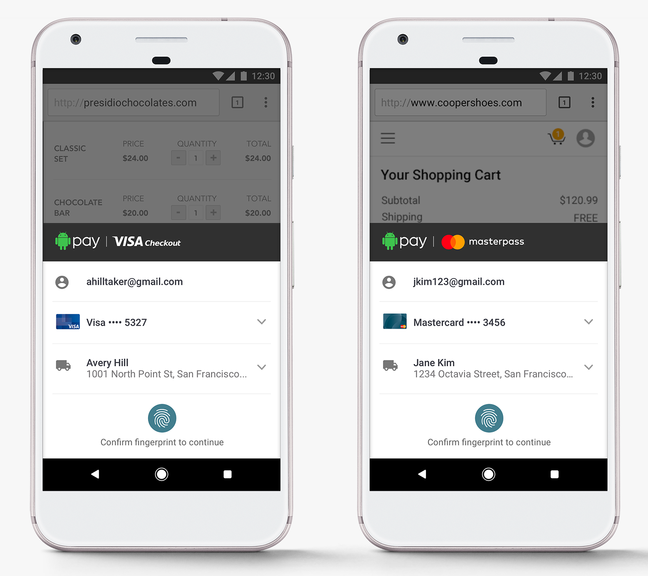
About as simple as online payments can get.
No more remembering individual logins for just one payment service or the other — if the site supports Visa Checkout or Masterpass, you’ll be able to pay with a couple taps and an authentication of your fingerprint on your phone. You won’t have to add your credit card numbers to another service or remember any more passwords.
The best part about the integration is that e-commerce sites don’t have to do any additional work to get it up and running either. Everything is handled on the Android Pay end. Buttons on the sites will be changed automatically, and soon every retailer that takes Visa Checkout or Masterpass will also be compatible with Android Pay.
The integration, according to Google, will be all finished early in 2017 so we unfortunately have to wait for a little while. But this integration with the massive presence of Visa Checkout and Masterpass adds a gigantic number of retailers much faster than Google could have done with Android Pay on its own. Keep on the lookout for the integration in the coming months.
Apple rolls out updates for the Watch and Mac
Apple launched updates on Monday for the Watch and Mac, mostly focused on squashing some bugs in each of the systems. The macOS Sierra 10.12.1 update adds an automatic smart album just for iPhone 7 Plus Depth Effect images, improves the security of Safari, fixes a glitch that caused text to paste incorrectly via Universal Clipboard, and improves the reliability of Auto Unlock with the Apple Watch. The macOS update also improves the compatibility of Microsoft Office with iCloud Desktop and Documents, and fixes an issue with Microsoft Exchange accounts preventing Mail from updating.
On the Watch side of things, update 3.1 improves battery life but doesn’t add any new features, according to release notes published on MacRumors. WatchOS 3.0 was a major overhaul and the latest update finesses some of its functions, squashing a bug that stopped the Watch Series 2 from charging fully, fixing another glitch that prevented Force Touch from working with some apps, and addressing one issue that made Activity rings disappear from the watch face. Also, the timer shouldn’t notify users twice once it’s finished anymore, Messages effects will work with Reduce Motion enabled and Watch wearers have the option to replay bubble and full-screen effects in Messages.
The Watch update is available across Series 2, Series 1 and first-generation models.
Source: MacRumors
Apple Pay Now Live in Japan
Following the release of iOS 10.1 this morning, Apple has activated Apple Pay in Japan, making it available for use at all locations that accept the Suica prepaid money card, QuicPay, or iD.
Apple Pay in Japan is unique because rather than exclusively using NFC, it also supports the FeliCa payments standard that’s been widely adopted in the country. iPhone 7 and iPhone 7 Plus models sold in Japan include a FeliCa chip, as do Apple Watch Series 2 models.
iPhone 7 and 7 Plus users in Japan can now use their iPhones to make purchases in cafes, purchase transit tickets, make purchases in apps and on websites, replace a Suica card, and more.
To use a Suica card with Apple Pay, customers in Japan will need to add their Suica card or Suica commuter card to the Wallet app. Once added, the iPhone 7 or 7 Plus can be used in place of a standard card.
Apple Pay in Japan works with credit and debit cards issued by American Express, JCB, Mastercard, Aeon Financial, Orico, Credit Saison, SoftBank, d Card, View Card, MUFG Card, and more.
An iPhone 7, 7 Plus, or Apple Watch Series 2 is required to make purchases in stores and at transportation facilities in Japan. The iPhone 6, 6s, 6 Plus, 6s Plus, and SE, along with iPad Pro models, the iPad Air 2, and the iPad mini 3 and later, can be used to make payments within apps and on the web.
Apple Pay is now available in 12 countries, including the U.S., UK, China, Australia, Canada, Switzerland, France, Hong Kong, Russia, Singapore, New Zealand, and Japan.
Related Roundups: Apple Pay, iPhone 7, iOS 10
Discuss this article in our forums
Apple will unveil not one, but three new MacBooks on Thursday
Apple has sent out media invites for its “Hello again” event on Thursday 26 October which is expected to revolve around the MacBook. 9to5Mac.com has picked up some Russian trademark filings that point to Apple announcing three new models with numbers: A1706, A1707 and A1708.
- Apple sends out invites to 27 October event likely for new MacBook Pro
9to5Mac also cites usually reliable leaksters KGI as saying Apple would unveil three new MacBooks on stage in Cupertino.
The filings don’t give away details of specifications or features of the laptops, but merely confirms their existence. It’s likely that all three models will be made available for pre-order the same day they’re announced. Both the Russian filings and KGI’s report say there won’t be any new iMacs or a 5K external display unveiled at Apple’s event, but they may be announced sometime in 2017.
The MacBook Pro will finally get an update and usher in a number of major updates, including improved internal components, a Touch ID fingerprint scanner and an OLED shortcut bar in place of the quick action function keys on MacBooks at the moment.
They should arrive in 13-inch and 15-inch variants and have USB Type-C ports and Thunderbolt 3 but there’s a possibility Apple will kill the headphone jack, like it did with the iPhone 7 and iPhone 7 Plus.
- Apple to continue headphone jack killing spree with MacBook Pro?
We’ll know everything for sure this coming Thursday as we’ll be reporting live from the event in Cupertino.
Pocket-lint Adventures: Filming and editing video while sky diving with the TomTom Bandit
Jumping out of a plane used to be one of the most extreme things you could do. Then getting it all on film was the next level. Now it’s all about not only filming the jump but editing it before you’ve even landed. We did exactly that using the TomTom Bandit action camera.
We took to the skies for Pocket-lint Adventures with the Infinite Skydiving team in Banbury. With ominous clouds starting to roll in we strapped on our TomTom Bandit, affixed our fetching helmet-onesie combo and got ready for the rush.
The camera was mounted minutes before we headed off and synched with our heart rate monitor. The connected phone was worn on the forearm like some sort of cyborg soldier. Since we simply needed to hit record and leave the kit working we were left with little else to worry about – aside from the whole potentially dying thing.
Strapped in we reached 13,000 feet and were told to shuffle to an open door, as you do. Feet dangling and deafening wind blaring we leant forward and let go. Noise, wind, adrenaline – the next 45 seconds were a free fall blur. Once the chute released, and we finished cheering, the phone was accessible. You just need a tap or two and a shake of your phone and the TomTom Bandit did the rest of the work end edited the video ready to share instantly.
While that part is easy, getting our fingers to stop shaking to press the screen when we landed was probably the biggest challenge.
The TomTom Bandit features a highlight option that marks parts of the video you want to highlight, and the easy to use editing software then allows you to put together a video of either your favourite bits, or highlights the camera believes you should feature based on speed, movement, or other factors. So in this case a tap on entering the plane, when we were just about to jump, another after the chute opened, and a further one on landing would all be options for a quick edit. Our “in-jump” video was done purely leaving it to the Bandit software.
Back on the ground and we had more time to edit a video using the three cameras we took to ensure we got every angle, and using the Bandit software is really easy.
Check out more of the Pocket-lint Adventures below:
Latest XPRIZE contests focus on water production and women’s safety
The XPRIZE nonprofit just announced its latest set of competitions aimed at “sparking breakthrough solutions to two urgent grand challenges.” The first is the “water abundance XPRIZE,” which focuses on harvesting clean water from the air using renewable resources. Specifically, the challenge asks participants to create a device that extracts a minimum of 2,000 liters of fresh water per day from the atmosphere, using 100 percent renewable energy. To make things even trickier, the cost can only be two cents per liter of water.
The winning team will receive a $1.75 million prize, and registration is open through March 31st, 2017. The top five teams will be selected at the end of January 2018, with the winner being crowned that August.
The second competition is named the “Anu & Naveen Jain Women’s Safety XPRIZE.” Its missions is to use technology to build a discreet system that’ll let women alert authorities as well as the community if they’re unsafe. The solution that this competition is looking for would “autonomously and inconspicuously” send out an emergency alert and also send info to “community responders.” It would do all this in 90 seconds or less and cost less than $40 annually and specifically be able to work in low-connectivity situations.
The total prize of $1 million will be awarded on June 1st, 2018. Registration is open through the end of February 2017, and five finalists will be announced a couple months before the contest’s conclusion. While this safety device sounds like it would be a small hardware device, the contest’s guidelines don’t mention what form the solution has to take — so it seems like an app would be theoretically possible, should it pass all of the contest’s other guidelines.
Source: XPRIZE
NBA gives you a better view of games on your phone
Just because you can watch live sports on your phone doesn’t mean you’ll enjoy it — the footage is usually optimized for TV, which sometimes means staring at players the size of ants. You won’t have to squint if you’re an NBA League Pass customer during the 2016-2017 season, though. The basketball streaming service is trotting out a Mobile View option that gives you a close-up shot in its Android and iOS apps. You can switch back to a traditional view when you want an overview, but this promises to help in those moments when you want to identify the ball carrier or get a good look at that impending dunk.
And crucially, this isn’t just a matter of cropping the regular view and calling it a day. The NBA and Turner Sports installed new cameras in every team’s arena, and each game has a producer dedicated to Mobile View. You should experience the same quality that you’d get on TV, just with a new perspective. As always, though, you’ll have to pay to see this for yourself. A full season of out-of-market games will cost you $200 US, while a team-specific pass will set you back $120; individual games cost $7 each.
Source: NBA League Pass, NBA (YouTube)

