


First look at the new MacBook Pro (the one without the Touch Bar)
This is the new MacBook Pro. But it’s probably not the one you were hoping to read about. What I have here today is the new entry-level 13-inch model — the one without the multi-touch Touch Bar you’ve surely heard about by now. No, this is for all intents and purposes the Pro that replaces the MacBook Air. (The Air is still on sale — for now — but unless you have an inflexible budget, you should buy the new Pro instead.)
As a refresher, the new Pro weighs the same as the Air, at approximately three pounds, but has a noticeably smaller footprint. It also has the Retina display you always wished you had on the Air. There are some other differences too, including a much larger touchpad, a redesigned keyboard and a new selection of ports: just two Thunderbolt connections and a headphone jack. Oh, and it has a new price: The 13-inch Pro starts at $1,499, a bit more than you would have hoped to pay for a refreshed Air.
The laptop is shipping now and on display in Apple Stores, so there’s nothing stopping you from getting hands-on today. For my part, I received my test unit yesterday evening, which means I am in no way ready to publish a full review. But I am ready to give you a first look. Join me.
First impressions
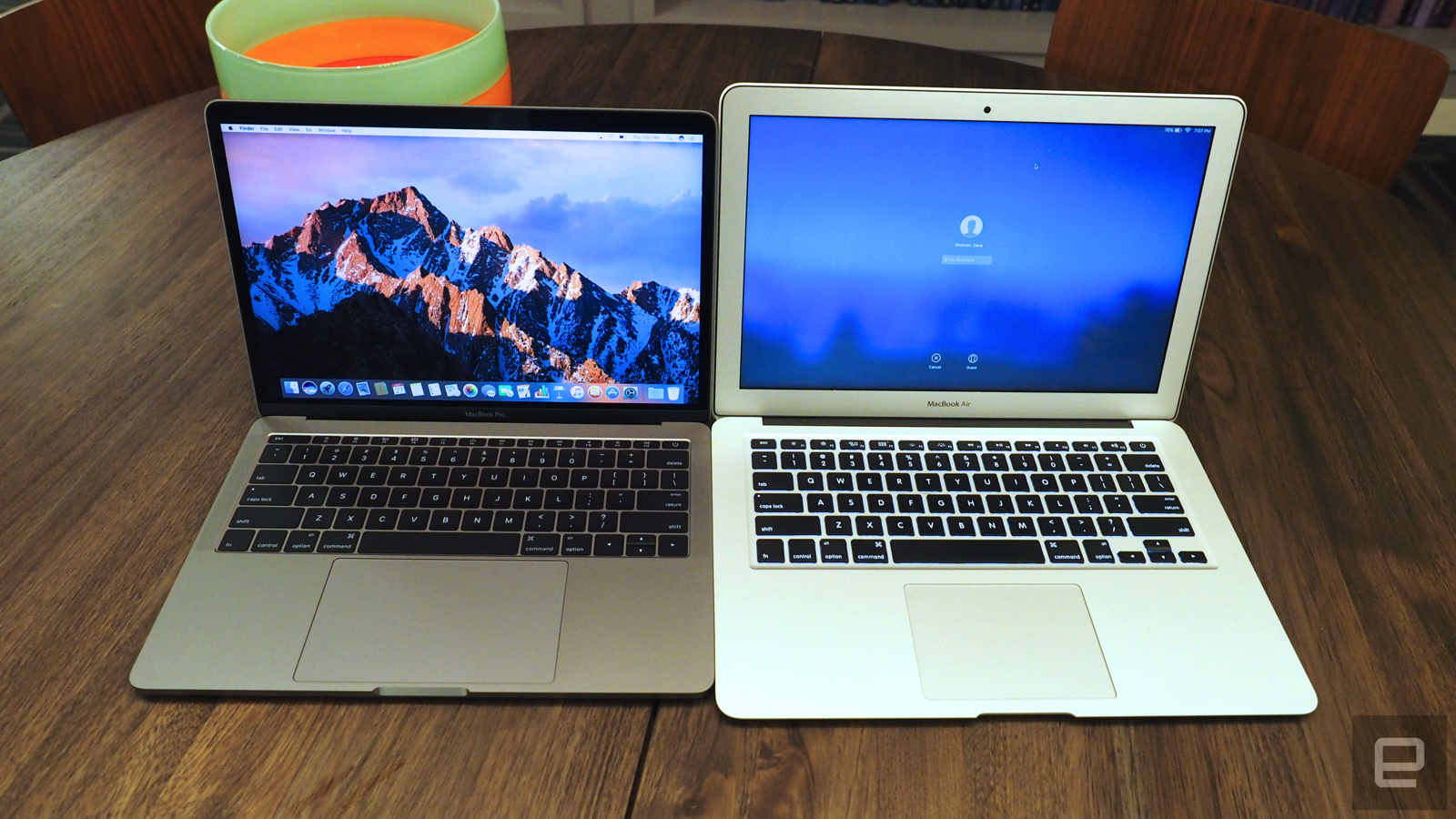
Let’s start with the design: Holy moly, is this thing small. I noticed it right away, just because my normal work laptop is a MacBook Air, which means I’m used to something much larger than this. The difference is especially obvious if you stack one machine on top of the other. Though both have 13.3-inch screens, the new MacBook Pro has a much smaller footprint — it’s shorter and less wide. Truly, trimming down that humongous bezel from the Air makes a world of difference. Just ask Dell, whose compact, 2.6-pound XPS 13 paved the way for laptops that take up shockingly little space. Basically, if you can achieve a nearly bezel-less screen, you can then squeeze it into a much smaller chassis than you would otherwise.
The MacBook Pro also weighs about the same as the Air: 3.02 pounds versus 2.96. And that underscores another reason the Air should probably be given the axe. It was once a featherweight feat of engineering; now it’s heavier than competing Windows machines (the XPS 13 being just one example), and it weighs the same as Apple’s once-heavier Pro line. All that said, three pounds is still plenty portable, especially if you’ve bought MacBook Pros in the past and are used to toting around something heavier. For those of you who are upgrading, this will feel like an improvement.

At 14.9mm thick, the Pro is also 12 percent thinner than the Air, though that’s not quite as obvious, just because the Air has a wedge-shaped design that gets narrower at the end. Thinner is generally good, so long as the battery life doesn’t suffer. In this case, it also means thinner ports. (Though let’s face it, Apple likes to get rid of legacy ports, so it would have done that even on a thicker machine — and did, on the 15-inch Pro.) Where there used to be several full-sized USB connections and an HDMI socket you’ll now find two Thunderbolt 3 ports, along with a headphone jack. If you choose one of the higher-end MacBook Pros, you’ll get four Thunderbolt ports.
Either way, be prepared to un-learn some old habits. Gone is the MagSafe power adapter, though you can at least charge out of any Thunderbolt port now. You’ll also need a dongle for any accessories requiring a full-sized USB connection. Out of the box, you cannot charge your iPhone off this.

In many other ways, the MacBook Pro looks and feels similar to the previous generation. It’s made of unibody aluminum, available in silver and Space Gray. Though the 500-nit display is 67 percent brighter than the previous-gen Retina panel, with 67 percent higher contrast and 25 percent more colors, the resolution is the same, at 2,560 x 1,600 (a pixel density of 227 ppi). It’s lovely, especially with those tiny bezels and skinny metal frame around the screen. Particularly for those of you who have only ever owned the Air or an ancient MacBook Pro, you’re in for a treat.
The keyboard is both the same as before, and also not the same. As I said, this is the version of the MacBook Pro that does not have the OLED touchscreen stretching above the keyboard. That means the physical Escape key has lived to see another day — as have all the other Function keys, including brightness and volume controls.
So the keyboard looks the same. But then you touch it. Under the keycaps, Apple went with the same “butterfly” mechanism that it first introduced on the 12-inch MacBook. That means these buttons are shallower and less pillowy than on the last-gen MBPs, but still manage to be a lot springier than they look. I felt a little sour at first, giving up my old keyboard design (I don’t love change), but so far I’m typing away at this very story, and I’m not making many typos either.

As for the Force Touch trackpad, it’s 46 percent larger than before, making it nearly as big as Apple’s Magic Trackpad accessory. It’s more than enough space for the basics — stuff like scrolling and pinching to zoom. I’ll be curious, too, to see how it fares in more professional-grade use cases, like video and photo editing. More on that some other day.
All the stuff we’ll save for our review
There’s a reason I’m not calling this a review. There’s so much I haven’t had time to test! Apple says the battery life on both the 13- and 15-inch MacBook Pros can reach 10 hours. I’ll be sure to investigate that claim. Apple also stepped up to sixth-gen Intel Core processors across its lineup, with faster solid-state drives promising read speeds of up to 3.1 gigabytes per second. Oh, and I specifically didn’t mention the speakers earlier either. I’d like to listen to my very large, and very eclectic, Spotify collection before weighing in on the audio quality.
Given that the Pro has always been aimed at power users — and has a starting price to match — I don’t want to give the performance short shrift. And benchmarks are just the beginning too; real-world use matters as well. So give me a few days to live with this thing and I’ll be back soon with a full review. In the meantime, what’s the over/under on how long Apple waits before killing off the 13-inch Air?
Photos by Edgar Alvarez
Facebook goes full Snapchat with filters and vanishing messages
Facebook has “borrowed” a lot of ideas from Snapchat lately, including the concept for Instagram Stories and Facebook Live selfie filters. In perhaps its most audacious move yet, the social network has started testing a new camera that lets you take selfies and videos with filters, effects and masks, which you can then share with friends in your News Feed. If nobody replies within 24 hours, they’ll disappear.
Of course, those tricks pretty much make Snapchat what it is, and Facebook now has very similar ones in the heart of its app. While the test is just limited to Ireland, if Zuckerberg & Co. adopt the features widely, it’ll mean that Facebook’s 1.4 billion monthly users will be able do a lot of the things that used to make Snapchat unique.
Facebook purchased its filter technology from MSQRD back in March, but so far, has only used it in Facebook Live with Rio Olympics and Halloween-themed masks. The company also launched Prisma-like filters lately, with more advanced blending options than the original. Now, both types of technology have been integrated in the new camera, at least in a limited test.
Even while Facebook’s user base is growing, sharing of images and other personal content is on the decline. By contrast, Snapchat has dramatically increased photo and video sharing aided, no doubt, by all the fun ways to mash it up. The company famously declined Facebook’s $3 billion offer to buy it out, something many people thought crazy at the time. However, it’s now better at monetizing its content, and figures it could make up to $1 billion in revenue next year.
Lithium battery failure wipes out DARPA robot at NASA
It’s not just Samsung that has problems with combusting batteries, as NASA’s office of Safety and Mission Assurance has just revealed. The body has announced that NASA centers have seen at least four major explosions and a number of close calls over the last decade. The latest crisis was a fire at the Jet Propulsion Lab that wiped out one of DARPA’s RoboSimian droids before a test.
Admittedly, the inquest has found that actually this was the fault of the test engineers, who forgot to enable a power management system. But one thing that becomes patently obvious is that, as lithium-ion batteries become ubiquitous, there’s a looming safety issue. NASA found that none of the personnel that tried to tackle the blaze knew how to fight the fire, and the proper safety equipment hadn’t been installed. Now that you know that NASA is ill-equipped to deal with battery fires, imagine how well you’ll do when that smartphone, tablet, laptop or hoverboard goes up in flames.
Via: Popular Mechanics
Source: NASA
This Halloween, dress as a sexy meme
Christmas may be the “most wonderful time of the year,” but Halloween is the high holiday of sexy costumography. If you want to stand out from the legions of alluring nurses, librarians and teachers, take some inspiration from the most seductive subject of all: internet memes! Show off your switchblade skills with a slinky Crab with a Knife costume, rock some socks as a toothsome hipster Ariel or just melt hearts with a sultry Doge outfit. There’s no meme too obscure, no reference too random that you can’t add your own sexy spin to it. Except maybe Pepe the Frog.
Planning to dress up as a meme this Halloween? Share you pics with us on Twitter and Instagram using the hashtag #Hallowmemes
Clever SIM sticker makes no-signal mobile payments possible
Mobile wallets aren’t just for getting in and out of Starbucks that bit quicker. In several parts of the world, many people rely solely on mobile wallets for all their financial needs. These are particularly prevalent in Kenya, for example, where 58 percent of adults manage their money with mobiles. And we’re not talking about smartphone apps and contactless payments here, but simpler systems like M-Pesa that work on feature phones and verify transactions via SMS messages. These are entirely reliant on the presence and performance of mobile networks, though, which a project called DigiTally is trying to address with a SIM sticker that lets users make and receive payments when there’s no network connection whatsoever.
Born out of the University of Cambridge and supported by a grant by the Bill and Melinda Gates Foundation, DigiTally is a new type of mobile wallet that can be installed on even the simplest of phones by way of SIM sticker that sits over the standard contacts. This effectively adds DigiTally as a SIM service. While users still need to visit somewhere to add money to their DigiTally wallets, transactions don’t need to be authorized over a mobile network. Well, not immediately anyway.
Users make payments to each other simply by exchanging eight-digit verification codes between their mobiles, and the transactions are instantly reflected in both of their balances. Say this occurs where there is no mobile signal. Whenever the two users next get a connection, the transaction history is uploaded to a server and account balances re-synced.
The idea is not only to enable mobile payments in areas with no cell coverage, or where congestion is such that SMS-based systems are slow, but also to cut costs for users. As the system isn’t reliant on text messages, savings could be made there, as well as bundling transactions to reduce associated fees. DigiTally has already been successfully trialled earlier this year in Nairobi, Kenya, and the plan is make the project open-source in early 2017.
Via: New Scientist
Source: University of Cambridge
Geohot cancels his self-driving add-on amid legal scrutiny
George “Geohot” Hotz, PlayStation and iPhone hacker extraordinaire, has canceled production on Comma One, a $1,000 aftermarket add-on that he said would allow some cars to operate semi-autonomously. He claimed the tech was “about on par” with Tesla’s Autopilot and it used cars’ video feeds to navigate the roads. It was due to start rolling out at the end of this year. But, after receiving a special order from the National Highway Traffic Safety Administration today, Geohot decided Comma One wasn’t worth the paperwork.
Geohot said on Twitter that the special order opened “with threats” rather than an attempt at dialogue. “Would much rather spend my life building amazing tech than dealing with regulators and lawyers,” he tweeted just before officially canceling the Comma One. “It isn’t worth it.”
The comma one is cancelled. comma.ai will be exploring other products and markets. Hello from Shenzhen, China. -GH 3/3
— comma ai (@comma_ai) October 28, 2016
The letter and special order sent to Geohot by the NHTSA outlined the administration’s role in overseeing the safety of motor vehicles and asked for detailed answers to 15 questions about how the Comma One would work.
“We are concerned that your product would put the safety of our customers and other road users at risk,” the letter said. “We strongly encourage you to delay selling or deploying your product on the public roadways unless and until you can ensure it is safe.”
The NHTSA asked for Geohot to submit his answers by November 10th. The one line that could reasonably be construed as a threat, as Geohot called it, was the following: “If you do not timely or completely respond to the Requests in the Special Order, you may be subject to civil penalties of up to $21,000 per day.” The letter closes with contact information for a member of the NHTSA legal staff.
When Geohot revealed the Comma One in September, we were impressed but understandably skeptical. His company, Comma.ai, seemed to be moving remarkably quickly — perhaps that’s because Geohot skipped some of the standard paperwork.
Via: TechCrunch
Source: Scribd, @comma_ai
LaCie Introduces ‘World’s Fastest Desktop Drive’ With Thunderbolt 3
Following the launch of the new MacBook Pro with four Thunderbolt 3 ports, LaCie has introduced its new lineup of Thunderbolt 3 storage solutions: the Bolt3 desktop drive and the enterprise-class 6big and 12big RAIDs.
LaCie’s new Bolt3 desktop drive with Thunderbolt 3
LaCie’s Bolt3 combines dual Thunderbolt 3 ports with a pair of the latest M.2 PCIe SSDs, striped together into a 2TB volume, to create the “world’s fastest desktop drive,” with speeds up to 2800MB/s for 4K-6K video editing.
That kind of speed slashes time off nearly every task in your post-production workflow. Ingest RAW footage from RED® or Blackmagic® cinema cameras in a fraction of the time. Transcode 4/5/6K footage much faster using Adobe® Premiere® Pro or DaVinci Resolve. Then transfer a terabyte of footage from the Bolt3 to RAID storage—such as the LaCie 12big Thunderbolt 3—in minutes instead of hours.
Thunderbolt 3 permits daisy chaining and provides twice the video bandwidth of any other cable, meaning you can daisy chain one USB-C or up to five Thunderbolt 3 devices, or connect dual 4K displays, through a single USB-C cable.

The Bolt3 is designed with an aluminum enclosure featuring a magnetic cable door and display stand to place it upright on a desktop. Included in the box is a Thunderbolt 3/USB-C cable, power supply, cleaning cloth, and quick install guide.
LaCie’s 6big features up to 60TB of storage and Thunderbolt 3 speeds up to 1400MB/s, while the 12big is available with up to 120TB of storage and delivers speeds up to 2600MB/s — up to 2400MB/s in RAID 5.
Both enterprise-class RAID storage solutions feature support for hardware RAID 5/6 and have 7200RPM Seagate enterprise-class hard drives with 256MB cache. Thunderbolt 3 lets users daisy chain dual 4K displays or a single 5K display to the 6big and 12big.
 LaCie’s new 6big RAID storage solution — the 12big is twice as tall
The LaCie Bolt3 will come in a 2TB SSD capacity for $1999.00. The LaCie 6big will come in 24TB, 36TB, 48TB, and 60TB capacities starting at $3199.00. The LaCie 12big will come in 48TB, 72TB, 96TB, and 120TB capacities starting at $6399.00.
The trio of storage solutions will be available at LaCie resellers this quarter.
Tags: LaCie, Thunderbolt 3
Discuss this article in our forums
MacBook Pro Touch Bar’s T1 Chip Runs ‘Variant’ of watchOS, Also Secures Touch ID and FaceTime Camera
In a series of tweets sent out last night, and now in an interview with The Verge, developer Steven Troughton-Smith has detailed the inner workings of the MacBook Pro’s new retina Touch Bar, describing its T1 chip as “a variant of the system-on-a-chip used in the Apple Watch.” This means that the Touch Bar is essentially running watchOS on the T1 chip, which macOS then communicates with through an interconnected USB bridge that “relays multitouch events back to macOS.”
The developer described this software setup as advantageous for the MacBook Pro’s security, since the T1 chip also acts as a layer of protection and “gates access” to the laptop’s FaceTime camera and Touch ID sensor. In the series of Tweets he sent out last night, Troughton-Smith also theorized that watchOS could power the Touch Bar alone without relying on macOS to be running on the MacBook Pro, which Apple software engineering chief Craig Federighi has now confirmed.
“From everything I can piece together, the T1 chip in the new MacBook Pro is a variant of the system-on-a-chip used in the Apple Watch,” explains Troughton-Smith, in an interview with The Verge. “Running watchOS on the T1 lets the Mac benefit from Apple’s deep work on iOS embedded security, as the T1 gates access to the Touch ID sensor and, from the looks of it, the front-facing camera in the new MacBook Pro too.”
Despite the use of watchOS in the Touch Bar, the T1 chip “has no fixed storage” and boots from a 25MB ramdisk, so it’s not the full version found on the Apple Watch that could run the complete watchOS UI with apps. As Troughton-Smith described it, “the ‘watchOS’ the T1 runs is presumably only ‘watchOS’ by dint of the CPU it’s designed for. T1 must be very similar to S1.”
The developer also confirmed that the T1 chip and Touch ID sensor are paired together at the factory, so if either begins acting up, “you can’t replace one without the other.” What this means for the future of the MacBook Pro line could be a device that more closely bridges the gap between macOS and iOS, according to Troughton-Smith.
“Perhaps someday it could run a higher class processor, like Apple’s A-series chips, and allow macOS to ‘run’ iOS apps and Extensions, like iMessage apps, or manage notifications, system tasks, networking, during sleep, without having to power up the x86 CPU.”
Yesterday, Phil Schiller commented on the idea of Apple manufacturing a MacBook with a touchscreen, but he remained adamant that such a direct merger between macOS and iOS software wouldn’t be “particularly useful.” Likewise, Apple’s newly published guidelines for developers describe the Touch Bar as “an input device,” and “not a secondary display.”
Related Roundup: MacBook Pro
Buyer’s Guide: Retina MacBook Pro (Buy Now)
Discuss this article in our forums
New MacBook Pro Has Better Keyboard Than 12-Inch MacBook, But It’s Expensive and Lacking Ports
Apple provided the media with demo units of the new MacBook Pro sans Touch Bar, and a handful of websites have now published their early thoughts and first impressions about the 13-inch notebook. The articles reveal some interesting tidbits beyond yesterday’s Touch Bar model hands-on and first impressions roundups.
While the new MacBook Pro’s keyboard is a controversial topic, with some users preferring Apple’s traditional scissor design, most reviews said Apple’s second-generation butterfly mechanism offers an improved typing experience compared to the 12-inch MacBook’s first-generation butterfly keyboard.
Brian Heater of TechCrunch said the keyboard “feels more natural” and that individual keys have “better give”:
The new technology certainly marks a step in the right direction. The process feels more natural, and the keys have better give. I still prefer the tactile feel of older keyboards, but a lot of that may just have to do with familiarity. After all, the device was only announced yesterday.
Jim Dalrymple at The Loop echoed that sentiment, noting there is “a little more travel distance when you press down on a key”:
It seems to me that there is a little more travel distance when you press down on a key with the newer keyboard. I actually like that a bit better. After using both, the MacBook keys didn’t have enough travel. This one feels much better to me.

Stuart Miles of Pocket-lint said the new keyboard is sandwiched between “louder, clearer, and cleaner” speakers with bass-heavier sound:
The keyboard is now sandwiched between two speakers that run the height of the keyboard and deliver a louder, clearer, cleaner noise which is considerably more rounded and bassy than the previous outings. That’s achievable because Apple has changed the speaker technology moving away from bouncing the sound off the display, instead placing the direct firing speakers either side of the keyboard.
Likewise, Heater said the speakers deliver richer sound than before, noting that “things get loud. Really, really loud.”
They’re good for casual listening and maybe an episode or two of a TV show. Anything longer than that, I would go with a pair of headphones or Bluetooth speaker. Also things start to deteriorate when things hit top volume.
Dan Ackerman at CNET said the new non-Touch Bar MacBook Pro might be “the new default MacBook for most people,” although its price is disappointing:
Meanwhile, Andrew Cunningham at Ars Technica highlighted the new MacBook Pro’s brighter display and wider DCI-P3 color gamut:
Both screens are 2560×1600 and 227 PPI, the same resolution and density as the old design, though the screens are brighter and support the DCI-P3 color gamut, which is increasingly becoming the norm for Apple’s devices.
Cunningham added that the new MacBook Pro scales to 1,440×900 pixels out of the box, which makes it look like it has a higher screen resolution:
The new 13-inch MacBook Pro support four display scaling modes: 1024×600, 1280×800, 1440×900, and 1680×1050. The old Pros used the 1280×800 mode out of the box, which just happened to match the display’s native resolution. The new Pros use the 1440×900 mode out of the box, which means they look like they have a higher screen resolution even though they don’t.
Cunningham said making comparisons between the new MacBook Pro and MacBook Air is “understandable but flawed.” He argued “it’s only really a comparison that works when all else is equal,” which is not the case given the new MacBook Pro is upwards of $500 more expensive than the remaining 13-inch MacBook Air.

Dana Wollman at Engadget applauded the new MacBook Pro’s smaller footprint, particularly compared to the MacBook Air:
Let’s start with the design: Holy moly, is this thing small. I noticed it right away, just because my normal work laptop is a MacBook Air, which means I’m used to something much larger than this. The difference is especially obvious if you stack one machine on top of the other. Though both have 13.3-inch screens, the new MacBook Pro has a much smaller footprint — it’s shorter and less wide. Truly, trimming down that humongous bezel from the Air makes a world of difference.
One aspect of the new MacBook Pro often criticized is its lack of ports. The non-Touch Bar model has only two Thunderbolt 3 ports, which carry power, USB, DisplayPort, HDMI, and VGA for video out over a single port. As with the 12-inch MacBook, customers will have to purchase adapters to connect certain devices and accessories.
Steve Kovach at Business Insider said the need for “a lot of dongles” is “the most frustrating thing” about the new MacBook Pro:
If you want to use older accessories or even charge your iPhone, you’re going to need to buy a separate adapter or brand-new cable. That’s going to be super annoying for a lot of people as the industry continues to shift to USB-C. For example, the cable that lets you charge your iPhone in the MacBook Pro will cost you $25. Yikes.
The new MacBook Pro is also expensive, although the non-Touch Bar model is slightly more affordable at $1,499. The non-Touch Bar model is currently available for pre-order and ships in 1 business day. Touch Bar models start at $1,799 and $2,399 for the 13-inch and 15-inch models respectively and ship in 4-5 weeks.
Related Roundup: MacBook Pro
Tag: reviews
Buyer’s Guide: Retina MacBook Pro (Buy Now)
Discuss this article in our forums

