


Top 5 tips and tricks for your new Huawei Mate 9

The day-one checklist for that freshly-unboxed Huawei Mate 9.
The Huawei Mate 9 is upon us, and it’s Huawei’s best phone yet. (Go read our review!) If you’re picking one up over the next month, as release time approaches in Europe in the U.S., you’ll want to know what to get to know your phone’s most important customizations options, tweaks, tips and other tricks.
We’ve been using the phone over the past month, and we’ve rounded up the top five essential options you’ll want to check out the day you get your device.
1. Enable the app drawer

By default, the Huawei Mate 9 doesn’t have an app drawer. And that’s OK, because unlike earlier Huawei phones you can easily enable it in the Settings, giving you a place to store less-used apps without cluttering up your home screens.
The settings changed involved is quick and simple, and we’ve got step-by-step instructions linked below!
More: How to enable the app drawer on the Huawei Mate 9
2. Use ‘View Mode’ to see more on-screen
 Left-to-right: Large, medium and small view modes.
Right out of the box, the Huawei Mate 9 offers a fairly large, magnified view of all your content and apps. If you prefer higher information density, as we do, you’ll want to change your “view mode” setting, which lets you alter how
You’ve got three settings to choose from, and you’ll need to reboot to apply changes to your view mode.
More: How to change display scaling on the Huawei Mate 9
3. Explore the dual-camera’s depth effects
The Huawei Mate 9’s dual camera setup lets you add lots of unique depth effects to your photos, using the secondary sensor to judge how far away your subject is and filling in the blanks with computational magic. The Mate 9’s dual ISP setup helps to simulate the lens blur effect of a DSLR, and it does a surprisingly good job.

To enable “wide aperture mode,” simply tap the aperture icon in the viewfinder. From there, you can control the size of your virtual aperture using the controls on the right side of the screen.
Best of all, you can alter this setting after the fact, because all the depth information is saved along with the photo. Simply find your photo in the Gallery app and tap the aperture icon.

4. Set up fingerprint and gesture shortcuts
The Mate 9’s fingerprint sensor is good for more than just securing your phone. Go to Settings > Fingerprint ID to enable a bunch of handy shortcuts, including swiping down to show the notification shade, swiping sideways to scroll through photos, or touch and hold to answer calls.

The Settings > Smart assistant > Motion control menu is home to even more optional gestures, including flip to mute — and various knuckle gestures for taking screenshots, recording the screen and enabling split-screen multi-window mode.
5. Customize your icons, wallpaper and theme!
Huawei’s software may have changed beyond recognition, but you can still theme EMUI to your heart’s content. Go to the Themes app to download additional styles and icon packs from Huawei’s online storefront, or simply switch to one of the six preloaded styles.

It’s worth remembering that you can mix and match themes, wallpapers and icon packs. Simply select the theme you’re currently using, then tap the Customize button at the bottom of the screen.
How will you customize your Huawei Mate 9? Shout out in the comments, and remember to hit up our full review for more info.
ZUK Edge unveiled in China with 86.4% screen-to-body ratio, Snapdragon 821, 6GB RAM
Thin bezels, great hardware, and a low price.
Lenovo’s sub-brand ZUK has unveiled the ZUK Edge in China, a mid-range phone with an 86.4% screen-to-body ratio and Snapdragon 821. The phone is similar to Xiaomi’s Mi Mix in that it cuts down on the bezels, although its overall design isn’t as radical. Another factor in its favor is the software, with the ZUK Edge running Android 7.0 Nougat out of the box.
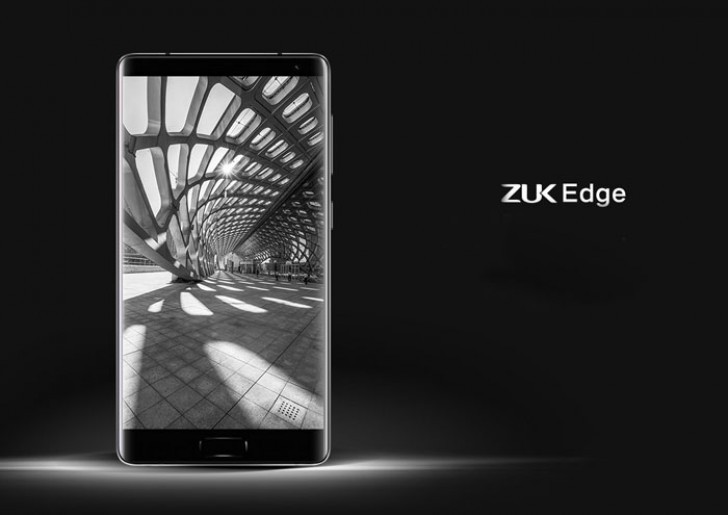
Coming to the specs, the ZUK Edge features a 5.5-inch Full HD display with 2.5D curved glass, 2.35GHz Snapdragon 821 SoC, 6GB of RAM, 64GB storage (UFS 2.0), 13MP ISOCELL camera with PDAF and 1.34μm pixel size, 8MP front shooter, 3.5mm jack (because Lenovo), LTE with VoLTE, Wi-Fi ac, and a 3100mAh battery with Qualcomm’s Quick Charge 3.0 fast charging tech.
The phone also offers Lenovo’s U-Touch navigation system, which made its debut in the ZUK Z2. The feature sees the home button doubling up as a replacement for the standard navigation keys, allowing you to access previous apps, the recents menu, and much more through customizable gestures.

The phone will be available in white and black color options, and Lenovo is also offering a model with 4GB of RAM and 64GB storage for ¥2,299 ($330). The variant with 6GB of RAM and 64GB storage will retail for ¥2,499 ($360). The ZUK Edge will go up for sale in China starting early next year, and as of now there’s no information regarding availability in other markets. Lenovo has introduced earlier models from its ZUK sub-brand in India, so it is likely we’ll see the ZUK Edge make its way to the market sometime next year.
Nexus owners, how’s the Android 7.1.1 update treating you?

After a few issues with the 7.0 update, Nexus owners are right up to date with the new 7.1.1 release.
With the arrival of the Google Pixel phones, Nexus phones like last year’s 5X and 6P were left in the unusual position of being out-of-step with the latest Android software. Google’s phones had a monopoly on Android 7.1 for their first couple of months on the market, with a finalized version of 7.1.1 not arriving for other devices until recent weeks.
But now, Nexus owners can get their hands Nougat’s first official maintenance release, bringing with it features like quick app shortcuts, new emoji and support for image keyboards — along with the usual bug fixes. And that’s a good thing, since the initial Android 7.0 rollout for the 6P in particular was beset by battery life issues and other glitches.
Nexus phones are up-to-date on 7.1.1, but miss out on some key Pixel features.
So whether you’ve updated manually, through the Android beta program or over-the-air, now’s your chance to let us know how Android 7.1.1 is working out on your Nexus. Is it everything you hoped it would be? Has it fixed any nagging bugs in version 7.0? Are you happy with the barebones Nougat experience Google delivered, or pining for Pixel-exclusive features like night mode and fingerprint scanner shortcuts? Maybe you’re still waiting for that OTA notification to pop up.
Hit the comments and let us know how you’re getting on with Android 7.1.1 on your phone or tablet. And be sure to mention which device you’re using, and how you updated your device.
For more Nexus discussion, hit up the Android Central forums!
- Nexus 6P forums
- Nexus 5X forums
Android Nougat
- Android 7.0 Nougat: Everything you need to know
- Will my phone get Android Nougat?
- Google Pixel + Pixel XL review
- All Android Nougat news
- How to manually update your Nexus or Pixel
- Join the Discussion
Mark Zuckerberg on Jarvis — his home-built AI platform

Mark Zuckerberg’s latest Facebook post serves as a look at how the next great idea might be born.
If you’re the wealthy CEO of one of the biggest tech companies out there, you probably have a staff of talented people who can do just about anything you ask of them. But if you’re Mark Zuckerberg — and the thing you want is something ultra-cool like a complete AI server that you built from scratch — you roll up your sleeves and fire up your favorite text editor and get back to your roots.
Seeing Zuckerberg face the same challenges as the average Joe is satisfying because he’s a guy who can fix them.
In his latest Facebook post, Zuck details the story of Jarvis, his home-brewed automation system and AI server. It’s a must-read for anyone interested in things like making smart devices talk to each other as well as trying to make them even smarter with their own AI. But it also has some deep insights into what one of the people who will be building the future of all this tech thinks about where we are heading and how we’ll get there.
Along the way, Zuckerberg ran into the same challenges everyone else trying to patch together a custom home automation system. For starters, most of the things we want to be automagic aren’t even connected to the internet yet. Sure, I can buy a really cool automated coffee maker but there are still all sorts of other things on the kitchen counter that play a role in making me breakfast.
Once you sort out equipment that does what you need it to do and creative wiring with smart outlets to do the rest, you find that none of these gadgets wants to talk to each other. Sonos and Crestron and Samsung make cool connected gadgets that work really well, but you still need to find a way to do everything from one place with one interface. Then you need to find a way to build controls that work when you’re trying to get the right piece of gear to do the right thing at the right time.
Seeing how the CEO of a huge tech company thinks lets us know that they can still be nerdy college kids at heart.
It’s sort of satisfying to see someone like Zuckerberg face these situations because he’s a man that might be able to fix it for the rest of us. Zuckerberg-built smart gadgets would get a million likes.
The post is especially insightful once he dives into making Jarvis smarter. Facebook has a pretty expansive code library that can show you an animated cat picture or drive vision processors to recognize a person by their face. And most everything in between. But that’s only a starting point and once you get an AI to do something, you need to program when and how to do it, as well as what happens after it’s done.
Understanding context is important for any AI. For example, when I tell it to turn the AC up in “my office”, that means something completely different from when Priscilla tells it the exact same thing. That one caused some issues! Or, for example, when you ask it to make the lights dimmer or to play a song without specifying a room, it needs to know where you are or it might end up blasting music in Max’s room when we really need her to take a nap. Whoops.
Even the best have those whoops moments.
Zuckerberg’s takeaway from all this is fascinating. Not because I agree with everything he says or all of his predictions, but because it gives us a glimpse of how someone with the means to shape the future thinks it’s going to play out.
Zuck might not be right about how the future’s going to play out, but he’ll be a big part of it all.
While the Zuckerberg house gets more automated — he mentions that he wants his Big Green Egg to be next and I’m on board and have the wire strippers ready — he’ll be working on ways to get a computer to mimic or expand our human senses. The big breakthrough that allows machines to learn without programming has yet to come and Zuckerberg has as much chance to make it as a fresh Google intern does. And when it does come, it’s great knowing that the shapers of the information age are just as interested as they were 10 years ago.
Do yourself a favor and give this one a good read.
Read: Building Jarvis on Facebook
Grab an unlocked LG V10 for just $259 right now!
DailySteals is now offering an unlocked AT&T variant of the LG V10 for just $259. This is a brand new 64GB unit that comes in the retail packaging, which means you are saving around $200 compared to listings at other retailers. You’ll have your choice between the Black and Opal Blue variants, so you can pick the one that matches your style.

This deal is only good for a few days, so if you are looking for a new phone for yourself or someone you know, you’ll want to act quickly.
See at DailySteals
HTC’s next big project is for U, coming Jan 12
HTC asked us to share this with you.
HTC is slated to announce its next big project, something for U, on January 12. While it appears too early to be announcing the successor to the HTC 10, perhaps that’s exactly what it is. More likely, though, is a non-phone announcement.

What do you think it is?
Google Daydream: The Ultimate Guide!

Google Daydream delivers an excellent way to enjoy VR from the comfort of the couch.
Google is continuing their efforts to deliver a superb VR experience that is accessible with just your phone, through a new platform they call Daydream. The first Daydream headset is absurdly comfortable, and already has access to tons of great games and experiences for you to explore. With Cardboard, they introduced a new generation of users to simple and inexpensive VR. With Daydream it’s obvious refining the goal was to refine that experience into something stellar for everyone.
Read more at VR Heads!
Best Gifts for Android Lovers
What will you get the Android fan in your life?

You’ve come to the right place. After all, who would know better what to get an Android fan than the editors at Android Central, right? Here are our suggestions for those friends who love the world’s best operating system and aren’t afraid to show it.
Android figurine

It’s the most obvious gift choice and yet, here you are, looking up the best gifts for your Android-loving friend or family member. These three-inch figurines have become nearly ubiquitous with the Android operating system. If you know someone who is a big fan of Android, they likely already have a figurine or two floating around.
The good news is that there are vast varieties of Android figurines to collect and give as a gift. The bad news is that there are figurines that only appear in a particular series, so if you’re buying a blind box, there’s no way to see what the figurine looks like before you wrap it.
See at Amazon
Android apparel

Help your friend show his loyalty to the Android operating system with an Android t-shirt or sweater officially sold by Google. There are pages upon pages of Android-centric tees and sweaters to choose from, in a range of sizes for both men and women.
See at Google
If you strike out at the Google online shop, give Teespring a try. Not all of the shirt designs are the most original, nor are they all worthy of a purchase, but if you spend some time perusing through the pages, you’re bound to find something worth wrapping up.
See at Teespring
Android kitchenware

Speaking of the Google Merchandise Store, you can never go wrong with gifting a mug. My favorite mug of all — and let me tell you, I have cupboards filled to the brim with mugs — is one of the older Android mug models that the online store used to sell. I drink coffee from it almost every morning (if it’s clean). If your friend is a big Android fan, there’s no doubt she’ll love sippin’ her latte from this 14-ounce ceramic mug each morning.
See at Google
GOgroove Pal Bot Android speaker

Why the heck not? It’s a portable, rechargeable speaker anthropomorphized as Google’s Android mascot. It’s got stereo speakers and a subwoofer, too. However, it only works with smartphones that still have their headphone jack. So, if your friend is using a Moto Z, which doesn’t have its 3.5mm audio plug, remind him of the choices he made in life and why he’s not getting an Android speaker for Christmas.
See at Newegg
Android Foundry Prints

Help your sibling decorate her barren walls with posters from the Android foundry. You can buy each print individually or a set of four for $48. There are nine to collect in all. Be sure to pair it with a nice frame, too. Amazon has plenty to choose from.
While you’re there, you might also consider this Android Foundry holiday gift pack? It features a scarf, socks, and your choice of swag, like an ice cube tray set or a sticker pack.
See at Dead Zebra
HTC is announcing something big on 12 January
Rarely do announcements in the tech world surprise us, such is the nature of the leaks and rumours, but HTC’s 12 January announcement has literally come out of the blue.
That’s about as much information as we’ve been given so far, with a “save the date” dropping into our inbox, marked with the words “for u”. There’s little else to garner from the note, other than the colour and texture of the background.
Finished in blue, it looks like the sky with a whisp of cloud, although it could as easily be ocean blue, with HTC Ocean thought to be the codename of the company’s forthcoming handset. The “for U” could refer to the personal nature of these devices, with HTC’s next user interface said to go without buttons and rely more heavily on gesture and voice.
That, however, seems a little unlikely, given the proximity to Mobile World Congress, the more popular venue for smartphone launches.
Then we have VR. With HTC Vive having been well reviewed, but still needing momentum, perhaps this is about freedom, losing the tether. VR is currently a very personal experience and perhaps HTC is going to use some of the Vive experience to push into a system that offers more freedom.
Or maybe HTC is going to venture into something new. The company has explored a number of different product areas recently – fitness devices with UA, the HTC Re camera – so perhaps the sky is a reference to drones. Drones have been appearing from all quarters and perhaps HTC wants to apply its industrial design skills in this area.
In truth, for once, we really don’t know.
HTC has promised that we’ll be hearing more soon and we’ll keep you updated when we do.
‘Rogue One’ is a milestone (and warning sign) for CG resurrection
Spoilers ahead for Rogue One: A Star Wars Story.
You probably didn’t expect many surprises in Rogue One, the first Star Wars “side story” which details how, exactly, the Rebel Alliance acquired the plans for the Death Star. Indeed, the entire film seems to exist just to fill in a bit of background detail for A New Hope, our first Luke Skywalker adventure. But it turns out Rogue One is much more than an elaborate bit of fan service. It’s surprisingly harrowing, genuinely moving and it’ll likely go down as a milestone for digital-actor resurrection.
Rogue One brought Peter Cushing, the legendary British actor who played Grand Moff Tarkin in the original Star Wars and passed away in 1994, back from the dead this past weekend as a CG character. His digital copy, which was portrayed by actor Guy Henry, isn’t just a quick cameo, either. He has several important scenes and lengthy dialogue exchanges with real actors, particularly Ben Mendelsohn’s Orson Krennic.

The film never highlights his digital nature; he’s simply treated like a typical actor. In many ways, CG Tarkin (as I’ll call him) is a landmark achievement. At the same time, though, the limitations of today’s computer rendering are quickly apparent in his stiff movements and cold, dead eyes.
It might be a bit cruel to say this, but it’s not hard to argue that CG Tarkin is the Jar Jar Binks of Rogue One. They’re both ambitious digital characters that are commendable on a technical level, but whose problematic execution can’t help but take you out of their films. And the notion of placing an actor in a film decades after their death raises some serious questions about how we’ll treat digital likenesses in the future.
This isn’t the first time we’ve seen deceased actors return to the screen. Oliver Reed’s face was digitally reconstructed for Gladiator in 2000 after his death, and most recently Paul Walker was digitally revived in Furious 7. We’ve seen the likes of Audrey Hepburn and Bruce Lee brought back in commercials. You could even count the holographic return of Tupac and Michael Jackson as one aspect of this trend. CG Tarkin, then, is just the next logical step.
“When he first showed up, my initial reaction was pure excitement at seeing Tarkin again,” one visual-effects artist who works with Disney (and asked not to be named) told me. “I had no idea it would be more than a little cameo. The more he did, the more I wondered why they were using him so much. He seemed as believable to me as I think they could have achieved. Everything looked great visually, but there was something off in the animation. The lips always give it away for me. There is a subtlety to mouth movements that gets lost in the motion-capture.”
I found it hard not to get distracted by CG Tarkin. While ILM’s animators did a fine job of recreating Peter Cushing’s visage, today’s technology still can’t effectively render things like believably human eyes. And those deficiencies are even more pronounced when a digital character is acting alongside extremely talented actors like Ben Mendelsohn. Rogue One also brings back some fan favorite Rebel fighter pilots by reusing old footage, as well as a major character from A New Hope with digital effects, but those instances are less noticeable because you see them only briefly.
“Don’t get me wrong, though — what they pulled off with all these characters is an absolutely impressive feat,” the visual-effects artist said. “A CG character that doesn’t immediately jump out as CG is a hell of a thing to pull off. As an industry, we’ve basically nailed creature work down. Just look at Caesar from Planet of the Apes and tell me that he isn’t a living, breathing character. It’s people that are the final challenge, and I think we are nearly there.”
While watching Rogue One, I couldn’t help but think of Ari Folman’s The Congress, a science-fiction film set in a world in which actors can sell their likenesses to movie studios that can do whatever they want with their digital doppelgangers. It’s only a matter of time until that fantasy is made real. And, let’s be honest, audiences will likely flock to see their favorite actors frozen in time, never aging with every subsequent comic-book sequel.
The visual-effects industry worker I talked to doesn’t think we’ll see many resurrections like CG Tarkin outside big-budget tentpole films. The worker also noted that it seems disrespectful to the memory of deceased actors, who don’t have the chance to turn down these posthumous film roles. These days, actors’ estates usually dictate how their images are licensed. But is that appropriate when the actors end up playing significant roles in films?
I wouldn’t be surprised if we settle on a solution similar to what was presented in The Congress. In that film, actors had to sign away their likenesses, and they were also barred from acting again (a particularly twisted noncompete clause). That wouldn’t be an ideal future, but at least it’s one actors can choose for themselves.
 AIVAnet