Google brings Map Maker back to the United States and 44 other countries

Back in April, a “clever” Google Map Maker user submitted an image of an Android logo urinating on an Apple logo to Google Maps, which forced Google to apologize for the inappropriate incident soon after. To ensure this kind of thing never happened again, Google shut down the Map Maker program in May so it could revamp the way users could submit their entries.
As promised, Google then relaunched the service a few weeks ago, but only in a few select markets. Now the service is seeing a much wider expansion, as the United States, along with 44 other countries, are now able to make edits and submissions in Map Maker.
Just like with the first wave of countries, Map Maker is a bit more closed off now. Every edit will need to be approved by a “regional lead”. As Google puts it, “[Regional Leads] are users who have demonstrated a clear interest in mapping their areas and will be helpful in moderating edits made by you.” This means that edits will likely take much longer to be published.
Google also says that the company has temporarily disabled the ability to add or edit geometries of polygons. Users can still edit other attributes like names on polygonal features, though. At this time, there’s no word as to when this feature will be turned back on.
To see if your country has been added to the Map Maker list, visit google.com/mapmaker.
OTA rolling for Galaxy S6 and S6 Edge owners on Sprint, brings Samsung Pay, Live Broadcasting and more
(adsbygoogle = window.adsbygoogle || []).push();
Those of you sporting a Samsung Galaxy S6 or Galaxy S6 Edge on Sprint have a software update heading out to your device. It weighs in at 303MB’s and brings a few tricks from the Note 5 and Galaxy S6 Edge+ to your devices. Mainly you can expect to find Samsung Pay included. Granted, the service isn’t slated to officially be available until next month. It is nice to see both Sprint and Samsung getting on the ball to make it available ahead of launch so users can be prepared.
Another addition is Live Broadcasting via YouTube. That function was a staple selling point on the Galaxy S6 Edge+ over the last few weeks. Simply put, you can host a live stream YouTube event via your phone to the world, or just to your friends.

They are also tossing in High Quality Audio, another Galaxy S6 Edge+ spec. Of course, it is set for use with Samsung headsets. Users will also find some UI updates along with some bug fixes.
As with any other software update, it could take a few days to a few weeks before your device see it available. You can always try heading into the device settings, bounce to About Phone and click on System Updates. Make sure you have a few minutes to kill, well over 50% battery life and a Wi-Fi connection available.
Source: Sprint
The post OTA rolling for Galaxy S6 and S6 Edge owners on Sprint, brings Samsung Pay, Live Broadcasting and more appeared first on AndroidSPIN.
Vysor lets you easily control your Android device from Chrome

There are a number of ways that allow you to control your Android device from your desktop but most require lengthy setup processes, and some just flat out aren’t that easy to use. That’s where Vysor comes in.
From the developers of popular Android applications like Helium, AllCast and ROM Manager, Vysor is a new application available in the Chrome web store that lets you easily control your Android device from your desktop, no root access required. You don’t even have to download an Android app to get the service to work. Crazy, right?
To use Vysor, first you’ll need to download the Chrome app, and make sure USB debugging is enabled on your Android smartphone or tablet. Plug in your Android device to your computer, follow the on-screen connection instructions, and that’s it. A resizable window will pop up on your desktop, allowing you to control your Android device with ease.
It should be noted that Vysor is still in early beta form, so don’t be surprised if it’s not as responsive as you’d like. After just a few minutes of playing around with the new app, though, I haven’t had any problems with it. I’ve been surfing the web, scrolling through Twitter and sending text messages without many problems.
There’s also a handy feature baked into the new app called Vysor Share. This feature lets you easily share your device’s screen with someone else, no matter where they are located.
Here’s how it works: next to where your device is listed on your desktop, you’ll find a share button. Clicking that will copy a link to your clipboard, which you can share with anyone you’d like. Whoever opens the link will then be able to control your device remotely, giving them full access to your smartphone or tablet’s screen, keyboard and even ADB access.
Even though it’s unfinished, this is one heck of a desktop tool. If you’re interested, head to the Chrome web store link below to get started.
WhatsApp updated with custom notifications, new emojis and more

Following a number of new features creeping into the beta build, a shiny new version of WhatsApp has finally landed at the Play Store, bringing with it new customizable notifications, contact mute controls, new emojis and the introduction of skin tone colors, among other things.
The new version is listed as 2.12.250 and most users will probably want to go and check out the variety of new custom chat options first. This menu allows users to customize specific conversation notifications with their own colors and tones. There are also now options to adjust how new messages pop-up depending on your screen’s on/off status and the ability to mute a conversation for a specific period of time.
Another helpful feature is the ability to mark conversations as read and unread, which might come in handy if you want to respond to something at a later date. There’s also a switch to lower the quality of voice calls to save on your data plan, which is bound to come in handy near the end of the month.

If you’re an avid emoji sender, you will also find the new skin colors options attached to a number of emojis. There are a few new ones too, including a lovely middle finger and Vulcan salute gesture for the Trekkies.
You can check the Play Store to see if there’s an update ready for you to download. Alternatively, you can grab the latest version of WhatsApp from APK Mirror.
EU Note 5 reportedly hits the FCC, but you shouldn’t get your hopes too high

While the Samsung Galaxy S6 Edge+ is a decent looking handset with plenty of power under the hood, for many folks the Note 5 is still the better choice. With a standard yet attractive design and the S-Pen for taking your productivity to new heights, there’s a lot to like about the Note 5. Unfortunately, as we all know by now, those in Europe won’t have the option to pick between the Edge+ and the Note 5, as only the former is available right now.
 Read also: Samsung won’t offer the Note 5 in Europe, but should it? (Poll)
What we all really want to know is if the Galaxy Note 5 will ever arrive to Europe. Samsung’s previous language suggests a 2015 arrival is unlikely, but has yet to rule out the possibility of the Note 5 arriving eventually. Some believe that Samsung will use IFA as a launching crowd for the European Note 5 and that it could end up varying, at least slightly, from the version debuting in the US, South Korea, and other markets.
.rvs_wrapper
width: 350px;
.rvs_wrapper.align_left
float: left;
.rvs_wrapper.align_right
float: right;
.rvs_wrapper.align_center,
.rvs_wrapper.align_none
width: 100%;
.rvs_wrapper.align_center
text-align: center;
.rvs_wrapper.align_center.cbc-latest-videos ul li
float: none;
display: inline-block;
vertical-align: top;
.rvs_wrapper.cbc-latest-videos:not(.align_none) ul li:nth-child(2n+1)
clear: both;
.rvs_title
font-weight: 600 !important;
margin: 0 !important;
font-size: 24px !important;
.rvs_wrapper.align_right .rvs_title
padding-left: 20px;
.rvs_title a
font-family: ‘Roboto Condensed’;
color: #3a3a3a;
.rvs_wrapper.cbc-latest-videos ul
padding-top: 10px;
.rvs_wrapper.align_left.cbc-latest-videos ul li,
.rvs_wrapper.align_none.cbc-latest-videos ul li
padding: 0 15px 0 0;
.rvs_wrapper.align_right.cbc-latest-videos ul li
padding: 0 0 0 15px;
float: right;
.rvs_wrapper.align_center.cbc-latest-videos ul li
padding: 0 7px;
.rvs_wrapper.cbc-latest-videos ul li > a
font-weight: 400;
.rvs_wrapper.cbc-latest-videos ul li > a .yt-thumbnail
margin-bottom: 0;
@media only screen and (min-width : 480px)
body #page .rvs_wrapper.cbc-latest-videos ul
width: 100% !important;
@media only screen and (max-width : 480px)
body #page .rvs_wrapper.cbc-latest-videos
width: 100%;
float: none !important;
overflow-x: auto;
overflow-y: hidden;
body #page .rvs_wrapper.cbc-latest-videos ul
overflow: auto;
max-height: none;
body .rvs_wrapper.cbc-latest-videos ul li
float: left !important;
clear: none !important;

While there is no concrete proof that the Note 5 is coming to Europe, it seems that a Note 5 variant with the model SM-N920F has now surfaced in the USA’s FCC database. What does that have to do with Europe? Possibly nothing, but it is worth mentioning that the “F” suffix has previously been used for European models of the Galaxy S5, S6, S6 Edge, Note 4, Note Edge and countless others. Before you get too excited, there’s no guarantees that Samsung isn’t using the F designation for another variant or region this time around, especially since they haven’t been too shy about breaking tradition recently (ditching plastic, ditching microSD, ditching the Note 5 in Europe, etc).
Then again, the Note 5 appears to be doing pretty well in sales so far, and the backlash over Samsung’s decision to end the Note series in Europe has been pretty high. Perhaps it is true that Samsung had a change of heart? What do you think of Samsung’s decision to announce only the Galaxy S6 Edge+ in Europe? Let us know your thoughts in the comments.
Amazon Prime Now, the free 2-hour delivery service, makes its way to Seattle, Bellevue, Redmond and Kirkland Washington
(adsbygoogle = window.adsbygoogle || []).push();
At the tail end of 2014 Amazon launched a service called Prime Now. It began in Manhattan and gave residents of specific zip codes the ability to order select products directly from Amazon and have them delivered with-in an hour of the order. Since its launch the service has expanded to various other parts of the US including Miami Florida and Dallas Texas. Today Amazon has announced that they are opening up the Prime Now services to four new locations in Washington with the addition of Seattle, Bellevue, Redmond and Kirkland.
“Prime Now is our fastest delivery option ever. With Prime Now, you can skip a trip to the store and get the items you need delivered right to your door in under an hour,” said Stephenie Landry, director of Amazon’s Prime Now service. “Customers love the convenience of one-hour delivery and we’re excited to bring Prime Now to our hometown customers in Seattle and surrounding areas.”
Here are the newly added zip codes that fall within the Prime Now coverage area:
98004, 98005, 98006, 98007, 98008, 98015, 98027, 98033, 98034, 98039, 98040, 98052, 98073, 98083, 98101, 98102, 98103, 98104, 98105, 98107, 98109, 98111, 98112, 98113, 98114, 98115, 98117, 98119, 98121, 98122, 98127, 98139, 98154, 98161, 98164, 98165, 98175, 98181, 98194, 98195.
Prime Now will deliver to consumers between 8 a.m. and midnight 7 days a week. As a Prime member you get 2 hour deliver for free, but if you want that extra fast 1 hour delivery option you can expect to pony up $7.99. I would leave that to the items you desperately need, or at least on an order that warrants the $8.00.
You do need to be an Amazon Prime member before you can even think about placing those free 2 hour delivery orders. You will also need the Amazon Prime Now installed to you Android or iOS device.
Additional details about Prime Now can be found on the services landing page.
http://playboard.me/widgets/pb-app-box/1/pb_load_app_box.js
Via Businesswire
The post Amazon Prime Now, the free 2-hour delivery service, makes its way to Seattle, Bellevue, Redmond and Kirkland Washington appeared first on AndroidSPIN.
HTC A9 (Aero) images leaked

Steve Hemmerstoffer, aka @OnLeaks, has just uploaded a couple of pictures apparently showing off the upcoming HTC A9, or the HTC Aero if you prefer. The handset has leaked a couple of time already this year and could form the beginning of a new range from HTC. The phone has been rumored to be heading to Sprint this November too.
The leak shows off the front and the back of the handset, alongside Apple’s latest flagship. While the A9’s design is not that different from HTC’s long running One range, the move over towards a flat back certainly leaves the handset bearing greater resemblance to Apple’s iPhone 6. I can’t say that I’m a big fan of the gold look either.
As part of the company’s efforts to improve its dwindling revenue this year, CEO Cher Wang has already announced that HTC will be releasing a new “hero” device this October, which could be the A9. However, the company has not been giving away any further details about the handset.
 See also: HTC promises hero product in October, significant improvements for M series next year
Fortunately, rumors have already alluded to some potential hardware specifications. The A9 may be one of the first smartphones to features MediaTek’s high end deca-core Helio X20 SoC, along with a 5.2-inch QHD resolution display, 4GB of RAM and a large 3,500mAh battery. The phone is also rumored to come with 2.5D glass and a full metal body design, just like in the picture. If true, the A9 would certainly make it into the high-end category, but we will have to wait and see about the price.
As with all leaks and rumors, we’ll have to take these pictures with a pinch of salt. Still, what do you think about this potential design for the HTC A9?
AUO to demo flexible AMOLED that detects being bent

Flexible displays have hit the mainstream this year and AU Optronics, a Taiwanese display company, is scheduled to unveil a new 5-inch bendable AMOLED prototype tomorrow. Not only is the display flexible, but it can also detect how a user bends it. This information can be used to interface with the display and any other connected components, alongside more familiar touch controls.
The AMOLED panel can detect the size, strength and direction of any user manipulation. This means that bending the display in a certain way could be used to interact with whatever is on the screen, such as zooming in and out of a picture or webpage, or flipping over to a new page or tab. While the 5-inch display size seems suited to smartphones, the display could be used for other consumer electronics, such as e-readers.
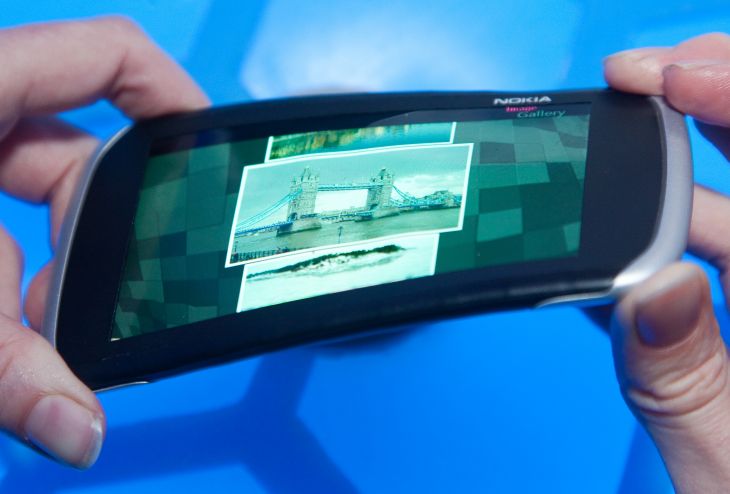
Although very novel, this idea is not entirely new. Nokia, Apple and LG have all either patented or discussed similar concepts for interactive OLED displays in the past. However, this is the first major prototype to be shown off that demonstrates these capabilities.

Nokia showed off an interactive flexible OLED display of its own back in 2011. Source.
AUO has also unveiled a range of other mobile display products too. The company has some very thin 0.45mm deep square AMOLED displays at 1.5 and 1.6-inch sizes, which seems well suited for the wearables market and could help smartwatches shed some bulk. AUO has also unveiled a 6-inch 4K resolution display for smartphones, which comes with a crazy pixel density of 737 PPI.
There is still a way left to go before such a display appears in any consumer products, but the flexible display trend will likely keep popping up over the next few years.
Koush’s latest project, Vysor, lets you control your Android device from your PC
(adsbygoogle = window.adsbygoogle || []).push();
There are a lot of developers out there who make fantastic apps, and Koush is one that hasn’t disappointed yet. The brains behind AllCast and Helium Backup has come through with his latest project, Vysor, which lets you control your Android device through your PC via Chrome. When Vysor detects your device, you’ll get a floating window on your desktop that will be a reflection of your device’s screen – from here, you’ll be able to unlock your screen and interact with it using your mouse as you would your finger. Naturally, it works best with a device which has on-screen buttons, but there are hotkeys for device’s that have physical buttons.
Vysor is actually still in development – it had to go public early because it was uncovered inadvertantly – but despite this, it works surprisingly well. All you need to do is connect up your phone to your PC and it’ll detect your device, allowing you to start interacting with it, which is probably quite useful for developers and people wanting to record footage from what’s showing on the device. You can download the Vysor beta right now for Chrome, but don’t be surprised if there are a few bugs here and there.
What do you think about Vysor? Let us know your thoughts in the comments below.
Source: Vysor via Android Police
The post Koush’s latest project, Vysor, lets you control your Android device from your PC appeared first on AndroidSPIN.
Don’t try this at home: You can apparently stuff up your Samsung Galaxy Note 5 S-Pen very easily
(adsbygoogle = window.adsbygoogle || []).push();
One of the biggest changes for the Samsung Galaxy Note 5 is the design of its S-Pen – doing away with a simple S-Pen without any moving parts, the Samsung Galaxy Note 5 S-Pen has added a clicking feature which lets it sit flush with the rest of the device while it is sitting in its slot. It’s this new design, however, that has come under scrutiny with news outlets covering how inserting the S-Pen backwards into the device can ruin the pen detection software and potentially get your S-Pen stuck inside the device. Check out Android Police‘s coverage on the issue:
As the video shows, this wasn’t an issue for the Note Edge, or in fact any Galaxy Note device before the Note 5, because all those S-Pens were designed – whether on purpose or not – so that they could not be inserted backwards. Of course, this is likely a very rare scenario in the wild, but there are opportunities for this to happen, and from the looks of it, it’s very easy for it to go horribly wrong. With so much coverage on the issue already today, we’d be surprised if Samsung didn’t at least give a statement on this over the next few days.
What do you think about the Samsung Galaxy Note 5 S-Pen potentially getting broken like this? Let us know your thoughts in the comments below.
Source: Android Police
The post Don’t try this at home: You can apparently stuff up your Samsung Galaxy Note 5 S-Pen very easily appeared first on AndroidSPIN.