Android 6.0.1 adds power button camera shortcut and next alarm DND mode

Android 6.0.1 has only just hit a range of Nexus devices in the past 24 hours, so users are still discovering a few new hidden extras packed into the update. While the chief feature of the update was touted as new emoji support, the update has also brought a double-tap power camera shortcut to the Nexus 5, 6, 7 (2013) and 9, along with tweaks to the Do Not Disturb mode.
This double tap power button camera shortcut originally appeared with the new Nexus 5X and 6P models, but now a wider number of Nexus owners can quickly launch their camera when the screen is off, which is bound to come in useful when you really quickly need to capture a picture.
 See also: Android 6.0.1 arriving on Nexus devices today, includes new emoji
Another not so new feature in Android 6.0.1 is the reintroduction of “until next alarm” feature to the OS’ Do Not Disturb notification mode. Rather than manually having to mute and unmute system sounds, this mode can be used to automatically unmute notifications once your alarm goes off in the morning. Another pretty useful addition.
If you haven’t updated your Nexus yet, click the big orange button below to go and grab the factory images. We also have a handy user guide for installing Marshmallow here too.
Samsung Pay for the Gear S2 delayed until 2016 in America

This year, a big push has been made in Android land to promote Pay services. Though arguably brought to the mainstream’s attention with last year’s iPhone 6 and Apple Pay, Google’s mobile OS has actually supported and included NFC technology since the Samsung Nexus S landed 5 years ago. Japan for that matter, has been using an NFC-based mobile payment system since the feature phone days of ten years ago.
Now that the technology is finally catching on in earnest in America however, Samsung’s system – called Samsung Pay – has prime potential to push the payment platform. The new Gear S2 smartwatch was cited as a way to pay when it launched this past autumn, however it seems that – at least for American users – the dream of a wrist-worn-wallet will have to wait:
@_TheTRn We're sorry for the wait, Michael. #SamsungPay is now coming to the #GearS2 in 2016. Stay tuned for more information. Thanks!
— Samsung Mobile US (@SamsungMobileUS) November 29, 2015
The above Tweet is now over a week old, but was picked up by SamMobile earlier today. As can be seen, Samsung Mobile US has responded to customer’s query by indicating the payment service has been delayed until 2016.
It is unclear just what has caused the setback, especially given that Samsung Pay is not only “turned on” for several 2015 flagships, but has already wracked up a million users. The likely culprit is a software glitch or bug, something that becomes a larger possibility given the variety of carriers who are offering the Gear S2 3G variant which may have modified software builds to support relevant network infrastructure or pre-loaded carrier software.
At this point in time, those who own the Gear S2 and live in the United States must endure a bit longer until they have the chance to pay with their wristwatch. Alas like it’s said, mo money, mo problems.
T-Mobile accused of false advertising by consumer advocacy groups

T-Mobile’s contract shake-ups have turned the company into the fastest growing carrier in the US. However, the company has now come under scrutiny for allegedly misleading customers with its advertisements.
Consumer advocacy groups have filed a complaint with the New York Attorney General’s office and the Consumer Financial Protection Bureau in a letter that alleges “deceptive marketing and abusive debt collection practices” against T-Mobile. More specifically, the group is raising issue with T-Mobile’s claim that customers can switch carriers any time, as apparently 91 percent of its customers are on two-year payment plans for devices that require lump sum costs to exit from.
Furthermore, the complaint points out that ending the financial agreements early can end up costing consumers more than if they broke traditional service contracts. However, T-Mobile clearly outlines the terms of any loans to consumers when they sign up.
“We ask T-Mobile to reform its own practices by no longer using the misleading language around no contracts … We ask that it stop claiming that it pays customers’ early termination fees” – Nell Geiser, Change to Win.
It’s worth noting that official regulatory bodies have not brought any accusations against T-Mobile at this point, it is only a number of groups that have signed a letter asking for an investigation. The group also plans to bring its complaint to the Federal Communications Commission and is similarly concerned about other US carriers as well.
T-Mobile has found itself the target of the campaign because it has been leading the charge to do away with strict contracts. The carrier has risen to popularity thanks to its “un-carrier” campaign, free video streaming plans and various other offers. The company was also just voted best wireless carrier in the US by Consumer Reports readers on Monday.
T-Mobile has not officially responded to the allegations, but CEO John Legere says that the company stands by its ads.
Keep your OnePlus X unique (and fingerprints-free) with dbrand’s skins

You get a whole lot of phone for your money with the OnePlus X. You’ll have to look hard to find a better-looking phone for $250, and the specs and features are nothing to scoff at.
The design, display, and performance of the OnePlus X are all great, but one thing you probably won’t like about it is the fingerprint-magnet on the back. It’s a sacrifice you’ll have to make with any glass-backed phone, but that doesn’t make grime and oil smudges any easier to live with. Plus, smudges make the normally slick OnePlus X even more prone to slip out of your hand. And then is when problems really begin.
.rvs_wrapper
width: 350px;
.rvs_wrapper.align_left
float: left;
.rvs_wrapper.align_right
float: right;
.rvs_wrapper.align_center,
.rvs_wrapper.align_none
width: 100%;
.rvs_wrapper.align_center
text-align: center;
.rvs_wrapper.align_center.cbc-latest-videos ul li
float: none;
display: inline-block;
vertical-align: top;
.rvs_wrapper.cbc-latest-videos:not(.align_none) ul li:nth-child(2n+1)
clear: both;
.rvs_title
font-weight: 600 !important;
margin: 0 !important;
font-size: 24px !important;
.rvs_wrapper.align_right .rvs_title
padding-left: 20px;
.rvs_title a
font-family: ‘Roboto Condensed’;
color: #3a3a3a;
.rvs_wrapper.cbc-latest-videos ul
padding-top: 10px;
.rvs_wrapper.align_left.cbc-latest-videos ul li,
.rvs_wrapper.align_none.cbc-latest-videos ul li
padding: 0 15px 0 0;
.rvs_wrapper.align_right.cbc-latest-videos ul li
padding: 0 0 0 15px;
float: right;
.rvs_wrapper.align_center.cbc-latest-videos ul li
padding: 0 7px;
.rvs_wrapper.cbc-latest-videos ul li > a
font-weight: 400;
.rvs_wrapper.cbc-latest-videos ul li > a .yt-thumbnail
margin-bottom: 0;
@media only screen and (min-width : 480px)
body #page .rvs_wrapper.cbc-latest-videos ul
width: 100% !important;
@media only screen and (max-width : 480px)
body #page .rvs_wrapper.cbc-latest-videos
width: 100%;
float: none !important;
overflow-x: auto;
overflow-y: hidden;
body #page .rvs_wrapper.cbc-latest-videos ul
overflow: auto;
max-height: none;
body .rvs_wrapper.cbc-latest-videos ul li
float: left !important;
clear: none !important;

Customization is another weakness of the OnePlus X. The device is only available in the Onyx (black glass) version in most markets, so you don’t even have the option to pick from several colors. Like Ford’s Model T, you can have the X in any color, as long as it’s black.
So, what can you do about these problems? You could simply put a case on it. But dbrand has a better solution, one that doesn’t involve hiding that beautiful phone in a case.
#gallery-1
margin: auto;
#gallery-1 .gallery-item
float: left;
margin-top: 10px;
text-align: center;
width: 25%;
#gallery-1 img
border: 2px solid #cfcfcf;
#gallery-1 .gallery-caption
margin-left: 0;
/* see gallery_shortcode() in wp-includes/media.php */


dbrand’s range of OnePlus X skins lets you customize the looks of your phone in hundreds of possible combinations. dbrand offers several textures to pick from: Carbon Fiber, Brushed Titanium, Matte, Leather, powder-coated True Color, and Wood. On top of that you can choose from a variety of colors, and you can mix and match skin elements for a truly personal look.
dbrand guarantees that its skins are precise cut, but let’s face it, the most precise skin can still look bad if you don’t apply it correctly. If you’re worried about this problem, dbrand has a video tutorial that shows exactly how to apply the skin on your OnePlus X.
You can buy individual skins for the rear, front, frame, and logo of the OnePlus X. The entire package costs a little under $20, which is not bad for the protection and customization it offers. And, if you want a different skin, dbrand guarantees that its vinyl skins leave no residue.
Looking for skins for other OnePlus devices? dbrand skins are available for the OnePlus One and OnePlus 2 as well.
[SPONSORED POST]
R.I.P Mailbox by Dropbox: A teary farewell, but a huge thanks
(adsbygoogle = window.adsbygoogle || []).push();
Today is a sad day. I received an email in my favorite email app ever, Mailbox by Dropbox, and this was what the heart-wrenching letter read:
“Hello Zain,
It’s with heavy hearts that we let you know Mailbox will shut down on February 26, 2016.
Mailbox ignited a shift in mobile email and many of its innovations are now ubiquitous across the industry. It’s been a great journey, and we’re proud of this impact and grateful to the community that helped make it possible.
When the Mailbox team joined Dropbox in 2013, we shared a passion for simplifying the way people work together. And solving the email problem seemed like a strong complement to the challenges Dropbox was already tackling.
But as we’ve increased our focus on collaboration, we realized there’s only so much an email app can do to fundamentally improve email. We’ve come to believe that the best way for us to improve people’s productivity going forward is to streamline the workflows that generate so much email in the first place.
We know saying goodbye to Mailbox will be hard for many. To help make the transition to a new email client easier, we’ve created guides and export tools. For more information about how we’ll be winding down Mailbox, please visit the Mailboxwebsite.
Thank you to everyone who helped bring Mailbox to life, whether by spreading the word, letting us know what you liked (and didn’t like), or simply using the product. You taught us so much, and we’re deeply grateful.
—The Mailbox Team”
Mailbox has been praised by its loyal users as the future of email. It centered around the idea that we should no longer be cluttered with dozens of unread emails haunting our digital inboxes. It defined a cyber heaven called “Inbox Zero.” It also introduced “snoozing,” which essentially let its users tackle important emails later and got them out of the main inbox until needed. It went even further and pushed a frontier with location-based snoozing, and allowed emails to reappear in the inbox when you arrived at a particular location. It worked extremely well for me when I wanted to deal with something when I got home or got to school. I greatly appreciated this feature and use it almost everyday. I also found Mailbox’s “auto archive” feature to act as a savior from the constant unwanted newsletters and otherwise irritating spam mail.
Mailbox also had a native client for Android, iOS, and OS X (the operating systems I use everyday), and having a native client is very important me. I don’t like having to open Chrome or Safari just to manage my email. Plus, native clients offer much better notification solutions than web-based clients on OS X.
This is not to say Mailbox was perfect, however. It has seen little development from Dropbox since the company purchased it in 2013 for $100 million. It was often riddled with bugs. I remember how it would just never load images on the OS X client, it drove me nearly mad. As a result, I have been looking for replacements recently. I tried Microsoft’s Outlook, who The Verge said was the best email app. It didn’t do it for me, and I hated the desktop application. It felt too traditional to me, and I longed for the simple, tasked-tailored experience Mailbox offered.
So, naturally I looked into Google’s option, Inbox. It isn’t perfect, either, and doesn’t have a native client for OS X. However, it is a great experience on Android and iOS. It is notable how much “Mailbox-influence” there is in Google’s Inbox, and that can be mostly clearly seen marking emails as “done” and the swipe-based user interface. The modern feel of swipes and managing email as a todo list is the future, as least for most people. Power users may not be a fan of this, but for the casual user who wants to “finish” dealing with their emails, it’s perfect. Inbox Zero, and an application centered around it, is the only way to provide a sense of relief from the haunting, never-ending world of email.
While I am sad to see Mailbox go, the app that sparked changed in creating email for the future, I am content seeings its principles largely determine the best email apps. Its influence can be seen all over Google Inbox, the “next best thing.”
One last toast. “To Inbox Zero!”
Via: Dropbox
The post R.I.P Mailbox by Dropbox: A teary farewell, but a huge thanks appeared first on AndroidSPIN.
New leak allegedly shows Samsung Galaxy S7 renders, not much difference though
(adsbygoogle = window.adsbygoogle || []).push();
We’ve had our fair share of rumours regarding Samsung‘s 2016 flagship smartphone, however we’ve yet to see any evidence of a physical device – and that’s not going to change today. What we do have is a number of Samsung Galaxy S7 renders which allegedly show what next year’s device is going to look like – and for those who are wondering, yes, we swear we’re not just showing you a Galaxy S6 render just for a story. These renders come from third-party accessory maker ITSkins who have revealed the dimensions for the Galaxy S7 depicted in the renders, as well as a slightly larger variant of the device which we’re apparently calling the Galaxy S7 Plus.


According to the leak, the Galaxy S7 will measure 143.37 x 70.8 x 6.94 mm, whereas the Galaxy S7 Plus is said to measure 163.32 x 82.01 x 7.82 mm, which would make it a 6-inch device – for reference, last year’s Galaxy S6 measured 143.4 x 70.5 x 6.8 mm, which for all intents and purposes is exactly the same size as the leaked Galaxy S7. SamMobile seems pretty convinced these renders are fake as the depicted device has a microSD slot while we’re expecting a USB Type-C slot in this year’s device – we’re finding it pretty hard to comment as there are rumours that Samsung is going to largely recycle the design of the Galaxy S6 for the Galaxy S7, so even if parts of these leaked renders are true, the concept here is still pretty much confirmed.
What do you think about these Samsung Galaxy S7 renders? Let us know your thoughts in the comments below.
The post New leak allegedly shows Samsung Galaxy S7 renders, not much difference though appeared first on AndroidSPIN.
Adobe Lightroom on Android is now free to use for all users
(adsbygoogle = window.adsbygoogle || []).push();
Most Adobe apps on Android require that you have an Adobe ID and own the desktop version of the software you’re planning on using – thankfully, Adobe has just revoked that requirement for Adobe Lightroom on Android. Truth be told, this has been available to iOS since October, but it’s always nice when it comes to Android shortly after. As of today, you’ll be able to download and use Lightroom completely free – naturally, there are a few catches. Unless you have access to the Creative Cloud, you won’t be able to sync your edited photos between desktop, web and mobile, though you can sign up for an Adobe ID for a trial of these additional features for a short time.
There are quite a few good photo editing apps out there – Snapseed immediately comes to mind – however, for those familiar with Adobe’s products, Lightroom is definitely going to be more up your street. Even if you have a favourite photo-editing app, it’s kinda worth just downloading the free app just to see what’s what – if you’re interested, we’ve got the Play Store link below:
What do you think about Adobe Lightroom on Android becoming free to use? Let us know your thoughts in the comments below.
http://playboard.me/widgets/pb-app-box/1/pb_load_app_box.jsSource: Adobe via engadget
The post Adobe Lightroom on Android is now free to use for all users appeared first on AndroidSPIN.
Google Authenticator finally gets its Material Design makeover and Android Wear support
(adsbygoogle = window.adsbygoogle || []).push();
You might have assumed that by now all of Google‘s Android apps would have been updated according to the Material Design guidelines that were brought in over a year ago with Android Lollipop – as it turns out, Google Authenticator is just getting its update today. It’s actually a pretty sizeable update for Authenticator, not only overhauling how the app looks, but adding useful features like Android Wear support. I can’t vouch for the app itself since I don’t use it, but most of the Material Design updates that Google’s apps have gotten have made them smoother and easier to use (generally). If you’re not on board with what Google Authenticator does, here’s a short video for you to watch:
Here are the full update notes as per the Play Store page:
WHAT’S NEW
- UI improvements: new theme and icon
- Support for Android Wear devices
- Bug fixes and performance improvements
- Developer preview: support for NFC Security Key (FIDO Universal 2nd Factor protocol)
If this is an update for you, we’ve got the Play Store link for you below:
http://playboard.me/widgets/pb-app-box/1/pb_load_app_box.jsWhat do you think about the update to Google Authenticator? Let us know your thoughts in the comments below.
Source: Droid-life
The post Google Authenticator finally gets its Material Design makeover and Android Wear support appeared first on AndroidSPIN.
Factory images for Android 6.0.1 update have been released
(adsbygoogle = window.adsbygoogle || []).push();
We’ve had the Android 6.0.1 update on our radar for some time now and it seems Google has decided today is the day – Google has released the factory images for Android 6.0.1 for the Nexus 6P, Nexus 5X, Nexus 6, Nexus 5, Nexus 7 (2013), Nexus 9 and Nexus Player. While the update inevitably contains the December security update, one of the more anticipated additions are the new emoji that SVP of Android Hiroshi Lockheimer announced would be coming in this update. We also got a sneak peek at all the new emoji if you’re not keen on flashing a new factory image right now.
As with all software updates, you can either wait for the update to roll out to your device – which can take days or weeks depending on where you are – or you can download the factory image from the Google Developers website and flash it yourself. In case this is your first time, flashing a factory image will wipe everything on your device, so make sure to backup everything before you attempt anything – otherwise, you might be better off waiting for the OTA (over-the-air) update.
Are you excited to see the factory images for Android 6.0.1? Let us know your thoughts in the comments below.
Source: Google Developers via TalkAndroid
The post Factory images for Android 6.0.1 update have been released appeared first on AndroidSPIN.
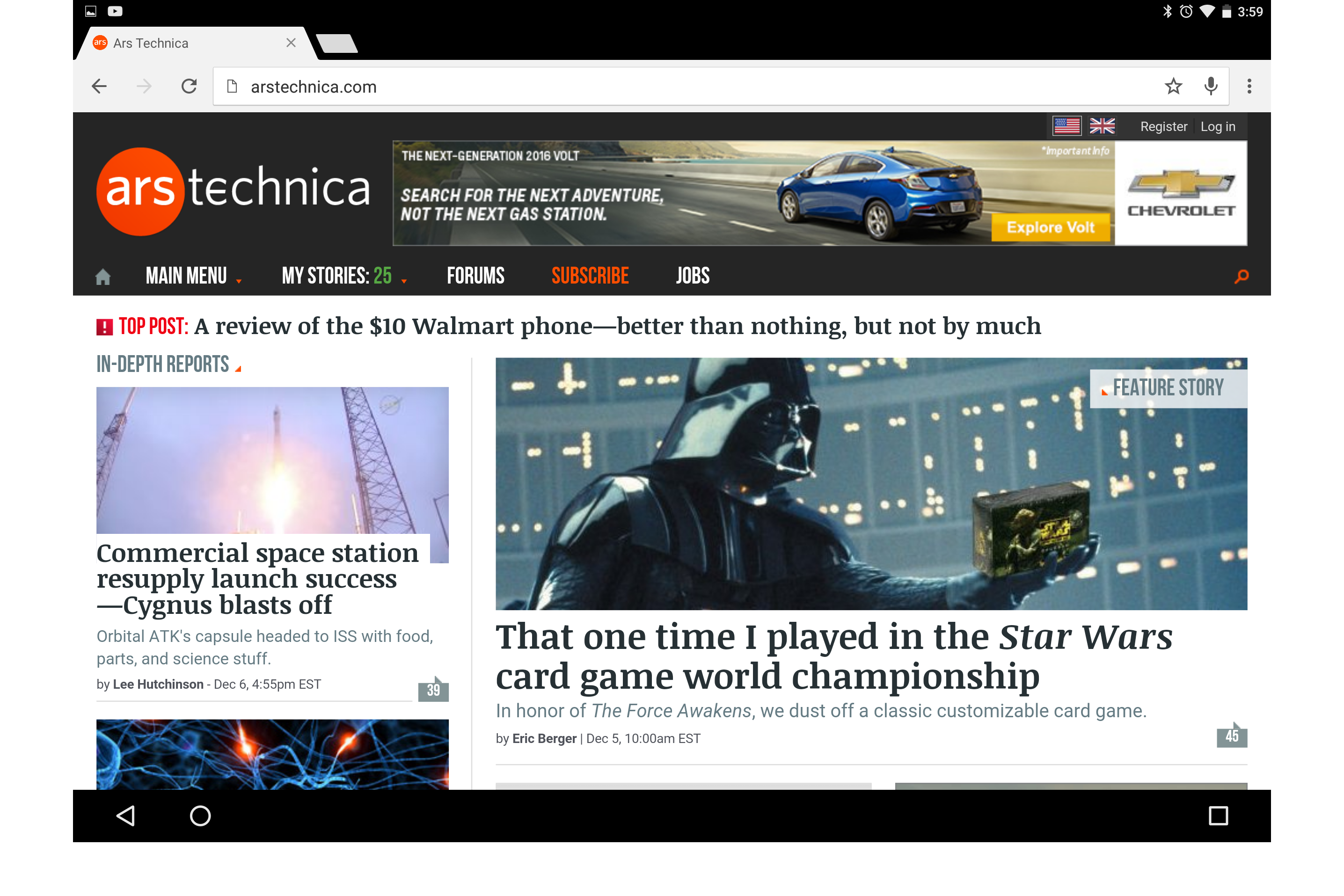
Android 6.0.1 arriving on Nexus devices today, includes new emoji

We already knew that a ton of new emoji were slated to hit Android devices sometime soon, thanks to a recent tweet from Hiroshi Lockheimer, Senior VP of Android, Chrome OS, and Chromecast at Google. As it turns out, the new emoji are arriving on Nexus devices starting today, as part of the update to Android 6.0.1 Marshmallow.

The biggest change in the update to 6.0.1, according to Ars Technica, is the addition of over 200 new and revamped emoji based on Unicode 8. Mainly, the poop emoji has been redesigned, and all of the odd pink body parts that appeared in past emoji packs have now been turned to a yellow skin tone. A full list of the new and revamped emoji can be found at Unicode’s website. Adding new emoji to the Google Keyboard application actually requires a full system update. Although the Google Keyboard app can be updated on its on in the Play Store, fonts are tied to the system itself, hence the need for a full update.
 See also: Android 6.0 Marshmallow updates roundup – December 4, 2015

Additionally, Android 6.0.1 brings a change for the nav bar on Android tablets. According to Ars, the buttons are no longer centered. The back and home buttons now sit on the left side, while the overview (recent apps) button sits on the right. This is obviously a move to help tablet users more easily reach the buttons, but it does look quite odd a first glance.
Android 6.0.1 is also being counted as the monthly security update for the month of December, so users can also expect a number of security fixes and performance improvements in this update.
As was the case with Android 6.0, the update should be available for the Nexus 5, Nexus 5X, Nexus 6, Nexus 6P, Nexus Player, Nexus 7 (2013) and Nexus 9. We’ll be sure to update you as we learn more.
Nexus in video
.rvs_wrapper
width: 350px;
.rvs_wrapper.align_left
float: left;
.rvs_wrapper.align_right
float: right;
.rvs_wrapper.align_center,
.rvs_wrapper.align_none
width: 100%;
.rvs_wrapper.align_center
text-align: center;
.rvs_wrapper.align_center.cbc-latest-videos ul li
float: none;
display: inline-block;
vertical-align: top;
.rvs_wrapper.cbc-latest-videos:not(.align_none) ul li:nth-child(2n+1)
clear: both;
.rvs_title
font-weight: 600 !important;
margin: 0 !important;
font-size: 24px !important;
.rvs_wrapper.align_right .rvs_title
padding-left: 20px;
.rvs_title a
font-family: ‘Roboto Condensed’;
color: #3a3a3a;
.rvs_wrapper.cbc-latest-videos ul
padding-top: 10px;
.rvs_wrapper.align_left.cbc-latest-videos ul li,
.rvs_wrapper.align_none.cbc-latest-videos ul li
padding: 0 15px 0 0;
.rvs_wrapper.align_right.cbc-latest-videos ul li
padding: 0 0 0 15px;
float: right;
.rvs_wrapper.align_center.cbc-latest-videos ul li
padding: 0 7px;
.rvs_wrapper.cbc-latest-videos ul li > a
font-weight: 400;
.rvs_wrapper.cbc-latest-videos ul li > a .yt-thumbnail
margin-bottom: 0;
@media only screen and (min-width : 480px)
body #page .rvs_wrapper.cbc-latest-videos ul
width: 100% !important;
@media only screen and (max-width : 480px)
body #page .rvs_wrapper.cbc-latest-videos
width: 100%;
float: none !important;
overflow-x: auto;
overflow-y: hidden;
body #page .rvs_wrapper.cbc-latest-videos ul
overflow: auto;
max-height: none;
body .rvs_wrapper.cbc-latest-videos ul li
float: left !important;
clear: none !important;